
ESCs not found / ESC bricked?
-
Hi,
I am currently running an old version of SDK (v0.8) with the legacy 'voxl-slip-uart-bridge' and 'voxl-esc' tools along with the M0117 4-in-1 ESC.
In trying to downgrade the firmware (from 39 back to 36) because of some debugging, I seem to have bricked my ESC...
When I first power on, I get a two-tone sound and all 4 LEDs blink, and one of them blink slightliy longer than the rest of them.
Currently when I runvoxl-esc-scan.pyI either get one of these two results:
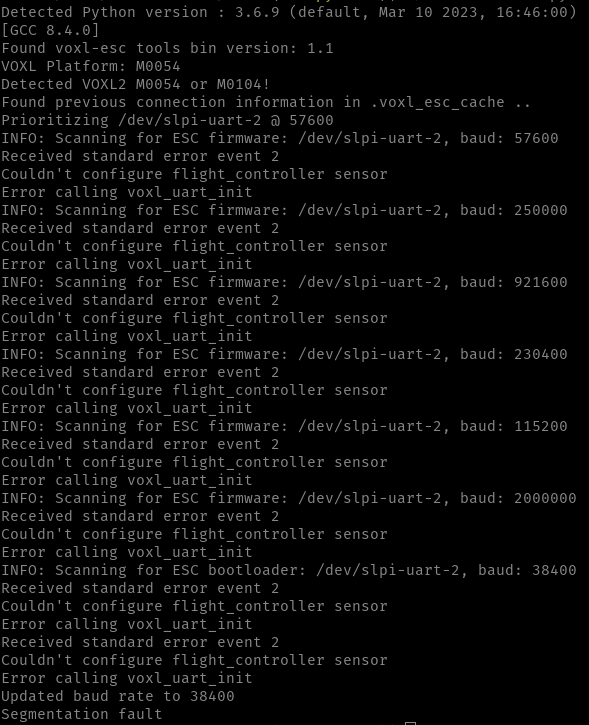
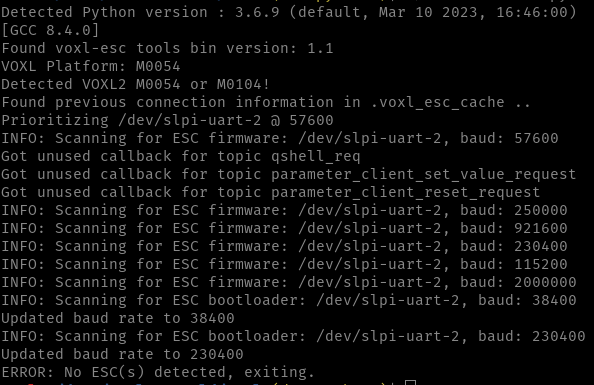
I seem to have maybe messed up the baud rate of the ESCs or they are not responding to the scans.
Do you have any recommendations on how to proceed in trying to communicate with the ESC?
Thank you,Jennifer
-
J jenyeom referenced this topic on
-
Hi,
I am currently running an old version of SDK (v0.8) with the legacy 'voxl-slip-uart-bridge' and 'voxl-esc' tools along with the M0117 4-in-1 ESC.
In trying to downgrade the firmware (from 39 back to 36) because of some debugging, I seem to have bricked my ESC...
When I first power on, I get a two-tone sound and all 4 LEDs blink, and one of them blink slightliy longer than the rest of them.
Currently when I runvoxl-esc-scan.pyI either get one of these two results:
I seem to have maybe messed up the baud rate of the ESCs or they are not responding to the scans.
Do you have any recommendations on how to proceed in trying to communicate with the ESC?
Thank you,Jennifer
@jenyeom , as we are discussing in another thread, SDK 0.8 is REALLY old and we cannot really support it. SLPI image had many improvements made since then.
I know you are trying to narrow down what change caused oscillations in your drone. I suspect it is due to using incorrect params which may have happened due to SDK upgrade.
Please use the latest voxl-esc tools from dev branch to update the firmware to latest, update params to generic params for your board and then we can work on getting your old params working with latest firmware (if you have not done that already).
To recover the ESC to latest firmware, use:
- latest voxl-esc tools from dev branch : https://gitlab.com/voxl-public/voxl-sdk/utilities/voxl-esc/-/tree/dev/voxl-esc-tools
- perform voxl-esc-scan.py, it should find all 4 ESCs, potentially running at different uart baud rates
- upgrade firmware to latest using ./voxl-esc-upload-firmware-all.sh , which is a wrapper for voxl-esc-upload-firmware.py . please keep track of which ESCs were updated
- upload latest compatible params (you can use generic params for now) : for example from here https://gitlab.com/voxl-public/voxl-sdk/utilities/voxl-esc/-/blob/master/voxl-esc-params/boards/esc_params_generic_m0134.xml . Later you can update params with your actual tuning results.
./voxl-esc-scan.pyto scan the escs./voxl-esc-verify-params.pyto verify params
Also, it is best to use serial-to-usb connection directly to a linux PC if you have that easily accessible. Then ESC testing / updating can be a bit quicker and more flexible.
Alex
-
@jenyeom , as we are discussing in another thread, SDK 0.8 is REALLY old and we cannot really support it. SLPI image had many improvements made since then.
I know you are trying to narrow down what change caused oscillations in your drone. I suspect it is due to using incorrect params which may have happened due to SDK upgrade.
Please use the latest voxl-esc tools from dev branch to update the firmware to latest, update params to generic params for your board and then we can work on getting your old params working with latest firmware (if you have not done that already).
To recover the ESC to latest firmware, use:
- latest voxl-esc tools from dev branch : https://gitlab.com/voxl-public/voxl-sdk/utilities/voxl-esc/-/tree/dev/voxl-esc-tools
- perform voxl-esc-scan.py, it should find all 4 ESCs, potentially running at different uart baud rates
- upgrade firmware to latest using ./voxl-esc-upload-firmware-all.sh , which is a wrapper for voxl-esc-upload-firmware.py . please keep track of which ESCs were updated
- upload latest compatible params (you can use generic params for now) : for example from here https://gitlab.com/voxl-public/voxl-sdk/utilities/voxl-esc/-/blob/master/voxl-esc-params/boards/esc_params_generic_m0134.xml . Later you can update params with your actual tuning results.
./voxl-esc-scan.pyto scan the escs./voxl-esc-verify-params.pyto verify params
Also, it is best to use serial-to-usb connection directly to a linux PC if you have that easily accessible. Then ESC testing / updating can be a bit quicker and more flexible.
Alex
As you recommended, I am connected to a PC through a USB and using the latest voxl-est tools from dev branch and it seems to be working somewhat, although I am still having some issues.
I was able to update the firmware for all ESCs to version 39, but when I uploaded the parameters (esc_params_generic_m0117.xml), it only seemed to update on ESCs 0, 1, and 3.
When I scan the ESC now, 0, 1, 3 are at v39 and baud rate of 250k where as ESC 2 is at v39 and baud rate of 57600.Of note, when I upload the firmware, I have to powercycle for ESC 2 as it does not find it, and I get a different tone when complete with the update, compared to the other ESCs.
Here are some screen shots from when I run
./voxl-esc-scan.pyafter uploading the generic params.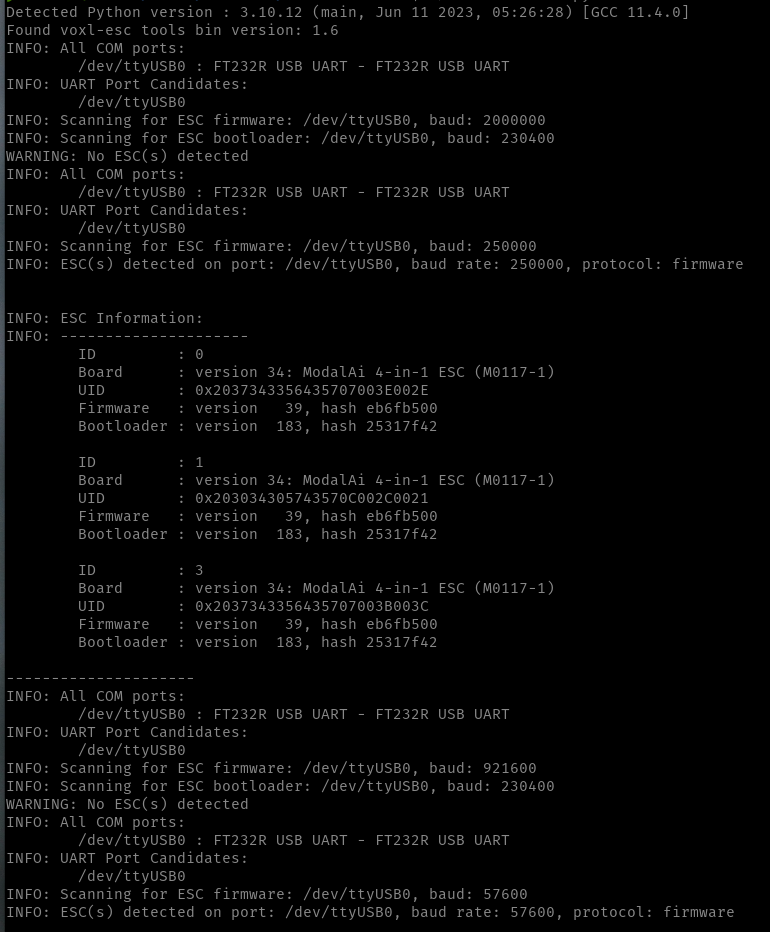
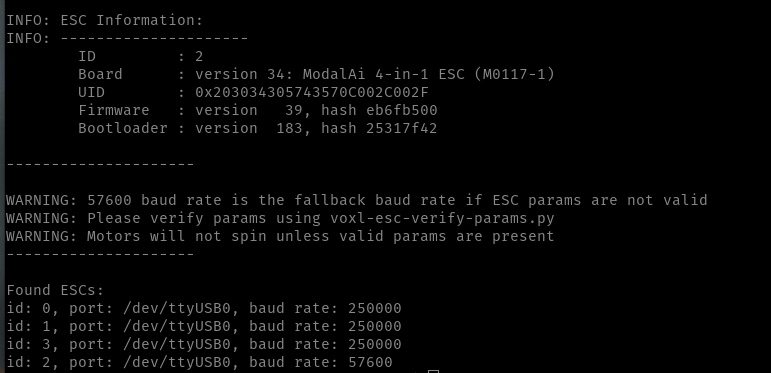
Any ideas how I can get ESC 2 to the desired baud rate?
Thanks again so much for all your help!! -
As you recommended, I am connected to a PC through a USB and using the latest voxl-est tools from dev branch and it seems to be working somewhat, although I am still having some issues.
I was able to update the firmware for all ESCs to version 39, but when I uploaded the parameters (esc_params_generic_m0117.xml), it only seemed to update on ESCs 0, 1, and 3.
When I scan the ESC now, 0, 1, 3 are at v39 and baud rate of 250k where as ESC 2 is at v39 and baud rate of 57600.Of note, when I upload the firmware, I have to powercycle for ESC 2 as it does not find it, and I get a different tone when complete with the update, compared to the other ESCs.
Here are some screen shots from when I run
./voxl-esc-scan.pyafter uploading the generic params. Any ideas how I can get ESC 2 to the desired baud rate?
Thanks again so much for all your help!!For additional info, here is what I get when I run
./voxl-esc-verify-params.py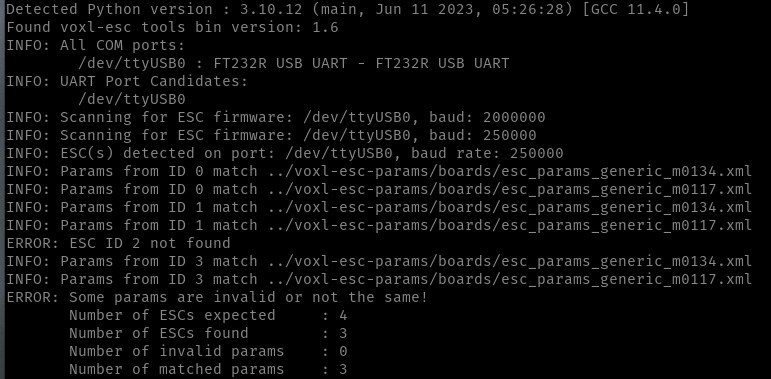
-
After multiple tries of updating the firmware and uploading the parameters, it seems to have finally worked!!

Reading along? Create a free ModalAI Forum account to join in.
With an account you can reply, ask your own question, get an email when a ModalAI engineer answers, and mark the reply that solved it. Your place in each thread is saved between visits.
Questions about VOXL, Flight Core, ESCs and ModalAI drones are answered here by the engineers who build them.
Register Login