
M0149 camera refocusing and tuning parameters
-
@Aaky ,
I will double check with the team to see if we need to fix the log playback. Perhaps you should just try to collect a new log that does not have those extra imu channels which do not exist - have you tried that? Also if you dont collect the qvio extended log, the log playback should not complain. But i believe you are correct that there is an issue that the log replay cannot play back the extended qvio data (normally that is not needed since you want to play back the raw data, but not any of the results of qvio. That is if you want to run qvio again using a log, you don't want to play back the results of old qvio data because there would be an attempt for two processes to publish the qvio results during replay (log replay and actual qvio process)
Regarding the MSV tuning.. please understand that by replaying the log with images and IMU, you are bypassing the whole camera pipeline, so the camera exposure and gain cannot be changed. Perhaps i was not clear in my original suggestion, but let me clarify.
By logging data sets with different MSV target values (or different exposure control strategies), you can feed the data into the same VIO algorithm and see which one performs better. Ideally, you would collect exactly the same data set with different MSV parameters, but that is impossible in real life, but you can do something that is pretty close. For indoor environments, you can hand carry the drone along the same path and record the data sets with different MSV target values. Indoor environments are simpler and easier to reproduce the same conditions. Outdoors could be a little bit trickier but still possible.
Additionally, what you can do is after the log is collected, you can process the individual images using some scripts (opencv?) and see how different processing affects the behavior of VIO. Please keep in mind that that will not be exactly the same as changing gain and exposure on the camera (because changing exposure will affect blur and changing gain will affect how noisy the pixels are), but if you are trying to find good starting points for the MSV, you could try post processing the images before the playback. Another approach is to apply some kind of gamma correction but that can also affect the image noise.
@Alex-Kushleyev Thanks for the explanation. Yes will follow your guidelines for MSV tuning.
I have query in libmodal-exposure codebase.
Check code at this link . It says OV7251 needs few frames to be skipped for gain calculation. Is this valid for AR0144 also since I am assuming same MSV calcaulation codebase is been utilized for AR0144 as well at libmodal-exposure v0.1.0 branch.
-
@Alex-Kushleyev Thanks for the explanation. Yes will follow your guidelines for MSV tuning.
I have query in libmodal-exposure codebase.
Check code at this link . It says OV7251 needs few frames to be skipped for gain calculation. Is this valid for AR0144 also since I am assuming same MSV calcaulation codebase is been utilized for AR0144 as well at libmodal-exposure v0.1.0 branch.
@Aaky , yes there was originally an issue related to ov7251 configuration that resulted in some flashing behavior if gain was updated every frame. However, this has been fixed - we have updated the actual ov72551 sensor driver and also
voxl-camera-serveris setting updated register on the camera to allow gain update every frame : https://gitlab.com/voxl-public/voxl-sdk/services/voxl-camera-server/-/blob/master/src/cci_direct_helpers.cpp?ref_type=heads#L44Here is the actual auto exposure configuration : https://gitlab.com/voxl-public/voxl-sdk/services/voxl-camera-server/-/blob/master/src/config_defaults.cpp?ref_type=heads#L166 (both gain and exposure update period is set to 1)
AR0144 does not have this issue, the default params are here : https://gitlab.com/voxl-public/voxl-sdk/services/voxl-camera-server/-/blob/master/src/config_defaults.cpp?ref_type=heads#L194
-
@Aaky , yes there was originally an issue related to ov7251 configuration that resulted in some flashing behavior if gain was updated every frame. However, this has been fixed - we have updated the actual ov72551 sensor driver and also
voxl-camera-serveris setting updated register on the camera to allow gain update every frame : https://gitlab.com/voxl-public/voxl-sdk/services/voxl-camera-server/-/blob/master/src/cci_direct_helpers.cpp?ref_type=heads#L44Here is the actual auto exposure configuration : https://gitlab.com/voxl-public/voxl-sdk/services/voxl-camera-server/-/blob/master/src/config_defaults.cpp?ref_type=heads#L166 (both gain and exposure update period is set to 1)
AR0144 does not have this issue, the default params are here : https://gitlab.com/voxl-public/voxl-sdk/services/voxl-camera-server/-/blob/master/src/config_defaults.cpp?ref_type=heads#L194
-
@Aaky , yes there was originally an issue related to ov7251 configuration that resulted in some flashing behavior if gain was updated every frame. However, this has been fixed - we have updated the actual ov72551 sensor driver and also
voxl-camera-serveris setting updated register on the camera to allow gain update every frame : https://gitlab.com/voxl-public/voxl-sdk/services/voxl-camera-server/-/blob/master/src/cci_direct_helpers.cpp?ref_type=heads#L44Here is the actual auto exposure configuration : https://gitlab.com/voxl-public/voxl-sdk/services/voxl-camera-server/-/blob/master/src/config_defaults.cpp?ref_type=heads#L166 (both gain and exposure update period is set to 1)
AR0144 does not have this issue, the default params are here : https://gitlab.com/voxl-public/voxl-sdk/services/voxl-camera-server/-/blob/master/src/config_defaults.cpp?ref_type=heads#L194
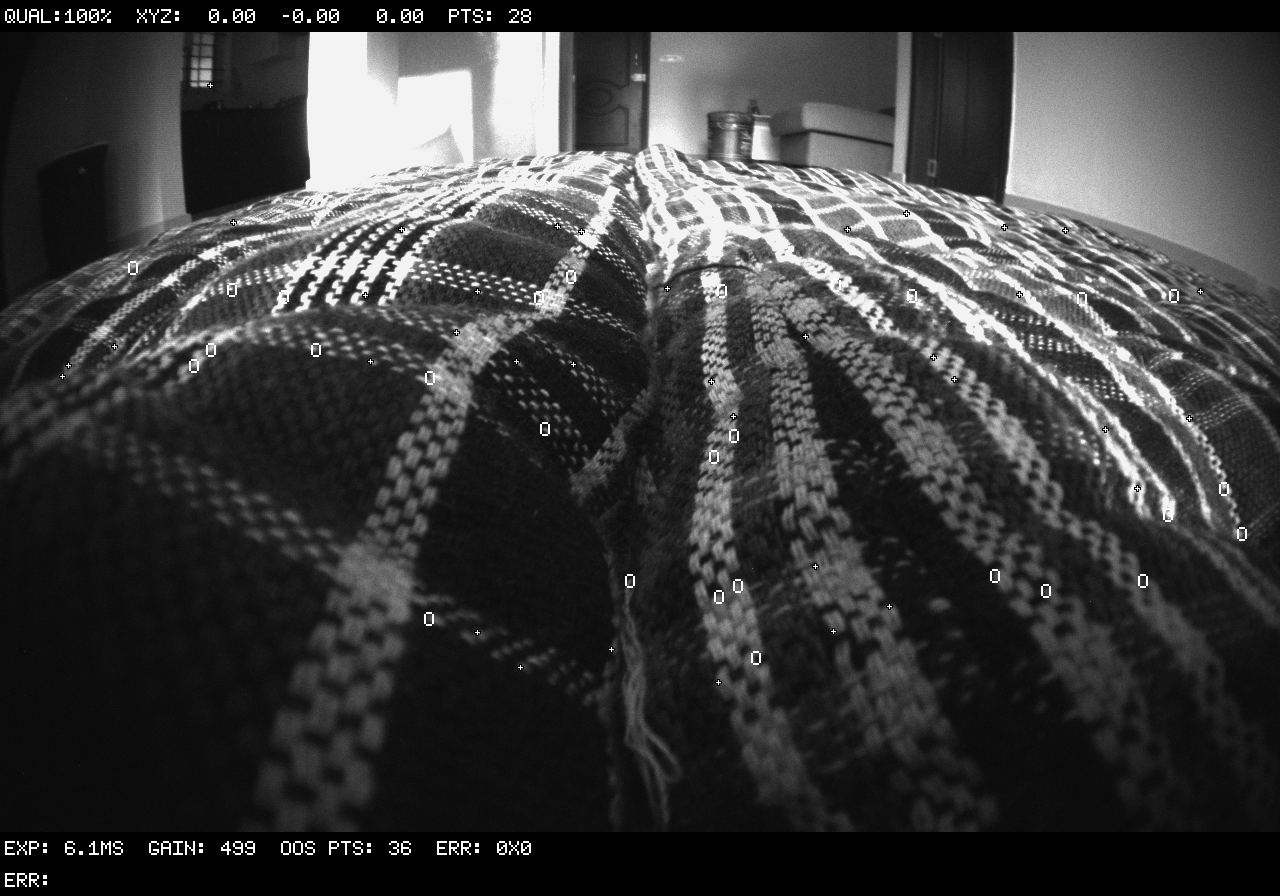
@Alex-Kushleyev By any chance is the camera focus application ready for testing? I am actually struggling to get proper focus on AR0144. Initially I was able to get very good focus but now image just looks very much blurry. Have a look at below images. These images are captured by voxl-logger.
First time focus :
Current focus :
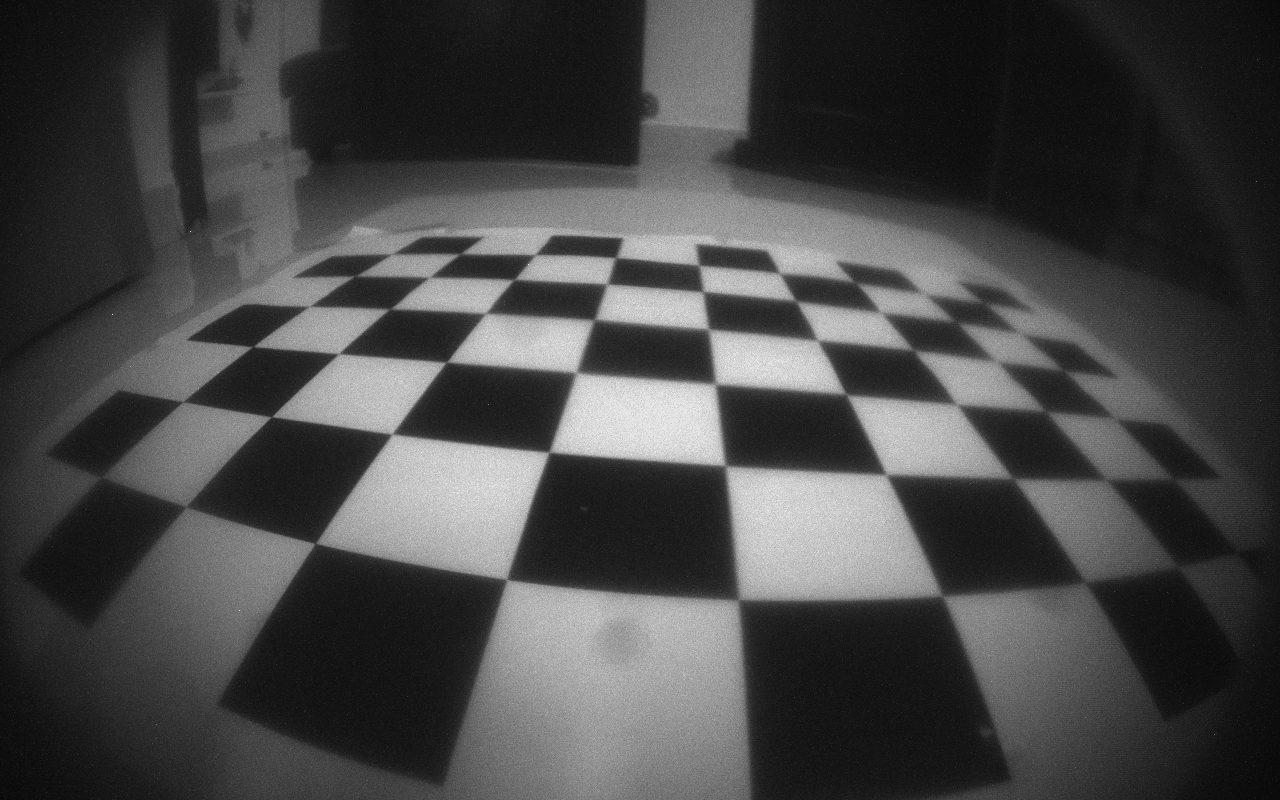
Current image appears to be blurry and also I am having hard time to get camera calibration right (reprojection error below 0.5). Previously it was good and my camera calibration worked well very fast. Let me knoiw.
-
@Alex-Kushleyev By any chance is the camera focus application ready for testing? I am actually struggling to get proper focus on AR0144. Initially I was able to get very good focus but now image just looks very much blurry. Have a look at below images. These images are captured by voxl-logger.
First time focus :
Current focus :
Current image appears to be blurry and also I am having hard time to get camera calibration right (reprojection error below 0.5). Previously it was good and my camera calibration worked well very fast. Let me knoiw.
@Aaky , yes there is something you can test.
First, you will need to install updated version of opencv with python3 bindings. i built the package and it can be downloaded here : . Source is here :
Second, i have some experimental tools that let you subscribe and publish images via mpa. (source) . You can build the package yourself or grab it here. install it on voxl2.
after installing the two packages and starting camera server, execute this:
cd /usr/share/modalai/voxl-mpa-tools
python3 pympa-focus-helper.py -i tracking
if all goes well, it will receive images and print dots to show that it's running (note that i used hires camera for testing):
voxl2:/usr/share/modalai/voxl-mpa-tools$ python3 pympa-focus-helper.py
output image dimensions :  [1920, 1080]
connecting to camera pipe hires_color
subscribed to camera pipe /run/mpa/hires_color/, channel 0
created output pipe hires_debug, channel 0, flags 0
waiting for the first image
.width=3840, height=2160, format=1, size=12441600
.............................
then you can open voxl-portal and look at the new image
hires_debug- the image will be monochrome for now (but i found that mono image is better for focusing)Focus helper (source here https://gitlab.com/voxl-public/voxl-sdk/utilities/voxl-mpa-tools/-/blob/pympa-experimental/tools/python/pympa-focus-helper.py) has options for input image pipe name, so you can change that to your tracking camera (
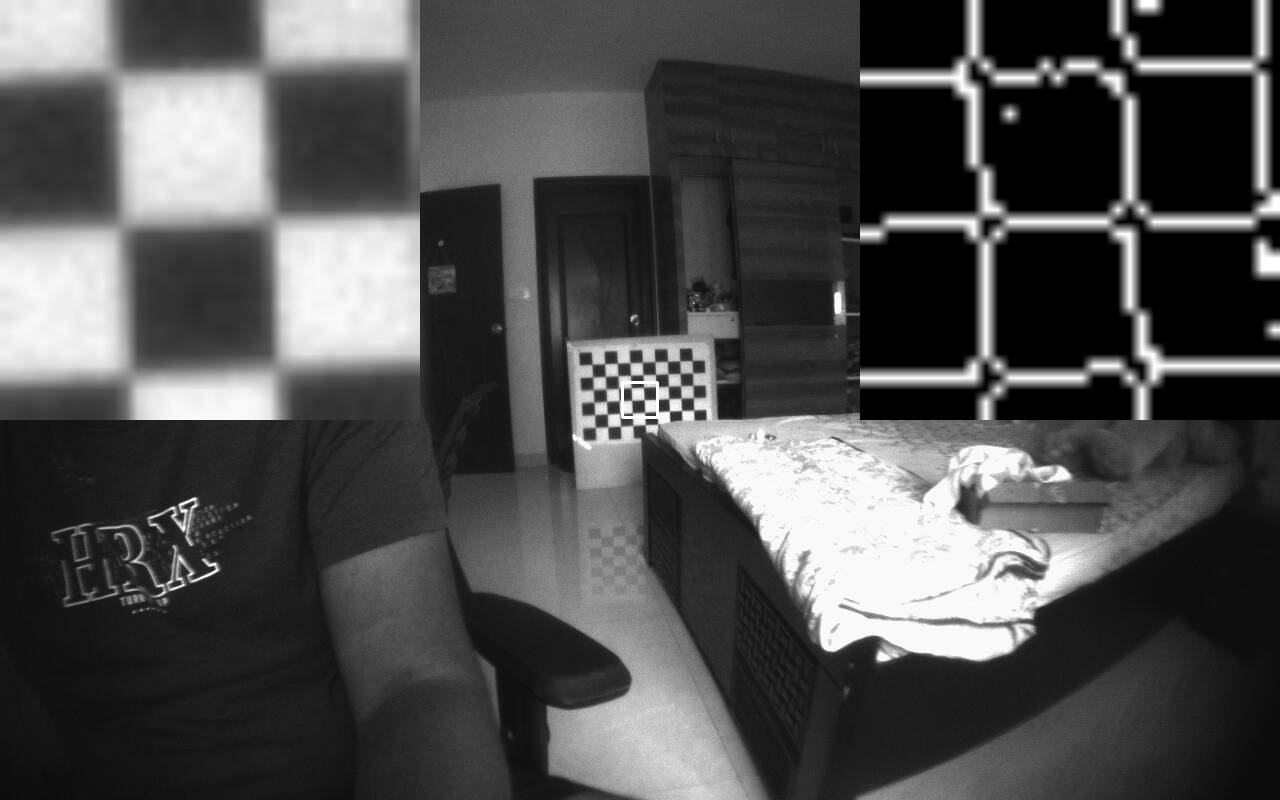
python3 pympa-focus-helper.py -i <camera_name>) and other options.You will see the original image with overlay of zoomed in window (top-left) and output of edge detector (top-right). You can use the zoomed in ROI to tune the lens focus by hand. I suggest pointing the camera at something like a checkerboard at the distance that you want to focus at. Hold the camera steady and turn the lens to see the sharpness of the edges (you can also check the edge detector output). For a wide FOV camera, which has a large depth of field, i think everything beyond several inches away from the camera should be in focus. You can experiment a bit. Currently we do not output any metric, but it is actually pretty easy to tune by eye using the zoomed in ROI.
Please try it out and let me know if you run into any issues.
-
@Aaky , yes there is something you can test.
First, you will need to install updated version of opencv with python3 bindings. i built the package and it can be downloaded here : . Source is here :
Second, i have some experimental tools that let you subscribe and publish images via mpa. (source) . You can build the package yourself or grab it here. install it on voxl2.
after installing the two packages and starting camera server, execute this:
cd /usr/share/modalai/voxl-mpa-tools
python3 pympa-focus-helper.py -i tracking
if all goes well, it will receive images and print dots to show that it's running (note that i used hires camera for testing):
voxl2:/usr/share/modalai/voxl-mpa-tools$ python3 pympa-focus-helper.py
output image dimensions :  [1920, 1080]
connecting to camera pipe hires_color
subscribed to camera pipe /run/mpa/hires_color/, channel 0
created output pipe hires_debug, channel 0, flags 0
waiting for the first image
.width=3840, height=2160, format=1, size=12441600
.............................
then you can open voxl-portal and look at the new image
hires_debug- the image will be monochrome for now (but i found that mono image is better for focusing)Focus helper (source here https://gitlab.com/voxl-public/voxl-sdk/utilities/voxl-mpa-tools/-/blob/pympa-experimental/tools/python/pympa-focus-helper.py) has options for input image pipe name, so you can change that to your tracking camera (
python3 pympa-focus-helper.py -i <camera_name>) and other options.You will see the original image with overlay of zoomed in window (top-left) and output of edge detector (top-right). You can use the zoomed in ROI to tune the lens focus by hand. I suggest pointing the camera at something like a checkerboard at the distance that you want to focus at. Hold the camera steady and turn the lens to see the sharpness of the edges (you can also check the edge detector output). For a wide FOV camera, which has a large depth of field, i think everything beyond several inches away from the camera should be in focus. You can experiment a bit. Currently we do not output any metric, but it is actually pretty easy to tune by eye using the zoomed in ROI.
Please try it out and let me know if you run into any issues.
@Alex-Kushleyev Thank you Alex for providing this package. I am facing one problem in installing opencv with python3 bindings as shown below.
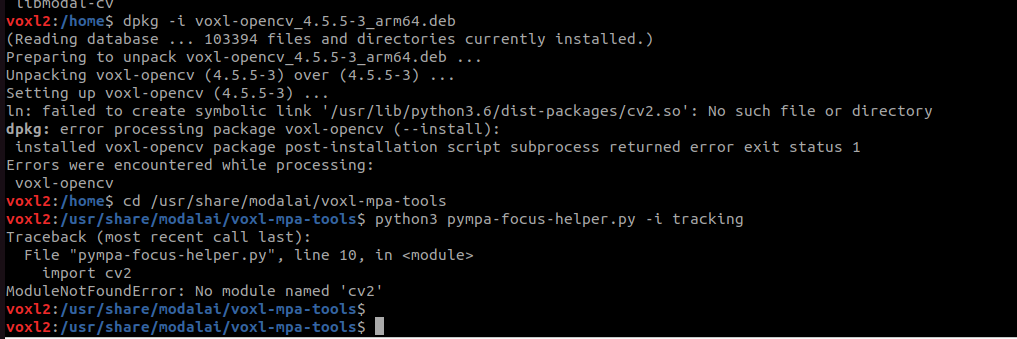
This issue is preventing me from running the command "python3 pympa-focus-helper.py -i tracking"
It isnt able to find cv2. I think the symlink isnt working since ```
/usr/lib/python3.6/dist-packages/cv2.soPlease let me know where to look for ahead. -
@Alex-Kushleyev Thank you Alex for providing this package. I am facing one problem in installing opencv with python3 bindings as shown below.
This issue is preventing me from running the command "python3 pympa-focus-helper.py -i tracking"
It isnt able to find cv2. I think the symlink isnt working since ```
/usr/lib/python3.6/dist-packages/cv2.soPlease let me know where to look for ahead.@Aaky ,
I will check this a bit later but can you verify that “ /usr/lib/python3.6/dist-packages/” path exists on voxl2, if not just create it “mkdir -p /usr/lib/python3.6/dist-packages/“ and then install the package again. Thanks!
-
@Aaky ,
I will check this a bit later but can you verify that “ /usr/lib/python3.6/dist-packages/” path exists on voxl2, if not just create it “mkdir -p /usr/lib/python3.6/dist-packages/“ and then install the package again. Thanks!
@Alex-Kushleyev Thanks Alex. This fix worked. Now I can see hires_debug over voxl-portal.
On a seperate note, I need some hardware help over AR0144 camera. Actually while we were assembling this camera over our drone, the lens holder which is black color as shown in picture below came off from one side.
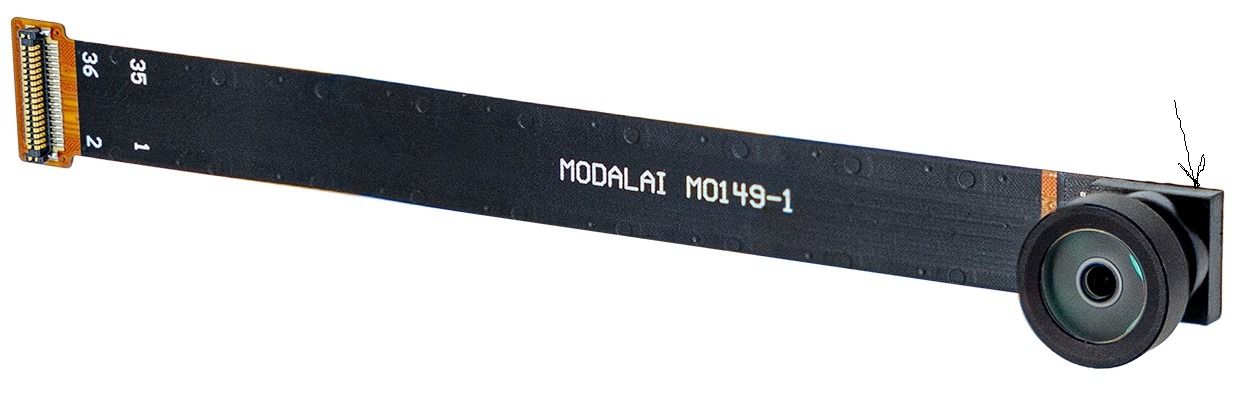
In order to fix this, we poured some fevi quick onto it, this made it sturdy but now voxl isnt able to find this camera. Even voxl-camera-server -l says 1 camera detected which is TOF.
I am aware this must be some hardware problem, but can you advice me anything else if I can check?
Logs :voxl2:~$ voxl-camera-server -d 0 ================================================================= configuration for 2 cameras: cam #0 name: tracking sensor type: ar0144 isEnabled: 1 camId: 0 camId2: -1 fps: 30 en_rotate: 0 en_rotate2: 0 en_preview: 1 pre_width: 1280 pre_height: 800 en_raw_preview: 1 en_small_video: 0 small_video_width: -1 small_video_height: -1 en_large_video: 0 large_video_width: -1 large_video_height: -1 en_snapshot: 0 snap_width: -1 snap_height: -1 ae_mode: lme_msv standby_enabled: 0 decimator: 1 independent_exposure:0 cam #1 name: tof sensor type: pmd-tof isEnabled: 1 camId: 1 camId2: -1 fps: 5 en_rotate: 0 en_rotate2: 0 en_preview: 1 pre_width: 224 pre_height: 1557 en_raw_preview: 1 en_small_video: 0 small_video_width: -1 small_video_height: -1 en_large_video: 0 large_video_width: -1 large_video_height: -1 en_snapshot: 0 snap_width: -1 snap_height: -1 ae_mode: off standby_enabled: 0 decimator: 5 independent_exposure:0 ================================================================= DEBUG: Attempting to open the hal module DEBUG: SUCCESS: Camera module opened on attempt 0 DEBUG: ----------- Number of cameras: 1 DEBUG: Cam idx: 0, Cam slot: 3, Slave Address: 0x007A, Sensor Id: 0x003D GPS server Connected DEBUG: Connected to cpu-monitor DEBUG: ------ voxl-camera-server: Starting 2 cameras Starting Camera: tracking (id #0) DEBUG: Checking Gain limits for Camera: tracking Using gain limits min: 54 max: 8000 DEBUG: cam ID 0 checking for fmt: 37 w: 1280 h: 800 o: 0 DEBUG: i: 0 fmt: 34 w: 176 h: 144 o:0 DEBUG: i: 4 fmt: 34 w: 176 h: 144 o:1 DEBUG: i: 8 fmt: 35 w: 176 h: 144 o:0 DEBUG: i: 12 fmt: 35 w: 176 h: 144 o:1 DEBUG: i: 16 fmt: 33 w: 176 h: 144 o:0 DEBUG: i: 20 fmt: 37 w: 224 h:1557 o:0 DEBUG: i: 24 fmt: 38 w: 224 h:1557 o:0 DEBUG: i: 28 fmt: 32 w: 224 h:1557 o:0 DEBUG: i: 32 fmt: 36 w: 224 h:1557 o:0 ERROR: Camera 0 failed to find supported preview config: 1280x800 WARNING: Failed to start cam tracking due to invalid resolution WARNING: assuming cam is missing and trying to compensate Starting Camera: tof (originally id #1) with id offset: 1 DEBUG: Checking Gain limits for Camera: tof Using gain limits min: 54 max: 8000 DEBUG: cam ID 0 checking for fmt: 38 w: 224 h: 1557 o: 0 DEBUG: i: 0 fmt: 34 w: 176 h: 144 o:0 DEBUG: i: 4 fmt: 34 w: 176 h: 144 o:1 DEBUG: i: 8 fmt: 35 w: 176 h: 144 o:0 DEBUG: i: 12 fmt: 35 w: 176 h: 144 o:1 DEBUG: i: 16 fmt: 33 w: 176 h: 144 o:0 DEBUG: i: 20 fmt: 37 w: 224 h:1557 o:0 DEBUG: i: 24 fmt: 38 w: 224 h:1557 o:0 DEBUG: i: 28 fmt: 32 w: 224 h:1557 o:0 DEBUG: i: 32 fmt: 36 w: 224 h:1557 o:0 VERBOSE: Successfully found configuration match for camera 0: 224x1557 VERBOSE: Adding preview stream for camera: 0 DEBUG: Converted gralloc flags 0x20900 to GBM flags 0x1400000 VERBOSE: Dumping GBM flags DEBUG: Found flag GBM_BO_USAGE_CAMERA_WRITE_QTI DEBUG: Found flag GBM_BO_USAGE_HW_COMPOSER_QTI VERBOSE: Opened GBM fd gbm_create_device(156): Info: backend name is: msm_drm VERBOSE: Created GBM device DEBUG: Allocated BO with width=224 height=1557 stride=336 aligned_w=336 aligned_h=1557 size=524288 flags=0x20900 format=GBM_FORMAT_RAW12 DEBUG: Converted gralloc flags 0x20900 to GBM flags 0x1400000 VERBOSE: Dumping GBM flags DEBUG: Found flag GBM_BO_USAGE_CAMERA_WRITE_QTI DEBUG: Found flag GBM_BO_USAGE_HW_COMPOSER_QTI DEBUG: Allocated BO with width=224 height=1557 stride=336 aligned_w=336 aligned_h=1557 size=524288 flags=0x20900 format=GBM_FORMAT_RAW12 DEBUG: Converted gralloc flags 0x20900 to GBM flags 0x1400000 VERBOSE: Dumping GBM flags DEBUG: Found flag GBM_BO_USAGE_CAMERA_WRITE_QTI DEBUG: Found flag GBM_BO_USAGE_HW_COMPOSER_QTI DEBUG: Allocated BO with width=224 height=1557 stride=336 aligned_w=336 aligned_h=1557 size=524288 flags=0x20900 format=GBM_FORMAT_RAW12 DEBUG: Converted gralloc flags 0x20900 to GBM flags 0x1400000 VERBOSE: Dumping GBM flags DEBUG: Found flag GBM_BO_USAGE_CAMERA_WRITE_QTI DEBUG: Found flag GBM_BO_USAGE_HW_COMPOSER_QTI DEBUG: Allocated BO with width=224 height=1557 stride=336 aligned_w=336 aligned_h=1557 size=524288 flags=0x20900 format=GBM_FORMAT_RAW12 DEBUG: Converted gralloc flags 0x20900 to GBM flags 0x1400000 VERBOSE: Dumping GBM flags DEBUG: Found flag GBM_BO_USAGE_CAMERA_WRITE_QTI DEBUG: Found flag GBM_BO_USAGE_HW_COMPOSER_QTI DEBUG: Allocated BO with width=224 height=1557 stride=336 aligned_w=336 aligned_h=1557 size=524288 flags=0x20900 format=GBM_FORMAT_RAW12 DEBUG: Converted gralloc flags 0x20900 to GBM flags 0x1400000 VERBOSE: Dumping GBM flags DEBUG: Found flag GBM_BO_USAGE_CAMERA_WRITE_QTI DEBUG: Found flag GBM_BO_USAGE_HW_COMPOSER_QTI DEBUG: Allocated BO with width=224 height=1557 stride=336 aligned_w=336 aligned_h=1557 size=524288 flags=0x20900 format=GBM_FORMAT_RAW12 DEBUG: Converted gralloc flags 0x20900 to GBM flags 0x1400000 VERBOSE: Dumping GBM flags DEBUG: Found flag GBM_BO_USAGE_CAMERA_WRITE_QTI DEBUG: Found flag GBM_BO_USAGE_HW_COMPOSER_QTI DEBUG: Allocated BO with width=224 height=1557 stride=336 aligned_w=336 aligned_h=1557 size=524288 flags=0x20900 format=GBM_FORMAT_RAW12 DEBUG: Converted gralloc flags 0x20900 to GBM flags 0x1400000 VERBOSE: Dumping GBM flags DEBUG: Found flag GBM_BO_USAGE_CAMERA_WRITE_QTI DEBUG: Found flag GBM_BO_USAGE_HW_COMPOSER_QTI DEBUG: Allocated BO with width=224 height=1557 stride=336 aligned_w=336 aligned_h=1557 size=524288 flags=0x20900 format=GBM_FORMAT_RAW12 DEBUG: Converted gralloc flags 0x20900 to GBM flags 0x1400000 VERBOSE: Dumping GBM flags DEBUG: Found flag GBM_BO_USAGE_CAMERA_WRITE_QTI DEBUG: Found flag GBM_BO_USAGE_HW_COMPOSER_QTI DEBUG: Allocated BO with width=224 height=1557 stride=336 aligned_w=336 aligned_h=1557 size=524288 flags=0x20900 format=GBM_FORMAT_RAW12 DEBUG: Converted gralloc flags 0x20900 to GBM flags 0x1400000 VERBOSE: Dumping GBM flags DEBUG: Found flag GBM_BO_USAGE_CAMERA_WRITE_QTI DEBUG: Found flag GBM_BO_USAGE_HW_COMPOSER_QTI DEBUG: Allocated BO with width=224 height=1557 stride=336 aligned_w=336 aligned_h=1557 size=524288 flags=0x20900 format=GBM_FORMAT_RAW12 DEBUG: Converted gralloc flags 0x20900 to GBM flags 0x1400000 VERBOSE: Dumping GBM flags DEBUG: Found flag GBM_BO_USAGE_CAMERA_WRITE_QTI DEBUG: Found flag GBM_BO_USAGE_HW_COMPOSER_QTI DEBUG: Allocated BO with width=224 height=1557 stride=336 aligned_w=336 aligned_h=1557 size=524288 flags=0x20900 format=GBM_FORMAT_RAW12 DEBUG: Converted gralloc flags 0x20900 to GBM flags 0x1400000 VERBOSE: Dumping GBM flags DEBUG: Found flag GBM_BO_USAGE_CAMERA_WRITE_QTI DEBUG: Found flag GBM_BO_USAGE_HW_COMPOSER_QTI DEBUG: Allocated BO with width=224 height=1557 stride=336 aligned_w=336 aligned_h=1557 size=524288 flags=0x20900 format=GBM_FORMAT_RAW12 DEBUG: Converted gralloc flags 0x20900 to GBM flags 0x1400000 VERBOSE: Dumping GBM flags DEBUG: Found flag GBM_BO_USAGE_CAMERA_WRITE_QTI DEBUG: Found flag GBM_BO_USAGE_HW_COMPOSER_QTI DEBUG: Allocated BO with width=224 height=1557 stride=336 aligned_w=336 aligned_h=1557 size=524288 flags=0x20900 format=GBM_FORMAT_RAW12 DEBUG: Converted gralloc flags 0x20900 to GBM flags 0x1400000 VERBOSE: Dumping GBM flags DEBUG: Found flag GBM_BO_USAGE_CAMERA_WRITE_QTI DEBUG: Found flag GBM_BO_USAGE_HW_COMPOSER_QTI DEBUG: Allocated BO with width=224 height=1557 stride=336 aligned_w=336 aligned_h=1557 size=524288 flags=0x20900 format=GBM_FORMAT_RAW12 DEBUG: Converted gralloc flags 0x20900 to GBM flags 0x1400000 VERBOSE: Dumping GBM flags DEBUG: Found flag GBM_BO_USAGE_CAMERA_WRITE_QTI DEBUG: Found flag GBM_BO_USAGE_HW_COMPOSER_QTI DEBUG: Allocated BO with width=224 height=1557 stride=336 aligned_w=336 aligned_h=1557 size=524288 flags=0x20900 format=GBM_FORMAT_RAW12 DEBUG: Converted gralloc flags 0x20900 to GBM flags 0x1400000 VERBOSE: Dumping GBM flags DEBUG: Found flag GBM_BO_USAGE_CAMERA_WRITE_QTI DEBUG: Found flag GBM_BO_USAGE_HW_COMPOSER_QTI DEBUG: Allocated BO with width=224 height=1557 stride=336 aligned_w=336 aligned_h=1557 size=524288 flags=0x20900 format=GBM_FORMAT_RAW12 DEBUG: Successfully set up pipeline for stream: PREVIEW VERBOSE: Entered thread: cam0-request(tid: 2856) DEBUG: Started Camera: tof ------ voxl-camera-server: Started 1 of 2 cameras ------ voxl-camera-server: Camera server is now running VERBOSE: Entered thread: cam0-result(tid: 2857) VERBOSE: Found Royale module config: imagerType 2, illuminationConfig.dutyCycle: 4 temp_sensor_type: 5 VERBOSE: Found Royale module config: maxImgW 224 maxImgH 172 frameTxMode 1 camName X1.1_850nm_2W VERBOSE: Found Royale module config: tempLimitSoft 60.000000 tempLimitHard 65.000000 autoExpoSupported yes VERBOSE: Found Royale usecase: MODE_9_5FPS - phases: 9 fps: 5 VERBOSE: Found Royale usecase: MODE_9_5FPS - exposure group[0] = gray VERBOSE: Found Royale usecase: MODE_9_5FPS - exposure group[1] = mod1 VERBOSE: Found Royale usecase: MODE_9_5FPS - exposure group[2] = mod2 VERBOSE: Found Royale usecase: MODE_9_5FPS - exp_limit[0] = (8 2200) VERBOSE: Found Royale usecase: MODE_9_5FPS - exp_limit[1] = (8 2200) VERBOSE: Found Royale usecase: MODE_9_5FPS - exp_limit[2] = (8 2200) VERBOSE: Found Royale usecase: MODE_9_5FPS - exp_time[0] = 200 VERBOSE: Found Royale usecase: MODE_9_5FPS - exp_time[1] = 2200 VERBOSE: Found Royale usecase: MODE_9_5FPS - exp_time[2] = 2200 VERBOSE: Found Royale usecase: MODE_9_10FPS - phases: 9 fps: 10 VERBOSE: Found Royale usecase: MODE_9_10FPS - exposure group[0] = gray VERBOSE: Found Royale usecase: MODE_9_10FPS - exposure group[1] = mod1 VERBOSE: Found Royale usecase: MODE_9_10FPS - exposure group[2] = mod2 VERBOSE: Found Royale usecase: MODE_9_10FPS - exp_limit[0] = (8 1100) VERBOSE: Found Royale usecase: MODE_9_10FPS - exp_limit[1] = (8 1100) VERBOSE: Found Royale usecase: MODE_9_10FPS - exp_limit[2] = (8 1100) VERBOSE: Found Royale usecase: MODE_9_10FPS - exp_time[0] = 200 VERBOSE: Found Royale usecase: MODE_9_10FPS - exp_time[1] = 1100 VERBOSE: Found Royale usecase: MODE_9_10FPS - exp_time[2] = 1100 VERBOSE: Found Royale usecase: MODE_9_15FPS - phases: 9 fps: 15 VERBOSE: Found Royale usecase: MODE_9_15FPS - exposure group[0] = gray VERBOSE: Found Royale usecase: MODE_9_15FPS - exposure group[1] = mod1 VERBOSE: Found Royale usecase: MODE_9_15FPS - exposure group[2] = mod2 VERBOSE: Found Royale usecase: MODE_9_15FPS - exp_limit[0] = (8 750) VERBOSE: Found Royale usecase: MODE_9_15FPS - exp_limit[1] = (8 750) VERBOSE: Found Royale usecase: MODE_9_15FPS - exp_limit[2] = (8 750) VERBOSE: Found Royale usecase: MODE_9_15FPS - exp_time[0] = 200 VERBOSE: Found Royale usecase: MODE_9_15FPS - exp_time[1] = 750 VERBOSE: Found Royale usecase: MODE_9_15FPS - exp_time[2] = 750 VERBOSE: Found Royale usecase: MODE_9_20FPS - phases: 9 fps: 20 VERBOSE: Found Royale usecase: MODE_9_20FPS - exposure group[0] = gray VERBOSE: Found Royale usecase: MODE_9_20FPS - exposure group[1] = mod1 VERBOSE: Found Royale usecase: MODE_9_20FPS - exposure group[2] = mod2 VERBOSE: Found Royale usecase: MODE_9_20FPS - exp_limit[0] = (8 560) VERBOSE: Found Royale usecase: MODE_9_20FPS - exp_limit[1] = (8 560) VERBOSE: Found Royale usecase: MODE_9_20FPS - exp_limit[2] = (8 560) VERBOSE: Found Royale usecase: MODE_9_20FPS - exp_time[0] = 200 VERBOSE: Found Royale usecase: MODE_9_20FPS - exp_time[1] = 560 VERBOSE: Found Royale usecase: MODE_9_20FPS - exp_time[2] = 560 VERBOSE: Found Royale usecase: MODE_9_30FPS - phases: 9 fps: 30 VERBOSE: Found Royale usecase: MODE_9_30FPS - exposure group[0] = gray VERBOSE: Found Royale usecase: MODE_9_30FPS - exposure group[1] = mod1 VERBOSE: Found Royale usecase: MODE_9_30FPS - exposure group[2] = mod2 VERBOSE: Found Royale usecase: MODE_9_30FPS - exp_limit[0] = (8 370) VERBOSE: Found Royale usecase: MODE_9_30FPS - exp_limit[1] = (8 370) VERBOSE: Found Royale usecase: MODE_9_30FPS - exp_limit[2] = (8 370) VERBOSE: Found Royale usecase: MODE_9_30FPS - exp_time[0] = 200 VERBOSE: Found Royale usecase: MODE_9_30FPS - exp_time[1] = 370 VERBOSE: Found Royale usecase: MODE_9_30FPS - exp_time[2] = 370 VERBOSE: Found Royale usecase: MODE_5_15FPS - phases: 5 fps: 15 VERBOSE: Found Royale usecase: MODE_5_15FPS - exposure group[0] = gray VERBOSE: Found Royale usecase: MODE_5_15FPS - exposure group[1] = mod VERBOSE: Found Royale usecase: MODE_5_15FPS - exp_limit[0] = (8 1500) VERBOSE: Found Royale usecase: MODE_5_15FPS - exp_limit[1] = (8 1500) VERBOSE: Found Royale usecase: MODE_5_15FPS - exp_time[0] = 200 VERBOSE: Found Royale usecase: MODE_5_15FPS - exp_time[1] = 1500 VERBOSE: Found Royale usecase: MODE_5_30FPS - phases: 5 fps: 30 VERBOSE: Found Royale usecase: MODE_5_30FPS - exposure group[0] = gray VERBOSE: Found Royale usecase: MODE_5_30FPS - exposure group[1] = mod VERBOSE: Found Royale usecase: MODE_5_30FPS - exp_limit[0] = (8 750) VERBOSE: Found Royale usecase: MODE_5_30FPS - exp_limit[1] = (8 750) VERBOSE: Found Royale usecase: MODE_5_30FPS - exp_time[0] = 200 VERBOSE: Found Royale usecase: MODE_5_30FPS - exp_time[1] = 750 VERBOSE: Found Royale usecase: MODE_5_45FPS - phases: 5 fps: 45 VERBOSE: Found Royale usecase: MODE_5_45FPS - exposure group[0] = gray VERBOSE: Found Royale usecase: MODE_5_45FPS - exposure group[1] = mod VERBOSE: Found Royale usecase: MODE_5_45FPS - exp_limit[0] = (8 500) VERBOSE: Found Royale usecase: MODE_5_45FPS - exp_limit[1] = (8 500) VERBOSE: Found Royale usecase: MODE_5_45FPS - exp_time[0] = 200 VERBOSE: Found Royale usecase: MODE_5_45FPS - exp_time[1] = 500 VERBOSE: Found Royale usecase: MODE_5_60FPS - phases: 5 fps: 60 VERBOSE: Found Royale usecase: MODE_5_60FPS - exposure group[0] = gray VERBOSE: Found Royale usecase: MODE_5_60FPS - exposure group[1] = mod VERBOSE: Found Royale usecase: MODE_5_60FPS - exp_limit[0] = (8 370) VERBOSE: Found Royale usecase: MODE_5_60FPS - exp_limit[1] = (8 370) VERBOSE: Found Royale usecase: MODE_5_60FPS - exp_time[0] = 200 VERBOSE: Found Royale usecase: MODE_5_60FPS - exp_time[1] = 370 VERBOSE: sid: 0x00AC, addr: 0x0000, data: 0x0050 VERBOSE: sid: 0x00AC, addr: 0x0001, data: 0x004D VERBOSE: sid: 0x00AC, addr: 0x0002, data: 0x0044 VERBOSE: sid: 0x00AC, addr: 0x0003, data: 0x0054 VERBOSE: sid: 0x00AC, addr: 0x0004, data: 0x0045 VERBOSE: sid: 0x00AC, addr: 0x0005, data: 0x0043 VERBOSE: sid: 0x00AC, addr: 0x0006, data: 0x0007 VERBOSE: sid: 0x00AC, addr: 0x0007, data: 0x0000I dont know if we can recover this camera back it would be really helpful if someone can guide me if we can get some information about this camera also if in future this holder comes out, what should be used to fix this. My observations were due to his lens holder coming out our image was becoming completely blurry even after focusing it, also image quality reduced alot. What are better ways to fix this kind of lenses? Also better way to know if this camera has gone completely bad or can be recovered?
-
@Alex-Kushleyev Thanks Alex. This fix worked. Now I can see hires_debug over voxl-portal.
On a seperate note, I need some hardware help over AR0144 camera. Actually while we were assembling this camera over our drone, the lens holder which is black color as shown in picture below came off from one side.
In order to fix this, we poured some fevi quick onto it, this made it sturdy but now voxl isnt able to find this camera. Even voxl-camera-server -l says 1 camera detected which is TOF.
I am aware this must be some hardware problem, but can you advice me anything else if I can check?
Logs :voxl2:~$ voxl-camera-server -d 0 ================================================================= configuration for 2 cameras: cam #0 name: tracking sensor type: ar0144 isEnabled: 1 camId: 0 camId2: -1 fps: 30 en_rotate: 0 en_rotate2: 0 en_preview: 1 pre_width: 1280 pre_height: 800 en_raw_preview: 1 en_small_video: 0 small_video_width: -1 small_video_height: -1 en_large_video: 0 large_video_width: -1 large_video_height: -1 en_snapshot: 0 snap_width: -1 snap_height: -1 ae_mode: lme_msv standby_enabled: 0 decimator: 1 independent_exposure:0 cam #1 name: tof sensor type: pmd-tof isEnabled: 1 camId: 1 camId2: -1 fps: 5 en_rotate: 0 en_rotate2: 0 en_preview: 1 pre_width: 224 pre_height: 1557 en_raw_preview: 1 en_small_video: 0 small_video_width: -1 small_video_height: -1 en_large_video: 0 large_video_width: -1 large_video_height: -1 en_snapshot: 0 snap_width: -1 snap_height: -1 ae_mode: off standby_enabled: 0 decimator: 5 independent_exposure:0 ================================================================= DEBUG: Attempting to open the hal module DEBUG: SUCCESS: Camera module opened on attempt 0 DEBUG: ----------- Number of cameras: 1 DEBUG: Cam idx: 0, Cam slot: 3, Slave Address: 0x007A, Sensor Id: 0x003D GPS server Connected DEBUG: Connected to cpu-monitor DEBUG: ------ voxl-camera-server: Starting 2 cameras Starting Camera: tracking (id #0) DEBUG: Checking Gain limits for Camera: tracking Using gain limits min: 54 max: 8000 DEBUG: cam ID 0 checking for fmt: 37 w: 1280 h: 800 o: 0 DEBUG: i: 0 fmt: 34 w: 176 h: 144 o:0 DEBUG: i: 4 fmt: 34 w: 176 h: 144 o:1 DEBUG: i: 8 fmt: 35 w: 176 h: 144 o:0 DEBUG: i: 12 fmt: 35 w: 176 h: 144 o:1 DEBUG: i: 16 fmt: 33 w: 176 h: 144 o:0 DEBUG: i: 20 fmt: 37 w: 224 h:1557 o:0 DEBUG: i: 24 fmt: 38 w: 224 h:1557 o:0 DEBUG: i: 28 fmt: 32 w: 224 h:1557 o:0 DEBUG: i: 32 fmt: 36 w: 224 h:1557 o:0 ERROR: Camera 0 failed to find supported preview config: 1280x800 WARNING: Failed to start cam tracking due to invalid resolution WARNING: assuming cam is missing and trying to compensate Starting Camera: tof (originally id #1) with id offset: 1 DEBUG: Checking Gain limits for Camera: tof Using gain limits min: 54 max: 8000 DEBUG: cam ID 0 checking for fmt: 38 w: 224 h: 1557 o: 0 DEBUG: i: 0 fmt: 34 w: 176 h: 144 o:0 DEBUG: i: 4 fmt: 34 w: 176 h: 144 o:1 DEBUG: i: 8 fmt: 35 w: 176 h: 144 o:0 DEBUG: i: 12 fmt: 35 w: 176 h: 144 o:1 DEBUG: i: 16 fmt: 33 w: 176 h: 144 o:0 DEBUG: i: 20 fmt: 37 w: 224 h:1557 o:0 DEBUG: i: 24 fmt: 38 w: 224 h:1557 o:0 DEBUG: i: 28 fmt: 32 w: 224 h:1557 o:0 DEBUG: i: 32 fmt: 36 w: 224 h:1557 o:0 VERBOSE: Successfully found configuration match for camera 0: 224x1557 VERBOSE: Adding preview stream for camera: 0 DEBUG: Converted gralloc flags 0x20900 to GBM flags 0x1400000 VERBOSE: Dumping GBM flags DEBUG: Found flag GBM_BO_USAGE_CAMERA_WRITE_QTI DEBUG: Found flag GBM_BO_USAGE_HW_COMPOSER_QTI VERBOSE: Opened GBM fd gbm_create_device(156): Info: backend name is: msm_drm VERBOSE: Created GBM device DEBUG: Allocated BO with width=224 height=1557 stride=336 aligned_w=336 aligned_h=1557 size=524288 flags=0x20900 format=GBM_FORMAT_RAW12 DEBUG: Converted gralloc flags 0x20900 to GBM flags 0x1400000 VERBOSE: Dumping GBM flags DEBUG: Found flag GBM_BO_USAGE_CAMERA_WRITE_QTI DEBUG: Found flag GBM_BO_USAGE_HW_COMPOSER_QTI DEBUG: Allocated BO with width=224 height=1557 stride=336 aligned_w=336 aligned_h=1557 size=524288 flags=0x20900 format=GBM_FORMAT_RAW12 DEBUG: Converted gralloc flags 0x20900 to GBM flags 0x1400000 VERBOSE: Dumping GBM flags DEBUG: Found flag GBM_BO_USAGE_CAMERA_WRITE_QTI DEBUG: Found flag GBM_BO_USAGE_HW_COMPOSER_QTI DEBUG: Allocated BO with width=224 height=1557 stride=336 aligned_w=336 aligned_h=1557 size=524288 flags=0x20900 format=GBM_FORMAT_RAW12 DEBUG: Converted gralloc flags 0x20900 to GBM flags 0x1400000 VERBOSE: Dumping GBM flags DEBUG: Found flag GBM_BO_USAGE_CAMERA_WRITE_QTI DEBUG: Found flag GBM_BO_USAGE_HW_COMPOSER_QTI DEBUG: Allocated BO with width=224 height=1557 stride=336 aligned_w=336 aligned_h=1557 size=524288 flags=0x20900 format=GBM_FORMAT_RAW12 DEBUG: Converted gralloc flags 0x20900 to GBM flags 0x1400000 VERBOSE: Dumping GBM flags DEBUG: Found flag GBM_BO_USAGE_CAMERA_WRITE_QTI DEBUG: Found flag GBM_BO_USAGE_HW_COMPOSER_QTI DEBUG: Allocated BO with width=224 height=1557 stride=336 aligned_w=336 aligned_h=1557 size=524288 flags=0x20900 format=GBM_FORMAT_RAW12 DEBUG: Converted gralloc flags 0x20900 to GBM flags 0x1400000 VERBOSE: Dumping GBM flags DEBUG: Found flag GBM_BO_USAGE_CAMERA_WRITE_QTI DEBUG: Found flag GBM_BO_USAGE_HW_COMPOSER_QTI DEBUG: Allocated BO with width=224 height=1557 stride=336 aligned_w=336 aligned_h=1557 size=524288 flags=0x20900 format=GBM_FORMAT_RAW12 DEBUG: Converted gralloc flags 0x20900 to GBM flags 0x1400000 VERBOSE: Dumping GBM flags DEBUG: Found flag GBM_BO_USAGE_CAMERA_WRITE_QTI DEBUG: Found flag GBM_BO_USAGE_HW_COMPOSER_QTI DEBUG: Allocated BO with width=224 height=1557 stride=336 aligned_w=336 aligned_h=1557 size=524288 flags=0x20900 format=GBM_FORMAT_RAW12 DEBUG: Converted gralloc flags 0x20900 to GBM flags 0x1400000 VERBOSE: Dumping GBM flags DEBUG: Found flag GBM_BO_USAGE_CAMERA_WRITE_QTI DEBUG: Found flag GBM_BO_USAGE_HW_COMPOSER_QTI DEBUG: Allocated BO with width=224 height=1557 stride=336 aligned_w=336 aligned_h=1557 size=524288 flags=0x20900 format=GBM_FORMAT_RAW12 DEBUG: Converted gralloc flags 0x20900 to GBM flags 0x1400000 VERBOSE: Dumping GBM flags DEBUG: Found flag GBM_BO_USAGE_CAMERA_WRITE_QTI DEBUG: Found flag GBM_BO_USAGE_HW_COMPOSER_QTI DEBUG: Allocated BO with width=224 height=1557 stride=336 aligned_w=336 aligned_h=1557 size=524288 flags=0x20900 format=GBM_FORMAT_RAW12 DEBUG: Converted gralloc flags 0x20900 to GBM flags 0x1400000 VERBOSE: Dumping GBM flags DEBUG: Found flag GBM_BO_USAGE_CAMERA_WRITE_QTI DEBUG: Found flag GBM_BO_USAGE_HW_COMPOSER_QTI DEBUG: Allocated BO with width=224 height=1557 stride=336 aligned_w=336 aligned_h=1557 size=524288 flags=0x20900 format=GBM_FORMAT_RAW12 DEBUG: Converted gralloc flags 0x20900 to GBM flags 0x1400000 VERBOSE: Dumping GBM flags DEBUG: Found flag GBM_BO_USAGE_CAMERA_WRITE_QTI DEBUG: Found flag GBM_BO_USAGE_HW_COMPOSER_QTI DEBUG: Allocated BO with width=224 height=1557 stride=336 aligned_w=336 aligned_h=1557 size=524288 flags=0x20900 format=GBM_FORMAT_RAW12 DEBUG: Converted gralloc flags 0x20900 to GBM flags 0x1400000 VERBOSE: Dumping GBM flags DEBUG: Found flag GBM_BO_USAGE_CAMERA_WRITE_QTI DEBUG: Found flag GBM_BO_USAGE_HW_COMPOSER_QTI DEBUG: Allocated BO with width=224 height=1557 stride=336 aligned_w=336 aligned_h=1557 size=524288 flags=0x20900 format=GBM_FORMAT_RAW12 DEBUG: Converted gralloc flags 0x20900 to GBM flags 0x1400000 VERBOSE: Dumping GBM flags DEBUG: Found flag GBM_BO_USAGE_CAMERA_WRITE_QTI DEBUG: Found flag GBM_BO_USAGE_HW_COMPOSER_QTI DEBUG: Allocated BO with width=224 height=1557 stride=336 aligned_w=336 aligned_h=1557 size=524288 flags=0x20900 format=GBM_FORMAT_RAW12 DEBUG: Converted gralloc flags 0x20900 to GBM flags 0x1400000 VERBOSE: Dumping GBM flags DEBUG: Found flag GBM_BO_USAGE_CAMERA_WRITE_QTI DEBUG: Found flag GBM_BO_USAGE_HW_COMPOSER_QTI DEBUG: Allocated BO with width=224 height=1557 stride=336 aligned_w=336 aligned_h=1557 size=524288 flags=0x20900 format=GBM_FORMAT_RAW12 DEBUG: Converted gralloc flags 0x20900 to GBM flags 0x1400000 VERBOSE: Dumping GBM flags DEBUG: Found flag GBM_BO_USAGE_CAMERA_WRITE_QTI DEBUG: Found flag GBM_BO_USAGE_HW_COMPOSER_QTI DEBUG: Allocated BO with width=224 height=1557 stride=336 aligned_w=336 aligned_h=1557 size=524288 flags=0x20900 format=GBM_FORMAT_RAW12 DEBUG: Converted gralloc flags 0x20900 to GBM flags 0x1400000 VERBOSE: Dumping GBM flags DEBUG: Found flag GBM_BO_USAGE_CAMERA_WRITE_QTI DEBUG: Found flag GBM_BO_USAGE_HW_COMPOSER_QTI DEBUG: Allocated BO with width=224 height=1557 stride=336 aligned_w=336 aligned_h=1557 size=524288 flags=0x20900 format=GBM_FORMAT_RAW12 DEBUG: Successfully set up pipeline for stream: PREVIEW VERBOSE: Entered thread: cam0-request(tid: 2856) DEBUG: Started Camera: tof ------ voxl-camera-server: Started 1 of 2 cameras ------ voxl-camera-server: Camera server is now running VERBOSE: Entered thread: cam0-result(tid: 2857) VERBOSE: Found Royale module config: imagerType 2, illuminationConfig.dutyCycle: 4 temp_sensor_type: 5 VERBOSE: Found Royale module config: maxImgW 224 maxImgH 172 frameTxMode 1 camName X1.1_850nm_2W VERBOSE: Found Royale module config: tempLimitSoft 60.000000 tempLimitHard 65.000000 autoExpoSupported yes VERBOSE: Found Royale usecase: MODE_9_5FPS - phases: 9 fps: 5 VERBOSE: Found Royale usecase: MODE_9_5FPS - exposure group[0] = gray VERBOSE: Found Royale usecase: MODE_9_5FPS - exposure group[1] = mod1 VERBOSE: Found Royale usecase: MODE_9_5FPS - exposure group[2] = mod2 VERBOSE: Found Royale usecase: MODE_9_5FPS - exp_limit[0] = (8 2200) VERBOSE: Found Royale usecase: MODE_9_5FPS - exp_limit[1] = (8 2200) VERBOSE: Found Royale usecase: MODE_9_5FPS - exp_limit[2] = (8 2200) VERBOSE: Found Royale usecase: MODE_9_5FPS - exp_time[0] = 200 VERBOSE: Found Royale usecase: MODE_9_5FPS - exp_time[1] = 2200 VERBOSE: Found Royale usecase: MODE_9_5FPS - exp_time[2] = 2200 VERBOSE: Found Royale usecase: MODE_9_10FPS - phases: 9 fps: 10 VERBOSE: Found Royale usecase: MODE_9_10FPS - exposure group[0] = gray VERBOSE: Found Royale usecase: MODE_9_10FPS - exposure group[1] = mod1 VERBOSE: Found Royale usecase: MODE_9_10FPS - exposure group[2] = mod2 VERBOSE: Found Royale usecase: MODE_9_10FPS - exp_limit[0] = (8 1100) VERBOSE: Found Royale usecase: MODE_9_10FPS - exp_limit[1] = (8 1100) VERBOSE: Found Royale usecase: MODE_9_10FPS - exp_limit[2] = (8 1100) VERBOSE: Found Royale usecase: MODE_9_10FPS - exp_time[0] = 200 VERBOSE: Found Royale usecase: MODE_9_10FPS - exp_time[1] = 1100 VERBOSE: Found Royale usecase: MODE_9_10FPS - exp_time[2] = 1100 VERBOSE: Found Royale usecase: MODE_9_15FPS - phases: 9 fps: 15 VERBOSE: Found Royale usecase: MODE_9_15FPS - exposure group[0] = gray VERBOSE: Found Royale usecase: MODE_9_15FPS - exposure group[1] = mod1 VERBOSE: Found Royale usecase: MODE_9_15FPS - exposure group[2] = mod2 VERBOSE: Found Royale usecase: MODE_9_15FPS - exp_limit[0] = (8 750) VERBOSE: Found Royale usecase: MODE_9_15FPS - exp_limit[1] = (8 750) VERBOSE: Found Royale usecase: MODE_9_15FPS - exp_limit[2] = (8 750) VERBOSE: Found Royale usecase: MODE_9_15FPS - exp_time[0] = 200 VERBOSE: Found Royale usecase: MODE_9_15FPS - exp_time[1] = 750 VERBOSE: Found Royale usecase: MODE_9_15FPS - exp_time[2] = 750 VERBOSE: Found Royale usecase: MODE_9_20FPS - phases: 9 fps: 20 VERBOSE: Found Royale usecase: MODE_9_20FPS - exposure group[0] = gray VERBOSE: Found Royale usecase: MODE_9_20FPS - exposure group[1] = mod1 VERBOSE: Found Royale usecase: MODE_9_20FPS - exposure group[2] = mod2 VERBOSE: Found Royale usecase: MODE_9_20FPS - exp_limit[0] = (8 560) VERBOSE: Found Royale usecase: MODE_9_20FPS - exp_limit[1] = (8 560) VERBOSE: Found Royale usecase: MODE_9_20FPS - exp_limit[2] = (8 560) VERBOSE: Found Royale usecase: MODE_9_20FPS - exp_time[0] = 200 VERBOSE: Found Royale usecase: MODE_9_20FPS - exp_time[1] = 560 VERBOSE: Found Royale usecase: MODE_9_20FPS - exp_time[2] = 560 VERBOSE: Found Royale usecase: MODE_9_30FPS - phases: 9 fps: 30 VERBOSE: Found Royale usecase: MODE_9_30FPS - exposure group[0] = gray VERBOSE: Found Royale usecase: MODE_9_30FPS - exposure group[1] = mod1 VERBOSE: Found Royale usecase: MODE_9_30FPS - exposure group[2] = mod2 VERBOSE: Found Royale usecase: MODE_9_30FPS - exp_limit[0] = (8 370) VERBOSE: Found Royale usecase: MODE_9_30FPS - exp_limit[1] = (8 370) VERBOSE: Found Royale usecase: MODE_9_30FPS - exp_limit[2] = (8 370) VERBOSE: Found Royale usecase: MODE_9_30FPS - exp_time[0] = 200 VERBOSE: Found Royale usecase: MODE_9_30FPS - exp_time[1] = 370 VERBOSE: Found Royale usecase: MODE_9_30FPS - exp_time[2] = 370 VERBOSE: Found Royale usecase: MODE_5_15FPS - phases: 5 fps: 15 VERBOSE: Found Royale usecase: MODE_5_15FPS - exposure group[0] = gray VERBOSE: Found Royale usecase: MODE_5_15FPS - exposure group[1] = mod VERBOSE: Found Royale usecase: MODE_5_15FPS - exp_limit[0] = (8 1500) VERBOSE: Found Royale usecase: MODE_5_15FPS - exp_limit[1] = (8 1500) VERBOSE: Found Royale usecase: MODE_5_15FPS - exp_time[0] = 200 VERBOSE: Found Royale usecase: MODE_5_15FPS - exp_time[1] = 1500 VERBOSE: Found Royale usecase: MODE_5_30FPS - phases: 5 fps: 30 VERBOSE: Found Royale usecase: MODE_5_30FPS - exposure group[0] = gray VERBOSE: Found Royale usecase: MODE_5_30FPS - exposure group[1] = mod VERBOSE: Found Royale usecase: MODE_5_30FPS - exp_limit[0] = (8 750) VERBOSE: Found Royale usecase: MODE_5_30FPS - exp_limit[1] = (8 750) VERBOSE: Found Royale usecase: MODE_5_30FPS - exp_time[0] = 200 VERBOSE: Found Royale usecase: MODE_5_30FPS - exp_time[1] = 750 VERBOSE: Found Royale usecase: MODE_5_45FPS - phases: 5 fps: 45 VERBOSE: Found Royale usecase: MODE_5_45FPS - exposure group[0] = gray VERBOSE: Found Royale usecase: MODE_5_45FPS - exposure group[1] = mod VERBOSE: Found Royale usecase: MODE_5_45FPS - exp_limit[0] = (8 500) VERBOSE: Found Royale usecase: MODE_5_45FPS - exp_limit[1] = (8 500) VERBOSE: Found Royale usecase: MODE_5_45FPS - exp_time[0] = 200 VERBOSE: Found Royale usecase: MODE_5_45FPS - exp_time[1] = 500 VERBOSE: Found Royale usecase: MODE_5_60FPS - phases: 5 fps: 60 VERBOSE: Found Royale usecase: MODE_5_60FPS - exposure group[0] = gray VERBOSE: Found Royale usecase: MODE_5_60FPS - exposure group[1] = mod VERBOSE: Found Royale usecase: MODE_5_60FPS - exp_limit[0] = (8 370) VERBOSE: Found Royale usecase: MODE_5_60FPS - exp_limit[1] = (8 370) VERBOSE: Found Royale usecase: MODE_5_60FPS - exp_time[0] = 200 VERBOSE: Found Royale usecase: MODE_5_60FPS - exp_time[1] = 370 VERBOSE: sid: 0x00AC, addr: 0x0000, data: 0x0050 VERBOSE: sid: 0x00AC, addr: 0x0001, data: 0x004D VERBOSE: sid: 0x00AC, addr: 0x0002, data: 0x0044 VERBOSE: sid: 0x00AC, addr: 0x0003, data: 0x0054 VERBOSE: sid: 0x00AC, addr: 0x0004, data: 0x0045 VERBOSE: sid: 0x00AC, addr: 0x0005, data: 0x0043 VERBOSE: sid: 0x00AC, addr: 0x0006, data: 0x0007 VERBOSE: sid: 0x00AC, addr: 0x0007, data: 0x0000I dont know if we can recover this camera back it would be really helpful if someone can guide me if we can get some information about this camera also if in future this holder comes out, what should be used to fix this. My observations were due to his lens holder coming out our image was becoming completely blurry even after focusing it, also image quality reduced alot. What are better ways to fix this kind of lenses? Also better way to know if this camera has gone completely bad or can be recovered?
@Aaky , you should check if any components got knocked off , which are sitting on the flex cable right next to the camera lens holder. If something got knocked loose, maybe you could attempt to replace a component (I could tell you what the component is, if there is a specific one that got knocked off).
Besides this, I do not have any other suggestions, unfortunately. It may be worth just plugging in another camera into that camera slot on VOXL2 just to make sure the camera port is still works.
Alex
-
@Aaky , you should check if any components got knocked off , which are sitting on the flex cable right next to the camera lens holder. If something got knocked loose, maybe you could attempt to replace a component (I could tell you what the component is, if there is a specific one that got knocked off).
Besides this, I do not have any other suggestions, unfortunately. It may be worth just plugging in another camera into that camera slot on VOXL2 just to make sure the camera port is still works.
Alex
@Alex-Kushleyev Thanks for the suggestion Alex.
My doubt is, Can Adhesive like Fevi quick damage the PCB or components over it? I was under impression fevi quick acts as good insulator and wouldn't cause any problems but it seems to be have gone wrong.In future if something like this happens, what should be used for sticking the holder back?
Quick Update: Camera seems to be working but unable to focus it now. I might have to clean the surface of CMOS as well. Any suggestions in this? Current image is extremely out of focused and looks very blurry.
-
@Alex-Kushleyev Thanks for the suggestion Alex.
My doubt is, Can Adhesive like Fevi quick damage the PCB or components over it? I was under impression fevi quick acts as good insulator and wouldn't cause any problems but it seems to be have gone wrong.In future if something like this happens, what should be used for sticking the holder back?
Quick Update: Camera seems to be working but unable to focus it now. I might have to clean the surface of CMOS as well. Any suggestions in this? Current image is extremely out of focused and looks very blurry.
Hi @Aaky , my guess is that CA-based super glue should not damage pcb components in general (at least in short term). I dont know about this particular glue, but it should be a good insulator. It is probably not officially approved for electronics though

My worry about such glue is that its fumes (while drying) could deposit residue or damage the Image sensor surface. Super glue sometimes leaves white residue around application site.
Maybe this is what happened, you can take a look at the sensor surface..
I am curious how the lens holder came off - was a lot of force applied to it? I dont think we have had this happen before.
-
Hi @Aaky , my guess is that CA-based super glue should not damage pcb components in general (at least in short term). I dont know about this particular glue, but it should be a good insulator. It is probably not officially approved for electronics though
My worry about such glue is that its fumes (while drying) could deposit residue or damage the Image sensor surface. Super glue sometimes leaves white residue around application site.
Maybe this is what happened, you can take a look at the sensor surface..
I am curious how the lens holder came off - was a lot of force applied to it? I dont think we have had this happen before.
@Alex-Kushleyev While assembling the sensor, it might have got some force onto it since our drone previously had OV7251 mount and this camera is significantly bigger in size.
How should I clean the sensor surface? Any particular liquid is recommended? I have lens cleaner with me does that work? Link.
Let me know if its safe to use this over sensor surface and also over lens surface.
-
@Alex-Kushleyev While assembling the sensor, it might have got some force onto it since our drone previously had OV7251 mount and this camera is significantly bigger in size.
How should I clean the sensor surface? Any particular liquid is recommended? I have lens cleaner with me does that work? Link.
Let me know if its safe to use this over sensor surface and also over lens surface.
@Aaky , I am not sure about that, i can check, but it should be a cleaning solution approved for cleaning camera sensors.
-
@Aaky , I am not sure about that, i can check, but it should be a cleaning solution approved for cleaning camera sensors.
@Alex-Kushleyev Thanks Alex. I managed to cleanup the lens and also is in the process of focusing the camera. Please look at below image. Is this ideal focus or can be done better? The checker board was 2.5 - 3 meters away from camera in this scenario.
-
@Alex-Kushleyev Thanks Alex. I managed to cleanup the lens and also is in the process of focusing the camera. Please look at below image. Is this ideal focus or can be done better? The checker board was 2.5 - 3 meters away from camera in this scenario.
@Alex-Kushleyev One more problem which I am facing is, with above shown focus I am trying to perform camera calibration but it is always failing. On the same checker board I did calibration of new OV7251 and it worked well providing reprojection error of 0.34 at the best. With AR0144 I am always getting reprojection error of around 0.6 to 0.8 and never going below 0.5. Can this also be somehow related to focus or the repair which I did manually?
Please let me know your thoughts on both these queries.
-
@Alex-Kushleyev One more problem which I am facing is, with above shown focus I am trying to perform camera calibration but it is always failing. On the same checker board I did calibration of new OV7251 and it worked well providing reprojection error of 0.34 at the best. With AR0144 I am always getting reprojection error of around 0.6 to 0.8 and never going below 0.5. Can this also be somehow related to focus or the repair which I did manually?
Please let me know your thoughts on both these queries.
@Aaky ,
I think the focus looks ok.
Keep in mind AR0144 has 2x resolution and reprojection error is reported in pixels, so 2x larger reprojection error for AR0144 roughly represents the same error as ov7251 in terms of angle that each pixel represents.
I will double check with the team what reprojection error is expected on AR0144
By the way, how did you resolve the issue of camera not being detected?
-
@Aaky ,
I think the focus looks ok.
Keep in mind AR0144 has 2x resolution and reprojection error is reported in pixels, so 2x larger reprojection error for AR0144 roughly represents the same error as ov7251 in terms of angle that each pixel represents.
I will double check with the team what reprojection error is expected on AR0144
By the way, how did you resolve the issue of camera not being detected?
@Alex-Kushleyev Yes I will be waiting for your input on reprojection error on AR0144.
Camera was not detecting maybe because the glue which I used was wet yesterday night. In the morning, probably after 10 hours when I checked camera was working normally. This might be only due to glue got enough time to dry off.
Also just FYI, I remember first time when I got AR0144 and I performed calibration I did get reprojection error below 0.5.
-
@Alex-Kushleyev Yes I will be waiting for your input on reprojection error on AR0144.
Camera was not detecting maybe because the glue which I used was wet yesterday night. In the morning, probably after 10 hours when I checked camera was working normally. This might be only due to glue got enough time to dry off.
Also just FYI, I remember first time when I got AR0144 and I performed calibration I did get reprojection error below 0.5.
@Aaky , our team provided feedback that typically we get around 0.6 pixel reprojection error when calibrating AR0144, so this is consistent with your results. At least, it seems that your camera is not performing worse than expected. We do see higher variance in reprojection error when calibrated multiple times (compared to ov7251). This could be due to the convergence criteria of the calibration procedure - we did not do a thorough investigation.
-
@Aaky , our team provided feedback that typically we get around 0.6 pixel reprojection error when calibrating AR0144, so this is consistent with your results. At least, it seems that your camera is not performing worse than expected. We do see higher variance in reprojection error when calibrated multiple times (compared to ov7251). This could be due to the convergence criteria of the calibration procedure - we did not do a thorough investigation.
@Alex-Kushleyev Okay. Thanks for the feedback. In that case should I increase the reprojection criteria in voxl-camera-calibration package and save the calibration below 0.6 reprojection? Any other suggestions are welcome. I will perform handheld qvio tests also with this calibration. Any specific error I should be looking for in qvio? Like BAD_CAM_CAL?
-
@Alex-Kushleyev Okay. Thanks for the feedback. In that case should I increase the reprojection criteria in voxl-camera-calibration package and save the calibration below 0.6 reprojection? Any other suggestions are welcome. I will perform handheld qvio tests also with this calibration. Any specific error I should be looking for in qvio? Like BAD_CAM_CAL?
@Aaky , yes you can adjust the threshold, since the threshold was tuned for ov7251. Reprojection error of 0.5 or 0.6 is not going to matter too much.
QVIO will complain about BAD_CAM_CAL if the calibration is REALLY bad, so it probably wont be the case here.
The ultimate metric of QVIO is drift vs distance traveled (and stability), in good feature rich environments it could get as low as few % drift over distance.

Reading along? Create a free ModalAI Forum account to join in.
With an account you can reply, ask your own question, get an email when a ModalAI engineer answers, and mark the reply that solved it. Your place in each thread is saved between visits.
Questions about VOXL, Flight Core, ESCs and ModalAI drones are answered here by the engineers who build them.
Register Login