
Unable to operate motor with new VOXL2 IO board + firmware
-
@Aaky , it would help if you created a PX4 log, which will show what you are doing with RC and what actuator outputs are being generated. You are ok with sharing the log, you can upload it to https://review.px4.io/ and send a link to the review page.
-
@Aaky , it would help if you created a PX4 log, which will show what you are doing with RC and what actuator outputs are being generated. You are ok with sharing the log, you can upload it to https://review.px4.io/ and send a link to the review page.
-
@Alex-Kushleyev Any luck reviewing my logs?
@Aaky , sorry about the delay.
In your log, it looks like you are in Position mode, which is what I think you intended. I see that during start-up the, motor outputs ramp from 0 to about 0.45 in about half a second.
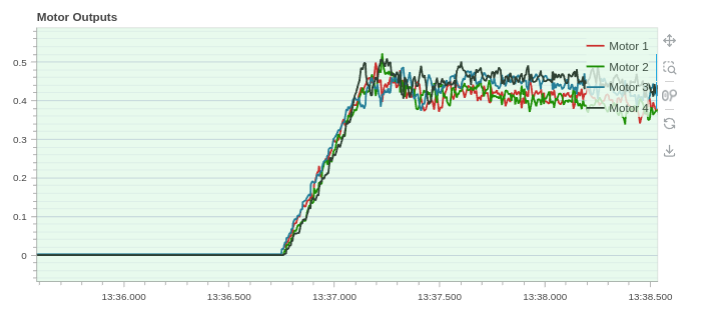
Can you please describe exactly what you saw during that start of the test? I do not see anything abnormal when i look at roll, pitch, yaw angles during the motor start-up.
If you look at a plot of angular rate, you can detect when the motors actually start spinning:
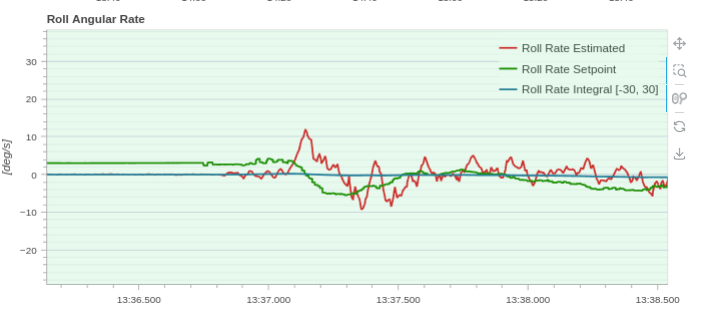
The motor command became non-zero at 13:36:750 (or so) and it looks like there was some movement (based on Roll angular rate) that started around the same time. So, it seems the ESC is responding correctly.
However, the thrust goes from zero to hover thrust in about 0.5 seconds, which is pretty fast, so maybe this seems surprising to you? Did the vehicle fly well?
-
@Aaky , sorry about the delay.
In your log, it looks like you are in Position mode, which is what I think you intended. I see that during start-up the, motor outputs ramp from 0 to about 0.45 in about half a second.
Can you please describe exactly what you saw during that start of the test? I do not see anything abnormal when i look at roll, pitch, yaw angles during the motor start-up.
If you look at a plot of angular rate, you can detect when the motors actually start spinning:
The motor command became non-zero at 13:36:750 (or so) and it looks like there was some movement (based on Roll angular rate) that started around the same time. So, it seems the ESC is responding correctly.
However, the thrust goes from zero to hover thrust in about 0.5 seconds, which is pretty fast, so maybe this seems surprising to you? Did the vehicle fly well?
@Alex-Kushleyev Thank you for the response. Yes the vehicle flies well, there isnt any issue in flying. Actually when we arm the UAV on ground, motors dont spin at all and when user raises the RC stick to 62.5% motors spin at that point only and achieve the hover throttle.
On all the normal vehicles which I have flown till date in PX4, motor do always spin on arm and post manual RC based throttle raise/Auto take off raises the throttle to hover conditions but with this setup I am seeing motors dont spin at all and actuator_outputs topic shows 0 units been commanded to voxl2_io. How can we increase this arming command to actuator to something say 0.1/0.05?
-
@Alex-Kushleyev Thank you for the response. Yes the vehicle flies well, there isnt any issue in flying. Actually when we arm the UAV on ground, motors dont spin at all and when user raises the RC stick to 62.5% motors spin at that point only and achieve the hover throttle.
On all the normal vehicles which I have flown till date in PX4, motor do always spin on arm and post manual RC based throttle raise/Auto take off raises the throttle to hover conditions but with this setup I am seeing motors dont spin at all and actuator_outputs topic shows 0 units been commanded to voxl2_io. How can we increase this arming command to actuator to something say 0.1/0.05?
@Aaky I believe the reason why your drone starts increasing rpm only when you raise the throttle above 50% is because you are in a position mode, in which the thrust control stick is controlling Z velocity. So in order to command the drone to take off, you have to raise the stick above 0 (middle position).
However, yes, it seems there is another issue, which is motors not spinning at idle, which means the minimum commanded PWM signal is below the threshold for the ESC to respond. This is dangerous because this could mean that the flight controller could send such low command during flight and motor(s) may turn off inadvertently.
I believe i know what the issue is, but in order to fix it, the px4 package needs to be rebuilt. Are you set up to build px4 for voxl2? if not i can make a change and build it for you to try. Can you tell me which version of px4 you are using?
voxl-version | grep px4. I can make a change based on your current version of px4 package. -
@Aaky I believe the reason why your drone starts increasing rpm only when you raise the throttle above 50% is because you are in a position mode, in which the thrust control stick is controlling Z velocity. So in order to command the drone to take off, you have to raise the stick above 0 (middle position).
However, yes, it seems there is another issue, which is motors not spinning at idle, which means the minimum commanded PWM signal is below the threshold for the ESC to respond. This is dangerous because this could mean that the flight controller could send such low command during flight and motor(s) may turn off inadvertently.
I believe i know what the issue is, but in order to fix it, the px4 package needs to be rebuilt. Are you set up to build px4 for voxl2? if not i can make a change and build it for you to try. Can you tell me which version of px4 you are using?
voxl-version | grep px4. I can make a change based on your current version of px4 package. -
@Alex-Kushleyev Thanks for the update. Yes I have setup to build px4 firmware on my machine. Please provide me instructions to correct this problem.
@Aaky , please to update this value from 1000 to 1100 which will increase the minimum PWM value that is sent to the motors : https://github.com/modalai/px4-firmware/blob/voxl-dev/src/drivers/voxl2_io/voxl2_io.hpp#L137 . However, do not recalibrate the ESC with this updated value, since it will reset your ESC minimum value also to 1100. Your commanded PWM value should never get close to the absolute minimum value that the ESC starts spinning. Otherwise, your motor can stop in flight.
So if the calibration was done at 1000us minimum signal, it is recommended to set the normal operating minimum at around 1100.
Please try this and let me know if it solves your issue with motors not spinning up when you arm the vehicle.
Alex
-
@Aaky , please to update this value from 1000 to 1100 which will increase the minimum PWM value that is sent to the motors : https://github.com/modalai/px4-firmware/blob/voxl-dev/src/drivers/voxl2_io/voxl2_io.hpp#L137 . However, do not recalibrate the ESC with this updated value, since it will reset your ESC minimum value also to 1100. Your commanded PWM value should never get close to the absolute minimum value that the ESC starts spinning. Otherwise, your motor can stop in flight.
So if the calibration was done at 1000us minimum signal, it is recommended to set the normal operating minimum at around 1100.
Please try this and let me know if it solves your issue with motors not spinning up when you arm the vehicle.
Alex
@Alex-Kushleyev I have modified the firmware and also built the same. I used install-voxl.sh script to manually place the binaries in voxl2 and post that if I try to run voxl-px4 I am getting following error:
voxl2:/$ /usr/bin/voxl-px4
[INFO] Reading from /etc/modalai/voxl-px4.conf
Found DSP signature file
[INFO] Daemon mode enabled

*************************
GPS=AUTODETECT
RC=CRSF_RAW
ESC=VOXL_ESC
POWER MANAGER=VOXLPM
DISTANCE SENSOR=NONE
OSD=DISABLE
DAEMON_MODE=ENABLE
SENSOR_CAL=ACTUAL
EXTRA STEPS:
*************************

INFO  [px4] mlockall() enabled. PX4's virtual address space is locked into RAM.
INFO  [px4] assuming working directory is rootfs, no symlinks needed.
INFO  [muorb] Got muorb init command
Sending initialization request
INFO  [muorb] muorb protobuf initalize method succeeded
INFO  [muorb] SLPI: Creating pthread test_MUORB

ERROR [muorb] SLPI: Hit maximum number of threads
INFO  [muorb] succesfully did ADVERTISE_TEST_TYPE
ERROR [muorb] Test timed out waiting for response
px4: symbol lookup error: px4: undefined symbol: fc_sensor_get_time_offset
Some undefined symbol problem. What should be further steps to debug this?
-
@Alex-Kushleyev I have modified the firmware and also built the same. I used install-voxl.sh script to manually place the binaries in voxl2 and post that if I try to run voxl-px4 I am getting following error:
voxl2:/$ /usr/bin/voxl-px4
[INFO] Reading from /etc/modalai/voxl-px4.conf
Found DSP signature file
[INFO] Daemon mode enabled

*************************
GPS=AUTODETECT
RC=CRSF_RAW
ESC=VOXL_ESC
POWER MANAGER=VOXLPM
DISTANCE SENSOR=NONE
OSD=DISABLE
DAEMON_MODE=ENABLE
SENSOR_CAL=ACTUAL
EXTRA STEPS:
*************************

INFO  [px4] mlockall() enabled. PX4's virtual address space is locked into RAM.
INFO  [px4] assuming working directory is rootfs, no symlinks needed.
INFO  [muorb] Got muorb init command
Sending initialization request
INFO  [muorb] muorb protobuf initalize method succeeded
INFO  [muorb] SLPI: Creating pthread test_MUORB

ERROR [muorb] SLPI: Hit maximum number of threads
INFO  [muorb] succesfully did ADVERTISE_TEST_TYPE
ERROR [muorb] Test timed out waiting for response
px4: symbol lookup error: px4: undefined symbol: fc_sensor_get_time_offset
Some undefined symbol problem. What should be further steps to debug this?
-
@Alex-Kushleyev Got this fixed after picking debians from this link for libfc and modalslpi. Yet to test the behaviour of motors on arm.
@Alex-Kushleyev I tried with updating the firmware as you mentioned to update PWM minimum value from 1000 to 1100 in voxl2_io.hpp file. With these changes I tried to arm UAV in Altitude flight mode in indoors but still motors weren't spinning and actuator_outputs topic shows all zeros for all the four motors still. Let me know further steps.
-
@Alex-Kushleyev I tried with updating the firmware as you mentioned to update PWM minimum value from 1000 to 1100 in voxl2_io.hpp file. With these changes I tried to arm UAV in Altitude flight mode in indoors but still motors weren't spinning and actuator_outputs topic shows all zeros for all the four motors still. Let me know further steps.
@Aaky ,
When you build px4, it is best to create a package (using make_package.sh) script, and install the package (.deb) instead of manually copying the files. The package installation would actually warn you that you had to update the libfc_sensor package.
Ok, now regarding your issue.. i just realized that the pwm range is actually a param that is loaded here : https://github.com/modalai/px4-firmware/blob/voxl-dev/src/drivers/voxl2_io/voxl2_io.cpp#L23, so your change for the default value did not actually do anything (sorry about that).
Now, let's try the following. I believe now the issue is that the mixer is set up to have the same value as DISABLED and PWM_MIN, which is an issue (i am working on providing a proper fix). However, I believe you should be able to work around it by doing the following:
- revert VOXL2_IO_DEFAULT_MIN back to 1000 and deploy the px4 package
- perform actuator test in QGC to find at which point (0-800) the motor starts spinning reliably. Usually, i find the point at which it just starts spinning and you can add around 40-50 to that for good margin.
- change VOXL2_IO_MIXER_MIN from 0 to the value you found in step above (lets say 50) here : https://github.com/modalai/px4-firmware/blob/voxl-dev/src/drivers/voxl2_io/voxl2_io.hpp#L132
- rebuild and deploy px4 package
- use actuator test to confirm that as soon as you move the slider from disabled, the motor start spinning
- perform flight test and make sure the motor starts spinning as soon as you arm the vehicle
Just FYI we are working on cleaning up the voxl2_io driver, which is causing this confusion. I believe the steps above should provide a temporary workaround.
-
@Aaky ,
When you build px4, it is best to create a package (using make_package.sh) script, and install the package (.deb) instead of manually copying the files. The package installation would actually warn you that you had to update the libfc_sensor package.
Ok, now regarding your issue.. i just realized that the pwm range is actually a param that is loaded here : https://github.com/modalai/px4-firmware/blob/voxl-dev/src/drivers/voxl2_io/voxl2_io.cpp#L23, so your change for the default value did not actually do anything (sorry about that).
Now, let's try the following. I believe now the issue is that the mixer is set up to have the same value as DISABLED and PWM_MIN, which is an issue (i am working on providing a proper fix). However, I believe you should be able to work around it by doing the following:
- revert VOXL2_IO_DEFAULT_MIN back to 1000 and deploy the px4 package
- perform actuator test in QGC to find at which point (0-800) the motor starts spinning reliably. Usually, i find the point at which it just starts spinning and you can add around 40-50 to that for good margin.
- change VOXL2_IO_MIXER_MIN from 0 to the value you found in step above (lets say 50) here : https://github.com/modalai/px4-firmware/blob/voxl-dev/src/drivers/voxl2_io/voxl2_io.hpp#L132
- rebuild and deploy px4 package
- use actuator test to confirm that as soon as you move the slider from disabled, the motor start spinning
- perform flight test and make sure the motor starts spinning as soon as you arm the vehicle
Just FYI we are working on cleaning up the voxl2_io driver, which is causing this confusion. I believe the steps above should provide a temporary workaround.
-
@Alex-Kushleyev Thanks Alex. This fix solved the problem and I am able to now see motors spin on arming. Thank you for your prompt and accurate response.
@Aaky, You are welcome. I will let you know when we release an update that cleans up the voxl2_io driver and uses standard range for the mixer (1000-2000 range instead of 0-800).
-
@Aaky, You are welcome. I will let you know when we release an update that cleans up the voxl2_io driver and uses standard range for the mixer (1000-2000 range instead of 0-800).
-
@Aaky, You are welcome. I will let you know when we release an update that cleans up the voxl2_io driver and uses standard range for the mixer (1000-2000 range instead of 0-800).
@Alex-Kushleyev Alex I just wanted to know with this workaround change, the minimum PWM which flight controller can provide to motors is the hardcoded value in VOXL2_IO_MIXER_MIN? So can this ensure that in flight, controller dosent provide zero values to ESC?
-
@Alex-Kushleyev Alex I just wanted to know with this workaround change, the minimum PWM which flight controller can provide to motors is the hardcoded value in VOXL2_IO_MIXER_MIN? So can this ensure that in flight, controller dosent provide zero values to ESC?
@Aaky , the mixer should never output a value lower than mixer min (while armed).

Reading along? Create a free ModalAI Forum account to join in.
With an account you can reply, ask your own question, get an email when a ModalAI engineer answers, and mark the reply that solved it. Your place in each thread is saved between visits.
Questions about VOXL, Flight Core, ESCs and ModalAI drones are answered here by the engineers who build them.
Register Login