
Unable to access Tracking camera
-
I am having some issue with tracking camera. No matter what configuration I select It does not allow me to access the tracking camera.
I cross checked all the connect on flight-deck. And connections looks fine
yocto:/#  voxl-configure-cameras 3
attempting to use camera configuration 3
adding override_cam_id value=1 to /etc/snav/camera.downward.xml
adding override_cam_id value=2 to /etc/snav/camera.stereo.xml

yocto:/# cat /etc/modalai/camera_env.sh
export CAM_CONFIG_ID=3
export HIRES_CAM_ID=0
export TRACKING_CAM_ID=1
export STEREO_CAM_ID=2
export TOF_CAM_ID=-1

yocto:/#  voxl-image-streamer -c 2 -n 4 -i 192.168.100.90
STEREO camera selected.
using cam_id=2
Segmentation fault
But for -c 1 it is opening stereo instead of tracking
yocto:/#  voxl-configure-cameras 1
attempting to use camera configuration 1
adding override_cam_id value=0 to /etc/snav/camera.downward.xml
adding override_cam_id value=1 to /etc/snav/camera.stereo.xml

yocto:/# cat /etc/modalai/camera_env.sh
export CAM_CONFIG_ID=1
export HIRES_CAM_ID=-1
export TRACKING_CAM_ID=0
export STEREO_CAM_ID=1
export TOF_CAM_ID=-1
yocto:/# voxl-image-streamer -c 0 -n 4 -i 192.168.100.90 HIRES camera selected. using cam_id=0 libcam.enable.publish 1 libcam.enable.publish.dump 0 libcam.publish.buffer.policy max libcam.publish.buffer.max 3 libcam.debug.level info libcam.dump.dir /data/misc/camera/dumps Opened camera 0 Type: 0 Preview FPS range 0: [ 15, 15 ] Preview FPS range 1: [ 20, 20 ] Preview FPS range 2: [ 24, 24 ] Preview FPS range 3: [ 7, 30 ] Preview FPS range 4: [ 30, 30 ] Preview FPS range 5: [ 60, 60 ] Preview FPS range 6: [ 90, 90 ] Preview FPS range 7: [ 120, 120 ] Preview size 0: [ 4160 x 3120 ] Preview size 1: [ 4056 x 3040 ] Preview size 2: [ 4000 x 3000 ] Preview size 3: [ 3040 x 3040 ] Preview size 4: [ 3016 x 3016 ] Preview size 5: [ 3840 x 2160 ] Preview size 6: [ 3648 x 2736 ] Preview size 7: [ 3264 x 2448 ] Preview size 8: [ 3200 x 2400 ] Preview size 9: [ 2976 x 2976 ] Preview size 10: [ 3044 x 1720 ] Preview size 11: [ 2704 x 2028 ] Preview size 12: [ 2704 x 1520 ] Preview size 13: [ 2592 x 1944 ] Preview size 14: [ 2688 x 1512 ] Preview size 15: [ 2028 x 1144 ] Preview size 16: [ 2160 x 2160 ] Preview size 17: [ 1920 x 2160 ] Preview size 18: [ 1920 x 1920 ] Preview size 19: [ 1880 x 1880 ] Preview size 20: [ 2048 x 1536 ] Preview size 21: [ 1920 x 1440 ] Preview size 22: [ 1920 x 1080 ] Preview size 23: [ 1600 x 1600 ] Preview size 24: [ 1600 x 1200 ] Preview size 25: [ 1520 x 1520 ] Preview size 26: [ 1440 x 1080 ] Preview size 27: [ 1080 x 1080 ] Preview size 28: [ 1280 x 960 ] Preview size 29: [ 1340 x 760 ] Preview size 30: [ 1280 x 768 ] Preview size 31: [ 1280 x 720 ] Preview size 32: [ 1200 x 1200 ] Preview size 33: [ 1280 x 640 ] Preview size 34: [ 1280 x 480 ] Preview size 35: [ 1040 x 780 ] Preview size 36: [ 1024 x 768 ] Preview size 37: [ 960 x 960 ] Preview size 38: [ 720 x 720 ] Preview size 39: [ 800 x 600 ] Preview size 40: [ 960 x 720 ] Preview size 41: [ 848 x 480 ] Preview size 42: [ 858 x 480 ] Preview size 43: [ 864 x 480 ] Preview size 44: [ 800 x 480 ] Preview size 45: [ 720 x 480 ] Preview size 46: [ 640 x 480 ] Preview size 47: [ 640 x 240 ] Preview size 48: [ 640 x 360 ] Preview size 49: [ 480 x 640 ] Preview size 50: [ 480 x 480 ] Preview size 51: [ 480 x 360 ] Preview size 52: [ 480 x 320 ] Preview size 53: [ 432 x 240 ] Preview size 54: [ 352 x 288 ] Preview size 55: [ 320 x 240 ] Preview format 0: nv12-venus Preview format 1: raw10 Preview format 2: raw12 Setting FPS to 30 Setting preview size to 640x480 Using default preview format of YUV_FORMAT Starting camera Created socket Bind successful Listen successful, waiting for connection...
yocto:/# voxl-image-streamer -c 1 -n 4 -i 192.168.100.90
TRACKING camera selected.
using cam_id=1
libcam.enable.publish  1
libcam.enable.publish.dump 0
libcam.publish.buffer.policy max
libcam.publish.buffer.max 3
libcam.debug.level info
libcam.dump.dir /data/misc/camera/dumps
Opened camera 1 Type: 1
Preview FPS range 0: [ 15, 15 ]
Preview FPS range 1: [ 20, 20 ]
Preview FPS range 2: [ 24, 24 ]
Preview FPS range 3: [ 7, 30 ]
Preview FPS range 4: [ 30, 30 ]
Preview FPS range 5: [ 60, 60 ]
Preview FPS range 6: [ 90, 90 ]
Preview FPS range 7: [ 120, 120 ]
Preview size 0: [ 1280 x 480 ]
Preview size 1: [ 848 x 480 ]
Preview size 2: [ 858 x 480 ]
Preview size 3: [ 864 x 480 ]
Preview size 4: [ 800 x 480 ]
Preview size 5: [ 720 x 480 ]
Preview size 6: [ 640 x 480 ]
Preview size 7: [ 640 x 240 ]
Preview size 8: [ 640 x 360 ]
Preview size 9: [ 480 x 480 ]
Preview size 10: [ 480 x 360 ]
Preview size 11: [ 480 x 320 ]
Preview size 12: [ 432 x 240 ]
Preview size 13: [ 352 x 288 ]
Preview size 14: [ 320 x 240 ]
Preview format 0: nv12-venus
Preview format 1: raw10
Preview format 2: raw12
Setting FPS to 30
Setting preview size to 640x480
Using default preview format of YUV_FORMAT
Starting camera
Created socket
Bind successful
Listen successful, waiting for connection...
Connection established
starting image stream
Creating TCP processing thread.
running!
No matter what camera configuration I select I am just able to access hire and stereo even if I dont set voxl-configure-cameras 1
yocto:/#  voxl-configure-cameras

Which camera configuration are you using?
1 Tracking + Stereo (default)
2 Tracking Only
3 Hires + Stereo + Tracking
4 Hires + Tracking
5 TOF + Tracking
6 Hires + TOF + Tracking
7 TOF + Stereo + Tracking (not currently supported)
8 None

2
attempting to use camera configuration 2
adding override_cam_id value=0 to /etc/snav/camera.downward.xml
adding override_cam_id value=-1 to /etc/snav/camera.stereo.xml
Even in the above situation where I have just set to tracking it still open Hires
The same happens with voxl-cam-ros
I am not able to access tracking cameras -
The camera configuration must match what is connected to the board. So if all 3 cameras are connected, that is the configuration you must use.
Do not connect or disconnect cameras while the board is powered on
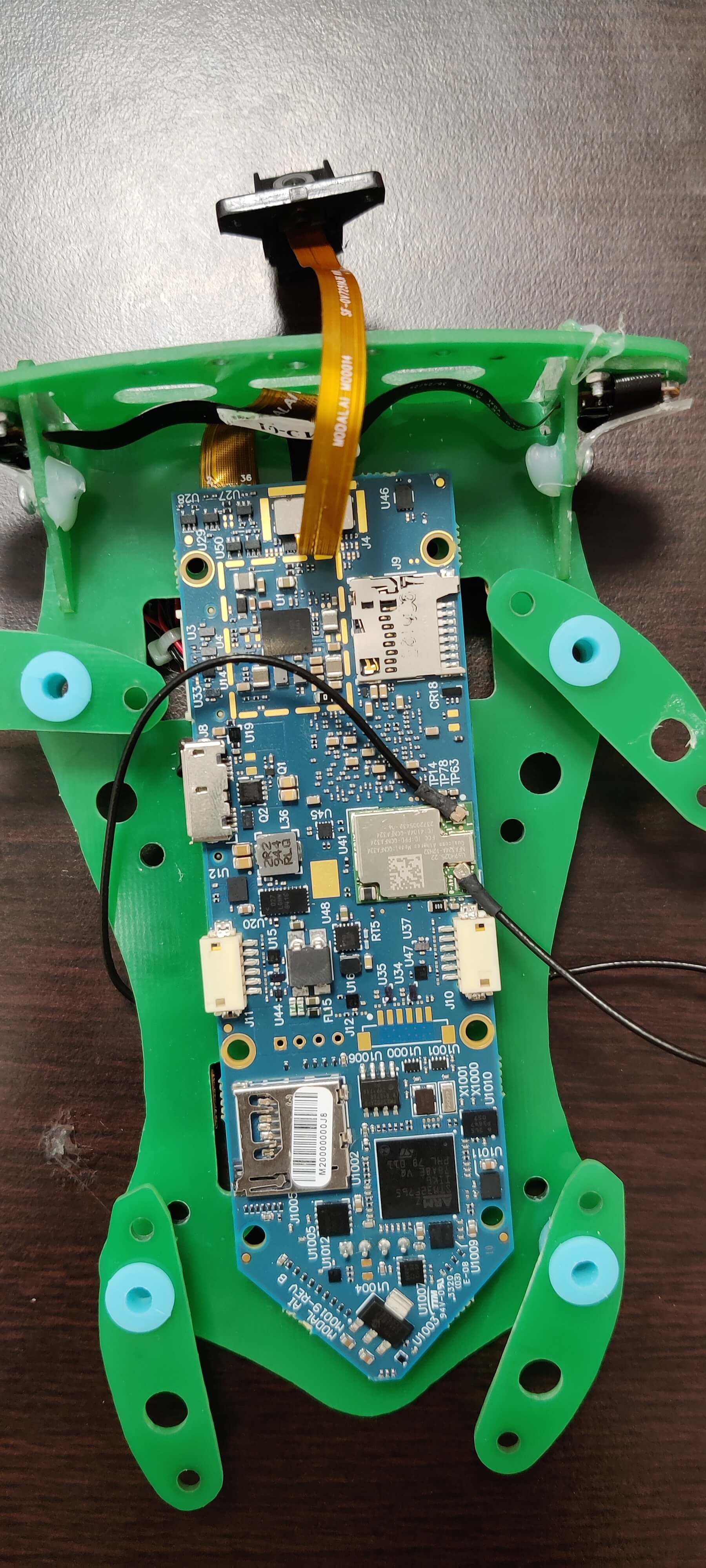
Can you share a picture of how you have connected things? Are you sure the pin ones line up appropriately?
-
Also, voxl-vision-px4 uses the tracking camera. So if it is running image streamer will need to be set as a slave as voxl-vision-px4 is the master
-
Also, voxl-vision-px4 uses the tracking camera. So if it is running image streamer will need to be set as a slave as voxl-vision-px4 is the master
These are default connection on the board
yocto:/# voxl-configure-cameras 3
attempting to use camera configuration 3
adding override_cam_id value=1 to /etc/snav/camera.downward.xml
adding override_cam_id value=2 to /etc/snav/camera.stereo.xml
yocto:/# cat /etc/modalai/camera_env.sh export CAM_CONFIG_ID=3 export HIRES_CAM_ID=0 export TRACKING_CAM_ID=1 export STEREO_CAM_ID=2 export TOF_CAM_ID=-1After setting configuration to 3 as well
yocto# roslaunch voxl_cam_ros tracking
... logging to /home/root/.ros/log/1f7737e8-ad09-11eb-b4a1-ec5c68cd1745/roslaunch-apq8096-3742.log
Checking log directory for disk usage. This may take awhile.
Press Ctrl-C to interrupt
Done checking log file disk usage. Usage is <1GB.

started roslaunch server http://192.168.100.90:46578/

SUMMARY
========

PARAMETERS
 * /rosdistro: indigo
 * /rosversion: 1.11.21
 * /tracking/voxl_cam_nodelet/cam_id: 0
 * /tracking/voxl_cam_nodelet/cam_name: tracking
 * /tracking/voxl_cam_nodelet/frame_id: tracking_frame
 * /tracking/voxl_cam_nodelet/frame_rate: 15
 * /tracking/voxl_cam_nodelet/height: 480
 * /tracking/voxl_cam_nodelet/is_cam_master: False
 * /tracking/voxl_cam_nodelet/skip_n_frames: 0
 * /tracking/voxl_cam_nodelet/snav_raw10_compatability: True
 * /tracking/voxl_cam_nodelet/width: 640

NODES
  /tracking/
    tracking_nodelet_manager (nodelet/nodelet)
    voxl_cam_nodelet (nodelet/nodelet)

auto-starting new master
process[master]: started with pid [3761]
ROS_MASTER_URI=http://localhost:11311/

setting /run_id to 1f7737e8-ad09-11eb-b4a1-ec5c68cd1745
process[rosout-1]: started with pid [3774]
started core service [/rosout]
process[tracking/tracking_nodelet_manager-2]: started with pid [3780]
process[tracking/voxl_cam_nodelet-3]: started with pid [3788]
[ INFO] [1620154027.140051685]: Initializing nodelet with 4 worker threads.
[ INFO] [1620154027.459145704]: SnapCamDriver Starting
[ INFO] [1620154027.459566279]: Monotonic offset: 1620153449.753732686
libcam.enable.publish  1
libcam.enable.publish.dump 0
libcam.publish.buffer.policy max
libcam.publish.buffer.max 3
libcam.debug.level info
libcam.dump.dir /data/misc/camera/dumps
ERROR: could not open camera subscriber for cam id 0
[ERROR] [1620154044.976910041]: CameraManager::Initialize() failed
[ERROR] [1620154044.977876660]: Unable to open camera.

Reading along? Create a free ModalAI Forum account to join in.
With an account you can reply, ask your own question, get an email when a ModalAI engineer answers, and mark the reply that solved it. Your place in each thread is saved between visits.
Questions about VOXL, Flight Core, ESCs and ModalAI drones are answered here by the engineers who build them.
Register Login