
Color Issue with New Camera Replacement on VOXL2 Board
-
Hello,
We recently replaced the hires camera (Link) connected to our VOXL2 board with a new camera that has 146 degree of FOV (Link). After the replacement, the camera server is functioning correctly, and the video output is fine. However, as you can see in Photo 1, the colors appear overall reddish. Photo 2 shows the result captured by the previous hires camera. We have purchased two cameras, and both exhibit the same color issue.
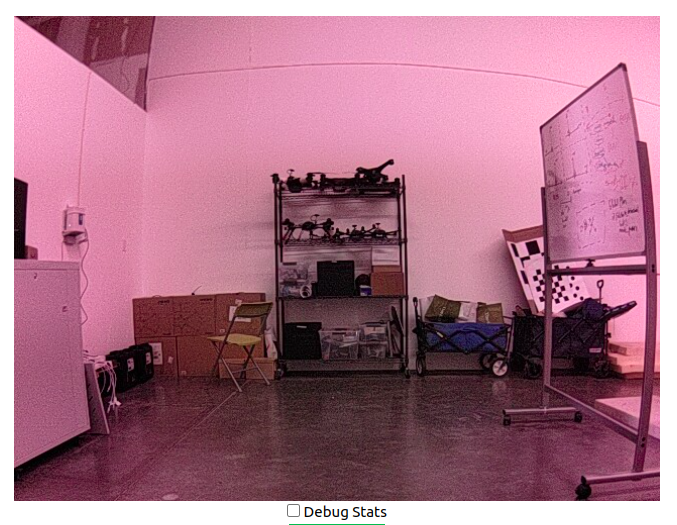
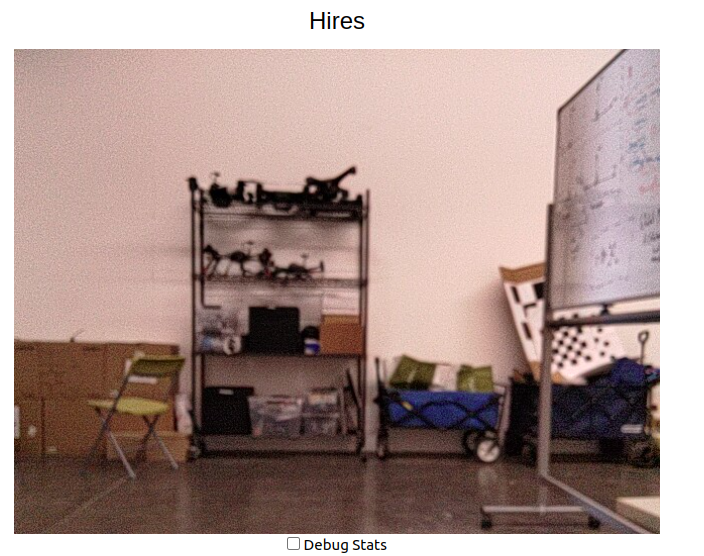
We are seeking guidance on how to resolve this color issue. Has anyone encountered a similar problem before? Do you have any suggestions or troubleshooting steps we could try to rectify this? Any help would be greatly appreciated.
Thank you in advance for your assistance.
-
That's the tuning we have on the wide FOV lens for IMX214. We will investigate in the next few months to see if we can improve.
-
That's the tuning we have on the wide FOV lens for IMX214. We will investigate in the next few months to see if we can improve.
-
That's the tuning we have on the wide FOV lens for IMX214. We will investigate in the next few months to see if we can improve.
@Chad-Sweet I changed some parameters in
voxl-camera-server.conf. I replaced "ae_mode" fromlspto modal. After changing it, I typedvoxl-send-command` to calibrate color. That command didn't work and exposure and gain didn't changed. Do you have any advice? Or Is there a camera driver to tune color?


Reading along? Create a free ModalAI Forum account to join in.
With an account you can reply, ask your own question, get an email when a ModalAI engineer answers, and mark the reply that solved it. Your place in each thread is saved between visits.
Questions about VOXL, Flight Core, ESCs and ModalAI drones are answered here by the engineers who build them.
Register Login