Skip to content
  • Categories
  • Recent
  • Tags
  • Popular
  • Users
  • Groups
Collapse
Brand Logo

ModalAI Forum

  1. ModalAI Support Forum
  2. Ask your questions right here!
  3. Microhard will not connect

Microhard will not connect

Scheduled Pinned Locked Moved Ask your questions right here!
6 Posts 2 Posters 2.2k Views 2 Watching
  • Oldest to Newest
  • Newest to Oldest
  • Most Votes
Reply
  • Reply as topic
Log in to reply
This topic has been deleted. Only users with topic management privileges can see it.
  • Andrew YingstA Offline
    Andrew YingstA Offline
    Andrew Yingst
    wrote on last edited by
    #1

    I have a VOXL2 with modem add-on with a Microhard pMDDL2450 and a paired standalone carrier. My problem is I can't get them to pair and don't understand the led patterns in order to troubleshoot. Currently both radios' ssri leds are blinking as a group. I am confident the IP address on the master is 192.168.168.1 via ADB. The slave IP also appears to be .1 instead of .2 no matter how we reset using S2. We have the radios separated in space. Ideas?

    1 Reply Last reply
    0
    • tomT Offline
      tomT Offline
      tom
      admin
      wrote on last edited by
      #2

      @Andrew-Yingst It sounds as though both Microhard modems are configured as "master".

      Have you tried this on the one you'd like to be the "slave":

      Link Preview Image
      Microhard Add-On Board User Guide

      ModalAI technical documentation for VOXL and VOXL 2 Companion Computers for PX4 and ArduPilot Obstacle Avoidance and GPS-denied navigation, assembled in the USA

      favicon

      ModalAI Technical Docs (docs.modalai.com)

      The process for configuring the standalone Microhard board is simple:

      Press and hold the S2 button on the Microhard pDDL Carrier USB Dongle for 5 seconds, then release. The module will then reset all settings to the default values required for a Slave module. This module will be assigned a default IP address of 192.168.168.2
      Once both Microhard modems have been configured, the two should now automatically connect to each other.

      If this "slave" board is connected to a PC and you're able to ping it you can go to it's IP in your browser and pull up it's web server. There you can easily configure it's mode among other things

      1 Reply Last reply
      0
      • Andrew YingstA Offline
        Andrew YingstA Offline
        Andrew Yingst
        wrote on last edited by
        #3

        We have tried that about 100 times. Microhard emailed this-"In regards to the quick setup via the CFG button, this option has been removed from our G2 version of the pMDDL modules." Does 'G2 version' mean anything to you?
        Andrew

        1 Reply Last reply
        0
        • tomT Offline
          tomT Offline
          tom
          admin
          wrote on last edited by
          #4

          @Andrew-Yingst I will look into it. In the meantime I would try to get the configuration going through the Web GUI

          1 Reply Last reply
          0
          • Andrew YingstA Offline
            Andrew YingstA Offline
            Andrew Yingst
            wrote on last edited by
            #5

            What hardware is needed for that?

            1 Reply Last reply
            0
            • tomT Offline
              tomT Offline
              tom
              admin
              wrote on last edited by
              #6

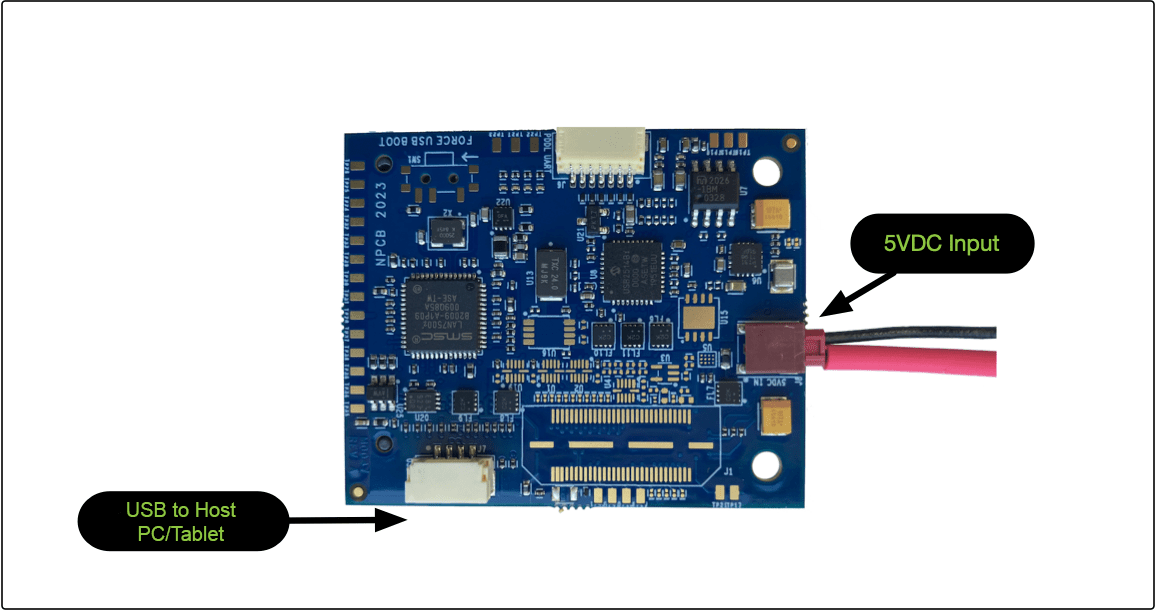
              @Andrew-Yingst You'll want to use a combo of MCBL-0010(https://www.modalai.com/collections/cables-1/products/mcbl-00010) and a USB-A to micro-usb(example: https://www.amazon.com/Charger-USB-Adapter-Replacement-Charging/dp/B08CBDZM6L/ref=sr_1_11?keywords=micro+usb+cable&qid=1682534177&sr=8-11)

              MCBL-0010 plugs in to the "USB to host PC" connector on the bottom of the standalone board. The micro-usb cable plugs into MCBL-0010 and the other end plugs into your PC.
              c05d0fa4-b23f-48d1-8969-d4f32e70103e-image.png

              Your PC will then see a new network interface come up. Once it assigns an IP address you should be able to ping the microhard modem (192.168.168.1).

              Next, navigate to that IP in your browser and you'll be able to access the web server

              1 Reply Last reply
              0

              Hello! It looks like you're interested in this conversation, but you don't have an account yet.

              Getting fed up of having to scroll through the same posts each visit? When you register for an account, you'll always come back to exactly where you were before, and choose to be notified of new replies (either via email, or push notification). You'll also be able to save bookmarks and upvote posts to show your appreciation to other community members.

              With your input, this post could be even better 💗

              Register Login
              Reply
              • Reply as topic
              Log in to reply
              • Oldest to Newest
              • Newest to Oldest
              • Most Votes


              ModalAI
              Categories Recent Tags ModalAI.com Docs
              © 2026 ModalAI® · Accelerating autonomy for smaller, smarter, safer drones · Powered by NodeBB
              • Login

              • Login or register to search.
              • First post
                Last post
              0
              • Categories
              • Recent
              • Tags
              • Popular
              • Users
              • Groups
