
Controlling a servo with VOXL
-
Hi ModalAI Team,
I would like to ask if you have any tips regarding how can I successfully control a servo motor with the m500 drone and VOXL. I know there are free PWM in the Flight Core but as I understand it, they are all used by the motors.
Another option I was thinking of is to get a PWM Driver connected to an I2C available on the VOXL board. Finally, I would use the voxl_io library that you provide to communicate.
Do you have any recommendations, tips, or suggestions? Is there a better way more straightforward to control a servo with the m500 drone?
Thank you
-
You could use an i2c to PWM breakout board from Sparkfun or Adafruit and then voxl-i2c to communicate with it https://docs.modalai.com/voxl-i2c-io/
-
Additionally, there is a python wrapper for libvoxl_io i2c functionality, so it should be relatively straightforward once you have the i2c->pwm board hooked up to VOXL i2c port. https://gitlab.com/voxl-public/core-libs/libvoxl_io/-/tree/master/lib/python
-
Hi @Alex-Kushleyev
How can I use the python wrappers from libvoxl_io?
I was able to complete the steps from the README. But when I deploy the ipk-file to the voxl, how can I find and run/use the python files? -
@SHofmeester , you can clone the libvoxl_io repository on VOXL and just run the python example scripts from the repository after the ipk has been installed. Then you can modify the python scripts to fit your needs.
Alex
-
@Alex-Kushleyev Thank you for your reply.
I tried installing the .ipk with opkg install, but it said "incompatible architecture". But when I tried it with v.0.3.4 of libvoxl_io, it worked perfectly.I cloned the repository and added my own python script. When I try to write '10' and then read from that register, it reads: '\x00'. Am I not writing correctly? (I tried it with other registers as well, but that also didn't work. When I scan bus 7, it does recognize device 64. When I disconnect the device and try to write, it says: 'could not write data')
Code:
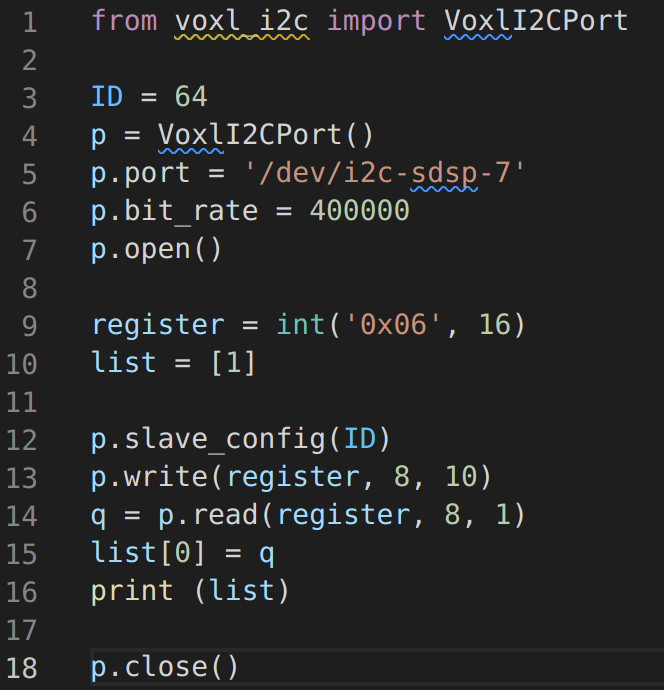
Output:

Thanks in advance
-
hi @SHofmeester ,
regarding package install, which branch are you building from? make sure you build from master. also, if you just want to get the libs installed, you can use opkg and install it on voxl from stable source. After installing the lib from opkg repo, then you can just run the python scripts from gitlab.
/ # opkg update
Downloading http://voxl-packages.modalai.com/stable/Packages.gz.
Updated source 'stable'.

/ # opkg install libvoxl_io
Installing libvoxl_io (0.5.4) on root.
Downloading http://voxl-packages.modalai.com/stable/libvoxl_io_0.5.4.ipk.
Configuring libvoxl_io.

Done installing libvoxl_io
Regarding reading / writing.. what device are you writing to? are you sure that you can write to this specific register? Does the device have any registers that are non-zero after power on, which you can read for sanity checking? If scanning is working, then reading must be working. If there is a read error, you would not receive any read bytes (empty array) from the read() function.
Alex
-
Hi @Alex-Kushleyev,
Your steps for installing the newest version of libvoxl_io worked, thank you.To answer your questions:
- Device: pca9685
- The datasheet describes registers 6-70 as being open for PWM-control, I have tried all of them with a for-in-range-loop.
- Before writing, I read all the registers, and some were indeed non-zero after power on. But as soon as I tried to write something to those registers, they read as \x00. After taking the power off for a while, they returned to \x10, as before. I also tried writing with a chr() value, but it still became/stayed 0.
Code:
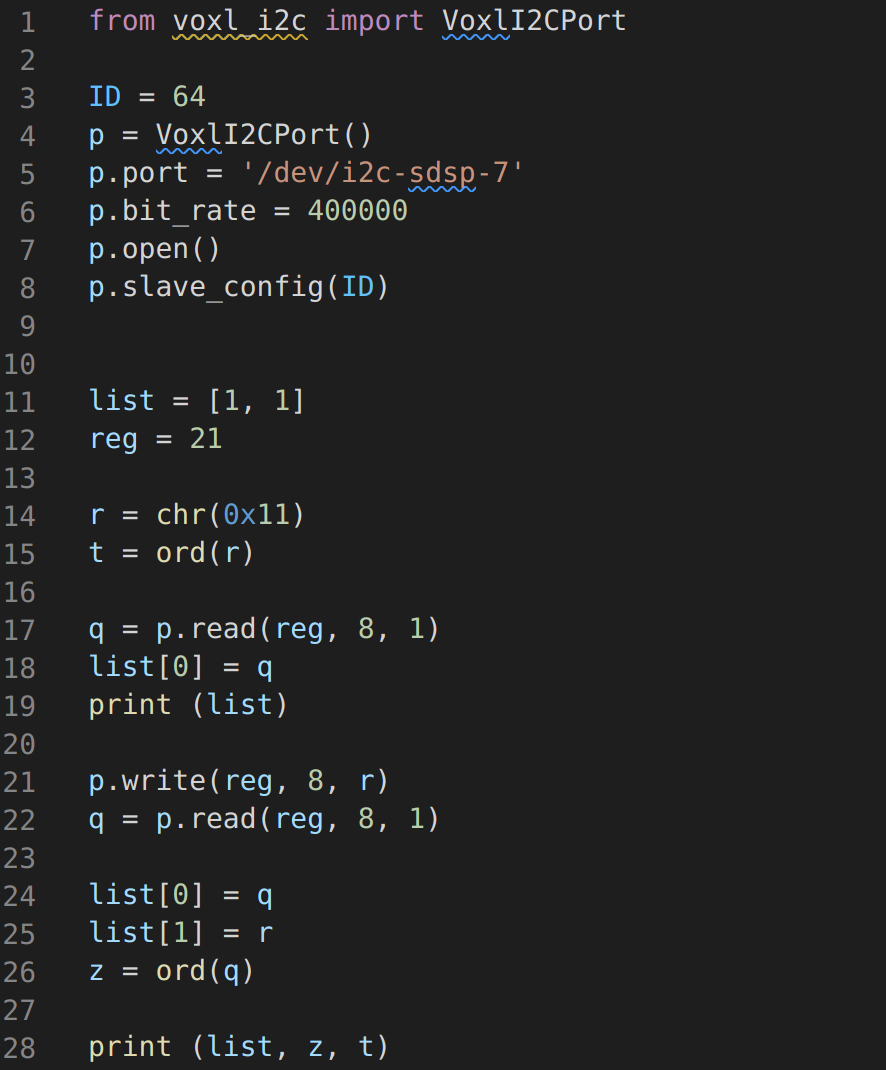
Output:

Sorry if it is a bit messy. But basically I read \x10 after power up (list[0]), after that I write \x11 (list[1]) and then read \x00.
Does this have to do with chr()?
Should the value be written another way?
Might there be a setup option I didn't put in the code?
I think, apart from the writing value, all the parameters are okay, is that right? -
Yes, chr is an issue most likely. Take a look at how uint8 from a binary representation is sent here : https://gitlab.com/voxl-public/voxl-sdk/core-libs/libapq8096-io/-/blob/master/lib/python/voxl_i2c_apm_v1.py#L48 you can do something similar (also example for hex). The data type needs to be some sort of an int.
#values of configuration registers CTRLA (address 0x00) and CTRLB (address 0x01)
CTRLA = np.uint8(int('0b01011000',2))  #offset calib every 128 conv, volt=Sense+; so sampling takes about 35ms (for both voltage and current together)
CTRLB = np.uint8(int('0b00000100',2))

#addresses of registers for reading data
REG_VRAW = int('0x1E',16)
REG_IRAW = int('0x14',16)

#write configuration to both LTC2946 devices
p.slave_config(ID0)
p.write(0,8,CTRLA)
p.write(1,8,CTRLB)
...
p.slave_config(ID0)
vraw_batt = p.read(REG_VRAW,8,2)
iraw_batt = p.read(REG_IRAW,8,2)




Reading along? Create a free ModalAI Forum account to join in.
With an account you can reply, ask your own question, get an email when a ModalAI engineer answers, and mark the reply that solved it. Your place in each thread is saved between visits.
Questions about VOXL, Flight Core, ESCs and ModalAI drones are answered here by the engineers who build them.
Register Login