Skip to content
  • Categories
  • Recent
  • Tags
  • Popular
  • Users
  • Groups
Collapse
Brand Logo

ModalAI Forum

  1. ModalAI Support Forum
  2. VOXL Compute & Autopilot
  3. VOXL 2
  4. Attitude Estimator Error

Attitude Estimator Error

Scheduled Pinned Locked Moved VOXL 2
11 Posts 3 Posters 1.7k Views 2 Watching
  • Oldest to Newest
  • Newest to Oldest
  • Most Votes
Reply
  • Reply as topic
Log in to reply
This topic has been deleted. Only users with topic management privileges can see it.
  • modaltbM Offline
    modaltbM Offline
    modaltb
    ModalAI Team
    wrote on last edited by
    #2

    Hi @mawriyo ,

    I just added some info that should help:
    https://docs.modalai.com/voxl2-px4-developer-guide/#how-to-access-the-px4-shell

    (Also, there's a known issue that when the PX4 process is killed (e.g. CTRL+C from the shell) the system freezes and needs a reboot)

    Please let me know if things aren't clear and we can update docs.

    1 Reply Last reply
    0
    • M Offline
      M Offline
      mawriyo
      wrote on last edited by mawriyo
      #3

      The following occurs
      https://imgur.com/a/dftsjQZ

      Apparently the file is too large... i apologize for the link 😕

      1 Reply Last reply
      0
      • modaltbM Offline
        modaltbM Offline
        modaltb
        ModalAI Team
        wrote on last edited by
        #4

        8c8472ed-2630-49af-a62a-01389fd4273d-image.png

        Shrunk it! ;). OK let me check into this

        1 Reply Last reply
        0
        • modaltbM Offline
          modaltbM Offline
          modaltb
          ModalAI Team
          wrote on last edited by
          #5

          @mawriyo ,

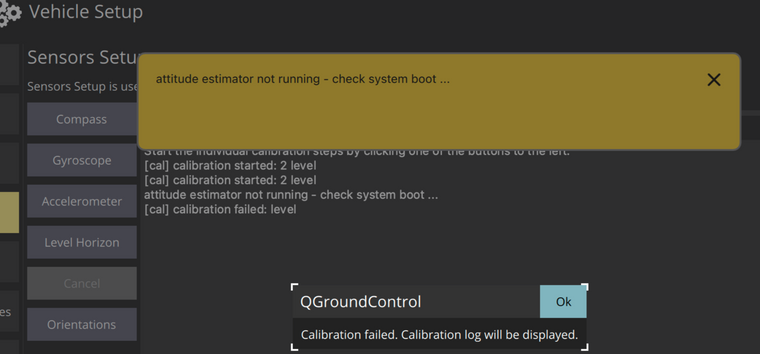
          Do you have an external mag/compass or no? I'm thinking maybe not, and if that's the case perhaps EKF2 is looking for mag data....

          I replicated during "level horizon" calibration if the mag is missing:
          46be0533-04c0-4212-9f0c-613719cf27f3-image.png

          In order to proceed without a mag, you can run the following (assuming PX4 is running already, and these commands are in a new terminal):

          # set to NONE
          px4-param set EKF2_MAG_TYPE 5
          
          # verify
          px4-param show EKF2_MAG_TYPE
          
          1 Reply Last reply
          0
          • M Offline
            M Offline
            mawriyo
            wrote on last edited by
            #6

            We are using an external gps + mag (Here3 gps combo) and wired up the system accordingly. We still are not able read data from either... Additionally we cannot get the voxl2 IO to register the voxl... IE We see a blue flashing led and a solid orange. We cant get that to become something we use...

            1 Reply Last reply
            0
            • M Offline
              M Offline
              mawriyo
              wrote on last edited by
              #7

              Updating px4 fixed the blinking LED matter and we can Arm. (yay!) but we still are having issues connecting the HERE3 radio... please advise

              Eric KatzfeyE 1 Reply Last reply
              0
              • M mawriyo

                Updating px4 fixed the blinking LED matter and we can Arm. (yay!) but we still are having issues connecting the HERE3 radio... please advise

                Eric KatzfeyE Offline
                Eric KatzfeyE Offline
                Eric Katzfey
                ModalAI Team
                wrote on last edited by
                #8

                @mawriyo Our PX4 implementation is custom for the VOXL 2 and usually requires some additional work when integrating new components. We normally use the Holybro GPS / Compass / LED units or the Matek units and so we can only say that those are known to be supported. Anything else, such as the Here3 unit, probably will need some extra work to integrate. How are you attaching the Here3 to the system? Do you have a wiring diagram that you can provide?

                1 Reply Last reply
                0
                • M Offline
                  M Offline
                  mawriyo
                  wrote on last edited by mawriyo
                  #9

                  Using https://ardupilot.org/copter/_images/here-plus-pixhawk.png as a reference...

                  5V -> 5V
                  GPSRX -> GNSS TX 3P3V
                  GPSTX -> GNSS RX 3P3V
                  I2C SCL -> MAG SCL 3P3V
                  I2C SDA -> MAG SDA 3P3V
                  Ground -> Ground

                  1:1
                  2:2
                  3:3
                  4:4
                  5:5
                  8:6

                  We also swapped RX and TX to double check.

                  Eric KatzfeyE 2 Replies Last reply
                  0
                  • M mawriyo

                    Using https://ardupilot.org/copter/_images/here-plus-pixhawk.png as a reference...

                    5V -> 5V
                    GPSRX -> GNSS TX 3P3V
                    GPSTX -> GNSS RX 3P3V
                    I2C SCL -> MAG SCL 3P3V
                    I2C SDA -> MAG SDA 3P3V
                    Ground -> Ground

                    1:1
                    2:2
                    3:3
                    4:4
                    5:5
                    8:6

                    We also swapped RX and TX to double check.

                    Eric KatzfeyE Offline
                    Eric KatzfeyE Offline
                    Eric Katzfey
                    ModalAI Team
                    wrote on last edited by
                    #10

                    @mawriyo Okay, looks like you have a Here+ GPS / Compass, not a Here3. Do you know which magnetometer is inside? Seems like some versions have HMC5883 which we should support now, and some have ICM20948 which we do not. However, adding new magnetometer support is usually relatively straight forward. I can't tell from your comments if you were successful in getting both GPS and Compass (magnetometer) running properly? You also mention a Here3 radio. Are you still having trouble with that? How are you trying to attach that to the system? Do you have any documentation on the Here3 radio that you are trying to use so that we can review it to understand how it is supposed to work. This is a new device for us and we have no experience with it.

                    1 Reply Last reply
                    0
                    • M mawriyo

                      Using https://ardupilot.org/copter/_images/here-plus-pixhawk.png as a reference...

                      5V -> 5V
                      GPSRX -> GNSS TX 3P3V
                      GPSTX -> GNSS RX 3P3V
                      I2C SCL -> MAG SCL 3P3V
                      I2C SDA -> MAG SDA 3P3V
                      Ground -> Ground

                      1:1
                      2:2
                      3:3
                      4:4
                      5:5
                      8:6

                      We also swapped RX and TX to double check.

                      Eric KatzfeyE Offline
                      Eric KatzfeyE Offline
                      Eric Katzfey
                      ModalAI Team
                      wrote on last edited by
                      #11

                      @mawriyo Here3 GPS support is now available in voxl-px4 1.4.27 available here: http://voxl-packages.modalai.com/dists/qrb5165/dev/binary-arm64/voxl-px4_1.4.27-202209272330_arm64.deb. This needs to be used with the Here3 in "i2c mode" which means opening up the unit, placing the switch in the "i2c" position, and creating a custom wiring harness to route UART and i2c lines over to VOXL 2 J19. Launch voxl-px4 with the new -h flag to enable this new support. The Here3 unit has an ak09916 magnetometer and TCA62724FMG LED controller.


                      1 Reply Last reply
                      0

                      Hello! It looks like you're interested in this conversation, but you don't have an account yet.

                      Getting fed up of having to scroll through the same posts each visit? When you register for an account, you'll always come back to exactly where you were before, and choose to be notified of new replies (either via email, or push notification). You'll also be able to save bookmarks and upvote posts to show your appreciation to other community members.

                      With your input, this post could be even better 💗

                      Register Login
                      Reply
                      • Reply as topic
                      Log in to reply
                      • Oldest to Newest
                      • Newest to Oldest
                      • Most Votes


                      ModalAI
                      Categories Recent Tags ModalAI.com Docs
                      © 2026 ModalAI® · Accelerating autonomy for smaller, smarter, safer drones · Powered by NodeBB
                      • Login

                      • Don't have an account? Register

                      • Login or register to search.
                      • First post
                        Last post
                      0
                      • Categories
                      • Recent
                      • Tags
                      • Popular
                      • Users
                      • Groups