Skip to content
  • Categories
  • Recent
  • Tags
  • Popular
  • Users
  • Groups
Collapse
Brand Logo

ModalAI Forum

  1. ModalAI Support Forum
  2. VOXL Accessories
  3. Microhard Modems
  4. Microhard Carrier Setup

Microhard Carrier Setup

Scheduled Pinned Locked Moved Microhard Modems
15 Posts 6 Posters 4.6k Views 4 Watching
  • Oldest to Newest
  • Newest to Oldest
  • Most Votes
Reply
  • Reply as topic
Log in to reply
This topic has been deleted. Only users with topic management privileges can see it.
  • T Offline
    T Offline
    tangotoo
    Contributor
    wrote on last edited by
    #1

    Where can I find information on the setup and configuration of the microhard module itself? I couldn't find a manual on uhard website or via modal. Thanks.

    1 Reply Last reply
    0
    • modaltbM Offline
      modaltbM Offline
      modaltb
      ModalAI Team
      wrote on last edited by
      #2

      Hi @tangotoo ,

      I believe we just use a standard config that boots up on the module, but I know there's a web interface from Microhard that you can access.

      Google for something like pDDL2450 - Operating Manual and you'll find a PDF available that shows some of the setup.

      We have docs here that describe how to use the modules as add-ons.

      1 Reply Last reply
      0
      • T Offline
        T Offline
        tangotoo
        Contributor
        wrote on last edited by
        #3

        Thanks, I'm using the 2.3GHz modules. Following the config button 10 seconds on master/5 seconds on the slave isn't providing a link between the two units for some reason.

        I followed the procedure here, https://docs.modalai.com/microhard-add-on-manual/ . I can see on the VOXL that the file /etc/network/interfaces was updated with the static IP to the uhard. Dmesg shows that the uhard is picked up on the VOXL USB, however a new network interface is not created on the voxl as for as I can see with ifconfig.

        I am able to get to the uhard WebUI on my standalone board via USB. Do you have a recommended way to get to the Microhard WebUI on the VOXL add on unit? I don't have a way to get to the USB Host port directly on the add-on carrier as far as I can tell.

        1 Reply Last reply
        0
        • T Offline
          T Offline
          tangotoo
          Contributor
          wrote on last edited by
          #4

          OK I can confirm I have at least two issues to resolve. For now, we'll attack the first issue of VOXLFlight not recognizing the carrier as eth0. After not seeing the eth0 listed in ifconfig, I checked the status of the modem service, it was in an error state because device eth0 not found. I also noticed that lsusb on the VOXL does not list the USB-to-Ethernet device as seen on my standalone USB module. Any ideas on where I should try to start troulbleshooting?

          Thanks!

          1 Reply Last reply
          0
          • T Offline
            T Offline
            tangotoo
            Contributor
            wrote on last edited by
            #5

            Progress. After flashing to latest, 3.8.0, a USB0 interface is detected and added to the interfaces. This is different than the eth0 I was seeing in the shell scripts from v3.6. The interface is not taking the static configuration from the /etc/network/interfaces file created during the execution of modem-configure.

            1 Reply Last reply
            0
            • T Offline
              T Offline
              tangotoo
              Contributor
              wrote on last edited by
              #6

              @modalab For anyone working with these in the future.
              I needed to be on 3.8.0 for the correct driver to be picked up for the microhard to register as an ethernet device.
              I needed to call dhcpcd manually to get it to pickup the static IP configuration.
              I used the AT command interface to the microhard over telnet to get it to be configured correctly. Holding the button for 10 seconds did not put it into a master transmitting state (confirmed via telnet).
              You need to enter AT&W after the commands to write them to the device otherwise they are discarded.

              Maybe this was a fluke of the 2.3GHz model, but it was definitely not plug and play.

              D 1 Reply Last reply
              1
              • modaltbM Offline
                modaltbM Offline
                modaltb
                ModalAI Team
                wrote on last edited by
                #7

                Thanks for this update @tangotoo . This isn't something we've seen (needing to use the AT commands for this) so we'll need to check this out on our side and I'll relay this to the team to check out. Thanks!!

                1 Reply Last reply
                0
                • T Offline
                  T Offline
                  tangotoo
                  Contributor
                  wrote on last edited by
                  #8

                  No problem. What I found was that the Microhards were in a Radio Off state by default. The slave unit on the USB standalone module was easy to access the web interface to configure, but since I couldn't get to the web interface on the master I used the telnet interface to configure the radio to on.

                  The new problem is wlan0 dropped out once I got the microhard at usb0 working. The interface is no longer present with an ifconfig on my system. Calling the wlan start function directly yielded a insmod error. So it looks like the system doesn't see the wifi module anymore? Any thoughts on this?

                  1 Reply Last reply
                  0
                  • T Offline
                    T Offline
                    tangotoo
                    Contributor
                    wrote on last edited by
                    #9

                    @modaltb I couldn't get my VOXLFlight to communicate between the PX4 and VOXL in 3.8 (I have a post on thishere) so I had to downgrade to 3.6. But now I am back to the problem of the cdc_acm driver being used instead of the cdc_ether so the microhard isn't detected by the kernel. Any ideas on what I need to try to get the module to load an ethernet driver? I'm not sure if the productID changed and now a rule that you had in the past may not load the driver anymore. I've tried blacklisting the ACM driver, adding a udev rule, and rmmoding but I can't seem to get it to work.

                    1 Reply Last reply
                    0
                    • tomT Offline
                      tomT Offline
                      tom
                      admin
                      wrote on last edited by
                      #10

                      @tangotoo See here: https://forum.modalai.com/topic/1388/voxl-modem-version-0-15-1-does-not-change-eth0-inet-address-voxl_platform_3-8-0-0-7?_=1664397712883

                      T 1 Reply Last reply
                      0
                      • tomT tom

                        @tangotoo See here: https://forum.modalai.com/topic/1388/voxl-modem-version-0-15-1-does-not-change-eth0-inet-address-voxl_platform_3-8-0-0-7?_=1664397712883

                        T Offline
                        T Offline
                        tangotoo
                        Contributor
                        wrote on last edited by
                        #11

                        @tom thanks. I was able to resolve the communications issue for 3.8 (mavlink-server is separate unlike the prior version).

                        1 Reply Last reply
                        0
                        • T tangotoo

                          @modalab For anyone working with these in the future.
                          I needed to be on 3.8.0 for the correct driver to be picked up for the microhard to register as an ethernet device.
                          I needed to call dhcpcd manually to get it to pickup the static IP configuration.
                          I used the AT command interface to the microhard over telnet to get it to be configured correctly. Holding the button for 10 seconds did not put it into a master transmitting state (confirmed via telnet).
                          You need to enter AT&W after the commands to write them to the device otherwise they are discarded.

                          Maybe this was a fluke of the 2.3GHz model, but it was definitely not plug and play.

                          D Offline
                          D Offline
                          dscott
                          wrote on last edited by
                          #12

                          I used the AT command interface to the microhard over telnet to get it to be configured correctly. Holding the button for 10 seconds did not put it into a master transmitting state (confirmed via telnet).

                          What I found was that the Microhards were in a Radio Off state by default. The slave unit on the USB standalone module was easy to access the web interface to configure, but since I couldn't get to the web interface on the master I used the telnet interface to configure the radio to on.

                          I experienced the exact same with the 2.4GHz model. The other things didn't come up, I assume because they are related to system image and voxl-modem service versions and I was already on the latest.

                          However one modem in particular I have not been able to get into a Radio On state. AT commands relating to radio settings produce errors:
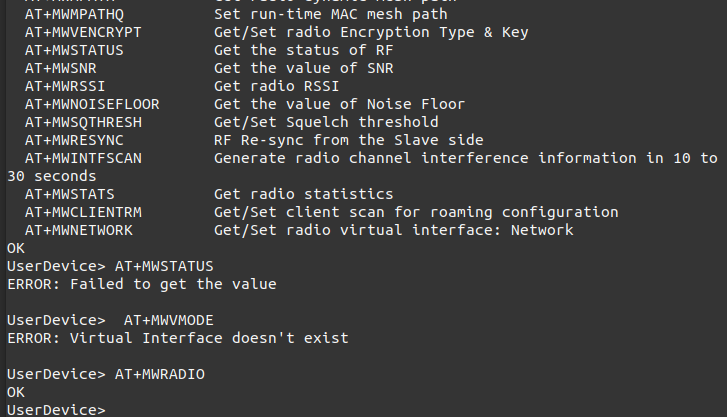
                          Screenshot from 2023-01-30 16-22-01.png
                          The Wireless section of the web interface does not seem functional either:
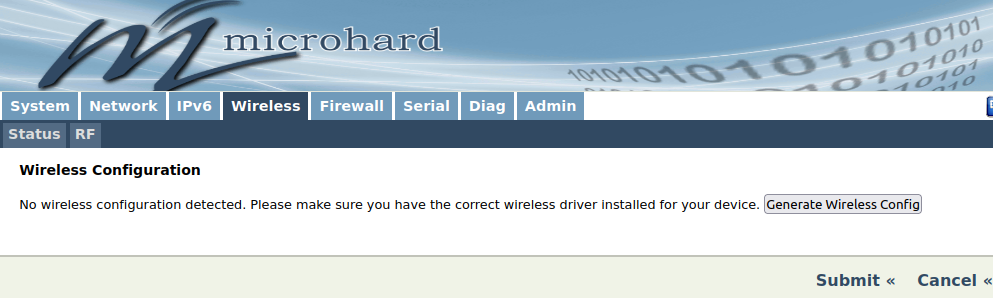
                          Screenshot from 2023-01-30 15-51-16.png
                          Clicking the Generate Wireless Config button refreshes the page but has no apparent effect.

                          As this doesn't happen with others we have, I've tried moving it between different add-on/standalone boards and resetting to default settings, but still get the same behavior.

                          Am I missing something else or is this one just a bad modem? All the modems I've referred to are the pMDDL2450 bought from ModalAI, and the others didn't need any wireless setting changes beyond the radio state and operation mode.

                          1 Reply Last reply
                          0
                          • ? Offline
                            ? Offline
                            A Former User
                            wrote on last edited by
                            #13

                            Hello @dscott I am also facing this similar issue where Microhard modem says to "Generate wireless config" but nothing happens. Did you get any resolution on this?

                            D 1 Reply Last reply
                            0
                            • ? A Former User

                              Hello @dscott I am also facing this similar issue where Microhard modem says to "Generate wireless config" but nothing happens. Did you get any resolution on this?

                              D Offline
                              D Offline
                              dscott
                              wrote on last edited by
                              #14

                              @Aks I was told by Microhard Support that this usually indicates a hardware problem that requires repair or replacement, but they also suggested to try reapplying the system firmware.

                              Reapplying the firmware for the modem seems to have worked for my case.

                              1 Reply Last reply
                              0
                              • Chad SweetC Offline
                                Chad SweetC Offline
                                Chad Sweet
                                ModalAI Team
                                wrote on last edited by
                                #15
                                This post is deleted!
                                1 Reply Last reply
                                0

                                Hello! It looks like you're interested in this conversation, but you don't have an account yet.

                                Getting fed up of having to scroll through the same posts each visit? When you register for an account, you'll always come back to exactly where you were before, and choose to be notified of new replies (either via email, or push notification). You'll also be able to save bookmarks and upvote posts to show your appreciation to other community members.

                                With your input, this post could be even better 💗

                                Register Login
                                Reply
                                • Reply as topic
                                Log in to reply
                                • Oldest to Newest
                                • Newest to Oldest
                                • Most Votes


                                ModalAI
                                Categories Recent Tags ModalAI.com Docs
                                © 2026 ModalAI® · Accelerating autonomy for smaller, smarter, safer drones · Powered by NodeBB
                                • Login

                                • Don't have an account? Register

                                • Login or register to search.
                                • First post
                                  Last post
                                0
                                • Categories
                                • Recent
                                • Tags
                                • Popular
                                • Users
                                • Groups


