
Stereo Camera Calibration update?
-
I have been trying to calibrate my two stereo cameras but the calibration keeps getting stuck on the 23rd rectangle.
At first I thought it was because of my internet speed, so I connected via Ethernet with speeds over 150 mbps. This greatly improved the calibration speed but I still cannot get that 23rd rectangle to turn green.
I’ve used the -t command, the -m command, but they’re not helping resolve my issue.voxl-calibrate-camera stereo -s 6x8 -l 0.040Does anyone have any ideas what the problem could be?
In the YouTube video, there are only 10 rectangles for the left stereo camera and 10 rectangles for the right stereo camera.
Then the option to manually add the extrinsic samples are allowed in the terminal by pressing enter to captrue at least two extrinsic samples.Has something been changed recently, because I am not given this option after 10 completions for both left and right stereo cameras.
-
Cannot calibrate my tracking camera either.
My image looks different from the example pic for calibrating the tracking camera as well.
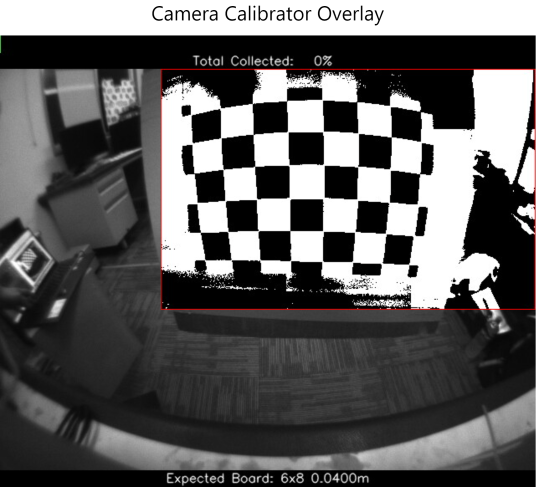
Everthing inside the red rectrangle appears to be distorted, while everything outside appears normal (black and white).voxl-calibrate-camera tracking -f -s 6x8 -l 0.040 -
That thresholding is intentional to give the users an idea of what the calibrator is looking at. We perform a threshold over the desired rectangle then search for the checkerboard, so there's likely a lighting issue if you can't see the corners well enough. This can be fixed either with a bright overhead light or using you phone flashlight to light up the corners that are struggling.
-
That thresholding is intentional to give the users an idea of what the calibrator is looking at. We perform a threshold over the desired rectangle then search for the checkerboard, so there's likely a lighting issue if you can't see the corners well enough. This can be fixed either with a bright overhead light or using you phone flashlight to light up the corners that are struggling.
@Alex-Gardner Thank you, I will try the tracking camera calibration with different lighting.
What about the stereo camera calibration? Why am I not given the opportunity to hit enter in the terminal after both cameras have gone through their 10 extrinsic’s (20 calibration extrinsic’s)?extrinic 21
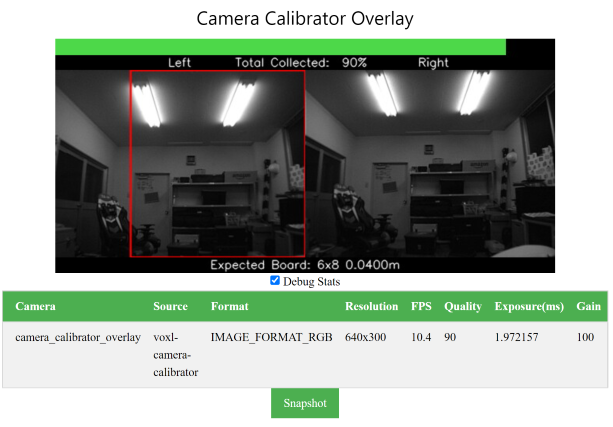
extrinic 22
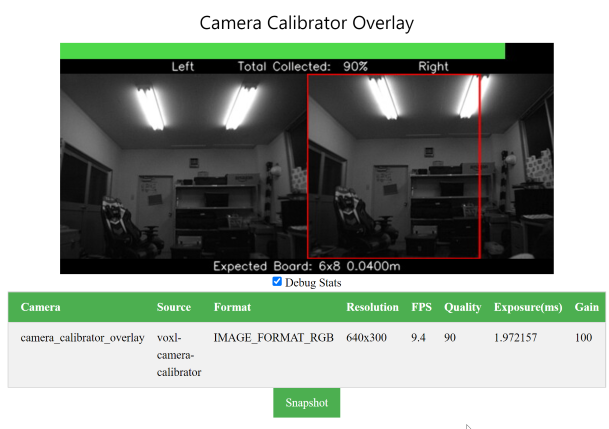
extrinic 23 - cannot complete
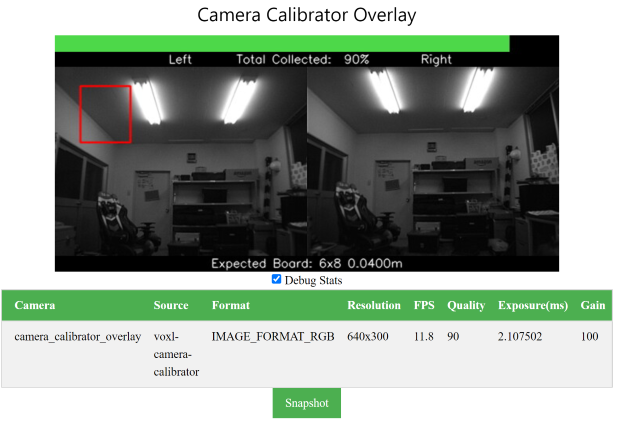
-
The targets that you were using are the intrinsics targets used to calibrate the lens of each camera, we used to have the extrinsics cal be manual entry, but we were eventually able to add targets to these as well, on any of the standard platforms that we sell these targets should all be attainable. If the checkerboard is out of frame on the second camera then there's an issue and your cameras are much more angled than they should be on our platforms, if you can see the board fine but it's not being recognized by the calibrator, then it's either a focus or a lighting issue. It looks like your setup has pretty bright lights directly behind the checkerboard, which could be causing problems for the thresholder, try to make sure that the primary light source in the area is shining on the board.
-
I tried the tracking calibration with more and better lighting. This still did not allow me to pass the first extrinic (red box). I was able to get the rainbow colored points to light up (constantly) and was able to even get the red extrinic calibration box to change to green for about 3-4 seconds. However, it could not pass the first extrinic.
-
The targets that you were using are the intrinsics targets used to calibrate the lens of each camera, we used to have the extrinsics cal be manual entry, but we were eventually able to add targets to these as well, on any of the standard platforms that we sell these targets should all be attainable. If the checkerboard is out of frame on the second camera then there's an issue and your cameras are much more angled than they should be on our platforms, if you can see the board fine but it's not being recognized by the calibrator, then it's either a focus or a lighting issue. It looks like your setup has pretty bright lights directly behind the checkerboard, which could be causing problems for the thresholder, try to make sure that the primary light source in the area is shining on the board.
@Alex-Gardner In the area that I am conducting the calibration in, there are actually another pair of fluorescent lights out of the camera view ( 4 sets of fluorescent light structures total). I am calibrating directly under two fluorescent light stuctures that are not viewable in the images I have provided.
About angle of the cameras, I am using the VOXL CAM frame (like in the Seeker). This is the way it was delivered to me from ModalAI. How can I change the angle on the cameras when they are mounted inside the green frame? Is this possible? -
The targets that you were using are the intrinsics targets used to calibrate the lens of each camera, we used to have the extrinsics cal be manual entry, but we were eventually able to add targets to these as well, on any of the standard platforms that we sell these targets should all be attainable. If the checkerboard is out of frame on the second camera then there's an issue and your cameras are much more angled than they should be on our platforms, if you can see the board fine but it's not being recognized by the calibrator, then it's either a focus or a lighting issue. It looks like your setup has pretty bright lights directly behind the checkerboard, which could be causing problems for the thresholder, try to make sure that the primary light source in the area is shining on the board.
-
Thank you Alex, I was finally able to calibrate the stereo cameras and the tracking camera.
You were spot on with the issue. It was because of the angle and focus on the stereo cameras and the angle on the tracking camera.


Reading along? Create a free ModalAI Forum account to join in.
With an account you can reply, ask your own question, get an email when a ModalAI engineer answers, and mark the reply that solved it. Your place in each thread is saved between visits.
Questions about VOXL, Flight Core, ESCs and ModalAI drones are answered here by the engineers who build them.
Register Login