
Connecting additional USB peripheral with Doodle labs radio.
-
Hello,
I am using VOXL2 with system image 1.4.1. I am following this guide for getting know more about doodle labs radio and its setup on voxl2. In the guide it is mentioned to use VOXL USB expander v2 for connecting Doodle labs modem to VOXL2 which is clear due to current requirement of Doodle labs modem. Now along with Doodle labs I am am intending to integrate gimbal camera which works over ethernet with voxl2. I can buy any USB to ethernet dongle but how should I connect it with VOXL2 if there is only single USB port over VOXL2 USB Expander v2 board? Please help. -
Hello,
I am using VOXL2 with system image 1.4.1. I am following this guide for getting know more about doodle labs radio and its setup on voxl2. In the guide it is mentioned to use VOXL USB expander v2 for connecting Doodle labs modem to VOXL2 which is clear due to current requirement of Doodle labs modem. Now along with Doodle labs I am am intending to integrate gimbal camera which works over ethernet with voxl2. I can buy any USB to ethernet dongle but how should I connect it with VOXL2 if there is only single USB port over VOXL2 USB Expander v2 board? Please help.Hi @Aks
You might need to consider using instead of the USB expander one of our Modem boards (board only) that has a USB hub on it, like this one: https://www.modalai.com/collections/modems/products/mdk-m0090?variant=40594936463411
It'll expose both a 4-pin format and a 10-pin format.
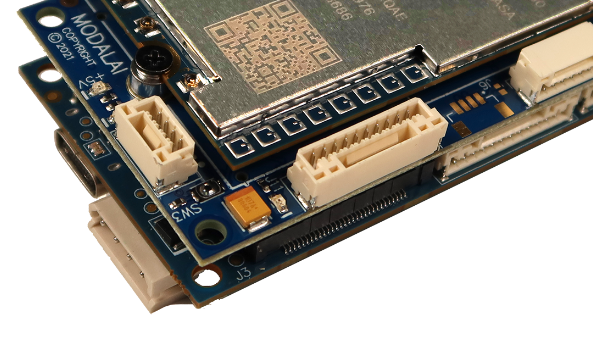
For Doodle, we have a mating cable with the 4-pin format:
https://docs.modalai.com/cable-datasheets/#mcbl-00068
It should be listed for sale soon, but we have drawings posted so you could make your own to hold you over for the time being.
Then, you can use the MCBL-00022 for the ETH dongle on the 10-pin:
https://docs.modalai.com/cable-datasheets/#mcbl-00022
Hope that helps! -
@Vinny Thanks for the detailed information. So with above mentioned 5G modem board, the 4 pin JST connector won't have any current limitations which are essential for Doodle labs modem to operate? The reason behind me asking this is , I also intend to use this modem for long range testing like 20 kms LOS which is probably going to consume maximum possible current. Just checking to eliminate any limitations which if comes as surprise later on would derail my development since in 5G modem block diagram over here I can see 1A current limitation to 4 pin JST and 10 pin JST connectors.
-
@Vinny Thanks for the detailed information. So with above mentioned 5G modem board, the 4 pin JST connector won't have any current limitations which are essential for Doodle labs modem to operate? The reason behind me asking this is , I also intend to use this modem for long range testing like 20 kms LOS which is probably going to consume maximum possible current. Just checking to eliminate any limitations which if comes as surprise later on would derail my development since in 5G modem block diagram over here I can see 1A current limitation to 4 pin JST and 10 pin JST connectors.
@Aks That's correct, they have a 1A limit (double nominal USB2 specs). So we expect with Doodle spec sheet showing maximum of ~4.5W, it should be right there.... we've tested Doodle off of this type of port and we know it works in the field, but we have not done extensive range and power testing.
Our new cable for that intentionally picks up the pins and splices them into two right away to allow for extra current at the radio with minimal losses. I think we'll have them posted for sale by next week!! -
@Vinny Thanks for the information. Acutally I had concall with Doodle labs team and came to know that power consumption for smart mini radio might vary from 5 to 8 Watts for long range application. In that case any external way of providing additional power supply would work since from VOXL2 we would be limited to 5 Watts?
-
@Vinny Thanks for the information. Acutally I had concall with Doodle labs team and came to know that power consumption for smart mini radio might vary from 5 to 8 Watts for long range application. In that case any external way of providing additional power supply would work since from VOXL2 we would be limited to 5 Watts?
@Aks Hi,
We went by what was in the datasheets for Doodle that I was provided at the time. It's possible different radios configured for different modes at Max TX power can consume more.
Now that I look at some of the newer docs, it does seem 10W-14W is a possible power consumption number on the Helix.
If more power is needed, you might need to create a "Y" connection from the power module v3.
We have a new 4G product coming soon which enables 2A on the USB3 port, so that would be an option to get you to 10W, but not exactly sure when we are launching that hardware. Hopefully in the next few weeks.
Hope that helps. -
@Vinny Noted. Thank you for answering all the queries. I would probably go with Y section from power supply itself to suffice the needs. Now with Y section, Voxl2 power won't hamper right? Also I would have to connect VCC and GND to Y section and D+,D- to USB pins. Correct me if I am worng.
-
@Vinny Noted. Thank you for answering all the queries. I would probably go with Y section from power supply itself to suffice the needs. Now with Y section, Voxl2 power won't hamper right? Also I would have to connect VCC and GND to Y section and D+,D- to USB pins. Correct me if I am worng.
Hi @Aks ,
Our power module is rated for 30W total output (6A@5V). During power on, the in-rush will be dominated by Voxl2 using most of that, but then once booted and enumerating USB the steady state demand for Voxl2 should really be under 8-9W, thus leaving plenty for expansion.
Yes you should wire up 5V and GND as a Y split from the power module, and along with D+/D- from the USB connector, I would still bring a GND along with USB for signal return currents.
You can use our new https://docs.modalai.com/cable-datasheets/#mcbl-00071 for help and just remove pin 1. We should have that listed for sale soon too.
Hope that helps! -
@Vinny Thank for the the details. Just one query since now I would be drawing power from Y section of VOXL power supply chip, Can I go ahead with using microhard USB add-on board as per this link and connect Doodle labs radio on one 4 pin JST (with power pins to Voxl power supply section) and another USB port for connecting gimbal (over Ethernet to USB dongle) ? Will this configuration work out now? Reason behind asking this is, I already have microhard add-on boards with me and I can try out this configuration very easily.
-
@Vinny Thank for the the details. Just one query since now I would be drawing power from Y section of VOXL power supply chip, Can I go ahead with using microhard USB add-on board as per this link and connect Doodle labs radio on one 4 pin JST (with power pins to Voxl power supply section) and another USB port for connecting gimbal (over Ethernet to USB dongle) ? Will this configuration work out now? Reason behind asking this is, I already have microhard add-on boards with me and I can try out this configuration very easily.
Hi @Aks,
That makes architectural sense to try out! Let us know how it works!

Reading along? Create a free ModalAI Forum account to join in.
With an account you can reply, ask your own question, get an email when a ModalAI engineer answers, and mark the reply that solved it. Your place in each thread is saved between visits.
Questions about VOXL, Flight Core, ESCs and ModalAI drones are answered here by the engineers who build them.
Register Login