Skip to content
  • Categories
  • Recent
  • Tags
  • Popular
  • Users
  • Groups
Collapse
Brand Logo

ModalAI Forum

  1. ModalAI Support Forum
  2. Ask your questions right here!
  3. Implementing PX4 avoidance in mission mode using the voxl and QGC

Implementing PX4 avoidance in mission mode using the voxl and QGC

Scheduled Pinned Locked Moved Ask your questions right here!
20 Posts 3 Posters 4.0k Views 2 Watching
  • Oldest to Newest
  • Newest to Oldest
  • Most Votes
Reply
  • Reply as topic
Log in to reply
This topic has been deleted. Only users with topic management privileges can see it.
  • S Offline
    S Offline
    scottesicdrone
    Contributor
    wrote on last edited by
    #6

    Sounds easy enough, thanks for the quick reply!

    1 Reply Last reply
    0
    • S Offline
      S Offline
      scottesicdrone
      Contributor
      wrote on last edited by
      #7

      Another roadblock! I decided to go straight to trying to run it in hardware as opposed to the simulator and I have been running into issues setting up the serial connection between the flight controller and VOXL. How do I specify the fcu_url on a serial port, specifically UART_J10 if I cannot talk to the ports with read and writes? I would not like to use udp and just use a serial connection but I'm confused about how to set up the fcu_url for a serial connection.

      1 Reply Last reply
      0
      • Chad SweetC Offline
        Chad SweetC Offline
        Chad Sweet
        ModalAI Team
        wrote on last edited by
        #8

        Not exactly familiar with that parameter. Have you seen how we implement mavros here https://docs.modalai.com/mavros? That might help. You might be able to use our voxl-vision-px4 to communicate with the flight controller, vio and mavros code: https://gitlab.com/voxl-public/ros/mavros_test

        1 Reply Last reply
        0
        • S Offline
          S Offline
          scottesicdrone
          Contributor
          wrote on last edited by
          #9

          I've been working on this more but I'm still stuck at this point. I've tried using a stripped-down version of voxl-vision-px4 to essential just initiate the UART connection but this still doesn't help set up the serial connection for the avoidance repo. I have this running on the yocto base layer and I want to try running the voxl-vision-px4 or libvoxl_io functions in the docker image to initiate the UART connection and see if that does the trick. I've been having tons of problems trying to build these libraries on the roskinetic docker image, is their anyway to build the libvoxl_io library or voxl-vision-px4 on the roskinetic-xenial docker image?

          1 Reply Last reply
          0
          • Chad SweetC Offline
            Chad SweetC Offline
            Chad Sweet
            ModalAI Team
            wrote on last edited by
            #10

            There is not a way for libvoxl_io to work inside of the Docker. It seems you have succesfully separated VIO from voxl-vision-px4, but you'll still need to use the MAVLink routing inside of voxl-vision-px4 which accepts MAVLink over UDP. Here's a diagram below to try and draw it out. You won't be able to use the ROS serial node directly in the docker. You'll need to pass the MAVLink over UDP, or run the ROS serial node in the Yocto layer and have it use libvoxl_io.
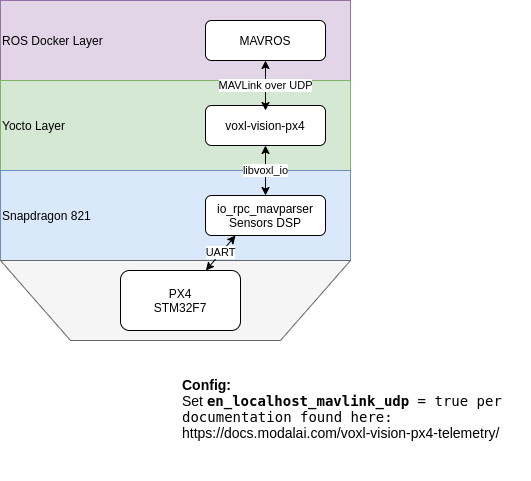
            voxl-docker-mavlink.png

            FWIW, the MPA architecture with the voxl-mpa-qvio-server will help separate VIO from vox-vision-px4, but that's still a month away from being stable.

            1 Reply Last reply
            0
            • S Offline
              S Offline
              scottesicdrone
              Contributor
              wrote on last edited by
              #11

              Thank you for your help, the UDP connection seems to be working for the most part! The connection is initiated and the ROS connections seem to be connected but it seems like the pointcloud isn't being updated fast enough. I checked the pointcloud topic made by the snap_dfs manager and that was being updated at around 2Hz at most and the avoidance algorithm requires the pointcloud to updated at least 10Hz. I also opened up the pointcloud in rviz and saw that the pointcloud was updating at that rate. Is this normal behavior or is something else going on here? I apologize that I keep encountering roadblocks but I do think I am close to getting this!

              1 Reply Last reply
              0
              • Chad SweetC Offline
                Chad SweetC Offline
                Chad Sweet
                ModalAI Team
                wrote on last edited by
                #12

                Check out the bottom of this readme where it recommends different parameters to increase frame rate. https://github.com/ATLFlight/dfs-ros-example

                Basically, in any computer vision task it's a tradeoff of frame rate and resolution

                1 Reply Last reply
                0
                • Chad SweetC Offline
                  Chad SweetC Offline
                  Chad Sweet
                  ModalAI Team
                  wrote on last edited by
                  #13

                  And FWIW, you don't need high resolution for obstacle avoidance. Just need to see things not to run in to!

                  1 Reply Last reply
                  0
                  • Chad SweetC Offline
                    Chad SweetC Offline
                    Chad Sweet
                    ModalAI Team
                    wrote on last edited by
                    #14

                    @scottesicdrone curious to see if you were you able to get things working?

                    1 Reply Last reply
                    0
                    • J DataJ Offline
                      J DataJ Offline
                      J Data
                      wrote on last edited by J Data
                      #15

                      @Chad-Sweet
                      I had a look the link you shared: snap_vio
                      But I think it is not working correctly with the voxl module I have.
                      Currently, I am running ROS noetic on the voxl module, and try to run the VIO with downward camer.
                      By using snap_camera_ros (I edited it a little bit to use the downward camera), I can see the downward camera is correctly set up for snap_vio. Also, I can see snap_imu is working correctly, so I can see the output of imu (angular_velocity and linear_acceleration).

                      But I cannot see any output of /downward/vio/odometry.

                      Could you please help me to run snap_vio with the voxl module?
                      What should I check first?

                      1 Reply Last reply
                      0
                      • J DataJ Offline
                        J DataJ Offline
                        J Data
                        wrote on last edited by
                        #16

                        The running file is similar with this.

                        <!-- camera nodelet -->
                        <!-- VIO nodelet -->
                        <!-- fisheye camera info spoofer -->
                        <!-- imu nodelet -->
                        <!-- cpa nodelet -->
                        1 Reply Last reply
                        0
                        • J DataJ Offline
                          J DataJ Offline
                          J Data
                          wrote on last edited by J Data
                          #17

                          @Chad-Sweet
                          Update.

                          I have output /downward/vio/odometry with some error messages

                          [ INFO] [1648150781.892213161]: [VISLAM] Got uav1/imu to uav1/dfc transform; Initializing VISLAM
                          [ INFO] [1648150781.892816862]: [VISLAM] (from tf) tbc:
                          x: 0.2
                          y: 0
                          z: -0.025
                          
                          [ INFO] [1648150781.893485304]: [VISLAM] (from tf) ombc:
                          X: 0
                          Y: 2.356
                          Z: 0
                          
                          MachineVision is licensed as community user
                          LNX_8074 supported? 1
                          LNX_8096 supported? 1
                          LNX_IA64 supported? 1
                          WINDOWS supported? 0
                          AR ERROR: arFileOpen(): Failed to open file: /data/.ros/vislam/Configuration.SF.xml
                          FASTCV: fcvAvailableHardware Linux
                          mempool cur block size 307200, new block size 307200
                          AR ERROR: arFileOpen(): Failed to open file: /data/.ros/na
                          
                          Error:   TF_NAN_INPUT: Ignoring transform for child_frame_id "grav" from authority "unknown_publisher" because of a nan value in the transform (0.000000 0.000000 0.000000) (-nan -nan -nan nan)
                                   at line 244 in ~/geometry2/tf2/src/buffer_core.cpp
                          Error:   TF_DENORMALIZED_QUATERNION: Ignoring transform for child_frame_id "grav" from authority "unknown_publisher" because of an invalid quaternion in the transform (-nan -nan -nan nan)
                                   at line 257 in ~/geometry2/tf2/src/buffer_core.cpp
                          [ERROR] [1648150782.073463584]: Ignoring transform for child_frame_id "grav" from authority "unknown_publisher" because of a nan value in the transform (0.000000 0.000000 0.000000) (-nan -nan -nan nan)
                          [ERROR] [1648150782.077556213]: Ignoring transform for child_frame_id "grav" from authority "unknown_publisher" because of an invalid quaternion in the transform (-nan -nan -nan nan)
                          [ERROR] [1648150782.094956631]: Ignoring transform for child_frame_id "grav" from authority "unknown_publisher" because of a nan value in the transform (0.000000 0.000000 0.000000) (-nan -nan -nan nan)
                          [ERROR] [1648150782.095484499]: Ignoring transform for child_frame_id "grav" from authority "unknown_publisher" because of an invalid quaternion in the transform (-nan -nan -nan nan)
                          Error:   TF_NAN_INPUT: Ignoring transform for child_frame_id "grav" from authority "unknown_publisher" because of a nan value in the transform (0.000000 0.000000 0.000000) (-nan -nan -nan nan)
                                   at line 244 in ~/tf2/src/buffer_core.cpp
                          Error:   TF_DENORMALIZED_QUATERNION: Ignoring transform for child_frame_id "grav" from authority "unknown_publisher" because of an invalid quaternion in the transform (-nan -nan -nan nan)
                                   at line 257 in ~/geometry2/tf2/src/buffer_core.cpp
                          

                          and repeated error message of

                          [ERROR] [1648150919.088496536]: [VISLAM] ERROR CODE = 2048, Stamp: 1648150919.022946523
                          

                          I am wondering how urdf should be set. Should there be any rotations of IMU or camera in urdf file?
                          urdf file I used has some rotations in y-axis for IMU and cameras.

                          1 Reply Last reply
                          0
                          • J DataJ Offline
                            J DataJ Offline
                            J Data
                            wrote on last edited by
                            #18

                            @Chad-Sweet
                            I am using customized urdf for snap_vio which has different numbers (positions and orientations) of sdf_pro.urdf.

                            Is there any urdf file for VOXL?

                            1 Reply Last reply
                            0
                            • J DataJ Offline
                              J DataJ Offline
                              J Data
                              wrote on last edited by
                              #19

                              @Chad-Sweet , No matter the tf setting in the urdf file is, the ros topic outputs are shown in the followings

                              1. rostopic echo mavros/imu/data (in base_link frame): x is backward, y is right, z is down
                              2. rostopic echo downward/imu (in imu frame): x is right, y is backward, z is down
                              1 Reply Last reply
                              0
                              • J DataJ Offline
                                J DataJ Offline
                                J Data
                                wrote on last edited by
                                #20

                                @modalab Hello, can you help me to resolve this problem?

                                1 Reply Last reply
                                0

                                Hello! It looks like you're interested in this conversation, but you don't have an account yet.

                                Getting fed up of having to scroll through the same posts each visit? When you register for an account, you'll always come back to exactly where you were before, and choose to be notified of new replies (either via email, or push notification). You'll also be able to save bookmarks and upvote posts to show your appreciation to other community members.

                                With your input, this post could be even better 💗

                                Register Login
                                Reply
                                • Reply as topic
                                Log in to reply
                                • Oldest to Newest
                                • Newest to Oldest
                                • Most Votes


                                ModalAI
                                Categories Recent Tags ModalAI.com Docs
                                © 2026 ModalAI® · Accelerating autonomy for smaller, smarter, safer drones · Powered by NodeBB
                                • Login

                                • Login or register to search.
                                • First post
                                  Last post
                                0
                                • Categories
                                • Recent
                                • Tags
                                • Popular
                                • Users
                                • Groups
