
Trying to make my own custom tflite model for voxl-tflite-server
-
I made a virtualenv environment which has Python3.7 and Tensorflow (version 2.2.3). I am trying to convert the faster_rcnn_resnet101_coco model (labelled as "faster_rcnn_resnet101_coco" in https://github.com/tensorflow/models/blob/master/research/object_detection/g3doc/tf1_detection_zoo.md) to a tflite model so that I can put it on the board and run via voxl-tflite-server. I have read the documentation on the voxl-tflite-server. I understand that quantization will allow GPU support for the model. Here's what my conversion code looks like so far:
  converter =  tf.compat.v1.lite.TFLiteConverter.from_frozen_graph(
    graph_def_file = 'faster_rcnn_resnet101_coco_2018_01_28/frozen_inference_graph.pb',
    input_arrays = ['normalized_input_image_tensor'],
    input_shapes={'normalized_input_image_tensor': [1,300,300,3]},
    output_arrays = ['TFLite_Detection_PostProcess', 'TFLite_Detection_PostProcess:1', 'TFLite_Detection_PostProcess:2', 'TFLite_Detection_PostProcess:3']
  )

  converter.use_experimental_new_converter = True
  converter.allow_custom_ops = True
  converter.target_spec.supported_types = [tf.float16]
  tflite_model = converter.convert()

  # Save the model.
  with open('custom_model.tflite', 'wb') as f:
    f.write(tflite_model)
I get the following output:
(tflite_env) stevearias@Steves-Macbook-Pro tflite_env % python3 convert_to_tflite_model.py
2022-02-12 19:48:02.033093: I tensorflow/core/platform/cpu_feature_guard.cc:143] Your CPU supports instructions that this TensorFlow binary was not compiled to use: AVX2 FMA
2022-02-12 19:48:02.071654: I tensorflow/compiler/xla/service/service.cc:168] XLA service 0x7f925aaec760 initialized for platform Host (this does not guarantee that XLA will be used). Devices:
2022-02-12 19:48:02.071679: I tensorflow/compiler/xla/service/service.cc:176]   StreamExecutor device (0): Host, Default Version
Traceback (most recent call last):
  File "convert_to_tflite_model.py", line 22, in <module>
    main()
  File "convert_to_tflite_model.py", line 8, in main
    output_arrays = ['TFLite_Detection_PostProcess', 'TFLite_Detection_PostProcess:1', 'TFLite_Detection_PostProcess:2', 'TFLite_Detection_PostProcess:3']
  File "/Users/stevearias/Documents/src/ece-498-repo/python-scripts/tflite_env/tflite_env/lib/python3.7/site-packages/tensorflow/lite/python/lite.py", line 780, in from_frozen_graph
    sess.graph, input_arrays)
  File "/Users/stevearias/Documents/src/ece-498-repo/python-scripts/tflite_env/tflite_env/lib/python3.7/site-packages/tensorflow/lite/python/util.py", line 128, in get_tensors_from_tensor_names
    ",".join(invalid_tensors)))
ValueError: Invalid tensors 'normalized_input_image_tensor' were found.
Did you encounter this error when trying to convert the ssdlite_mobilenet_v2_coco model to a tflite model?
-
Hey @Steve-Arias,
the input + output tensor names may change per model. Opening up the saved_model.pb from faster_rcnn_resnet101_coco in netron shows that the input tensor for this graph is just titled "image_tensor". If you would rather do this programmatically, this stack overflow post shows how to parse out tensor names:
https://stackoverflow.com/questions/52918051/how-to-convert-pb-to-tflite-format.
Netron link: https://github.com/lutzroeder/netron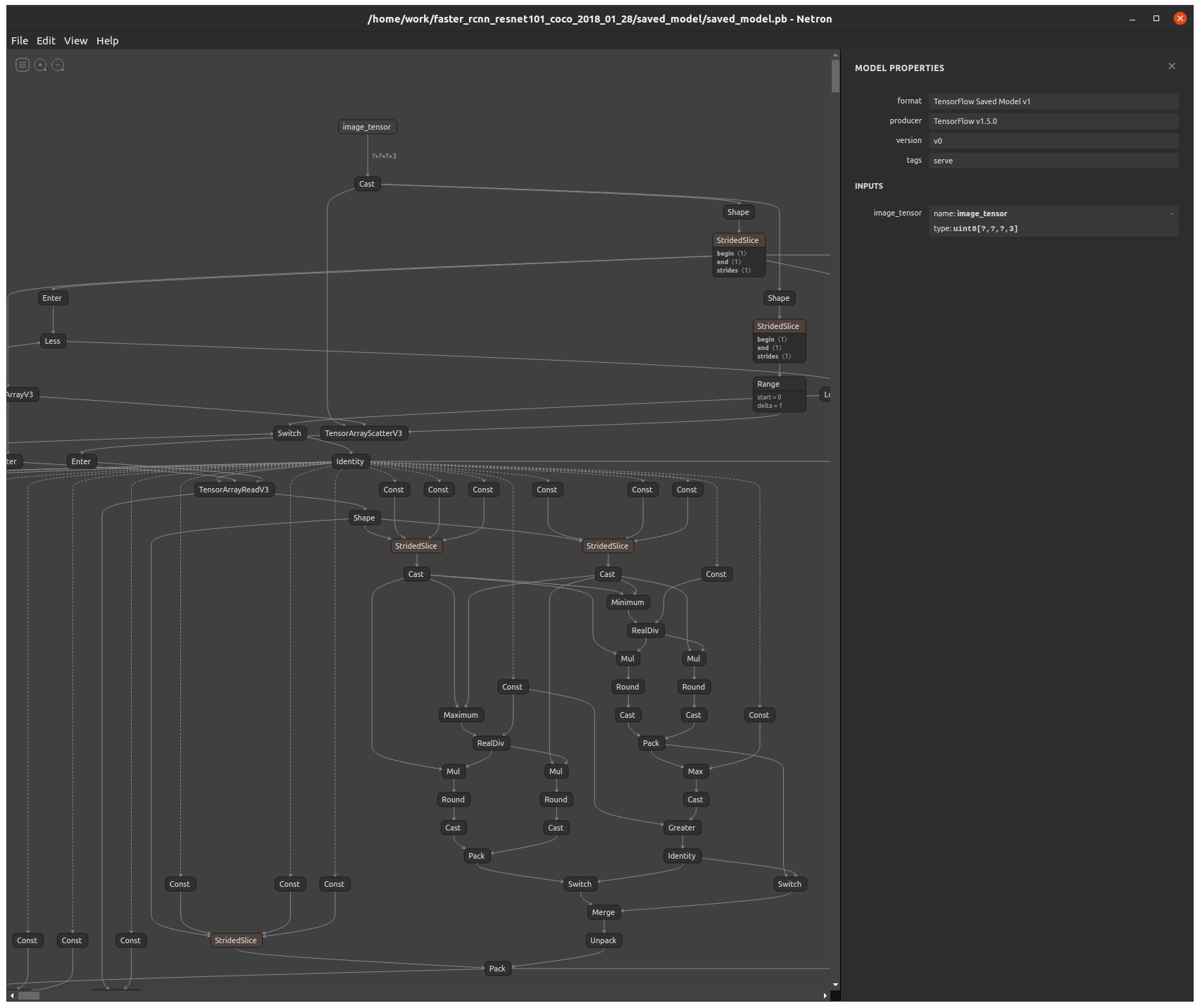
-
Hey @Steve-Arias,
the input + output tensor names may change per model. Opening up the saved_model.pb from faster_rcnn_resnet101_coco in netron shows that the input tensor for this graph is just titled "image_tensor". If you would rather do this programmatically, this stack overflow post shows how to parse out tensor names:
https://stackoverflow.com/questions/52918051/how-to-convert-pb-to-tflite-format.
Netron link: https://github.com/lutzroeder/netron@Matt-Turi Yep, looks like 'image_tensor' and 'detection_classes' are the input and outputs names, respectively.
converter =  tf.compat.v1.lite.TFLiteConverter.from_frozen_graph(
    graph_def_file = 'faster_rcnn_resnet101_coco_2018_01_28/frozen_inference_graph.pb',
    input_arrays = ['image_tensor'],
    input_shapes={'image_tensor': [1,300,300,3]},
    output_arrays = ['detection_classes']
  )

  converter.use_experimental_new_converter = True
  converter.allow_custom_ops = True
  converter.target_spec.supported_types = [tf.float16]
  tflite_model = converter.convert()

  # Save the model.
  with open('custom_model.tflite', 'wb') as f:
    f.write(tflite_model)
When I run the code now, I get the following:
(tflite_env) stevearias@Steves-Macbook-Pro tflite_env % python3 convert_to_tflite_model.py
2022-02-14 14:41:58.792670: I tensorflow/core/platform/cpu_feature_guard.cc:143] Your CPU supports instructions that this TensorFlow binary was not compiled to use: AVX2 FMA
2022-02-14 14:41:58.827082: I tensorflow/compiler/xla/service/service.cc:168] XLA service 0x7f9606206700 initialized for platform Host (this does not guarantee that XLA will be used). Devices:
2022-02-14 14:41:58.827104: I tensorflow/compiler/xla/service/service.cc:176]   StreamExecutor device (0): Host, Default Version
Traceback (most recent call last):
  File "convert_to_tflite_model.py", line 22, in <module>
    main()
  File "convert_to_tflite_model.py", line 14, in main
    tflite_model = converter.convert()
  File "/Users/stevearias/Documents/src/ece-498-repo/python-scripts/tflite_env/tflite_env/lib/python3.7/site-packages/tensorflow/lite/python/lite.py", line 1084, in convert
    **converter_kwargs)
  File "/Users/stevearias/Documents/src/ece-498-repo/python-scripts/tflite_env/tflite_env/lib/python3.7/site-packages/tensorflow/lite/python/convert.py", line 496, in toco_convert_impl
    enable_mlir_converter=enable_mlir_converter)
  File "/Users/stevearias/Documents/src/ece-498-repo/python-scripts/tflite_env/tflite_env/lib/python3.7/site-packages/tensorflow/lite/python/convert.py", line 227, in toco_convert_protos
    raise ConverterError("See console for info.\n%s\n%s\n" % (stdout, stderr))
tensorflow.lite.python.convert.ConverterError: See console for info.
2022-02-14 14:42:07.697347: W tensorflow/compiler/mlir/lite/python/graphdef_to_tfl_flatbuffer.cc:144] Ignored output_format.
2022-02-14 14:42:07.697406: W tensorflow/compiler/mlir/lite/python/graphdef_to_tfl_flatbuffer.cc:147] Ignored drop_control_dependency.
Traceback (most recent call last):
  File "/Users/stevearias/Documents/src/ece-498-repo/python-scripts/tflite_env/tflite_env/bin/toco_from_protos", line 8, in <module>
    sys.exit(main())
  File "/Users/stevearias/Documents/src/ece-498-repo/python-scripts/tflite_env/tflite_env/lib/python3.7/site-packages/tensorflow/lite/toco/python/toco_from_protos.py", line 93, in main
    app.run(main=execute, argv=[sys.argv[0]] + unparsed)
  File "/Users/stevearias/Documents/src/ece-498-repo/python-scripts/tflite_env/tflite_env/lib/python3.7/site-packages/tensorflow/python/platform/app.py", line 40, in run
    _run(main=main, argv=argv, flags_parser=_parse_flags_tolerate_undef)
  File "/Users/stevearias/Documents/src/ece-498-repo/python-scripts/tflite_env/tflite_env/lib/python3.7/site-packages/absl/app.py", line 312, in run
    _run_main(main, args)
  File "/Users/stevearias/Documents/src/ece-498-repo/python-scripts/tflite_env/tflite_env/lib/python3.7/site-packages/absl/app.py", line 258, in _run_main
    sys.exit(main(argv))
  File "/Users/stevearias/Documents/src/ece-498-repo/python-scripts/tflite_env/tflite_env/lib/python3.7/site-packages/tensorflow/lite/toco/python/toco_from_protos.py", line 56, in execute
    enable_mlir_converter)
Exception: Merge of two inputs that differ on more than one predicate {s(SecondStagePostprocessor/BatchMultiClassNonMaxSuppression/map/while/PadOrClipBoxList/Greater:0,else), s(SecondStagePostprocessor/BatchMultiClassNonMaxSuppression/map/while/PadOrClipBoxList/cond/cond/pred_id/_564__cf__570:0,then), s(SecondStagePostprocessor/BatchMultiClassNonMaxSuppression/map/while/PadOrClipBoxList/cond/Greater/_563__cf__569:0,then)} and {s(SecondStagePostprocessor/BatchMultiClassNonMaxSuppression/map/while/PadOrClipBoxList/Greater:0,else), s(SecondStagePostprocessor/BatchMultiClassNonMaxSuppression/map/while/PadOrClipBoxList/cond/cond/pred_id/_564__cf__570:0,else), s(SecondStagePostprocessor/BatchMultiClassNonMaxSuppression/map/while/PadOrClipBoxList/cond/Greater/_563__cf__569:0,else)}
	for node {{node SecondStagePostprocessor/BatchMultiClassNonMaxSuppression/map/while/PadOrClipBoxList/cond/cond/Merge}}
Any idea on what the issue is?
-
@Steve-Arias said in Trying to make my own custom tflite model for voxl-tflite-server:
I made a virtualenv environment which has Python3.7 and Tensorflow (version 2.2.3). I am trying to convert the faster_rcnn_resnet101_coco model (labelled as "faster_rcnn_resnet101_coco" in https://github.com/tensorflow/models/blob/master/research/object_detection/g3doc/tf1_detection_zoo.md) to a tflite model so that I can put it on the board and run via voxl-tflite-server. I have read the documentation on the voxl-tflite-server. I understand that quantization will allow GPU support for the model. Here's what my conversion code looks like so far:
Sorry for the confusion on this, the tensorflow docs / resources on proper model conversion are a bit sparse. However, as per this link https://github.com/tensorflow/tensorflow/issues/40059, it seems that may be an issue exclusive to tensorflow 2.2. Since these models were trained in a tf1 environment, it should be safe to attempt the conversion with a different, more current release that should fix these bugs. Let me try to convert this graph on my end now and see if I can solve these issues with just a fresher tf version.
-
Update: did some digging and was able to reproduce the error in tf1/tf2 with no fix in any versions. For this model architecture in particular, there does not seem to be much support for the "lite" or mobile version of the operations implemented. That said, it would require a full retraining with some modifications to the pipeline.config file in order to utilize, see some good info here: https://github.com/tensorflow/tensorflow/issues/37401.
However, in this post they claim that the tf2 versions (https://github.com/tensorflow/models/blob/master/research/object_detection/g3doc/tf2_detection_zoo.md) of these models should fix these issues, specifically the ssd versions like SSD ResNet101 V1 FPN 640x640 (RetinaNet101), and can be converted following this guide. I will validate this process now and get back to you.
-
Update: did some digging and was able to reproduce the error in tf1/tf2 with no fix in any versions. For this model architecture in particular, there does not seem to be much support for the "lite" or mobile version of the operations implemented. That said, it would require a full retraining with some modifications to the pipeline.config file in order to utilize, see some good info here: https://github.com/tensorflow/tensorflow/issues/37401.
However, in this post they claim that the tf2 versions (https://github.com/tensorflow/models/blob/master/research/object_detection/g3doc/tf2_detection_zoo.md) of these models should fix these issues, specifically the ssd versions like SSD ResNet101 V1 FPN 640x640 (RetinaNet101), and can be converted following this guide. I will validate this process now and get back to you.
@Matt-Turi Any update?
-
I was unable properly convert the resnet tf2 architecture on my end. It may be worth attempting the tf1 model conversion with tensorflow v1.12.0 as that was what they used for creation, but it would be much easier to use a model that has clearer support. Is there any particular reason you want to use the resnet architecture over something like mobilenet/mobiledet?
-
I was unable properly convert the resnet tf2 architecture on my end. It may be worth attempting the tf1 model conversion with tensorflow v1.12.0 as that was what they used for creation, but it would be much easier to use a model that has clearer support. Is there any particular reason you want to use the resnet architecture over something like mobilenet/mobiledet?
@Matt-Turi I wanted to try the resnet architecture as the accuracy/speed ratio is a bit better than the mobilenet architecture. But it's not a hard requirement, so I'll just use the mobilenet architectures. Thanks!

Reading along? Create a free ModalAI Forum account to join in.
With an account you can reply, ask your own question, get an email when a ModalAI engineer answers, and mark the reply that solved it. Your place in each thread is saved between visits.
Questions about VOXL, Flight Core, ESCs and ModalAI drones are answered here by the engineers who build them.
Register Login