Skip to content
  • Categories
  • Recent
  • Tags
  • Popular
  • Users
  • Groups
Collapse
Brand Logo

ModalAI Forum

  1. ModalAI Support Forum
  2. Ask your questions right here!
  3. ToF sensor

ToF sensor

Scheduled Pinned Locked Moved Ask your questions right here!
rostof
29 Posts 4 Posters 7.5k Views 6 Watching
  • Oldest to Newest
  • Newest to Oldest
  • Most Votes
Reply
  • Reply as topic
Log in to reply
This topic has been deleted. Only users with topic management privileges can see it.
  • G Offline
    G Offline
    gauravshukla914
    Regular
    wrote on last edited by
    #5

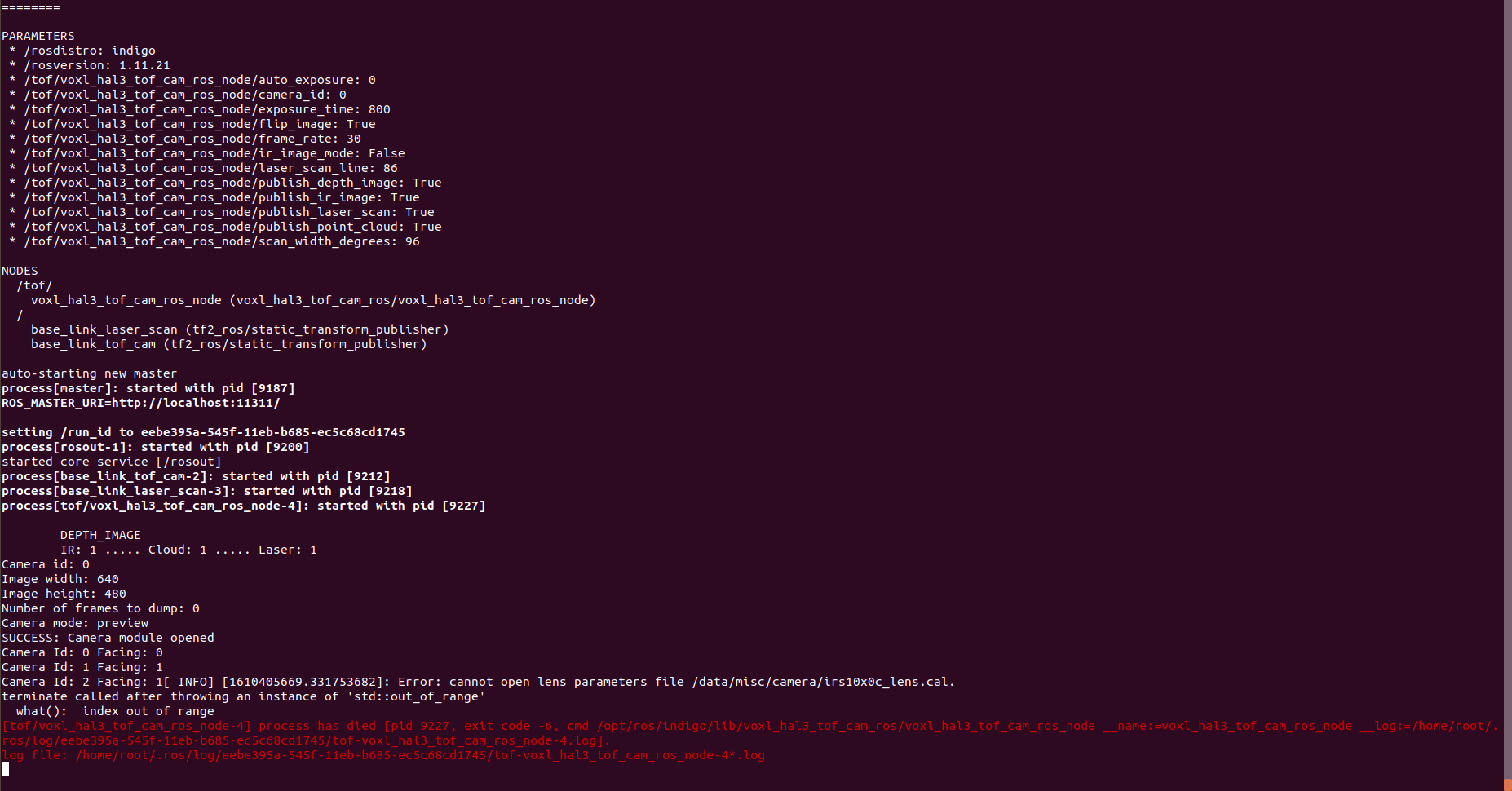
    Hello. A quick update. We resolved that issue by change the image width and height to 640 and 480 respectively in the hello_hal3_camera_main.cpp file on line 68 and line 69. We are now able to see the list of the topics, but these topics are not publishing anything. Assuming, it could be an error of a missing file mentioned below.

    /data/misc/camera/irs10x0c_lens.cal

    We looked into this directory but could not find this file. I'm attaching a screenshot of the same.Screenshot from 2021-01-11 16-57-42.png

    1 Reply Last reply
    0
    • G Offline
      G Offline
      gauravshukla914
      Regular
      wrote on last edited by gauravshukla914
      #6

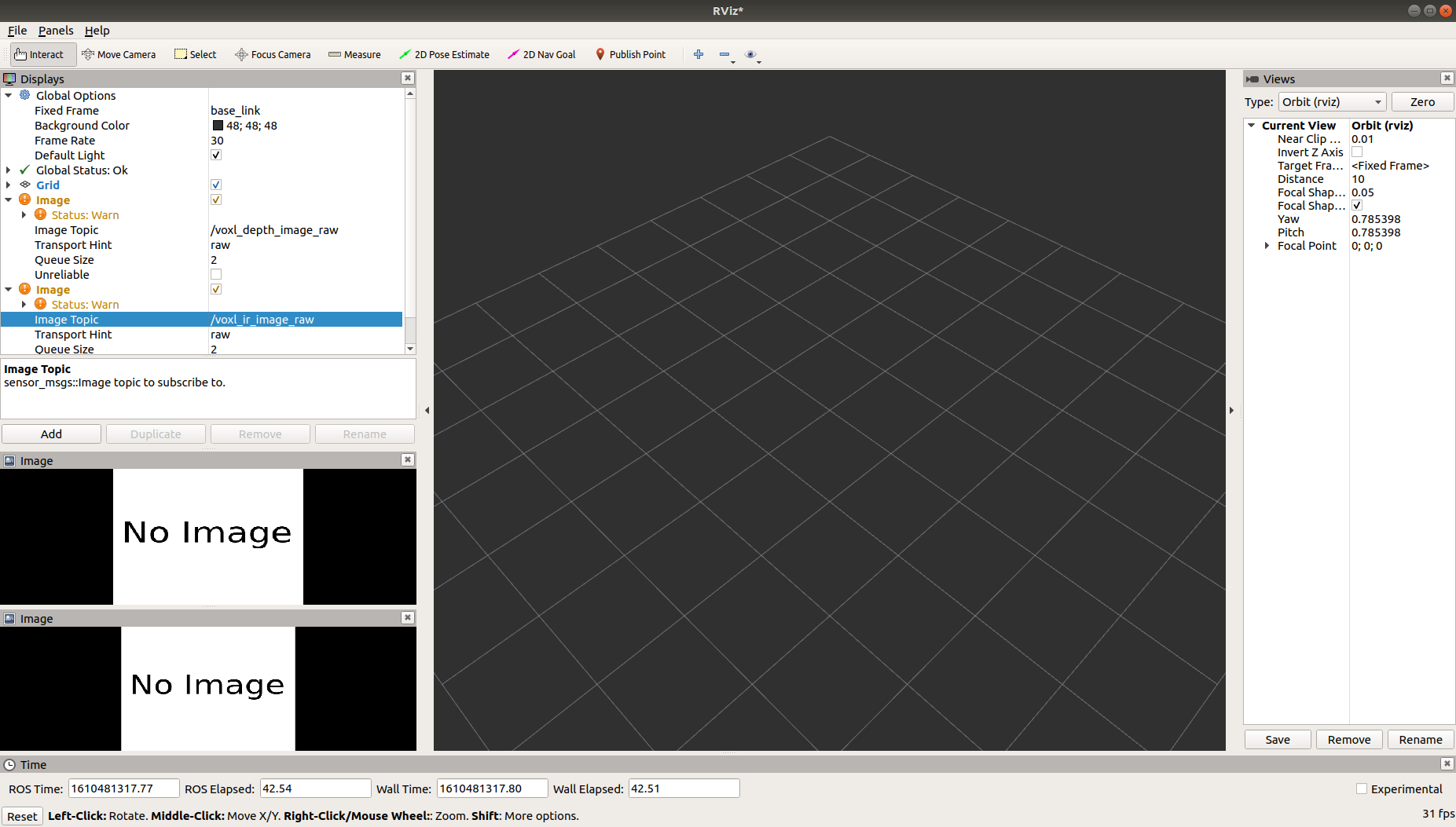
      how can I get this file? irs10x0c_lens.cal
      I purchased this tof addon :
      https://www.modalai.com/pages/tof-add-on
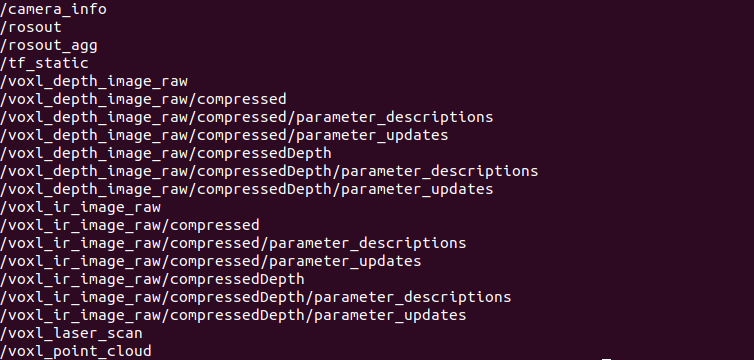
      topics_tof.png
      rviz.png
      Do I have to calibrate it?
      None of the topics are publishing anying.
      There is no image data.

      1 Reply Last reply
      0
      • modaltbM Offline
        modaltbM Offline
        modaltb
        ModalAI Team
        wrote on last edited by modaltb
        #7

        @gauravshukla914 ,

        I'm not aware of any calibration required for ToF.... This procedure should work out the box so I'm confused: https://gitlab.com/voxl-public/ros/voxl-hal3-tof-cam-ros#visualization

        I'm sure you have this correct, but where have you attached the camera? It should be connected to J3 here: https://docs.modalai.com/camera-connections/#camera-ports

        G 1 Reply Last reply
        0
        • modaltbM modaltb

          @gauravshukla914 ,

          I'm not aware of any calibration required for ToF.... This procedure should work out the box so I'm confused: https://gitlab.com/voxl-public/ros/voxl-hal3-tof-cam-ros#visualization

          I'm sure you have this correct, but where have you attached the camera? It should be connected to J3 here: https://docs.modalai.com/camera-connections/#camera-ports

          G Offline
          G Offline
          gauravshukla914
          Regular
          wrote on last edited by gauravshukla914
          #8

          @modaltb Yes I have attached it properly to J3 and we followed the same process but when I launch the file it says the file /data/misc/camera/irs10x0c_lens.cal is missing. I looked into the directory as well there is not such file exist.
          I tried this and I do get frames out of it. So that means it is attached properly
          https://gitlab.com/voxl-public/other/apps-proc-examples/-/tree/dev/hellotof

          1 Reply Last reply
          0
          • H Offline
            H Offline
            hitendra
            wrote on last edited by
            #9

            Hi:

            Could you please list the content of your /data/misc/camera directory? I am wondering if the process of generating that file was interrupted and now it doesn't attempt to generate it anymore.

            If there is anything in the /data/misc/camera directory I would move it to another temp directory - say /data/misc/camera/temp and try running the app again.

            Also as a quick experiment, I would put in just the TOF camera, remove other cameras and run the app again to see if it helps.

            G 1 Reply Last reply
            0
            • H hitendra

              Hi:

              Could you please list the content of your /data/misc/camera directory? I am wondering if the process of generating that file was interrupted and now it doesn't attempt to generate it anymore.

              If there is anything in the /data/misc/camera directory I would move it to another temp directory - say /data/misc/camera/temp and try running the app again.

              Also as a quick experiment, I would put in just the TOF camera, remove other cameras and run the app again to see if it helps.

              G Offline
              G Offline
              gauravshukla914
              Regular
              wrote on last edited by gauravshukla914
              #10

              @hitendra Thanks for the suggestions.
              Here is the list of file present in data/misc/camera directory
              camera'.png
              each of these files are just have these of 0 bytes each

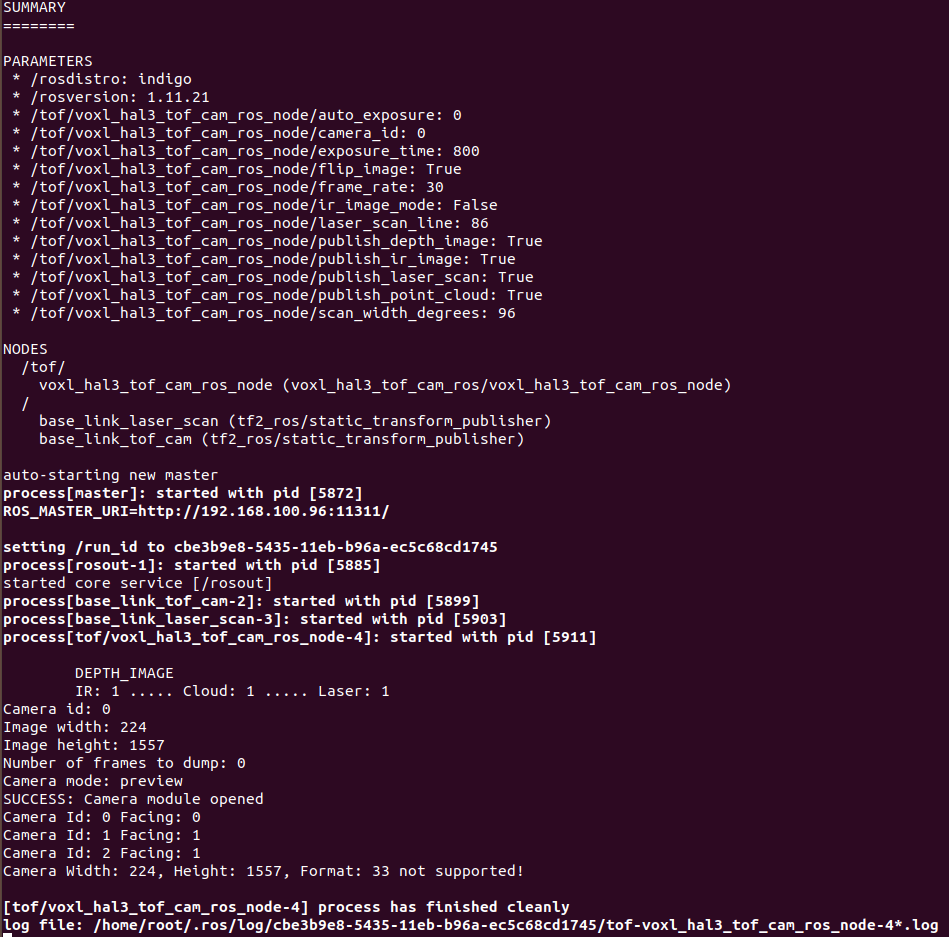
              default installed voxl_hal3_tof package gives error as resolution not supported. And changing the resolution from the source as we did mentioned earlier does run the package but than stops at irs10x0c_lens.cal file being missing
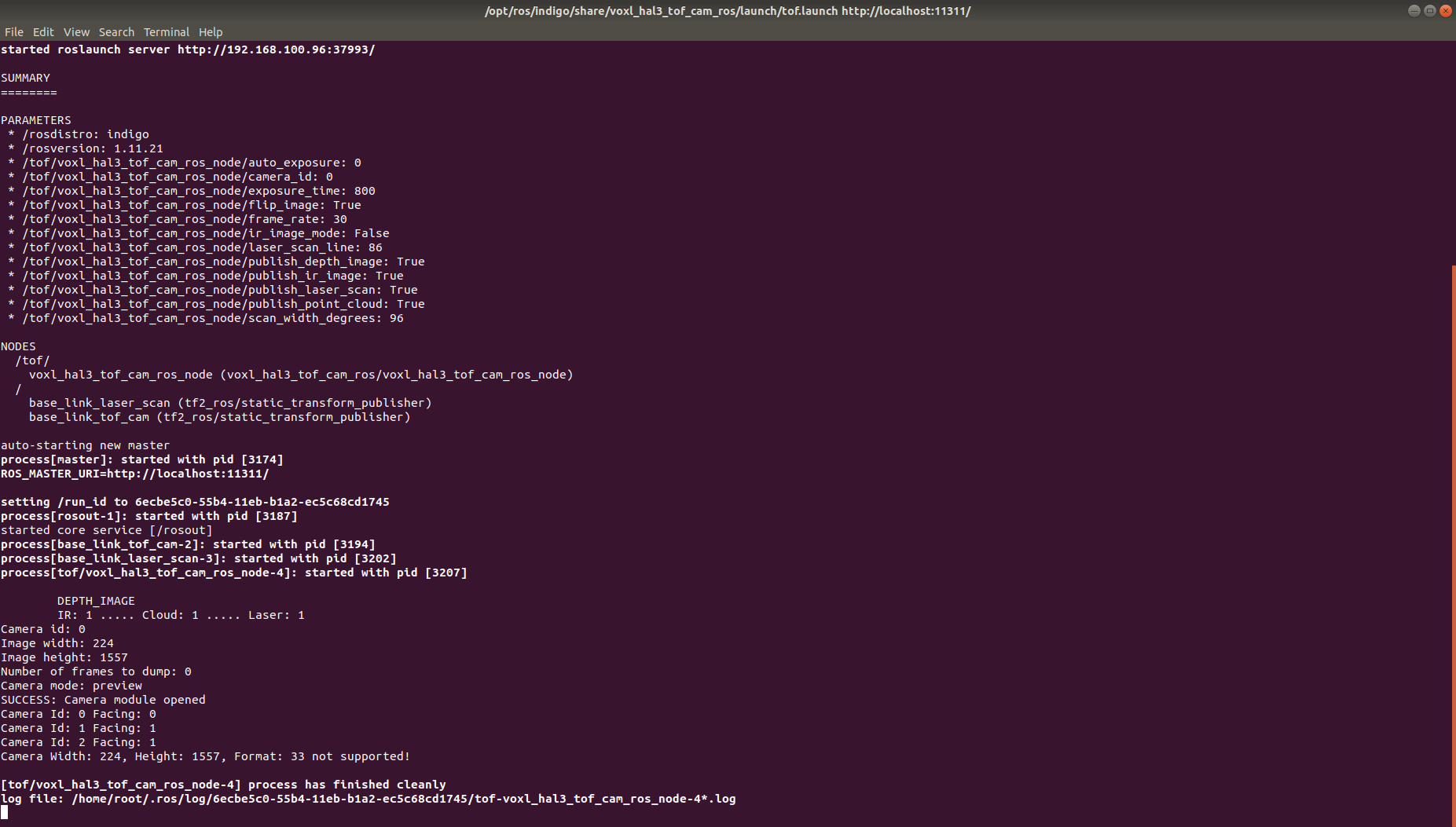
              tof_error_2.png
              after changing the resolution and compiling again
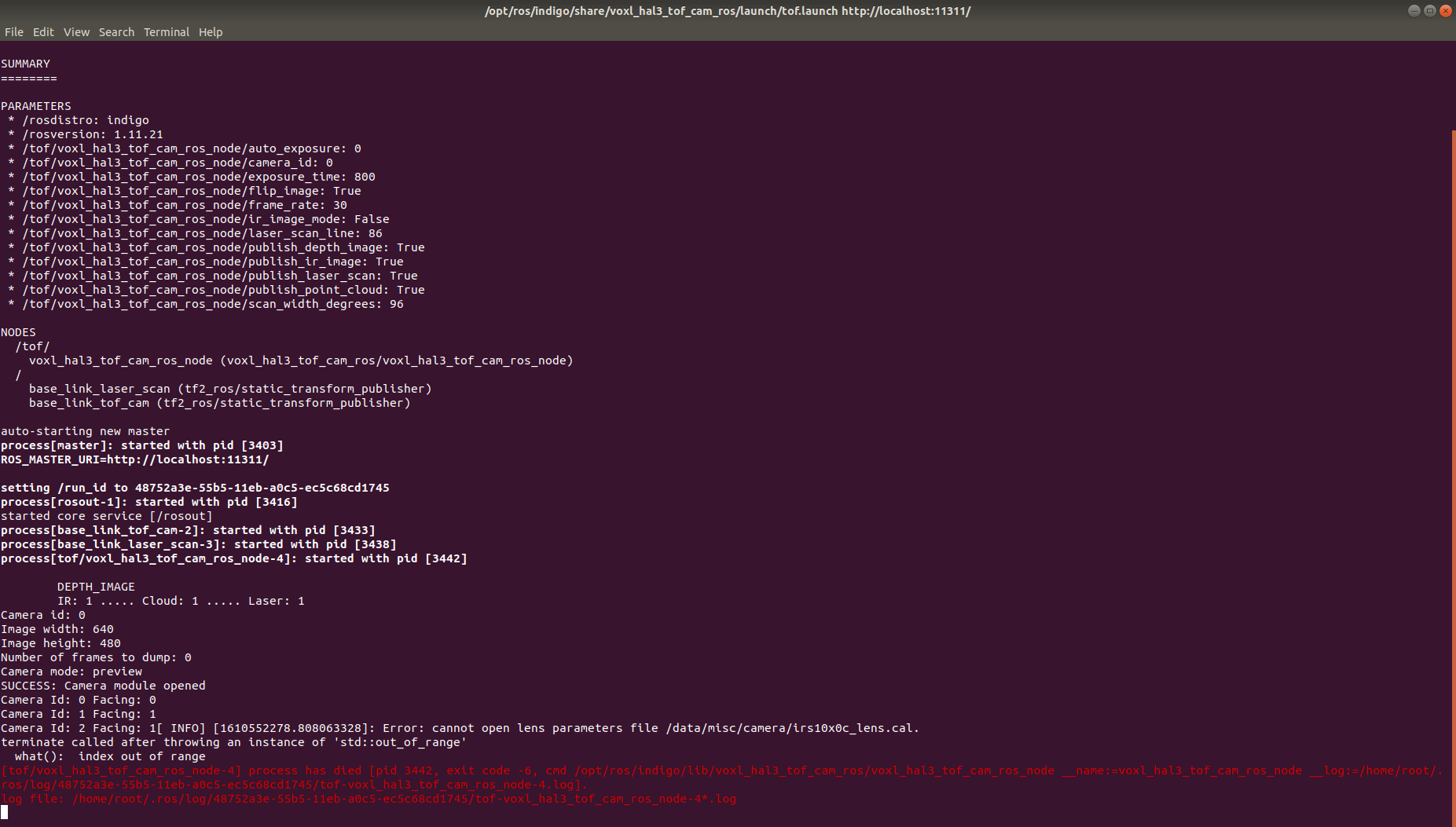
              tof_erro3.png
              and hence topics are created but they don't publish any data

              1 Reply Last reply
              0
              • Chad SweetC Offline
                Chad SweetC Offline
                Chad Sweet
                ModalAI Team
                wrote on last edited by
                #11

                That lens cal file is created the first time the driver is launched, it does take about 20 seconds to generate. Changing the resolution in the code probably is just covering up the fact the TOF camera isn't launching.

                The CAM_ID changes based on which sensors are plugged in due to a quirk in the Qualcomm camera subsystem. It's most likely the wrong CAM_ID is being assigned to TOF in the config. Maybe a camera is/was unplugged?

                1 Reply Last reply
                0
                • G Offline
                  G Offline
                  gauravshukla914
                  Regular
                  wrote on last edited by
                  #12

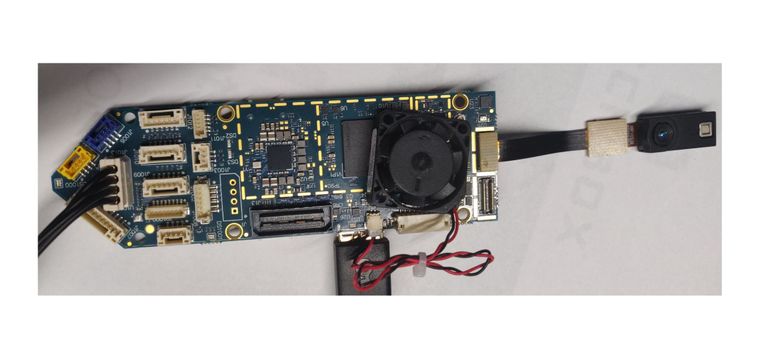
                  this is my setup Untitled.jpg

                  yocto:/# voxl-configure-cameras 
                  
                  Which camera configuration are you using?
                  1 Tracking + Stereo (default)
                  2 Tracking Only
                  3 Hires + Stereo + Tracking
                  4 Hires + Tracking
                  5 TOF + Tracking
                  6 Hires + TOF + Tracking
                  7 TOF + Stereo + Tracking (not currently supported)
                  8 None
                  
                  5
                  attempting to use camera configuration 5
                  adding override_cam_id value=1 to /etc/snav/camera.downward.xml
                  adding override_cam_id value=-1 to /etc/snav/camera.stereo.xml
                  yocto:/# echo $TOF_CAM_ID
                  yocto:/# roslaunch /opt/ros/indigo/share/voxl_hal3_tof_cam_ros/launch/tof.launch
                  ... logging to /home/root/.ros/log/34d08072-55bb-11eb-aee3-ec5c68cd1745/roslaunch-apq8096-3324.log
                  Checking log directory for disk usage. This may take awhile.
                  Press Ctrl-C to interrupt
                  Done checking log file disk usage. Usage is <1GB.
                  
                  started roslaunch server http://192.168.100.96:36814/
                  
                  SUMMARY
                  ========
                  
                  PARAMETERS
                   * /rosdistro: indigo
                   * /rosversion: 1.11.21
                   * /tof/voxl_hal3_tof_cam_ros_node/auto_exposure: 0
                   * /tof/voxl_hal3_tof_cam_ros_node/camera_id: 0
                   * /tof/voxl_hal3_tof_cam_ros_node/exposure_time: 800
                   * /tof/voxl_hal3_tof_cam_ros_node/flip_image: True
                   * /tof/voxl_hal3_tof_cam_ros_node/frame_rate: 30
                   * /tof/voxl_hal3_tof_cam_ros_node/ir_image_mode: False
                   * /tof/voxl_hal3_tof_cam_ros_node/laser_scan_line: 86
                   * /tof/voxl_hal3_tof_cam_ros_node/publish_depth_image: True
                   * /tof/voxl_hal3_tof_cam_ros_node/publish_ir_image: True
                   * /tof/voxl_hal3_tof_cam_ros_node/publish_laser_scan: True
                   * /tof/voxl_hal3_tof_cam_ros_node/publish_point_cloud: True
                   * /tof/voxl_hal3_tof_cam_ros_node/scan_width_degrees: 96
                  
                  NODES
                    /tof/
                      voxl_hal3_tof_cam_ros_node (voxl_hal3_tof_cam_ros/voxl_hal3_tof_cam_ros_node)
                    /
                      base_link_laser_scan (tf2_ros/static_transform_publisher)
                      base_link_tof_cam (tf2_ros/static_transform_publisher)
                  
                  auto-starting new master
                  process[master]: started with pid [3343]
                  ROS_MASTER_URI=http://localhost:11311/
                  
                  setting /run_id to 34d08072-55bb-11eb-aee3-ec5c68cd1745
                  process[rosout-1]: started with pid [3356]
                  started core service [/rosout]
                  process[base_link_tof_cam-2]: started with pid [3371]
                  process[base_link_laser_scan-3]: started with pid [3378]
                  process[tof/voxl_hal3_tof_cam_ros_node-4]: started with pid [3386]
                  
                  	DEPTH_IMAGE
                  	IR: 1 ..... Cloud: 1 ..... Laser: 1
                  Camera id: 0
                  Image width: 224
                  Image height: 1557
                  Number of frames to dump: 0
                  Camera mode: preview
                  SUCCESS: Camera module opened
                  Camera Id: 0 Facing: 1
                  ERROR: Libcamera sending post-processed TOF data. App does NOT get RAW16 TOF camera data
                  
                  
                  [tof/voxl_hal3_tof_cam_ros_node-4] process has finished cleanly
                  log file: /home/root/.ros/log/34d08072-55bb-11eb-aee3-ec5c68cd1745/tof-voxl_hal3_tof_cam_ros_node-4*.log
                  ^C[base_link_laser_scan-3] killing on exit
                  [base_link_tof_cam-2] killing on exit
                  [rosout-1] killing on exit
                  [master] killing on exit
                  shutting down processing monitor...
                  yocto:/# echo $TOF_CAM_ID
                  0
                  yocto:/# ls /data/misc/camera/
                  cam_socket2  cam_socket3  cam_socket4  temp
                  yocto:/# 
                  

                  I don't know what else I am missing

                  1 Reply Last reply
                  0
                  • Chad SweetC Offline
                    Chad SweetC Offline
                    Chad Sweet
                    ModalAI Team
                    wrote on last edited by
                    #13

                    You're selecting TOF+Tracking, but there is no tracking sensor installed. So the TOF_CAM_ID is probably coming out incorrect.

                    Do you have a tracking camera? If so, please power off and install
                    If not, can you please try export TOF_CAM_ID=1 ?

                    thanks!

                    G 1 Reply Last reply
                    0
                    • Chad SweetC Chad Sweet

                      You're selecting TOF+Tracking, but there is no tracking sensor installed. So the TOF_CAM_ID is probably coming out incorrect.

                      Do you have a tracking camera? If so, please power off and install
                      If not, can you please try export TOF_CAM_ID=1 ?

                      thanks!

                      G Offline
                      G Offline
                      gauravshukla914
                      Regular
                      wrote on last edited by
                      #14

                      @Chad-Sweet
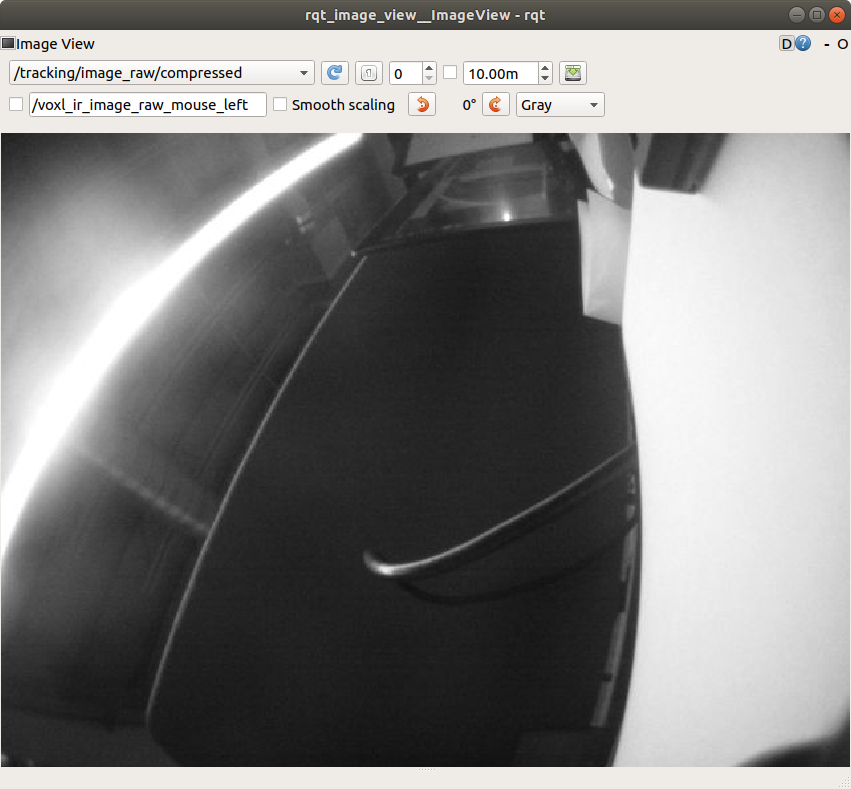
                      we installed tracking camera and reconfigured voxl using voxl-configure-camera

                      and tracking camera is working
                      Screenshot from 2021-01-13 11-23-59.png

                      than we tried to run tof package again but still the problem persist. we even tried to change the TOF_CAM_ID but still no change.

                      yocto:/# roslaunch voxl_hal3_tof_cam_ros tof.launch 
                      ... logging to /home/root/.ros/log/3f833ac4-55c4-11eb-a699-ec5c68cd1745/roslaunch-apq8096-4079.log
                      Checking log directory for disk usage. This may take awhile.
                      Press Ctrl-C to interrupt
                      Done checking log file disk usage. Usage is <1GB.
                      
                      started roslaunch server http://192.168.100.96:55989/
                      
                      SUMMARY
                      ========
                      
                      PARAMETERS
                       * /rosdistro: indigo
                       * /rosversion: 1.11.21
                       * /tof/voxl_hal3_tof_cam_ros_node/auto_exposure: 0
                       * /tof/voxl_hal3_tof_cam_ros_node/camera_id: 0
                       * /tof/voxl_hal3_tof_cam_ros_node/exposure_time: 800
                       * /tof/voxl_hal3_tof_cam_ros_node/flip_image: True
                       * /tof/voxl_hal3_tof_cam_ros_node/frame_rate: 30
                       * /tof/voxl_hal3_tof_cam_ros_node/ir_image_mode: False
                       * /tof/voxl_hal3_tof_cam_ros_node/laser_scan_line: 86
                       * /tof/voxl_hal3_tof_cam_ros_node/publish_depth_image: True
                       * /tof/voxl_hal3_tof_cam_ros_node/publish_ir_image: True
                       * /tof/voxl_hal3_tof_cam_ros_node/publish_laser_scan: True
                       * /tof/voxl_hal3_tof_cam_ros_node/publish_point_cloud: True
                       * /tof/voxl_hal3_tof_cam_ros_node/scan_width_degrees: 96
                      
                      NODES
                        /tof/
                          voxl_hal3_tof_cam_ros_node (voxl_hal3_tof_cam_ros/voxl_hal3_tof_cam_ros_node)
                        /
                          base_link_laser_scan (tf2_ros/static_transform_publisher)
                          base_link_tof_cam (tf2_ros/static_transform_publisher)
                      
                      auto-starting new master
                      process[master]: started with pid [4098]
                      ROS_MASTER_URI=http://localhost:11311/
                      
                      setting /run_id to 3f833ac4-55c4-11eb-a699-ec5c68cd1745
                      process[rosout-1]: started with pid [4111]
                      started core service [/rosout]
                      process[base_link_tof_cam-2]: started with pid [4124]
                      process[base_link_laser_scan-3]: started with pid [4129]
                      process[tof/voxl_hal3_tof_cam_ros_node-4]: started with pid [4141]
                      
                      	DEPTH_IMAGE
                      	IR: 1 ..... Cloud: 1 ..... Laser: 1
                      Camera id: 0
                      Image width: 224
                      Image height: 1557
                      Number of frames to dump: 0
                      Camera mode: preview
                      SUCCESS: Camera module opened
                      Camera Id: 0 Facing: 1
                      Camera Id: 1 Facing: 1
                      ERROR: Libcamera sending post-processed TOF data. App does NOT get RAW16 TOF camera data
                      
                      
                      [tof/voxl_hal3_tof_cam_ros_node-4] process has finished cleanly
                      log file: /home/root/.ros/log/3f833ac4-55c4-11eb-a699-ec5c68cd1745/tof-voxl_hal3_tof_cam_ros_node-4*.log
                      ^C[base_link_laser_scan-3] killing on exit
                      [base_link_tof_cam-2] killing on exit
                      [rosout-1] killing on exit
                      [master] killing on exit
                      shutting down processing monitor...
                      ... shutting down processing monitor complete
                      done
                      yocto:/#
                      
                      1 Reply Last reply
                      0
                      • Chad SweetC Offline
                        Chad SweetC Offline
                        Chad Sweet
                        ModalAI Team
                        wrote on last edited by
                        #15

                        OK, good the tracking sensor is working. Sorry about this, the tof setup is still in beta. We clearly need to document the setup way better.

                        Can you please print which version of system image you are using (voxl-version)? The error implies an older system image which does not support that hal3_tof_cam_ros.

                        ERROR: Libcamera sending post-processed TOF data. App does NOT get RAW16 TOF camera data

                        The error above implies an older version of libcamera which would use tof_cam_ros instead

                        Just FYI, the TOF_CAM_ID needs to match what is in the launch file. This message shows what is in the launch file:
                        /tof/voxl_hal3_tof_cam_ros_node/camera_id: 0

                        G 1 Reply Last reply
                        0
                        • Chad SweetC Chad Sweet

                          OK, good the tracking sensor is working. Sorry about this, the tof setup is still in beta. We clearly need to document the setup way better.

                          Can you please print which version of system image you are using (voxl-version)? The error implies an older system image which does not support that hal3_tof_cam_ros.

                          ERROR: Libcamera sending post-processed TOF data. App does NOT get RAW16 TOF camera data

                          The error above implies an older version of libcamera which would use tof_cam_ros instead

                          Just FYI, the TOF_CAM_ID needs to match what is in the launch file. This message shows what is in the launch file:
                          /tof/voxl_hal3_tof_cam_ros_node/camera_id: 0

                          G Offline
                          G Offline
                          gauravshukla914
                          Regular
                          wrote on last edited by
                          #16

                          @Chad-Sweet

                          --------------------------------------------------------------------------------
                          system-image:    ModalAI 3.1.0 BUILDER: ekatzfey BUILD_TIME: 2020-12-23_19:41
                          kernel:          #1 SMP PREEMPT Wed Dec 23 19:50:23 UTC 2020 3.18.71-perf
                          factory-bundle:  1.0.1 (Yocto installation)
                          --------------------------------------------------------------------------------
                          architecture:    aarch64
                          processor:       apq8096
                          os:              GNU/Linux
                          --------------------------------------------------------------------------------
                          voxl-suite:
                          Package: voxl-suite
                          Version: 0.2.0
                          Depends: docker, imu_app (= 0.0.6), libvoxl_io (= 0.5.2), voxl-cam-manager (= 0.2.2), voxl-docker-support (= 1.1.1), voxl-hal3-tof-cam-ros (= 0.0.2), voxl-modem (= 0.10.0), voxl-nodes (= 0.0.8), voxl-rtsp (= 1.0.2), voxl-utils (= 0.5.2), voxl-vision-px4 (= 0.6.8), voxl_imu (= 0.0.4), voxl-time-sync (= 0.0.1), voxl-vpn (= 0.0.2), librc_math (= 1.1.2), libmodal_pipe (= 1.2.2), modalai-vl (= 0.1.3)
                          Status: install user installed
                          Section: base
                          Architecture: armv7a
                          Maintainer: james@modalai.com
                          MD5Sum: af706cd3c1ea59f274f2ed9b93141f1d
                          Size: 870
                          Filename: voxl-suite_0.2.0.ipk
                          Description: meta-package to install all of the voxl-suite
                          Installed-Time: 3126
                          
                          --------------------------------------------------------------------------------
                          

                          according to git repository launch file is taking tof cam id from environment variable and we select option 5 from voxl-configure-camera which sets accordingly

                          1 Reply Last reply
                          0
                          • Chad SweetC Offline
                            Chad SweetC Offline
                            Chad Sweet
                            ModalAI Team
                            wrote on last edited by Chad Sweet
                            #17

                            that all looks good. Will investigate further

                            1 Reply Last reply
                            0
                            • G Offline
                              G Offline
                              gauravshukla914
                              Regular
                              wrote on last edited by
                              #18

                              Okay. Looking forward to your solution asap!

                              1 Reply Last reply
                              0
                              • Chad SweetC Offline
                                Chad SweetC Offline
                                Chad Sweet
                                ModalAI Team
                                wrote on last edited by
                                #19

                                Can you please type and report the output?
                                opkg list-installed | grep royal

                                G 1 Reply Last reply
                                0
                                • Chad SweetC Offline
                                  Chad SweetC Offline
                                  Chad Sweet
                                  ModalAI Team
                                  wrote on last edited by
                                  #20

                                  Assuming the ipk is installed, can you please then run this command and then try the ROS node again?

                                  setprop persist.camera.modalai.tof 1

                                  G 1 Reply Last reply
                                  1
                                  • Chad SweetC Chad Sweet

                                    Can you please type and report the output?
                                    opkg list-installed | grep royal

                                    G Offline
                                    G Offline
                                    gauravshukla914
                                    Regular
                                    wrote on last edited by
                                    #21

                                    @Chad-Sweet
                                    this is the version of royal sdk installed
                                    royale-331-spectre-4-7 - 0.0.1

                                    1 Reply Last reply
                                    0
                                    • Chad SweetC Chad Sweet

                                      Assuming the ipk is installed, can you please then run this command and then try the ROS node again?

                                      setprop persist.camera.modalai.tof 1

                                      G Offline
                                      G Offline
                                      gauravshukla914
                                      Regular
                                      wrote on last edited by
                                      #22

                                      @Chad-Sweet
                                      Thanks for the solution it worked!
                                      but after a minute or so it started throwing error

                                      DEPTH_IMAGE
                                      	IR: 1 ..... Cloud: 1 ..... Laser: 1
                                      Camera id: 0
                                      Image width: 224
                                      Image height: 1557
                                      Number of frames to dump: 0
                                      Camera mode: preview
                                      SUCCESS: Camera module opened
                                      Camera Id: 0 Facing: 1
                                      Camera Id: 1 Facing: 1
                                      SUCCESS: TOF interface created!
                                      =========== modalai  Royale3.31, Spectre4.7 CameraDevice::activateUseCase() : return SUCCESS!!
                                      =========== modalai  Royale3.31, Spectre4.7 CameraDevice::activateUseCase() : return SUCCESS!!
                                      Libcamera sending RAW16 TOF data. App calling the PMD libs to postprocess the RAW16 data
                                      [ INFO] [1610561725.908936828]: Loading lens parameters from /data/misc/camera/irs10x0c_lens.cal.
                                      [ INFO] [1610561725.913180926]: 
                                      cx/cy     114.822 89.022
                                      fx/fy     111.394 111.394
                                      tan coeff -0.00222965 -0.00368372
                                      rad coeff -0.261745 0.098178 -0.0166875


                                      Camera HAL3 ToF camera test is now running
                                      Frame: 0 SensorTimestamp = 	 213139865341
                                      Frame: 30 SensorTimestamp = 	 214139747341
                                      Frame: 60 SensorTimestamp = 	 215139847341
                                      Frame: 90 SensorTimestamp = 	 216139794341
                                      Frame: 120 SensorTimestamp = 	 217139814341
                                      Frame: 150 SensorTimestamp = 	 218139859341
                                      Frame: 180 SensorTimestamp = 	 219139889341
                                      Frame: 210 SensorTimestamp = 	 220139917341
                                      Frame: 240 SensorTimestamp = 	 221139905341
                                      Frame: 270 SensorTimestamp = 	 222139941341
                                      Frame: 300 SensorTimestamp = 	 223139931341
                                      Frame: 330 SensorTimestamp = 	 224139999341
                                      .
                                      .
                                      .
                                      .
                                      .
                                      Frame: 2430 SensorTimestamp = 	 294139985341
                                      HELLOCAMERA-ERROR: Error sending request 2449
                                      HELLOCAMERA-ERROR: Framenumber: 2446 ErrorCode: 4
                                      HELLOCAMERA-ERROR: Framenumber: 2447 ErrorCode: 2
                                      HELLOCAMERA-ERROR: Framenumber: 2448 ErrorCode: 2
                                      HELLOCAMERA-ERROR: Framenumber: 2449 ErrorCode: 2
                                      HELLOCAMERA-ERROR: Framenumber: 0 ErrorCode: 1
                                      HELLOCAMERA-ERROR: Error sending request 2450
                                      HELLOCAMERA-ERROR: Error sending request 2451
                                      HELLOCAMERA-ERROR: Error sending request 2452
                                      HELLOCAMERA-ERROR: Error sending request 2453
                                      HELLOCAMERA-ERROR: Error sending request 2454
                                      ^C[tof/voxl_hal3_tof_cam_ros_node-4] killing on exit
                                      [base_link_laser_scan-3] killing on exit
                                      [base_link_tof_cam-2] killing on exit
                                      HELLOCAMERA-ERROR: Error sending request 2455
                                      [tof/voxl_hal3_tof_cam_ros_node-4] escalating to SIGTERM
                                      [rosout-1] killing on exit
                                      [master] killing on exit
                                      shutting down processing monitor...
                                      ... shutting down processing monitor complete
                                      done
                                      
                                      1 Reply Last reply
                                      0
                                      • Chad SweetC Offline
                                        Chad SweetC Offline
                                        Chad Sweet
                                        ModalAI Team
                                        wrote on last edited by
                                        #23

                                        OK, good progress. That should be working. Can you give it a full power cycle and see if it says up?

                                        1 Reply Last reply
                                        0
                                        • G Offline
                                          G Offline
                                          gauravshukla914
                                          Regular
                                          wrote on last edited by
                                          #24

                                          I am not sure if I understood that. Can you please elaborate.

                                          1 Reply Last reply
                                          0

                                          Hello! It looks like you're interested in this conversation, but you don't have an account yet.

                                          Getting fed up of having to scroll through the same posts each visit? When you register for an account, you'll always come back to exactly where you were before, and choose to be notified of new replies (either via email, or push notification). You'll also be able to save bookmarks and upvote posts to show your appreciation to other community members.

                                          With your input, this post could be even better 💗

                                          Register Login
                                          Reply
                                          • Reply as topic
                                          Log in to reply
                                          • Oldest to Newest
                                          • Newest to Oldest
                                          • Most Votes


                                          ModalAI
                                          Categories Recent Tags ModalAI.com Docs
                                          © 2026 ModalAI® · Accelerating autonomy for smaller, smarter, safer drones · Powered by NodeBB
                                          • Login

                                          • Don't have an account? Register

                                          • Login or register to search.
                                          • First post
                                            Last post
                                          0
                                          • Categories
                                          • Recent
                                          • Tags
                                          • Popular
                                          • Users
                                          • Groups