Skip to content
  • Categories
  • Recent
  • Tags
  • Popular
  • Users
  • Groups
Collapse
Brand Logo

ModalAI Forum

  1. ModalAI Support Forum
  2. VOXL Compute & Autopilot
  3. VOXL
  4. camera resolution on hires camera

camera resolution on hires camera
Scheduled Pinned Locked Moved VOXL
15 Posts 5 Posters 2.8k Views 2 Watching
  • Oldest to Newest
  • Newest to Oldest
  • Most Votes
Reply
  • Reply as topic
Log in to reply
This topic has been deleted. Only users with topic management privileges can see it.
  • C Offline
    C Offline
    colerose
    Contributor
    wrote on last edited by
    #6

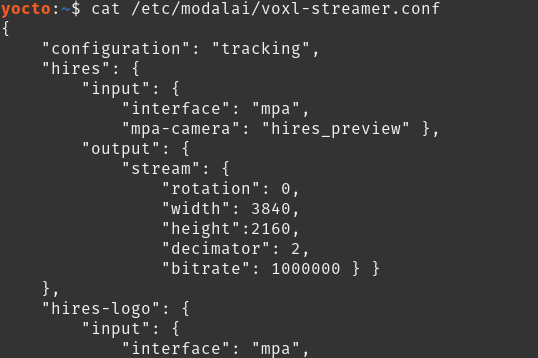
    I am seeing poor quality images up close as well. Is there a recommended change that I could make to the height, width, and bitrate in the voxl-camera-server.conf and voxl-streamer.conf files to get good resolution for close up objects?

    1 Reply Last reply
    0
    • ? Offline
      ? Offline
      A Former User
      wrote on last edited by
      #7

      If you're not seeing any good quality images it could be that the lens is out of focus, you can twist the outer plastic on the front of the camera to focus it. Could you upload some images that you're seeing so that I can take a look and possibly help more.

      1 Reply Last reply
      0
      • Eric KatzfeyE Offline
        Eric KatzfeyE Offline
        Eric Katzfey
        ModalAI Team
        wrote on last edited by
        #8

        I usually test these things with Ethernet instead of a wireless connection to make sure that I have enough bandwidth on the link. I set the bitrate to 50000000 (50Mb). My current test setup has an IMX230 4K sensor instead of the IMX214 4K sensor but the results should be similar. I also use VLC on a Linux box on my local network (also with Ethernet) to view the video. Here are photos of my setup and the results of 640x360 vs 1920x1080. The 1080p is clearly better.
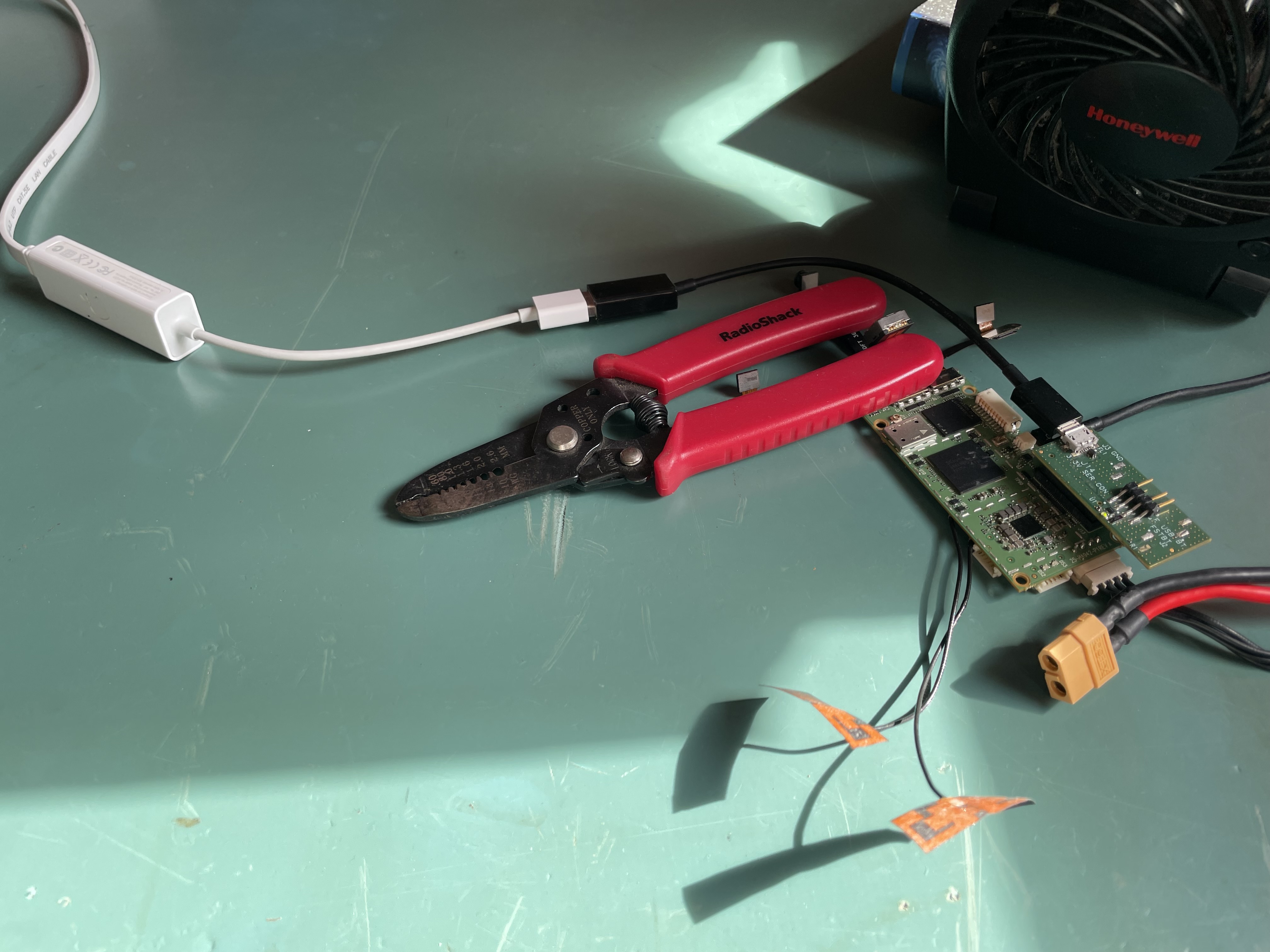
        test setup
        low resolution
        high resolution

        1 Reply Last reply
        0
        • C Offline
          C Offline
          colerose
          Contributor
          wrote on last edited by
          #9

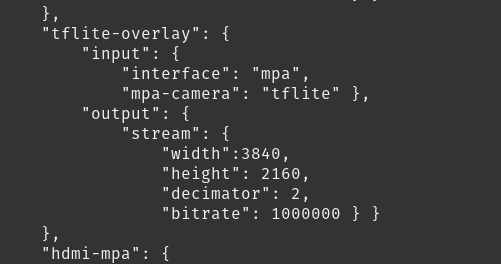
          Thanks @Eric-Katzfey! I have been able to successfully increase the resolution on the hires camera by modifying the files as you described them below. However, once I do so, running the voxl-tflite-server and then running voxl-tflite-overlay no longer shows the detections. I can see the camera stream in a higher resolution on the Tflite tab in voxl-streamer (and by connecting through opencv) however there are no detections happening when running the voxl-tflite-server in debug mode and when viewing the streamer. Any idea why this might be happening?

          1 Reply Last reply
          0
          • Eric KatzfeyE Offline
            Eric KatzfeyE Offline
            Eric Katzfey
            ModalAI Team
            wrote on last edited by
            #10

            That sounds more like an @Matt-Turi or @Alex-Gardner question.

            1 Reply Last reply
            0
            • ? Offline
              ? Offline
              A Former User
              wrote on last edited by
              #11

              You are not seeing any detections on the overlay because the tflite server expects our default input image size, then resizes it down to 300x300 for model execution. In order to run with 1920x1080p resolution, you must change line 287 of models.cpp to match:

              mcv_init_resize_map(1920, 1080, model_img_width, model_img_height, &map);
              // This would for 1920px width, 1080px height


              Then, as long as your skip_n_frames parameter is set to 0, voxl-streamer will be able to display the output correctly.

              1 Reply Last reply
              0
              • ? Offline
                ? Offline
                A Former User
                wrote on last edited by
                #12

                If you use the dev opkg repo, there is now a new version of voxl-tflite-server (v0.1.2) that will handle any input size, and color output with the hires cam by default.

                1 Reply Last reply
                0
                • C Offline
                  C Offline
                  colerose
                  Contributor
                  wrote on last edited by
                  #13

                  Thanks @Matt-Turi! I'll give this a shot!

                  1 Reply Last reply
                  0
                  • G Offline
                    G Offline
                    gauravshukla914
                    Regular
                    wrote on last edited by
                    #14

                    Hello @Alex-Gardner I'm currently using M0025 sensor which is by default with VOXL-Flight deck. I read your comment above that the sensor M0024 would be a better choice for medium to long range application. Is there a way to integrate M0024 sensor with the voxl-flight deck? I understand that the sensor size is a little big and it won't fit in the space that's being designed for the default sensor.

                    1 Reply Last reply
                    0
                    • ? Offline
                      ? Offline
                      A Former User
                      wrote on last edited by
                      #15

                      We don't sell any platforms with the M0024 sensor onboard by default. If you're just trying to use it for color fpv/more general inspection I'd suggest just VHB taping it to the front, if you're trying to use it for hyper-accurate detections you'll have to modify one of our platforms or design your own (as most of our platforms are meant to serve as reference designs and not full production hardware).

                      1 Reply Last reply
                      0

                      Hello! It looks like you're interested in this conversation, but you don't have an account yet.

                      Getting fed up of having to scroll through the same posts each visit? When you register for an account, you'll always come back to exactly where you were before, and choose to be notified of new replies (either via email, or push notification). You'll also be able to save bookmarks and upvote posts to show your appreciation to other community members.

                      With your input, this post could be even better 💗

                      Register Login
                      Reply
                      • Reply as topic
                      Log in to reply
                      • Oldest to Newest
                      • Newest to Oldest
                      • Most Votes


                      ModalAI
                      Categories Recent Tags ModalAI.com Docs
                      © 2026 ModalAI® · Accelerating autonomy for smaller, smarter, safer drones · Powered by NodeBB
                      • Login

                      • Don't have an account? Register

                      • Login or register to search.
                      • First post
                        Last post
                      0
                      • Categories
                      • Recent
                      • Tags
                      • Popular
                      • Users
                      • Groups