
Running 4 Ar0144s on M0188
-
@cbay I got it working by swapping it to ID's 0-3 (2 on the hires lines).
Any known issues with doing this for use in VIO?
@cbay , yes this should work.
Whenever you add cameras of the same type, you should always check for possible I2C (CCI) conflicts. If you look here https://docs.modalai.com/M0188/#image-sensor-interfaces , the sensor IDs 0,2,3,6 (which is what you use) use unique CCI buses 0-3, so that is all good.
If you used ID 1, it would conflict with with another AR0144 on ID6 (both use CCI1)
One last thing to check is the sensor sync.
- if you see
fsinin the configuration of the sensor (and name of the sensormodule in/usr/lib/camera/), it means it is set up as a sync slave - currently you have the IDs 0 and 6 set up as sync slaves, but ID 2 and 3 as free-running
There are two issues enabling sync'ed drivers for AR0144 in ID 2 and 3:
- the driver is provided only for ID2 in :
/usr/share/modalai/chi-cdk/ar0144-fsin/- this is easy to fix - ID1 and ID3 on M0188 do not have the sync line connected to the camera connector
- this is easy to fix by installing a 0-ohm resistor, which is DNI by default.
Depending on your requirements for VIO (which VIO are you using?), you may or may not need the cameras synchronized.
Please let me know your requirements and we can go from there..
Alex
- if you see
-
@cbay , yes this should work.
Whenever you add cameras of the same type, you should always check for possible I2C (CCI) conflicts. If you look here https://docs.modalai.com/M0188/#image-sensor-interfaces , the sensor IDs 0,2,3,6 (which is what you use) use unique CCI buses 0-3, so that is all good.
If you used ID 1, it would conflict with with another AR0144 on ID6 (both use CCI1)
One last thing to check is the sensor sync.
- if you see
fsinin the configuration of the sensor (and name of the sensormodule in/usr/lib/camera/), it means it is set up as a sync slave - currently you have the IDs 0 and 6 set up as sync slaves, but ID 2 and 3 as free-running
There are two issues enabling sync'ed drivers for AR0144 in ID 2 and 3:
- the driver is provided only for ID2 in :
/usr/share/modalai/chi-cdk/ar0144-fsin/- this is easy to fix - ID1 and ID3 on M0188 do not have the sync line connected to the camera connector
- this is easy to fix by installing a 0-ohm resistor, which is DNI by default.
Depending on your requirements for VIO (which VIO are you using?), you may or may not need the cameras synchronized.
Please let me know your requirements and we can go from there..
Alex
@Alex-Kushleyev We are running OpenVINS for our VIO. Not sure what other requirements you need to know
- if you see
-
A Alex Kushleyev referenced this topic on
-
@Alex-Kushleyev We are running OpenVINS for our VIO. Not sure what other requirements you need to know
@cbay , OK got it.
In order to synchronize all 4 cameras, you will need:
- use
fsinsensormodules for camera slots 2 and 3 -- i will need to provide one for slot 3 - add a resistor to actually enable sync signal for slot 3 (will provide a diagram for M0188)
Meanwhile, you should be able to enable sync for camera slot 2 by using the following sensormodule:
/usr/share/modalai/chi-cdk/ar0144-fsin/com.qti.sensormodule.ar0144_fsin_2.bininstead ofcom.qti.sensormodule.ar0144_2.bin-- just replace it in/usr/lib/camera/Also, we have a tool for checking camera sync (you may have to build it yourself from this branch) : https://gitlab.com/voxl-public/voxl-sdk/utilities/voxl-mpa-tools/-/blob/add-new-image-tools/tools/voxl-check-cam-sync.c -- this is a quick way to check if the timestamps of the frames are aligned.
Alex
- use
-
@cbay , OK got it.
In order to synchronize all 4 cameras, you will need:
- use
fsinsensormodules for camera slots 2 and 3 -- i will need to provide one for slot 3 - add a resistor to actually enable sync signal for slot 3 (will provide a diagram for M0188)
Meanwhile, you should be able to enable sync for camera slot 2 by using the following sensormodule:
/usr/share/modalai/chi-cdk/ar0144-fsin/com.qti.sensormodule.ar0144_fsin_2.bininstead ofcom.qti.sensormodule.ar0144_2.bin-- just replace it in/usr/lib/camera/Also, we have a tool for checking camera sync (you may have to build it yourself from this branch) : https://gitlab.com/voxl-public/voxl-sdk/utilities/voxl-mpa-tools/-/blob/add-new-image-tools/tools/voxl-check-cam-sync.c -- this is a quick way to check if the timestamps of the frames are aligned.
Alex
cross-posting the reply here as well, since this is more relevant thread:
I have uploaded the latest ar0144 drivers with
fsinversions for all camera slots here : https://storage.googleapis.com/modalai_public/temp/ar0144/ar0144_drivers_20260402.zipThere are two additional files (inside the zip), which you should copy to
/usr/lib/camerato make sure you have the latest updates:com.qti.sensor.ar0144.so-- contains functions for exposure / gain control (we recently made some improvements to make gain control smoother)com.qti.tuned.default.bin-- fixed gain scaling so that min gain (1.0x analog gain) is equal to 100 in the HAL3 gain units, not 54 (and the max gain will be 29.6 = 29600 for AR0144) -- you can also double check this usingvoxl-camera-server -land update the min/max gain settings in yourvoxl-camera-server.confto make sure you are using the full range.
My colleague will follow up with a diagram for locations of the DNI resistors that need to be installed to enable sync signal for camera slots 1 and 3 (0402 0-ohm resistor)
Alex
- use
-
cross-posting the reply here as well, since this is more relevant thread:
I have uploaded the latest ar0144 drivers with
fsinversions for all camera slots here : https://storage.googleapis.com/modalai_public/temp/ar0144/ar0144_drivers_20260402.zipThere are two additional files (inside the zip), which you should copy to
/usr/lib/camerato make sure you have the latest updates:com.qti.sensor.ar0144.so-- contains functions for exposure / gain control (we recently made some improvements to make gain control smoother)com.qti.tuned.default.bin-- fixed gain scaling so that min gain (1.0x analog gain) is equal to 100 in the HAL3 gain units, not 54 (and the max gain will be 29.6 = 29600 for AR0144) -- you can also double check this usingvoxl-camera-server -land update the min/max gain settings in yourvoxl-camera-server.confto make sure you are using the full range.
My colleague will follow up with a diagram for locations of the DNI resistors that need to be installed to enable sync signal for camera slots 1 and 3 (0402 0-ohm resistor)
Alex
@cbay ,
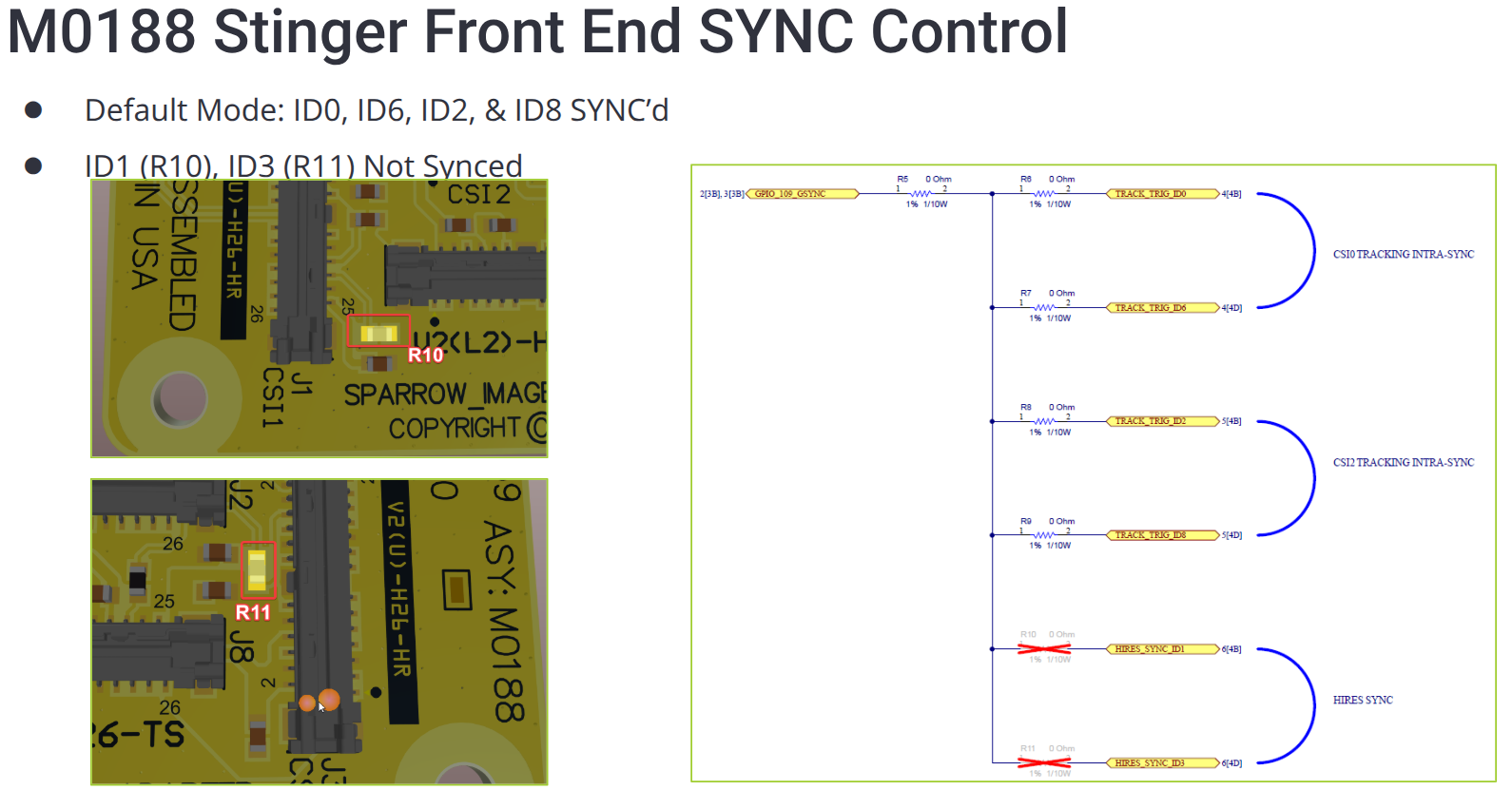
Here is the diagram for M0188 showing resistor R10 and R11 that need to be added (0 ohm) in order to connect the sync signal to the camera slot 1 and 3.
For some historical reasons, these resistors were DNI'ed in order to prevent (incorrectly configured) hires cameras from outputting a sync signal and interfering with the tracking cameras.
Please be careful when adding the resistors, as spacing between components is pretty tight.
We will update the docs for M0188, M0195 and M0173 to reflect the default state and how to enable the sync on the camera ports that do not have it already connected.
-
@cbay ,
Here is the diagram for M0188 showing resistor R10 and R11 that need to be added (0 ohm) in order to connect the sync signal to the camera slot 1 and 3.
For some historical reasons, these resistors were DNI'ed in order to prevent (incorrectly configured) hires cameras from outputting a sync signal and interfering with the tracking cameras.
Please be careful when adding the resistors, as spacing between components is pretty tight.
We will update the docs for M0188, M0195 and M0173 to reflect the default state and how to enable the sync on the camera ports that do not have it already connected.
@Alex-Kushleyev Thanks so much, we have the resistors on the way, will let you know how this goes.
Once this has been done, I would assume we would have no issues getting all of the cameras working with OpenVins
-
Hi @alex-kushleyev, are the file
com.qti.sensor.ar0144.soandcom.qti.tuned.default.binnow included in or superceded by a newer SDK version that's been released since April, like 1.6.6, and so we don't need to copy them manually now? -
Hi @markmst ,
please see the following changelog for the AR0144 camera driver and the default tuning file. You can reference the system image versions here : https://docs.modalai.com/sdk-1.6-release-notes/v1.8.06, v1.8.08, v1.8.09
- fix the min gain in default tuning file from 54 to 100. Even if you specify min gain of 54 in voxl-camera-server config, it will get corrected to 100 (so, no issue). this change is going to be in
com.qti.tuned.default.bin
v1.8.05
- improve AR0144 exposure control to make it smoother (compensate with digital gain for the fact that AR0144 analog gain steps are not linear. This change actually lives in the
com.qti.sensor.ar0144.sofile. - fix an issue where the max value (saturated pixel value) would be a function of the analog gain (would vary between 224 and 255)
By the way, it looks like we are going to move towards maintaining the camera drivers in the camera server repo so that we can update them much quicker and not require the system image update.
Can you tell me which AR0144 drivers you have been using? (where they came from). I can commit the latest to the camera server repo for convenience.
Alex
- fix the min gain in default tuning file from 54 to 100. Even if you specify min gain of 54 in voxl-camera-server config, it will get corrected to 100 (so, no issue). this change is going to be in
-
Hi Alex,
My VOXL2 Mini came with voxl-suite 1.6.5 installed, and my system image is
voxl2-mini (M0104):/$ cat /etc/version
1.8.08-M0104-14.1a-perfso I am hoping I have the latest AR0144 drivers already. Then I added
com.qti.sensormodule.ar0144_fsin_3.binfrom the zip you shared on April 2nd.It is working well and all the timestamps match. I just wanted to check if I still needed to replace
com.qti.tuned.default.binandcom.qti.sensor.ar0144.sobut I with v1.8.08 I already have these changes baked into the image.Thanks
Mark -
Yes, I believe the system image v1.8.08 has all the above changes built applied. Easy way to confirm
voxl-camera-server -land check the printed min gain. it should be 100 not 54. if you see 100, then you have the latestcom.quite.tuned.default.bin- exposure control improvements should also be in there as of v1.8.05 (
com.qti.sensor.ar0144.so). this is harder to test, but sdk 1.6.5 should have the latest. To test, cover up the camera to drive the exposure and gain to the max and then uncover and you should observe smooth transition, no jumps in image brightness.
it looks like we are not shipping
com.qti.sensormodule.ar0144_fsin_3.binin the system image right now, but like i mentioned earlier we are moving towards putting the camera drivers into thevoxl-camera-serverrepository.. but for now you will need to manually copy that one.Alex
Reading along? Create a free ModalAI Forum account to join in.
With an account you can reply, ask your own question, get an email when a ModalAI engineer answers, and mark the reply that solved it. Your place in each thread is saved between visits.
Questions about VOXL, Flight Core, ESCs and ModalAI drones are answered here by the engineers who build them.
Register Login