
Starling V2 cameras not being detected
-
The drone is wired up according to the diagram, could you explain what you mean by the pin1 location?
Here is the output for
voxl-camera-server -lstarling (D0005):~$ voxl-camera-server -l existing instance of voxl-camera-server found, attempting to stop it DEBUG: Attempting to open the hal module DEBUG: SUCCESS: Camera module opened on attempt 0 DEBUG: ----------- Number of cameras: 1 DEBUG: Cam idx: 0, Cam slot: 3, Slave Address: 0x00E2, Sensor Id: 0x7750 DEBUG: Note: This list comes from the HAL module and may not be indicative DEBUG: of configurations that have full pipelines DEBUG: Number of cameras: 1 ====================================Here is the contents of
/usr/lib/camerastarling (D0005):~$ ls -l /usr/lib/camera total 6612 -rwxr-xr-x 1 root root 9912 Oct 22 03:46 com.qti.eeprom.cmk_imx577.so -rwxr-xr-x 1 root root 9904 Oct 22 03:46 com.qti.sensor.ar0144.so -rwxr-xr-x 1 root root 5808 Oct 22 03:46 com.qti.sensor.boson.so -rwxr-xr-x 1 root root 5816 Oct 22 03:46 com.qti.sensor.cmk_imx577.so -rwxr-xr-x 1 root root 5816 Oct 22 03:46 com.qti.sensor.cmk_imx577_flip.so -rwxr-xr-x 1 root root 9904 Oct 22 03:46 com.qti.sensor.imx214.so -rwxr-xr-x 1 root root 9912 Oct 22 03:46 com.qti.sensor.imx214_flip.so -rwxr-xr-x 1 root root 9904 Oct 22 03:46 com.qti.sensor.imx335.so -rwxr-xr-x 1 root root 5808 Oct 22 03:46 com.qti.sensor.imx377.so -rwxr-xr-x 1 root root 9912 Oct 22 03:46 com.qti.sensor.imx412_fpv.so -rwxr-xr-x 1 root root 9904 Oct 22 03:46 com.qti.sensor.imx664.so -rwxr-xr-x 1 root root 9904 Oct 22 03:46 com.qti.sensor.imx678.so -rwxr-xr-x 1 root root 9912 Oct 22 03:46 com.qti.sensor.imx678_flip.so -rwxr-xr-x 1 root root 9912 Oct 22 03:46 com.qti.sensor.imx678_mod.so -rwxr-xr-x 1 root root 5808 Oct 22 03:46 com.qti.sensor.irs1645.so -rwxr-xr-x 1 root root 5808 Oct 22 03:46 com.qti.sensor.irs2975c.so -rwxr-xr-x 1 root root 9904 Oct 22 03:46 com.qti.sensor.ov64b40.so -rwxr-xr-x 1 root root 9904 Oct 22 03:46 com.qti.sensor.ov7251.so -rwxr-xr-x 1 root root 9912 Oct 22 03:46 com.qti.sensor.ov7251_front_left.so -rwxr-xr-x 1 root root 9920 Oct 22 03:46 com.qti.sensor.ov7251_front_left_flip.so -rwxr-xr-x 1 root root 9920 Oct 22 03:46 com.qti.sensor.ov7251_front_right.so -rwxr-xr-x 1 root root 9920 Oct 22 03:46 com.qti.sensor.ov7251_front_right_flip.so -rwxr-xr-x 1 root root 9912 Oct 22 03:46 com.qti.sensor.ov7251_fsin.so -rwxr-xr-x 1 root root 9912 Oct 22 03:46 com.qti.sensor.ov7251_fsout.so -rwxr-xr-x 1 root root 9912 Oct 22 03:46 com.qti.sensor.ov7251_rear_left.so -rwxr-xr-x 1 root root 9920 Oct 22 03:46 com.qti.sensor.ov7251_rear_left_flip.so -rwxr-xr-x 1 root root 9912 Oct 22 03:46 com.qti.sensor.ov7251_rear_right.so -rwxr-xr-x 1 root root 9920 Oct 22 03:46 com.qti.sensor.ov7251_rear_right_flip.so -rwxr-xr-x 1 root root 9904 Oct 22 03:46 com.qti.sensor.ov9782.so -rwxr-xr-x 1 root root 9912 Oct 22 03:46 com.qti.sensor.ov9782_front_left.so -rwxr-xr-x 1 root root 9920 Oct 22 03:46 com.qti.sensor.ov9782_front_left_flip.so -rwxr-xr-x 1 root root 9920 Oct 22 03:46 com.qti.sensor.ov9782_front_right.so -rwxr-xr-x 1 root root 9920 Oct 22 03:46 com.qti.sensor.ov9782_front_right_flip.so -rwxr-xr-x 1 root root 9912 Oct 22 03:46 com.qti.sensor.ov9782_rear_left.so -rwxr-xr-x 1 root root 9920 Oct 22 03:46 com.qti.sensor.ov9782_rear_left_flip.so -rwxr-xr-x 1 root root 9912 Oct 22 03:46 com.qti.sensor.ov9782_rear_right.so -rwxr-xr-x 1 root root 9920 Oct 22 03:46 com.qti.sensor.ov9782_rear_right_flip.so -rw-r--r-- 1 root root 149272 Feb 10 17:39 com.qti.sensormodule.imx214_2.bin -rw-r--r-- 1 root root 674736 Feb 10 17:39 com.qti.sensormodule.irs1645_0.bin -rw-r--r-- 1 root root 142472 Feb 10 17:39 com.qti.sensormodule.ov7251_3.bin -rw-r--r-- 1 root root 957344 Oct 22 03:46 com.qti.tuned.cmk_imx577.bin -rw-r--r-- 1 root root 835464 Oct 22 03:46 com.qti.tuned.cmk_ov9282.bin -rw-r--r-- 1 root root 931864 Oct 22 03:46 com.qti.tuned.default.bin -rw-r--r-- 1 root root 957344 Oct 22 03:46 com.qti.tuned.imx412_fpv.bin -rw-r--r-- 1 root root 793816 Oct 22 03:46 com.qti.tuned.ov9782.bin -rw-r--r-- 1 root root 882376 Oct 22 03:46 com.qti.tuned.sony_imx335.bin drwxr-xr-x 2 root root 4096 Oct 22 04:04 components starling (D0005):~$@Alex-Kushleyev Is there any way I can see if the cameras are recognized at all to see if the connection is good?
-
@Alex-Kushleyev Is there any way I can see if the cameras are recognized at all to see if the connection is good?
@Leo-Allesch , sorry for the delay.
Based on your previous post, only one camera is detected:
Cam idx: 0, Cam slot: 3, Slave Address: 0x00E2, Sensor Id: 0x7750(if more cameras were detected, you would see them show up in that list, which is output of
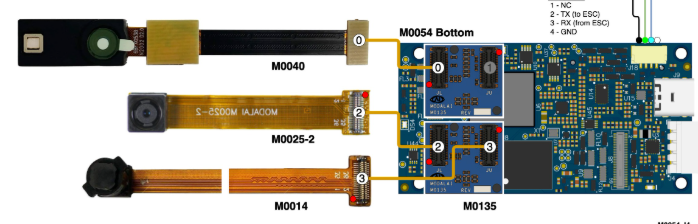
voxl-camera-server -l).This is the tracking camera in camera slot 3 (VOXL2 J7 Upper slot). The slot numbers are also labeled in the diagram https://docs.modalai.com/voxl2-d0005/, specifically you can see 0, 2, 3 labeled on the M0135 interposers that are plugged into VOXL2:
I do see the correct sensormodules in
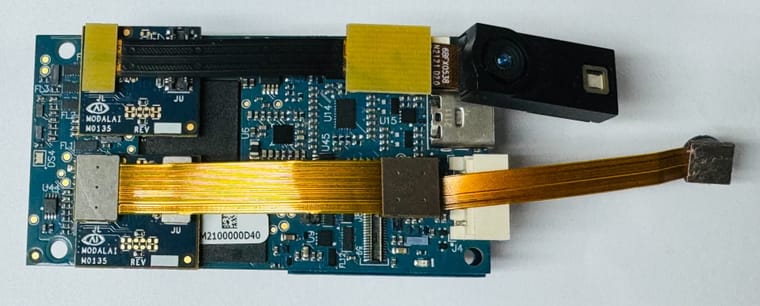
/usr/lib/camera/. (slot 0 for TOF and slot 2 for IMX214).I suspect that you have the hires camera and TOF module plugged in backwards into the M0135 adapters. The tracking camera (unfortunately?) has a different connector orientation compared to other cameras, but pin1 is correctly marked with a dot (or a number 1) on all connectors.
Your cameras should be connected like in the picture below:
Another look (in the assembly of the drone):
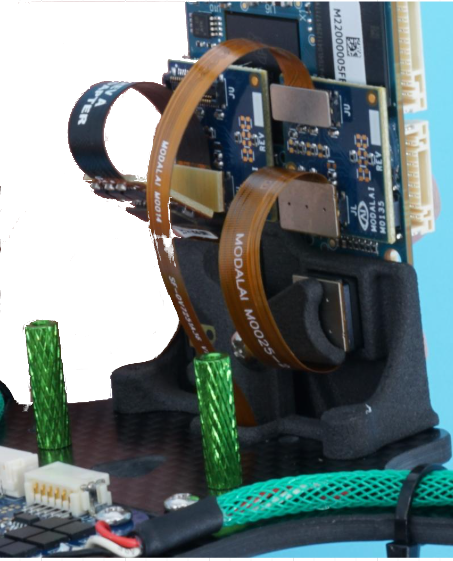
Please double check the connections.
Alex
-
@Leo-Allesch , sorry for the delay.
Based on your previous post, only one camera is detected:
Cam idx: 0, Cam slot: 3, Slave Address: 0x00E2, Sensor Id: 0x7750(if more cameras were detected, you would see them show up in that list, which is output of
voxl-camera-server -l).This is the tracking camera in camera slot 3 (VOXL2 J7 Upper slot). The slot numbers are also labeled in the diagram https://docs.modalai.com/voxl2-d0005/, specifically you can see 0, 2, 3 labeled on the M0135 interposers that are plugged into VOXL2:
I do see the correct sensormodules in
/usr/lib/camera/. (slot 0 for TOF and slot 2 for IMX214).I suspect that you have the hires camera and TOF module plugged in backwards into the M0135 adapters. The tracking camera (unfortunately?) has a different connector orientation compared to other cameras, but pin1 is correctly marked with a dot (or a number 1) on all connectors.
Your cameras should be connected like in the picture below:
Another look (in the assembly of the drone):
Please double check the connections.
Alex
@Alex-Kushleyev Yes I've verified that my connections matched this, and I've tried reseatting them as well
-
@Alex-Kushleyev Yes I've verified that my connections matched this, and I've tried reseatting them as well
@Leo-Allesch , thanks for checking that. I am assuming that the cameras used to work at some point - can you confirm? What happened between the working and non-working state?
Alex
-
@Leo-Allesch , thanks for checking that. I am assuming that the cameras used to work at some point - can you confirm? What happened between the working and non-working state?
Alex
@Alex-Kushleyev I received this drone for a engineering capstone project, so I have no complete history of the drone, as far as I'm aware the previous person with this drone never got it fly but also never damaged it in any way
-
@Alex-Kushleyev I received this drone for a engineering capstone project, so I have no complete history of the drone, as far as I'm aware the previous person with this drone never got it fly but also never damaged it in any way
@Alex-Kushleyev can we easily swap the cameras onto the port that the tracking camera is on? We know that port works so verifying that it's the port not the camera would be ideal. What configuration would we need to change to do that?
-
@Alex-Kushleyev I received this drone for a engineering capstone project, so I have no complete history of the drone, as far as I'm aware the previous person with this drone never got it fly but also never damaged it in any way
OK, i understand. So i think the next step is to figure out what exactly is not working: cameras, M0135 interposers or VOXL2.
Since we know that the camera slot 3 hardware and software path seems to be working, you can try plugging in other cameras (hires, TOF) in to that slot:
- power off VOXL2, disconnect tracking camera, disconnect TOF and hires camera
- plug in IMX214 hires camera into tracking camera's slot, the camera flex will be going towards the center of M0135
- power on voxl2 and copy
com.qti.sensormodule.imx214_3.binfrom/usr/share/modalai/chi-cdk/imx214to/usr/lib/camera/. You can leave the existing sensormodules in/usr/lib/camera/, no need to delete. - run
voxl-camera-server -lto see if the camera is detected - repeat the same test for the TOF sensor ( you will need to copy
com.qti.sensormodule.irs1645_3.bincamera driver)
Alternatively, if you have another VOXL2, you could do some testing with that, but I am assuming that another VOXL2 is not available.
Alex
-
OK, i understand. So i think the next step is to figure out what exactly is not working: cameras, M0135 interposers or VOXL2.
Since we know that the camera slot 3 hardware and software path seems to be working, you can try plugging in other cameras (hires, TOF) in to that slot:
- power off VOXL2, disconnect tracking camera, disconnect TOF and hires camera
- plug in IMX214 hires camera into tracking camera's slot, the camera flex will be going towards the center of M0135
- power on voxl2 and copy
com.qti.sensormodule.imx214_3.binfrom/usr/share/modalai/chi-cdk/imx214to/usr/lib/camera/. You can leave the existing sensormodules in/usr/lib/camera/, no need to delete. - run
voxl-camera-server -lto see if the camera is detected - repeat the same test for the TOF sensor ( you will need to copy
com.qti.sensormodule.irs1645_3.bincamera driver)
Alternatively, if you have another VOXL2, you could do some testing with that, but I am assuming that another VOXL2 is not available.
Alex
@Alex-Kushleyev OK, so I've spent some time switching ports around, here's what I've found out. I actually got the tracking camera and imx214 to work each on port 0 and port 3 separately and at the same time. I've never gotten anything to work on port 2, and I have never gotten the TOF sensor to work on any channel. Can certain sensors only work on certain ports? And is port 1 ever used? I also have seen that the m0040 has been EOL so is there a different sensor that I need?
-
@Alex-Kushleyev OK, so I've spent some time switching ports around, here's what I've found out. I actually got the tracking camera and imx214 to work each on port 0 and port 3 separately and at the same time. I've never gotten anything to work on port 2, and I have never gotten the TOF sensor to work on any channel. Can certain sensors only work on certain ports? And is port 1 ever used? I also have seen that the m0040 has been EOL so is there a different sensor that I need?
It seems the TOF sensor and camera port 2 are not functional. I am assuming that you tried using both M0135 adapters to test port 2? Considering that it was working before, this is likely not a software issue, but a hardware issue, but it is not clear why exactly.
All of your cameras are interchangeable in the camera ports, as long as the camera ports and sensors are working (and the
sensormoduledrivers are set up correctly).By default, the port 1 (camera slot 1), is reserved for use in a stereo configuration when used with M0076, like this one : https://docs.modalai.com/voxl2-camera-configs/#c10---front-stereo-only . So it will not work as a generic camera port when used with M0135. The functionality can be re-configured in software (requires a change in the kernel), but we don't have a ready-to-go kernel with just this change (we can revisit this later, if needed).
By the way, you can also test VOXL2 J8. J8 is set up in a similar way as J6, that is the J8L can be used for any camera, but J8U is reserved (by default) for another stereo pair. However, this will allow you to test yet another port just to double check things. The camera slot IDs for J8 are 4 and 5. Please note that the orientation of J8 is rotated compared to J6 and J7. You can see how a TOF sensor is attached to VOXL2 J8 via M0076 adapter : https://docs.modalai.com/voxl2-camera-configs/#cx---two-time-of-flights-tof . M0076 is a single port version of M0135 interposer (only providing the Lower camera port).
So, if you test VOXL2 J8, use the lower camera port 4 (J8L).
Yes, M0040 is EOL, so the replacements are not available. The upgraded version of TOF sensor is here : https://docs.modalai.com/M0169/ , however it has different dimensions and connector requirements. We can discuss this further if needed.
What is your goal? Do you need the original configuration working or are you potentially looking for any updates?
Alex
-
It seems the TOF sensor and camera port 2 are not functional. I am assuming that you tried using both M0135 adapters to test port 2? Considering that it was working before, this is likely not a software issue, but a hardware issue, but it is not clear why exactly.
All of your cameras are interchangeable in the camera ports, as long as the camera ports and sensors are working (and the
sensormoduledrivers are set up correctly).By default, the port 1 (camera slot 1), is reserved for use in a stereo configuration when used with M0076, like this one : https://docs.modalai.com/voxl2-camera-configs/#c10---front-stereo-only . So it will not work as a generic camera port when used with M0135. The functionality can be re-configured in software (requires a change in the kernel), but we don't have a ready-to-go kernel with just this change (we can revisit this later, if needed).
By the way, you can also test VOXL2 J8. J8 is set up in a similar way as J6, that is the J8L can be used for any camera, but J8U is reserved (by default) for another stereo pair. However, this will allow you to test yet another port just to double check things. The camera slot IDs for J8 are 4 and 5. Please note that the orientation of J8 is rotated compared to J6 and J7. You can see how a TOF sensor is attached to VOXL2 J8 via M0076 adapter : https://docs.modalai.com/voxl2-camera-configs/#cx---two-time-of-flights-tof . M0076 is a single port version of M0135 interposer (only providing the Lower camera port).
So, if you test VOXL2 J8, use the lower camera port 4 (J8L).
Yes, M0040 is EOL, so the replacements are not available. The upgraded version of TOF sensor is here : https://docs.modalai.com/M0169/ , however it has different dimensions and connector requirements. We can discuss this further if needed.
What is your goal? Do you need the original configuration working or are you potentially looking for any updates?
Alex
Ok, so I swapped the two M0135 boards and found that the lower port on one of the boards (the one originally on J7) does not work. And I still could not get the TOF sensor to work. So technically we could get away with using the broken board on the left side and enabling port 1 in the kernel, but if we are replacing the TOF sensor then it may be easier to just replace a M0135 board. The goal of our capstone project is to work with both VSLAM and target detection, so I believe we will need a working depth sensor for that (correct me if I'm wrong??). As far as using the new TOF module, that's fine with us, however, I'm just unsure about it fitting correctly and the ribbon cable routing so we may need some assistance with that. We can also 3D print a mounting bracket as well.
-
Ok, so I swapped the two M0135 boards and found that the lower port on one of the boards (the one originally on J7) does not work. And I still could not get the TOF sensor to work. So technically we could get away with using the broken board on the left side and enabling port 1 in the kernel, but if we are replacing the TOF sensor then it may be easier to just replace a M0135 board. The goal of our capstone project is to work with both VSLAM and target detection, so I believe we will need a working depth sensor for that (correct me if I'm wrong??). As far as using the new TOF module, that's fine with us, however, I'm just unsure about it fitting correctly and the ribbon cable routing so we may need some assistance with that. We can also 3D print a mounting bracket as well.
@Alex-Kushleyev any update for this?
-
@Alex-Kushleyev any update for this?
So it seems like the VOXL2 ports (J6L, J7L, J7U) seem to be functioning (when tested with the hires or tracking camera and a working M0135)?
Can you please provide more information on your requirements: VSLAM and target detection. Both can be done without TOF sensor. TOF sensor is often used to help with obstacle detection / avoidance in indoor environments.
The easiest way to add the new TOF sensor to your drone would be to use the following:
- sensor: https://www.modalai.com/products/m0178?variant=48528287793456
- this has the M0177 and M0178 board combo + actual sensor
- adapter : https://docs.modalai.com/M0172/
The connection for the new TOF module to VOXL2 would look like this :
VOXL2 <-> M0172 <-> M0177 <-> M0178 <-> IRS2975 TOF sensorYou are right that the cable routing may be an issue, you would likely need to update the mounting bracket for the camera as well.
I am going to double check if we have any TOF V1 left at all.. will get back to you soon.
Replacement M0135 (if you need):
Alex
- sensor: https://www.modalai.com/products/m0178?variant=48528287793456
-
So it seems like the VOXL2 ports (J6L, J7L, J7U) seem to be functioning (when tested with the hires or tracking camera and a working M0135)?
Can you please provide more information on your requirements: VSLAM and target detection. Both can be done without TOF sensor. TOF sensor is often used to help with obstacle detection / avoidance in indoor environments.
The easiest way to add the new TOF sensor to your drone would be to use the following:
- sensor: https://www.modalai.com/products/m0178?variant=48528287793456
- this has the M0177 and M0178 board combo + actual sensor
- adapter : https://docs.modalai.com/M0172/
The connection for the new TOF module to VOXL2 would look like this :
VOXL2 <-> M0172 <-> M0177 <-> M0178 <-> IRS2975 TOF sensorYou are right that the cable routing may be an issue, you would likely need to update the mounting bracket for the camera as well.
I am going to double check if we have any TOF V1 left at all.. will get back to you soon.
Replacement M0135 (if you need):
Alex
@Leo-Allesch , actually we do have a very limited quantity of the TOF V1, so hopefully that would avoid doing the re-design of the camera mounts and flex routing.
Please reach out to https://modalai.com/contact for a custom order. you probably should get one or two of M0135 as well.
Alex
- sensor: https://www.modalai.com/products/m0178?variant=48528287793456
-
@Leo-Allesch , actually we do have a very limited quantity of the TOF V1, so hopefully that would avoid doing the re-design of the camera mounts and flex routing.
Please reach out to https://modalai.com/contact for a custom order. you probably should get one or two of M0135 as well.
Alex
Yeah so our engineering capstone project is to in some way integrate target detection into the VSLAM mapping to provide more detailed information inside the mapping. Our client was hoping maybe for the ability to save points or a bounding box on the mapping at certain target points and having the ability to see what they are.
How can VSLAM work without any depth sensor and just a camera? It was my understanding that it needs the depth feedback to create the 3D mapping.
In any case I'll reach out to my client about making that order.
-
Yeah so our engineering capstone project is to in some way integrate target detection into the VSLAM mapping to provide more detailed information inside the mapping. Our client was hoping maybe for the ability to save points or a bounding box on the mapping at certain target points and having the ability to see what they are.
How can VSLAM work without any depth sensor and just a camera? It was my understanding that it needs the depth feedback to create the 3D mapping.
In any case I'll reach out to my client about making that order.
@Leo-Allesch , if you are talking about VSLAM, which stands for Visual Simultaneous Localization and Mapping, then this is a sub-class of SLAM which uses only cameras (and often IMUs, then it is VISLAM).
VSLAM and VISLAM usually generate and maintain a sparse map of 3D features (points), which is used for self localization.
If you want to be able to detect a target, and you have your 3D pose from VIO (VIO = VISLAM), then you can either triangulate the target location or get it's location from a single frame if you know the size of the target (such as April tag, etc). Then you can transform the coordinate of the tag from the camera frame into your "world" (VIO) coordinates.
The depth sensor would allow you to build a more detailed 3D map / point cloud using the 3D pose output from the VIO algorithm (or just using a depth sensor, which may be more complicated). You can also build a dense 3D map using camera only (and IMU), but that typically requires a lot more computation than using a depth sensor.
You don't necessarily need a depth sensor for identifying the position of a specific target that is easily detected by a camera.
There is a lot of research material you can find on these topics, please look into it deeper and let us know if you have specific questions about using VOXL2 hardware and software.
Alex


Reading along? Create a free ModalAI Forum account to join in.
With an account you can reply, ask your own question, get an email when a ModalAI engineer answers, and mark the reply that solved it. Your place in each thread is saved between visits.
Questions about VOXL, Flight Core, ESCs and ModalAI drones are answered here by the engineers who build them.
Register Login