
Calibration for EIS
-
Hi! When I follow the instructions on here to calibrate at half resolution for EIS, I'm noticing that the output video is zoomed in. Even setting misp_zoom to 0, and resolution to 4040x3040 for an imx412 camera is not giving me the full camera view.
I'm using voxl-camera-server_2.2.4
Here is my voxl-camera-server.conf file:{ "type": "imx412", "name": "hires", "enabled": true, "camera_id": 1, "fps": 10, "en_preview": true, "en_raw_preview": true, "en_misp": true, "preview_width": 4040, "preview_height": 3040, "misp_width": 2020, "misp_height": 1520, "misp_awb": "auto", "misp_zoom": 0, "en_eis": false, "eis_mode": "full-follow", "eis_view": "eis-only", "eis_follow_rate": 0.01, "en_large_video": false, "en_small_video": true, "en_snapshot": false, "ae_mode": "lme_msv", "en_rotate": false, "misp_venc_enable": true, "misp_venc_mode": "h264", "misp_venc_br_ctrl": "cbr", "misp_venc_Qfixed": 30, "misp_venc_Qmin": 15, "misp_venc_Qmax": 51, "misp_venc_nPframes": 29, "misp_venc_mbps": 3, "ae_desired_msv": 100, "exposure_min_us": 25, "exposure_max_us": 5000, "gain_min": 100, "gain_max": 32000, "exposure_soft_min_us": 5000, "snapshot_jpeg_quality": 75, "small_video_width": 1024, "small_video_height": 768, "small_venc_mode": "h264", "small_venc_br_ctrl": "cqp", "small_venc_Qfixed": 30, "small_venc_Qmin": 15, "small_venc_Qmax": 40, "small_venc_nPframes": 9, "small_venc_mbps": 2, "small_venc_osd": false, "large_video_width": 4056, "large_video_height": 3040, "large_venc_mode": "h264", "large_venc_br_ctrl": "cqp", "large_venc_Qfixed": 40, "large_venc_Qmin": 15, "large_venc_Qmax": 50, "large_venc_nPframes": 29, "large_venc_mbps": 40, "large_venc_osd": false, "en_snapshot_width": 4056, "en_snapshot_height": 3040, "exif_focal_length": 3.0999999046325684, "exif_focal_length_in_35mm_format": 17, "exif_fnumber": 1.2400000095367432, "misp_venc_osd": false, "misp_gamma": 1.6, "ae_filter_alpha": 0.600000023841858, "ae_ignore_fraction": 0.20000000298023224, "ae_slope": 0.05000000074505806, "ae_exposure_period": 1, "ae_gain_period": 1 } -
Hi! When I follow the instructions on here to calibrate at half resolution for EIS, I'm noticing that the output video is zoomed in. Even setting misp_zoom to 0, and resolution to 4040x3040 for an imx412 camera is not giving me the full camera view.
I'm using voxl-camera-server_2.2.4
Here is my voxl-camera-server.conf file:{ "type": "imx412", "name": "hires", "enabled": true, "camera_id": 1, "fps": 10, "en_preview": true, "en_raw_preview": true, "en_misp": true, "preview_width": 4040, "preview_height": 3040, "misp_width": 2020, "misp_height": 1520, "misp_awb": "auto", "misp_zoom": 0, "en_eis": false, "eis_mode": "full-follow", "eis_view": "eis-only", "eis_follow_rate": 0.01, "en_large_video": false, "en_small_video": true, "en_snapshot": false, "ae_mode": "lme_msv", "en_rotate": false, "misp_venc_enable": true, "misp_venc_mode": "h264", "misp_venc_br_ctrl": "cbr", "misp_venc_Qfixed": 30, "misp_venc_Qmin": 15, "misp_venc_Qmax": 51, "misp_venc_nPframes": 29, "misp_venc_mbps": 3, "ae_desired_msv": 100, "exposure_min_us": 25, "exposure_max_us": 5000, "gain_min": 100, "gain_max": 32000, "exposure_soft_min_us": 5000, "snapshot_jpeg_quality": 75, "small_video_width": 1024, "small_video_height": 768, "small_venc_mode": "h264", "small_venc_br_ctrl": "cqp", "small_venc_Qfixed": 30, "small_venc_Qmin": 15, "small_venc_Qmax": 40, "small_venc_nPframes": 9, "small_venc_mbps": 2, "small_venc_osd": false, "large_video_width": 4056, "large_video_height": 3040, "large_venc_mode": "h264", "large_venc_br_ctrl": "cqp", "large_venc_Qfixed": 40, "large_venc_Qmin": 15, "large_venc_Qmax": 50, "large_venc_nPframes": 29, "large_venc_mbps": 40, "large_venc_osd": false, "en_snapshot_width": 4056, "en_snapshot_height": 3040, "exif_focal_length": 3.0999999046325684, "exif_focal_length_in_35mm_format": 17, "exif_fnumber": 1.2400000095367432, "misp_venc_osd": false, "misp_gamma": 1.6, "ae_filter_alpha": 0.600000023841858, "ae_ignore_fraction": 0.20000000298023224, "ae_slope": 0.05000000074505806, "ae_exposure_period": 1, "ae_gain_period": 1 }@SKA , the minimum zoom should be 1.0, not 0.0. Can you try to see if that works?
Alex
-
@SKA , the minimum zoom should be 1.0, not 0.0. Can you try to see if that works?
Alex
@Alex-Kushleyev I tried 1.0 as well, it didn't make a difference.
-
@Alex-Kushleyev I tried 1.0 as well, it didn't make a difference.
@SKA ,
Does the zoom level change if you change misp_zoom param from 1.0 to a higher number? You can also adjust zoom via voxl-portal when you view the stream and enable the check box for camera controls (bottom left). Did you try changing zoom that way?
Alex
-
@SKA ,
Does the zoom level change if you change misp_zoom param from 1.0 to a higher number? You can also adjust zoom via voxl-portal when you view the stream and enable the check box for camera controls (bottom left). Did you try changing zoom that way?
Alex
@Alex-Kushleyev No, it doesn't change. Let me try adjusting in voxl-portal.
-
@Alex-Kushleyev No, it doesn't change. Let me try adjusting in voxl-portal.
@SKA , you are probably looking at the wrong stream, since you have small video enabled, which does not use misp. Use hires_misp_ streams
-
@SKA , you are probably looking at the wrong stream, since you have small video enabled, which does not use misp. Use hires_misp_ streams
@Alex-Kushleyev I'm looking at hires_misp_grey. I know I've been looking at the misp streams all along because they haven't been fisheye, like the hires_small_grey stream.
Also, just checked out the zoom slider in voxl-portal, it doesn't seem to work -
@Alex-Kushleyev I'm looking at hires_misp_grey. I know I've been looking at the misp streams all along because they haven't been fisheye, like the hires_small_grey stream.
Also, just checked out the zoom slider in voxl-portal, it doesn't seem to work@SKA , just to clarify, if you disable EIS, then undistortion is disabled, you will see fisheye image. If EIS is enabled, the output will be undistorted (zoomed in a bit). Part of EIS figures out the minimum zoom level such that the undistorted image is maximized (no black pixels at the edges), so if EIS is enabled and you set misp_zoom to 1.0, the image will appear slightly zoomed in because it is undistorted (and parts of the image are no longer visible, what used to be the corners).
if you set misp_zoom to 1.0 and eis is disabled, you will see the image that is not zoomed in. If your misp width and height aspect ratio differs from the raw preview aspect ratio, then misp will crop the top+bottom (usually), to get the correct aspect ratio. For example, if your raw preview size is 4040x3040 and your misp output is 1920x1080, then misp will first crop the top and bottom of the raw image to get the 16:9 aspect ratio and then resize the image to 1920x1080 (well actually all the steps are happening at the same time, not sequentially).
I have to ask, how do you know that your image is zoomed in and not original? btw since you have the small video stream enabled, you can look at that image (hires_small_color) to see if the zoom level is the same - this is coming from the ISP and it should also crop + resize to your resolution for small video stream you have selected (you can make the small video resolution the same as misp output resolution and compare images, they should look identical zoom-wise)
Alex
-
@SKA , just to clarify, if you disable EIS, then undistortion is disabled, you will see fisheye image. If EIS is enabled, the output will be undistorted (zoomed in a bit). Part of EIS figures out the minimum zoom level such that the undistorted image is maximized (no black pixels at the edges), so if EIS is enabled and you set misp_zoom to 1.0, the image will appear slightly zoomed in because it is undistorted (and parts of the image are no longer visible, what used to be the corners).
if you set misp_zoom to 1.0 and eis is disabled, you will see the image that is not zoomed in. If your misp width and height aspect ratio differs from the raw preview aspect ratio, then misp will crop the top+bottom (usually), to get the correct aspect ratio. For example, if your raw preview size is 4040x3040 and your misp output is 1920x1080, then misp will first crop the top and bottom of the raw image to get the 16:9 aspect ratio and then resize the image to 1920x1080 (well actually all the steps are happening at the same time, not sequentially).
I have to ask, how do you know that your image is zoomed in and not original? btw since you have the small video stream enabled, you can look at that image (hires_small_color) to see if the zoom level is the same - this is coming from the ISP and it should also crop + resize to your resolution for small video stream you have selected (you can make the small video resolution the same as misp output resolution and compare images, they should look identical zoom-wise)
Alex
@Alex-Kushleyev Thanks!
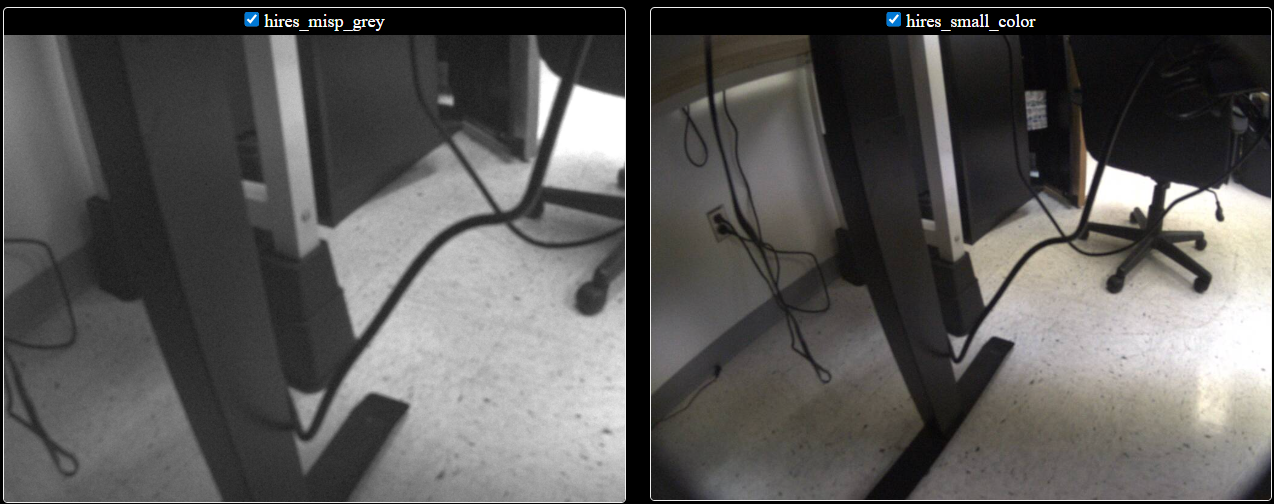
This is what I'm seeing with voxl-camera-server set to the following:
                        "en_misp":      true,
                        "preview_width":        4040,
                        "preview_height":       3040,
                        "misp_width":   2020,
                        "misp_height":  1520,
                        "misp_awb":     "auto",
                        "misp_zoom":    1.,
                        "en_eis":       false,
                        "eis_mode":     "full-follow",
                        "eis_view":     "eis-only",
                        "eis_follow_rate":      0.01,
                        "en_large_video":       false,
                        "en_small_video":       true,
I'll keep debugging why this is happening. Will EIS accept an intrinsics file calibrated from hires_small_grey setting the width and height to 2020x1520?
-
@Alex-Kushleyev Thanks!
This is what I'm seeing with voxl-camera-server set to the following:
                        "en_misp":      true,
                        "preview_width":        4040,
                        "preview_height":       3040,
                        "misp_width":   2020,
                        "misp_height":  1520,
                        "misp_awb":     "auto",
                        "misp_zoom":    1.,
                        "en_eis":       false,
                        "eis_mode":     "full-follow",
                        "eis_view":     "eis-only",
                        "eis_follow_rate":      0.01,
                        "en_large_video":       false,
                        "en_small_video":       true,
I'll keep debugging why this is happening. Will EIS accept an intrinsics file calibrated from hires_small_grey setting the width and height to 2020x1520?
@SKA , can you please try to set the FPS to 30 (instead of 10) and see if the issue persists? I am wondering if incorrect resolution is selected by the camera pipeline somehow. Also please try to disable the small video and see if the issue persists.
I just tested with 30fps on camera server version 2.2.4 and it worked fine, no zoom.
Also, which IMX412 camera drivers are you using?
Alex
-
@SKA , can you please try to set the FPS to 30 (instead of 10) and see if the issue persists? I am wondering if incorrect resolution is selected by the camera pipeline somehow. Also please try to disable the small video and see if the issue persists.
I just tested with 30fps on camera server version 2.2.4 and it worked fine, no zoom.
Also, which IMX412 camera drivers are you using?
Alex
Another question.. did this work for you before or is this the first time trying to calibrate at half resolution? if you request the full resolution, do you get the non-zoomed image? i know it will be slow to display in voxl-portal, but you could still check.
If you enable EIS with default camera calibration (no intrinsics cal file). does EIS and zoom work as expected? note that your version of voxl-portal may not have the browser support for zooming, but the config file zoom should still work. If you want to use the latest voxl-portal for EIS, please use this branch : https://gitlab.com/voxl-public/voxl-sdk/services/voxl-portal/-/tree/eis-integration . however the initial zoom of the image coming from the camera server is not dependent on the version of voxl-portal.
Alex

Reading along? Create a free ModalAI Forum account to join in.
With an account you can reply, ask your own question, get an email when a ModalAI engineer answers, and mark the reply that solved it. Your place in each thread is saved between visits.
Questions about VOXL, Flight Core, ESCs and ModalAI drones are answered here by the engineers who build them.
Register Login