Skip to content
  • Categories
  • Recent
  • Tags
  • Popular
  • Users
  • Groups
Collapse
Brand Logo

ModalAI Forum

  1. ModalAI Support Forum
  2. General Questions
  3. How to fly the drone (Stinger Vision FPV 3.5" sUAS )

How to fly the drone (Stinger Vision FPV 3.5" sUAS )

Scheduled Pinned Locked Moved Unsolved General Questions
3 Posts 2 Posters 564 Views
  • Oldest to Newest
  • Newest to Oldest
  • Most Votes
Reply
  • Reply as topic
Log in to reply
This topic has been deleted. Only users with topic management privileges can see it.
  • Akhil SharmaA Offline
    Akhil SharmaA Offline
    Akhil Sharma
    wrote on last edited by
    #1

    Hello,

    We recently purchased the Stinger Vision FPV 3.5" sUAS drone with battery / controller;

    The controller is linked to the drone as evidenced by the ability to turn on/off the light on the drone; however, switching the "arm" switch to armed instead of disarmed, does not allow us to fly the drone.

    The controller seems to be different than the ones used in the videos you have for this Stinger Vision FPV drone - could you please suggest how to just fly it normally? We confirmed the battery is fully charged too (on the drone).

    Best,

    Akhil

    1 Reply Last reply
    0
    • Robbie McCueR Offline
      Robbie McCueR Offline
      Robbie McCue
      wrote on last edited by
      #2

      Hi Akhil,

      Assuming the controller is from ModalAI the following steps can be done to arm the drone:

      1.) Ensure the controller is on and all switches are flipped away from you

      2.) Flip the arm switch (top silver switch on left side) all the way towards you(see image)

      Hope this helps!
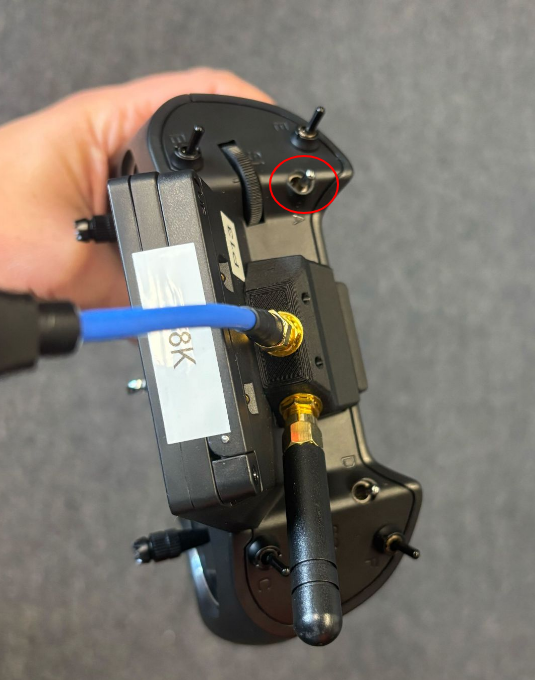
      zorro_arm.png

      Akhil SharmaA 1 Reply Last reply
      1
      • Robbie McCueR Robbie McCue

        Hi Akhil,

        Assuming the controller is from ModalAI the following steps can be done to arm the drone:

        1.) Ensure the controller is on and all switches are flipped away from you

        2.) Flip the arm switch (top silver switch on left side) all the way towards you(see image)

        Hope this helps!
        zorro_arm.png

        Akhil SharmaA Offline
        Akhil SharmaA Offline
        Akhil Sharma
        wrote on last edited by
        #3

        @Robbie-McCue yes this worked thank you so much Robbie!!

        1 Reply Last reply
        0

        Reading along? Create a free ModalAI Forum account to join in.

        With an account you can reply, ask your own question, get an email when a ModalAI engineer answers, and mark the reply that solved it. Your place in each thread is saved between visits.

        Questions about VOXL, Flight Core, ESCs and ModalAI drones are answered here by the engineers who build them.

        Register Login
        Reply
        • Reply as topic
        Log in to reply
        • Oldest to Newest
        • Newest to Oldest
        • Most Votes


        ModalAI
        Categories Recent Tags ModalAI.com Docs
        © 2026 ModalAI® · Accelerating autonomy for smaller, smarter, safer drones · Powered by NodeBB
        • Login

        • Don't have an account? Register

        • Login or register to search.
        • First post
          Last post
        0
        • Categories
        • Recent
        • Tags
        • Popular
        • Users
        • Groups