
Starling 2: TOF sensor not recognized by VOXL Portal
-
Hello - I'm having an issue in which the TOF sensor in a Starling-2 is not recognized by VOXL Portal, even though the sensor looks perfectly fine and the connections and cable look fine at visual inspection. I've tried connecting and disconnecting the sensor, and enabling/disabling the cameras one by one, but no luck. After some troubleshooting it seems the issue may be with the camera board. Please advise on how to proceed. Starling-2 was purchased on February 2025 and TOF sensor has not been previously used. Thanks, Hector Gutierrez
Hello @hgutier ,
Can you please provide output of
voxl-camera-server -l, which will scan all the connected cameras? You can just list the top part, something like this (just an example). Please note that this command will stop the background camera server service, if it's running, which can be restarted usingsystemctl start voxl-camera-serveror just rebooting voxl2.voxl-camera-server -l DEBUG: Attempting to open the hal module DEBUG: SUCCESS: Camera module opened on attempt 0 DEBUG: ----------- Number of cameras: 3 DEBUG: Cam idx: 0, Cam slot: 0, Slave Address: 0x0020, Sensor Id: 0x0214 DEBUG: Cam idx: 1, Cam slot: 1, Slave Address: 0x0030, Sensor Id: 0x0356 DEBUG: Cam idx: 2, Cam slot: 2, Slave Address: 0x0034, Sensor Id: 0x0077Also, please list the following contents:
ls /usr/lib/camera/*sensormodule*We will just double check that the software is set up correctly to use the TOF module.
Thank you
Alex
-
Hello @hgutier ,
Can you please provide output of
voxl-camera-server -l, which will scan all the connected cameras? You can just list the top part, something like this (just an example). Please note that this command will stop the background camera server service, if it's running, which can be restarted usingsystemctl start voxl-camera-serveror just rebooting voxl2.voxl-camera-server -l DEBUG: Attempting to open the hal module DEBUG: SUCCESS: Camera module opened on attempt 0 DEBUG: ----------- Number of cameras: 3 DEBUG: Cam idx: 0, Cam slot: 0, Slave Address: 0x0020, Sensor Id: 0x0214 DEBUG: Cam idx: 1, Cam slot: 1, Slave Address: 0x0030, Sensor Id: 0x0356 DEBUG: Cam idx: 2, Cam slot: 2, Slave Address: 0x0034, Sensor Id: 0x0077Also, please list the following contents:
ls /usr/lib/camera/*sensormodule*We will just double check that the software is set up correctly to use the TOF module.
Thank you
Alex
Hi Alex - apologies for the long delay. Here is the output I get from voxl-camera-server -l :
voxl2:/$ voxl-camera-server -l
DEBUG: Attempting to open the hal module
DEBUG: SUCCESS: Camera module opened on attempt 0
DEBUG: ----------- Number of cameras: 0
DEBUG: Note: This list comes from the HAL module and may not be indicative
DEBUG: of configurations that have full pipelines
DEBUG: Number of cameras: 0In other words, my drone does not see any cameras at all. The same shows when running VOXL portal (zero cameras).
I just run apt update && apt upgrade successfully in this drone.The other command you mentioned gives the following output:
voxl2:/$ ls /usr/lib/camera/sensormodule
/usr/lib/camera/com.qti.sensormodule.imx412_2.bin /usr/lib/camera/com.qti.sensormodule.imx412_3.binPlease advise - something is really wrong here since I cant see any of my cameras. My Starling 2 has the camera configuration C27 (triple tracking)
Thanks, Hector -
Hi Alex - apologies for the long delay. Here is the output I get from voxl-camera-server -l :
voxl2:/$ voxl-camera-server -l
DEBUG: Attempting to open the hal module
DEBUG: SUCCESS: Camera module opened on attempt 0
DEBUG: ----------- Number of cameras: 0
DEBUG: Note: This list comes from the HAL module and may not be indicative
DEBUG: of configurations that have full pipelines
DEBUG: Number of cameras: 0In other words, my drone does not see any cameras at all. The same shows when running VOXL portal (zero cameras).
I just run apt update && apt upgrade successfully in this drone.The other command you mentioned gives the following output:
voxl2:/$ ls /usr/lib/camera/sensormodule
/usr/lib/camera/com.qti.sensormodule.imx412_2.bin /usr/lib/camera/com.qti.sensormodule.imx412_3.binPlease advise - something is really wrong here since I cant see any of my cameras. My Starling 2 has the camera configuration C27 (triple tracking)
Thanks, Hector@Hector-Gutierrez , since you have a standard camera configuration, you should run the following command to configure your VOXL2 for C27:
voxl-configure-cameras 27This command should copy the correct sensormodule files to
/usr/lib/cameraand set up a default config in/etc/modalai/voxl-camera-server.conffor this camera arrangement.Alex
-
@Hector-Gutierrez , since you have a standard camera configuration, you should run the following command to configure your VOXL2 for C27:
voxl-configure-cameras 27This command should copy the correct sensormodule files to
/usr/lib/cameraand set up a default config in/etc/modalai/voxl-camera-server.conffor this camera arrangement.Alex
Thanks. The output of voxl-camera-server -l is shown below, but it seems generic. Several issues remain:
-
voxl-camera-server detected 4 cameras, but my drone has 5
-
when opening voxl portal, zero cameras are detected. Also, the IMU plotter runs but gives empty plots.
Please let me know what to try next - it does seem like a hardware problem.
Thanks - Regards, Hector
voxl2:/$ voxl-camera-server -l
DEBUG: Attempting to open the hal module
DEBUG: SUCCESS: Camera module opened on attempt 0
DEBUG: ----------- Number of cameras: 4
DEBUG: Cam idx: 0, Cam slot: 0, Slave Address: 0x0030, Sensor Id: 0x0356
DEBUG: Cam idx: 1, Cam slot: 1, Slave Address: 0x0034, Sensor Id: 0x0577
DEBUG: Cam idx: 2, Cam slot: 2, Slave Address: 0x0030, Sensor Id: 0x0356
DEBUG: Cam idx: 3, Cam slot: 6, Slave Address: 0x0030, Sensor Id: 0x0356
DEBUG: Note: This list comes from the HAL module and may not be indicative
DEBUG: of configurations that have full pipelines
DEBUG: Number of cameras: 4Stats for camera: 0
ANDROID_SCALER_AVAILABLE_RAW_SIZES:
These are likely supported by the sensor
1280 x 800
1280 x 800
ANDROID_SCALER_AVAILABLE_STREAM_CONFIGURATIONS:
These are NOT necessarily supported by the sensor
1280 x 800 HAL_PIXEL_FORMAT_YCbCr_420_888
1280 x 800 HAL_PIXEL_FORMAT_BLOB
1280 x 768 HAL_PIXEL_FORMAT_YCbCr_420_888
1280 x 768 HAL_PIXEL_FORMAT_BLOB
1280 x 720 HAL_PIXEL_FORMAT_YCbCr_420_888
1280 x 720 HAL_PIXEL_FORMAT_BLOB
1024 x 738 HAL_PIXEL_FORMAT_YCbCr_420_888
1024 x 738 HAL_PIXEL_FORMAT_BLOB
1024 x 768 HAL_PIXEL_FORMAT_YCbCr_420_888
1024 x 768 HAL_PIXEL_FORMAT_BLOB
864 x 480 HAL_PIXEL_FORMAT_YCbCr_420_888
864 x 480 HAL_PIXEL_FORMAT_BLOB
800 x 600 HAL_PIXEL_FORMAT_YCbCr_420_888
800 x 600 HAL_PIXEL_FORMAT_BLOB
800 x 480 HAL_PIXEL_FORMAT_YCbCr_420_888
800 x 480 HAL_PIXEL_FORMAT_BLOB
720 x 480 HAL_PIXEL_FORMAT_YCbCr_420_888
720 x 480 HAL_PIXEL_FORMAT_BLOB
640 x 512 HAL_PIXEL_FORMAT_YCbCr_420_888
640 x 512 HAL_PIXEL_FORMAT_BLOB
640 x 480 HAL_PIXEL_FORMAT_YCbCr_420_888
640 x 480 HAL_PIXEL_FORMAT_BLOB
640 x 400 HAL_PIXEL_FORMAT_YCbCr_420_888
640 x 400 HAL_PIXEL_FORMAT_BLOB
640 x 360 HAL_PIXEL_FORMAT_YCbCr_420_888
640 x 360 HAL_PIXEL_FORMAT_BLOB
352 x 288 HAL_PIXEL_FORMAT_YCbCr_420_888
352 x 288 HAL_PIXEL_FORMAT_BLOB
320 x 240 HAL_PIXEL_FORMAT_YCbCr_420_888
320 x 240 HAL_PIXEL_FORMAT_BLOB
240 x 320 HAL_PIXEL_FORMAT_YCbCr_420_888
240 x 320 HAL_PIXEL_FORMAT_BLOB
176 x 144 HAL_PIXEL_FORMAT_YCbCr_420_888
176 x 144 HAL_PIXEL_FORMAT_BLOB
1280 x 800 HAL_PIXEL_FORMAT_RAW10
1280 x 800 HAL_PIXEL_FORMAT_RAW12
1280 x 800 HAL_PIXEL_FORMAT_RAW16
1280 x 800 HAL_PIXEL_FORMAT_RAW_OPAQUEANDROID_SENSOR_INFO_SENSITIVITY_RANGE
min = 54
max = 1596ANDROID_SENSOR_MAX_ANALOG_SENSITIVITY
1596ANDROID_SENSOR_INFO_EXPOSURE_TIME_RANGE
min = 0ns
max = 1318629735ns====================================
Stats for camera: 1ANDROID_SCALER_AVAILABLE_RAW_SIZES:
These are likely supported by the sensor
4056 x 3040
3840 x 2160
1920 x 1080
1920 x 1080
1920 x 1080
1280 x 720
1280 x 720ANDROID_SCALER_AVAILABLE_STREAM_CONFIGURATIONS:
These are NOT necessarily supported by the sensor
4056 x 3040 HAL_PIXEL_FORMAT_YCbCr_420_888
4056 x 3040 HAL_PIXEL_FORMAT_BLOB
4000 x 3000 HAL_PIXEL_FORMAT_YCbCr_420_888
4000 x 3000 HAL_PIXEL_FORMAT_BLOB
3840 x 2160 HAL_PIXEL_FORMAT_YCbCr_420_888
3840 x 2160 HAL_PIXEL_FORMAT_BLOB
3264 x 2448 HAL_PIXEL_FORMAT_YCbCr_420_888
3264 x 2448 HAL_PIXEL_FORMAT_BLOB
3200 x 2400 HAL_PIXEL_FORMAT_YCbCr_420_888
3200 x 2400 HAL_PIXEL_FORMAT_BLOB
2976 x 2976 HAL_PIXEL_FORMAT_YCbCr_420_888
2976 x 2976 HAL_PIXEL_FORMAT_BLOB
2688 x 1512 HAL_PIXEL_FORMAT_YCbCr_420_888
2688 x 1512 HAL_PIXEL_FORMAT_BLOB
2592 x 1944 HAL_PIXEL_FORMAT_YCbCr_420_888
2592 x 1944 HAL_PIXEL_FORMAT_BLOB
2048 x 1536 HAL_PIXEL_FORMAT_YCbCr_420_888
2048 x 1536 HAL_PIXEL_FORMAT_BLOB
1920 x 1440 HAL_PIXEL_FORMAT_YCbCr_420_888
1920 x 1440 HAL_PIXEL_FORMAT_BLOB
1928 x 1208 HAL_PIXEL_FORMAT_YCbCr_420_888
1928 x 1208 HAL_PIXEL_FORMAT_BLOB
1920 x 1080 HAL_PIXEL_FORMAT_YCbCr_420_888
1920 x 1080 HAL_PIXEL_FORMAT_BLOB
1600 x 1200 HAL_PIXEL_FORMAT_YCbCr_420_888
1600 x 1200 HAL_PIXEL_FORMAT_BLOB
1440 x 1080 HAL_PIXEL_FORMAT_YCbCr_420_888
1440 x 1080 HAL_PIXEL_FORMAT_BLOB
1280 x 960 HAL_PIXEL_FORMAT_YCbCr_420_888
1280 x 960 HAL_PIXEL_FORMAT_BLOB
1280 x 800 HAL_PIXEL_FORMAT_YCbCr_420_888
1280 x 800 HAL_PIXEL_FORMAT_BLOB
1280 x 768 HAL_PIXEL_FORMAT_YCbCr_420_888
1280 x 768 HAL_PIXEL_FORMAT_BLOB
1280 x 720 HAL_PIXEL_FORMAT_YCbCr_420_888
1280 x 720 HAL_PIXEL_FORMAT_BLOB
1080 x 1080 HAL_PIXEL_FORMAT_YCbCr_420_888
1080 x 1080 HAL_PIXEL_FORMAT_BLOB
1024 x 738 HAL_PIXEL_FORMAT_YCbCr_420_888
1024 x 738 HAL_PIXEL_FORMAT_BLOB
1024 x 768 HAL_PIXEL_FORMAT_YCbCr_420_888
1024 x 768 HAL_PIXEL_FORMAT_BLOB
864 x 480 HAL_PIXEL_FORMAT_YCbCr_420_888
864 x 480 HAL_PIXEL_FORMAT_BLOB
800 x 600 HAL_PIXEL_FORMAT_YCbCr_420_888
800 x 600 HAL_PIXEL_FORMAT_BLOB
800 x 480 HAL_PIXEL_FORMAT_YCbCr_420_888
800 x 480 HAL_PIXEL_FORMAT_BLOB
720 x 1280 HAL_PIXEL_FORMAT_YCbCr_420_888
720 x 1280 HAL_PIXEL_FORMAT_BLOB
720 x 480 HAL_PIXEL_FORMAT_YCbCr_420_888
720 x 480 HAL_PIXEL_FORMAT_BLOB
640 x 512 HAL_PIXEL_FORMAT_YCbCr_420_888
640 x 512 HAL_PIXEL_FORMAT_BLOB
640 x 480 HAL_PIXEL_FORMAT_YCbCr_420_888
640 x 480 HAL_PIXEL_FORMAT_BLOB
640 x 400 HAL_PIXEL_FORMAT_YCbCr_420_888
640 x 400 HAL_PIXEL_FORMAT_BLOB
640 x 360 HAL_PIXEL_FORMAT_YCbCr_420_888
640 x 360 HAL_PIXEL_FORMAT_BLOB
352 x 288 HAL_PIXEL_FORMAT_YCbCr_420_888
352 x 288 HAL_PIXEL_FORMAT_BLOB
320 x 240 HAL_PIXEL_FORMAT_YCbCr_420_888
320 x 240 HAL_PIXEL_FORMAT_BLOB
240 x 320 HAL_PIXEL_FORMAT_YCbCr_420_888
240 x 320 HAL_PIXEL_FORMAT_BLOB
176 x 144 HAL_PIXEL_FORMAT_YCbCr_420_888
176 x 144 HAL_PIXEL_FORMAT_BLOB
4056 x 3040 HAL_PIXEL_FORMAT_RAW10
4056 x 3040 HAL_PIXEL_FORMAT_RAW12
4056 x 3040 HAL_PIXEL_FORMAT_RAW16
4056 x 3040 HAL_PIXEL_FORMAT_RAW_OPAQUE
3840 x 2160 HAL_PIXEL_FORMAT_RAW10
3840 x 2160 HAL_PIXEL_FORMAT_RAW12
3840 x 2160 HAL_PIXEL_FORMAT_RAW16
3840 x 2160 HAL_PIXEL_FORMAT_RAW_OPAQUE
1920 x 1080 HAL_PIXEL_FORMAT_RAW10
1920 x 1080 HAL_PIXEL_FORMAT_RAW12
1920 x 1080 HAL_PIXEL_FORMAT_RAW16
1920 x 1080 HAL_PIXEL_FORMAT_RAW_OPAQUEANDROID_SENSOR_INFO_SENSITIVITY_RANGE
min = 100
max = 35200ANDROID_SENSOR_MAX_ANALOG_SENSITIVITY
2200ANDROID_SENSOR_INFO_EXPOSURE_TIME_RANGE
min = 0ns
max = 243753000ns====================================
Stats for camera: 2ANDROID_SCALER_AVAILABLE_RAW_SIZES:
These are likely supported by the sensor
1280 x 800
1280 x 800ANDROID_SCALER_AVAILABLE_STREAM_CONFIGURATIONS:
These are NOT necessarily supported by the sensor
1280 x 800 HAL_PIXEL_FORMAT_YCbCr_420_888
1280 x 800 HAL_PIXEL_FORMAT_BLOB
1280 x 768 HAL_PIXEL_FORMAT_YCbCr_420_888
1280 x 768 HAL_PIXEL_FORMAT_BLOB
1280 x 720 HAL_PIXEL_FORMAT_YCbCr_420_888
1280 x 720 HAL_PIXEL_FORMAT_BLOB
1024 x 738 HAL_PIXEL_FORMAT_YCbCr_420_888
1024 x 738 HAL_PIXEL_FORMAT_BLOB
1024 x 768 HAL_PIXEL_FORMAT_YCbCr_420_888
1024 x 768 HAL_PIXEL_FORMAT_BLOB
864 x 480 HAL_PIXEL_FORMAT_YCbCr_420_888
864 x 480 HAL_PIXEL_FORMAT_BLOB
800 x 600 HAL_PIXEL_FORMAT_YCbCr_420_888
800 x 600 HAL_PIXEL_FORMAT_BLOB
800 x 480 HAL_PIXEL_FORMAT_YCbCr_420_888
800 x 480 HAL_PIXEL_FORMAT_BLOB
720 x 480 HAL_PIXEL_FORMAT_YCbCr_420_888
720 x 480 HAL_PIXEL_FORMAT_BLOB
640 x 512 HAL_PIXEL_FORMAT_YCbCr_420_888
640 x 512 HAL_PIXEL_FORMAT_BLOB
640 x 480 HAL_PIXEL_FORMAT_YCbCr_420_888
640 x 480 HAL_PIXEL_FORMAT_BLOB
640 x 400 HAL_PIXEL_FORMAT_YCbCr_420_888
640 x 400 HAL_PIXEL_FORMAT_BLOB
640 x 360 HAL_PIXEL_FORMAT_YCbCr_420_888
640 x 360 HAL_PIXEL_FORMAT_BLOB
352 x 288 HAL_PIXEL_FORMAT_YCbCr_420_888
352 x 288 HAL_PIXEL_FORMAT_BLOB
320 x 240 HAL_PIXEL_FORMAT_YCbCr_420_888
320 x 240 HAL_PIXEL_FORMAT_BLOB
240 x 320 HAL_PIXEL_FORMAT_YCbCr_420_888
240 x 320 HAL_PIXEL_FORMAT_BLOB
176 x 144 HAL_PIXEL_FORMAT_YCbCr_420_888
176 x 144 HAL_PIXEL_FORMAT_BLOB
1280 x 800 HAL_PIXEL_FORMAT_RAW10
1280 x 800 HAL_PIXEL_FORMAT_RAW12
1280 x 800 HAL_PIXEL_FORMAT_RAW16
1280 x 800 HAL_PIXEL_FORMAT_RAW_OPAQUEANDROID_SENSOR_INFO_SENSITIVITY_RANGE
min = 54
max = 1596ANDROID_SENSOR_MAX_ANALOG_SENSITIVITY
1596ANDROID_SENSOR_INFO_EXPOSURE_TIME_RANGE
min = 0ns
max = 1318629735ns====================================
Stats for camera: 3ANDROID_SCALER_AVAILABLE_RAW_SIZES:
These are likely supported by the sensor
1280 x 800
1280 x 800ANDROID_SCALER_AVAILABLE_STREAM_CONFIGURATIONS:
These are NOT necessarily supported by the sensor
1280 x 800 HAL_PIXEL_FORMAT_YCbCr_420_888
1280 x 800 HAL_PIXEL_FORMAT_BLOB
1280 x 768 HAL_PIXEL_FORMAT_YCbCr_420_888
1280 x 768 HAL_PIXEL_FORMAT_BLOB
1280 x 720 HAL_PIXEL_FORMAT_YCbCr_420_888
1280 x 720 HAL_PIXEL_FORMAT_BLOB
1024 x 738 HAL_PIXEL_FORMAT_YCbCr_420_888
1024 x 738 HAL_PIXEL_FORMAT_BLOB
1024 x 768 HAL_PIXEL_FORMAT_YCbCr_420_888
1024 x 768 HAL_PIXEL_FORMAT_BLOB
864 x 480 HAL_PIXEL_FORMAT_YCbCr_420_888
864 x 480 HAL_PIXEL_FORMAT_BLOB
800 x 600 HAL_PIXEL_FORMAT_YCbCr_420_888
800 x 600 HAL_PIXEL_FORMAT_BLOB
800 x 480 HAL_PIXEL_FORMAT_YCbCr_420_888
800 x 480 HAL_PIXEL_FORMAT_BLOB
720 x 480 HAL_PIXEL_FORMAT_YCbCr_420_888
720 x 480 HAL_PIXEL_FORMAT_BLOB
640 x 512 HAL_PIXEL_FORMAT_YCbCr_420_888
640 x 512 HAL_PIXEL_FORMAT_BLOB
640 x 480 HAL_PIXEL_FORMAT_YCbCr_420_888
640 x 480 HAL_PIXEL_FORMAT_BLOB
640 x 400 HAL_PIXEL_FORMAT_YCbCr_420_888
640 x 400 HAL_PIXEL_FORMAT_BLOB
640 x 360 HAL_PIXEL_FORMAT_YCbCr_420_888
640 x 360 HAL_PIXEL_FORMAT_BLOB
352 x 288 HAL_PIXEL_FORMAT_YCbCr_420_888
352 x 288 HAL_PIXEL_
FORMAT_BLOB
320 x 240 HAL_PIXEL_FORMAT_YCbCr_420_888
320 x 240 HAL_PIXEL_FORMAT_BLOB
240 x 320 HAL_PIXEL_FORMAT_YCbCr_420_888
240 x 320 HAL_PIXEL_FORMAT_BLOB
176 x 144 HAL_PIXEL_FORMAT_YCbCr_420_888
176 x 144 HAL_PIXEL_FORMAT_BLOB
1280 x 800 HAL_PIXEL_FORMAT_RAW10
1280 x 800 HAL_PIXEL_FORMAT_RAW12
1280 x 800 HAL_PIXEL_FORMAT_RAW16
1280 x 800 HAL_PIXEL_FORMAT_RAW_OPAQUEANDROID_SENSOR_INFO_SENSITIVITY_RANGE
min = 54
max = 1596ANDROID_SENSOR_MAX_ANALOG_SENSITIVITY
1596ANDROID_SENSOR_INFO_EXPOSURE_TIME_RANGE
min = 0ns
max = 1318629735ns====================================
Number of cameras detected: 4 -
-
Thanks. The output of voxl-camera-server -l is shown below, but it seems generic. Several issues remain:
-
voxl-camera-server detected 4 cameras, but my drone has 5
-
when opening voxl portal, zero cameras are detected. Also, the IMU plotter runs but gives empty plots.
Please let me know what to try next - it does seem like a hardware problem.
Thanks - Regards, Hector
voxl2:/$ voxl-camera-server -l
DEBUG: Attempting to open the hal module
DEBUG: SUCCESS: Camera module opened on attempt 0
DEBUG: ----------- Number of cameras: 4
DEBUG: Cam idx: 0, Cam slot: 0, Slave Address: 0x0030, Sensor Id: 0x0356
DEBUG: Cam idx: 1, Cam slot: 1, Slave Address: 0x0034, Sensor Id: 0x0577
DEBUG: Cam idx: 2, Cam slot: 2, Slave Address: 0x0030, Sensor Id: 0x0356
DEBUG: Cam idx: 3, Cam slot: 6, Slave Address: 0x0030, Sensor Id: 0x0356
DEBUG: Note: This list comes from the HAL module and may not be indicative
DEBUG: of configurations that have full pipelines
DEBUG: Number of cameras: 4Stats for camera: 0
ANDROID_SCALER_AVAILABLE_RAW_SIZES:
These are likely supported by the sensor
1280 x 800
1280 x 800
ANDROID_SCALER_AVAILABLE_STREAM_CONFIGURATIONS:
These are NOT necessarily supported by the sensor
1280 x 800 HAL_PIXEL_FORMAT_YCbCr_420_888
1280 x 800 HAL_PIXEL_FORMAT_BLOB
1280 x 768 HAL_PIXEL_FORMAT_YCbCr_420_888
1280 x 768 HAL_PIXEL_FORMAT_BLOB
1280 x 720 HAL_PIXEL_FORMAT_YCbCr_420_888
1280 x 720 HAL_PIXEL_FORMAT_BLOB
1024 x 738 HAL_PIXEL_FORMAT_YCbCr_420_888
1024 x 738 HAL_PIXEL_FORMAT_BLOB
1024 x 768 HAL_PIXEL_FORMAT_YCbCr_420_888
1024 x 768 HAL_PIXEL_FORMAT_BLOB
864 x 480 HAL_PIXEL_FORMAT_YCbCr_420_888
864 x 480 HAL_PIXEL_FORMAT_BLOB
800 x 600 HAL_PIXEL_FORMAT_YCbCr_420_888
800 x 600 HAL_PIXEL_FORMAT_BLOB
800 x 480 HAL_PIXEL_FORMAT_YCbCr_420_888
800 x 480 HAL_PIXEL_FORMAT_BLOB
720 x 480 HAL_PIXEL_FORMAT_YCbCr_420_888
720 x 480 HAL_PIXEL_FORMAT_BLOB
640 x 512 HAL_PIXEL_FORMAT_YCbCr_420_888
640 x 512 HAL_PIXEL_FORMAT_BLOB
640 x 480 HAL_PIXEL_FORMAT_YCbCr_420_888
640 x 480 HAL_PIXEL_FORMAT_BLOB
640 x 400 HAL_PIXEL_FORMAT_YCbCr_420_888
640 x 400 HAL_PIXEL_FORMAT_BLOB
640 x 360 HAL_PIXEL_FORMAT_YCbCr_420_888
640 x 360 HAL_PIXEL_FORMAT_BLOB
352 x 288 HAL_PIXEL_FORMAT_YCbCr_420_888
352 x 288 HAL_PIXEL_FORMAT_BLOB
320 x 240 HAL_PIXEL_FORMAT_YCbCr_420_888
320 x 240 HAL_PIXEL_FORMAT_BLOB
240 x 320 HAL_PIXEL_FORMAT_YCbCr_420_888
240 x 320 HAL_PIXEL_FORMAT_BLOB
176 x 144 HAL_PIXEL_FORMAT_YCbCr_420_888
176 x 144 HAL_PIXEL_FORMAT_BLOB
1280 x 800 HAL_PIXEL_FORMAT_RAW10
1280 x 800 HAL_PIXEL_FORMAT_RAW12
1280 x 800 HAL_PIXEL_FORMAT_RAW16
1280 x 800 HAL_PIXEL_FORMAT_RAW_OPAQUEANDROID_SENSOR_INFO_SENSITIVITY_RANGE
min = 54
max = 1596ANDROID_SENSOR_MAX_ANALOG_SENSITIVITY
1596ANDROID_SENSOR_INFO_EXPOSURE_TIME_RANGE
min = 0ns
max = 1318629735ns====================================
Stats for camera: 1ANDROID_SCALER_AVAILABLE_RAW_SIZES:
These are likely supported by the sensor
4056 x 3040
3840 x 2160
1920 x 1080
1920 x 1080
1920 x 1080
1280 x 720
1280 x 720ANDROID_SCALER_AVAILABLE_STREAM_CONFIGURATIONS:
These are NOT necessarily supported by the sensor
4056 x 3040 HAL_PIXEL_FORMAT_YCbCr_420_888
4056 x 3040 HAL_PIXEL_FORMAT_BLOB
4000 x 3000 HAL_PIXEL_FORMAT_YCbCr_420_888
4000 x 3000 HAL_PIXEL_FORMAT_BLOB
3840 x 2160 HAL_PIXEL_FORMAT_YCbCr_420_888
3840 x 2160 HAL_PIXEL_FORMAT_BLOB
3264 x 2448 HAL_PIXEL_FORMAT_YCbCr_420_888
3264 x 2448 HAL_PIXEL_FORMAT_BLOB
3200 x 2400 HAL_PIXEL_FORMAT_YCbCr_420_888
3200 x 2400 HAL_PIXEL_FORMAT_BLOB
2976 x 2976 HAL_PIXEL_FORMAT_YCbCr_420_888
2976 x 2976 HAL_PIXEL_FORMAT_BLOB
2688 x 1512 HAL_PIXEL_FORMAT_YCbCr_420_888
2688 x 1512 HAL_PIXEL_FORMAT_BLOB
2592 x 1944 HAL_PIXEL_FORMAT_YCbCr_420_888
2592 x 1944 HAL_PIXEL_FORMAT_BLOB
2048 x 1536 HAL_PIXEL_FORMAT_YCbCr_420_888
2048 x 1536 HAL_PIXEL_FORMAT_BLOB
1920 x 1440 HAL_PIXEL_FORMAT_YCbCr_420_888
1920 x 1440 HAL_PIXEL_FORMAT_BLOB
1928 x 1208 HAL_PIXEL_FORMAT_YCbCr_420_888
1928 x 1208 HAL_PIXEL_FORMAT_BLOB
1920 x 1080 HAL_PIXEL_FORMAT_YCbCr_420_888
1920 x 1080 HAL_PIXEL_FORMAT_BLOB
1600 x 1200 HAL_PIXEL_FORMAT_YCbCr_420_888
1600 x 1200 HAL_PIXEL_FORMAT_BLOB
1440 x 1080 HAL_PIXEL_FORMAT_YCbCr_420_888
1440 x 1080 HAL_PIXEL_FORMAT_BLOB
1280 x 960 HAL_PIXEL_FORMAT_YCbCr_420_888
1280 x 960 HAL_PIXEL_FORMAT_BLOB
1280 x 800 HAL_PIXEL_FORMAT_YCbCr_420_888
1280 x 800 HAL_PIXEL_FORMAT_BLOB
1280 x 768 HAL_PIXEL_FORMAT_YCbCr_420_888
1280 x 768 HAL_PIXEL_FORMAT_BLOB
1280 x 720 HAL_PIXEL_FORMAT_YCbCr_420_888
1280 x 720 HAL_PIXEL_FORMAT_BLOB
1080 x 1080 HAL_PIXEL_FORMAT_YCbCr_420_888
1080 x 1080 HAL_PIXEL_FORMAT_BLOB
1024 x 738 HAL_PIXEL_FORMAT_YCbCr_420_888
1024 x 738 HAL_PIXEL_FORMAT_BLOB
1024 x 768 HAL_PIXEL_FORMAT_YCbCr_420_888
1024 x 768 HAL_PIXEL_FORMAT_BLOB
864 x 480 HAL_PIXEL_FORMAT_YCbCr_420_888
864 x 480 HAL_PIXEL_FORMAT_BLOB
800 x 600 HAL_PIXEL_FORMAT_YCbCr_420_888
800 x 600 HAL_PIXEL_FORMAT_BLOB
800 x 480 HAL_PIXEL_FORMAT_YCbCr_420_888
800 x 480 HAL_PIXEL_FORMAT_BLOB
720 x 1280 HAL_PIXEL_FORMAT_YCbCr_420_888
720 x 1280 HAL_PIXEL_FORMAT_BLOB
720 x 480 HAL_PIXEL_FORMAT_YCbCr_420_888
720 x 480 HAL_PIXEL_FORMAT_BLOB
640 x 512 HAL_PIXEL_FORMAT_YCbCr_420_888
640 x 512 HAL_PIXEL_FORMAT_BLOB
640 x 480 HAL_PIXEL_FORMAT_YCbCr_420_888
640 x 480 HAL_PIXEL_FORMAT_BLOB
640 x 400 HAL_PIXEL_FORMAT_YCbCr_420_888
640 x 400 HAL_PIXEL_FORMAT_BLOB
640 x 360 HAL_PIXEL_FORMAT_YCbCr_420_888
640 x 360 HAL_PIXEL_FORMAT_BLOB
352 x 288 HAL_PIXEL_FORMAT_YCbCr_420_888
352 x 288 HAL_PIXEL_FORMAT_BLOB
320 x 240 HAL_PIXEL_FORMAT_YCbCr_420_888
320 x 240 HAL_PIXEL_FORMAT_BLOB
240 x 320 HAL_PIXEL_FORMAT_YCbCr_420_888
240 x 320 HAL_PIXEL_FORMAT_BLOB
176 x 144 HAL_PIXEL_FORMAT_YCbCr_420_888
176 x 144 HAL_PIXEL_FORMAT_BLOB
4056 x 3040 HAL_PIXEL_FORMAT_RAW10
4056 x 3040 HAL_PIXEL_FORMAT_RAW12
4056 x 3040 HAL_PIXEL_FORMAT_RAW16
4056 x 3040 HAL_PIXEL_FORMAT_RAW_OPAQUE
3840 x 2160 HAL_PIXEL_FORMAT_RAW10
3840 x 2160 HAL_PIXEL_FORMAT_RAW12
3840 x 2160 HAL_PIXEL_FORMAT_RAW16
3840 x 2160 HAL_PIXEL_FORMAT_RAW_OPAQUE
1920 x 1080 HAL_PIXEL_FORMAT_RAW10
1920 x 1080 HAL_PIXEL_FORMAT_RAW12
1920 x 1080 HAL_PIXEL_FORMAT_RAW16
1920 x 1080 HAL_PIXEL_FORMAT_RAW_OPAQUEANDROID_SENSOR_INFO_SENSITIVITY_RANGE
min = 100
max = 35200ANDROID_SENSOR_MAX_ANALOG_SENSITIVITY
2200ANDROID_SENSOR_INFO_EXPOSURE_TIME_RANGE
min = 0ns
max = 243753000ns====================================
Stats for camera: 2ANDROID_SCALER_AVAILABLE_RAW_SIZES:
These are likely supported by the sensor
1280 x 800
1280 x 800ANDROID_SCALER_AVAILABLE_STREAM_CONFIGURATIONS:
These are NOT necessarily supported by the sensor
1280 x 800 HAL_PIXEL_FORMAT_YCbCr_420_888
1280 x 800 HAL_PIXEL_FORMAT_BLOB
1280 x 768 HAL_PIXEL_FORMAT_YCbCr_420_888
1280 x 768 HAL_PIXEL_FORMAT_BLOB
1280 x 720 HAL_PIXEL_FORMAT_YCbCr_420_888
1280 x 720 HAL_PIXEL_FORMAT_BLOB
1024 x 738 HAL_PIXEL_FORMAT_YCbCr_420_888
1024 x 738 HAL_PIXEL_FORMAT_BLOB
1024 x 768 HAL_PIXEL_FORMAT_YCbCr_420_888
1024 x 768 HAL_PIXEL_FORMAT_BLOB
864 x 480 HAL_PIXEL_FORMAT_YCbCr_420_888
864 x 480 HAL_PIXEL_FORMAT_BLOB
800 x 600 HAL_PIXEL_FORMAT_YCbCr_420_888
800 x 600 HAL_PIXEL_FORMAT_BLOB
800 x 480 HAL_PIXEL_FORMAT_YCbCr_420_888
800 x 480 HAL_PIXEL_FORMAT_BLOB
720 x 480 HAL_PIXEL_FORMAT_YCbCr_420_888
720 x 480 HAL_PIXEL_FORMAT_BLOB
640 x 512 HAL_PIXEL_FORMAT_YCbCr_420_888
640 x 512 HAL_PIXEL_FORMAT_BLOB
640 x 480 HAL_PIXEL_FORMAT_YCbCr_420_888
640 x 480 HAL_PIXEL_FORMAT_BLOB
640 x 400 HAL_PIXEL_FORMAT_YCbCr_420_888
640 x 400 HAL_PIXEL_FORMAT_BLOB
640 x 360 HAL_PIXEL_FORMAT_YCbCr_420_888
640 x 360 HAL_PIXEL_FORMAT_BLOB
352 x 288 HAL_PIXEL_FORMAT_YCbCr_420_888
352 x 288 HAL_PIXEL_FORMAT_BLOB
320 x 240 HAL_PIXEL_FORMAT_YCbCr_420_888
320 x 240 HAL_PIXEL_FORMAT_BLOB
240 x 320 HAL_PIXEL_FORMAT_YCbCr_420_888
240 x 320 HAL_PIXEL_FORMAT_BLOB
176 x 144 HAL_PIXEL_FORMAT_YCbCr_420_888
176 x 144 HAL_PIXEL_FORMAT_BLOB
1280 x 800 HAL_PIXEL_FORMAT_RAW10
1280 x 800 HAL_PIXEL_FORMAT_RAW12
1280 x 800 HAL_PIXEL_FORMAT_RAW16
1280 x 800 HAL_PIXEL_FORMAT_RAW_OPAQUEANDROID_SENSOR_INFO_SENSITIVITY_RANGE
min = 54
max = 1596ANDROID_SENSOR_MAX_ANALOG_SENSITIVITY
1596ANDROID_SENSOR_INFO_EXPOSURE_TIME_RANGE
min = 0ns
max = 1318629735ns====================================
Stats for camera: 3ANDROID_SCALER_AVAILABLE_RAW_SIZES:
These are likely supported by the sensor
1280 x 800
1280 x 800ANDROID_SCALER_AVAILABLE_STREAM_CONFIGURATIONS:
These are NOT necessarily supported by the sensor
1280 x 800 HAL_PIXEL_FORMAT_YCbCr_420_888
1280 x 800 HAL_PIXEL_FORMAT_BLOB
1280 x 768 HAL_PIXEL_FORMAT_YCbCr_420_888
1280 x 768 HAL_PIXEL_FORMAT_BLOB
1280 x 720 HAL_PIXEL_FORMAT_YCbCr_420_888
1280 x 720 HAL_PIXEL_FORMAT_BLOB
1024 x 738 HAL_PIXEL_FORMAT_YCbCr_420_888
1024 x 738 HAL_PIXEL_FORMAT_BLOB
1024 x 768 HAL_PIXEL_FORMAT_YCbCr_420_888
1024 x 768 HAL_PIXEL_FORMAT_BLOB
864 x 480 HAL_PIXEL_FORMAT_YCbCr_420_888
864 x 480 HAL_PIXEL_FORMAT_BLOB
800 x 600 HAL_PIXEL_FORMAT_YCbCr_420_888
800 x 600 HAL_PIXEL_FORMAT_BLOB
800 x 480 HAL_PIXEL_FORMAT_YCbCr_420_888
800 x 480 HAL_PIXEL_FORMAT_BLOB
720 x 480 HAL_PIXEL_FORMAT_YCbCr_420_888
720 x 480 HAL_PIXEL_FORMAT_BLOB
640 x 512 HAL_PIXEL_FORMAT_YCbCr_420_888
640 x 512 HAL_PIXEL_FORMAT_BLOB
640 x 480 HAL_PIXEL_FORMAT_YCbCr_420_888
640 x 480 HAL_PIXEL_FORMAT_BLOB
640 x 400 HAL_PIXEL_FORMAT_YCbCr_420_888
640 x 400 HAL_PIXEL_FORMAT_BLOB
640 x 360 HAL_PIXEL_FORMAT_YCbCr_420_888
640 x 360 HAL_PIXEL_FORMAT_BLOB
352 x 288 HAL_PIXEL_FORMAT_YCbCr_420_888
352 x 288 HAL_PIXEL_
FORMAT_BLOB
320 x 240 HAL_PIXEL_FORMAT_YCbCr_420_888
320 x 240 HAL_PIXEL_FORMAT_BLOB
240 x 320 HAL_PIXEL_FORMAT_YCbCr_420_888
240 x 320 HAL_PIXEL_FORMAT_BLOB
176 x 144 HAL_PIXEL_FORMAT_YCbCr_420_888
176 x 144 HAL_PIXEL_FORMAT_BLOB
1280 x 800 HAL_PIXEL_FORMAT_RAW10
1280 x 800 HAL_PIXEL_FORMAT_RAW12
1280 x 800 HAL_PIXEL_FORMAT_RAW16
1280 x 800 HAL_PIXEL_FORMAT_RAW_OPAQUEANDROID_SENSOR_INFO_SENSITIVITY_RANGE
min = 54
max = 1596ANDROID_SENSOR_MAX_ANALOG_SENSITIVITY
1596ANDROID_SENSOR_INFO_EXPOSURE_TIME_RANGE
min = 0ns
max = 1318629735ns====================================
Number of cameras detected: 4When you were looking for cameras in
voxl-portal- was thevoxl-camera-serveractually running? you need to make sure that it's running (either as a background service, which normally starts up using systemd right after boot, or manually if you are running the camera server in a terminal in the foreground).It does look like the 3 AR0144 and 1 IMX412 were detected, so lets first make sure you can view those corresponding streams first.
Alex
-
-
When you were looking for cameras in
voxl-portal- was thevoxl-camera-serveractually running? you need to make sure that it's running (either as a background service, which normally starts up using systemd right after boot, or manually if you are running the camera server in a terminal in the foreground).It does look like the 3 AR0144 and 1 IMX412 were detected, so lets first make sure you can view those corresponding streams first.
Alex
Yes, voxl-camera-server was running. In fact I stopped it and started it again to be sure it was running.
I also checked with voxl-inspect-services and it showed the camera server was running. And yet I cannot open any of the cameras on voxl Portal - the portal starts properly but there are no cameras. And also the IMU plots look empty.
And the ToF sensor is not being detected ...
Please let me know what to try next.Thanks, Hector
-
Yes, voxl-camera-server was running. In fact I stopped it and started it again to be sure it was running.
I also checked with voxl-inspect-services and it showed the camera server was running. And yet I cannot open any of the cameras on voxl Portal - the portal starts properly but there are no cameras. And also the IMU plots look empty.
And the ToF sensor is not being detected ...
Please let me know what to try next.Thanks, Hector
@Hector-Gutierrez , with the voxl-camera-server running on the foreground, please run the following and monitor the output of voxl-camera-server as well:
voxl-inspect-cam -aThis test should connect to ALL the camera streams generated by the voxl-camera-server and print out the stats.
Alex
-
@Hector-Gutierrez , with the voxl-camera-server running on the foreground, please run the following and monitor the output of voxl-camera-server as well:
voxl-inspect-cam -aThis test should connect to ALL the camera streams generated by the voxl-camera-server and print out the stats.
Alex
@Alex-Kushleyev
Thanks for the prompt reply. I receive the following output:
Pipe Name | bytes | wide | hgt |exp(ms)| gain | frame id |latency(ms)| fps | mbpt
| hires_large_color |18495360 | 4056 | 3040 | 16.67 | 747 | 1880 | 93.2 | 30.0 | 44422
| hires_large_encoded | 2064 | 4056 | 3040 | 16.67 | 747 | 1879 | 100.0 | 30.0 | 0
| hires_large_grey |12330240 | 4056 | 3040 | 16.67 | 747 | 1880 | 72.2 | 30.0 | 29618
| hires_small_color | 1179648 | 1024 | 768 | 16.67 | 747 | 1880 | 50.4 | 30.0 | 2832
| hires_small_encoded | 256 | 1024 | 768 | 16.67 | 747 | 1880 | 61.6 | 30.0 | 0
| hires_small_grey | 786432 | 1024 | 768 | 16.67 | 747 | 1881 | 48.4 | 30.0 | 1888
| hires_snapshot |
| ov_overlay | 3235840 | 1280 | 2528 | 6.81 | 614 | 1640 | 84.2 | 4.7 | 1228
| tracking_down | 1024000 | 1280 | 800 | 6.90 | 614 | 1647 | 34.1 | 30.0 | 2458
| tracking_down_bayer | 1024000 | 1280 | 800 | 6.90 | 614 | 1647 | 33.7 | 30.0 | 2458
| tracking_down_misp_grey | 1024000 | 1280 | 800 | 6.73 | 570 | 1648 | 33.3 | 30.0 | 2458
| tracking_down_misp_norm | 1024000 | 1280 | 800 | 6.73 | 570 | 1648 | 36.3 | 30.0 | 2458
| tracking_front | 1024000 | 1280 | 800 | 5.63 | 307 | 1648 | 33.5 | 30.0 | 2458
| tracking_front_bayer | 1024000 | 1280 | 800 | 5.63 | 307 | 1648 | 33.7 | 30.0 | 2458
| tracking_front_misp_grey | 1024000 | 1280 | 800 | 5.63 | 307 | 1648 | 30.2 | 30.0 | 2458
| tracking_front_misp_norm | 1024000 | 1280 | 800 | 5.63 | 307 | 1648 | 35.5 | 30.0 | 2458
| tracking_rear | 1024000 | 1280 | 800 | 5.32 | 192 | 1649 | 33.9 | 30.0 | 2458
| tracking_rear_bayer | 1024000 | 1280 | 800 | 5.32 | 192 | 1649 | 33.1 | 30.0 | 2458
| tracking_rear_misp_grey | 1024000 | 1280 | 800 | 5.32 | 192 | 1649 | 31.5 | 30.0 | 2458
| tracking_rear_misp_norm | 1024000 | 1280 | 800 | 5.32 | 192 | 1649 | 35.1 | 30.0 | 2458Still dont see the ToF sensor ... Please advise
Thanks, Hector -
@Alex-Kushleyev
Thanks for the prompt reply. I receive the following output:
Pipe Name | bytes | wide | hgt |exp(ms)| gain | frame id |latency(ms)| fps | mbpt
| hires_large_color |18495360 | 4056 | 3040 | 16.67 | 747 | 1880 | 93.2 | 30.0 | 44422
| hires_large_encoded | 2064 | 4056 | 3040 | 16.67 | 747 | 1879 | 100.0 | 30.0 | 0
| hires_large_grey |12330240 | 4056 | 3040 | 16.67 | 747 | 1880 | 72.2 | 30.0 | 29618
| hires_small_color | 1179648 | 1024 | 768 | 16.67 | 747 | 1880 | 50.4 | 30.0 | 2832
| hires_small_encoded | 256 | 1024 | 768 | 16.67 | 747 | 1880 | 61.6 | 30.0 | 0
| hires_small_grey | 786432 | 1024 | 768 | 16.67 | 747 | 1881 | 48.4 | 30.0 | 1888
| hires_snapshot |
| ov_overlay | 3235840 | 1280 | 2528 | 6.81 | 614 | 1640 | 84.2 | 4.7 | 1228
| tracking_down | 1024000 | 1280 | 800 | 6.90 | 614 | 1647 | 34.1 | 30.0 | 2458
| tracking_down_bayer | 1024000 | 1280 | 800 | 6.90 | 614 | 1647 | 33.7 | 30.0 | 2458
| tracking_down_misp_grey | 1024000 | 1280 | 800 | 6.73 | 570 | 1648 | 33.3 | 30.0 | 2458
| tracking_down_misp_norm | 1024000 | 1280 | 800 | 6.73 | 570 | 1648 | 36.3 | 30.0 | 2458
| tracking_front | 1024000 | 1280 | 800 | 5.63 | 307 | 1648 | 33.5 | 30.0 | 2458
| tracking_front_bayer | 1024000 | 1280 | 800 | 5.63 | 307 | 1648 | 33.7 | 30.0 | 2458
| tracking_front_misp_grey | 1024000 | 1280 | 800 | 5.63 | 307 | 1648 | 30.2 | 30.0 | 2458
| tracking_front_misp_norm | 1024000 | 1280 | 800 | 5.63 | 307 | 1648 | 35.5 | 30.0 | 2458
| tracking_rear | 1024000 | 1280 | 800 | 5.32 | 192 | 1649 | 33.9 | 30.0 | 2458
| tracking_rear_bayer | 1024000 | 1280 | 800 | 5.32 | 192 | 1649 | 33.1 | 30.0 | 2458
| tracking_rear_misp_grey | 1024000 | 1280 | 800 | 5.32 | 192 | 1649 | 31.5 | 30.0 | 2458
| tracking_rear_misp_norm | 1024000 | 1280 | 800 | 5.32 | 192 | 1649 | 35.1 | 30.0 | 2458Still dont see the ToF sensor ... Please advise
Thanks, Hector@Hector-Gutierrez ,
OK, so it looks like that the 4 detected cameras are actually streaming data.I am not sure why
voxl-portalis not showing any cameras. When you access thevoxl-portalvia browser, do you see the actual portal (with green menu bar at the top), but no cameras are listed in the Cameras section?How are you connected to the drone? (wifi, adb, etc).
Regarding the TOF sensor, since
voxl-camera-server -ldid not show that the TOF sensor is detected, the stream is not available.Please double check that
com.qti.sensormodule.irs2975c*file is in/usr/lib/camera/directory - please provide the exact name or let me know if it's missing.Also, can you please take a picture of your cameras plugged into the M0173 camera front end? I just want to make sure the TOF sensor is plugged in correctly.
Alex
-
@Hector-Gutierrez ,
OK, so it looks like that the 4 detected cameras are actually streaming data.I am not sure why
voxl-portalis not showing any cameras. When you access thevoxl-portalvia browser, do you see the actual portal (with green menu bar at the top), but no cameras are listed in the Cameras section?How are you connected to the drone? (wifi, adb, etc).
Regarding the TOF sensor, since
voxl-camera-server -ldid not show that the TOF sensor is detected, the stream is not available.Please double check that
com.qti.sensormodule.irs2975c*file is in/usr/lib/camera/directory - please provide the exact name or let me know if it's missing.Also, can you please take a picture of your cameras plugged into the M0173 camera front end? I just want to make sure the TOF sensor is plugged in correctly.
Alex
@Alex-Kushleyev
Hi Alex, I disassembled and reassembled the camera board and now I get 4 cameras in VOXL Portal ! I did reconnect the ToF sensor as well to the camera board, it seems properly connected.
The cameras working well are hires_large_color, and all three tracking cameras. I still dont see the ToF sensor , and the view of the hires camera is blurry (out of focus). The hires camera was recently replaced, so how to get it into focus is another question.
I listed the files on /usr/lib/camera and found this file: com.qti.sensormodule.irs2975c_3.bin
So now we are down to the ToF sensor (and to put the hires camera in focus). Let me know what to try next !
thanks, Hector -
@Alex-Kushleyev
Hi Alex, I disassembled and reassembled the camera board and now I get 4 cameras in VOXL Portal ! I did reconnect the ToF sensor as well to the camera board, it seems properly connected.
The cameras working well are hires_large_color, and all three tracking cameras. I still dont see the ToF sensor , and the view of the hires camera is blurry (out of focus). The hires camera was recently replaced, so how to get it into focus is another question.
I listed the files on /usr/lib/camera and found this file: com.qti.sensormodule.irs2975c_3.bin
So now we are down to the ToF sensor (and to put the hires camera in focus). Let me know what to try next !
thanks, Hector@Hector-Gutierrez , in order to focus the hires camera (I am assuming IMX412), you can twist the lens in the M12 lens holder. Normally we do focus the hires cameras to a norminal focus distance, but maybe you had one from earlier batch which was not focused. Also, focus of the camera depends on the application, so it is recommended for users to double check and correct the focus for their needs. If there is some sealant on the threads, it is not permanent and can be removed using tweezers - loosening it up a bit should allow you to twist the lens inside the holder.
Regarding the PMD TOF, not sure yet. Has it worked before?
Alex
-
@Alex-Kushleyev
Hi Alex, I disassembled and reassembled the camera board and now I get 4 cameras in VOXL Portal ! I did reconnect the ToF sensor as well to the camera board, it seems properly connected.
The cameras working well are hires_large_color, and all three tracking cameras. I still dont see the ToF sensor , and the view of the hires camera is blurry (out of focus). The hires camera was recently replaced, so how to get it into focus is another question.
I listed the files on /usr/lib/camera and found this file: com.qti.sensormodule.irs2975c_3.bin
So now we are down to the ToF sensor (and to put the hires camera in focus). Let me know what to try next !
thanks, Hector@Hector-Gutierrez
Hi Alex - As you suggested, the focus issue was resolved by twisting the lens until good focus at 3 m. was achieved.
The TOF sensor remains a problem. I've tried detaching and reconnecting its cable (on both ends) but no luck so far.
Both VOXL Portal and voxl-camera-server -l only see 4 cameras.
We didnt use the TOF sensor before so I didnt notice if it was working previously or not.
Please let me know what to try next - thanks, Hector -
@Hector-Gutierrez
Hi Alex - As you suggested, the focus issue was resolved by twisting the lens until good focus at 3 m. was achieved.
The TOF sensor remains a problem. I've tried detaching and reconnecting its cable (on both ends) but no luck so far.
Both VOXL Portal and voxl-camera-server -l only see 4 cameras.
We didnt use the TOF sensor before so I didnt notice if it was working previously or not.
Please let me know what to try next - thanks, Hector@Hector-Gutierrez , can you please send a picture of the TOF sensor connected to M0173? Just to make sure the connections are correct.
-
@Hector-Gutierrez , can you please send a picture of the TOF sensor connected to M0173? Just to make sure the connections are correct.
@Alex-Kushleyev
Hi Alex - attached are some pictures of the connection. Something odd is happening. The connector engages its socket in two different locations relative to the hole for the screw. In the centered location (where it should be!) the TOF sensor causes a power short and the drone wont boot (see picture with red LED). In the off-center location there is no short and the drone boots, but I only get 4 cameras and the TOF is not visible.
    -
@Alex-Kushleyev
Hi Alex - attached are some pictures of the connection. Something odd is happening. The connector engages its socket in two different locations relative to the hole for the screw. In the centered location (where it should be!) the TOF sensor causes a power short and the drone wont boot (see picture with red LED). In the off-center location there is no short and the drone boots, but I only get 4 cameras and the TOF is not visible.
   @Hector-Gutierrez
Download link for the pictures in case they did not attach to previous message:
https://quickconnect.to/asapstorage/d/s/13iMi9oRZUxhkQYoW2DCHtZ7nI9HgYJx/bj3PLF8EXd5pKdKgwphVqcbD7VaaMBQX-V7WAgk58WAw -
@Hector-Gutierrez
Download link for the pictures in case they did not attach to previous message:
https://quickconnect.to/asapstorage/d/s/13iMi9oRZUxhkQYoW2DCHtZ7nI9HgYJx/bj3PLF8EXd5pKdKgwphVqcbD7VaaMBQX-V7WAgk58WAw@Hector-Gutierrez
Update from my previous post. I install the TOF connector in the centered location and fully attach the screws (including the one that secures the TOF ribbon cable). There is no short, the drone start normally, and I get 4 cameras on VOXL portal, but no TOF. Also voxl-camera-server -l only see 4 cameras. So TOF connection is definitely Ok, but sensor not present. -
@Hector-Gutierrez
Update from my previous post. I install the TOF connector in the centered location and fully attach the screws (including the one that secures the TOF ribbon cable). There is no short, the drone start normally, and I get 4 cameras on VOXL portal, but no TOF. Also voxl-camera-server -l only see 4 cameras. So TOF connection is definitely Ok, but sensor not present.@Hector-Gutierrez , I am sorry, i was not able to access the image you shared. Can you please just resize / crop the image so that it fits into the forum? Just please make sure the details are still easy to see.
Thank you!
Alex
-
@Hector-Gutierrez , I am sorry, i was not able to access the image you shared. Can you please just resize / crop the image so that it fits into the forum? Just please make sure the details are still easy to see.
Thank you!
Alex
@Alex-Kushleyev
Hi Alex - attached are the pictures.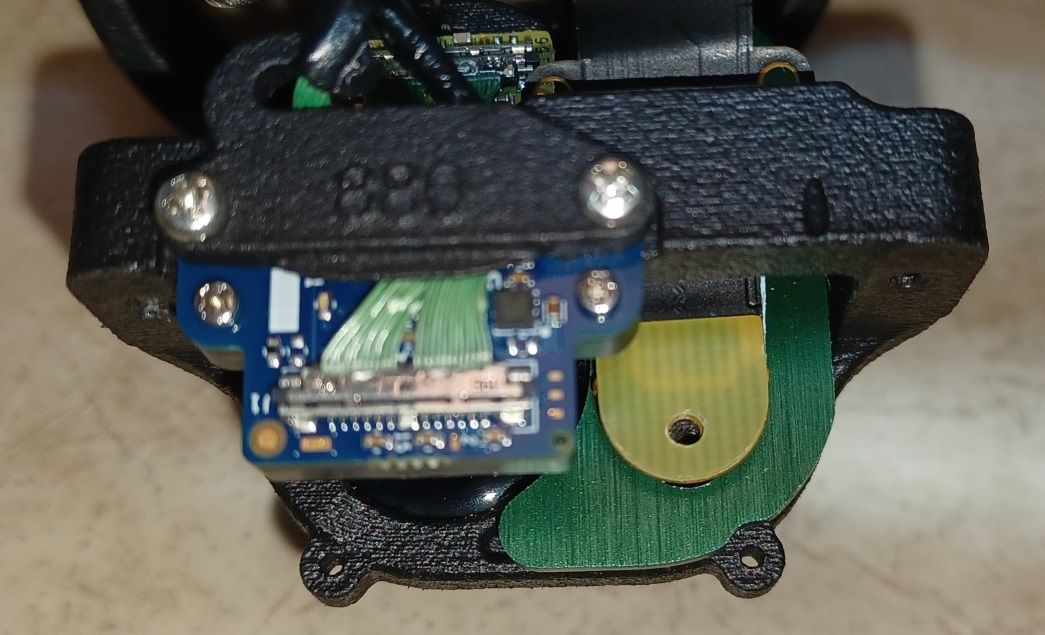
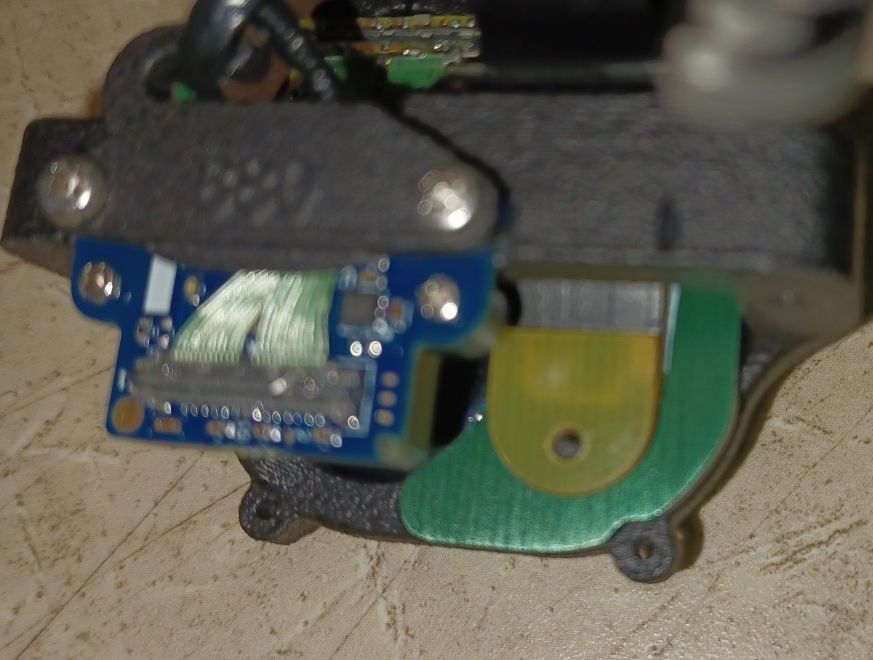
After installing the TOF connector in the centered location and fully attach all the screws (including the one that secures the TOF ribbon cable), there is no short and the drone starts normally. I get 4 cameras on VOXL portal, but no TOF. Also voxl-camera-server -l only see 4 cameras. So TOF connection seems definitely Ok, but sensor not present. Seems to me like a bad TOF sensor - let me know your thoughts.
-
@Alex-Kushleyev
Hi Alex - attached are the pictures. After installing the TOF connector in the centered location and fully attach all the screws (including the one that secures the TOF ribbon cable), there is no short and the drone starts normally. I get 4 cameras on VOXL portal, but no TOF. Also voxl-camera-server -l only see 4 cameras. So TOF connection seems definitely Ok, but sensor not present. Seems to me like a bad TOF sensor - let me know your thoughts.
@Hector-Gutierrez Clarification on the pictures. The top picture is the centered position of the TOF ribbon cable. The bottom picture can be disregarded. The connection is done on the centered position (top picture). Thanks.
-
@Hector-Gutierrez , I am sorry, i was not able to access the image you shared. Can you please just resize / crop the image so that it fits into the forum? Just please make sure the details are still easy to see.
Thank you!
Alex
@Alex-Kushleyev - Any updates on this thread ? Let me know if there is anything else I could try or if you consider this a hardware problem with the PMD sensor itself. Thanks, Hector


Reading along? Create a free ModalAI Forum account to join in.
With an account you can reply, ask your own question, get an email when a ModalAI engineer answers, and mark the reply that solved it. Your place in each thread is saved between visits.
Questions about VOXL, Flight Core, ESCs and ModalAI drones are answered here by the engineers who build them.
Register Login