
uvc-server and voxl-streamer H.265 support?
-
Hi,
We are using VOLX2 and VOXL2-mini.
Currently, only H.264 is supported for UVC camera.
Will UVC camera H.265 be supported if I upgrade to SDK 1.4.1?
(voxl-streamer 0.75 / uvc-server 0.17)Thanks in advance.
JS, Kim
@Jskim ,
h265 support was added to
voxl-streameras of SDK 1.4.0-1, but you can just upgrade the package usingapt update && apt install voxl-streameror install the .deb from our package repository http://voxl-packages.modalai.com/dists/qrb5165/dev/binary-arm64/voxl-streamer_0.7.5-202412021550_arm64.debHere is the link to the repository, where you can see the changes:
https://gitlab.com/voxl-public/voxl-sdk/services/voxl-streamer/-/network/master?ref_type=heads
With that release, you can use command line
-e h265or--encoder h265or in thevoxl-streamer.conf"encoder": h265The help option has also been updated (
voxl-streamer -h)Please let me know if you have any other questions.
Alex
-
-
We upgraded VOXL2 as follows.
system-image: 1.8.02-M0054-14.1a-perf
hw platform: M0054
voxl-suite: 1.4.2~beta2 -
However, uvc camera seems to be unrelated to voxl-streamer.
even if voxl-streamer service is not running, voxl-uvc-server is running.
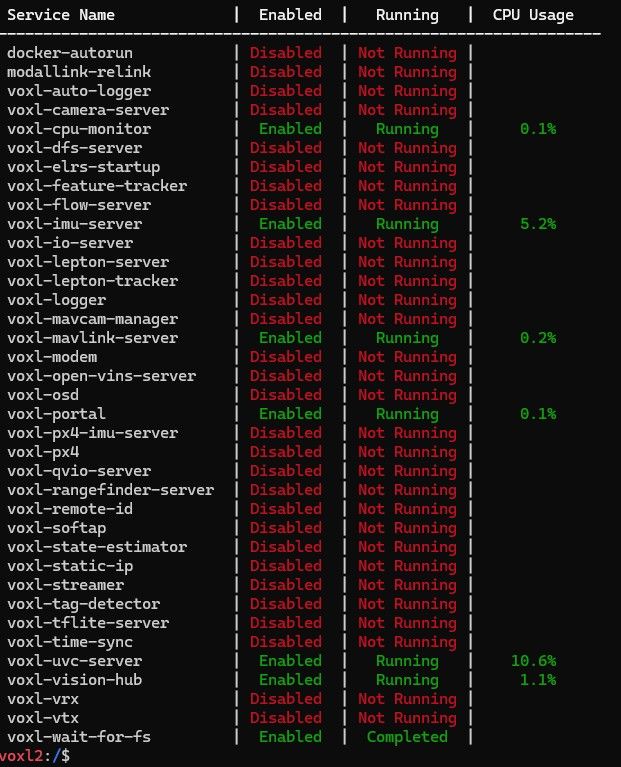

- uvc camera is not affected by voxl-streamer-h.265. It needs to be confirmed.
Thanks,
JS, Kim -
-
-
We upgraded VOXL2 as follows.
system-image: 1.8.02-M0054-14.1a-perf
hw platform: M0054
voxl-suite: 1.4.2~beta2 -
However, uvc camera seems to be unrelated to voxl-streamer.
even if voxl-streamer service is not running, voxl-uvc-server is running.
- uvc camera is not affected by voxl-streamer-h.265. It needs to be confirmed.
Thanks,
JS, Kim@Jskim , the uvc server outputs image frames in the format that is supported by your camera. H264/ h265 is usually not one of the formats that cameras output via uvc.
Voxl-streamer can automatically encode these uncompressed images from uvc server if you set up voxl-streamer to use the output pipe name from uvc server and you can select h264 / h265 as output encoding. The encoded video is then available via rtsp streaming protocol.
Does this explanation help?
Alex
-
-
@Jskim , the uvc server outputs image frames in the format that is supported by your camera. H264/ h265 is usually not one of the formats that cameras output via uvc.
Voxl-streamer can automatically encode these uncompressed images from uvc server if you set up voxl-streamer to use the output pipe name from uvc server and you can select h264 / h265 as output encoding. The encoded video is then available via rtsp streaming protocol.
Does this explanation help?
Alex
@Alex-Kushleyev
Thank you for your reply. I understand.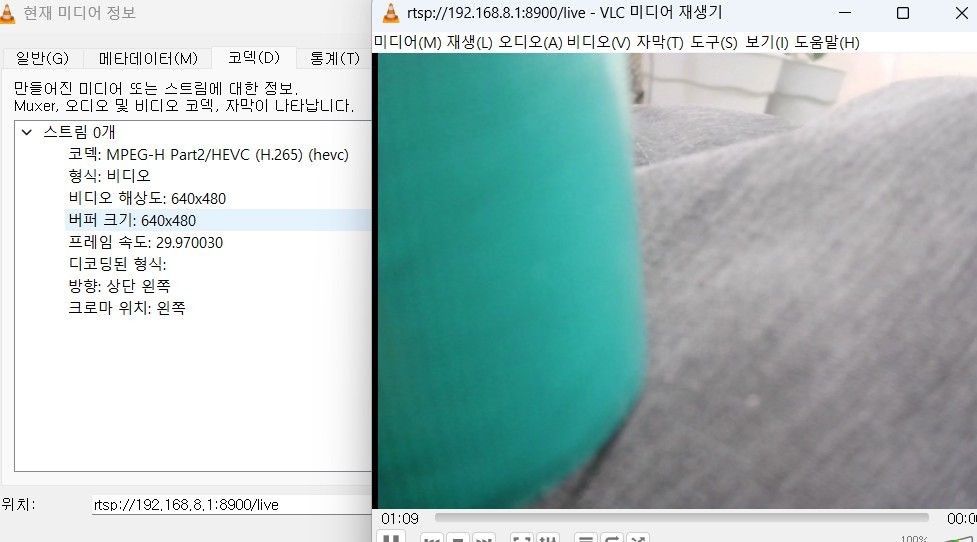
[Additional questions]
voxl-streamer CPU Usage increases rapidly. Performance improvement is needed. (H.265 and H.264 are the same.)[Experiment contents are as follows.]
- voxl-streamer CPU Usage increases gradually when using UVC camera
- System configuration
- local : voxl2 + Ethernet Expansion and USB Hub + Wi-Fi dongle
- uvc camera modem : Logotech TOPSYNC
- Remote : Notebook, VLC Viewer
- Experiment results
- uvc-streamer.conf : bitrate=400000 / h.265, 640x480@30
- Measurement results (after 1 hour)
=> CPU Usage : 31.3% -> 56% -> 61% -> 65% -> -----> 65.8%



*I tried changing the bitrate, but the symptom is the same.
Thanks,
JS, Kim
-
@Alex-Kushleyev
Thank you for your reply. I understand.[Additional questions]
voxl-streamer CPU Usage increases rapidly. Performance improvement is needed. (H.265 and H.264 are the same.)[Experiment contents are as follows.]
- voxl-streamer CPU Usage increases gradually when using UVC camera
- System configuration
- local : voxl2 + Ethernet Expansion and USB Hub + Wi-Fi dongle
- uvc camera modem : Logotech TOPSYNC
- Remote : Notebook, VLC Viewer
- Experiment results
- uvc-streamer.conf : bitrate=400000 / h.265, 640x480@30
- Measurement results (after 1 hour)
=> CPU Usage : 31.3% -> 56% -> 61% -> 65% -> -----> 65.8%
*I tried changing the bitrate, but the symptom is the same.
Thanks,
JS, Kim
@Jskim , I think what you are seeing is a side effect of cpu frequency scaling.
voxl-inspect-servicesshows the cpu usage with respect to the current cpu clock frequency (also depends on what core the process is running..).For your information, you can check the cpu core information using
voxl-inspect-cpu.In order to eliminate the variability in your test, you should set the cpu to performance mode, which will fix the frequency of all cpu cores to their maximum (different maximum value for different cores)
voxl-set-cpu-mode perfThen you can check using
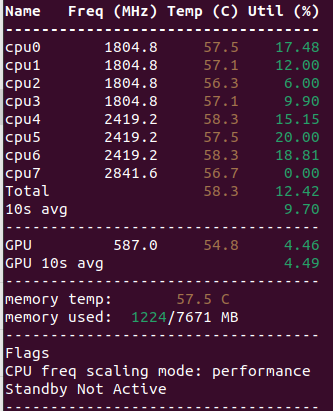
voxl-inspect-cputo make sure the cpu cores have been set to the max (see before and after screen shots):Auto CPU Frequency Scaling
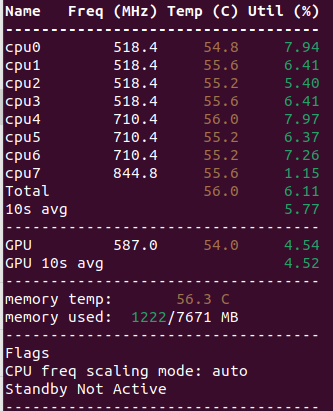
Performance Mode
Also keep in mind, that
voxl-inspect-servicesis averaging the cpu usage over a long period of time, so it may take some time for it to converge to the true value. A better instant cpu usage of a process can be obtained usingtop, for example:
this shows voxl-streamer is using 25.7% of a single core. i have tested and it seems to remain more or less constant. If you switch the cpu mode to auto (voxl-set-cpu-mode auto), you will see the cpu usage appear to go up (because the cpu frequency is decreased).This is not much of a concern because the system will automatically increase the cpu frequency when needed (in auto mode). The automatic mode is the most power efficient. However, if you need the maximum performance and lowest latency, you can set the cpu mode to
perf.In order to confirm that there is no issue in
voxl-streamer, please set your cpu mode toperfand look at output oftopafter certain periods of time.I hope this helps.
Alex
-
@Jskim , I think what you are seeing is a side effect of cpu frequency scaling.
voxl-inspect-servicesshows the cpu usage with respect to the current cpu clock frequency (also depends on what core the process is running..).For your information, you can check the cpu core information using
voxl-inspect-cpu.In order to eliminate the variability in your test, you should set the cpu to performance mode, which will fix the frequency of all cpu cores to their maximum (different maximum value for different cores)
voxl-set-cpu-mode perfThen you can check using
voxl-inspect-cputo make sure the cpu cores have been set to the max (see before and after screen shots):Auto CPU Frequency Scaling
Performance Mode
Also keep in mind, that
voxl-inspect-servicesis averaging the cpu usage over a long period of time, so it may take some time for it to converge to the true value. A better instant cpu usage of a process can be obtained usingtop, for example:
this shows voxl-streamer is using 25.7% of a single core. i have tested and it seems to remain more or less constant. If you switch the cpu mode to auto (voxl-set-cpu-mode auto), you will see the cpu usage appear to go up (because the cpu frequency is decreased).This is not much of a concern because the system will automatically increase the cpu frequency when needed (in auto mode). The automatic mode is the most power efficient. However, if you need the maximum performance and lowest latency, you can set the cpu mode to
perf.In order to confirm that there is no issue in
voxl-streamer, please set your cpu mode toperfand look at output oftopafter certain periods of time.I hope this helps.
Alex

Reading along? Create a free ModalAI Forum account to join in.
With an account you can reply, ask your own question, get an email when a ModalAI engineer answers, and mark the reply that solved it. Your place in each thread is saved between visits.
Questions about VOXL, Flight Core, ESCs and ModalAI drones are answered here by the engineers who build them.
Register Login