
IMX412 Colour
-
Hi, I have a single IMX412 connected to M0173 J5 on a VOXL2.
com.qti.sensormodule.imx412_fpv_2.binis the only sensormodule file I have in/usr/lib/camera.This is my camera server config file:
/**
 * voxl-camera-server Configuration File
 *
 * Each camera has configurations for up to 4 HAL3 streams:
 *    - `preview` stream for raw unprocessed images from CV cameras
 *    - `small_video` 720p (ish) h264/h265 compressed for fpv video streaming
 *    - `large_video` 4k (ish) h264/h265 for onboard video recording to disk
 *    - `snapshot` ISP-processed JPG snapshots that get saved to disk
 *
 * on QRB5165 platforms (VOXL2 and VOXL2 mini) you can only have 3 of the 4 enabled
 *
 * This file is generated from default values by voxl-configure-cameras.
 * Do not expect arbitrary resolutions to work, the ISP and video compression
 * pipelines only support very specific resolutions.
 *
 * The default video compression mode is cqp or Constant Quantization Parameter
 *
 *
 *
 */
{
	"version":	0.1,
	"fsync_en":	true,
	"fsync_gpio":	109,
	"cameras":	[{
			"type":	"imx412",
			"name":	"hires_front",
			"enabled":	true,
			"camera_id":	0,
			"fps":	30,
			"en_preview":	false,
			"preview_width":	640,
			"preview_height":	480,
			"en_raw_preview":	false,
			"en_small_video":	true,
			"small_video_width":	640,
			"small_video_height":	480,
			"small_venc_mode":	"h265",
			"small_venc_br_ctrl":	"cqp",
			"small_venc_Qfixed":	30,
			"small_venc_Qmin":	15,
			"small_venc_Qmax":	40,
			"small_venc_nPframes":	9,
			"small_venc_mbps":	2,
			"en_large_video":	false,
			"large_video_width":	4056,
			"large_video_height":	3040,
			"large_venc_mode":	"h265",
			"large_venc_br_ctrl":	"cqp",
			"large_venc_Qfixed":	38,
			"large_venc_Qmin":	15,
			"large_venc_Qmax":	50,
			"large_venc_nPframes":	29,
			"large_venc_mbps":	30,
			"en_snapshot":	false,
			"en_snapshot_width":	4056,
			"en_snapshot_height":	3040,
			"exif_focal_length":	3.0999999046325684,
			"exif_focal_length_in_35mm_format":	17,
			"exif_fnumber":	1.2400000095367432,
			"ae_mode":	"isp"
		}]
}
The issue I'm having has to do with the colour of the video. Indoors, the image looks fine but outdoors, there's a red tint that I can't seem to get rid of. I'm using
ispcurrently, but I've also played around withlme_msv, to not much improvement. Is this behaviour normal?
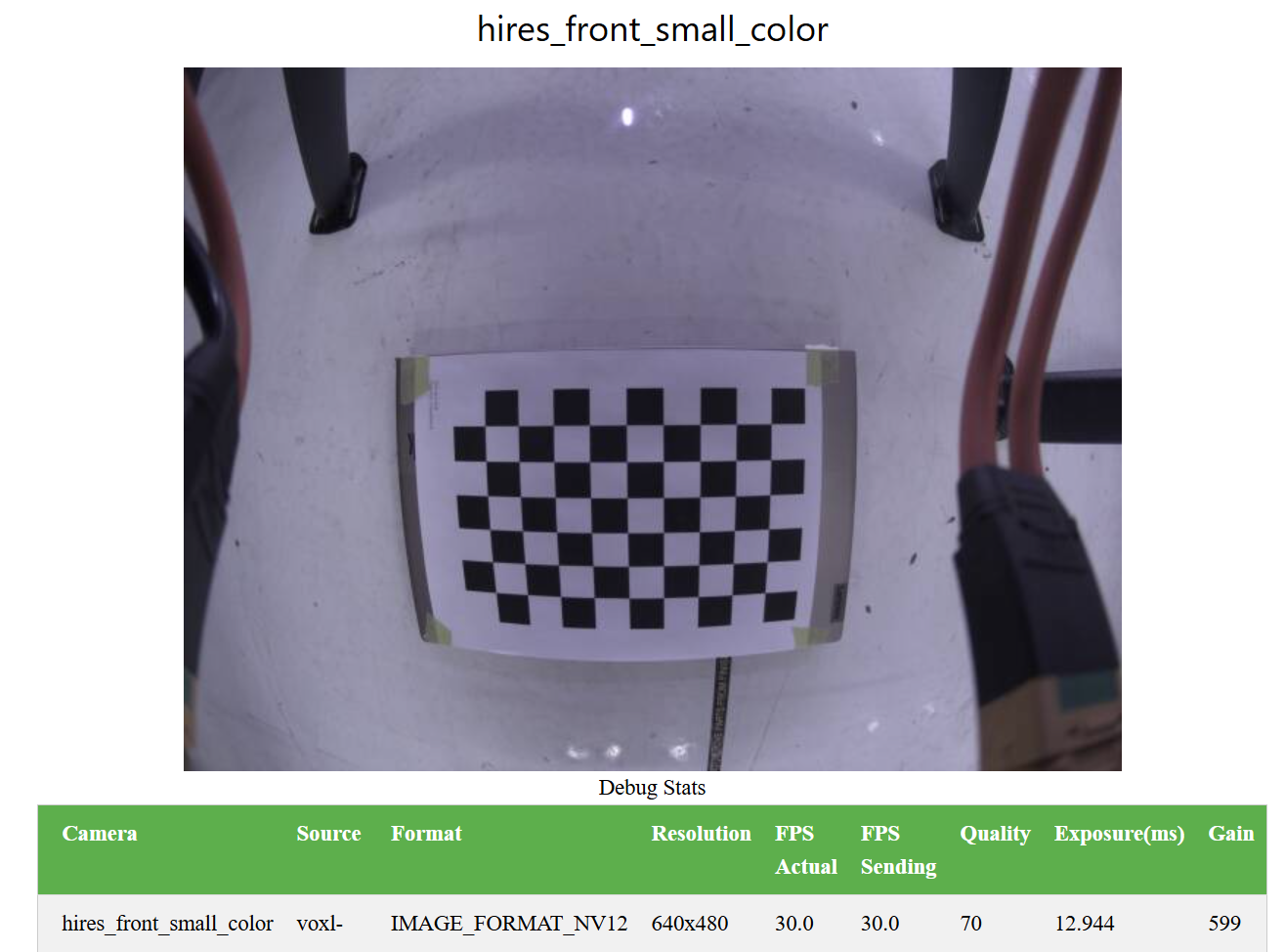
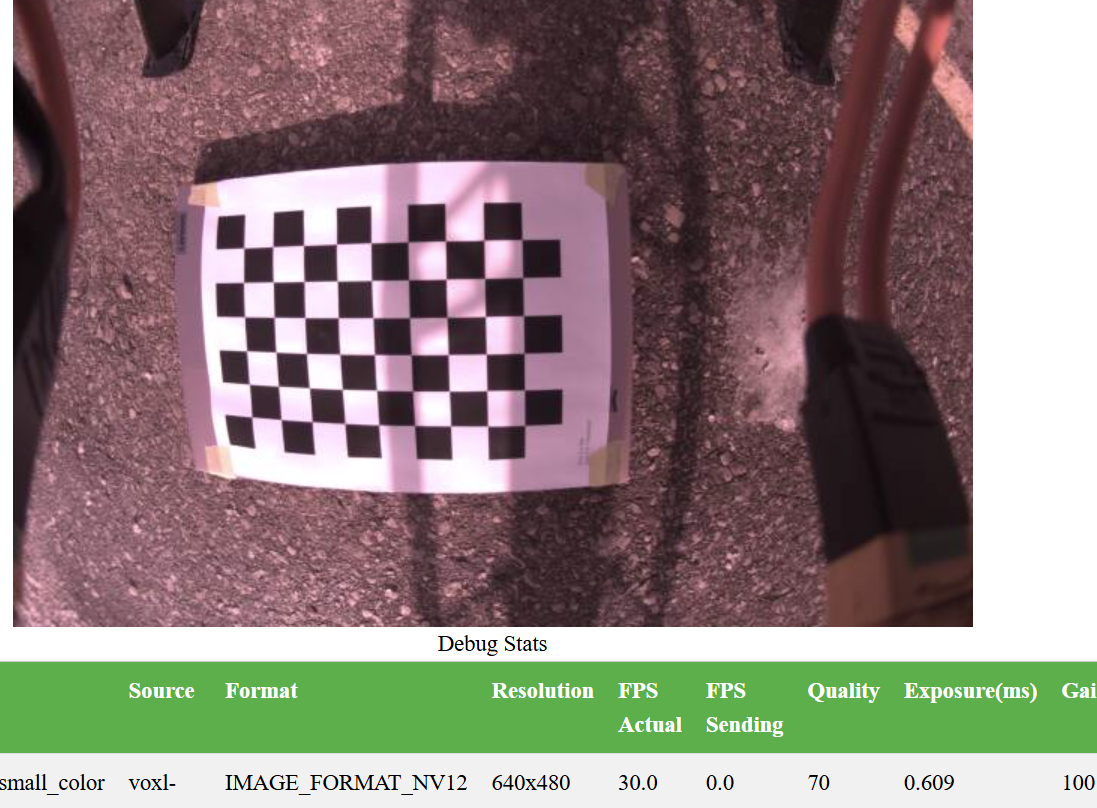
-
Hi, I have a single IMX412 connected to M0173 J5 on a VOXL2.
com.qti.sensormodule.imx412_fpv_2.binis the only sensormodule file I have in/usr/lib/camera.This is my camera server config file:
/**
 * voxl-camera-server Configuration File
 *
 * Each camera has configurations for up to 4 HAL3 streams:
 *    - `preview` stream for raw unprocessed images from CV cameras
 *    - `small_video` 720p (ish) h264/h265 compressed for fpv video streaming
 *    - `large_video` 4k (ish) h264/h265 for onboard video recording to disk
 *    - `snapshot` ISP-processed JPG snapshots that get saved to disk
 *
 * on QRB5165 platforms (VOXL2 and VOXL2 mini) you can only have 3 of the 4 enabled
 *
 * This file is generated from default values by voxl-configure-cameras.
 * Do not expect arbitrary resolutions to work, the ISP and video compression
 * pipelines only support very specific resolutions.
 *
 * The default video compression mode is cqp or Constant Quantization Parameter
 *
 *
 *
 */
{
	"version":	0.1,
	"fsync_en":	true,
	"fsync_gpio":	109,
	"cameras":	[{
			"type":	"imx412",
			"name":	"hires_front",
			"enabled":	true,
			"camera_id":	0,
			"fps":	30,
			"en_preview":	false,
			"preview_width":	640,
			"preview_height":	480,
			"en_raw_preview":	false,
			"en_small_video":	true,
			"small_video_width":	640,
			"small_video_height":	480,
			"small_venc_mode":	"h265",
			"small_venc_br_ctrl":	"cqp",
			"small_venc_Qfixed":	30,
			"small_venc_Qmin":	15,
			"small_venc_Qmax":	40,
			"small_venc_nPframes":	9,
			"small_venc_mbps":	2,
			"en_large_video":	false,
			"large_video_width":	4056,
			"large_video_height":	3040,
			"large_venc_mode":	"h265",
			"large_venc_br_ctrl":	"cqp",
			"large_venc_Qfixed":	38,
			"large_venc_Qmin":	15,
			"large_venc_Qmax":	50,
			"large_venc_nPframes":	29,
			"large_venc_mbps":	30,
			"en_snapshot":	false,
			"en_snapshot_width":	4056,
			"en_snapshot_height":	3040,
			"exif_focal_length":	3.0999999046325684,
			"exif_focal_length_in_35mm_format":	17,
			"exif_fnumber":	1.2400000095367432,
			"ae_mode":	"isp"
		}]
}
The issue I'm having has to do with the colour of the video. Indoors, the image looks fine but outdoors, there's a red tint that I can't seem to get rid of. I'm using
ispcurrently, but I've also played around withlme_msv, to not much improvement. Is this behaviour normal?
@jcai , can you please try the following:
remove
com.qti.sensormodule.imx412_fpv_2.bin(or rename tocom.qti.sensormodule.imx412_fpv_2.bin.bakand copy the following to/usr/lib/camera:cp /usr/share/modalai/chi-cdk/imx412/com.qti.sensormodule.imx412_2.bin /usr/lib/camera/then restart camera server.
This other sensormodule driver will use another tuning file for image processing. Let me know if that works better for you, I can explain more details about what's going on.
Alex
-
@jcai , can you please try the following:
remove
com.qti.sensormodule.imx412_fpv_2.bin(or rename tocom.qti.sensormodule.imx412_fpv_2.bin.bakand copy the following to/usr/lib/camera:cp /usr/share/modalai/chi-cdk/imx412/com.qti.sensormodule.imx412_2.bin /usr/lib/camera/then restart camera server.
This other sensormodule driver will use another tuning file for image processing. Let me know if that works better for you, I can explain more details about what's going on.
Alex
Another thing to check.. does your IMX412 camera have IR filter installed or not? You should know this based on the part number of IMX412 that you purchased.
If there is no IR filter, it is possible that you will see more red tint in the image. If this is the case, we can discuss how to fix it.
Alex
-
Another thing to check.. does your IMX412 camera have IR filter installed or not? You should know this based on the part number of IMX412 that you purchased.
If there is no IR filter, it is possible that you will see more red tint in the image. If this is the case, we can discuss how to fix it.
Alex
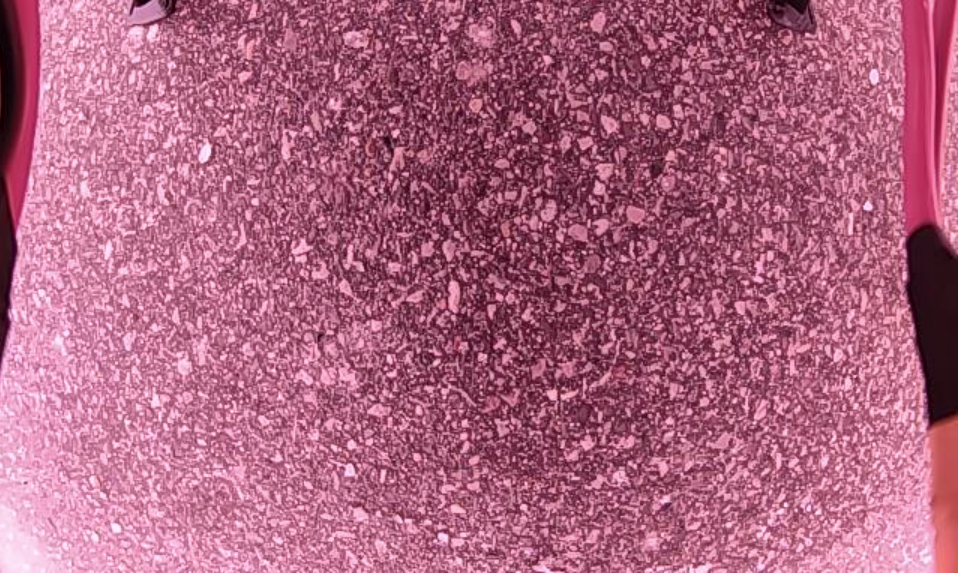
@Alex-Kushleyev I've tried the other driver, and the result looks largely the same. It's a bit brighter. (Cropped for file size)
My sensor indeed doesn't have the IR filter.

-
@Alex-Kushleyev I've tried the other driver, and the result looks largely the same. It's a bit brighter. (Cropped for file size)
My sensor indeed doesn't have the IR filter.
@jcai , thank you for trying.
The issue here is that the tuning files we have for the Qualcomm ISP assume that the camera has a IR filter, so the AWB (auto white balance) algorithm in the camera pipeline is not able to compensate the significant difference in RGB levels with the IR filter removed.
The tuning file is pretty much a black box for the end user, deviating from the original camera parameters / lens specs (which were used for the tuning) can leave to image degradation or color variations.
We have been working on our own processing pipeline (MISP) which bypasses the ISP and performs debayering, color balance, etc. I will need to document a few steps so that you can try it out.
Does your use case require the full frame resolution, or what output resolution are you looking for?
Alex
-
@jcai , thank you for trying.
The issue here is that the tuning files we have for the Qualcomm ISP assume that the camera has a IR filter, so the AWB (auto white balance) algorithm in the camera pipeline is not able to compensate the significant difference in RGB levels with the IR filter removed.
The tuning file is pretty much a black box for the end user, deviating from the original camera parameters / lens specs (which were used for the tuning) can leave to image degradation or color variations.
We have been working on our own processing pipeline (MISP) which bypasses the ISP and performs debayering, color balance, etc. I will need to document a few steps so that you can try it out.
Does your use case require the full frame resolution, or what output resolution are you looking for?
Alex
@Alex-Kushleyev Thanks for the info. For now, we're going to swap the sensor for one with the filter to see how it performs. I'll be updating results here
-
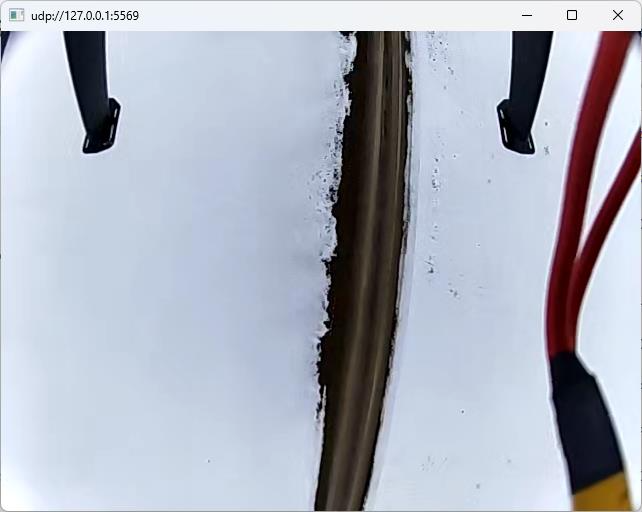
@Alex-Kushleyev Thanks for the info. For now, we're going to swap the sensor for one with the filter to see how it performs. I'll be updating results here
Update: the filter was absolutely the difference maker
-
@Alex-Kushleyev - Did the MISP pipeline get published yet? We have the same issue with the IR filter compensations and tried to run the binary switch that you noted above. After restarting the voxl-camera-server it stated that it could no longer find the cameras so I switched back to the old imx412_0.bin that was already there.
-
@Alex-Kushleyev - Did the MISP pipeline get published yet? We have the same issue with the IR filter compensations and tried to run the binary switch that you noted above. After restarting the voxl-camera-server it stated that it could no longer find the cameras so I switched back to the old imx412_0.bin that was already there.
If your lens does not have an IR filter, the colors will be distorted. Please take a look at sample images : https://docs.modalai.com/M0161/#image-samples-for-sensor
You could replace the lens with another lens that has an IR filter.
If you do want to keep the lens without IR filter, please follow the steps below.
My best suggestion is to download the latest IMX412 drivers from here
Extract the archive and select the sensormodule with the correct id (matching the ID that you have already been using). back up existing imx412 sensormodules and copy the new one to
/usr/lib/camera/Then, edit
/etc/modalai/voxl-camera-server.conf- i will just provide a minimal config for a single IMX412 camera (you will need to check the camera id in the config file). If you use voxl-portal, you should be able to seehires_misp_colorand h264 encoded streamhires_misp_encoded.{ "version": 0.1, "fsync_en": true, "fsync_gpio": 109, "cameras": [ { "type": "imx412", "name": "hires", "enabled": true, "camera_id": 0, "fps": 30, "en_preview": true, "en_raw_preview": true, "en_misp": true, "preview_width": 3840, "preview_height": 2160, "misp_width": 1920, "misp_height": 1080, "misp_zoom": 1, "misp_gamma": 1, "misp_awb": "auto", "ae_mode": "lme_msv", "gain_min": 100, "gain_max": 32000, "ae_desired_msv": 100, "misp_venc_enable": true, "misp_venc_mode": "h264", "misp_venc_br_ctrl":"cbr", "misp_venc_mbps": 5, "en_small_video": false, "en_large_video": false, "en_snapshot": false } ] }Please note that after you start
voxl-camera-server, the config file will be auto-populated with some more default parameters for this camera.When viewing
hires_misp_colorstream invoxl-portal, if you see any flickering, please try to set voxl2 cpu mode to perf :voxl-set-cpu-mode perfas well as reduce the jpeg quality that is used to display this stream (which is YUV converted to jpeg in the back-end). The mjpeg quality can be changed by enabling the advanced controls invoxl-portal(click the tiny check box in the bottom left corner of the page) and reduce the Quality slider.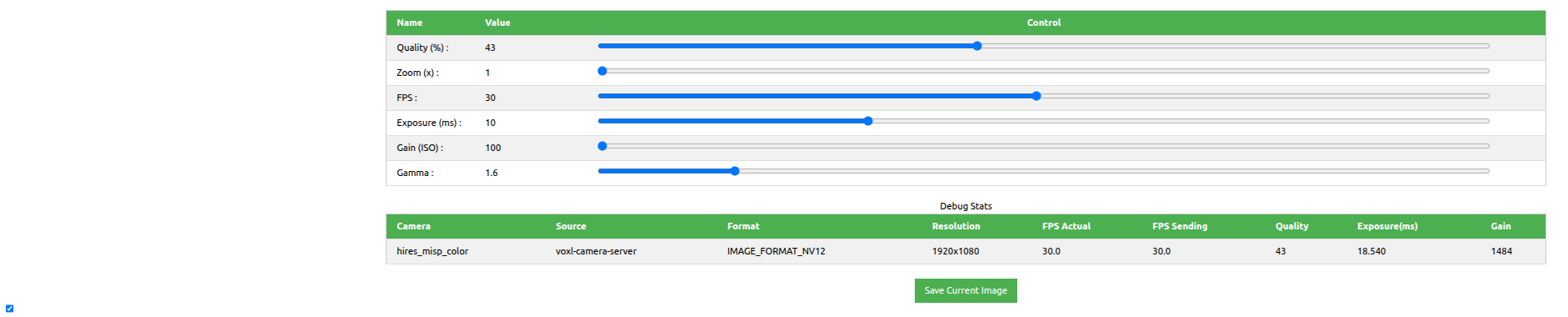
Using MISP should help with reducing the IR effects, but it won't be perfect due to really strong IR light that can be present durig day time outdoors.
Alex
-
If your lens does not have an IR filter, the colors will be distorted. Please take a look at sample images : https://docs.modalai.com/M0161/#image-samples-for-sensor
You could replace the lens with another lens that has an IR filter.
If you do want to keep the lens without IR filter, please follow the steps below.
My best suggestion is to download the latest IMX412 drivers from here
Extract the archive and select the sensormodule with the correct id (matching the ID that you have already been using). back up existing imx412 sensormodules and copy the new one to
/usr/lib/camera/Then, edit
/etc/modalai/voxl-camera-server.conf- i will just provide a minimal config for a single IMX412 camera (you will need to check the camera id in the config file). If you use voxl-portal, you should be able to seehires_misp_colorand h264 encoded streamhires_misp_encoded.{ "version": 0.1, "fsync_en": true, "fsync_gpio": 109, "cameras": [ { "type": "imx412", "name": "hires", "enabled": true, "camera_id": 0, "fps": 30, "en_preview": true, "en_raw_preview": true, "en_misp": true, "preview_width": 3840, "preview_height": 2160, "misp_width": 1920, "misp_height": 1080, "misp_zoom": 1, "misp_gamma": 1, "misp_awb": "auto", "ae_mode": "lme_msv", "gain_min": 100, "gain_max": 32000, "ae_desired_msv": 100, "misp_venc_enable": true, "misp_venc_mode": "h264", "misp_venc_br_ctrl":"cbr", "misp_venc_mbps": 5, "en_small_video": false, "en_large_video": false, "en_snapshot": false } ] }Please note that after you start
voxl-camera-server, the config file will be auto-populated with some more default parameters for this camera.When viewing
hires_misp_colorstream invoxl-portal, if you see any flickering, please try to set voxl2 cpu mode to perf :voxl-set-cpu-mode perfas well as reduce the jpeg quality that is used to display this stream (which is YUV converted to jpeg in the back-end). The mjpeg quality can be changed by enabling the advanced controls invoxl-portal(click the tiny check box in the bottom left corner of the page) and reduce the Quality slider.Using MISP should help with reducing the IR effects, but it won't be perfect due to really strong IR light that can be present durig day time outdoors.
Alex
Also, a quick note.. regarding what preview resolution to use with IMX412 camera with MISP enabled..
For best quality (non-EIS applications, where the output is 16:9 aspect ratio, such as
3840x2160,1920x1080,1280x720), you should select3840x2160as the preview resolution. For EIS applications, the full frame4040x3040resolution should be used because it will allow more stabilization margin. selecting3840x2160will tell the camera to crop this region from the full frame4040x3040, since we don't need the rest of the image.For low latency applications, you can use input resolution of
1936x1080. Note that this is slightly non-standard (as opposed to1920x1080because the1936x1080resolution allows faster processing. So you could have input resolution of1936x1080and output resolution of1920x1080,1280x720, etc.Alex

Reading along? Create a free ModalAI Forum account to join in.
With an account you can reply, ask your own question, get an email when a ModalAI engineer answers, and mark the reply that solved it. Your place in each thread is saved between visits.
Questions about VOXL, Flight Core, ESCs and ModalAI drones are answered here by the engineers who build them.
Register Login