
VOXL2 custom Camera configs?
-
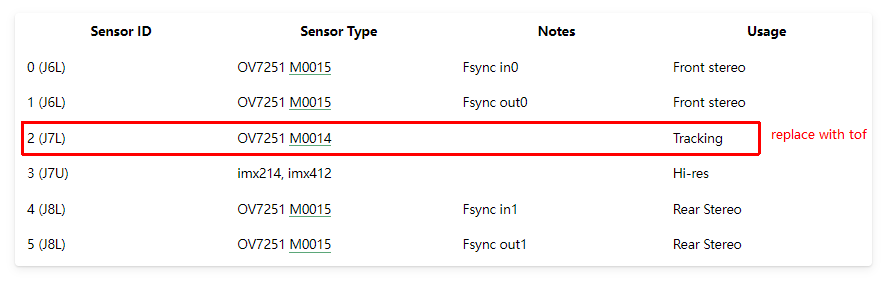
Hi, I want to use the VOXL2 drone platform, and I would like to confirm if I can replace the Tracking camera (J7L OV7251 M0014) in the "C-11: Front Stereo, Rear Stereo, Hires, and Tracking (D0006 Sentinel)" camera configuras with a tof camera (PMD ToF M0040), and what modifications and configurations I need to make.
Thanks! -
Hi, I want to use the VOXL2 drone platform, and I would like to confirm if I can replace the Tracking camera (J7L OV7251 M0014) in the "C-11: Front Stereo, Rear Stereo, Hires, and Tracking (D0006 Sentinel)" camera configuras with a tof camera (PMD ToF M0040), and what modifications and configurations I need to make.
Thanks!Hi @kzid,
Yes you can easily do it. If you have currently a ov7251 tracking camera connected to J7L, then you will have the following
sensormodulefile in/usr/lib/camera/:com.qti.sensormodule.ov7251_2.bin(slot index 2 maps to J7L)
If you want to replace this camera with M0040 TOF sensor, you should remove the above sensor module file (not strictly required, but better do it to avoid confusion) and copy the following sensormodule for TOF sensor:
cp /usr/share/modalai/chi-cdk/irs1645/com.qti.sensormodule.irs1645_2.bin /usr/lib/camera/Obviously, you need to physically remove the ov7251 camera and plug in TOF camera (while power to VOXL2 is off)
Then you can run
voxl-camera-server -lto confirm that the tof camera has been detected and its slot number and camera id number will be the same as the ov7251 camera that you removed (assuming you have not touched other cameras).Finally, you will need to update the
/etc/modalai/voxl-camera-server.confto replace the entry for the tracking camera with the entry for TOF camera. If you already have an entry for another TOF camera, you can just copy that and update the camera id as needed (camera id should remain the same as your ov7251 tracking camera) and change the name of the camera in the config file as needed to avoid duplication (such astof2instead oftofif you already have one)Please let me know if you need more info.
Alex
-
Hi @kzid,
Yes you can easily do it. If you have currently a ov7251 tracking camera connected to J7L, then you will have the following
sensormodulefile in/usr/lib/camera/:com.qti.sensormodule.ov7251_2.bin(slot index 2 maps to J7L)
If you want to replace this camera with M0040 TOF sensor, you should remove the above sensor module file (not strictly required, but better do it to avoid confusion) and copy the following sensormodule for TOF sensor:
cp /usr/share/modalai/chi-cdk/irs1645/com.qti.sensormodule.irs1645_2.bin /usr/lib/camera/Obviously, you need to physically remove the ov7251 camera and plug in TOF camera (while power to VOXL2 is off)
Then you can run
voxl-camera-server -lto confirm that the tof camera has been detected and its slot number and camera id number will be the same as the ov7251 camera that you removed (assuming you have not touched other cameras).Finally, you will need to update the
/etc/modalai/voxl-camera-server.confto replace the entry for the tracking camera with the entry for TOF camera. If you already have an entry for another TOF camera, you can just copy that and update the camera id as needed (camera id should remain the same as your ov7251 tracking camera) and change the name of the camera in the config file as needed to avoid duplication (such astof2instead oftofif you already have one)Please let me know if you need more info.
Alex
If you don't have a config example for tof, you can just use the following:
                {
                        "type": "pmd-tof",
                        "name": "tof",
                        "camera_id":    2,
                        "enabled":      true,
                }
and the reset will get filled in with defaults when you run
voxl-camera-server(you can check the default config params that were added afterwards)Double check the camera id, i think it should be 2.
Alex
-
Hi @Alex-Kushleyev ,
Thanks very much for your reply. I have two other questions:- Can the TOF camera be directly connected to this cable? And which TOF camera module should I choose, or only the M0040 supports VOLX2?
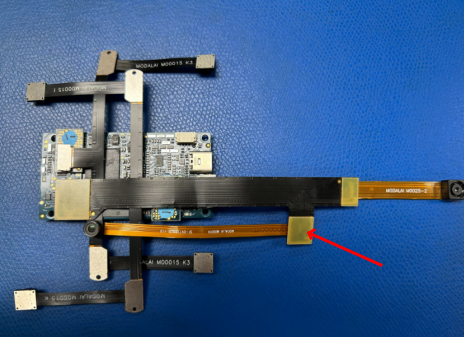
- After replacing the TOF camera, can 6 cameras work at the same time ?
Thanks again!
- Can the TOF camera be directly connected to this cable? And which TOF camera module should I choose, or only the M0040 supports VOLX2?
-
Hi @Alex-Kushleyev ,
Thanks very much for your reply. I have two other questions:- Can the TOF camera be directly connected to this cable? And which TOF camera module should I choose, or only the M0040 supports VOLX2?
- After replacing the TOF camera, can 6 cameras work at the same time ?
Thanks again!
Hi @kzid,
I just checked with the team and we no longer have M0040 TOF module available because it is EOL. We do offer the upgraded version of the TOF module, which we are now shipping with sensor bundles. Here is more information about the new module:
https://docs.modalai.com/M0169/
M0169 is an adapter board and the kit MSU-M0169-1-01 contains the adapter board and the TOF sensor itself and additional cables. https://www.modalai.com/products/m0178?variant=48528287826224 -- you will see the SKU: MSU-M0169-1-01
Now, some more details.. The new TOF sensor is more powerful than the old one, and it requires more input power. The Y-flex that you want to connect to can only provide 3.3V to the cameras and this power rail does not provide enough current for the new TOF sensor. For this reason, the M0169 adapter board requires a 5V (1.5A+ burst) input in addition to being connected to the VOXL2 via the camera flex cable. For this reason, take a look at what is included in the kit:
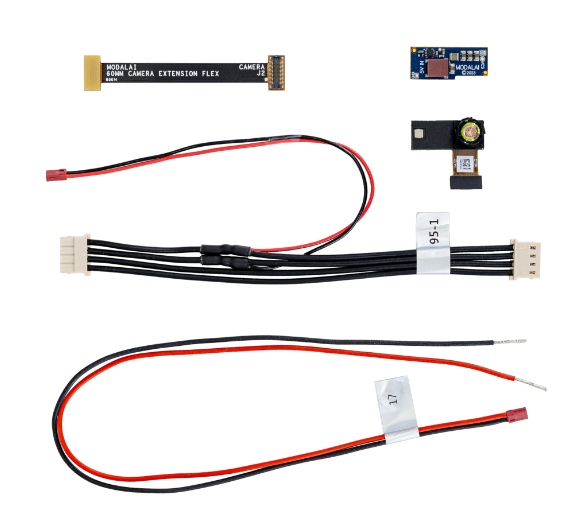
- we provide a spliced 4-pin standard power cable with a tap for the 5V power to connect to M0169 to power the new TOF sensor.
- there is also a spare 2-conductor power cable provided in case you would want to tap off the 5V power from somewhere else.
Please see the full connection diagram (which is a bit complex..). The large red arrow points to where you currently have the OV7251 camera connected.
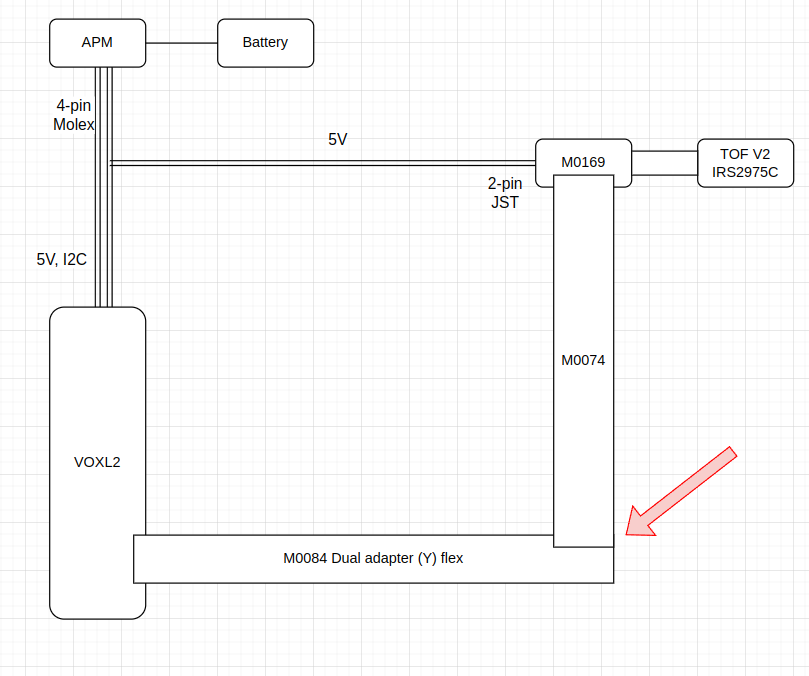
Unfortunately, this is the only option right now if you want to keep your Y-flex (since you want to keep your 4K camera).
Lastly, to answer your second question, yes all 6 cameras will still work.. but it is going to be a bit messy connecting everything together. This is far from ideal and we would not recommend this for new designs, but it would allow you to test the new TOF sensor.
Moving forward, we have introduced a new family of camera modules that use micro coax cables (except for the TOF sensor) together with a camera front end board, which also brings in enough power for TOF without extra interposers and cables : https://www.modalai.com/products/m0173?variant=48528274456880 (look for C27 camera configuration: 3x AR0144 tracking, 1x Hires, 1 TOF or C29: 2x AR0144 tracking 2x Hires, 1 TOF. However you would need to buy a whole kit and would not be able to use existing cameras and flexes.
I know this is a lot of information, please take a look and let me know if you need any further clarification..
Alex
- Can the TOF camera be directly connected to this cable? And which TOF camera module should I choose, or only the M0040 supports VOLX2?
-
Hi @Alex-Kushleyev ,
Thank you very much for such a detailed reply, we will carefully refer to your suggestions to make the purchase.thanks again!

Reading along? Create a free ModalAI Forum account to join in.
With an account you can reply, ask your own question, get an email when a ModalAI engineer answers, and mark the reply that solved it. Your place in each thread is saved between visits.
Questions about VOXL, Flight Core, ESCs and ModalAI drones are answered here by the engineers who build them.
Register Login