
How to run tf-lite-server on VOXL
-
posted a few basics in the docs https://docs.modalai.com/voxl-tflite-server/
You can see exactly where the image comes in her: https://gitlab.com/voxl-public/modal-pipe-architecture/voxl-tflite-server/-/blob/master/server/threads.cpp#L105
-
Awesome. Thank you for posting those Chad. So far I have been able to connect to the voxl server. After connecting to the voxl, I ensure that voxl-camera-server and voxl-tflite-server are enabled and running. I also initially enable (but don't run) the voxl-streamer service.
When running voxl-streamer -c hires I am able to connect to the hires camera and see video feed after accessing the stream via a network connection through rtsp on VLC Media Player.
After that, I had a colleague of mine stand in front of the hires camera and then I ran voxl-streamer -c tflite-overlay. When viewing the output through VLC, I only get the very first frame, almost as if only a photo was taken. There is no video feed except for the first frame which correctly detects my colleague as a person. Additionally, the photo is in black and white. Any idea what I could be doing wrong here or how to go about fixing this issue?
Here is what the output from the stream looks like.
 -
It looks like the photo didn't upload as it was too large in size. Here is a more compressed version of it
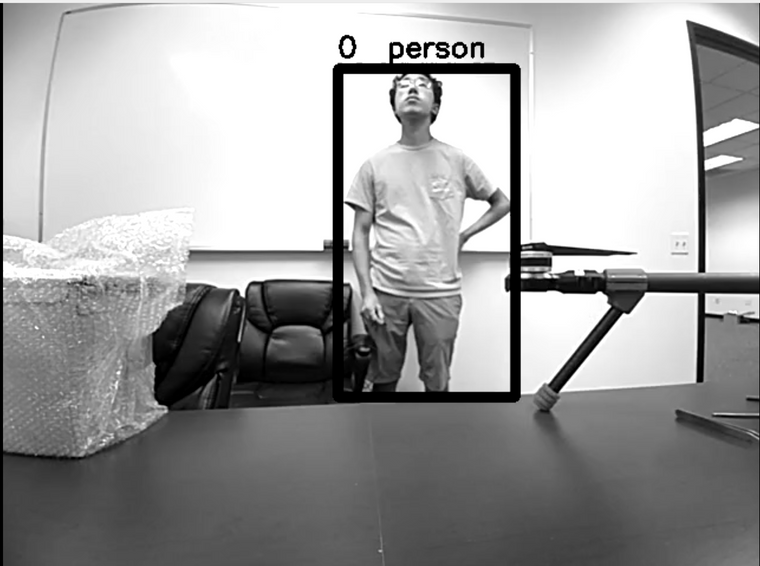 .
. -
This is a known issue with our GStreamer interface running low framerates. You can install voxl-portal, which is a little web server that provides access to any of the cameras running on voxl in a web browser. If you're on our latest system image (3.3.0) and voxl-suite (0.4.6), you can run
opkg updatethenopkg install voxl-portaland then pull up the drone's ip in a web browser and view image streams. -
Thanks Alex. I actually was able to get it to stop freezing by connecting to the rtsp port via opencv in python. However, it was still a low quality image in black and white.
Additionally, I was able to successfully install and start voxl-portal and access the tf-lite server through the portal. However, the image is still low quality and in black and white. Any idea how to modify the image quality and add color to it on the tf-lite server? Thanks.
-
Hi @Alex-Gardner. I asked my question over the weekend so I just wanted to bump this message as I am still having the same problem.
-
Hello colerose,
The output image quality is dependent on what you feed into the tflite-server as input, but we run the object detection on a downscaled 300x300 image.
To add color to the output, insert this section to line 326 of models.cpp:
// adding color
cv::Mat output_image;
cv::Mat yuv(img_height + img_height/2, img_width,
            CV_8UC1, (uchar*)new_frame->image_pixels);
cv::cvtColor(yuv, output_image, CV_YUV2RGB_NV21);
Then, in the main object detection loop, change the
input_imgcv::Mat to our newoutput_img(lines 425 and 426) :cv::rectangle(output_img, rect, cv::Scalar(0), 7); cv::putText(output_img, labels[detected_classes[i]], pt, cv::FONT_HERSHEY_SIMPLEX, 0.8, cv::Scalar(0), 2);Finally, change the metadata and data that we send via MPA to match our new rgb image, lines 429-435:
meta.format = IMAGE_FORMAT_RGB; meta.size_bytes = (img_height * img_width * 3); meta.stride = (img_width * 3); if (input_img.data != NULL){ pipe_server_write_camera_frame(TFLITE_CH, meta, (char*)output_img.data); } -
Hi @Matt-Turi , thanks for the response! I'm assuming you meant to write output_img as output_image? You initially defined it as output_image and then wrote output_img. If that is the case, then I made the changes that you outlined above and reinstalled the tflite-server with the new code.
However, when running the streamer with the tflite-overlay I get the following error:

-
Hi @Matt-Turi , thanks for the response! I'm assuming you meant to write output_img as output_image? You initially defined it as output_image and then wrote output_img. If that is the case, then I made the changes that you outlined above and reinstalled the tflite-server with the new code.
However, when running the streamer with the tflite-overlay I get the following error:
@Matt-Turi my apologies. I compiled the wrong version of my code. That worked!
-
As an additional question, is there a way to attach some kind of metadata to the frames sent over RTSP? I am accessing the stream through opencv in python however I would like to be able to know the original top, left, right, and bottom locations that the neural net provides for each frame that comes in.
-
Hey @colerose,
Glad to hear you got it working, and I apologize for the typos in my code snippets. I do not know of any way to send coordinates over rtsp, but if you are willing to work in c++, you are able to access that data directly in the voxl-tflite-server.

Reading along? Create a free ModalAI Forum account to join in.
With an account you can reply, ask your own question, get an email when a ModalAI engineer answers, and mark the reply that solved it. Your place in each thread is saved between visits.
Questions about VOXL, Flight Core, ESCs and ModalAI drones are answered here by the engineers who build them.
Register Login