
ToF v2 keeps crashing because of high temperature
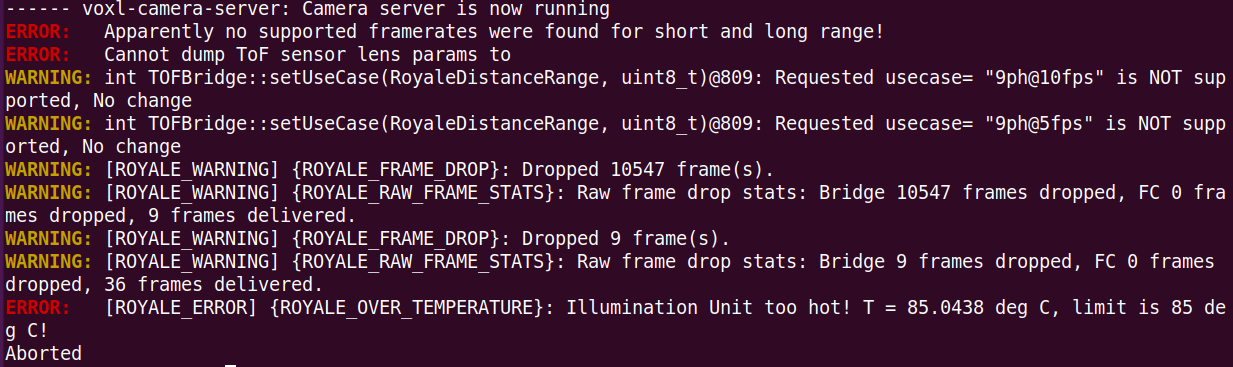
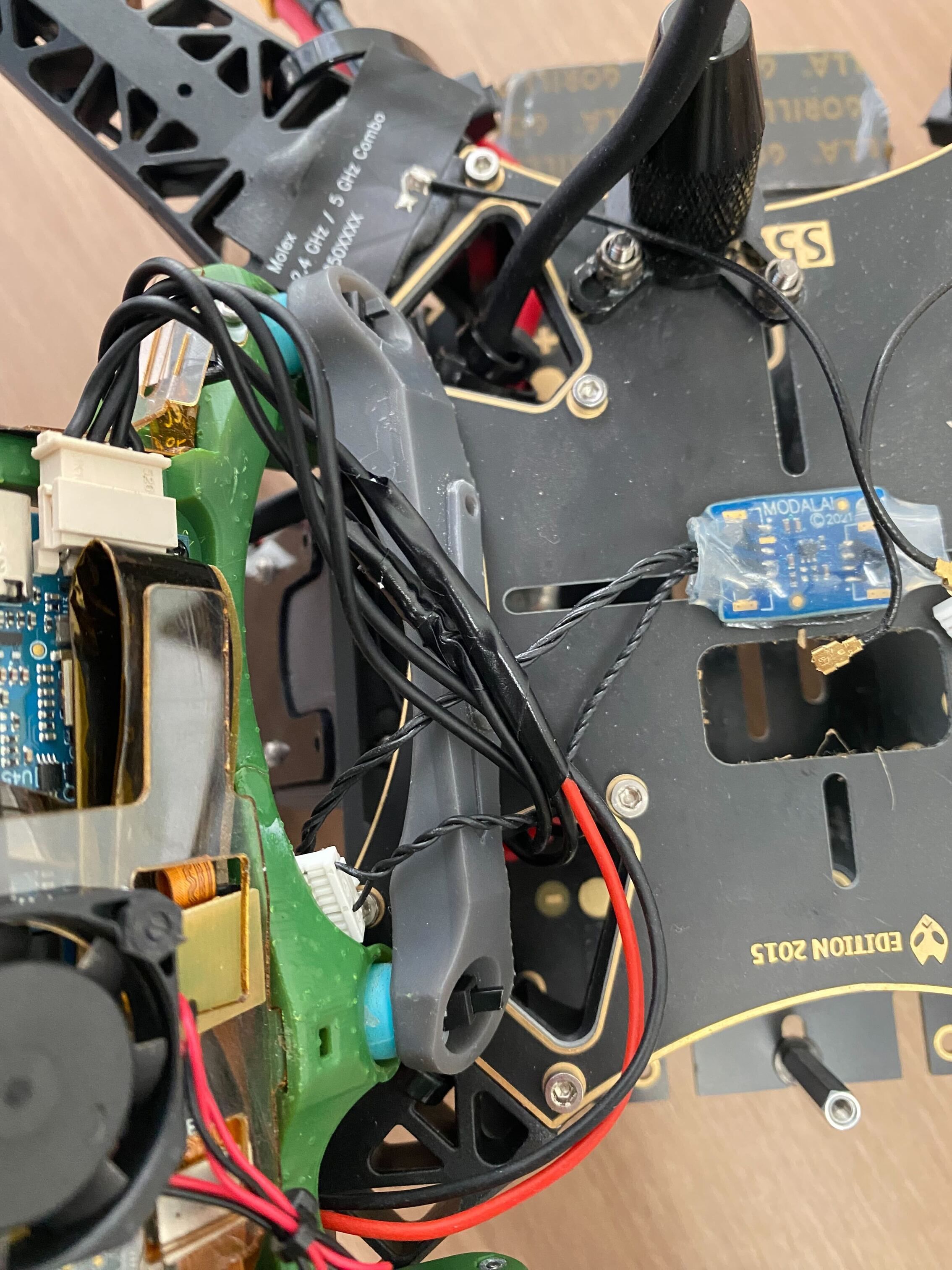
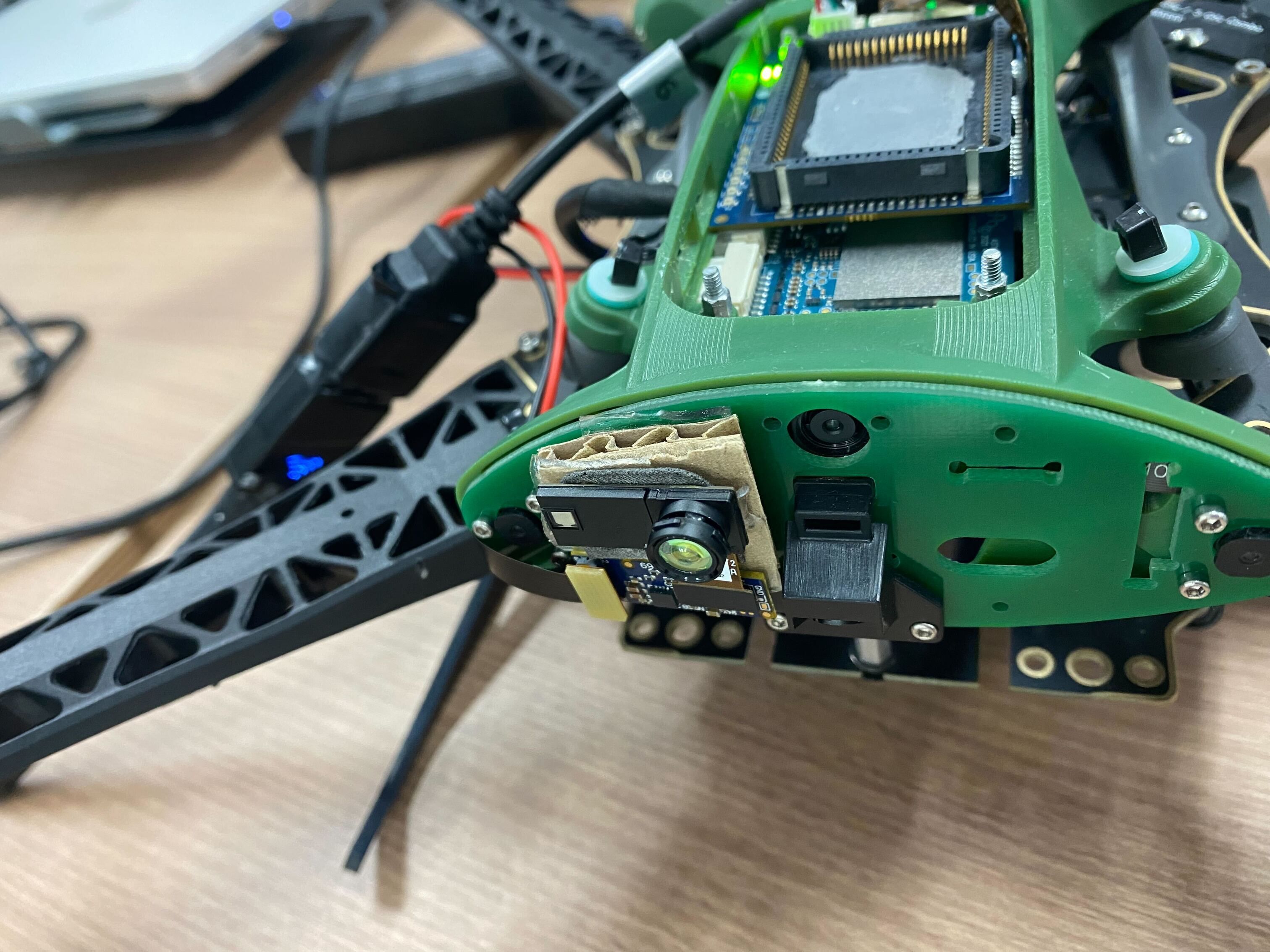
-
@dlee ,
Yes the new TOF sensor (IRS2975C) is more powerful that the previous generation. What I mean by that is that it can emit more IR power but also heats up more. Emitting more power allows the sensor detect objects at larger distances or objects that are not as reflective.
In current operating mode, the auto exposure control is enabled inside the sensor itself, which modulates the emitted IR power based on the returns that the sensor is getting. That is to say, the power draw will vary depending on what is in the view of the sensor. If there are obstacles nearby, the output power should be low, otherwise it can be high. At full power, the module can consume close to 0.8-0.9W
So the first solution, if design allows, is to add a heat spreader to dissipate the heat, which you already started experimenting with. The sensor has a large exposed copper pad in the back for heat sinking purposes for this exact reason. Just be careful not to short this pad to anything, use non-conducting (but heat transfering) adhesive pad between the sensor and heat spreader.
In terms of a software solution to the issue, we can query the temperature of the emitter. We can also control the maximum emitted power used by the auto exposure algorithm. That is to say, still leave the auto exposure running in the sensor, but limit the maximum power that it is allowed to use.
We are planning to add some software protection that limits the maximum output power as a function of the emitter temperature. This will require some implementation and testing.
Meanwhile, please consider using a heat spreader, which will be the best solution if you want to make use of the full sensor's operating range and not have our software limit the output power in order to prevent overheating.
-
@dlee ,
Yes the new TOF sensor (IRS2975C) is more powerful that the previous generation. What I mean by that is that it can emit more IR power but also heats up more. Emitting more power allows the sensor detect objects at larger distances or objects that are not as reflective.
In current operating mode, the auto exposure control is enabled inside the sensor itself, which modulates the emitted IR power based on the returns that the sensor is getting. That is to say, the power draw will vary depending on what is in the view of the sensor. If there are obstacles nearby, the output power should be low, otherwise it can be high. At full power, the module can consume close to 0.8-0.9W
So the first solution, if design allows, is to add a heat spreader to dissipate the heat, which you already started experimenting with. The sensor has a large exposed copper pad in the back for heat sinking purposes for this exact reason. Just be careful not to short this pad to anything, use non-conducting (but heat transfering) adhesive pad between the sensor and heat spreader.
In terms of a software solution to the issue, we can query the temperature of the emitter. We can also control the maximum emitted power used by the auto exposure algorithm. That is to say, still leave the auto exposure running in the sensor, but limit the maximum power that it is allowed to use.
We are planning to add some software protection that limits the maximum output power as a function of the emitter temperature. This will require some implementation and testing.
Meanwhile, please consider using a heat spreader, which will be the best solution if you want to make use of the full sensor's operating range and not have our software limit the output power in order to prevent overheating.
@Alex-Kushleyev We've also been playing with these sensors, and installed aluminum heat spreaders and even decreased
exposure_max_usto 2000 and we are burning up the beta sensors regularly (get overheat warnings, and then eventually they stop drawing power and we only get sporadic "flashes" on the depth returns). We've been running at 5V. We're now almost out of sensors, and out of patience. I see you now have them in the Starling 2 - could you advise on how you have it set up there to avoid these overheating failures?Edit: we don't have a fan or airflow over these, and our design is nominally water resistant which doesn't permit us to put these in an area with flow from the rotors. We have a fan drawing air over the VOXL itself internally but the previous gen ToF had absolutely no issue with being mounted away from air flow and working reliably. I am looking for a solution which permits that. Extended range is useless to me if the sensors die on the ground.
-
@Alex-Kushleyev We've also been playing with these sensors, and installed aluminum heat spreaders and even decreased
exposure_max_usto 2000 and we are burning up the beta sensors regularly (get overheat warnings, and then eventually they stop drawing power and we only get sporadic "flashes" on the depth returns). We've been running at 5V. We're now almost out of sensors, and out of patience. I see you now have them in the Starling 2 - could you advise on how you have it set up there to avoid these overheating failures?Edit: we don't have a fan or airflow over these, and our design is nominally water resistant which doesn't permit us to put these in an area with flow from the rotors. We have a fan drawing air over the VOXL itself internally but the previous gen ToF had absolutely no issue with being mounted away from air flow and working reliably. I am looking for a solution which permits that. Extended range is useless to me if the sensors die on the ground.
@msberk, can you please clarify "We've been running at 5V" -- what exactly are you using 5V for?
Also, can you please send a screenshot of voxl-portal showing tof frame and statistics, something like this, where I was testing two different TOF sensors at different FPS and different exposures (all are listed in the table).
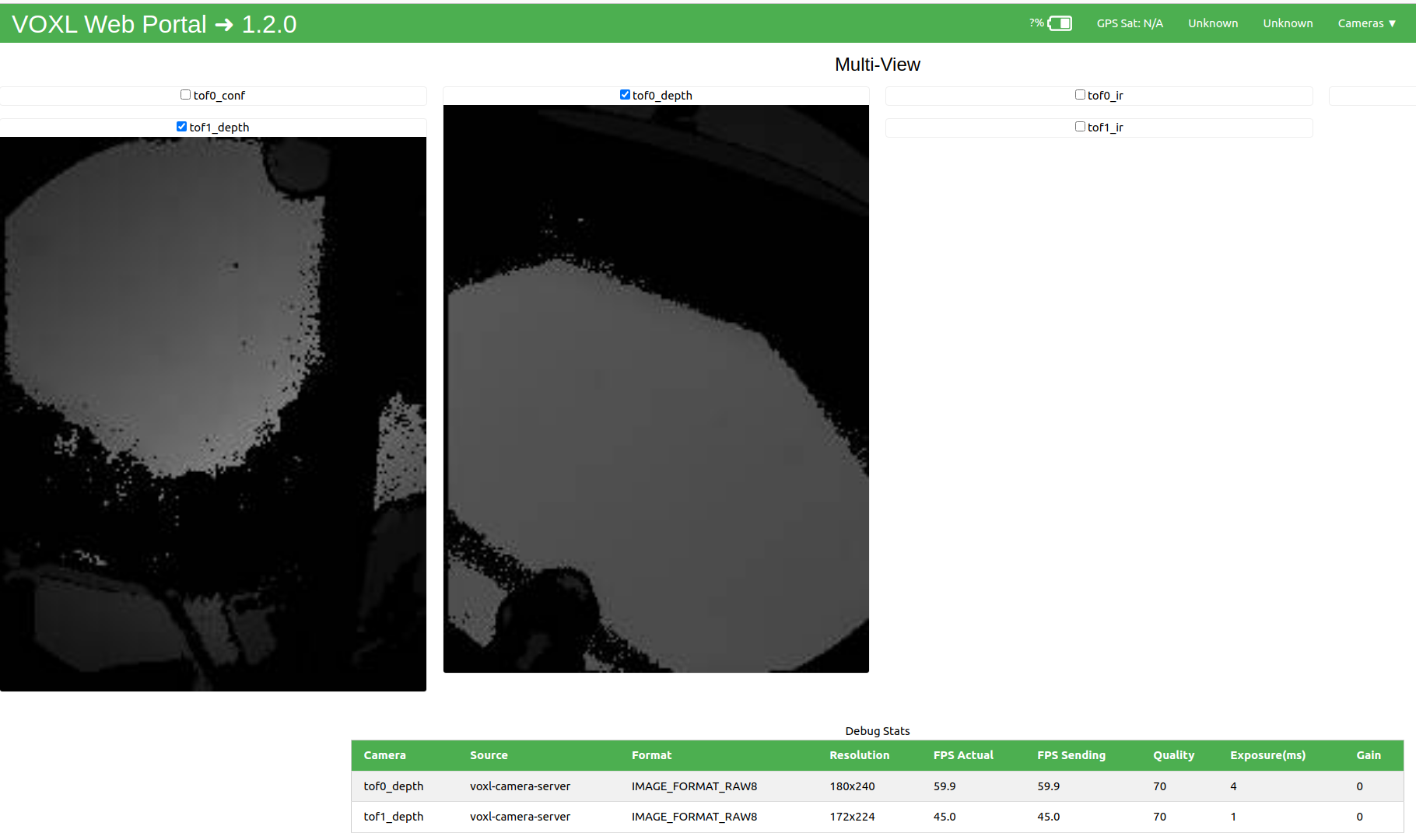
Note, that if you dont' see the Exposure measurmeent (it is always zero), it means it is not being set / read correctly (probably old version of voxl-camera-server). Also, the exposure shown for TOF sensor in voxl-portal stats is the total exposure per frame, but the setting in voxl-camera-server.conf is exposure per illuminated phase. also, you have to set
"ae_mode": "lme_msv"for tof sensor, in order for the exposure limit to work."ae_mode": "lme_msv", "exposure_max_us": 2000,I can explain a bit more about total exposure vs phase exposure, but please send me your stats first, where you set the exposure limit to 2000us (and also clarify what FPS you are using)
-
@msberk, can you please clarify "We've been running at 5V" -- what exactly are you using 5V for?
Also, can you please send a screenshot of voxl-portal showing tof frame and statistics, something like this, where I was testing two different TOF sensors at different FPS and different exposures (all are listed in the table).
Note, that if you dont' see the Exposure measurmeent (it is always zero), it means it is not being set / read correctly (probably old version of voxl-camera-server). Also, the exposure shown for TOF sensor in voxl-portal stats is the total exposure per frame, but the setting in voxl-camera-server.conf is exposure per illuminated phase. also, you have to set
"ae_mode": "lme_msv"for tof sensor, in order for the exposure limit to work."ae_mode": "lme_msv", "exposure_max_us": 2000,I can explain a bit more about total exposure vs phase exposure, but please send me your stats first, where you set the exposure limit to 2000us (and also clarify what FPS you are using)
@Alex-Kushleyev I will get the screenshots in a moment.
lme_msvwasn't set and I noticed that power usage wasn't going down and figured there was just a bug in the config-reading code, so I recompiled with the default exposure value in the#DEFINE AE_{HIST,MSV}_DEFAULTS_TOF_LIOW2overridden to 2000us and a printf inside the code chunk which sets it confirming that 2000 was being sent, so I am confident it was decreased. Good to know that settinglme_msvwill get it to respect theexposure_max_us, that was pretty unclear.Changes:
diff --git a/src/config_defaults.cpp b/src/config_defaults.cpp
index 096ff48..33c5a2e 100644
--- a/src/config_defaults.cpp
+++ b/src/config_defaults.cpp
@@ -223,7 +223,7 @@
     0,   \
     0,  \
     0,   \
-    6000,\
+    2000,\
     0, \
     0.0, \
     0.0, \
(END)
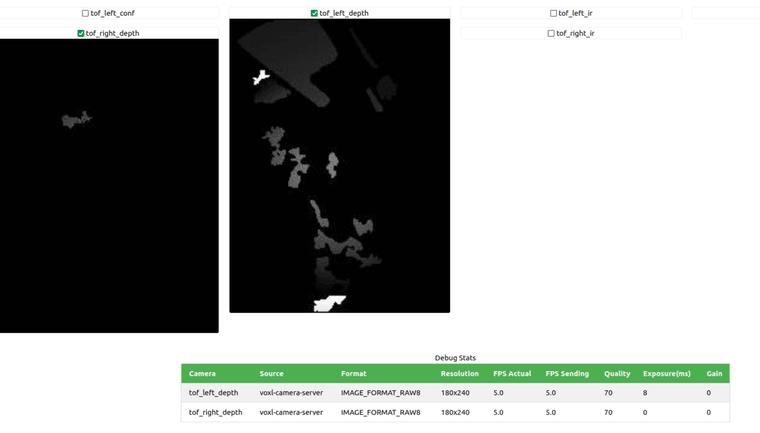
FPS is set to 5.
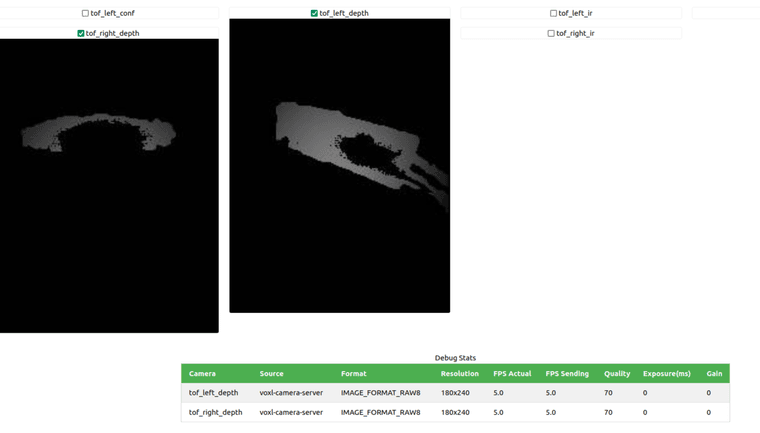
And here's another where one of the sensors is given a longer range to ping over:
-
@Alex-Kushleyev I will get the screenshots in a moment.
lme_msvwasn't set and I noticed that power usage wasn't going down and figured there was just a bug in the config-reading code, so I recompiled with the default exposure value in the#DEFINE AE_{HIST,MSV}_DEFAULTS_TOF_LIOW2overridden to 2000us and a printf inside the code chunk which sets it confirming that 2000 was being sent, so I am confident it was decreased. Good to know that settinglme_msvwill get it to respect theexposure_max_us, that was pretty unclear.Changes:
diff --git a/src/config_defaults.cpp b/src/config_defaults.cpp
index 096ff48..33c5a2e 100644
--- a/src/config_defaults.cpp
+++ b/src/config_defaults.cpp
@@ -223,7 +223,7 @@
     0,   \
     0,  \
     0,   \
-    6000,\
+    2000,\
     0, \
     0.0, \
     0.0, \
(END)
FPS is set to 5.
And here's another where one of the sensors is given a longer range to ping over:
@msberk , ok so you are not seeing exposure being reported.. You should double check that you are using the version of camera server that supports this feature:
(you should be able to see this print if you run
voxl-camera-server -d 0)In the following lines of code, the sensor temperature and exposure is read back and printed :
The exposure value should also be send with the tof data
IRMeta.exposure_ns.So if you run your
voxl-camera-server -d 0now and grep forTOF exp, if you don't see anything, it means you are not using the right version of camera server.If you correctly set the exposure to 2000us in 5FPS mode, the sensor should feel much cooler to the touch, it should never overheat. You could even try going lower to 1000us exposure for testing.
Alex
-
@msberk , ok so you are not seeing exposure being reported.. You should double check that you are using the version of camera server that supports this feature:
(you should be able to see this print if you run
voxl-camera-server -d 0)In the following lines of code, the sensor temperature and exposure is read back and printed :
The exposure value should also be send with the tof data
IRMeta.exposure_ns.So if you run your
voxl-camera-server -d 0now and grep forTOF exp, if you don't see anything, it means you are not using the right version of camera server.If you correctly set the exposure to 2000us in 5FPS mode, the sensor should feel much cooler to the touch, it should never overheat. You could even try going lower to 1000us exposure for testing.
Alex
OK, never mind, i guess you do see the exposure value show up in voxl-portal, so that is a good sign!
You could enable debug prints and see what the temperature of the sensors is reporting.
Also, can you please clarify where you are connecting 5V ?
-
@msberk , ok so you are not seeing exposure being reported.. You should double check that you are using the version of camera server that supports this feature:
(you should be able to see this print if you run
voxl-camera-server -d 0)In the following lines of code, the sensor temperature and exposure is read back and printed :
The exposure value should also be send with the tof data
IRMeta.exposure_ns.So if you run your
voxl-camera-server -d 0now and grep forTOF exp, if you don't see anything, it means you are not using the right version of camera server.If you correctly set the exposure to 2000us in 5FPS mode, the sensor should feel much cooler to the touch, it should never overheat. You could even try going lower to 1000us exposure for testing.
Alex
@Alex-Kushleyev Ah, right, sorry. 5V going to the power wires of the two ToF sensors.
-
@Alex-Kushleyev Ah, right, sorry. 5V going to the power wires of the two ToF sensors.
@msberk , thanks. Also, can you please clarify what adapter board you have plugged into the TOF2 sensor. Is it in this configuration ? https://docs.modalai.com/M0171/
-
@msberk , thanks. Also, can you please clarify what adapter board you have plugged into the TOF2 sensor. Is it in this configuration ? https://docs.modalai.com/M0171/
@Alex-Kushleyev It is M0169, we have yet to see M0171 go up for sale on the store or beta store, but would love some since the wire interface is clunky.
-
@Alex-Kushleyev It is M0169, we have yet to see M0171 go up for sale on the store or beta store, but would love some since the wire interface is clunky.
@msberk, OK, M0169 is fine and 5V input there is ok too.
So, after you were able to lower the exposure value, did you feel a noticeable temperature drop of the sensor? what if you set the limit to 1000us, does it overheat (that should be very unlikely).
Printing out the temperature should be helpful, if you want to change that debug print to regular print, so that you don't have all the other debug messages scrolling, that will be easy to see..
Alex
-
@msberk, OK, M0169 is fine and 5V input there is ok too.
So, after you were able to lower the exposure value, did you feel a noticeable temperature drop of the sensor? what if you set the limit to 1000us, does it overheat (that should be very unlikely).
Printing out the temperature should be helpful, if you want to change that debug print to regular print, so that you don't have all the other debug messages scrolling, that will be easy to see..
Alex
@Alex-Kushleyev It seems to be behaving at present. I picked 2000us since it seemed to give similar performance to the previous sensor. I'm going to try installing the "regular" 1.9.4 with the updated
ae_msvsetting and run that debug/grep again and make sure the setting is being respected. If so I may be ok, and just had something weird happen earlier since it was running on the bench for a while. What do y'all run on the starling 2 for max exposure? 6000 seemed practically unusable unless very actively cooled and we toasted a couple of these seemingly irrecoverably at that setting when we had them in the enclosure like the old sensors.Edit: running with default 1.9.4 and the correct settings in conf and it seems to respect 2000us limit. Also, to answer your temp question yes going from 6000 to 2000 made a huge difference in qualitative temperatures.
-
@Alex-Kushleyev It seems to be behaving at present. I picked 2000us since it seemed to give similar performance to the previous sensor. I'm going to try installing the "regular" 1.9.4 with the updated
ae_msvsetting and run that debug/grep again and make sure the setting is being respected. If so I may be ok, and just had something weird happen earlier since it was running on the bench for a while. What do y'all run on the starling 2 for max exposure? 6000 seemed practically unusable unless very actively cooled and we toasted a couple of these seemingly irrecoverably at that setting when we had them in the enclosure like the old sensors.Edit: running with default 1.9.4 and the correct settings in conf and it seems to respect 2000us limit. Also, to answer your temp question yes going from 6000 to 2000 made a huge difference in qualitative temperatures.
@msberk , OK, please do more testing at 2000us and keep an eye on the temperature. By the way, the TOF v1 had max phase exposure of 1.2ms, so even 2ms for TOF V2 will give you better performance than TOF V1.
On Starling 2 there is a heat spreader that helps dissipate the heat.
I believe there is a limit of 95C, if the sensor gets to that point, it will turn itself off.
Alex
-
@msberk , OK, please do more testing at 2000us and keep an eye on the temperature. By the way, the TOF v1 had max phase exposure of 1.2ms, so even 2ms for TOF V2 will give you better performance than TOF V1.
On Starling 2 there is a heat spreader that helps dissipate the heat.
I believe there is a limit of 95C, if the sensor gets to that point, it will turn itself off.
Alex
@Alex-Kushleyev Thanks so much for your help. If 1200us was the V1 level we may just set it to that and move forward, making something that works at the previous level with minimal surgery to the drone is our shortest path to success at the moment.
-
@Alex-Kushleyev Thanks so much for your help. If 1200us was the V1 level we may just set it to that and move forward, making something that works at the previous level with minimal surgery to the drone is our shortest path to success at the moment.
@Alex-Kushleyev just learned you cannot set the exposure max to 1200. 1000 and 1500 work. If you set it to 1200 you get a vague IO error
ERROR:   [ERROR] in _sensor_ioctl, ioctl failed: Connection timed out
ERROR:   [ERROR] in voxl_cci_read, Failed ioctl call
ERROR:   Failed CCI read
Just posting this here as an FYI to other wrestling with these new sensors.
-
@Alex-Kushleyev just learned you cannot set the exposure max to 1200. 1000 and 1500 work. If you set it to 1200 you get a vague IO error
ERROR:   [ERROR] in _sensor_ioctl, ioctl failed: Connection timed out
ERROR:   [ERROR] in voxl_cci_read, Failed ioctl call
ERROR:   Failed CCI read
Just posting this here as an FYI to other wrestling with these new sensors.
@msberk , one more thing, there was a recent change that bumped the default fps from 5 to 10, so if you were testing that and reduce the exposure time to 2000us, but the FPS was at 10hz instead of 5Hz, the power dissipation was double of what you intended. The exposure (up to 6000us) is specified per illuminated phase. There are 8 illuminated phases per frame in medium and long range TOF V2 modes. Perhaps this caused your overheating issues after you changed exposure to 2000 us but did not notice that the FPS increased to 10Hz.
I am going to share some more information about how the different modes, exposures and FPS relate to the power usage, but long story short, here is the take-away:
- if you have 5fps with 2000us exposure per phase (total 16ms exposure per frame), so that is 80ms of total exposure (active IR) time per second
- then for 10fps, 2000us exposure per phase ... 160ms of total exposure time (active IR) per second, double the power consumption / dissipation.
here is the commit with the change 5fps to 10
https://gitlab.com/voxl-public/voxl-sdk/services/voxl-camera-server/-/commit/919c24bef21cbea2eb7be33853884f5f606a0763another commit that removes the need for setting
lme_msvfor TOF to use theexposure_max_us
https://gitlab.com/voxl-public/voxl-sdk/services/voxl-camera-server/-/commit/0f195e2cbbe9cd4329d178ff42aa6f5fdf5e9307Alex
-
@msberk , one more thing, there was a recent change that bumped the default fps from 5 to 10, so if you were testing that and reduce the exposure time to 2000us, but the FPS was at 10hz instead of 5Hz, the power dissipation was double of what you intended. The exposure (up to 6000us) is specified per illuminated phase. There are 8 illuminated phases per frame in medium and long range TOF V2 modes. Perhaps this caused your overheating issues after you changed exposure to 2000 us but did not notice that the FPS increased to 10Hz.
I am going to share some more information about how the different modes, exposures and FPS relate to the power usage, but long story short, here is the take-away:
- if you have 5fps with 2000us exposure per phase (total 16ms exposure per frame), so that is 80ms of total exposure (active IR) time per second
- then for 10fps, 2000us exposure per phase ... 160ms of total exposure time (active IR) per second, double the power consumption / dissipation.
here is the commit with the change 5fps to 10
https://gitlab.com/voxl-public/voxl-sdk/services/voxl-camera-server/-/commit/919c24bef21cbea2eb7be33853884f5f606a0763another commit that removes the need for setting
lme_msvfor TOF to use theexposure_max_us
https://gitlab.com/voxl-public/voxl-sdk/services/voxl-camera-server/-/commit/0f195e2cbbe9cd4329d178ff42aa6f5fdf5e9307Alex
@msberk ,
We added a section to documentation that explains the power consumption of the TOF V2 sensor. As you will see, it depends on the operating conditions. Please review the details and you can use this to experiment with parameters and find something that works well for you.
https://docs.modalai.com/M0171/#power-consumption
If something is not clear in that documentation, please let me know.
Alex
-
@msberk ,
We added a section to documentation that explains the power consumption of the TOF V2 sensor. As you will see, it depends on the operating conditions. Please review the details and you can use this to experiment with parameters and find something that works well for you.
https://docs.modalai.com/M0171/#power-consumption
If something is not clear in that documentation, please let me know.
Alex
@Alex-Kushleyev Thanks! This is helpful. Definitely easier to overheat these than the last gen so good to have the specs on it.


Reading along? Create a free ModalAI Forum account to join in.
With an account you can reply, ask your own question, get an email when a ModalAI engineer answers, and mark the reply that solved it. Your place in each thread is saved between visits.
Questions about VOXL, Flight Core, ESCs and ModalAI drones are answered here by the engineers who build them.
Register Login