
Hi-res IMX214 (M0024-2) Color and Stuttering Issue
-
I just had my first flight with the M0024-2 image sensor and had some issues with there being a pink hue over majority of the image.
It seems like sometimes the center of the image has the correct colors, but the rest is very pink, almost like there was heat damage to the device. I was previously using the M0025 with the same IMX214 sensor and had no issues with it, but decided to upgrade for the larger FOV and longer focal length. I am using this sensor to detect color, so the color being accurate is very important for the project I am working on.
There is also some stuttering/shakiness on the videos taken with this sensor.
-
I just had my first flight with the M0024-2 image sensor and had some issues with there being a pink hue over majority of the image.
It seems like sometimes the center of the image has the correct colors, but the rest is very pink, almost like there was heat damage to the device. I was previously using the M0025 with the same IMX214 sensor and had no issues with it, but decided to upgrade for the larger FOV and longer focal length. I am using this sensor to detect color, so the color being accurate is very important for the project I am working on.
There is also some stuttering/shakiness on the videos taken with this sensor.
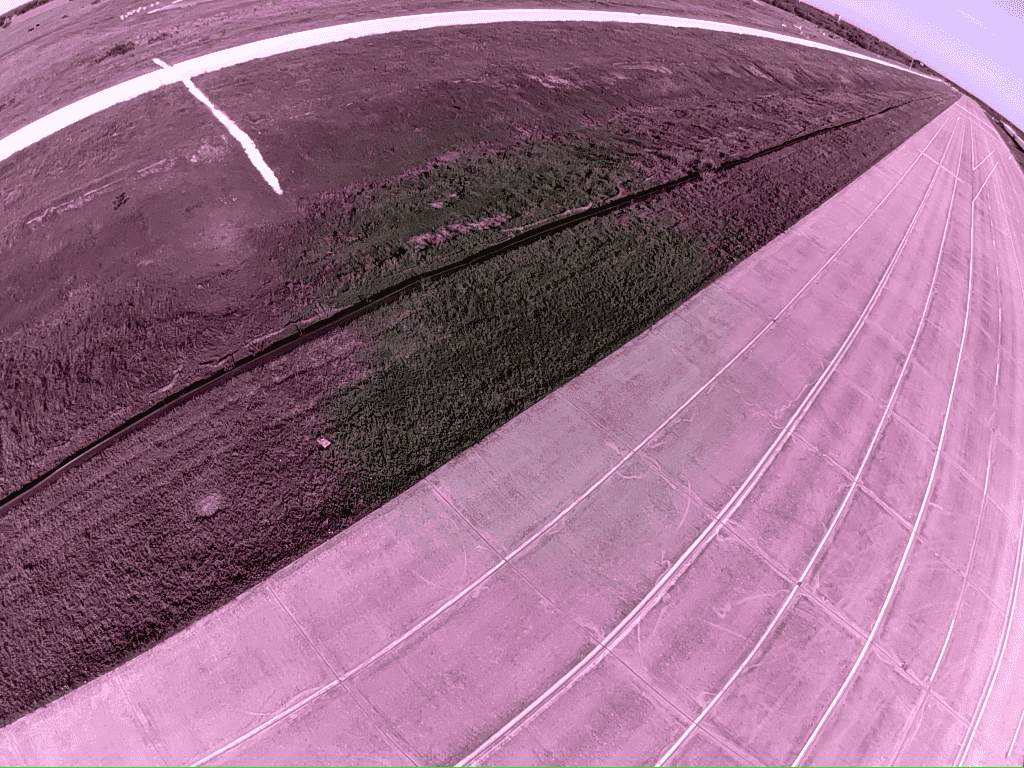
Here is a compressed example of the pink hue over the image that I am talking about
-
Here is a compressed example of the pink hue over the image that I am talking about
@Payton-Clem , we are working on resolving this configuration issue. Basically different cameras / lenses require different ISP tuning files. Can you please try the following:
copy file from
/usr/share/modalai/chi-cdk/tuned/com.qti.tuned.imx214_m0024.binto/usr/lib/camera/com.qti.tuned.imx214.bin(note the file name will change from the original name) and restart camera server. This tuning file is specific to M0024 module which has a different lens from M0025. I believe it should solve your issue.If you use this tuning file with your original M0025 camera, the image may look worse than before, in which case you can just remove
com.qti.tuned.imx214.binfor that use case.Regarding sharking / stuttering, is this new or did you also see it with M0025? is it a rolling shutter effect or something else?
Alex
-
@Payton-Clem , we are working on resolving this configuration issue. Basically different cameras / lenses require different ISP tuning files. Can you please try the following:
copy file from
/usr/share/modalai/chi-cdk/tuned/com.qti.tuned.imx214_m0024.binto/usr/lib/camera/com.qti.tuned.imx214.bin(note the file name will change from the original name) and restart camera server. This tuning file is specific to M0024 module which has a different lens from M0025. I believe it should solve your issue.If you use this tuning file with your original M0025 camera, the image may look worse than before, in which case you can just remove
com.qti.tuned.imx214.binfor that use case.Regarding sharking / stuttering, is this new or did you also see it with M0025? is it a rolling shutter effect or something else?
Alex
@Alex-Kushleyev That worked, thank you! And yes, it is the rolling shutter effect, I believe it was just more noticeable with the color change. Everything seems to be working now!


Reading along? Create a free ModalAI Forum account to join in.
With an account you can reply, ask your own question, get an email when a ModalAI engineer answers, and mark the reply that solved it. Your place in each thread is saved between visits.
Questions about VOXL, Flight Core, ESCs and ModalAI drones are answered here by the engineers who build them.
Register Login