
voxl-dfs-server: stereo pointcloud coordinate frame
-
Very quick question. I'm working on an application where I need to project the stereo_front_pc (from voxl-dfs-server) into the hires camera frame. This of course requires that I know the coordinate frame of the generated pointcloud. Since the underlying rectification process is closed source, I can't see any transformations involved in the rectification, just the resulting maps.
Is the coordinate frame associated with left camera, rectified left camera (in which case, how do I lookup R), or something else?
Tagging @James-Strawson and @thomas, since they are the authors of this package.
Thanks!
-
Very quick question. I'm working on an application where I need to project the stereo_front_pc (from voxl-dfs-server) into the hires camera frame. This of course requires that I know the coordinate frame of the generated pointcloud. Since the underlying rectification process is closed source, I can't see any transformations involved in the rectification, just the resulting maps.
Is the coordinate frame associated with left camera, rectified left camera (in which case, how do I lookup R), or something else?
Tagging @James-Strawson and @thomas, since they are the authors of this package.
Thanks!
I am seeing a very strong correlation between projected pointcloud and the front left image, but it's not perfect (bottom edge seems a bit off), so my guess is that the pointcloud coordinate frame is aligned with the left camera after slight rotation (for rectification):
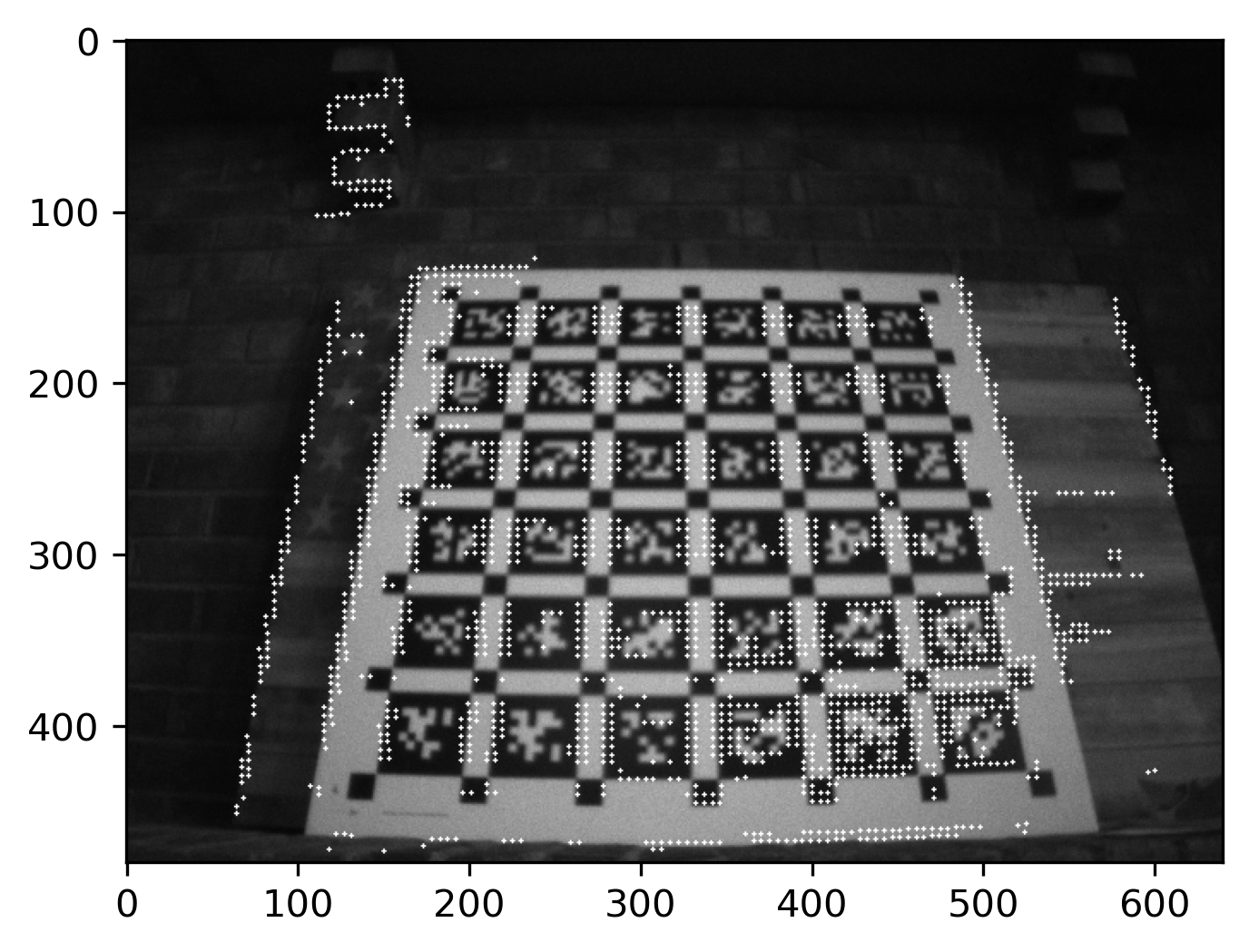
If so, how to extract this rotation and correct the transform?
-
I am seeing a very strong correlation between projected pointcloud and the front left image, but it's not perfect (bottom edge seems a bit off), so my guess is that the pointcloud coordinate frame is aligned with the left camera after slight rotation (for rectification):
If so, how to extract this rotation and correct the transform?
Hey Eric, happy to try and help you with this!
Firstly,
voxl-inspect-extrinsicsshould be helpful in at least getting some of the transformation matrices for the different cameras with respect to the body. If you need to configure extrinsics, check out the guide here.When we generate the pointcloud, it's based purely off the values in the disparity map. And we obtain the disparity map from a lower-level API that doesn't explicitly specify which pixel coordinate system it generates the disparity map with respect to. So I dug through the documentation and all I could find was a brief hint that it might be the left image which lines up with your observed outputs.
Your results do look off, though, and I think I might know why: Inside of
voxl-dfs-serverwe do an undistortion process on the left and right images before computing DFS. If you get points in undistorted space and try to project them back onto a distorted image the result will definitely be a little off.I understand the need to go from the undistorted space back to distorted space for extrinsics lookup, but I'm not sure I have a great method to do so. One thing you could try -- we undistort our images using a distortion grid specified in:
typedef struct mcv_undistort_config_t{
    int width;
    int height;
    int image_mode;
    mcv_cvp_undistort_grid_t* undistort_grid;

    /* Unused */
    mcvWarpMode warp_mode;       ///< currently unused
    mcvBorderMode border_mode;   ///< currently unused
    float transform[9];          ///< currently unused

} mcv_undistort_config_t;
where
/**
 * @brief General structure for an undistortion grid
 */
typedef struct mcv_cvp_undistort_grid_t {
    double* x;
    double* y;
} mcv_cvp_undistort_grid_t;
This undistortion grid gets populated before the DFS process starts, I wonder if you could extract it and somehow invert the result to get a grid that projects from undistorted space back to distorted space?
I apologize, I'm definitely not an expert here. Will forward this thread to James when he gets in, he'll likely have a better insight.
Hope this at least helps somewhat!
Thomas Patton
-
Hi Eric,
The stereo camera pair intrinsics and extrinsics are saved to /data/modalai/opencv_stereo_intrinsics.yaml and /data/modalai/opencv_stereo_extrinsics.yaml
We then use the following opencv calls to generate the rectification maps for each left and right image
cv::Mat R1, P1, R2, P2;
	cv::Mat map11, map12, map21, map22;
	cv::Mat Q; // Output 4×4 disparity-to-depth mapping matrix, to be used later
	double alpha = -1; // default scaling, similar to our "zoom" parameter
	cv::stereoRectify(M1, D1, M2, D2, img_size, R, T, R1, R2, P1, P2, Q, cv::CALIB_ZERO_DISPARITY, alpha, img_size);

	// make sure this uses CV_32_FC2 map format so we can read it and convert to our own
	// MCV undistortion map format, map12 and 22 are empty/unused!!
	cv::initUndistortRectifyMap(M1, D1, R1, P1, img_size, CV_32FC2, map11, map12);
	cv::initUndistortRectifyMap(M2, D2, R2, P2, img_size, CV_32FC2, map21, map22);
Those maps then get converted into a format that can be used by the Qualcomm hardware acceleration blocks for image dewarping, but the fundamental matrices and undistortion coefficients stay the same. I think the above lines is what you are after.
You are correct that the disparity map is centered about the left camera, I believe this is typical in OpenCV land too.
Note that we do not do a precise calibration between the Stereo and Hires Cameras from the factory, depending on how precise you need to alignment to be you may need to use a tool like Kalibr to do that.

Reading along? Create a free ModalAI Forum account to join in.
With an account you can reply, ask your own question, get an email when a ModalAI engineer answers, and mark the reply that solved it. Your place in each thread is saved between visits.
Questions about VOXL, Flight Core, ESCs and ModalAI drones are answered here by the engineers who build them.
Register Login