
VOXL2 dfs server crashing after update (stack smashing)
-
Hello, sorry to hear you are having issues with the DFS Server. I checked through our code updates and I don't believe there were any changes to DFS Server between 0.9.5 and 1.0.0 which makes me think the problem is related to configuration. From your logs the server is starting up which is a great sign. However, the lines:
client voxl-vision-hub0 connected to ch 5
client voxl-vision-hub0 connected to ch 2
Seem odd to me as typically the client should be
voxl-portal0. Here's what I would recommend trying:- Use
exitto get out of the shell andadb rebootto restart your VOXL2 - Once the device restarts, use
adb shellto access the terminal and then usevoxl-camera-serverto start the camera server manually - In a web browser access VOXL Portal as you have been. You should be able to see the stereo camera output.
- In another terminal, use
adb shellto access the terminal and then usevoxl-dfs-serverto launch the DFS Server.
This is the standard process I use when I launch the DFS Server. Give this a shot and let me know if it works, I've internally pinged some other members of the team that may know more as well.
Best of luck!
Thomas
- Use
-
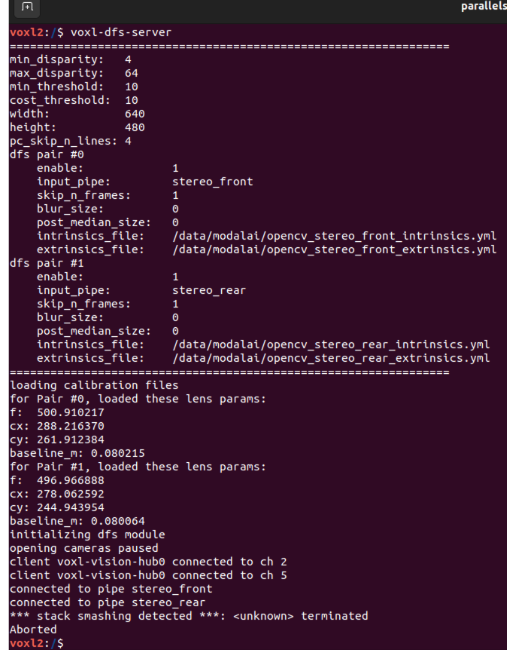
Hi, I just updated VOXL SDK on my VOXL2 from 0.9.5 to 1.0.0 and I cant get the dfs server working again. Before the SDK update I had the dfs server working fine and was able to view the point clouds on the VOXL portal. After the update I calibrated the stereo camera pairs and I configured the dfs server to run. If I start the dfs server manually I get the following output:
min_disparity:   4
max_disparity:   64
min_threshold:   10
cost_threshold:  10
width:           640
height:          480
pc_skip_n_lines: 4
dfs pair #0
    enable:             1
    input_pipe:         stereo_front
    skip_n_frames:      1
    blur_size:          0
    post_median_size:   0
    intrinsics_file:    /data/modalai/opencv_stereo_front_intrinsics.yml
    extrinsics_file:    /data/modalai/opencv_stereo_front_extrinsics.yml
dfs pair #1
    enable:             1
    input_pipe:         stereo_rear
    skip_n_frames:      1
    blur_size:          0
    post_median_size:   0
    intrinsics_file:    /data/modalai/opencv_stereo_rear_intrinsics.yml
    extrinsics_file:    /data/modalai/opencv_stereo_rear_extrinsics.yml
=================================================================
loading calibration files
for Pair #0, loaded these lens params:
f:  502.817902
cx: 301.336517
cy: 244.307022
baseline_m: 0.059588
for Pair #1, loaded these lens params:
f:  500.095612
cx: 317.889618
cy: 247.801651
baseline_m: 0.063119
initializing dfs module
opening cameras paused
client voxl-vision-hub0 connected to ch 5
client voxl-vision-hub0 connected to ch 2
connected to pipe stereo_rear
connected to pipe stereo_front
*** stack smashing detected ***: <unknown> terminated
Aborted
Any idea what could be wrong?
Thanks.
Best, Andrii.@AndriiHlyvko did the above fix for you? I'm having the same error, and I followed Thomas' suggestion -- unfortunately no change! Any other ideas?
-
@AndriiHlyvko did the above fix for you? I'm having the same error, and I followed Thomas' suggestion -- unfortunately no change! Any other ideas?
@camharrisvayu, @Thomas-Patton I just ended up downgrading my SDK version back to 0.9.5. I noticed that the camera calibration doesnt work as well in 1.0.0 either. When I was trying to recalibrate my stereo cameras in 1.0.0 it was having a difficult time detecting the chess board. So I reverted back to 0.9.5 and those problems went away.
-
@camharrisvayu, @Thomas-Patton I just ended up downgrading my SDK version back to 0.9.5. I noticed that the camera calibration doesnt work as well in 1.0.0 either. When I was trying to recalibrate my stereo cameras in 1.0.0 it was having a difficult time detecting the chess board. So I reverted back to 0.9.5 and those problems went away.
For camera calibration I can confirm we changed some of the threshold values between 0.9.5 and 1.0.0 with the goal of making calibration easier. If you're having a tougher time I'd recommend doing the calibration on SDK 0.9.5, pulling the intrinsics/extrinsics files to a local device, updating to 1.0.0, and then bringing the files back in. We have a nice page on how to push and pull files from your VOXL2 here. Camera calibration is a pretty tough task as we have to try and set threshold values that will inevitably not work well for everyone. We are currently working on a more sophisticated thresholding procedure but we're still some time away from it being released.
As for the DFS Server, it's tough for me to diagnose what the issue is without more info. Could you run
cat /etc/modalai/voxl-dfs-server.confso I can take a look at the output of your DFS configuration? That may help me in reproducing the issue.Again, sorry for the issues, best of luck!
Thomas
-
For camera calibration I can confirm we changed some of the threshold values between 0.9.5 and 1.0.0 with the goal of making calibration easier. If you're having a tougher time I'd recommend doing the calibration on SDK 0.9.5, pulling the intrinsics/extrinsics files to a local device, updating to 1.0.0, and then bringing the files back in. We have a nice page on how to push and pull files from your VOXL2 here. Camera calibration is a pretty tough task as we have to try and set threshold values that will inevitably not work well for everyone. We are currently working on a more sophisticated thresholding procedure but we're still some time away from it being released.
As for the DFS Server, it's tough for me to diagnose what the issue is without more info. Could you run
cat /etc/modalai/voxl-dfs-server.confso I can take a look at the output of your DFS configuration? That may help me in reproducing the issue.Again, sorry for the issues, best of luck!
Thomas
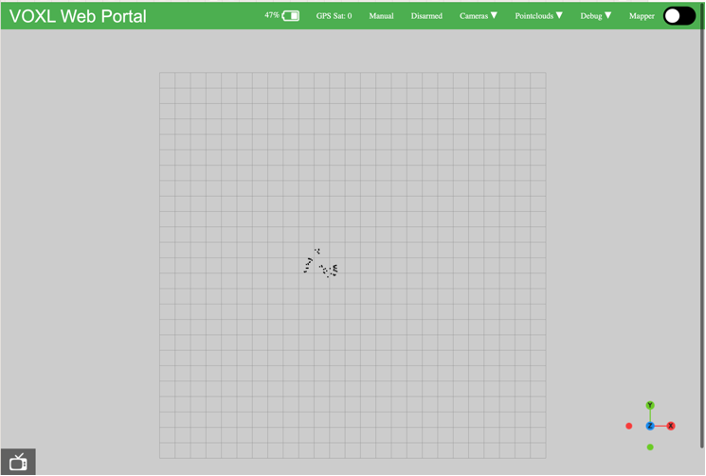
@Thomas-Patton Got the same problem. What I noticed is that when I run the dfs server manually I can see some points in the voxl portal, but after half a second I get the stack smashing detected and no more points. My dfs server conf is the following:
/**
 * This file contains configuration parameters for voxl-dfs-server.
 * You can specify up to 2 pairs to do detection on simultaneously.
 *
 *
 * min_disparity:     minimum disparity that is checked, default 4 since objects
 *                    really far away are hard to detect reliably anyway.
 *
 * max_disparity:     default 64, can decrease to improve latency slightly
 *                    maximum value is 64, 48 is a good option
 *
 * min_threshold:     must be <= cost_threshold, typically the same as cost_threshold,
 *                    must be in the range [0,100], default 10
 *
 * cost_threshold:    must be in the range [0,100], default 10. Lower numbers will
 *                    be more conservative and only detect matches with higher confidence
 *
 * width/ height:     All input images must have this resolution
 *
 * pc_skip_n_lines:   lines/columns to skip when outputting a point cloud. Set to
 *                    0 to output one point for every pixel, althought this is not
 *                    recommended since the resoluting point cloud would be huge.
 *                    default is 4, meaning generate point for every 5th row/column
 *
 * blur_size:         Optional gaussian blur before stereo match for particularly
 *                    noisy images. Off by default. Must be an odd number or set
 *                    to 0 to disable.
 *
 * skip_n_frames:     Automatically skip this number of input frames. Default 1 meaning
 *                    every other stereo frame is processed. Frames will be Automatically
 *                    skipped if the cpu can't keep up.
 *
 * post_median_size:  optional median filter after disparity matching. Can help to
 *                    reduce speckles but that's usually best done in 3D not 2D.
 *                    Off by default. Must be an odd number if you turn it on, a good
 *                    starting point is 15. This requires additional CPU.
 *
 */
{
	"min_disparity":	4,
	"max_disparity":	64,
	"min_threshold":	10,
	"cost_threshold":	10,
	"width":	640,
	"height":	480,
	"pc_skip_n_lines":	4,
	"dfs_pair_0":	{
		"enable":	true,
		"input_pipe":	"stereo_front",
		"skip_n_frames":	1,
		"blur_size":	0,
		"post_median_size":	0,
		"intrinsics_file":	"/data/modalai/opencv_stereo_front_intrinsics.yml",
		"extrinsics_file":	"/data/modalai/opencv_stereo_front_extrinsics.yml"
	},
	"dfs_pair_1":	{
		"enable":	true,
		"input_pipe":	"stereo_rear",
		"skip_n_frames":	1,
		"blur_size":	0,
		"post_median_size":	0,
		"intrinsics_file":	"/data/modalai/opencv_stereo_rear_intrinsics.yml",
		"extrinsics_file":	"/data/modalai/opencv_stereo_rear_extrinsics.yml"
	}
}
I am also using the 1.0.0 SDK with the stock sentinel platform.
Hope it helps solving the problem. -
I am running into the same issue when running dfs server. Is there anything that I could do, besides switching to SDK 0.9.5 to fetch the old camera configuration and push it onto the the new flashed SDK?
-
Sadly no updates. I've tried to reproduce the error using the configuration files you provided but DFS is working fine for me. We are releasing an update to this module in the next SDK release so hopefully that will be able to fix it. If the older SDK versions work for you I would suggest running those.
Thanks and sorry again,
Thomas
-
Sadly no updates. I've tried to reproduce the error using the configuration files you provided but DFS is working fine for me. We are releasing an update to this module in the next SDK release so hopefully that will be able to fix it. If the older SDK versions work for you I would suggest running those.
Thanks and sorry again,
Thomas
-
@afdrus Facing the same issue on Sentinel with VOXL SDK 1.0
@SMRazaRizvi @madswamp @Jgaucin @AndriiHlyvko @camharrisvayu
Hey all, apologies on this. We were finally able to recreate the issue but unable to determine what the root cause was. Regardless, we have a new SDK (1.1.0) released which isn't showing the stack smashing issue.
https://developer.modalai.com/asset/2
Please let me know if this is still an issue and sorry for the wait on this.
Thanks,
Thomas Patton

Reading along? Create a free ModalAI Forum account to join in.
With an account you can reply, ask your own question, get an email when a ModalAI engineer answers, and mark the reply that solved it. Your place in each thread is saved between visits.
Questions about VOXL, Flight Core, ESCs and ModalAI drones are answered here by the engineers who build them.
Register Login