R
R
Robbie McCue
Posts
-
Camera Calibration – Starling 2 Max -
Communication moduleWe have some documentation about integrating voxl2 with a 3rd party VTX here: https://docs.modalai.com/voxl2-with-third-party-vtx/. Hope this helps!
-
Stinger not responding to throttle (and only throttle)Hello,
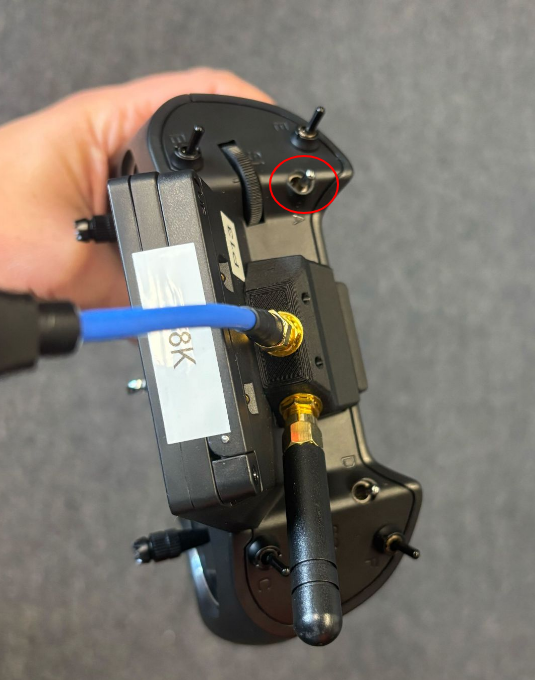
This behavior sounds like turtle mode may be engaged. What are you using for a controller?
If it is a zorro blue the turtle mode switch is in the top left. As a general rule of thumb all switches should be away from you prior to arming. Controls have changed slightly since the guide on the docs page has been updated. I am working on updating them now. For now, please see the image on this forum post for current control mapping.
Hope this help,
Robbie -
Stinger FPV/Blue Zorro/GogglesThere should be a serial number sticker on the bottom of the drone, likely near the camera at the front. It should start with an m and be followed by a series of numbers.
-
Stinger FPV/Blue Zorro/GogglesHello,
1.)
There are 2 possible ways to record video on the orqa goggles with our vrx. One is to insert a microsd card into the slot above the left eye of the goggles and press the red record button on the top right of the goggles. This records video through the orqa goggles and will show the OSD. The second way is to slide away the plastic cover on the VRX. This will expose the usb port used to record video from the vrx. This video will not include the osd and will save as a .h265 video file, which can be converted to your needed format using a variety of free/open sourced tools (ffmpeg is a popular one for this).2.)
For zorro blue controls please see this image, it should walk through all of the controls you need to know to get started.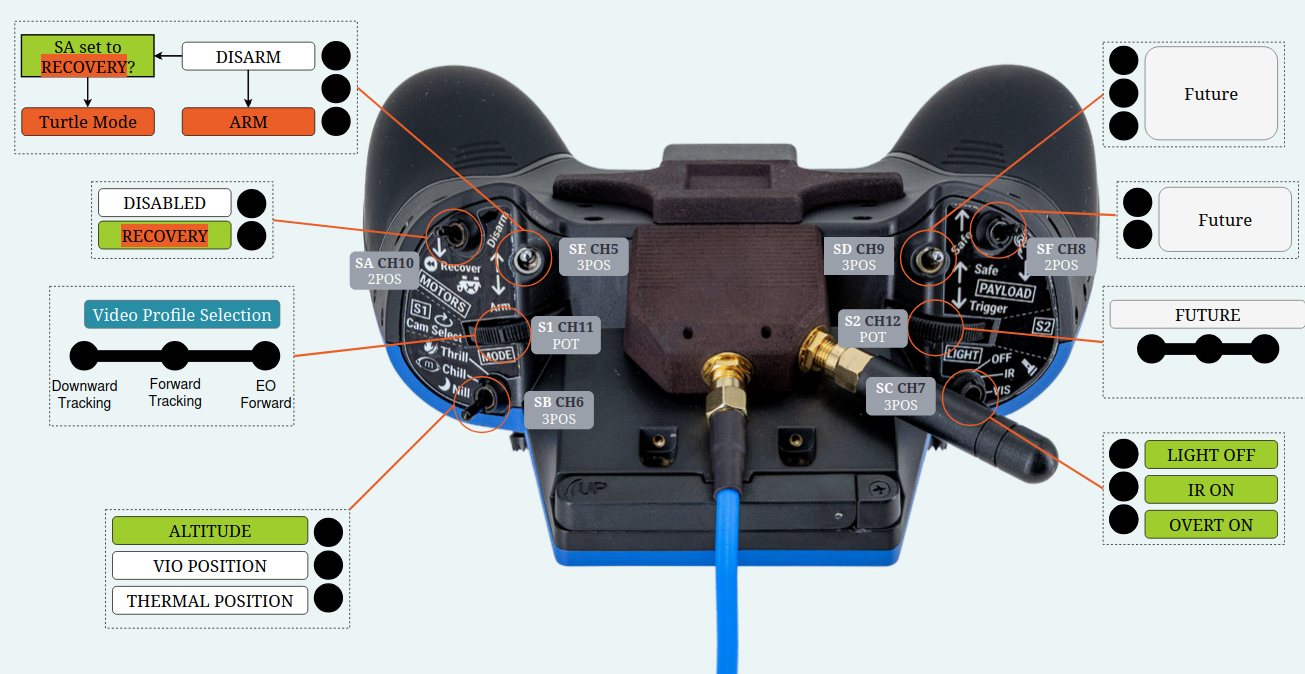
The backtrack switch is shown in the image as recovery. While flying flip this switch to start backtracking. On the osd you will have a visual indicator of how much backtrack is available. This shows as a swirl in the top left of the osd, which will grow as you collect more data for backtrack. Once you enter backtrack the swirl will begin to go away until all the data has been used. Backtrack will perform best immediately following engaging backtrack mode.
To engage turtle mode after a crash start by disarming the drone. Once the drone is disarmed flipped the recovery switch (Same as used for backtrack), arm the drone, and them move the right stick to flip yourself back up. Once you do this you will need to exit turtle mode (by disarming, turning off turtle mode, and arming the drone again).
3.)
It is possible the usbc cable on the vrx came unseated slightly during shipping. Please try removing the plastic housing on the vrx (the one that holds the usbc cable in), unplug it and try replug it in. The connection may be loose. To take off the plastic housing you can use a t5 screwdriver.If the units are in need of repair, our RMA form can be found here:
https://www.modalai.com/pages/rma?_pos=1&_sid=3c289327d&_ss=r -
Legacy Documentation for VOXL-Flight Deck (EOL) - Indoor Flight, VIO & Auto-Navigation@minhthinh Documentation for the original VOXL Flight can be found here. The guide will link back to the original VOXL and the original Flight Core as those are the boards it was built around. You can also refer to the release notes of the previous sdks to see what was available in the specific release that you are using
-
Legacy Documentation for VOXL-Flight Deck (EOL) - Indoor Flight, VIO & Auto-NavigationDocumentation for the flight deck platform can be found here: https://docs.modalai.com/voxl2-flight-deck/.
The user guide section provides links to using obstacle avoidance and VIO, that page is here[https://docs.modalai.com/voxl2-flight-deck-userguide-software/](https://docs.modalai.com/voxl2-flight-deck-userguide-software/].
The camera setup for the setup is here https://docs.modalai.com/voxl2-flight-deck-userguide-connections/.
The documentation on this website should also be helpful, there are specific sections about the sdk that may be helpful, including the voxl sdk camera server and other features.
Hope this helps,
Robbie -
Issues building Yolov8 trainerHi Jeremy,
i just replicated this issue and was able to build the container by making the following changes to the docker file. Try adding these on your end and see if this resolves the issue.
FROM nvidia/cuda:11.8.0-cudnn8-devel-ubuntu22.04 WORKDIR /app RUN echo '@@@@@@@@@@@@@@@@@@@@@@@@@@@@@@@@@@@@@@@@@@@@@@@@@@@@@@@@@@@@@@@@@@@@@@' RUN echo '@@@@@@@@@@@@@@@@@@@@@@@@@@@@@@@@@@@@@@@@@@@@@@@@@@@@@@@@@@@@@@@@@@@@@@' RUN echo '@@@@@@@@@@@@@@@@@@@@@@@@@, ,&@@@@@@@@@@@@@@@@@@@@@' RUN echo '@@@@@@@@@@@@@@@@@@& %@@@@@@@@@@@@@@@@@@@@( .@@@@@@@@@@@@@@@' RUN echo '@@@@@@@@@@@@@@( ,@@@@@@@@@@@@@@@@@@@@@@@@@@@@@@@@# @@@@@@@@@@@' RUN echo '@@@@@@@@@@@. @@@@@@@@@@/ ,%@@@@@@%* (@@@@@@@@@. %@@@ @@@@@@@@' RUN echo '@@@@@@@@% @@@@@@@@@@@ @&, *@& *@@@@@@@@@@ @@ %@@@@@@@@' RUN echo '@@@@@@, %@@@ @@@@@@@@@@@@@ @@@@@& @@@@@& @@@@@@@@@@@ *# @@@@@@' RUN echo '@@@@@ %@@@@@ *@@@@@@@@@@@@@ @@@@@& @@@@@% @@@@@@@@@@@* @@@@ @@@@@' RUN echo '@@@@@@. ., @@@@@@@@@@@@@ @@@@@& @@@@@% @@@@@@@@@@. @@@@@@@' RUN echo '@@@@@@@@@ @@& @@@&@@@@@@@@ @@@@@@.,@@@@@& @@@@@@@@ @@@@@@@@@' RUN echo '@@@@@@@@@@@@( %@@% (@@@@@@@@@@@@@@@@@@@@@@@@@@, *@@@@@@@@@@@@' RUN echo '@@@@@@@@@@@@@@@@@&. ,@@@@. .%@@@@@@@@@@@@@/ %@@@@@@@@@@@@@@@@' RUN echo '@@@@@@@@@@@@@@@@@@@@@@@@@@@@@@@@@@@(,. .(@@@@@@@@@@@@@@@@@@@@@@@@@' RUN echo '@@@@@@@@@@@@@@@@@@@@@@@@@@@@@@@@@@@@@@@@@@@@@@@@@@@@@@@@@@@@@@@@@@@@@@' RUN apt-get update && apt-get install -y \ git \ wget \ curl \ unzip \ python3 \ python3-pip \ build-essential \ cmake \ libgl1-mesa-glx \ libglib2.0-0 \ libusb-1.0-0 \ && rm -rf /var/lib/apt/lists/* RUN pip3 install torch torchvision torchaudio --index-url https://download.pytorch.org/whl/cu118 RUN pip3 install cmake RUN pip3 install protobuf==3.20.3 RUN pip3 install onnx #RUN pip3 install ultralytics tensorflow onnx onnx2tf>1.17.5,<=1.22.3 tflite_support onnxruntime onnxslim onnx_graphsurgeon>=0.3.26 sng4onnx>=1.0.1 tf_keras RUN pip3 install ultralytics tensorflow "onnx2tf>1.17.5,<=1.22.3" tflite_support onnxruntime onnxslim "onnx_graphsurgeon>=0.3.26" "sng4onnx>=1.0.1" tf_keras -
How to fly the drone (Stinger Vision FPV 3.5" sUAS )Hi Akhil,
Assuming the controller is from ModalAI the following steps can be done to arm the drone:
1.) Ensure the controller is on and all switches are flipped away from you
2.) Flip the arm switch (top silver switch on left side) all the way towards you(see image)
Hope this helps!