
Stinger FPV/Blue Zorro/Goggles
-
-
Project needs are to record pictures and or video to deliver to clients; your youtube videos show its possible through USB on the VRX. The USB on the VRX has been blocked off attached to the goggles. How can the system capture and store video to review later especially with the ORQA goggles? Can you store video on the ORQA goggles that was delivered with Stinger?
-
Do you have documentation/ user guide on the Zorro Blue, controls? Remote control seems different than videos online, such as what button does the backtrack? How long of flight path is the backtrack capable of? What is the correct sequence for turtle on the zorro blue? Do you have SOP, closure images/ documentation on the current model setups?
-
Turn on the goggles and drone and half the time all I see is "No Input Signal" what is the order of operations using the VRX/ORQA? Shouldnt this system be ready to fly out of the box? Any documentation on the goggles? Recommend SOPs or additional videos created with the ORQA/blue set up.
-
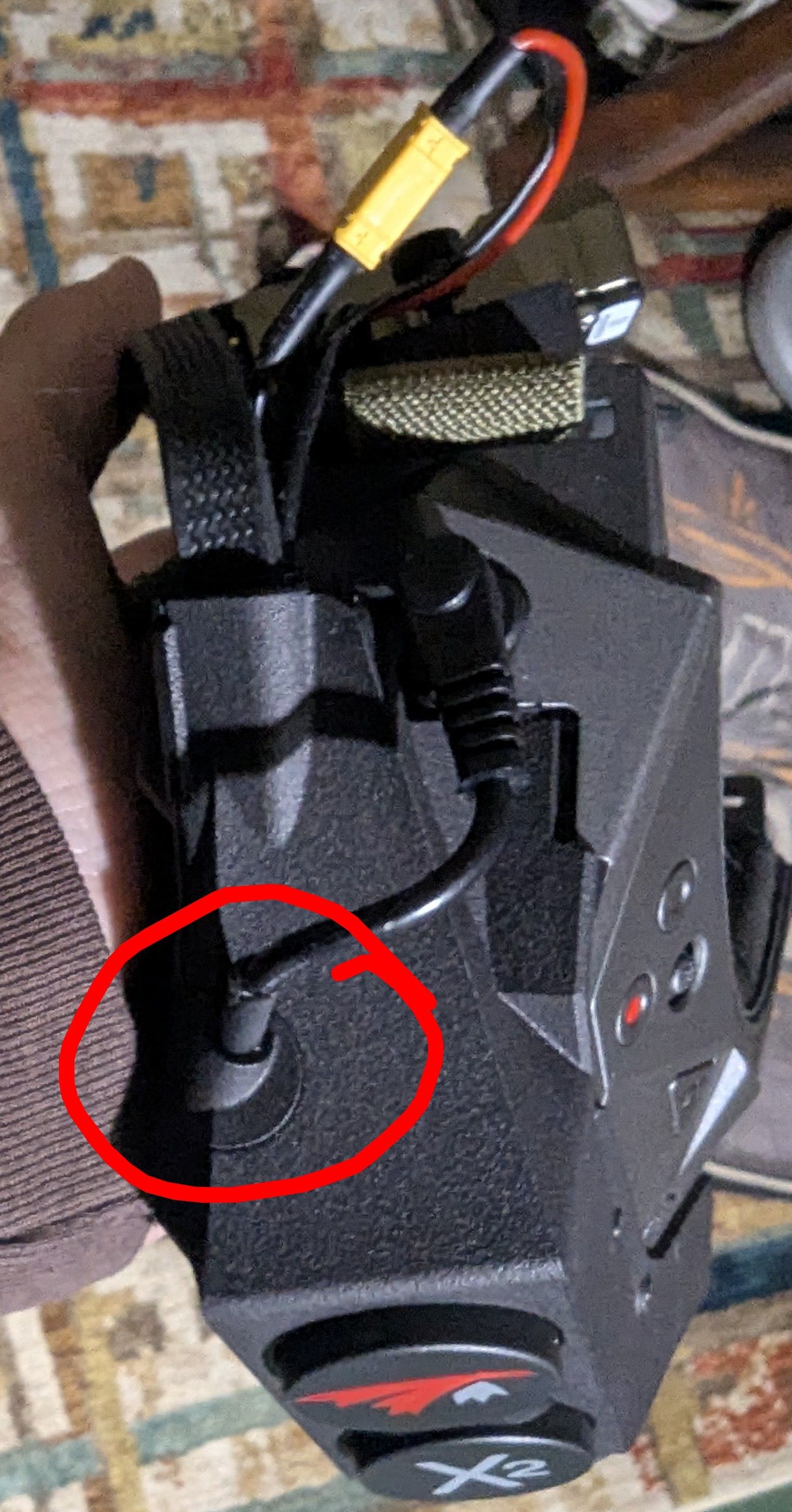
Also with the goggles the system I has a bad power connection. The cable that comes out of the goggles with the barrel jack, circled red in the image, if barely touched will cause the system to shut off. I have lost visual signal while test flying.
-
-
Hello,
1.)
There are 2 possible ways to record video on the orqa goggles with our vrx. One is to insert a microsd card into the slot above the left eye of the goggles and press the red record button on the top right of the goggles. This records video through the orqa goggles and will show the OSD. The second way is to slide away the plastic cover on the VRX. This will expose the usb port used to record video from the vrx. This video will not include the osd and will save as a .h265 video file, which can be converted to your needed format using a variety of free/open sourced tools (ffmpeg is a popular one for this).2.)
For zorro blue controls please see this image, it should walk through all of the controls you need to know to get started.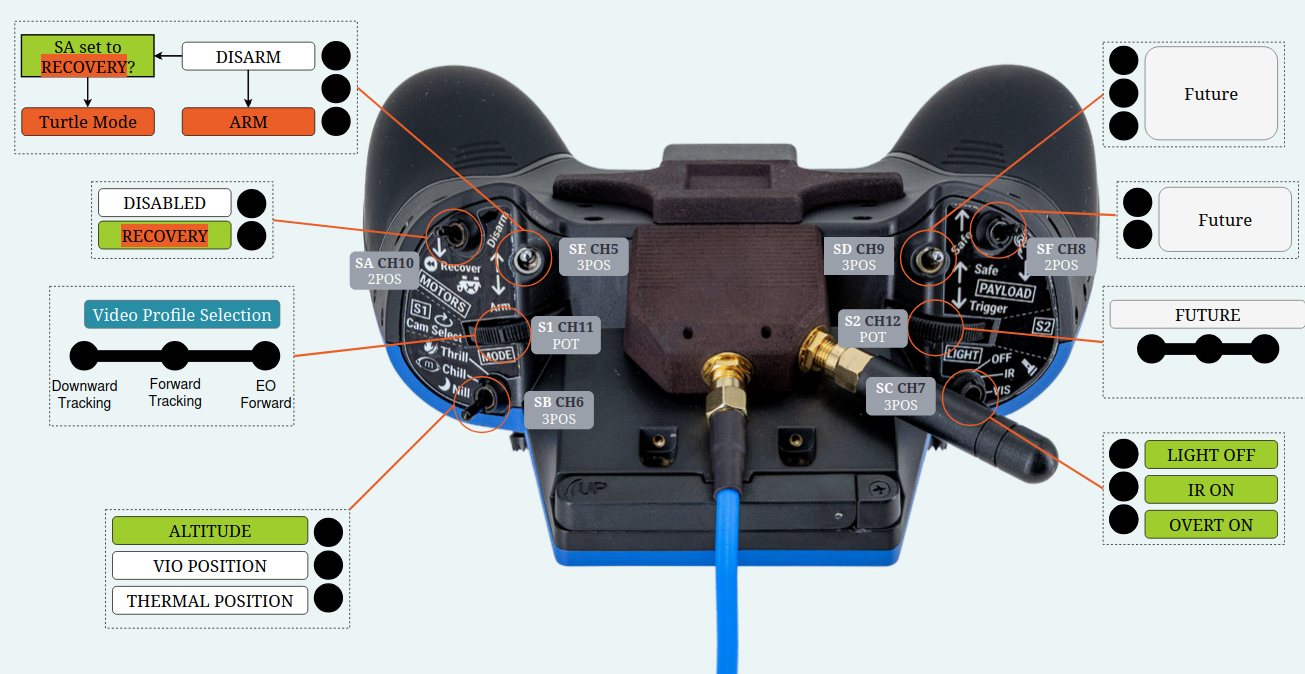
The backtrack switch is shown in the image as recovery. While flying flip this switch to start backtracking. On the osd you will have a visual indicator of how much backtrack is available. This shows as a swirl in the top left of the osd, which will grow as you collect more data for backtrack. Once you enter backtrack the swirl will begin to go away until all the data has been used. Backtrack will perform best immediately following engaging backtrack mode.
To engage turtle mode after a crash start by disarming the drone. Once the drone is disarmed flipped the recovery switch (Same as used for backtrack), arm the drone, and them move the right stick to flip yourself back up. Once you do this you will need to exit turtle mode (by disarming, turning off turtle mode, and arming the drone again).
3.)
It is possible the usbc cable on the vrx came unseated slightly during shipping. Please try removing the plastic housing on the vrx (the one that holds the usbc cable in), unplug it and try replug it in. The connection may be loose. To take off the plastic housing you can use a t5 screwdriver.If the units are in need of repair, our RMA form can be found here:
https://www.modalai.com/pages/rma?_pos=1&_sid=3c289327d&_ss=r -
Hello,
1.)
There are 2 possible ways to record video on the orqa goggles with our vrx. One is to insert a microsd card into the slot above the left eye of the goggles and press the red record button on the top right of the goggles. This records video through the orqa goggles and will show the OSD. The second way is to slide away the plastic cover on the VRX. This will expose the usb port used to record video from the vrx. This video will not include the osd and will save as a .h265 video file, which can be converted to your needed format using a variety of free/open sourced tools (ffmpeg is a popular one for this).2.)
For zorro blue controls please see this image, it should walk through all of the controls you need to know to get started.The backtrack switch is shown in the image as recovery. While flying flip this switch to start backtracking. On the osd you will have a visual indicator of how much backtrack is available. This shows as a swirl in the top left of the osd, which will grow as you collect more data for backtrack. Once you enter backtrack the swirl will begin to go away until all the data has been used. Backtrack will perform best immediately following engaging backtrack mode.
To engage turtle mode after a crash start by disarming the drone. Once the drone is disarmed flipped the recovery switch (Same as used for backtrack), arm the drone, and them move the right stick to flip yourself back up. Once you do this you will need to exit turtle mode (by disarming, turning off turtle mode, and arming the drone again).
3.)
It is possible the usbc cable on the vrx came unseated slightly during shipping. Please try removing the plastic housing on the vrx (the one that holds the usbc cable in), unplug it and try replug it in. The connection may be loose. To take off the plastic housing you can use a t5 screwdriver.If the units are in need of repair, our RMA form can be found here:
https://www.modalai.com/pages/rma?_pos=1&_sid=3c289327d&_ss=r@Robbie-McCue does the Stinger have an assigned serial number from ModalAI? If so where is it found?
-
@Robbie-McCue does the Stinger have an assigned serial number from ModalAI? If so where is it found?
There should be a serial number sticker on the bottom of the drone, likely near the camera at the front. It should start with an m and be followed by a series of numbers.
-
R Robbie McCue referenced this topic on
-
I'm losing video feed flying just behind a wall not far from me. What can I do to prevent video signal loss? Increase transmit watts or is there a frequency better suited to penetrate thick concrete walls?
Reading along? Create a free ModalAI Forum account to join in.
With an account you can reply, ask your own question, get an email when a ModalAI engineer answers, and mark the reply that solved it. Your place in each thread is saved between visits.
Questions about VOXL, Flight Core, ESCs and ModalAI drones are answered here by the engineers who build them.
Register Login