
@Eric-Katzfey We're using Crazyswarm2 for now with a motion capture system for positioning
Posts
-
Swarming Oriented Platform -
Swarming Oriented PlatformI have a set of Sentinels and a set of Crazyflies. I like the Sentinels for the onboard compute, sensor suite and all the built-in functionality that comes with the voxl SDK, but I've found it difficult to manage networking multiple together and managing as swarms.
The crazyflies are obviously less robust, but they're cheaper and much easier to scale swarms of because of the existing open source swarming software packages.
I was just curious if ModalAI has ever looked at producing a more swarming-oriented platform. Something like a scaled-down version of Starling 2 with more scalable networking options. Seems like a hole in the NDAA-compliant UAS market. It's easier for us to purchase COTS systems than build our own so I just wanted to see if that would be a potential option on the horizon or if ModalAI is sticking to single agent mission-type platforms
-
Sentinel Receiver/Transmitter RetrofitWanted to check in again. Any advice on swapping spektrum RC for ghost atto on voxl2?
-
Platform-Specific PX4 Bug - Incorrect Evaluation of NaNHardware - VOXL2
Software version - up to SDK 1.4.0I identified what could be a significant bug when attempting to implement offboard control via acceleration setpoints in px4 on voxl2. See this post for complete details:
https://discuss.px4.io/t/ros2-offboard-transitioning-from-position-to-acceleration-setpoints/44552/2
TLDR: acceleration control doesn't work because a constrain function in the MC position control code incorrectly clamps a value of NaN for vz (set in trajectory_setpoint.vz field from an external controller) to the downward velocity limit. This only occurs on VOXL2, not in px4_sitl built from the same firmware but running on my laptop.
I resolved the issue by wrapping the specific constrain function in a call to PX4_ISFINITE which just calls __builtin_isfinite(), but this raises the question of why is NaN being evaluated incorrectly within the constrain function and could checks on NaN be failing silently elsewhere in the control stack and causing other hard to track issues.
IDK if this is being caused by a compiler flag set specifically for voxl2, it's inherent to the QRB5165 hardware, or if this issue would apply to all ARM devices. Can someone take a look and provide some feedback?
-
GPIO on DSP?@tom got it, I think you indirectly answered my question by giving me the last valid configuration. Am I looking in the right place?:
voxl sdk 1.5.0 -> system image 1.8.04 -> recipes-kernel/linux-msm/files/dts/common/m0xxx-modalai-gpio.dtsi :
&soc {
	voxl_gpio {
		...

		modalai,gpio-init-output-high = <0 1 53 56 57 85 86 87 88 89 124 152 157 159>;
		modalai,**gpio-init-output-low** = <36 37 **46** 54 55 67 82 83 84 131 153 154 155>;
		modalai,gpio-init-input = <48 49 50 51 52 110 111 112 113 114>;

		status = "ok";
	};

	...
};
So settings for gpio pin 46 on sentinel w/ spektrum receiver should be direction:out, value:0 assuming they aren't overwritten somewhere else.
-
GPIO on DSP?@tom assuming this reply was accidental. I was asking about how the M0094 worked and required GPIO pin settings for rc data flow
-
GPIO on DSP?@jmltt nvm solved - GPIO pin 46 needs to have direction set to in or else data won't get through for some reason
one of the more recent voxl2 kernel board support package updates in the system image went from initializing GPIO46 as input to just not initializing it at all
-
Spektrum RC Bind Issues after SDK UpdateSo I'm guessing this has to do with the following I noticed in the changelog:
1.7.4
(voxl2_SDK_1.1.3)BSP:
- add
voxl-fysnc-modkernel module - add
voxl-gpio-modkernel module
--- GPIO now exporting to /sys/class/gpio - convert SE13 from 4W to 2W UART, freeing GPIO36/37
- add
voxl-platform-modkernel module
--- see/sys/module/voxl_platform_mod/parameters - add new target 'M0054-2' support (same rootfs as M0054-1)
- new kernel
- new devcfg.mbn
In system image 1.7.1 (SDK v1.1.2) on the drone that has no rc issues, recipes-kernel/linux-msm/files/dts/common/m0xxx-modalai-gpio.dtsi has:
&soc {
	b2b_conn_gpio_init {
		compatible = "modalai,voxl-b2b";
		pinctrl-names = "default";
		pinctrl-0 = <&tck22912G_ctrl_pin &b2b_pin7 &b2b_pin9 &b2b_pin17 &b2b_pin19 &b2b_pin38 &b2b_pin40 &hs_b2b_pin41 &hs_b2b_pin42 &hs_b2b_pin43 &hs_b2b_pin44 &hs_b2b_pin46 &hs_b2b_pin47 &hs_b2b_pin50 &hs_b2b_pin51 &hs_b2b_pin78 &hs_b2b_pin79 &hs_b2b_pin80 &hs_b2b_pin81 &hs_b2b_pin82 &j10_lvl_shf_ctrl_pin>;
		status = "ok";
	};

	rc_in_enable_init {
		compatible = "modalai,voxl-rc-in";
		pinctrl-names = "default";
		pinctrl-0 = <&rc_in_3v3_en_pin>;
		status = "ok";
	};
};
In image 1.7.4 (SDK 1.1.3), recipes-kernel/linux-msm/files/dts/common/m0xxx-modalai-gpio.dtsi:
&soc {
	voxl_gpio {
		compatible = "modalai,voxl-gpio";
		pinctrl-names = "default";
		pinctrl-0 = <&tck22912G_ctrl_pin
			&b2b_pin7 &b2b_pin9 &b2b_pin17 &b2b_pin19 &b2b_pin38 &b2b_pin40
			&hs_b2b_pin41 &hs_b2b_pin42 &hs_b2b_pin43 &hs_b2b_pin44 &hs_b2b_pin46 &hs_b2b_pin47 &hs_b2b_pin50 &hs_b2b_pin51 &hs_b2b_pin78 &hs_b2b_pin79 &hs_b2b_pin80 &hs_b2b_pin81 &hs_b2b_pin82 &hs_b2b_pin95 &hs_b2b_pin96
			&j10_lvl_shf_ctrl_pin &rc_in_3v3_en_pin &ds2_led_red &ds2_led_green &ds2_led_blue &id_som_1 &id_som_2 &id_mai_3 &id_mai_4>;

		modalai,gpio-init-output-high = <0 1 53 56 57 85 86 87 88 89 124 152 157 159>;
		modalai,gpio-init-output-low = <36 37 46 54 55 67 82 83 84 131 153 154 155>;
		modalai,gpio-init-input = <48 49 50 51 52>;

		status = "ok";
	};

	voxl_fsync {
		compatible = "modalai,voxl-fsync";
		pinctrl-names = "default";
		pinctrl-0 = <&camera_sync_110 &camera_sync_111 &camera_sync_112 &camera_sync_113 &camera_sync_114>;

		status = "ok";
	};
};
And then in image 1.8.06 (SDK v1.6.3) that is on the drone with the bind issues, recipes-kernel/linux-msm/files/dts/common/m0xxx-modalai-gpio.dtsi:
&soc {
	voxl_gpio {
		compatible = "modalai,voxl-gpio";
		pinctrl-names = "default";
		pinctrl-0 = <&tck22912G_ctrl_pin
			&b2b_pin7 &b2b_pin9 &b2b_pin17 &b2b_pin19 &b2b_pin38 &b2b_pin40
			&hs_b2b_pin41 &hs_b2b_pin42 &hs_b2b_pin43 &hs_b2b_pin44 &hs_b2b_pin46 &hs_b2b_pin47 &hs_b2b_pin50 &hs_b2b_pin51 &hs_b2b_pin78 &hs_b2b_pin79 &hs_b2b_pin80 &hs_b2b_pin81 &hs_b2b_pin82 &hs_b2b_pin95 &hs_b2b_pin96
			&j10_lvl_shf_ctrl_pin &rc_in_3v3_en_pin &ds2_led_red &ds2_led_green &ds2_led_blue &id_som_1 &id_som_2 &id_mai_3 &id_mai_4
			&camera_sync_110 &camera_sync_111 &camera_sync_112 &camera_sync_113 &camera_sync_114>;

		modalai,gpio-init-output-high = <0 1 53 56 57 67 85 86 87 88 89 124 152 157 159>;
		modalai,gpio-init-output-low = <36 37 54 55 82 83 84 131 153 154 155>;
		modalai,gpio-init-input = <48 49 50 51 52 110 111 112 113 114>;

		status = "ok";
	};

	voxl_fsync {
		compatible = "modalai,voxl-fsync";
		pinctrl-names = "default";

		status = "ok";
	};
};
So the gpio initialization process changed and rc_in_enable_init was removed between SDK v1.1.2 and v1.1.3, and between SDK v1.1.3 and v1.6.3, GPIO pin 67 got moved from modalai,gpio-init-output-low to modalai,gpio-init-output-high and GPIO pin 46 got removed from modalai,gpio-init-output-low.
Idk which change is responsible for the binding issues. I'd like to avoid flashing v1.1.3 to narrow it down. Can someone explain how the pins are meant to function for my set-up (M0094 + M0054, rc already bound)?
- add
-
GPIO on DSP?@Vinny Can you explain how the J10/J19, M0094 and the spektrum receiver are meant to work together?
I have a dev drone w/ VOXL2 & spektrum satellite receiver. After flashing the latest SDK (1.6.3) the receiver and transmitter stay bound but I have to force a rebind to get RC data coming in to PX4 every time I power cycle the drone. No issue up to SDK 1.1.2 and I noticed the way kernel GPIO initialization is handled changed in 1.1.3. More details here:
https://forum.modalai.com/topic/5243/spektrum-rc-bind-issues-after-sdk-update
I'm guessing this has to do with GPIO pin settings for pins 46, 67 or 159 being set wrong on boot, but I don't know enough about the hardware to understand what's going on. If I have a spektrum receiver on a dev drone w/ M0054 that is already bound to a transmitter, what should the GPIO pin settings be on boot to enable rc data flow to px4?
-
Spektrum RC Bind Issues after SDK UpdateOk so I've been comparing the Sentinel I have on an older SDK with no issues after power cycling with the one I just updated to the latest SDK and I noticed for the sentinel on the older SDK (1.1.2), the /sys/class/gpio only has the following
voxl2:~$ ls /sys/class/gpio/
export        gpiochip1076  gpiochip1094  unexport
gpiochip1072  gpiochip1085  gpiochip1100
where the sentinel with the latest SDK shows:
sentinel (D0006):~$ ls /sys/class/gpio/
export        gpio1152/     gpio1184/     gpio1213/     gpio1259/
gpio1100/     gpio1153/     gpio1185/     gpio1214/     gpiochip1072/
gpio1101/     gpio1154/     gpio1186/     gpio1224/     gpiochip1076/
gpio1136/     gpio1155/     gpio1187/     gpio1231/     gpiochip1085/
gpio1137/     gpio1156/     gpio1188/     gpio1252/     gpiochip1094/
gpio1148/     gpio1157/     gpio1189/     gpio1253/     gpiochip1100/
gpio1149/     gpio1167/     gpio1210/     gpio1254/     unexport
gpio1150/     gpio1182/     gpio1211/     gpio1255/
gpio1151/     gpio1183/     gpio1212/     gpio1257/
Then I ran voxl-bind-spektrum -ds on both and get nearly identical output, the SDK 1.6.3 the spektrum bind GPIO pin for M0154 is set even thought I'm on M0054
SDK 1.6.3:
sentinel (D0006):~$ voxl-bind-spektrum -ds
Enabling debug mode
Writing 1259 to /sys/class/gpio/export for gpio pin 1259
Writing 1 to /sys/class/gpio/gpio%d/value for gpio pin 1259
Writing 1259 to /sys/class/gpio/export for gpio pin 1259
Writing 0 to /sys/class/gpio/gpio%d/value for gpio pin 1259
Writing 1259 to /sys/class/gpio/export for gpio pin 1259
Writing 1 to /sys/class/gpio/gpio%d/value for gpio pin 1259
Writing 1146 to /sys/class/gpio/export for gpio pin 1146
Writing 0 to /sys/class/gpio/gpio%d/value for gpio pin 1146
Writing 1120 to /sys/class/gpio/export for gpio pin 1120
Writing 0 to /sys/class/gpio/gpio%d/value for gpio pin 1120
Writing 1146 to /sys/class/gpio/export for gpio pin 1146
Writing 0 to /sys/class/gpio/gpio%d/value for gpio pin 1146
Writing 1120 to /sys/class/gpio/export for gpio pin 1120
Writing 0 to /sys/class/gpio/gpio%d/value for gpio pin 1120
number of pulses: 7
Writing 1146 to /sys/class/gpio/export for gpio pin 1146
Writing 1 to /sys/class/gpio/gpio%d/value for gpio pin 1146
Writing 1120 to /sys/class/gpio/export for gpio pin 1120
Writing 1 to /sys/class/gpio/gpio%d/value for gpio pin 1120
Writing 1146 to /sys/class/gpio/export for gpio pin 1146
Writing 0 to /sys/class/gpio/gpio%d/value for gpio pin 1146
Writing 1120 to /sys/class/gpio/export for gpio pin 1120
Writing 0 to /sys/class/gpio/gpio%d/value for gpio pin 1120
Writing 1146 to /sys/class/gpio/export for gpio pin 1146
Writing 1 to /sys/class/gpio/gpio%d/value for gpio pin 1146
Writing 1120 to /sys/class/gpio/export for gpio pin 1120
Writing 1 to /sys/class/gpio/gpio%d/value for gpio pin 1120
Writing 1146 to /sys/class/gpio/export for gpio pin 1146
Writing 0 to /sys/class/gpio/gpio%d/value for gpio pin 1146
Writing 1120 to /sys/class/gpio/export for gpio pin 1120
Writing 0 to /sys/class/gpio/gpio%d/value for gpio pin 1120
Writing 1146 to /sys/class/gpio/export for gpio pin 1146
Writing 1 to /sys/class/gpio/gpio%d/value for gpio pin 1146
Writing 1120 to /sys/class/gpio/export for gpio pin 1120
Writing 1 to /sys/class/gpio/gpio%d/value for gpio pin 1120
Writing 1146 to /sys/class/gpio/export for gpio pin 1146
Writing 0 to /sys/class/gpio/gpio%d/value for gpio pin 1146
Writing 1120 to /sys/class/gpio/export for gpio pin 1120
Writing 0 to /sys/class/gpio/gpio%d/value for gpio pin 1120
Writing 1146 to /sys/class/gpio/export for gpio pin 1146
Writing 1 to /sys/class/gpio/gpio%d/value for gpio pin 1146
Writing 1120 to /sys/class/gpio/export for gpio pin 1120
Writing 1 to /sys/class/gpio/gpio%d/value for gpio pin 1120
Writing 1146 to /sys/class/gpio/export for gpio pin 1146
Writing 0 to /sys/class/gpio/gpio%d/value for gpio pin 1146
Writing 1120 to /sys/class/gpio/export for gpio pin 1120
Writing 0 to /sys/class/gpio/gpio%d/value for gpio pin 1120
Writing 1146 to /sys/class/gpio/export for gpio pin 1146
Writing 1 to /sys/class/gpio/gpio%d/value for gpio pin 1146
Writing 1120 to /sys/class/gpio/export for gpio pin 1120
Writing 1 to /sys/class/gpio/gpio%d/value for gpio pin 1120
Writing 1146 to /sys/class/gpio/export for gpio pin 1146
Writing 0 to /sys/class/gpio/gpio%d/value for gpio pin 1146
Writing 1120 to /sys/class/gpio/export for gpio pin 1120
Writing 0 to /sys/class/gpio/gpio%d/value for gpio pin 1120
Writing 1146 to /sys/class/gpio/export for gpio pin 1146
Writing 1 to /sys/class/gpio/gpio%d/value for gpio pin 1146
Writing 1120 to /sys/class/gpio/export for gpio pin 1120
Writing 1 to /sys/class/gpio/gpio%d/value for gpio pin 1120
Writing 1146 to /sys/class/gpio/export for gpio pin 1146
Writing 0 to /sys/class/gpio/gpio%d/value for gpio pin 1146
Writing 1120 to /sys/class/gpio/export for gpio pin 1120
Writing 0 to /sys/class/gpio/gpio%d/value for gpio pin 1120
Writing 1146 to /sys/class/gpio/export for gpio pin 1146
Writing 1 to /sys/class/gpio/gpio%d/value for gpio pin 1146
Writing 1120 to /sys/class/gpio/export for gpio pin 1120
Writing 1 to /sys/class/gpio/gpio%d/value for gpio pin 1120
Writing 1146 to /sys/class/gpio/export for gpio pin 1146
Writing 0 to /sys/class/gpio/gpio%d/value for gpio pin 1146
Writing 1120 to /sys/class/gpio/export for gpio pin 1120
Writing 0 to /sys/class/gpio/gpio%d/value for gpio pin 1120
Writing 1146 to /sys/class/gpio/export for gpio pin 1146
Writing in to /sys/class/gpio/gpio%d/direction for gpio pin 1146
read 0 from gpio pin 1146
Writing 1120 to /sys/class/gpio/export for gpio pin 1120
Writing in to /sys/class/gpio/gpio%d/direction for gpio pin 1120
read 0 from gpio pin 1120
An orange light should now be flashing on your receiver
If so, your receiver is successfully in binding mode
SDK 1.1.2
voxl2:~$ voxl-bind-spektrum -ds
Enabling debug mode
Writing 1259 to /sys/class/gpio/export for gpio pin 1259
Writing 1 to /sys/class/gpio/gpio%d/value for gpio pin 1259
Writing 1259 to /sys/class/gpio/export for gpio pin 1259
Writing 0 to /sys/class/gpio/gpio%d/value for gpio pin 1259
Writing 1259 to /sys/class/gpio/export for gpio pin 1259
Writing 1 to /sys/class/gpio/gpio%d/value for gpio pin 1259
Writing 1146 to /sys/class/gpio/export for gpio pin 1146
Writing 0 to /sys/class/gpio/gpio%d/value for gpio pin 1146
Writing 1146 to /sys/class/gpio/export for gpio pin 1146
Writing 0 to /sys/class/gpio/gpio%d/value for gpio pin 1146
number of pulses: 7
Writing 1146 to /sys/class/gpio/export for gpio pin 1146
Writing 1 to /sys/class/gpio/gpio%d/value for gpio pin 1146
Writing 1146 to /sys/class/gpio/export for gpio pin 1146
Writing 0 to /sys/class/gpio/gpio%d/value for gpio pin 1146
Writing 1146 to /sys/class/gpio/export for gpio pin 1146
Writing 1 to /sys/class/gpio/gpio%d/value for gpio pin 1146
Writing 1146 to /sys/class/gpio/export for gpio pin 1146
Writing 0 to /sys/class/gpio/gpio%d/value for gpio pin 1146
Writing 1146 to /sys/class/gpio/export for gpio pin 1146
Writing 1 to /sys/class/gpio/gpio%d/value for gpio pin 1146
Writing 1146 to /sys/class/gpio/export for gpio pin 1146
Writing 0 to /sys/class/gpio/gpio%d/value for gpio pin 1146
Writing 1146 to /sys/class/gpio/export for gpio pin 1146
Writing 1 to /sys/class/gpio/gpio%d/value for gpio pin 1146
Writing 1146 to /sys/class/gpio/export for gpio pin 1146
Writing 0 to /sys/class/gpio/gpio%d/value for gpio pin 1146
Writing 1146 to /sys/class/gpio/export for gpio pin 1146
Writing 1 to /sys/class/gpio/gpio%d/value for gpio pin 1146
Writing 1146 to /sys/class/gpio/export for gpio pin 1146
Writing 0 to /sys/class/gpio/gpio%d/value for gpio pin 1146
Writing 1146 to /sys/class/gpio/export for gpio pin 1146
Writing 1 to /sys/class/gpio/gpio%d/value for gpio pin 1146
Writing 1146 to /sys/class/gpio/export for gpio pin 1146
Writing 0 to /sys/class/gpio/gpio%d/value for gpio pin 1146
Writing 1146 to /sys/class/gpio/export for gpio pin 1146
Writing 1 to /sys/class/gpio/gpio%d/value for gpio pin 1146
Writing 1146 to /sys/class/gpio/export for gpio pin 1146
Writing 0 to /sys/class/gpio/gpio%d/value for gpio pin 1146
Writing 1146 to /sys/class/gpio/export for gpio pin 1146
Writing in to /sys/class/gpio/gpio%d/direction for gpio pin 1146
read 0 from gpio pin 1146
An orange light should now be flashing on your receiver
If so, your receiver is successfully in binding mode
Now the SDK1.1.2 quad shows:
voxl2:~$ ls /sys/class/gpio/
export    gpio1259      gpiochip1076  gpiochip1094  unexport
gpio1146  gpiochip1072  gpiochip1085  gpiochip1100
And SDK1.6.3:
sentinel (D0006):~$ ls /sys/class/gpio/
export    gpio1148  gpio1155  gpio1185  gpio1212  gpio1254      gpiochip1094
gpio1100  gpio1149  gpio1156  gpio1186  gpio1213  gpio1255      gpiochip1100
gpio1101  gpio1150  gpio1157  gpio1187  gpio1214  gpio1257      unexport
gpio1120  gpio1151  gpio1167  gpio1188  gpio1224  gpio1259
gpio1136  gpio1152  gpio1182  gpio1189  gpio1231  gpiochip1072
gpio1137  gpio1153  gpio1183  gpio1210  gpio1252  gpiochip1076
gpio1146  gpio1154  gpio1184  gpio1211  gpio1253  gpiochip1085
The pin settings after running voxl-spektrum-bind are the same for both vehicles in /sys/class/gpio/gpio1146 and /sys/class/gpio/gpio1259. After power cycling I'm right back where I started, but the settings for gpio1259 persist on the v1.6.3 quad.
I'm guessing I need to do something with the settings for gpio pin 46 or 159 to fix this. What should the gpio pin settings be on boot for a VOXL2 vehicle with an already bound spektrum receiver? Is the problem that /sys/class/gpio/gpio1259 settings persist between power cycles? Where are all these gpio settings getting written to on boot?
-
Sentinel Receiver/Transmitter RetrofitI have several Sentinels that were shipped with taoglas GPS/mag unit, ghost atto receiver, and orqa controllers with the ghost atto uberlite-24 transmitters. I also have some older sentinels that shipped with a different GPS/mag unit and the spektrum receiver/bind board.
Is there a way I could purchase the GPS/mag units, ghost atto receiver and transmitter/controller and cable assembly to the J19 connector that were used for the last iteration of the Sentinels? I don't even really care about the GPS/mag but I noticed on our newer quads there are wires from the ghost atto receiver board and the gps unit spliced together going into pin 1 of the J19 so I can't just hot swap the spektrum receiver with the ghost atto one.
-
Spektrum RC Bind Issues after SDK UpdateI've got an older Sentinel that shipped with Spektrum RC satellite receiver and some SDK pre v1.0.0 (I think it's SDK v0.8). It hasn't been used since we got it and I was setting up for first flight. I flashed the lastest SDK (1.6.3) and went through the set up procedure, calibrated it and flew it with the same Spektrum Transmitter I've used for some other Sentinels we've been flying more regularly.
I noticed after power cycling the vehicle and transmitter (Spektrum SPM9900), the Spektrum receiver and transmitter appear to bind automatically as expected (solid orange light on transmitter and receiver light up at same time when powered on), but px4 never gets the RC data (px4-listener input_rc returns never published) until I force them to rebind by running voxl-bind-spektrum -s and setting the transmitter in bind mode.
Does anyone know what could be causing this? I don't know enough about how the spektrum bind board (M0094) works, but reading through voxl-spektrum-bind.c I'm guessing this has something to do with the GPIO pin direction settings. Did the default settings change between SDK versions? I don't have this problem with other Sentinels running SDK 1.1
-
Wifi Adapter Disconnecting - wlan0 not detected@Vinny Perfect, thanks!
-
Wifi Adapter Disconnecting - wlan0 not detected@Vinny That's it! I don't know how I missed it.
I couldn't find the wifi adapters that shipped with the sentinels in your store so I'm assuming you don't sell them individually.
Does it matter what kind of adapter I get, are there any specs that I need to looks for or can I pretty much use anything?
Thanks!
-
Wifi Adapter Disconnecting - wlan0 not detected@Alex-Kushleyev I just wanted to check back and see if you guys still have any of the longer cables or the entire assemblies that I could purchase. I haven't had a chance to troubleshoot the potentially bad cable, but we're just looking to replace it since we need to retrofit the older models anyways.
Again, if not no worries we make our own cables and buy the adapters it'd just be easier to buy ready-made sets.
-
Wifi Adapter Disconnecting - wlan0 not detected@Alex-Kushleyev That is the type of cable I'd need but I've actually ordered that one (MCBL-00009-1) before for a separate application and just eyeballing it it's about half the length I'd need. Here's a picture of the set-up
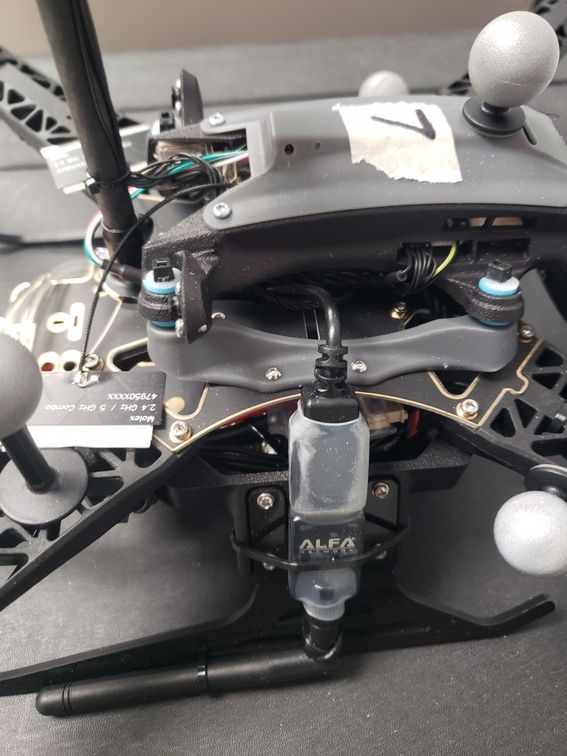
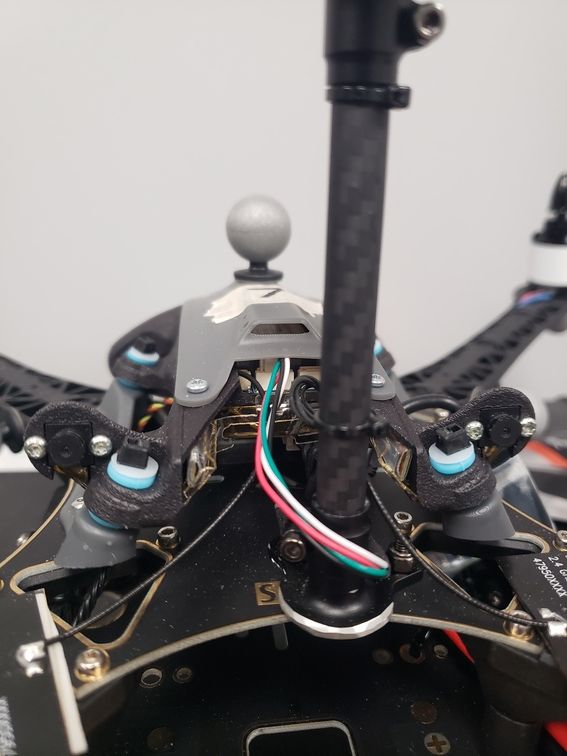
Also, in addition to trying to troubleshoot this adapter/cable I need to retrofit four older Sentinel models (were only shipped with the microhard carrier board, no wifi adapter) with wifi adapters so if it's possible I'd like to just purchase five assemblies (usb to jst and wifi adapter shrink wrapped together). If you guys don't have any of that cabling already made or there's no mechanism for me to order them as a set that's totally fine. We can order the piece parts and make the cabling ourselves, it'd just be easier for us to order them if that's possible.
-
Wifi Adapter Disconnecting - wlan0 not detected@jmltt This is still a problem. I reverted the changes for static IP set-up and am just using DHCP so the settings are the same as how the quad was shipped. Still getting cannot enable, usb cable bad? messages after the wifi adapter if recognized on start-up. I'm hoping the the wifi adapter or cabling is just bad and not the port on the carrier board.
[    2.361738] usbcore: registered new interface driver 8188eu
[    2.447119] usbcore: registered new interface driver rtl8821cu
[    2.499469] usbcore: registered new interface driver rtl88XXau
[    2.912052] usb 1-1: new high-speed USB device number 2 using xhci-hcd
[    3.048404] usb 1-1: New USB device found, idVendor=0424, idProduct=2514, bcdDevice= b.b3
[    3.048410] usb 1-1: New USB device strings: Mfr=0, Product=0, SerialNumber=0
[    4.220352] usb 1-1-port4: Cannot enable. Maybe the USB cable is bad?
[    5.022237] f_cdev_alloc: port_name:at_usb0 (ffffffe44efe8000) portno:(0)
[    5.024793] f_cdev_alloc: port_name:at_usb1 (ffffffe44c25f400) portno:(1)
[    5.068782] usb 1-1-port4: Cannot enable. Maybe the USB cable is bad?
[    5.069166] usb 1-1-port4: attempt power cycle
[    6.208341] usb 1-1-port4: Cannot enable. Maybe the USB cable is bad?
[    6.280130] usb 1-1.4: new high-speed USB device number 6 using xhci-hcd
[    6.280207] usb 1-1.4: Device not responding to setup address.
[    6.484149] usb 1-1.4: Device not responding to setup address.
[    6.688146] usb 1-1.4: device not accepting address 6, error -71
[    6.688417] usb 1-1-port4: unable to enumerate USB device
[    7.673010] usb 1-1-port4: Cannot enable. Maybe the USB cable is bad?
[    8.520477] usb 1-1-port4: Cannot enable. Maybe the USB cable is bad?
[    8.520664] usb 1-1-port4: attempt power cycle
[    9.660805] usb 1-1-port4: Cannot enable. Maybe the USB cable is bad?
[   10.500523] usb 1-1-port4: Cannot enable. Maybe the USB cable is bad?
[   10.500714] usb 1-1-port4: unable to enumerate USB device
When I take the lid off the and reseat the JST connector it starts working again. Maybe the problem is the lid clamping down on the wires and slowly pulling the connector out or maybe it's just bad wires.
Is there any way to order a replacement assembly? Like the way it's shipped, 4-pin JST to to USB to wifi adapter with the shrink wrap and everything? I know Sentinels EOL but I'm assuming you might have the same wifi adapter set-up for another platform
If this is more of a customer support question can someone point me to an email address to direct this to? Thanks
-
voxl-px4 vs mainline px4 SITL questionsLooks the same bug as here: https://github.com/PX4/PX4-Autopilot/issues/22148
Added the change from this commit and it looks like it works now: https://github.com/PX4/PX4-Autopilot/pull/22194/commits/38f3c711084b349cb9ed82cf44ff181c6a40738a
-
SITL using VOXL2 PX4 software@Zachary-Lowell-0 said in SITL using VOXL2 PX4 software:
That is correct it would only be able to support one vehicle. You can test SITL multi vehicles on your parent computer running SITL, however the modules and drivers running in that environment would differ from what is running on the voxl2.
I'm trying to do the same thing as the original poster (see https://forum.modalai.com/topic/4930/voxl-px4-vs-mainline-px4-sitl-questions)
Can you explain generally the differences between the code running on the vehicle vs a SITL build? Is the flight control stack (save sensor input) mostly the same if building the sitl from the px4-firmware branch that's on the quads? I'm going to try out HITL using modalai's docker image as well, but I'd like a SITL build that's going to be as close as possible to what's running on the quads so I can test multi-vehicle control via ros2
-
voxl-px4 vs mainline px4 SITL questionsBackground: I'm trying to set up a multi-vehicle sim environment using gazebo and px4 sitl. I've got 4 quads on SDK v1.3.5. I wanted to pull the voxl-px4/modalai px4-firmware version from that release to build px4_sitl on my local machine so I can test in sim against a version that's going to most representative of firmware on the quads.
I'm building inside a ubuntu 22 docker container after running ./px4-firmware/Tools/setup/ubuntu.sh. The px4_sitl build failed because of the bug mentioned here: https://forum.modalai.com/topic/3510/px4-build-broken-for-sitl-targets
I implemented the poster's fix (https://github.com/modalai/px4-firmware/pull/61) and was able to build px4-sitl but when I run it I get the following errors:
ERROR [gz_bridge] timed out waiting for clock message
ERROR [gz_bridge] Task start failed (-1)
ERROR [init] gz_bridge failed to start
ERROR [px4] Startup script returned with return value: 256Are there extra steps I missed that are required to build px4_sitl from modalai's px4-firmware fork vs the mainline px4? Is it just not going to work if I try to build it on my laptop?
If I have to pull a mainline px4 branch to build sitl on my laptop, is there a specific release (e.g. 1.14.0-1.14.4) that would be most analogous to the past/current branches of modalai's px4-firmware? The voxl-px4 version I have installed on the quads is using the 1.14.0-2.0.85 firmware.
I'm doing multi-vehicle offboard control via ros2 w/ ext vision for state estimation, mostly testing code that publishes trajectory setpoints. I'd like to make sure at least the controller and estimator code is as close as possible to what's running on the quads.