
@Eric-Katzfey PLATFORM=M0054. I changed the command to gps start and now when I run "voxl-px4" the gps commands don't print to the shell. QGS and "voxl-inspect-gps" also show that there is no GPS connection. Thoughts?

@Eric-Katzfey PLATFORM=M0054. I changed the command to gps start and now when I run "voxl-px4" the gps commands don't print to the shell. QGS and "voxl-inspect-gps" also show that there is no GPS connection. Thoughts?
@Eric-Katzfey Still getting an error but its a different error code number. I've made the changes that you recommended as well. Any other thoughts on what could be wrong?
ERROR [muorb] [gps] failed to open /dev/spidev14.0 err: 34
ERROR [muorb] [drivers__device] Could not convert /dev/spidev14.0 into a valid uart port number
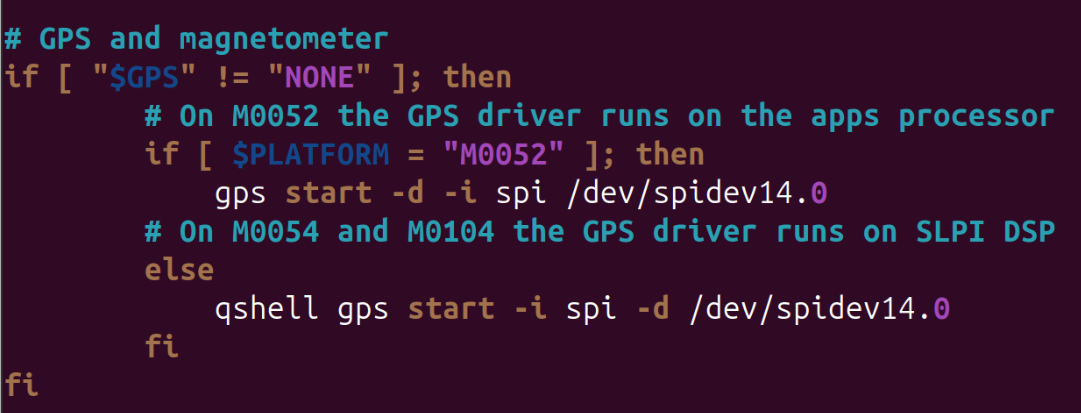
@Zachary-Lowell-0 It seems like PX4 is configured to find the GPS on UART even though I give it the "dev/spidev14.0" port. Is there a way to force PX4 to listen through SPI protocol? Below is the error I'm receiving:
ERROR [muorb] [gps] failed to open /dev/spidev14.0 err: 22
ERROR [muorb] [drivers__device] Could not convert /dev/spidev14.0 into a valid uart port number
Hi,
I'm currently attempting to use a GPS through the J10 SPI port on the VOXL 2. I plugged it in and ran voxl-inspect-gps but it doesn't seem to be connected. Do I have to change some software settings to get this to work?
Thanks.
Hi,
I'd like to set up H-RTK ZED-F9P Ultralight GPS with RTK with the VOXL2. I'm planning to plug this into the VOXL's J19 port using the GPS unit's 6/8 (VCC, TX, RX, SCL, SDA, GND) pins into the VOXL's first 6 pins. Does this sound like it should work?
Thanks
@Teon Hi,
Can I ask if you got the RTK set up working? I'm trying to do the same thing.
@Eric-Katzfey Understood. Will look into this. Do you have any idea why my J19 Port testing method failed? How can I make sure that the issue is not stemming from the port itself?
Hi,
I'm attempting to plug in a Zed-F9P into a VOXL 2's J19 connector and it doesn't seem to work. I've tried to query the GPS but it returns as no device found. I've moved to make sure the J19 port is working by shorting the TX and RX pins and sending data over RX while listing with busybox. I'm not able to receive any data from TX through this method.
Is it possible my VOXL connector is broken or am I doing something wrong?