
TOF SLAM
-
On your TOF Sensor page, you have two demo videos. I'm interested in reproducing that result.
What SLAM algorithm are you using? (I have used a few different SLAM algorithm in the past, but those were processor intensive, and I suspect I'll need something a little more lightweight to run on the VOXL.)
From the videos, it looks like you are using ROS and rviz. Is that correct? If so, I presume you are using mpa_to_ros to publish the TOF data on a topic in ROS...and then use the SLAM algorithm to ingest that data and produce the map in the videos. Is that correct? Are there any other sensors' data that the SLAM algortihm is ingesting (e.g., IMU)?
-
Hi Jared,
Our current SLAM project that we've been working on for the past few months uses ETH Zurich's voxblox algorithm. Our demos for this have been using ros for visualization (but with all the actual mapping running on-board), but we are nearing (next month or two) an initial ros-free release that will use voxl-portal for visualization in a web browser. This mapping system uses voxl-qvio-server for localization (with optional help from voxl-vision-px4 if using apriltags/other fiducial markers) and the tof sensor for actual mapping. Additionally, we have done a small amount of mapping with depth from stereo cameras, but as this has generally been designed as an indoor tool (where the tof sensor thrives) we primarily use tof.
-
Hi Jared,
Our current SLAM project that we've been working on for the past few months uses ETH Zurich's voxblox algorithm. Our demos for this have been using ros for visualization (but with all the actual mapping running on-board), but we are nearing (next month or two) an initial ros-free release that will use voxl-portal for visualization in a web browser. This mapping system uses voxl-qvio-server for localization (with optional help from voxl-vision-px4 if using apriltags/other fiducial markers) and the tof sensor for actual mapping. Additionally, we have done a small amount of mapping with depth from stereo cameras, but as this has generally been designed as an indoor tool (where the tof sensor thrives) we primarily use tof.
@Alex-Gardner Sounds good. We'll look into it. Thanks!
-
@Alex-Gardner, I was wondering if you have a timeline when when your current SLAM work would be released (e.g., working demo code). Thanks!
-
@jaredjohansen, our current SLAM work is still under active development, but you can check the repo here for some working beta code!
-
Great -- thank you!
-
@jaredjohansen, our current SLAM work is still under active development, but you can check the repo here for some working beta code!
@Matt-Turi I've been beta-testing the mapper project this week and seem to be 95% of the way there.
Mapping appears to go well, walls are reliably detected and the mesh looks good for flight. However, within the mapper I cannot seem to get a path to load.
From the mesh view, I'm clicking plan to point, and selecting an arbitrary point within the map and press 'go'. From terminal (voxl-mapper -d), I see that it solves for the path (fairly quickly), attempts to do some smoothing and ultimately reports a Success message.However, I don't see the path load in the mapper, nor do I see any indication to proceed with a flight.
-
@Matt-Turi I've been beta-testing the mapper project this week and seem to be 95% of the way there.
Mapping appears to go well, walls are reliably detected and the mesh looks good for flight. However, within the mapper I cannot seem to get a path to load.
From the mesh view, I'm clicking plan to point, and selecting an arbitrary point within the map and press 'go'. From terminal (voxl-mapper -d), I see that it solves for the path (fairly quickly), attempts to do some smoothing and ultimately reports a Success message.However, I don't see the path load in the mapper, nor do I see any indication to proceed with a flight.
voxl-inspect-services
 Service Name        |  Enabled  |   Running   |  CPU Usage
--------------------------------------------------------------
 docker-autorun      | Disabled  | Not Running | Not Running
 docker-daemon       | Disabled  | Not Running | Not Running
 modallink-relink    | Disabled  | Not Running | Not Running
 voxl-camera-server  |  Enabled  |   Running   |     6.1
 voxl-cpu-monitor    |  Enabled  |   Running   |     0.0
 voxl-dfs-server     | Disabled  | Not Running | Not Running
 voxl-imu-server     |  Enabled  |   Running   |     0.0
 voxl-modem          | Disabled  | Not Running | Not Running
 voxl-portal         |  Enabled  |   Running   |     0.0
 voxl-qvio-server    |  Enabled  |   Running   |    11.9
 voxl-streamer       | Disabled  | Not Running | Not Running
 voxl-tag-detector   | Disabled  | Not Running | Not Running
 voxl-tflite-server  | Disabled  | Not Running | Not Running
 voxl-time-sync      | Disabled  | Not Running | Not Running
 voxl-vision-px4     |  Enabled  |   Running   |     4.0
 voxl-wait-for-fs    |  Enabled  |  Completed  |  Completed
Current voxl-vision-px4.conf:
{
        "qgc_ip":       "192.168.8.84",
        "en_localhost_mavlink_udp":     true,
        "en_secondary_qgc":     false,
        "secondary_qgc_ip":     "192.168.1.29",
        "qgc_udp_port_number":  14550,
        "localhost_udp_port_number":    14551,
        "udp_mtu":      512,
        "en_vio":       true,
        "en_voa":       true,
        "en_send_vio_to_qgc":   true,
        "en_send_voa_to_qgc":   true,
        "en_set_clock_from_gps":        true,
        "en_force_onboard_mav1_mode":   true,
        "en_reset_px4_on_error":        true,
        "qvio_auto_reset_quality":      0.00050000002374872565,
        "horizon_cal_tolerance":        0.300000011920929,
        "voa_upper_bound_m":    1.25,
        "voa_lower_bound_m":    1.25,
        "en_adsb":      false,
        "adsb_uart_bus":        7,
        "adsb_uart_baudrate":   57600,
        "px4_uart_bus": 5,
        "px4_uart_baudrate":    921600,
        "offboard_mode":        "trajectory",
        "follow_tag_id":        0,
        "en_tag_fixed_frame":   false,
        "fixed_frame_filter_len":       5,
        "en_transform_mavlink_pos_setpoints_from_fixed_frame":  false
}
Running on seeker drone
-
@alarm_hq This sounds like a version mismatch between voxl-portal and voxl-mapper, as the mapping components in voxl-portal are also under active development. Could you specify where you pulled the two packages from (i.e. from dev or stable opkg OR the branch name)?
The two projects will soon be synced so the latest dev versions of both are compatible, but for now there are differences which may cause certain components to not render correctly.
-
I was using a plot branch of voxl-portal and what I believe to be the dev of mapper.
However, I'll just recompile and reinstall both.
-
I'm still having issues generating the path, though now voxl-mapper is not giving me the success messages as before.
Additionally, I've included output from
voxl-mapper, voxl-inspect-cpu and voxl-inspect-services.
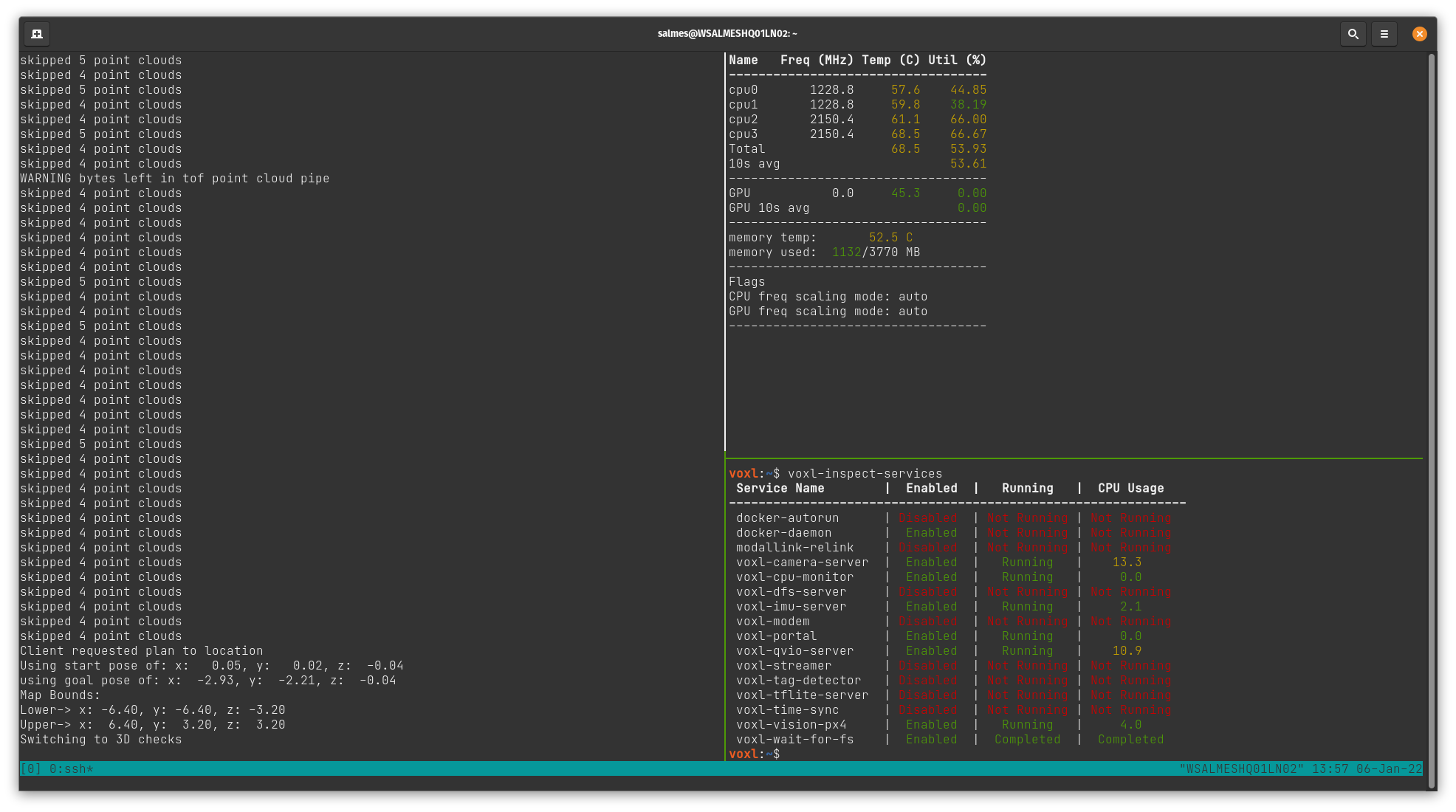
As of now, using the seeker, I've configured voxl-vision-px4.conf and voxl-mapper.conf as specified in the voxl-mapper dev branch readme. Using the voxl-portal I was able to generate this map:
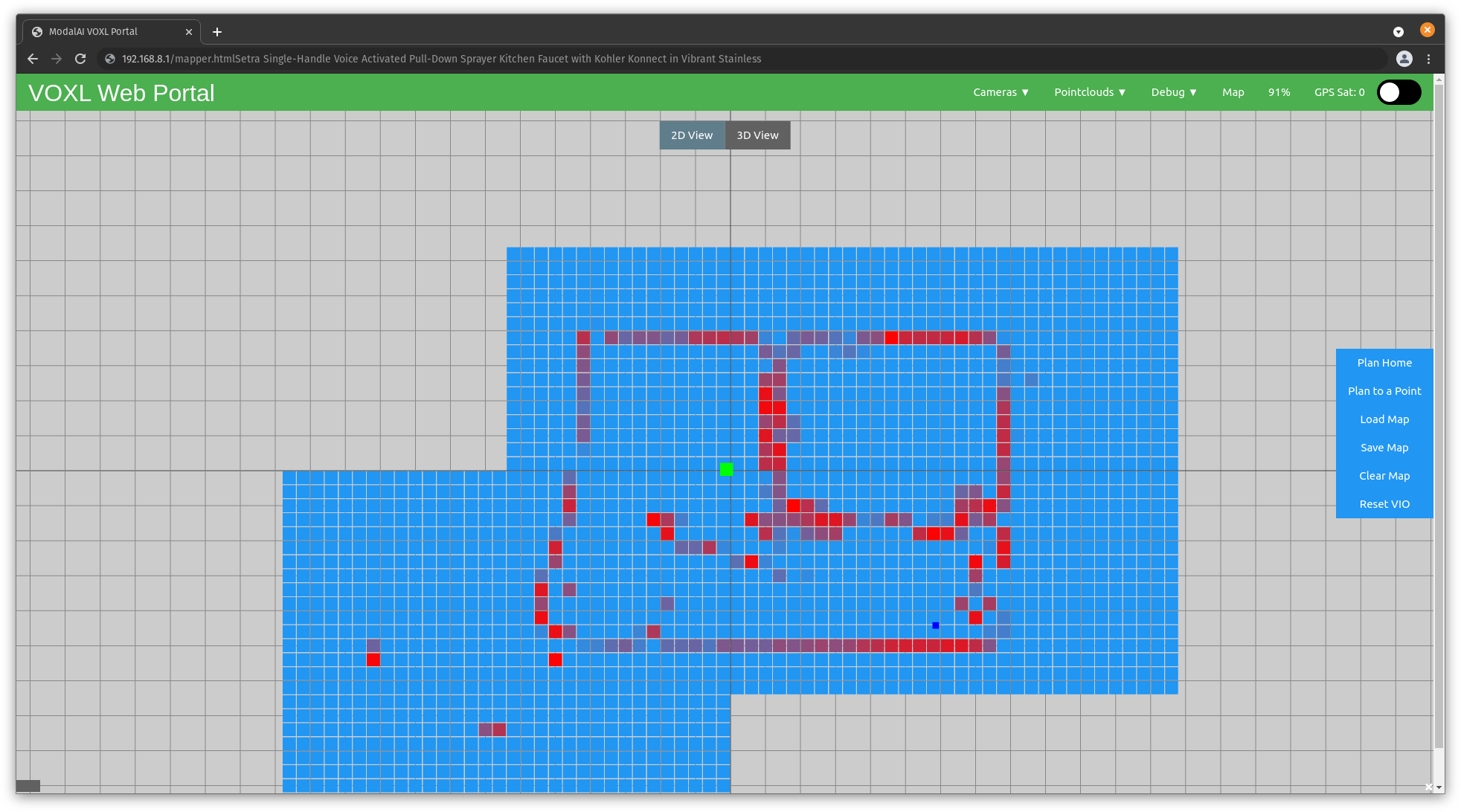
When clicking on 'Plan To a Point', voxl-mapper outputs: Client requested plan to location. I see a green 'Go!' button appear, but no paths. Clicking the button seems to cause the ui to hang briefly, and then return to the original menu items with no effect on the drone.
voxl-mapper simply states Switching to 3D checks.
Any guidance would be greatly appreciated.
-
To view the paths, you will need to switch to the "3D View" tab at the top of the mapping page in voxl-portal before clicking either "Plan to a Point" or "Plan Home". The path rendering has not yet been implemented for the 2D costmap, but you will still be given the option to follow the path from that view.
-
I can sometimes get the paths to load in the 3D view. At least, i got working the first time, but was still unable to fly. Does the drone need to be actively flying with off-board (holding position) enabled, or is it sufficient to be powered on with off-board enabled at the controller?
Subsequent attempts had similar behaviour to what i had before with no indication at the UI/terminal of why the path had not loaded. I need to step away from this for at least the weekend, but I'm definitely stuck.
To be very verbose, my process is to turn the drone on, wait about a minute, then hand carry the drone around the space (about 30 degrees yawed towards walls) doing two passes, one clockwise, one counter clockwise. Sometimes i'll skip the second pass if the 2d map looks good enough. I'll land back at ~0,0,0 then pick a point in the ui, once satisfied with the choice, press the go! button.
I'm thinking the issue may be from selecting a new point after the first one was inadequate. This might be anecdotal, but it feels like any point after the first leads to issues.
Here is my view after a path was not generated after planning to a point (top right). Drone slightly visible in the bottom right.
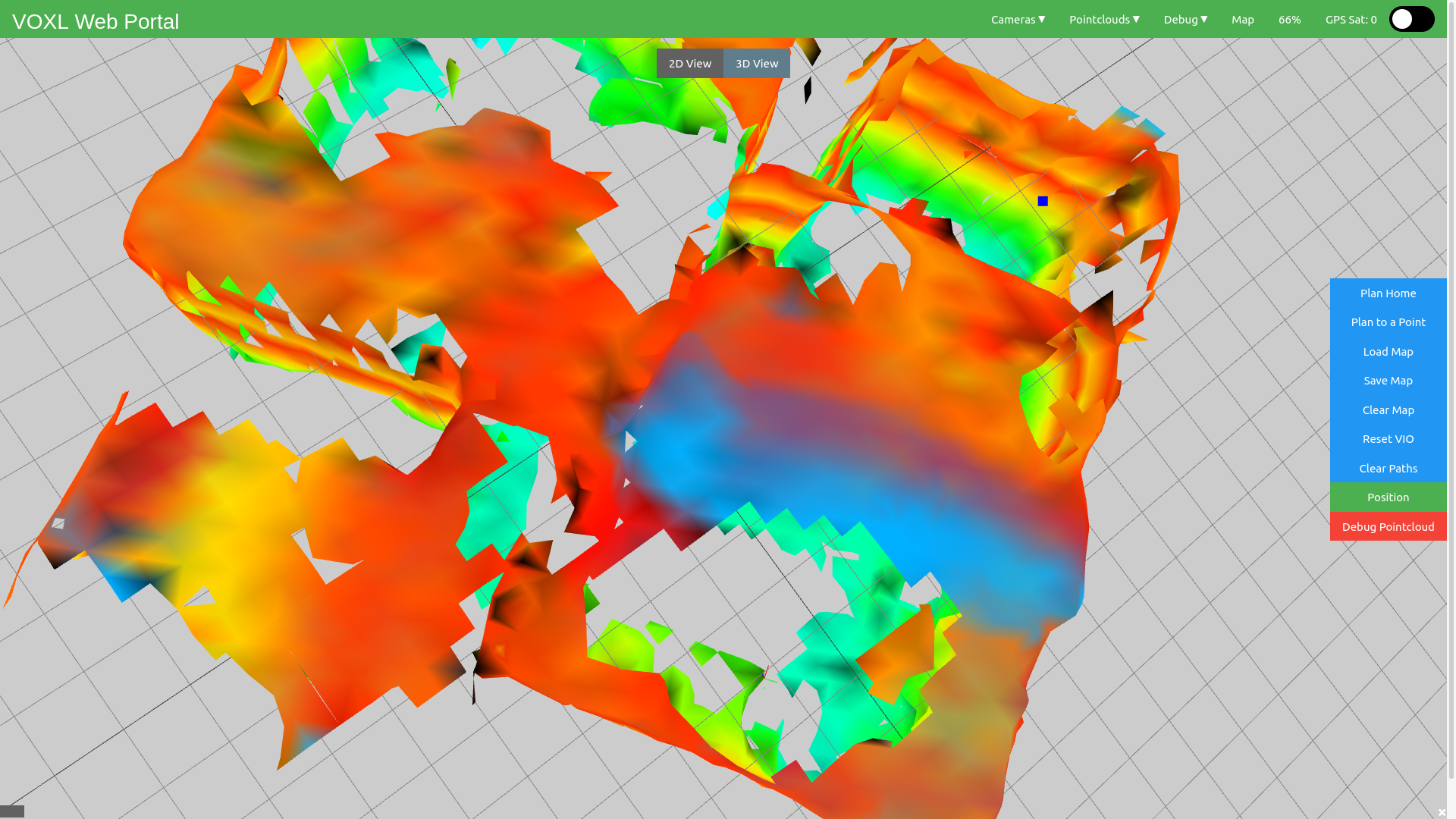
Unrelated, and perhaps should be another topic, is there a way to view the 3d/2d maps with a different camera control model? IE not the default trackball?
-
@alarm_hq,
It seems like the RRT* portion of the path generation is never converging. Are you able to generate any paths, particularly if the drone is closer?Also, could you paste your current config file (i.e. output of cat /etc/modalai/voxl-mapper.conf)? The rrt_max_runtime_nanoseconds and rrt_use_first_solution parameters may help fix this issue.
-
As for a different camera control model, there are no others implemented now but it would be an easy addition. Is there a specific one you are looking for?
-
I have generated a path, though was unable to have the drone take off. Does the drone have to be in a hover state, or can it take off with the plan?
I don't have a specific preference for the camera control model, other than it's easier to use with a laptop trackpad. If i had to pick one, I'd say flycontrols.
/**
 * This file contains configuration that's specific to voxl-mapper.
 */
{
	"robot_radius":	0.2,
	"point_skip":	7,
	"voxel_size":	0.20000000298023224,
	"voxels_per_side":	16,
	"esdf_save_path":	"/data/voxl_mapper/esdf_map",
	"tsdf_save_path":	"/data/voxl_mapper/tsdf_map",
	"mesh_save_path":	"/data/voxl_mapper/mesh.ply",
	"esdf_max_distance":	4,
	"esdf_min_distance":	0.20000000298023224,
	"esdf_default_distance":	2,
	"esdf_inner_sphere_radius":	0.20000000298023224,
	"esdf_outer_sphere_radius":	0.600000023841858,
	"rrt_min_distance":	0.2,
	"rrt_max_runtime_nanoseconds":	-1,
	"rrt_use_first_solution":	true,
	"rrt_treat_unknown_as_occupied":	true,
	"rrt_send_tree":	false,
	"loco_num_segments":	12,
	"loco_derivative_to_optimize":	3,
	"loco_poly_degree":	12,
	"loco_smoothness_cost_weight":	0.3,
	"loco_collision_cost_weight":	12,
	"loco_waypoint_cost_weight":	0.025,
	"loco_min_collision_sampling_dist":	0.2,
	"loco_add_waypoints":	true,
	"loco_scale_time":	true,
	"loco_split_at_collisions":	true,
	"loco_resample_trajectory":	true,
	"loco_verbose":	false
}
/etc/modalai/voxl-mapper.conf
-
Your parameters look okay, although it may be useful to set the rrt_max_runtime_nanoseconds to something like 5000000000 (5s) for a hard cut-off while generating the paths. Also, unless you are attempting to plan across long distances, you can ease the parameters for the loco smoother, something like this:
"loco_num_segments":	5,
"loco_derivative_to_optimize":	3,
"loco_poly_degree":	4,
"loco_smoothness_cost_weight":	2.5,
"loco_collision_cost_weight":	18.0,
"loco_waypoint_cost_weight":	0.0,
The drone however cannot take off with a plan with the current package. In order to fly the paths you generate, the drone must be hovering and in offboard mode. Our typical procedure is:
- take off and map out the room while flying under manual control
- once the map is sufficient, fly the drone to your desired start location and flip it into "offboard" mode
- Then using the mapping interface in voxl-portal (3D view), select the "plan home" button and visually validate the path.
- finally, you can select follow path in voxl-portal (while the drone is still hovering in offboard mode) and watch the drone fly the generated trajectory.
Once you are comfortable with this process and have the drone flying some basic paths back to home, it should be straightforward to transition into planning to specific locations.
The mapping and path generation can be done without flight as you have seen, but if the drone is resting on the ground it will likely think it is too close to an obstacle to move - thus the planning may fail. If you would like to continue testing the path generation without flight, it is best to rest the drone on top of an object that it has not already mapped to mimic a hover state before you attempt to plan somewhere. But again, you will not be able to fly this path unless the drone is already in the air.
For the camera controls, we have also had some difficulties with laptops/mobile so I will work on getting the flycontrols added soon!
-
Thanks Matt, I think these are all great suggestions and I look forward to trying it out.
Good luck with the flycontrols or similar change!
-
-
@Matt-Turi thanks so much!
Reading along? Create a free ModalAI Forum account to join in.
With an account you can reply, ask your own question, get an email when a ModalAI engineer answers, and mark the reply that solved it. Your place in each thread is saved between visits.
Questions about VOXL, Flight Core, ESCs and ModalAI drones are answered here by the engineers who build them.
Register Login