
Voxl IO on Voxl2 J19 port
-
Hi, I have a new Voxl IO board that is connected to the J19 port on a Voxl 2 and I also have a Voxl ESC. This is the same setup I used to use over a year ago, but now I have a new Voxl IO board and I updated the SDK to 1.2.0 but it doesn't work anymore. Link
The Voxl IO has a solid orange LED light (the blue LED is off), which I assume is the problem. Do I need to configure the UART port because I'm using the J19 port? If so, can you tell me how to do it?
Thanks!
Hi @xav04 , sorry to hear you are having problems! Can you share the contents of your voxl-px4.conf (
/etc/modalai/voxl-px4.conf)? I would like to get a bit more information to understand what your use case is, is it SBUS RC only as in the link you shared?I would also recommend double checking that the voxl2-io driver is running in px4, you can either use QGC or run voxl-px4 with daemon mode disabled then run the command
qshell voxl2_io statusto check (px4-qshell voxl2_io status will not show you the actual status info).-Jacob
-
Hi @xav04 , sorry to hear you are having problems! Can you share the contents of your voxl-px4.conf (
/etc/modalai/voxl-px4.conf)? I would like to get a bit more information to understand what your use case is, is it SBUS RC only as in the link you shared?I would also recommend double checking that the voxl2-io driver is running in px4, you can either use QGC or run voxl-px4 with daemon mode disabled then run the command
qshell voxl2_io statusto check (px4-qshell voxl2_io status will not show you the actual status info).-Jacob
Hi @Jacob-Camarillo , thanks for your response. This is what I have in the
/etc/modalai/voxl-px4.conffile: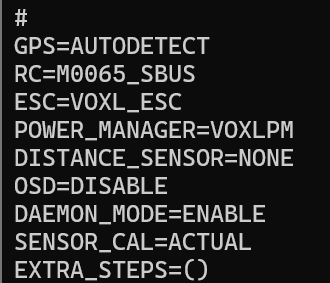
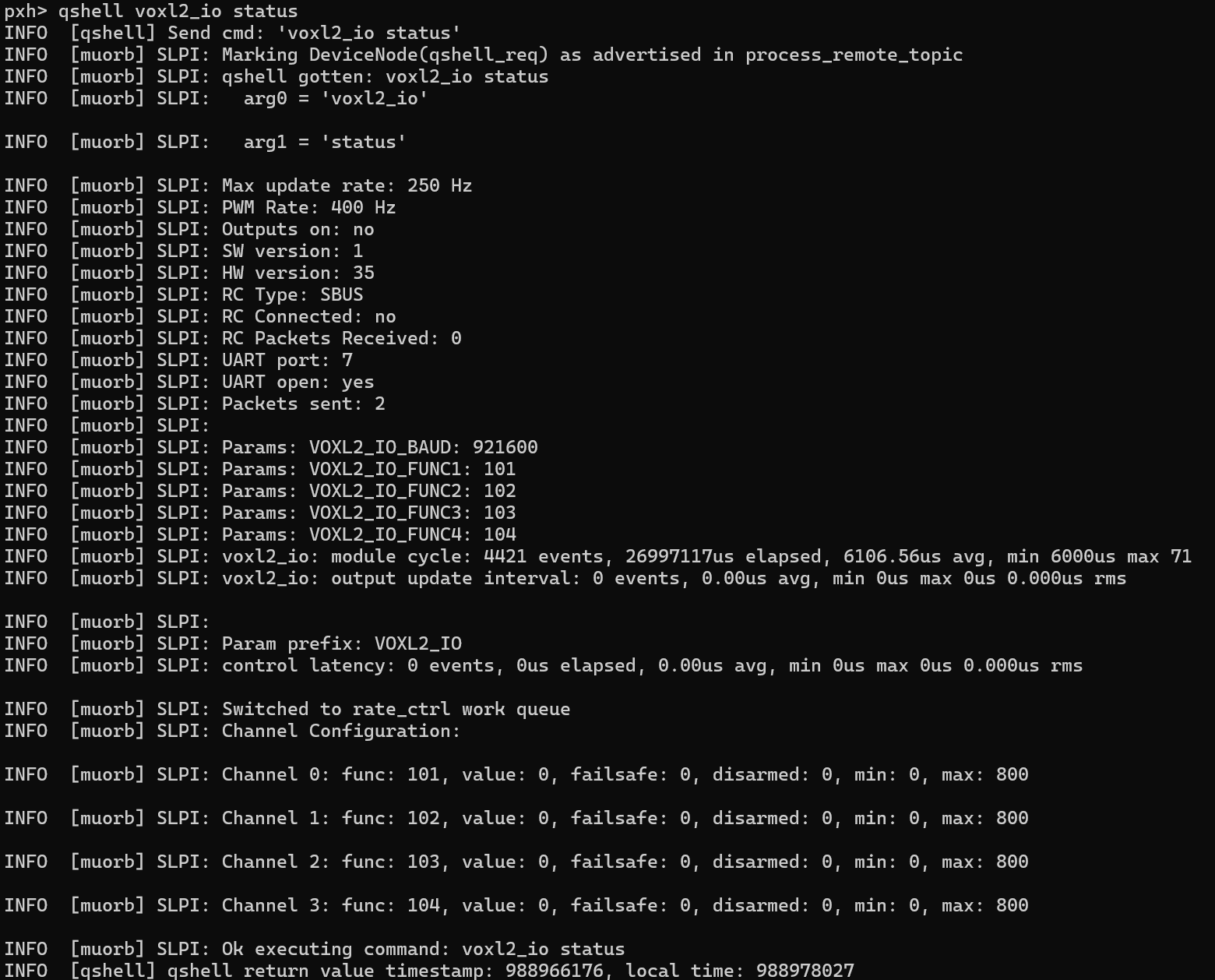
This is the output of
qshell voxl2_io status:
-
Hi @Jacob-Camarillo , thanks for your response. This is what I have in the
/etc/modalai/voxl-px4.conffile:This is the output of
qshell voxl2_io status:
@xav04 , i discussed with Jacob and we think you should switch to using our latest firmware for VOXL IO board (M0065) and latest px4. We have made a number of fixes / improvements which are not yet in SDK 1.2.0 (will be in 1.3.0).
I am going to paste below a lot of useful information that can also be found in our docs, but this may be a bit more concentrated:
latest m0065 firmware
latest px4 build
how to update m0065 firmware
https://docs.modalai.com/voxl2-io-firmware/#how-to-update-firmware
how to enable voxl2-io driver in px4
check
/etc/modalai/voxl-px4.confconfiguration file# if voxl2-io will be used for ESC, set the ESC parameter: ESC=VOXL2_IO_PWM_ESC # if voxl2-io will be used for SBUS RC input, set the RC parameter: RC=M0065_SBUShow to check which uart port that M0065 board is connected to
J18-> DSP UART 2
J19-> DSP UART 7script that actually starts px4
(you should not have to change it, just FYI). use
/etc/modalai/voxl-px4.conffor configuration/usr/bin/voxl-px4-start - qshell voxl2_io start (or `-p 2` will use default uart port 2) - qshell voxl2_io start -p 7 (uart port 7)how to test if VOXL2_IO driver is running
#stop voxl-px4 instance that may be running in the background
systemctl stop voxl-px4
start voxl-px4 in foreground and grep for messages from VOXL2_IO
voxl-px4 -d | grep VOXL2_IO
ESC: VOXL2_IO_PWM_ESC
INFO  [muorb] SLPI: VOXL2_IO: Driver starting
INFO  [muorb] SLPI: VOXL2_IO: Params: VOXL2_IO_BAUD  : 921600
INFO  [muorb] SLPI: VOXL2_IO: Params: VOXL2_IO_FUNC1 : 101
INFO  [muorb] SLPI: VOXL2_IO: Params: VOXL2_IO_FUNC2 : 102
INFO  [muorb] SLPI: VOXL2_IO: Params: VOXL2_IO_FUNC3 : 103
INFO  [muorb] SLPI: VOXL2_IO: Params: VOXL2_IO_FUNC4 : 104
INFO  [muorb] SLPI: VOXL2_IO: Params: VOXL2_IO_FUNC5 : 0
INFO  [muorb] SLPI: VOXL2_IO: Params: VOXL2_IO_FUNC6 : 0
INFO  [muorb] SLPI: VOXL2_IO: Params: VOXL2_IO_FUNC7 : 0
INFO  [muorb] SLPI: VOXL2_IO: Params: VOXL2_IO_FUNC8 : 0
INFO  [muorb] SLPI: VOXL2_IO: Params: VOXL2_IO_DIS   : 1000
INFO  [muorb] SLPI: VOXL2_IO: Params: VOXL2_IO_MIN   : 1100
INFO  [muorb] SLPI: VOXL2_IO: Params: VOXL2_IO_MAX   : 2000
INFO  [muorb] SLPI: VOXL2_IO: Params: VOXL2_IO_CMIN  : 1050
INFO  [muorb] SLPI: VOXL2_IO: Params: VOXL2_IO_CMAX  : 2000
INFO  [muorb] SLPI: VOXL2_IO:
INFO  [muorb] SLPI: VOXL2_IO: Opening UART device 2, baud rate 921600
INFO  [muorb] SLPI: VOXL2_IO: Successfully opened UART device
INFO  [muorb] SLPI: VOXL2_IO: Detecting M0065 board...
INFO  [muorb] SLPI: VOXL2_IO: 	VOXL2_IO ID: 0
INFO  [muorb] SLPI: VOXL2_IO: 	Board Type : 35: ModalAi I/O Expander (M0065)
INFO  [muorb] SLPI: VOXL2_IO: 	Unique ID  : 0x4304296039364B560671FF36
INFO  [muorb] SLPI: VOXL2_IO: 	Firmware   : version    2, hash f94baad1
INFO  [muorb] SLPI: VOXL2_IO: 	Bootloader : version    0, hash 17147346
INFO  [muorb] SLPI: VOXL2_IO: 	Reply time : 2550us
INFO  [muorb] SLPI: VOXL2_IO: Driver initialization succeeded
You will see there were new parameters added, you can see their values in the print above:
#additional pwm output channels supported ( up to 8 )
INFO [muorb] SLPI: VOXL2_IO: Params: VOXL2_IO_FUNC5 : 0
INFO [muorb] SLPI: VOXL2_IO: Params: VOXL2_IO_FUNC6 : 0
INFO [muorb] SLPI: VOXL2_IO: Params: VOXL2_IO_FUNC7 : 0
INFO [muorb] SLPI: VOXL2_IO: Params: VOXL2_IO_FUNC8 : 0VOXL2_IO_DIS : 1000 #pulse in microseconds when not armed
VOXL2_IO_MIN : 1100 #min pulse in microseconds when armed
VOXL2_IO_MAX : 2000 #max pulse in microseconds when armed
VOXL2_IO_CMIN : 1050 #min pulse in microseconds during esc calibration procedure
VOXL2_IO_CMAX : 2000 #max pulse in microseconds during esc calibration procedureSuggested ESC calibration procedure:
- power on VOXL2 and ESC while the PWM cable is not plugged into VOXL2. Calibration procedure only works before the ESC receives any valid signals
- start px4 and QGC and verify that the calibration parameters are set to suggested values (min 1050 and max 2000) and regular min and max values are set to min=1100 and max=2000.
- verify that the voxl2_io driver has started correctly : either
qshell voxl2_io statusor look at the blue led on M0065 should be blinking which means it is receiving the pwm commands from voxl2_io driver (the disabled commands, since not armed) - start the custom esc calibration procedure :
qshell voxl2_io calibrate_escsand follow instructions (which are mainly just plug in the motor pwm cable into m0065 within 10 seconds). You can enter this command right in the px4 prompt, if you start px4 usingvoxl-px4 -din foreground in interactive mode - after the calibration is complete, test to make sure the PWM ranges have been correctly set:
- using QGC actuator test, set the actuator slider from disabled (lowest position) to 1100 and the motors should spinup and stay on (no jerking)
- it is encouraged to double check the motor starting point but temporarily lowering the VOXL2_IO_MIN param to 1000 and using actuator test to find the motor starting point, should be around 1060 (the calibration value was 1050). If the motor starting point is very close to 1100, it may not be safe to use this configuration, because if mixer commands 1100 during flight, variations due to temperature of the ESC MCU could cause 1100 command to be interpreted as DISABLED.
- IMPORTANT: if VOXL2_IO_MIN was temporarily modified to find the motor starting point, revert it back to the desired value of 1100
- In order to test actuators other than the 4 motors, you can use QGC to configure the actuator function as for normal actuators.
additional resources
- voxl2-io user guide : https://docs.modalai.com/voxl2-io-user-guide/
- m0065 firmware changelog : https://docs.modalai.com/voxl2-io-firmware/#release-notes
- m0065 board led patterns : https://docs.modalai.com/voxl2-io-user-guide/#led-patterns
- config examples (i think this matches your case): https://docs.modalai.com/voxl2-io-user-guide/#voxl-2-io-sbus-input-and-4-in-1-uart-esc-output
-
@xav04 , i discussed with Jacob and we think you should switch to using our latest firmware for VOXL IO board (M0065) and latest px4. We have made a number of fixes / improvements which are not yet in SDK 1.2.0 (will be in 1.3.0).
I am going to paste below a lot of useful information that can also be found in our docs, but this may be a bit more concentrated:
latest m0065 firmware
latest px4 build
how to update m0065 firmware
https://docs.modalai.com/voxl2-io-firmware/#how-to-update-firmware
how to enable voxl2-io driver in px4
check
/etc/modalai/voxl-px4.confconfiguration file# if voxl2-io will be used for ESC, set the ESC parameter: ESC=VOXL2_IO_PWM_ESC # if voxl2-io will be used for SBUS RC input, set the RC parameter: RC=M0065_SBUShow to check which uart port that M0065 board is connected to
J18-> DSP UART 2
J19-> DSP UART 7script that actually starts px4
(you should not have to change it, just FYI). use
/etc/modalai/voxl-px4.conffor configuration/usr/bin/voxl-px4-start - qshell voxl2_io start (or `-p 2` will use default uart port 2) - qshell voxl2_io start -p 7 (uart port 7)how to test if VOXL2_IO driver is running
#stop voxl-px4 instance that may be running in the background
systemctl stop voxl-px4
start voxl-px4 in foreground and grep for messages from VOXL2_IO
voxl-px4 -d | grep VOXL2_IO
ESC: VOXL2_IO_PWM_ESC
INFO  [muorb] SLPI: VOXL2_IO: Driver starting
INFO  [muorb] SLPI: VOXL2_IO: Params: VOXL2_IO_BAUD  : 921600
INFO  [muorb] SLPI: VOXL2_IO: Params: VOXL2_IO_FUNC1 : 101
INFO  [muorb] SLPI: VOXL2_IO: Params: VOXL2_IO_FUNC2 : 102
INFO  [muorb] SLPI: VOXL2_IO: Params: VOXL2_IO_FUNC3 : 103
INFO  [muorb] SLPI: VOXL2_IO: Params: VOXL2_IO_FUNC4 : 104
INFO  [muorb] SLPI: VOXL2_IO: Params: VOXL2_IO_FUNC5 : 0
INFO  [muorb] SLPI: VOXL2_IO: Params: VOXL2_IO_FUNC6 : 0
INFO  [muorb] SLPI: VOXL2_IO: Params: VOXL2_IO_FUNC7 : 0
INFO  [muorb] SLPI: VOXL2_IO: Params: VOXL2_IO_FUNC8 : 0
INFO  [muorb] SLPI: VOXL2_IO: Params: VOXL2_IO_DIS   : 1000
INFO  [muorb] SLPI: VOXL2_IO: Params: VOXL2_IO_MIN   : 1100
INFO  [muorb] SLPI: VOXL2_IO: Params: VOXL2_IO_MAX   : 2000
INFO  [muorb] SLPI: VOXL2_IO: Params: VOXL2_IO_CMIN  : 1050
INFO  [muorb] SLPI: VOXL2_IO: Params: VOXL2_IO_CMAX  : 2000
INFO  [muorb] SLPI: VOXL2_IO:
INFO  [muorb] SLPI: VOXL2_IO: Opening UART device 2, baud rate 921600
INFO  [muorb] SLPI: VOXL2_IO: Successfully opened UART device
INFO  [muorb] SLPI: VOXL2_IO: Detecting M0065 board...
INFO  [muorb] SLPI: VOXL2_IO: 	VOXL2_IO ID: 0
INFO  [muorb] SLPI: VOXL2_IO: 	Board Type : 35: ModalAi I/O Expander (M0065)
INFO  [muorb] SLPI: VOXL2_IO: 	Unique ID  : 0x4304296039364B560671FF36
INFO  [muorb] SLPI: VOXL2_IO: 	Firmware   : version    2, hash f94baad1
INFO  [muorb] SLPI: VOXL2_IO: 	Bootloader : version    0, hash 17147346
INFO  [muorb] SLPI: VOXL2_IO: 	Reply time : 2550us
INFO  [muorb] SLPI: VOXL2_IO: Driver initialization succeeded
You will see there were new parameters added, you can see their values in the print above:
#additional pwm output channels supported ( up to 8 )
INFO [muorb] SLPI: VOXL2_IO: Params: VOXL2_IO_FUNC5 : 0
INFO [muorb] SLPI: VOXL2_IO: Params: VOXL2_IO_FUNC6 : 0
INFO [muorb] SLPI: VOXL2_IO: Params: VOXL2_IO_FUNC7 : 0
INFO [muorb] SLPI: VOXL2_IO: Params: VOXL2_IO_FUNC8 : 0VOXL2_IO_DIS : 1000 #pulse in microseconds when not armed
VOXL2_IO_MIN : 1100 #min pulse in microseconds when armed
VOXL2_IO_MAX : 2000 #max pulse in microseconds when armed
VOXL2_IO_CMIN : 1050 #min pulse in microseconds during esc calibration procedure
VOXL2_IO_CMAX : 2000 #max pulse in microseconds during esc calibration procedureSuggested ESC calibration procedure:
- power on VOXL2 and ESC while the PWM cable is not plugged into VOXL2. Calibration procedure only works before the ESC receives any valid signals
- start px4 and QGC and verify that the calibration parameters are set to suggested values (min 1050 and max 2000) and regular min and max values are set to min=1100 and max=2000.
- verify that the voxl2_io driver has started correctly : either
qshell voxl2_io statusor look at the blue led on M0065 should be blinking which means it is receiving the pwm commands from voxl2_io driver (the disabled commands, since not armed) - start the custom esc calibration procedure :
qshell voxl2_io calibrate_escsand follow instructions (which are mainly just plug in the motor pwm cable into m0065 within 10 seconds). You can enter this command right in the px4 prompt, if you start px4 usingvoxl-px4 -din foreground in interactive mode - after the calibration is complete, test to make sure the PWM ranges have been correctly set:
- using QGC actuator test, set the actuator slider from disabled (lowest position) to 1100 and the motors should spinup and stay on (no jerking)
- it is encouraged to double check the motor starting point but temporarily lowering the VOXL2_IO_MIN param to 1000 and using actuator test to find the motor starting point, should be around 1060 (the calibration value was 1050). If the motor starting point is very close to 1100, it may not be safe to use this configuration, because if mixer commands 1100 during flight, variations due to temperature of the ESC MCU could cause 1100 command to be interpreted as DISABLED.
- IMPORTANT: if VOXL2_IO_MIN was temporarily modified to find the motor starting point, revert it back to the desired value of 1100
- In order to test actuators other than the 4 motors, you can use QGC to configure the actuator function as for normal actuators.
additional resources
- voxl2-io user guide : https://docs.modalai.com/voxl2-io-user-guide/
- m0065 firmware changelog : https://docs.modalai.com/voxl2-io-firmware/#release-notes
- m0065 board led patterns : https://docs.modalai.com/voxl2-io-user-guide/#led-patterns
- config examples (i think this matches your case): https://docs.modalai.com/voxl2-io-user-guide/#voxl-2-io-sbus-input-and-4-in-1-uart-esc-output
Hi @Alex-Kushleyev and @Jacob-Camarillo , thanks! Somehow it worked, now the RC is connected, however there is a significant delay which caused a crash. The "RC Loss failsafe trigger" was activated at < 0.5s every 4 seconds so I was not even able to arm. Then I increased it to 1s, which wasn't ideal from the start and I lost connection for a longer time when I was flying. Is there a way to fix this?
Also, I don't know if it's related, but on a position control flight, the drone didn't react when I sent it to the right or left. I checked the local position and qvio while I moved the drone manually and all looked fine. Any ideas?
Thanks!
-
Hi @Alex-Kushleyev and @Jacob-Camarillo , thanks! Somehow it worked, now the RC is connected, however there is a significant delay which caused a crash. The "RC Loss failsafe trigger" was activated at < 0.5s every 4 seconds so I was not even able to arm. Then I increased it to 1s, which wasn't ideal from the start and I lost connection for a longer time when I was flying. Is there a way to fix this?
Also, I don't know if it's related, but on a position control flight, the drone didn't react when I sent it to the right or left. I checked the local position and qvio while I moved the drone manually and all looked fine. Any ideas?
Thanks!
@xav04 , can you provide some details about the RC receiver that you are connecting to M0065 J3?
Have you tried looking at the RC values through QGC and see if they are delayed / updated infrequently?
The lack of response to position control may be related to RC issues, so maybe let's get those figured out first?
Alex
-
@xav04 , can you provide some details about the RC receiver that you are connecting to M0065 J3?
Have you tried looking at the RC values through QGC and see if they are delayed / updated infrequently?
The lack of response to position control may be related to RC issues, so maybe let's get those figured out first?
Alex
@Alex-Kushleyev I use a Flysky FS-I6S 10ch 2.4G AFHDS 2A RC Transmitter and a RC Receiver, Flysky FS-A8S 2.4G 8CH Mini Receiver w/PPM i-Bus SBUS Output This is the same setup I used a year ago with the first Voxl IO and it used to work fine.
Yes, in QGC there is a delay when I move the sticks. Sometimes it doesn't even show the movement the first time.
-
@Alex-Kushleyev I use a Flysky FS-I6S 10ch 2.4G AFHDS 2A RC Transmitter and a RC Receiver, Flysky FS-A8S 2.4G 8CH Mini Receiver w/PPM i-Bus SBUS Output This is the same setup I used a year ago with the first Voxl IO and it used to work fine.
Yes, in QGC there is a delay when I move the sticks. Sometimes it doesn't even show the movement the first time.
@xav04 ,
Can you please clarify one more thing, if you move one of the sticks slowly (let's say it takes 1 second to move the stick from min to max), do the values as seen in QGC change gradually or just jump to the latest value?
Also, the orangle LED on M0065 board is an indicator of the received RC packets into M0065. Does that blink fast (5hz) and at consistent rate or much slower and/or not stable rate?
Also, when you originally said "Somehow it worked, now the RC is connected" -- did you follow all the steps that I described? What version of PX4 and M0065 firmware are you running?
Alex
-
@xav04 ,
Can you please clarify one more thing, if you move one of the sticks slowly (let's say it takes 1 second to move the stick from min to max), do the values as seen in QGC change gradually or just jump to the latest value?
Also, the orangle LED on M0065 board is an indicator of the received RC packets into M0065. Does that blink fast (5hz) and at consistent rate or much slower and/or not stable rate?
Also, when you originally said "Somehow it worked, now the RC is connected" -- did you follow all the steps that I described? What version of PX4 and M0065 firmware are you running?
Alex
@xav04 ,
We found an issue that caused the SBUS data to be delayed / dropped in the voxl2_io driver, when all the pwm outputs were disabled.
Please see this post, it provides a workaround (by enabling one of the pwm outputs as a servo) and the link to the proper fix in the px4-firmware : https://forum.modalai.com/topic/3505/voxlio-board-sbus-lagging
Alex
-
@xav04 ,
We found an issue that caused the SBUS data to be delayed / dropped in the voxl2_io driver, when all the pwm outputs were disabled.
Please see this post, it provides a workaround (by enabling one of the pwm outputs as a servo) and the link to the proper fix in the px4-firmware : https://forum.modalai.com/topic/3505/voxlio-board-sbus-lagging
Alex
@Alex-Kushleyev thanks for the update. Is it possible to use the PWM ports too?
-
@Alex-Kushleyev thanks for the update. Is it possible to use the PWM ports too?
@xav04 , yes, please see https://docs.modalai.com/voxl2-io-user-guide/

Reading along? Create a free ModalAI Forum account to join in.
With an account you can reply, ask your own question, get an email when a ModalAI engineer answers, and mark the reply that solved it. Your place in each thread is saved between visits.
Questions about VOXL, Flight Core, ESCs and ModalAI drones are answered here by the engineers who build them.
Register Login