
RB5 running VOXL cannot connect to QGroundControl over WiFi
-
We cannot get our RB5 running VOXL (
system-image: 1.4.1-M0052-14.1a-perfandvoxl-suite: 0.9.5) to connect to QGC over WiFi. It is connected to the WiFi and communication using e.g. SSH and the web interface works fine. From the logs in QGC it does not appear to be discovered, but other ZeroConf devices appear. We have tried to manually set the IP in the voxl-configure-vision-px4 and to create an entry in the "Comm links" page in Application settings in QGC, but neither gave any results. We believe we have all the required services running, here is all the enabled services: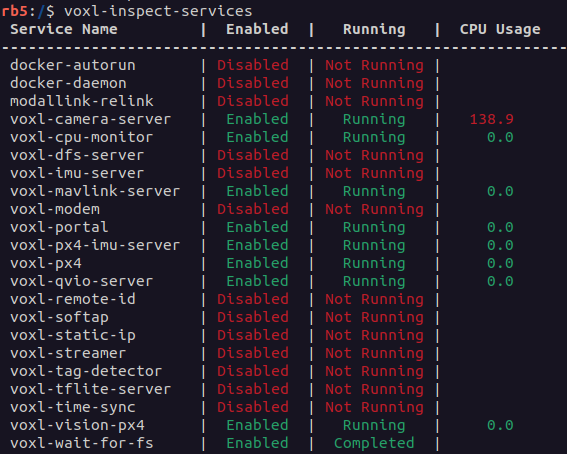
We have also followed all the suggested steps from this forum post, but it did not solve our problem.
We have also tried using two different computers, one running Ubuntu 22.04 and one running Windows 10.
Please let us know if you need any additional information.
-
We cannot get our RB5 running VOXL (
system-image: 1.4.1-M0052-14.1a-perfandvoxl-suite: 0.9.5) to connect to QGC over WiFi. It is connected to the WiFi and communication using e.g. SSH and the web interface works fine. From the logs in QGC it does not appear to be discovered, but other ZeroConf devices appear. We have tried to manually set the IP in the voxl-configure-vision-px4 and to create an entry in the "Comm links" page in Application settings in QGC, but neither gave any results. We believe we have all the required services running, here is all the enabled services:We have also followed all the suggested steps from this forum post, but it did not solve our problem.
We have also tried using two different computers, one running Ubuntu 22.04 and one running Windows 10.
Please let us know if you need any additional information.
We figured it out, the answer is explained in this reply to another question: https://forum.modalai.com/post/9575

Reading along? Create a free ModalAI Forum account to join in.
With an account you can reply, ask your own question, get an email when a ModalAI engineer answers, and mark the reply that solved it. Your place in each thread is saved between visits.
Questions about VOXL, Flight Core, ESCs and ModalAI drones are answered here by the engineers who build them.
Register Login