Skip to content
  • Categories
  • Recent
  • Tags
  • Popular
  • Users
  • Groups
Collapse
Brand Logo

ModalAI Forum

  1. ModalAI Support Forum
  2. VOXL Compute & Autopilot
  3. VOXL 2
  4. ADB Connecting Issue with VOXL2 Board

ADB Connecting Issue with VOXL2 Board

Scheduled Pinned Locked Moved VOXL 2
35 Posts 6 Posters 7.6k Views 3 Watching
  • Oldest to Newest
  • Newest to Oldest
  • Most Votes
Reply
  • Reply as topic
Log in to reply
This topic has been deleted. Only users with topic management privileges can see it.
  • tomT Offline
    tomT Offline
    tom
    admin
    wrote on last edited by
    #26

    @dlee Do you have anything plugged in to your VOXL2s? cameras? modems? add-on boards, usb devices etc.?

    dleeD 1 Reply Last reply
    0
    • tomT tom

      @dlee Do you have anything plugged in to your VOXL2s? cameras? modems? add-on boards, usb devices etc.?

      dleeD Offline
      dleeD Offline
      dlee
      Regular
      wrote on last edited by dlee
      #27

      @tom I plugged microhard module to use station wifi on voxl (not in microhard). But when I detach the microhard modem, it still didn't work.

      1 Reply Last reply
      0
      • tomT Offline
        tomT Offline
        tom
        admin
        wrote on last edited by
        #28

        @dlee Remove the microhard modem and anything else you have plugged in. Does it then allow you to stay in ADB?

        dleeD 1 Reply Last reply
        0
        • tomT tom

          @dlee Remove the microhard modem and anything else you have plugged in. Does it then allow you to stay in ADB?

          dleeD Offline
          dleeD Offline
          dlee
          Regular
          wrote on last edited by
          #29

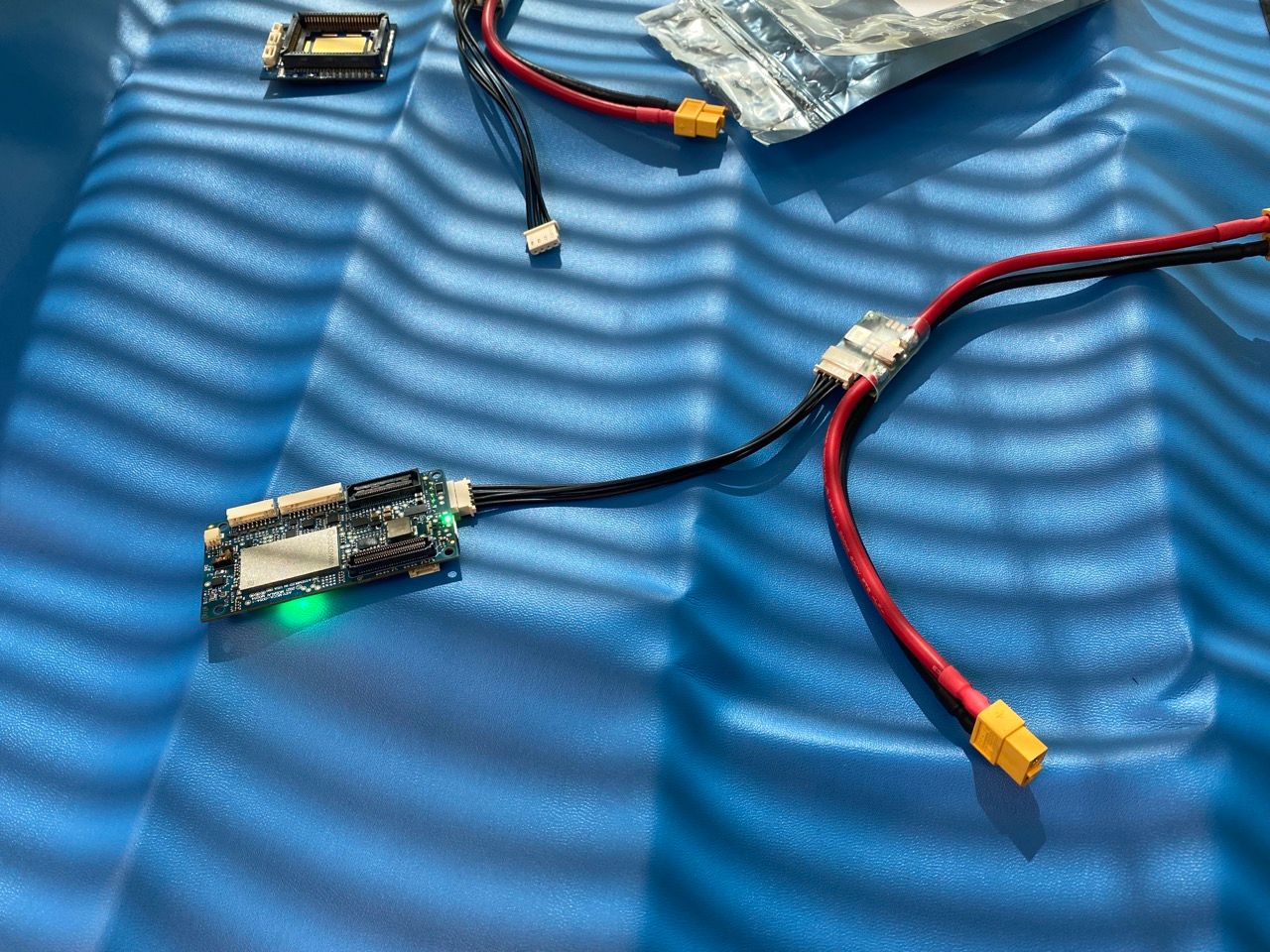
          @tom Removed it. ADB wasn't detected. Do you have some advices my setup?
          IMG_6989 Large.jpeg

          1 Reply Last reply
          0
          • tomT Offline
            tomT Offline
            tom
            admin
            wrote on last edited by
            #30

            @dlee I would plug in USB-C and see what dmesg -wH shows

            dleeD 1 Reply Last reply
            0
            • tomT tom

              @dlee I would plug in USB-C and see what dmesg -wH shows

              dleeD Offline
              dleeD Offline
              dlee
              Regular
              wrote on last edited by
              #31

              @tom This is the result of dmesg -wH

              [Feb13 02:49] audit: type=1326 audit(1676326229.184:214): auid=1000 uid=1000 gid=1000 ses=3 subj=snap.slack.slack pid=1571188 comm="slack" exe="/snap/slack/68/usr/lib/slack/slack" sig=0 arch=c000003e syscall=92 compat=0 ip=0x7f40dea483b7 code=0x50000
              [Feb13 03:02] audit: type=1326 audit(1676326970.794:215): auid=1000 uid=1000 gid=1000 ses=3 subj=snap.slack.slack pid=1571188 comm="slack" exe="/snap/slack/68/usr/lib/slack/slack" sig=0 arch=c000003e syscall=92 compat=0 ip=0x7f40dea483b7 code=0x50000
              [Feb13 03:05] audit: type=1326 audit(1676327178.011:216): auid=1000 uid=1000 gid=1000 ses=3 subj=snap.slack.slack pid=1571188 comm="slack" exe="/snap/slack/68/usr/lib/slack/slack" sig=0 arch=c000003e syscall=92 compat=0 ip=0x7f40dea483b7 code=0x50000
              [Feb13 03:06] audit: type=1326 audit(1676327247.035:217): auid=1000 uid=1000 gid=1000 ses=3 subj=snap.slack.slack pid=1571188 comm="slack" exe="/snap/slack/68/usr/lib/slack/slack" sig=0 arch=c000003e syscall=92 compat=0 ip=0x7f40dea483b7 code=0x50000
              [Feb13 03:07] audit: type=1326 audit(1676327271.040:218): auid=1000 uid=1000 gid=1000 ses=3 subj=snap.slack.slack pid=1571188 comm="slack" exe="/snap/slack/68/usr/lib/slack/slack" sig=0 arch=c000003e syscall=92 compat=0 ip=0x7f40dea483b7 code=0x50000
              [Feb13 03:09] xhci_hcd 0000:00:14.0: Timeout while waiting for setup device command
              [  +5.375697] xhci_hcd 0000:00:14.0: Timeout while waiting for setup device command
              [  +0.207848] usb 2-2.1: device not accepting address 26, error -62
              [Feb13 03:10] usb 2-2.1: new SuperSpeed USB device number 28 using xhci_hcd
              [  +0.027777] usb 2-2.1: New USB device found, idVendor=05c6, idProduct=901d, bcdDevice= 0.00
              [  +0.000016] usb 2-2.1: New USB device strings: Mfr=1, Product=2, SerialNumber=3
              [  +0.000007] usb 2-2.1: Product: QUSB_BULK_SN:73AD68FF
              [  +0.000006] usb 2-2.1: Manufacturer: Qualcomm CDMA Technologies MSM
              [  +0.000005] usb 2-2.1: SerialNumber: 8cc63c2c
              
              
              1 Reply Last reply
              0
              • modaltbM Offline
                modaltbM Offline
                modaltb
                ModalAI Team
                wrote on last edited by
                #32

                @dlee said in ADB Connecting Issue with VOXL2 Board:

                QUSB_BULK_SN:73AD68FF

                When VOXL2 is showing up as QUSB_BULK_* in USB devices it means it's in emergency download (EDL) mode.

                It goes into EDL mode:

                • if the EDL switch (SW2) is "ON"
                • VOXL2 fails to boot normally do to an error

                If the error is recoverable, using QDL resolves SW/flash related issues. If after using QDL to reflash, and turning SW2 back off, the VOXL2 continues to boot into EDL mode, in my experience there's possible HW damage that is causing bootup to fail....

                dleeD 1 Reply Last reply
                0
                • modaltbM modaltb

                  @dlee said in ADB Connecting Issue with VOXL2 Board:

                  QUSB_BULK_SN:73AD68FF

                  When VOXL2 is showing up as QUSB_BULK_* in USB devices it means it's in emergency download (EDL) mode.

                  It goes into EDL mode:

                  • if the EDL switch (SW2) is "ON"
                  • VOXL2 fails to boot normally do to an error

                  If the error is recoverable, using QDL resolves SW/flash related issues. If after using QDL to reflash, and turning SW2 back off, the VOXL2 continues to boot into EDL mode, in my experience there's possible HW damage that is causing bootup to fail....

                  dleeD Offline
                  dleeD Offline
                  dlee
                  Regular
                  wrote on last edited by
                  #33

                  @modaltb If HW was damaged, Can I get RMA service?

                  VinnyV 1 Reply Last reply
                  0
                  • modaltbM Offline
                    modaltbM Offline
                    modaltb
                    ModalAI Team
                    wrote on last edited by
                    #34

                    Hi @dlee information on the RMA process is here : https://www.modalai.com/pages/rma

                    1 Reply Last reply
                    0
                    • dleeD dlee

                      @modaltb If HW was damaged, Can I get RMA service?

                      VinnyV Offline
                      VinnyV Offline
                      Vinny
                      ModalAI Team
                      wrote on last edited by
                      #35

                      Hi @dlee
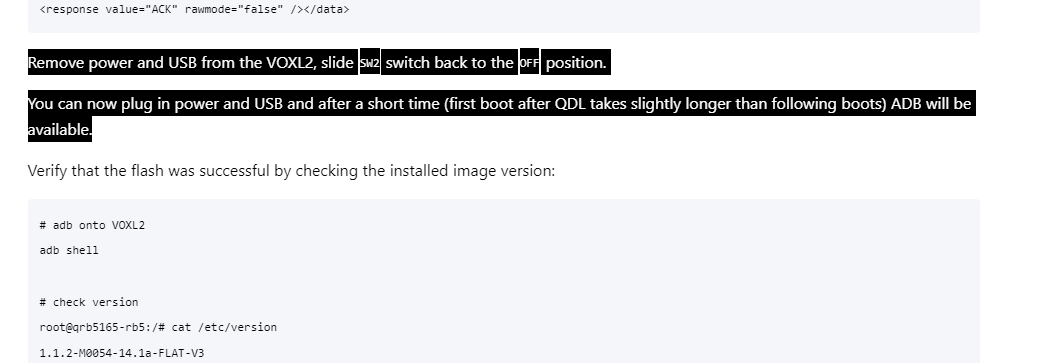
                      Can you please double check SW2. From that photo you posted, it seems as if it may stay be in the "ON" position, which would keep it in "EDL" mode and show up as "QUSB_BULK..." instead of an ADB debug device.
                      Please be sure to follow this step carefully when performing QDL updates:
                      https://docs.modalai.com/voxl2-qdl/
                      e7393327-f780-48b8-8b20-4c18a36639ff-image.png
                      We do not have many HW failures on Voxl2 in the field from routine use, so to have one so soon is surprising. However, if you are confident you are following all instructions and still wish to RMA it, we'll test it again to check for all basic functionality and debug the root cause of the failure, if any, and prompt you for further actions.
                      Thanks!

                      1 Reply Last reply
                      0

                      Hello! It looks like you're interested in this conversation, but you don't have an account yet.

                      Getting fed up of having to scroll through the same posts each visit? When you register for an account, you'll always come back to exactly where you were before, and choose to be notified of new replies (either via email, or push notification). You'll also be able to save bookmarks and upvote posts to show your appreciation to other community members.

                      With your input, this post could be even better 💗

                      Register Login
                      Reply
                      • Reply as topic
                      Log in to reply
                      • Oldest to Newest
                      • Newest to Oldest
                      • Most Votes


                      ModalAI
                      Categories Recent Tags ModalAI.com Docs
                      © 2026 ModalAI® · Accelerating autonomy for smaller, smarter, safer drones · Powered by NodeBB
                      • Login

                      • Don't have an account? Register

                      • Login or register to search.
                      • First post
                        Last post
                      0
                      • Categories
                      • Recent
                      • Tags
                      • Popular
                      • Users
                      • Groups