
VOXL2 ERROR: Could not detect voxl hardware type
-
I was testing with a VOXL2 Dev Bundle and everything was working correctly. And in a reboot I got this error. Now it pops up all the time and I can't make use of the voxl SDK.
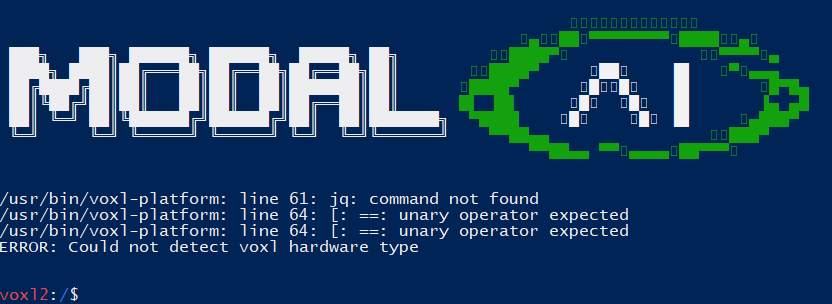
How can I fix it?
-
Hi @AngelAlbeniz ,
The
jqpackage is in our system image, I'm wondering if you have upgraded the system image at the same time?apt-get install jqshould fix it for you (assuming you have network connection)Our system image installs it here: https://gitlab.com/voxl-public/system-image-build/meta-voxl2/-/blob/dev/recipes-append/recipes-core/ubuntu-base/ubuntu-base_18.04.bbappend#L12
(I would recommend updating the system image too if possible if you haven't? We deliver our "platform release" in a system image and then the SDK that rides on top).
-
Hi @AngelAlbeniz ,
The
jqpackage is in our system image, I'm wondering if you have upgraded the system image at the same time?apt-get install jqshould fix it for you (assuming you have network connection)Our system image installs it here: https://gitlab.com/voxl-public/system-image-build/meta-voxl2/-/blob/dev/recipes-append/recipes-core/ubuntu-base/ubuntu-base_18.04.bbappend#L12
(I would recommend updating the system image too if possible if you haven't? We deliver our "platform release" in a system image and then the SDK that rides on top).
@modaltb Sorry for the delay in replying.
apt-get install jq, worked and fixed the problem. I am about to update the system image.
Many thanks.


Reading along? Create a free ModalAI Forum account to join in.
With an account you can reply, ask your own question, get an email when a ModalAI engineer answers, and mark the reply that solved it. Your place in each thread is saved between visits.
Questions about VOXL, Flight Core, ESCs and ModalAI drones are answered here by the engineers who build them.
Register Login