
M0173 with 4 AR0144 Tracking cameras
-
Hi,
Currently in the process of trying to integrate 4 AR0144 tracking camera's with the M0173 on the VOXL2. I have the camera in Slot 0 working and sending video but the rest are proving difficult. I have all of the sensor modules moved to /usr/lib/camera (all the ones found in /usr/share/modalai/chi-cdk/ar0144, not sure what to do wiht the other ar0144 folders). I am able to see another ar0144 connected to slot 2 when running voxl-camera-server -l but it "does not seem to be alive" when starting the server.
Any support would be helpful, I am on the newest SDK. I currently have them setup to be stereo pairs but don't require them to be used that way and may move them later, the plan is to use them all for VIO.
Cheers
Carson -
Seems like its due to my Kernel Config being 0, instead of 1. I can't seem to find documentation on how to update it to 1.
-
Seems like its due to my Kernel Config being 0, instead of 1. I can't seem to find documentation on how to update it to 1.
-
@cbay welp, Echo 1 worked, worried was going to brick something but it seemed to work. I think this only allows me to use 3/4 AR0144's so will still need support for the 4th
-
@cbay echoing 1 into /sys/module/voxl_platform_mod/parameters doesnt persist, so another method is required
@cbay , you need to flash the kernel for VOXL2 that supports M0173. It is part of the SDK install (there are only two options). Then the selection will persist.
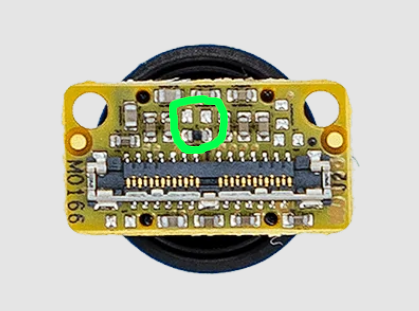
Regarding running 4 Tracking cameras, it is only possible if you change the i2c slave address of one of the cameras (using a hardware modification to move the "slave ID selection" resistor on the AR0144 camera module. In addition to that, you will need updated camera driver (sensormodule) to use the alternate slave ID for the AR0144 camera.
This has been done in another thread:
https://forum.modalai.com/topic/4491/ar0144-rgb-output-on-voxl2If you look at M0173 connectors (https://docs.modalai.com/M0173/) you can see which I2C (CCI) bus is used for which connector on M0173. There are only 4 unique CCI buses on VOXL2 and unfortunately with M0173, one of them (CCI3 is used for the TOF camera, which uses another connector). So that is why it is not possible to have 4 cameras with the same slave ID when using M0173 approach.
So here is the CCI bus usage for your use case (C27 + AR0144 instead of IMX412 in M0173 J4 (camera slot 1))
: M0173 J1: AR0144 slot 0 : CCI0
: M0173 J2: AR0144 slot 6 : CCI1
: M0173 J5: AR0144 slot 2 : CCI2
: M0173 J4: AR0144 slot 1 : CCI1 *** this is the camera / slot that uses conflicting CCI1 bus, so you need to change the camera's slave address to avoid conflict with AR0144 in slot 6.
: M0173 J3: Unused or TOF (slot 3) : CCI3
(also this is helpful https://docs.modalai.com/voxl2-connectors/)
My suggestion: since you dont have a hires camera, you can connect all 4 cameras to M0173, basically C27 but instead of hires, you have another AR0144 (in slot 1). You will need the AR0144 driver for slot 1 with alt slave address from here : https://storage.googleapis.com/modalai_public/temp/ar0144/ar0144_drivers_alt_slave_addr_0x20_20250709.zip . And make the resistor change on one of the AR0144 cameras and plug it into slot 1 (J4 on M0173).
If you want to use a hires camera as well, then you can use exactly C27 and add another tracking camera to VOXL2 J8 using an adapter such as M0155 or M0181 (use J2 on M0181 for camera slot 5, since M0181 J1 is for boson only) , or similar.
You will find the following image as well as more details for changing the i2c slave id of AR0144 in the forum post mentioned above. Please do this at your own risk as it will void the warranty, since you would be performing hardware modifications to the camera module.
Alex
-
@cbay , you need to flash the kernel for VOXL2 that supports M0173. It is part of the SDK install (there are only two options). Then the selection will persist.
Regarding running 4 Tracking cameras, it is only possible if you change the i2c slave address of one of the cameras (using a hardware modification to move the "slave ID selection" resistor on the AR0144 camera module. In addition to that, you will need updated camera driver (sensormodule) to use the alternate slave ID for the AR0144 camera.
This has been done in another thread:
https://forum.modalai.com/topic/4491/ar0144-rgb-output-on-voxl2If you look at M0173 connectors (https://docs.modalai.com/M0173/) you can see which I2C (CCI) bus is used for which connector on M0173. There are only 4 unique CCI buses on VOXL2 and unfortunately with M0173, one of them (CCI3 is used for the TOF camera, which uses another connector). So that is why it is not possible to have 4 cameras with the same slave ID when using M0173 approach.
So here is the CCI bus usage for your use case (C27 + AR0144 instead of IMX412 in M0173 J4 (camera slot 1))
: M0173 J1: AR0144 slot 0 : CCI0
: M0173 J2: AR0144 slot 6 : CCI1
: M0173 J5: AR0144 slot 2 : CCI2
: M0173 J4: AR0144 slot 1 : CCI1 *** this is the camera / slot that uses conflicting CCI1 bus, so you need to change the camera's slave address to avoid conflict with AR0144 in slot 6.
: M0173 J3: Unused or TOF (slot 3) : CCI3
(also this is helpful https://docs.modalai.com/voxl2-connectors/)
My suggestion: since you dont have a hires camera, you can connect all 4 cameras to M0173, basically C27 but instead of hires, you have another AR0144 (in slot 1). You will need the AR0144 driver for slot 1 with alt slave address from here : https://storage.googleapis.com/modalai_public/temp/ar0144/ar0144_drivers_alt_slave_addr_0x20_20250709.zip . And make the resistor change on one of the AR0144 cameras and plug it into slot 1 (J4 on M0173).
If you want to use a hires camera as well, then you can use exactly C27 and add another tracking camera to VOXL2 J8 using an adapter such as M0155 or M0181 (use J2 on M0181 for camera slot 5, since M0181 J1 is for boson only) , or similar.
You will find the following image as well as more details for changing the i2c slave id of AR0144 in the forum post mentioned above. Please do this at your own risk as it will void the warranty, since you would be performing hardware modifications to the camera module.
Alex
This is awesome thank you! Will attempt this and let you know my results. It looks like in the future we will be moving forward with the M0188 on the mini for 4 tracking, 2 lepton and a boson. Our main focus is getting these 4 tracking working with possibly 2 leptons.
-
This is awesome thank you! Will attempt this and let you know my results. It looks like in the future we will be moving forward with the M0188 on the mini for 4 tracking, 2 lepton and a boson. Our main focus is getting these 4 tracking working with possibly 2 leptons.
@cbay , M0188 (with voxl2 mini) would allow you to use 4 tracking without changing the CCI slave address, you just use AR0144 instead of
Hires Sensor ID3:https://docs.modalai.com/M0188/
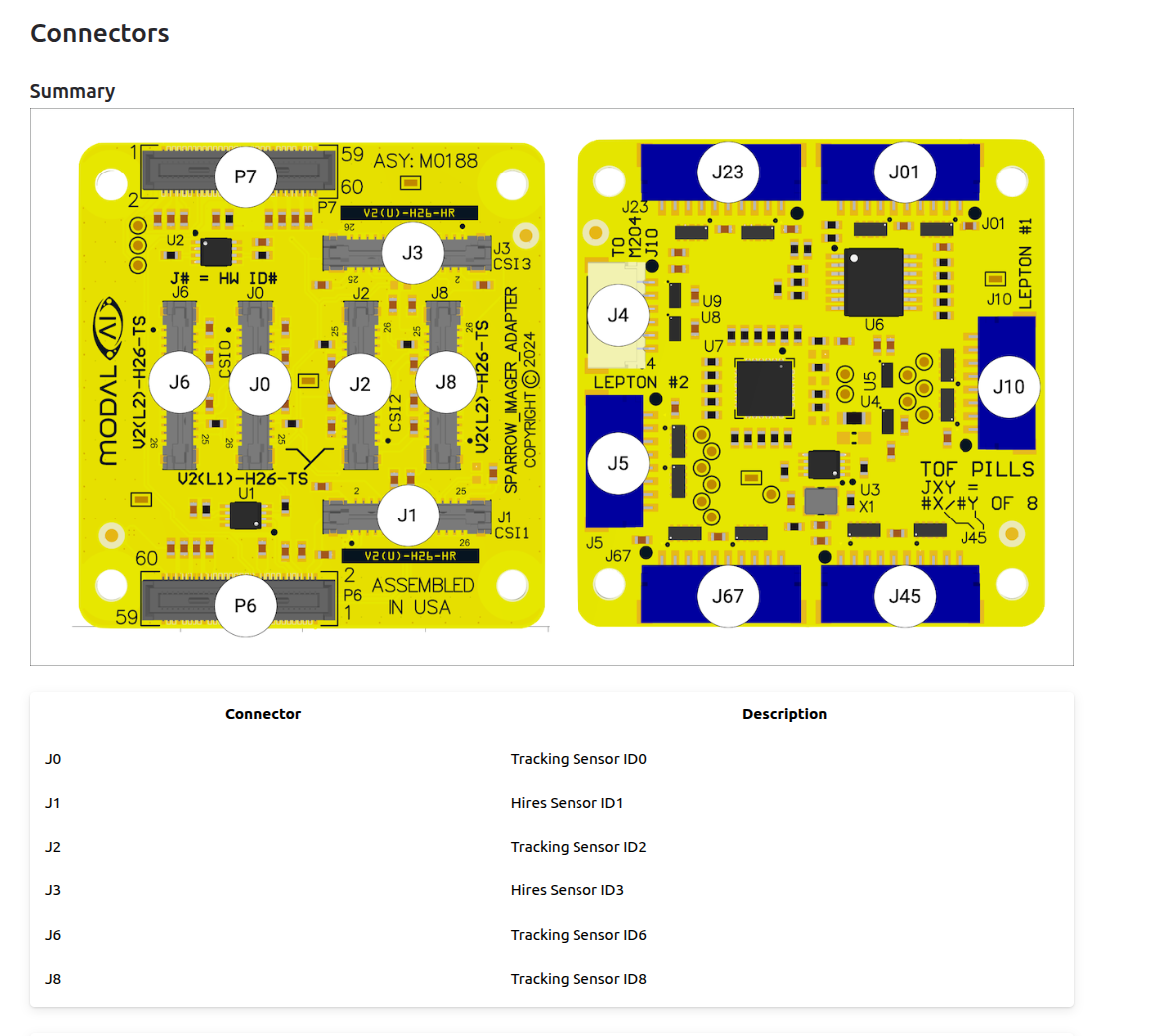
And, you could either use a hires camera in ID1 or another (5th) AR0144 with alt slave address.
By the way, Tracking Sensor ID8 on M0188 is untested and is not available.
Alex
-
@cbay , M0188 (with voxl2 mini) would allow you to use 4 tracking without changing the CCI slave address, you just use AR0144 instead of
Hires Sensor ID3:https://docs.modalai.com/M0188/
And, you could either use a hires camera in ID1 or another (5th) AR0144 with alt slave address.
By the way, Tracking Sensor ID8 on M0188 is untested and is not available.
Alex
One last detail,
I will need to check for you whether the M0173 (ID1) and M0188 (ID1 , ID3) have the sync line connected to corresponding coax ports. Worst case scenario you may need to add a 0402 0 ohm resistor (or use unsync'ed AR0144 driver).
I will get back to you about that. If i dont get back to you before you test, you can just use the unsync'ed driver for the camera with alt slave (instead of combo/fsin, use just ..sensormodule.ar0144_0x20_x.bin -- both variants are present in the zip with drivers for alt address)
If you use a combo / fsync variant of the AR0144 driver (both set up the camera to expect a sync signal from the host), but the sync line is not coming through to the camera, you will not get any frames (this is how this particular camera does sync, as it starts the exposure).
Alex
-
One last detail,
I will need to check for you whether the M0173 (ID1) and M0188 (ID1 , ID3) have the sync line connected to corresponding coax ports. Worst case scenario you may need to add a 0402 0 ohm resistor (or use unsync'ed AR0144 driver).
I will get back to you about that. If i dont get back to you before you test, you can just use the unsync'ed driver for the camera with alt slave (instead of combo/fsin, use just ..sensormodule.ar0144_0x20_x.bin -- both variants are present in the zip with drivers for alt address)
If you use a combo / fsync variant of the AR0144 driver (both set up the camera to expect a sync signal from the host), but the sync line is not coming through to the camera, you will not get any frames (this is how this particular camera does sync, as it starts the exposure).
Alex
@Alex-Kushleyev If I dont need to change the CCI to use 4 tracking camera's with M0188, then I am not going to bother to do so with the M0173, I will just run 3 cameras in the meantime.
Am I right to believe that M0188 can allow me to run 4-AR0144, 2-Leptons and 1-Boson+?
-
@Alex-Kushleyev If I dont need to change the CCI to use 4 tracking camera's with M0188, then I am not going to bother to do so with the M0173, I will just run 3 cameras in the meantime.
Am I right to believe that M0188 can allow me to run 4-AR0144, 2-Leptons and 1-Boson+?
@cbay , M0188 does NOT support a Boson sensor, which has different power requirements (compared to tracking, hires cameras) and uses different pinout of the same micro coax port type.
M0195 supports 4 cameras + Boson https://docs.modalai.com/M0195/ , but the Boson takes ID2 (CCI2), meaning you would have to put AR0144 cameras on IDs 0,1,3,6 and IDs 1 and 6 would still have a CCI conflict (CCI1). So you would still need the alt slave address for one AR0144.
Boson can only be connected to J2 of M0195, as documented.
Let me check about the dual lepton. It is documented, but i just want to confirm that it works.
Alex
-
@cbay , M0188 does NOT support a Boson sensor, which has different power requirements (compared to tracking, hires cameras) and uses different pinout of the same micro coax port type.
M0195 supports 4 cameras + Boson https://docs.modalai.com/M0195/ , but the Boson takes ID2 (CCI2), meaning you would have to put AR0144 cameras on IDs 0,1,3,6 and IDs 1 and 6 would still have a CCI conflict (CCI1). So you would still need the alt slave address for one AR0144.
Boson can only be connected to J2 of M0195, as documented.
Let me check about the dual lepton. It is documented, but i just want to confirm that it works.
Alex
@Alex-Kushleyev Got the three Ar0144s working, though only 2 are giving me Misp norm streams.
Thanks again for your help
-
@Alex-Kushleyev Got the three Ar0144s working, though only 2 are giving me Misp norm streams.
Thanks again for your help
@cbay , what happens with the third misp norm stream? Is it not available? Maybe you did not enable misp for that camera in voxl-camera-server.conf?
-
@cbay , what happens with the third misp norm stream? Is it not available? Maybe you did not enable misp for that camera in voxl-camera-server.conf?
@Alex-Kushleyev said in M0173 with 4 AR0144 Tracking cameras:
@cbay , what happens with the third misp norm stream? Is it not available? Maybe you did not enable misp for that camera in voxl-camera-server.conf?
Before it was the exact same setup in voxl-camera-server, rebooted and it just works now so not sure what was happening
-
@cbay , M0188 does NOT support a Boson sensor, which has different power requirements (compared to tracking, hires cameras) and uses different pinout of the same micro coax port type.
M0195 supports 4 cameras + Boson https://docs.modalai.com/M0195/ , but the Boson takes ID2 (CCI2), meaning you would have to put AR0144 cameras on IDs 0,1,3,6 and IDs 1 and 6 would still have a CCI conflict (CCI1). So you would still need the alt slave address for one AR0144.
Boson can only be connected to J2 of M0195, as documented.
Let me check about the dual lepton. It is documented, but i just want to confirm that it works.
Alex
@Alex-Kushleyev said in M0173 with 4 AR0144 Tracking cameras:
one
Any info about the dual lepton, it does seem to be documented that it works, please let me know if it doesnt.
-
@Alex-Kushleyev said in M0173 with 4 AR0144 Tracking cameras:
one
Any info about the dual lepton, it does seem to be documented that it works, please let me know if it doesnt.
Hi @cbay ,
I checked with the team - we have not tested using the second lepton plugged into either M0188 or M0195.
The
voxl-lepton-serveris not set up to handle two sensors. It would have to be the same process managing both sensors because the i2c communication to both would happen over the same i2c bus and the i2c switcher would need to control which sensor is actually being communicated with via i2c.We have checked that we can control the i2c switcher, but that's about it. We have not needed to use the second lepton (yet).
If you wanted to try it, that would be a risk, but here are the steps:
- plug in and test lepton in primary port
- unplug the primary lepton and plug it into secondary port
- update the
voxl-lepton-serverto control the i2c switcher to switch the i2c path to second port - test the lepton plugged into second port
- *** main task *** update the
voxl-lepton-serverto manage two lepton sensors, switching the i2c communication path, when it is appropriate- please note that during normal operation, the i2c communication with lepton is not needed, i believe we only use it if we need to reset the sensor
Alex
-
Hi @cbay ,
I checked with the team - we have not tested using the second lepton plugged into either M0188 or M0195.
The
voxl-lepton-serveris not set up to handle two sensors. It would have to be the same process managing both sensors because the i2c communication to both would happen over the same i2c bus and the i2c switcher would need to control which sensor is actually being communicated with via i2c.We have checked that we can control the i2c switcher, but that's about it. We have not needed to use the second lepton (yet).
If you wanted to try it, that would be a risk, but here are the steps:
- plug in and test lepton in primary port
- unplug the primary lepton and plug it into secondary port
- update the
voxl-lepton-serverto control the i2c switcher to switch the i2c path to second port - test the lepton plugged into second port
- *** main task *** update the
voxl-lepton-serverto manage two lepton sensors, switching the i2c communication path, when it is appropriate- please note that during normal operation, the i2c communication with lepton is not needed, i believe we only use it if we need to reset the sensor
Alex
@Alex-Kushleyev Thanks so much for the information. I will be receiving the boards shortly and will run through those tests.
How much work do you think it would take to update voxl-lepton-server
-
@Alex-Kushleyev Thanks so much for the information. I will be receiving the boards shortly and will run through those tests.
How much work do you think it would take to update voxl-lepton-server
@cbay , you could actually test two leptons by disabling i2c port for one (or both) of them. Lepton starts up streaming data by default via SPI, so you can get frames from it without any communication.
In order to do that, you would need to run two instances of
voxl-lepton-serverand the second instance would have to be modified to read from a different config file and to not kill the existingvoxl-lepton-serverprocess (and probably name itself differently, so that the first server does not kill the second during start-up).If this all works, then in order to actually test two leptons with i2c communication (which we use the set the FFC mode depending on the flight mode and also reset the sensor if it gets into a weird state while streaming), the lepton server functionality would probably need to be added to a C++ class so that multiple instances could be run from the same process. The reason is that there needs to be a single point where the i2c switcher is set to one or the other lepton, right before communicating to one of the leptons (without the other server / thread creating a race condition and trying to do communicate right at the same time)..
I'd have to think about the fastest way of doing this, but at least you should be able to test two leptons with second not using i2c with very minimal changes.
Here is the source code for the
voxl-lepton-serverin case you did not already find it: https://gitlab.com/voxl-public/voxl-sdk/services/voxl-lepton-server/-/blob/master/src/Alex
-
@cbay , you could actually test two leptons by disabling i2c port for one (or both) of them. Lepton starts up streaming data by default via SPI, so you can get frames from it without any communication.
In order to do that, you would need to run two instances of
voxl-lepton-serverand the second instance would have to be modified to read from a different config file and to not kill the existingvoxl-lepton-serverprocess (and probably name itself differently, so that the first server does not kill the second during start-up).If this all works, then in order to actually test two leptons with i2c communication (which we use the set the FFC mode depending on the flight mode and also reset the sensor if it gets into a weird state while streaming), the lepton server functionality would probably need to be added to a C++ class so that multiple instances could be run from the same process. The reason is that there needs to be a single point where the i2c switcher is set to one or the other lepton, right before communicating to one of the leptons (without the other server / thread creating a race condition and trying to do communicate right at the same time)..
I'd have to think about the fastest way of doing this, but at least you should be able to test two leptons with second not using i2c with very minimal changes.
Here is the source code for the
voxl-lepton-serverin case you did not already find it: https://gitlab.com/voxl-public/voxl-sdk/services/voxl-lepton-server/-/blob/master/src/Alex
-
@Alex-Kushleyev Hi, I'm working with @cbay on this project and I just wanted to report that I was able to modify
voxl-lepton-serverwith your suggestions and achieved dual lepton camera streaming into voxl-portal.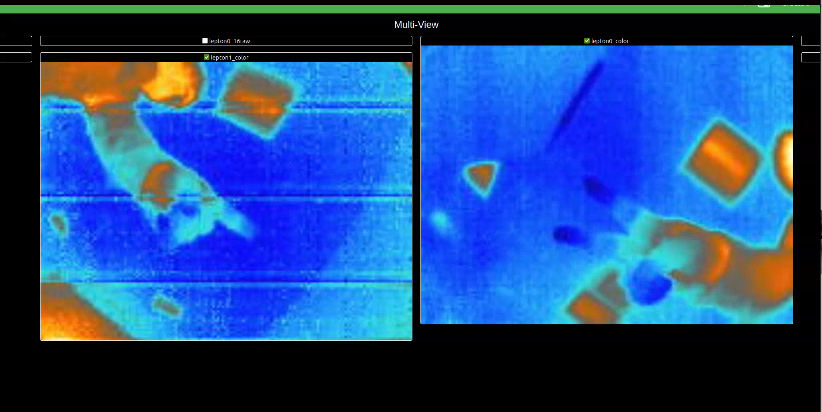
@Haxerus , that's great to hear! Can you clarify what you did? I am guessing the following:
- modify
voxl-lepton-serverto run multiple instances - disable i2c interface for the second lepton
Also, the image on the left seems noisy (horizontal lines)? I am not sure what it is, something to check.. (is it always present, what about when only single lepton is running).
Do you need anything else for any next steps?
Alex
- modify
-
@Haxerus , that's great to hear! Can you clarify what you did? I am guessing the following:
- modify
voxl-lepton-serverto run multiple instances - disable i2c interface for the second lepton
Also, the image on the left seems noisy (horizontal lines)? I am not sure what it is, something to check.. (is it always present, what about when only single lepton is running).
Do you need anything else for any next steps?
Alex
@Alex-Kushleyev sure thing. As per your suggestion, I modified
voxl-lepton-serverby moving all the Lepton camera-specific logic into a C++ class and added locks to any I2C operations to prevent race conditions. I then just created 2 instances of the LeptonCamera class I made which parse and publish the camera feeds to their own pipes which I can view in voxl-portal.I didn't need to disable any I2C interface for the second Lepton. I'm not too sure what you were referring to by that.
In regards to the horizontal line artifacts, those don't seems to consistently appear and I don't know what causes it. I'll investigate it further.
My next steps are to get the Leptons working with
voxl-open-vins-server. One question I had was that our VOXL 2 Mini appears to be running a service calledvoxl-lepton-trackerhowever I cannot find the source code for this anywhere on the voxl public GitLab. Was it removed or hidden? - modify
-
A Alex Kushleyev referenced this topic on
Reading along? Create a free ModalAI Forum account to join in.
With an account you can reply, ask your own question, get an email when a ModalAI engineer answers, and mark the reply that solved it. Your place in each thread is saved between visits.
Questions about VOXL, Flight Core, ESCs and ModalAI drones are answered here by the engineers who build them.
Register Login