
VOXL 2 Camera Connected but Not Feed
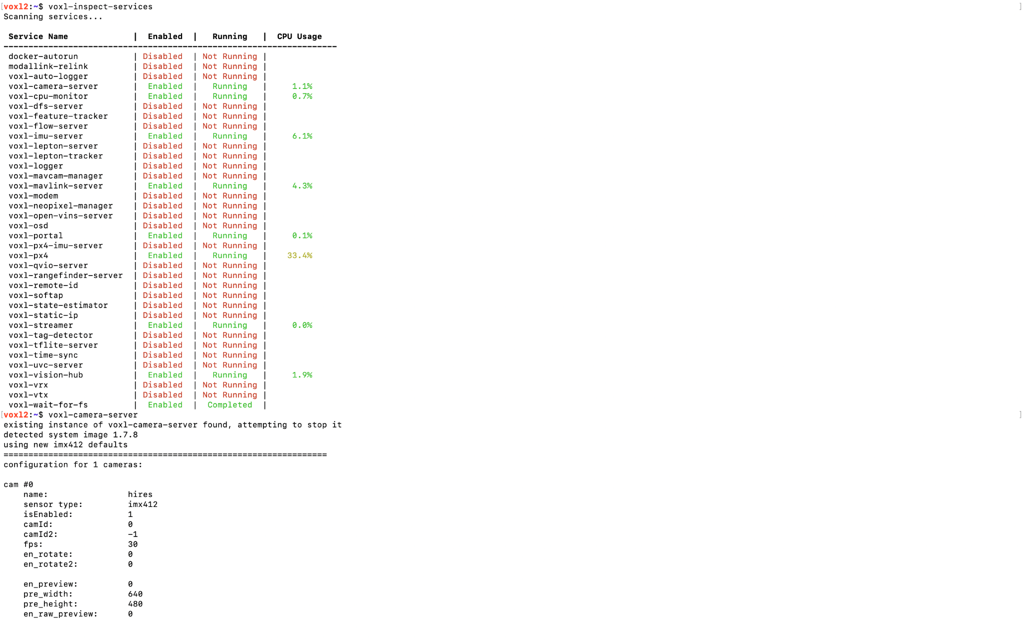
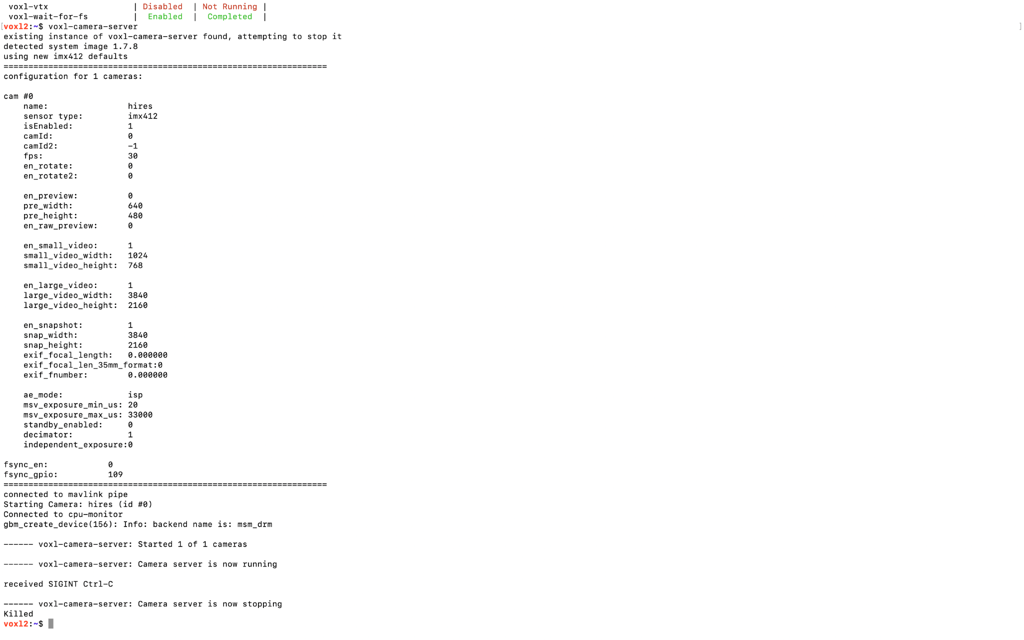
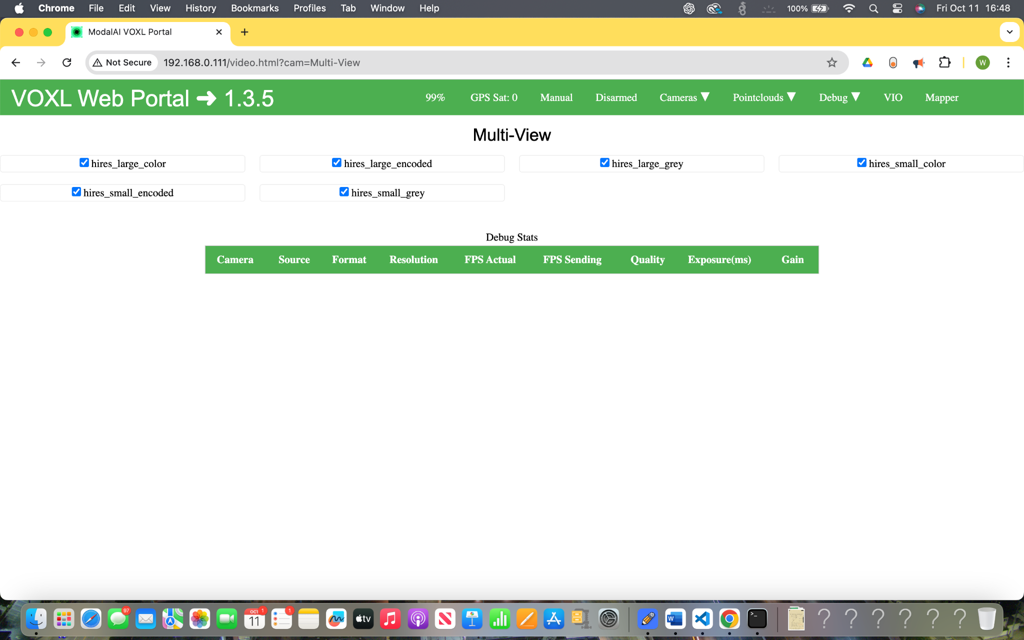
-
@tom ^ (Reminder)
@Wesley-Gunawan Hi Wesley, I faced a similar issue recently. I was using IMX678 Hires Camera in J7U. The camera was detected when I run
voxl-camera-server -l, even the green led light on the sensor glows but I didn't get any data run I runvoxl-inspect-cam -a. I had an alternate IMX678 camera and without changing any config, I replaced it and it worked. I don't know what is wrong with the first sensor. I should probably do RMA, but yeah, if you have another sensor, give it a try! -
@Wesley-Gunawan Hi Wesley, I faced a similar issue recently. I was using IMX678 Hires Camera in J7U. The camera was detected when I run
voxl-camera-server -l, even the green led light on the sensor glows but I didn't get any data run I runvoxl-inspect-cam -a. I had an alternate IMX678 camera and without changing any config, I replaced it and it worked. I don't know what is wrong with the first sensor. I should probably do RMA, but yeah, if you have another sensor, give it a try!@Wesley-Gunawan can you please share a picture of your setup? It needs to match a camera config found here: https://docs.modalai.com/voxl2-camera-configs/
Often when a camera can't be found:
- it's installed backwards
- the cable isn't fully connected or the connector is damaged
- the wrong camera config has been configured during setup
-
@Wesley-Gunawan can you please share a picture of your setup? It needs to match a camera config found here: https://docs.modalai.com/voxl2-camera-configs/
Often when a camera can't be found:
- it's installed backwards
- the cable isn't fully connected or the connector is damaged
- the wrong camera config has been configured during setup
Hi, the camera is connected correctly because when the configuration or installation setup isn't correct, voxl-camera-server wouldn't even detect the camera's connection, in this case it does, but no input from the camera has ever been acquired. Here is the image of the setup:
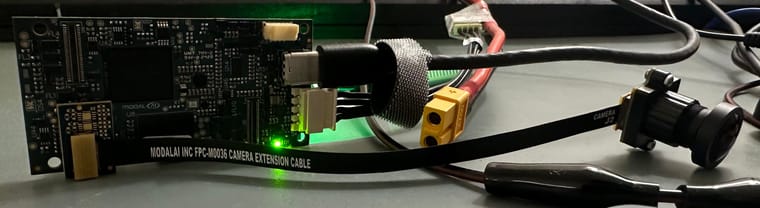
Is there any other information you need to help me debug this issue? It's been over a week and I need it working as soon as possible or else I have to return the whole kit. As for the camera defect possibility suggested by a user in this forum last week, I already tried swapping the camera and it still doesn't work.
-
Hi, the camera is connected correctly because when the configuration or installation setup isn't correct, voxl-camera-server wouldn't even detect the camera's connection, in this case it does, but no input from the camera has ever been acquired. Here is the image of the setup:
Is there any other information you need to help me debug this issue? It's been over a week and I need it working as soon as possible or else I have to return the whole kit. As for the camera defect possibility suggested by a user in this forum last week, I already tried swapping the camera and it still doesn't work.
@Wesley-Gunawan It looks like you are using a C08 config. https://docs.modalai.com/voxl2-camera-configs/#c8---hires-only
Have you tried
voxl-configure-cameras 8?voxl-camera-server documentation for troubleshooting recommends running
voxl-camera-server -d0. Can you try that and paste the output? -
@Wesley-Gunawan It looks like you are using a C08 config. https://docs.modalai.com/voxl2-camera-configs/#c8---hires-only
Have you tried
voxl-configure-cameras 8?voxl-camera-server documentation for troubleshooting recommends running
voxl-camera-server -d0. Can you try that and paste the output?@Moderator It is camera configuration 8, the board wouldn't detect the camera otherwise (tried that before) so I'm assuming the camera configuration is correct.
voxl2:~$ voxl-camera-server -d0
existing instance of voxl-camera-server found, attempting to stop it
detected system image 1.7.8
using new imx412 defaultsconfiguration for 1 cameras:
cam #0
name: hires
sensor type: imx412
isEnabled: 1
camId: 0
camId2: -1
fps: 30
en_rotate: 0
en_rotate2: 0en_preview: 0 pre_width: 640 pre_height: 480 en_raw_preview: 0 en_small_video: 1 small_video_width: 1024 small_video_height: 768 en_large_video: 1 large_video_width: 3840 large_video_height: 2160 en_snapshot: 1 snap_width: 3840 snap_height: 2160 exif_focal_length: 0.000000 exif_focal_len_35mm_format:0 exif_fnumber: 0.000000 ae_mode: isp msv_exposure_min_us: 20 msv_exposure_max_us: 33000 standby_enabled: 0 decimator: 1 independent_exposure:0fsync_en: 0
fsync_gpio: 109DEBUG: Attempting to open the hal module
DEBUG: SUCCESS: Camera module opened on attempt 0
DEBUG: ----------- Number of cameras: 1VERBOSE: cci-direct: using voxl_platform_mod config 0 layout
DEBUG: Cam idx: 0, Cam slot: 2, Slave Address: 0x0034, Sensor Id: 0x0577
connected to mavlink pipe
DEBUG: ------ voxl-camera-server: Starting 1 cameras
Starting Camera: hires (id #0)
DEBUG: Checking Gain limits for Camera: hires
DEBUG: Using gain limits min: 100 max: 1600
DEBUG: cam ID 0 checking for fmt: 35 w: 1024 h: 768 o: 0
DEBUG: ==> option 0: format= 34 width=4056 height=3040 is_input=0
DEBUG: ==> option 4: format= 34 width=4056 height=3040 is_input=1
DEBUG: ==> option 8: format= 35 width=4056 height=3040 is_input=0
DEBUG: ==> option 12: format= 35 width=4056 height=3040 is_input=1
DEBUG: ==> option 16: format= 33 width=4056 height=3040 is_input=0
DEBUG: ==> option 20: format= 34 width=4000 height=3000 is_input=0
DEBUG: ==> option 24: format= 34 width=4000 height=3000 is_input=1
DEBUG: ==> option 28: format= 35 width=4000 height=3000 is_input=0
DEBUG: ==> option 32: format= 35 width=4000 height=3000 is_input=1
DEBUG: ==> option 36: format= 33 width=4000 height=3000 is_input=0
DEBUG: ==> option 40: format= 34 width=3840 height=2160 is_input=0
DEBUG: ==> option 44: format= 34 width=3840 height=2160 is_input=1
DEBUG: ==> option 48: format= 35 width=3840 height=2160 is_input=0
DEBUG: ==> option 52: format= 35 width=3840 height=2160 is_input=1
DEBUG: ==> option 56: format= 33 width=3840 height=2160 is_input=0
DEBUG: ==> option 60: format= 34 width=3264 height=2448 is_input=0
DEBUG: ==> option 64: format= 34 width=3264 height=2448 is_input=1
DEBUG: ==> option 68: format= 35 width=3264 height=2448 is_input=0
DEBUG: ==> option 72: format= 35 width=3264 height=2448 is_input=1
DEBUG: ==> option 76: format= 33 width=3264 height=2448 is_input=0
DEBUG: ==> option 80: format= 34 width=3200 height=2400 is_input=0
DEBUG: ==> option 84: format= 34 width=3200 height=2400 is_input=1
DEBUG: ==> option 88: format= 35 width=3200 height=2400 is_input=0
DEBUG: ==> option 92: format= 35 width=3200 height=2400 is_input=1
DEBUG: ==> option 96: format= 33 width=3200 height=2400 is_input=0
DEBUG: ==> option 100: format= 34 width=2976 height=2976 is_input=0
DEBUG: ==> option 104: format= 34 width=2976 height=2976 is_input=1
DEBUG: ==> option 108: format= 35 width=2976 height=2976 is_input=0(Too much to show, at the end of the output):
VERBOSE: Dumping GBM flags
DEBUG: Found flag GBM_BO_USAGE_CPU_READ_QTI
DEBUG: Found flag GBM_BO_USAGE_CAMERA_WRITE_QTI
DEBUG: Allocated BO with width=25054814 height=1 stride=25054814 aligned_w=25054814 aligned_h=1 size=25054814 flags=0x20003 format=GBM_FORMAT_BLOB fd=226 vaddr=0x7fe8aaae70
DEBUG: Successfully set up pipeline for stream: SNAPSHOT
DEBUG: Started Camera: hires------ voxl-camera-server: Started 1 of 1 cameras
------ voxl-camera-server: Camera server is now running
VERBOSE: Entered thread: cam0-result(tid: 2676)
VERBOSE: Entered thread: cam0-request(tid: 2675)
VERBOSE: added request for small video stream
VERBOSE: Sending request for frame 0 for camera hires for 1 streams
VERBOSE: Received result from HAl3 for frame number 0
VERBOSE: Received 0 buffers from camera hires, partial result:1
VERBOSE: finished sending request for frame 0 for camera hires
VERBOSE: returning from SendOneCaptureRequest for frame 1 for camera hires
VERBOSE: added request for small video stream
VERBOSE: Sending request for frame 1 for camera hires for 1 streams
VERBOSE: finished sending request for frame 1 for camera hires
VERBOSE: returning from SendOneCaptureRequest for frame 2 for camera hires
VERBOSE: added request for small video stream
VERBOSE: Sending request for frame 2 for camera hires for 1 streams
VERBOSE: finished sending request for frame 2 for camera hires
VERBOSE: returning from SendOneCaptureRequest for frame 3 for camera hires
VERBOSE: added request for small video stream
VERBOSE: Sending request for frame 3 for camera hires for 1 streams
VERBOSE: finished sending request for frame 3 for camera hires
VERBOSE: returning from SendOneCaptureRequest for frame 4 for camera hires
VERBOSE: added request for small video stream
VERBOSE: Sending request for frame 4 for camera hires for 1 streams
VERBOSE: finished sending request for frame 4 for camera hires
VERBOSE: returning from SendOneCaptureRequest for frame 5 for camera hires
VERBOSE: added request for small video stream
VERBOSE: Sending request for frame 5 for camera hires for 1 streams
VERBOSE: Received result from HAl3 for frame number 1
VERBOSE: Received 0 buffers from camera hires, partial result:1
VERBOSE: Received result from HAl3 for frame number 2
VERBOSE: Received 0 buffers from camera hires, partial result:1
DEBUG: Value of standby_active is: 0
DEBUG: Value of standby_active is: 0received SIGINT Ctrl-C
------ voxl-camera-server: Camera server is now stopping
DEBUG: Stopping Camera: hires
Killed -
@Moderator It is camera configuration 8, the board wouldn't detect the camera otherwise (tried that before) so I'm assuming the camera configuration is correct.
voxl2:~$ voxl-camera-server -d0
existing instance of voxl-camera-server found, attempting to stop it
detected system image 1.7.8
using new imx412 defaultsconfiguration for 1 cameras:
cam #0
name: hires
sensor type: imx412
isEnabled: 1
camId: 0
camId2: -1
fps: 30
en_rotate: 0
en_rotate2: 0en_preview: 0 pre_width: 640 pre_height: 480 en_raw_preview: 0 en_small_video: 1 small_video_width: 1024 small_video_height: 768 en_large_video: 1 large_video_width: 3840 large_video_height: 2160 en_snapshot: 1 snap_width: 3840 snap_height: 2160 exif_focal_length: 0.000000 exif_focal_len_35mm_format:0 exif_fnumber: 0.000000 ae_mode: isp msv_exposure_min_us: 20 msv_exposure_max_us: 33000 standby_enabled: 0 decimator: 1 independent_exposure:0fsync_en: 0
fsync_gpio: 109DEBUG: Attempting to open the hal module
DEBUG: SUCCESS: Camera module opened on attempt 0
DEBUG: ----------- Number of cameras: 1VERBOSE: cci-direct: using voxl_platform_mod config 0 layout
DEBUG: Cam idx: 0, Cam slot: 2, Slave Address: 0x0034, Sensor Id: 0x0577
connected to mavlink pipe
DEBUG: ------ voxl-camera-server: Starting 1 cameras
Starting Camera: hires (id #0)
DEBUG: Checking Gain limits for Camera: hires
DEBUG: Using gain limits min: 100 max: 1600
DEBUG: cam ID 0 checking for fmt: 35 w: 1024 h: 768 o: 0
DEBUG: ==> option 0: format= 34 width=4056 height=3040 is_input=0
DEBUG: ==> option 4: format= 34 width=4056 height=3040 is_input=1
DEBUG: ==> option 8: format= 35 width=4056 height=3040 is_input=0
DEBUG: ==> option 12: format= 35 width=4056 height=3040 is_input=1
DEBUG: ==> option 16: format= 33 width=4056 height=3040 is_input=0
DEBUG: ==> option 20: format= 34 width=4000 height=3000 is_input=0
DEBUG: ==> option 24: format= 34 width=4000 height=3000 is_input=1
DEBUG: ==> option 28: format= 35 width=4000 height=3000 is_input=0
DEBUG: ==> option 32: format= 35 width=4000 height=3000 is_input=1
DEBUG: ==> option 36: format= 33 width=4000 height=3000 is_input=0
DEBUG: ==> option 40: format= 34 width=3840 height=2160 is_input=0
DEBUG: ==> option 44: format= 34 width=3840 height=2160 is_input=1
DEBUG: ==> option 48: format= 35 width=3840 height=2160 is_input=0
DEBUG: ==> option 52: format= 35 width=3840 height=2160 is_input=1
DEBUG: ==> option 56: format= 33 width=3840 height=2160 is_input=0
DEBUG: ==> option 60: format= 34 width=3264 height=2448 is_input=0
DEBUG: ==> option 64: format= 34 width=3264 height=2448 is_input=1
DEBUG: ==> option 68: format= 35 width=3264 height=2448 is_input=0
DEBUG: ==> option 72: format= 35 width=3264 height=2448 is_input=1
DEBUG: ==> option 76: format= 33 width=3264 height=2448 is_input=0
DEBUG: ==> option 80: format= 34 width=3200 height=2400 is_input=0
DEBUG: ==> option 84: format= 34 width=3200 height=2400 is_input=1
DEBUG: ==> option 88: format= 35 width=3200 height=2400 is_input=0
DEBUG: ==> option 92: format= 35 width=3200 height=2400 is_input=1
DEBUG: ==> option 96: format= 33 width=3200 height=2400 is_input=0
DEBUG: ==> option 100: format= 34 width=2976 height=2976 is_input=0
DEBUG: ==> option 104: format= 34 width=2976 height=2976 is_input=1
DEBUG: ==> option 108: format= 35 width=2976 height=2976 is_input=0(Too much to show, at the end of the output):
VERBOSE: Dumping GBM flags
DEBUG: Found flag GBM_BO_USAGE_CPU_READ_QTI
DEBUG: Found flag GBM_BO_USAGE_CAMERA_WRITE_QTI
DEBUG: Allocated BO with width=25054814 height=1 stride=25054814 aligned_w=25054814 aligned_h=1 size=25054814 flags=0x20003 format=GBM_FORMAT_BLOB fd=226 vaddr=0x7fe8aaae70
DEBUG: Successfully set up pipeline for stream: SNAPSHOT
DEBUG: Started Camera: hires------ voxl-camera-server: Started 1 of 1 cameras
------ voxl-camera-server: Camera server is now running
VERBOSE: Entered thread: cam0-result(tid: 2676)
VERBOSE: Entered thread: cam0-request(tid: 2675)
VERBOSE: added request for small video stream
VERBOSE: Sending request for frame 0 for camera hires for 1 streams
VERBOSE: Received result from HAl3 for frame number 0
VERBOSE: Received 0 buffers from camera hires, partial result:1
VERBOSE: finished sending request for frame 0 for camera hires
VERBOSE: returning from SendOneCaptureRequest for frame 1 for camera hires
VERBOSE: added request for small video stream
VERBOSE: Sending request for frame 1 for camera hires for 1 streams
VERBOSE: finished sending request for frame 1 for camera hires
VERBOSE: returning from SendOneCaptureRequest for frame 2 for camera hires
VERBOSE: added request for small video stream
VERBOSE: Sending request for frame 2 for camera hires for 1 streams
VERBOSE: finished sending request for frame 2 for camera hires
VERBOSE: returning from SendOneCaptureRequest for frame 3 for camera hires
VERBOSE: added request for small video stream
VERBOSE: Sending request for frame 3 for camera hires for 1 streams
VERBOSE: finished sending request for frame 3 for camera hires
VERBOSE: returning from SendOneCaptureRequest for frame 4 for camera hires
VERBOSE: added request for small video stream
VERBOSE: Sending request for frame 4 for camera hires for 1 streams
VERBOSE: finished sending request for frame 4 for camera hires
VERBOSE: returning from SendOneCaptureRequest for frame 5 for camera hires
VERBOSE: added request for small video stream
VERBOSE: Sending request for frame 5 for camera hires for 1 streams
VERBOSE: Received result from HAl3 for frame number 1
VERBOSE: Received 0 buffers from camera hires, partial result:1
VERBOSE: Received result from HAl3 for frame number 2
VERBOSE: Received 0 buffers from camera hires, partial result:1
DEBUG: Value of standby_active is: 0
DEBUG: Value of standby_active is: 0received SIGINT Ctrl-C
------ voxl-camera-server: Camera server is now stopping
DEBUG: Stopping Camera: hires
Killed@Wesley-Gunawan that looks like it's running properly. Can you open another terminal and run
voxl-inspect-cam -a? -
@Wesley-Gunawan that looks like it's running properly. Can you open another terminal and run
voxl-inspect-cam -a?@Moderator I already tried that in the past, even before I consulted this forum, the output has always been like this
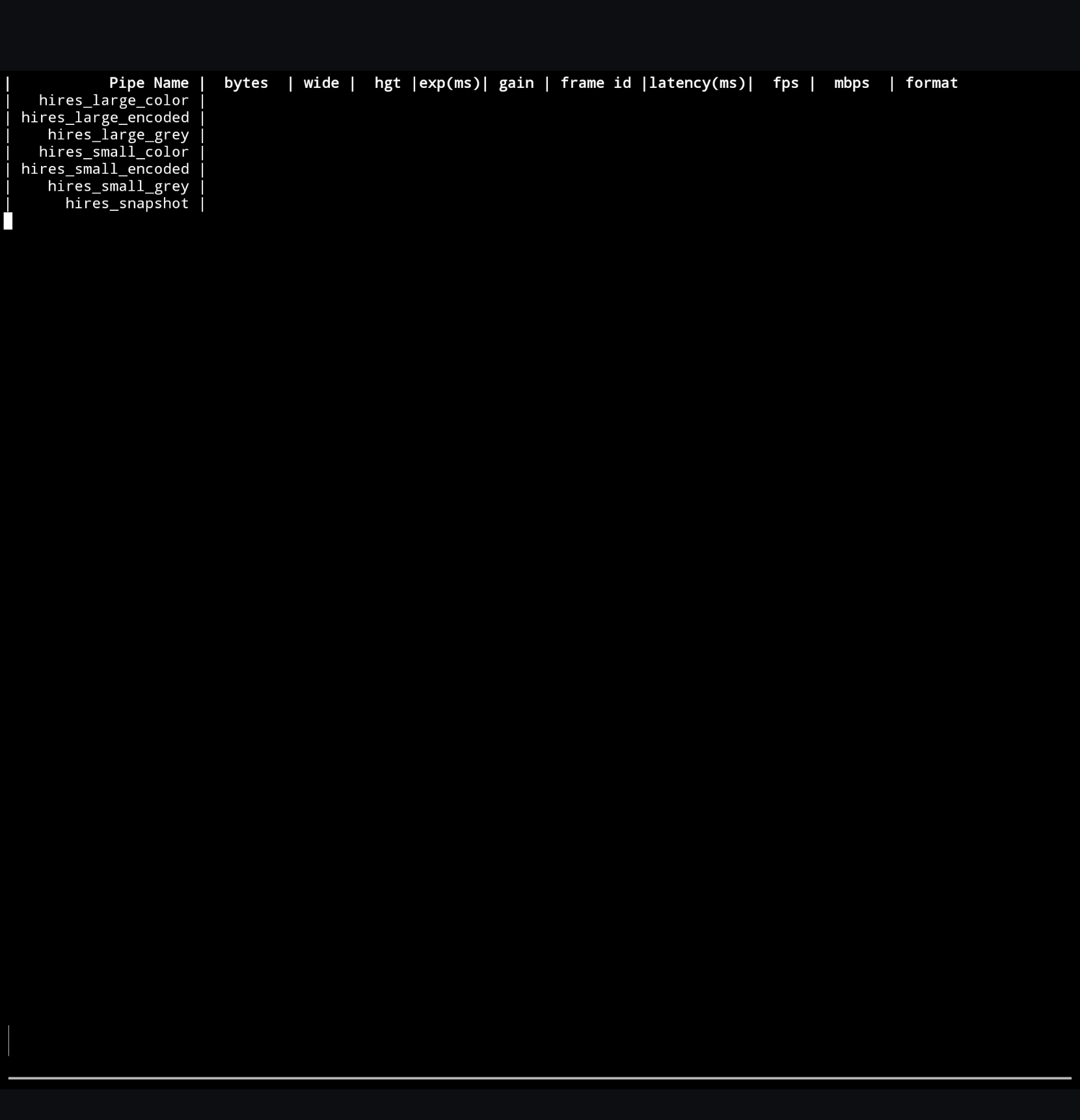
-
@Moderator I already tried that in the past, even before I consulted this forum, the output has always been like this
@Wesley-Gunawan Can you please set and run inspect-cam again?
"en_preview": true,
"en_snapshot": false,
-
@Wesley-Gunawan Can you please set and run inspect-cam again?
"en_preview": true,
"en_snapshot": false,
@Moderator voxl-camera-server -d0
existing instance of voxl-camera-server found, attempting to stop it
detected system image 1.7.8
using new imx412 defaultsconfiguration for 1 cameras:
cam #0
name: hires
sensor type: imx412
isEnabled: 1
camId: 0
camId2: -1
fps: 30
en_rotate: 0
en_rotate2: 0en_preview: 1 pre_width: 640 pre_height: 480 en_raw_preview: 0 en_small_video: 1 small_video_width: 1024 small_video_height: 768 en_large_video: 1 large_video_width: 3840 large_video_height: 2160 en_snapshot: 0 snap_width: 3840 snap_height: 2160 exif_focal_length: 0.000000 exif_focal_len_35mm_format:0 exif_fnumber: 0.000000 ae_mode: isp msv_exposure_min_us: 20 msv_exposure_max_us: 33000 standby_enabled: 0 decimator: 1 independent_exposure:0fsync_en: 0
fsync_gpio: 109DEBUG: Attempting to open the hal module
DEBUG: SUCCESS: Camera module opened on attempt 0
DEBUG: ----------- Number of cameras: 1(Too long, in the end):
------ voxl-camera-server: Camera server is now running
VERBOSE: Entered thread: cam0-request(tid: 2735)
DEBUG: Value of standby_active is: 0received SIGINT Ctrl-C
------ voxl-camera-server: Camera server is now stopping
DEBUG: Stopping Camera: hires
DEBUG: ------ Last request frame for hires: 0
VERBOSE: Leaving hires request thread
DEBUG: ------ Last hires result frame: -1
VERBOSE: Leaving hires result thread
DEBUG: ------ Last frame encoded: -1
DEBUG: OMX_EventCmdComplete
DEBUG: OMX_EventCmdComplete
DEBUG: OMX_EventCmdComplete
DEBUG: ------ Last frame encoded: -1
DEBUG: OMX_EventCmdComplete
DEBUG: OMX_EventCmdComplete
DEBUG: Deleting buffers for hires preview stream
DEBUG: OMX_EventCmdComplete
DEBUG: Deleting buffers for hires small video stream
DEBUG: Deleting buffers for hires large video stream
DEBUG: Deleting buffers for hires snapshot stream
free(): invalid pointer
Abortedvoxl-inspect-cam -a output is the picture attached
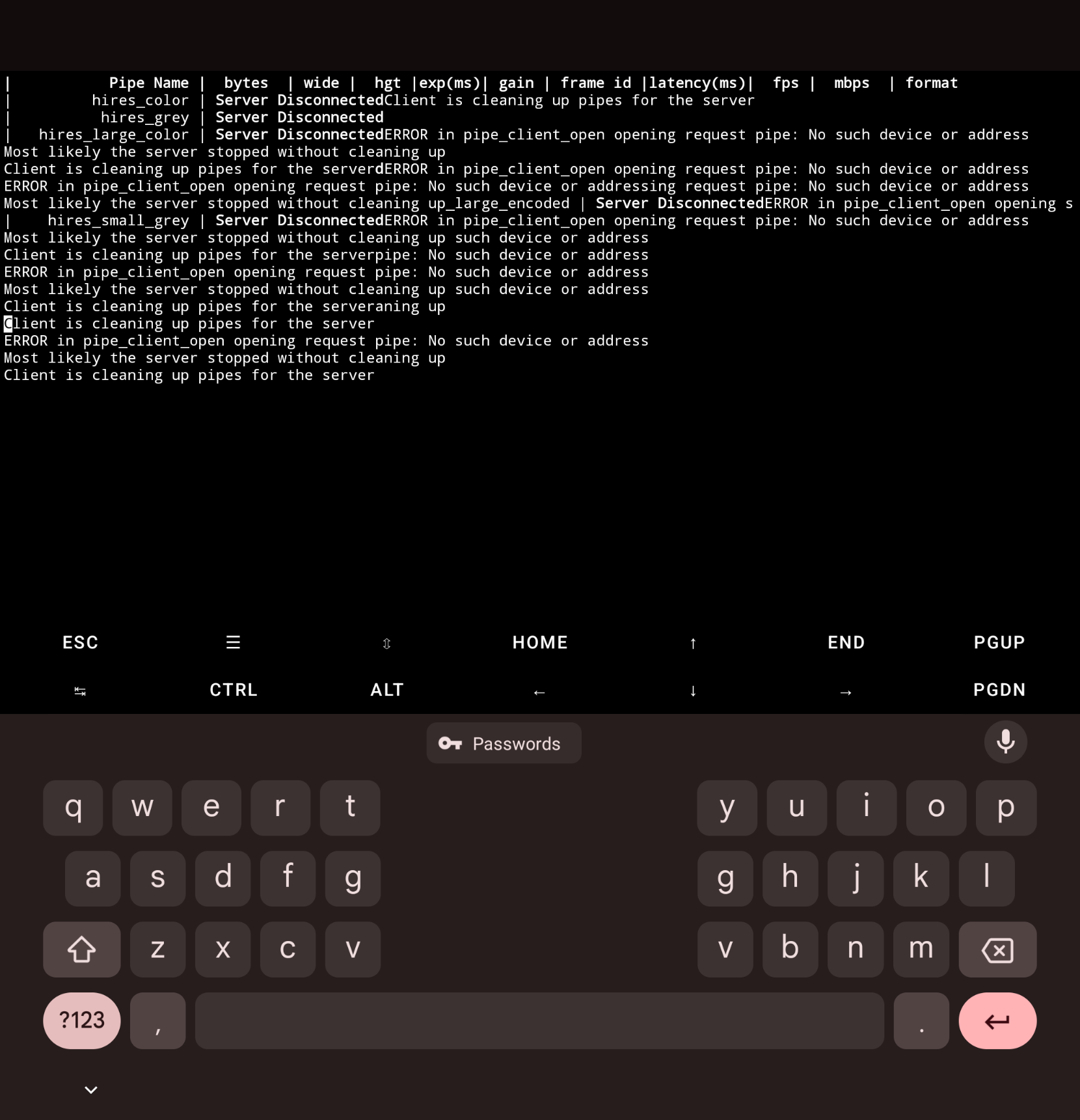
-
@Moderator voxl-camera-server -d0
existing instance of voxl-camera-server found, attempting to stop it
detected system image 1.7.8
using new imx412 defaultsconfiguration for 1 cameras:
cam #0
name: hires
sensor type: imx412
isEnabled: 1
camId: 0
camId2: -1
fps: 30
en_rotate: 0
en_rotate2: 0en_preview: 1 pre_width: 640 pre_height: 480 en_raw_preview: 0 en_small_video: 1 small_video_width: 1024 small_video_height: 768 en_large_video: 1 large_video_width: 3840 large_video_height: 2160 en_snapshot: 0 snap_width: 3840 snap_height: 2160 exif_focal_length: 0.000000 exif_focal_len_35mm_format:0 exif_fnumber: 0.000000 ae_mode: isp msv_exposure_min_us: 20 msv_exposure_max_us: 33000 standby_enabled: 0 decimator: 1 independent_exposure:0fsync_en: 0
fsync_gpio: 109DEBUG: Attempting to open the hal module
DEBUG: SUCCESS: Camera module opened on attempt 0
DEBUG: ----------- Number of cameras: 1(Too long, in the end):
------ voxl-camera-server: Camera server is now running
VERBOSE: Entered thread: cam0-request(tid: 2735)
DEBUG: Value of standby_active is: 0received SIGINT Ctrl-C
------ voxl-camera-server: Camera server is now stopping
DEBUG: Stopping Camera: hires
DEBUG: ------ Last request frame for hires: 0
VERBOSE: Leaving hires request thread
DEBUG: ------ Last hires result frame: -1
VERBOSE: Leaving hires result thread
DEBUG: ------ Last frame encoded: -1
DEBUG: OMX_EventCmdComplete
DEBUG: OMX_EventCmdComplete
DEBUG: OMX_EventCmdComplete
DEBUG: ------ Last frame encoded: -1
DEBUG: OMX_EventCmdComplete
DEBUG: OMX_EventCmdComplete
DEBUG: Deleting buffers for hires preview stream
DEBUG: OMX_EventCmdComplete
DEBUG: Deleting buffers for hires small video stream
DEBUG: Deleting buffers for hires large video stream
DEBUG: Deleting buffers for hires snapshot stream
free(): invalid pointer
Abortedvoxl-inspect-cam -a output is the picture attached
@Wesley-Gunawan did voxl-inspect-cam show anything while voxl-camera-server was running? it looks like you restarted voxl-camera-server while voxl-inspect-cam was running.
I think the proper steps are:
- update config (done)
- reboot VOXL 2
- run voxl-inspect-cam -a
-
@Wesley-Gunawan did voxl-inspect-cam show anything while voxl-camera-server was running? it looks like you restarted voxl-camera-server while voxl-inspect-cam was running.
I think the proper steps are:
- update config (done)
- reboot VOXL 2
- run voxl-inspect-cam -a
This is after power cycle (poweroff -f, power source off, turn on again)


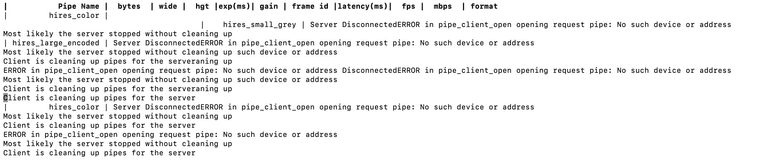
Reading along? Create a free ModalAI Forum account to join in.
With an account you can reply, ask your own question, get an email when a ModalAI engineer answers, and mark the reply that solved it. Your place in each thread is saved between visits.
Questions about VOXL, Flight Core, ESCs and ModalAI drones are answered here by the engineers who build them.
Register Login