
SSH Port 22 Does Not Work!
-
@Alex-Kushleyev
Hi Alex,The drone is connected via WiFi. I have connected using adb shell, and have ran ifconfig to verify that wlan0 has an IP address that is appropriate. I pinged it, and received all packets, but sshing into the robot isn't working! I'm wondering if port 22 is down, and I can't change it? Connection times out is the message I receive, or route to host unreachable. It would be great if someone would point me in the right direction. Thanks!
@19bpl , you can check status of ssh server on voxl2:
voxl2:/$ systemctl status sshd
● ssh.service - OpenBSD Secure Shell server
   Loaded: loaded (/lib/systemd/system/ssh.service; enabled; vendor preset: enabled)
   Active: active (running) since Tue 2024-03-19 04:38:48 UTC; 17h ago
  Process: 1491 ExecStartPre=/usr/sbin/sshd -t (code=exited, status=0/SUCCESS)
 Main PID: 1503 (sshd)
    Tasks: 1 (limit: 4915)
   CGroup: /system.slice/ssh.service
           └─1503 /usr/sbin/sshd -D

Mar 19 04:38:47 m0054 systemd[1]: Starting OpenBSD Secure Shell server...
Mar 19 04:38:48 m0054 systemd[1]: Started OpenBSD Secure Shell server.
Mar 19 04:38:48 m0054 sshd[1503]: Server listening on 0.0.0.0 port 22.
Mar 19 04:38:48 m0054 sshd[1503]: Server listening on :: port 22.
you can also verify that it is possible to ssh from voxl2 into itself by running the ssh command right from voxl and using its own ip:
voxl2:/$ ssh root@<voxl-ip-address>Regarding your linux PC, normally the outgoing connections to remote port 22 (ssh) are not blocked by default firewall rules. Not sure about Windows.
-
@19bpl , you can check status of ssh server on voxl2:
voxl2:/$ systemctl status sshd
● ssh.service - OpenBSD Secure Shell server
   Loaded: loaded (/lib/systemd/system/ssh.service; enabled; vendor preset: enabled)
   Active: active (running) since Tue 2024-03-19 04:38:48 UTC; 17h ago
  Process: 1491 ExecStartPre=/usr/sbin/sshd -t (code=exited, status=0/SUCCESS)
 Main PID: 1503 (sshd)
    Tasks: 1 (limit: 4915)
   CGroup: /system.slice/ssh.service
           └─1503 /usr/sbin/sshd -D

Mar 19 04:38:47 m0054 systemd[1]: Starting OpenBSD Secure Shell server...
Mar 19 04:38:48 m0054 systemd[1]: Started OpenBSD Secure Shell server.
Mar 19 04:38:48 m0054 sshd[1503]: Server listening on 0.0.0.0 port 22.
Mar 19 04:38:48 m0054 sshd[1503]: Server listening on :: port 22.
you can also verify that it is possible to ssh from voxl2 into itself by running the ssh command right from voxl and using its own ip:
voxl2:/$ ssh root@<voxl-ip-address>Regarding your linux PC, normally the outgoing connections to remote port 22 (ssh) are not blocked by default firewall rules. Not sure about Windows.
@Alex-Kushleyev
Hi Alex,Thank you for your reply. Yes I have always been able to ssh when in the voxl suite, but can't open another terminal window and complete this task. Maybe that's the reason why port22 says "route to host unreachable"? As well, maybe you can help me further. After I ssh using the voxl suite (which works) and I see the "Welcome to Ubuntu" text message associated with the tutorial, I setup all necessary files w.r.t. appropriate IP addresses. I use the drone addr. in the qip setup field, but when running QGroundControl, and adding a connection via the drone, QGroundControl says I'm disconnected. Then when clicking the connect button, it says connection was broken. Any ideas? Thanks again
-
@Alex-Kushleyev
Hi Alex,Thank you for your reply. Yes I have always been able to ssh when in the voxl suite, but can't open another terminal window and complete this task. Maybe that's the reason why port22 says "route to host unreachable"? As well, maybe you can help me further. After I ssh using the voxl suite (which works) and I see the "Welcome to Ubuntu" text message associated with the tutorial, I setup all necessary files w.r.t. appropriate IP addresses. I use the drone addr. in the qip setup field, but when running QGroundControl, and adding a connection via the drone, QGroundControl says I'm disconnected. Then when clicking the connect button, it says connection was broken. Any ideas? Thanks again
@19bpl ,
I am not sure what you mean by "After I ssh using the voxl suite (which works) " - can you clarify?
Please review this documentation carefully and make sure your required services are running (
voxl-px4andvoxl-mavlink-server https://docs.modalai.com/qgc-wifi/
 -
@19bpl ,
I am not sure what you mean by "After I ssh using the voxl suite (which works) " - can you clarify?
Please review this documentation carefully and make sure your required services are running (
voxl-px4andvoxl-mavlink-server https://docs.modalai.com/qgc-wifi/@Alex-Kushleyev
Hi Alex,So after running voxl2:/$ ssh root@<voxl-ip-address> everything works. Mavlink, px4, etc. all work and are running and configured properly. Opening up QGroundControl, it doesn't connect when adding the drone's IP addr. Is it possible to perhaps to a zoom where you can see my progress and help with any extenuating problems? Thanks again!
-
@Alex-Kushleyev
Hi Alex,So after running voxl2:/$ ssh root@<voxl-ip-address> everything works. Mavlink, px4, etc. all work and are running and configured properly. Opening up QGroundControl, it doesn't connect when adding the drone's IP addr. Is it possible to perhaps to a zoom where you can see my progress and help with any extenuating problems? Thanks again!
@19bpl , if you can ssh from voxl2 into itself, then voxl2's ssh server is working (which is expected behavior). However, if you cannot ssh into voxl2 from your PC, then there is some networking issue, which is probably also why QGC cannot connect to voxl2.
So you should carefully look at your network set up and firewall rules and figure our why your PC cannot connect to VOXL2.
Alex
-
@19bpl , if you can ssh from voxl2 into itself, then voxl2's ssh server is working (which is expected behavior). However, if you cannot ssh into voxl2 from your PC, then there is some networking issue, which is probably also why QGC cannot connect to voxl2.
So you should carefully look at your network set up and firewall rules and figure our why your PC cannot connect to VOXL2.
Alex
@Alex-Kushleyev
I have followed the documentation for weeks now, following every word and every step. I'd like to show you some screenshots if that's ok. QGroundControl cannot recognize the VOXL Sentinel Drone...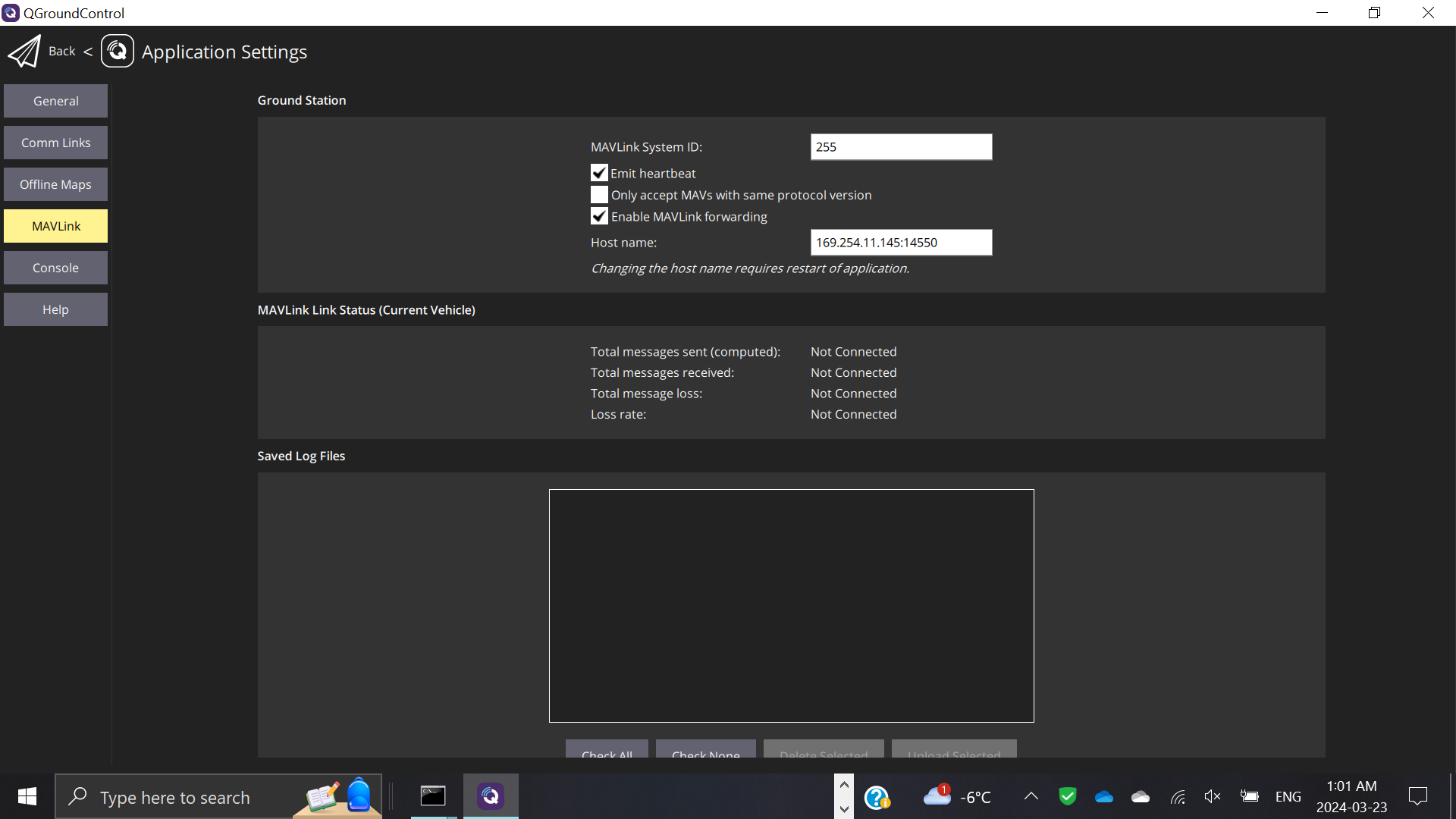
-
@Alex-Kushleyev
I have followed the documentation for weeks now, following every word and every step. I'd like to show you some screenshots if that's ok. QGroundControl cannot recognize the VOXL Sentinel Drone... -
This post is deleted!
-
This post is deleted!
-
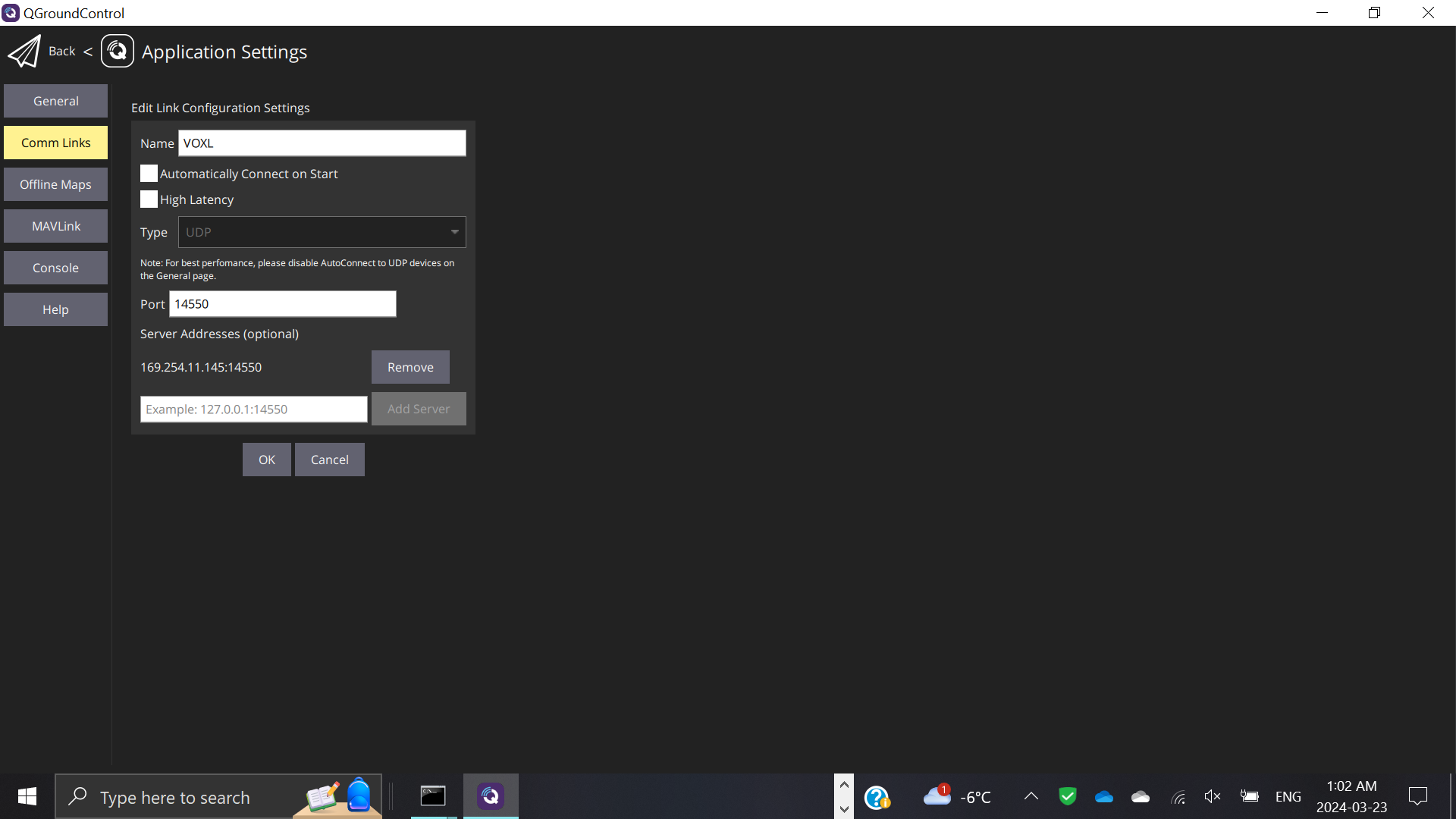
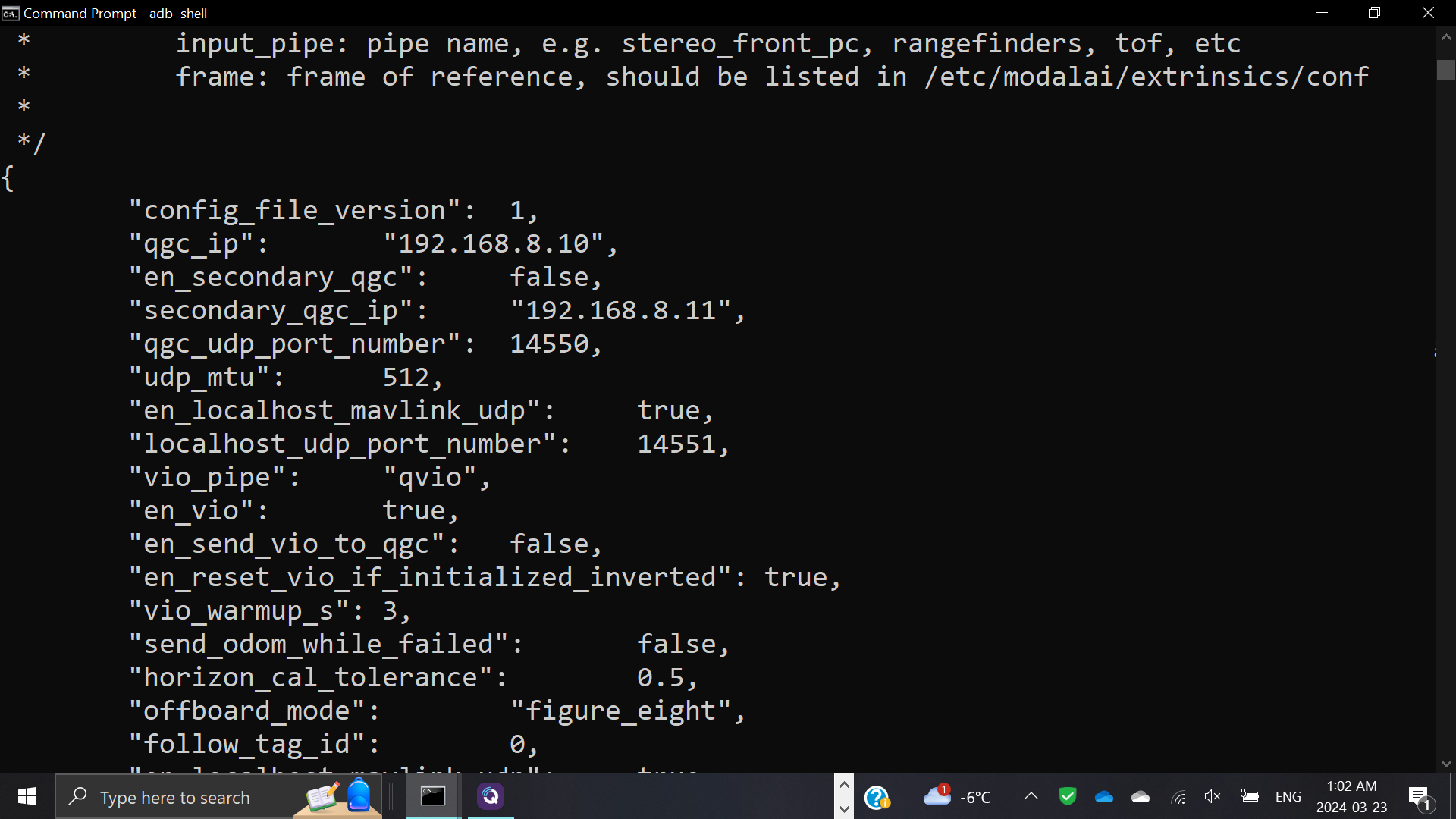
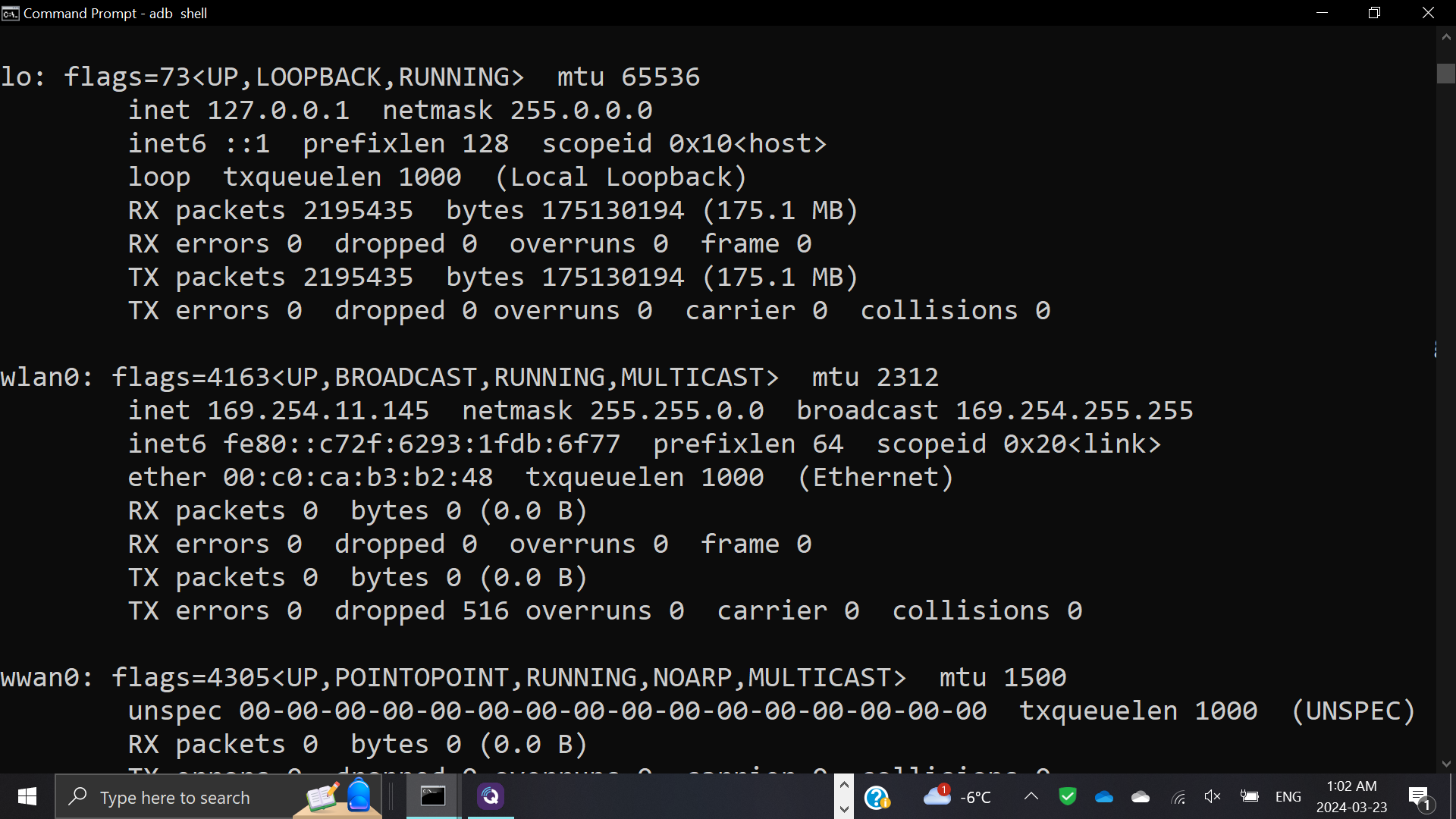
@19bpl The IP address of your voxl2 is 169.254.11.145. What is the IP address of the computer running QGC? VOXL2 is setup by default to assume that the WiFi is in "SoftAP" or access point mode. Because of that the default value for "qgc_ip" in /etc/modalai/voxl-mavlink-server.conf is 192.168.8.10. That is the IP address that would be assigned to your QGC computer if it connected to the VOXL2 WiFi network. But in your case it appears that you are setup in station mode so you will need to change that qgc_ip address to the address that your QGC computer is getting on your network. Then, on the "Comm links" tab of QGC you will enter the IP address of the VOXL2 as a "Server address". Changing both of those will allow the VOXL2 to know the QGC address and QGC to know the VOXL2 address.
-
@19bpl The IP address of your voxl2 is 169.254.11.145. What is the IP address of the computer running QGC? VOXL2 is setup by default to assume that the WiFi is in "SoftAP" or access point mode. Because of that the default value for "qgc_ip" in /etc/modalai/voxl-mavlink-server.conf is 192.168.8.10. That is the IP address that would be assigned to your QGC computer if it connected to the VOXL2 WiFi network. But in your case it appears that you are setup in station mode so you will need to change that qgc_ip address to the address that your QGC computer is getting on your network. Then, on the "Comm links" tab of QGC you will enter the IP address of the VOXL2 as a "Server address". Changing both of those will allow the VOXL2 to know the QGC address and QGC to know the VOXL2 address.
Also 169.* IP range is usually self assigned ip, which means there is no manually assigned ip address or no connection to a router that would assign an ip address.
-
Also 169.* IP range is usually self assigned ip, which means there is no manually assigned ip address or no connection to a router that would assign an ip address.
@Alex-Kushleyev Yes, great point! I would suggest switching WiFi to "Soft AP" mode and trying that approach. It appears that you are in station mode and not able to get setup on your network properly. If you want to use station mode make sure you are up correctly on the network and have internet access before attempting to connect to QGC. Seems you may just have some fundamental problem with your network setup here.
-
@Alex-Kushleyev Yes, great point! I would suggest switching WiFi to "Soft AP" mode and trying that approach. It appears that you are in station mode and not able to get setup on your network properly. If you want to use station mode make sure you are up correctly on the network and have internet access before attempting to connect to QGC. Seems you may just have some fundamental problem with your network setup here.
Hi Eric,
Thank you for the tips! If I will use softap today and update you on any issues I may have with QGroundControl
-
@Alex-Kushleyev Yes, great point! I would suggest switching WiFi to "Soft AP" mode and trying that approach. It appears that you are in station mode and not able to get setup on your network properly. If you want to use station mode make sure you are up correctly on the network and have internet access before attempting to connect to QGC. Seems you may just have some fundamental problem with your network setup here.
@Eric-Katzfey
Eric,I used softap mode, and discovered that the voxl IP addr. is 192.168.8.1 so I added that to the comm. links section. I set the qgc IP addr. in the appropriate conf. file to my computer's one, which is 192.168.2.18. Nothing is working! QGroundControl doesn't work, and when restarting, it still doesn't connect. Now I saw a video saying that the MAVLink Ground Station Host name should reflect the host IP address, so I changed that in all. Nothing is working
-
@Eric-Katzfey
Eric,I used softap mode, and discovered that the voxl IP addr. is 192.168.8.1 so I added that to the comm. links section. I set the qgc IP addr. in the appropriate conf. file to my computer's one, which is 192.168.2.18. Nothing is working! QGroundControl doesn't work, and when restarting, it still doesn't connect. Now I saw a video saying that the MAVLink Ground Station Host name should reflect the host IP address, so I changed that in all. Nothing is working
@19bpl ,
Let's take a step back and see what your network actually looks like..
- does your VOXL2 have a wifi or wired connectivity? which one? You need at least one of those (wifi or wired adapter) in order to connect to a network. Based on the information you sent before, I can see
wlan0interface, which is a wifi adapter - how is your desktop PC connected to network? wired or wireless?
- do you have a wireless router? If so, do you want VOLX2 to connect to that router?
- does your PC have a wireless card?
- do you want to use that wireless card to connecto to VOXL2 directly (while VOXL2 is in SoftAP mode). SoftAP mode means VOXL2 would be acting as a wireless access point (similar to a typical wifi router).
- If you do have a wifi router and you simply want VOXL2 to connect to your network via the wifi router, then VOXL2 needs to be in
stationmode. You can configure voxl2 to station mode using the following command :voxl-wifi station <ssid> [password].
The most typical case is when users have a wifi adapter plugged into VOXL2 and you also have a wifi router. Additionally, you have a PC that is connected to the same network either via a wired ethernet or wirelessly via the same router. Then you would want to set up your VOXL2 in station mode, connected to your wifi router.
After you execute the
voxl-wifi statition ..command, if the information you provided is correct, your wifi router will assign an ip address to your VOXL, that should be in the same range as your PC (such as192.168.2.xxx, assuming your network mask is default 255.255.255.0, which is also specified by the router). At that point, you should be able ping your PC from VOXL2 and vice versa. If pinging works, then GCS should also work, if it is configured to use these new IP addresses. - does your VOXL2 have a wifi or wired connectivity? which one? You need at least one of those (wifi or wired adapter) in order to connect to a network. Based on the information you sent before, I can see
-
@Eric-Katzfey
Eric,I used softap mode, and discovered that the voxl IP addr. is 192.168.8.1 so I added that to the comm. links section. I set the qgc IP addr. in the appropriate conf. file to my computer's one, which is 192.168.2.18. Nothing is working! QGroundControl doesn't work, and when restarting, it still doesn't connect. Now I saw a video saying that the MAVLink Ground Station Host name should reflect the host IP address, so I changed that in all. Nothing is working
@19bpl If your QGC computer was connected to the VOXL2 AP it would have an IP address of 192.168.8.10. At the very least 192.168.8.<something>. So your QGC computer isn't connected to the VOXL2 network.
-
@Eric-Katzfey
Eric,I used softap mode, and discovered that the voxl IP addr. is 192.168.8.1 so I added that to the comm. links section. I set the qgc IP addr. in the appropriate conf. file to my computer's one, which is 192.168.2.18. Nothing is working! QGroundControl doesn't work, and when restarting, it still doesn't connect. Now I saw a video saying that the MAVLink Ground Station Host name should reflect the host IP address, so I changed that in all. Nothing is working
@19bpl At the very least you need to be able to ping the QGC computer from VOXL2 and VOXL2 from the QGC computer before attempting anything else.


Reading along? Create a free ModalAI Forum account to join in.
With an account you can reply, ask your own question, get an email when a ModalAI engineer answers, and mark the reply that solved it. Your place in each thread is saved between visits.
Questions about VOXL, Flight Core, ESCs and ModalAI drones are answered here by the engineers who build them.
Register Login