Skip to content
  • Categories
  • Recent
  • Tags
  • Popular
  • Users
  • Groups
Collapse
Brand Logo

ModalAI Forum

P

phodskins

@phodskins
Unfollow Follow
About
Posts
2
Topics
1
Shares
0
Groups
0
Followers
0
Following
0

Posts

Recent Best Controversial

  • Starling 2 Max Quickstart Guide + Initial Setup
    P phodskins

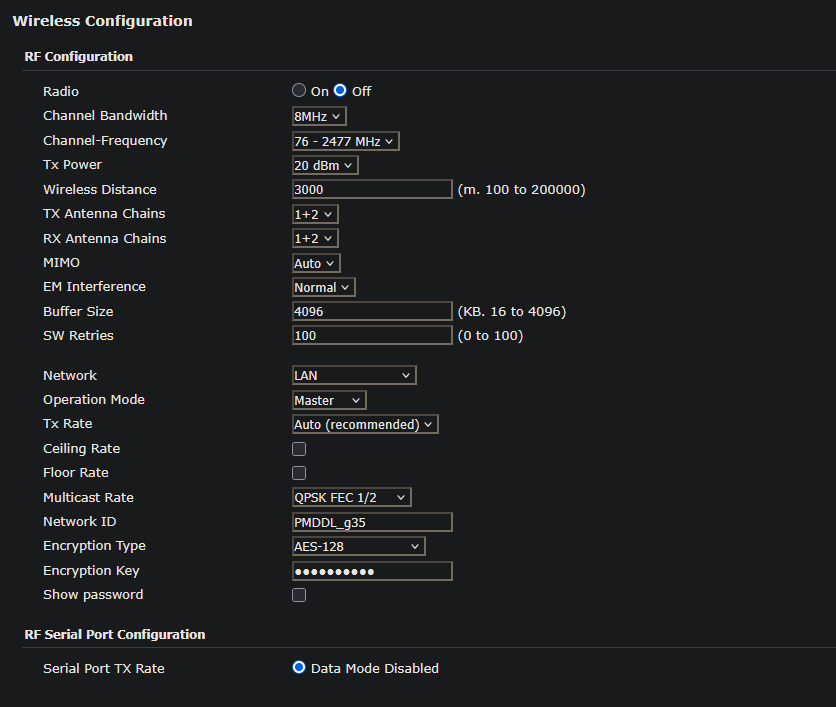
    If anyone is struggling to find the pMDDL2450 info that arrives with the Starling 2 Max + Microhard option (mine didn't come with any documentation) here is the RF configuration. By default the Max arrived with the radio turned off. I have paired mine with a pMDDL2450-ENC module connected to a laptop running QGround / MissionPlanner.

    One way to access the settings without having an external radio module to pair is ssh port forwarding. Make sure you're connected to the drone / have setup your VOXL WIFI settings then ssh into the VOXL using ssh -L 8443:192.168.168.1:443 root@192.168.8.1

    You can then access the microhard landing page at https://localhost:8443

    My pMDDL2450 has the following default settings for the radio:
    c59d1c08-fd0f-4ce9-b40e-ec413952ce4d-image.png

    Starling & Starling 2

  • Starling 2 Max Quickstart Guide + Initial Setup
    P phodskins

    Hello, we recently purchased a full Starling 2 Max kit. It arrived with a card pointing to a 'QuickStart' guide but the website documentation seems to be absent. Is there an up to date QuickStart guide for the Max?

    The batteries arrived without a charger - is there a recommended charger for the Amprius 3A batteries?

    We opted for the microhard addon. Is there a default network ID and frequency/channel for the microhard radio?

    Starling & Starling 2
  • Login

  • Don't have an account? Register

  • Login or register to search.
  • First post
    Last post
0
  • Categories
  • Recent
  • Tags
  • Popular
  • Users
  • Groups