Skip to content
  • Categories
  • Recent
  • Tags
  • Popular
  • Users
  • Groups
Collapse
Brand Logo

ModalAI Forum

N

ndwe

@ndwe
Unfollow Follow
About
Posts
5
Topics
2
Shares
0
Groups
0
Followers
0
Following
0

Posts

Recent Best Controversial

  • Yaw Error Estimate on PX4v1.15
    N ndwe

    @Eric-Katzfey Hi, thanks for the response.

    EKF2_MAG_DECL - yes, set to Sydney, Australia
    COM_ARM_EKF_YAW is set to the max 1.0 - the value it is reading is 3.5+
    Wouldn't changing EKF2_MAG_TYPE to 1 mean that the compass isn't used during flight and rely solely on GPS for heading, but I can ask px4 community this.

    Moving to px4 v1.16 the error changes to X/Y position control error, but the fix is the same.

    A question on px4 firmware versions. ModalAI develops on px4 v.14.
    The latest being modalai_fc-v2_1.14.0-2.0.133.px4

    When I install this firmware the error isn't present and (Ready to fly) arming can occur on the ground without having to move the drone to fix the yaw error. Would you recommend using this version on a non-voxl system, we are using a Jetson? We are interested to know if there is a reason why this version works with your hardware but not later versions of px4?

    Thanks again

    Ask your questions right here! yaw flight core v2

  • Yaw Error Estimate on PX4v1.15
    N ndwe

    Hi,
    We are using fc-v2 with the ModalAI 4-in-1 ESC (M0138) and a 3DR M10 ublox gps unit.

    The fc-v2 was shipped with px4 v1.15. The system works well but there is a pre-flight check fail that we are trying to clear.

    PREFLIGHT FAIL: EKF YAW ERROR

    Care has been taken to calibrate the sensors but we are unable avoid this.

    The solution has been to sway the drone side to side and then the error clears and the drone is 'Ready to fly". Because of our use case this is not a practical approach.

    The drone is for outdoor use and needs GPS.

    Any advise on how to fix this issue would be greatly appreciated.

    Cheers

    Ask your questions right here! yaw flight core v2

  • Mavlink messages through voxl-logging
    N ndwe

    Ok thanks, I can parse the raw data. I guess I was expecting the csv to contain the data as well

    Ask your questions right here!

  • Mavlink messages through voxl-logging
    N ndwe

    voxl-replay -p /data/voxl-logger/log0014/ -z
    voxl-replay: invalid option -- 'z'

    Replay a log

    -d, --debug enable verbose debug mode
    -h, --help print this help message
    -n, --number {number} number of log to open, e.g. 32
    -p, --path {path} complete path of log to open, e.g. /data/mylog/
    -s, --start {seconds} starts the replay (float) seconds into the log
    -f, --finish {seconds} ends the replay (float) seconds into the log
    -i, --include {name} name of pipe to publish, publish all if not specified
    -e, --exclude {name} name of pipe to not publish, publish all if not specified
    -y, --auto_kill automatically kills servers that conflict with the log

    When I use the -d flag

    voxl2:/data/voxl-logger/log0013$ voxl-replay -p /data/voxl-logger/log0013/ -d
    enabling debug mode
    opening json info file: /data/voxl-logger/log0013/info.json
    using log_format_version=1
    log contains 1 channels
    log started at 20016320271533ns
    log publish channel 0:
    type: mav
    out path: /run/mpa/mavlink_attitude/
    log path: /data/voxl-logger/log0013//run/mpa/mavlink_attitude/
    total samples: 88
    opening csv file: /data/voxl-logger/log0013//run/mpa/mavlink_attitude/data.csv
    opening raw file: /data/voxl-logger/log0013//run/mpa/mavlink_attitude/data.raw
    creating pipe: /run/mpa/mavlink_attitude/
    finding start frame for channel 0
    header for channel 0 /run/mpa/mavlink_attitude/
    i,timestamp(ns)
    log started at 20016320271533ns, shifting to 20016407463491ns
    replay start time ns: 1498719153614entering main loop
    starting to publish mavlink to: /run/mpa/mavlink_attitude/
    publishing to ch0 at 1498819501us a mavlink packet with timestamp 1498819381us
    publishing to ch0 at 1498819646us a mavlink packet with timestamp 1498819397us
    publishing to ch0 at 1498819671us a mavlink packet with timestamp 1498819400us

    Thanks

    Ask your questions right here!

  • Mavlink messages through voxl-logging
    N ndwe

    I'm trying to log mavlink messages though voxl-logger but all of the mavlink message pipes contain only i, timestamp.

    I have been able to log imu and tracking camera data but not the mavlink messages. Any ideas?

    Note: still on sdk1.3

    $ voxl-version 
    --------------------------------------------------------------------------------
    system-image: 1.7.10-M0054-14.1a-perf
    kernel:       #1 SMP PREEMPT Fri Sep 27 21:59:02 UTC 2024 4.19.125
    --------------------------------------------------------------------------------
    hw platform:  M0054
    mach.var:     1.0.1
    --------------------------------------------------------------------------------
    voxl-suite:   1.3.5
    
    
    voxl2:/home/starling2voxl-logger -m mavlink_attitude -t 3
    starting 3.0 second timer
    connected to ch 0 mavlink: /run/mpa/mavlink_attitude/
    stopping automatically after requested timeout
    summary of data logged:
    ch 0, type: mav, samples:      88, path: /run/mpa/mavlink_attitude/
    created new log here:
    /data/voxl-logger/log0013/
    voxl2:/home/starling2$ cat /data/voxl-logger/log0013/run/mpa/mavlink_attitude/data.csv 
    i,timestamp(ns)
    0,20016407463491
    1,20016507691080


    mavlink_message_t
    	mavlink_ap_heartbeat
    	mavlink_attitude
    	mavlink_from_gcs
    	mavlink_gps_raw_int
    	mavlink_local_position_ned
    	mavlink_onboard
    	mavlink_sys_status
    	mavlink_to_gcs
    
    
    $ voxl-mavlink-server -j
    loading our own config file
    =================================================================
    Parameters as loaded from config file:
    primary_static_gcs_ip:        
    secondary_static_gcs_ip:      192.168.41.42
    onboard_port_to_autopilot:    14556
    onboard_port_from_autopilot:  14557
    gcs_port_to_autopilot:        14558
    gcs_port_from_autopilot:      14559
    en_external_uart_ap:          0
    autopilot_uart_bus:           1
    autopilot_uart_baudrate:      921600
    autopilot_mission_delay_start:      -1
    udp_mtu:                      0
    gcs_timeout_s                 4.50
    en_external_ap_timesync:      1
    en_external_ap_heartbeat:     1
    =================================================================
    existing instance of voxl-mavlink-server found, attempting to stop it
    starting receive thread for onboard channel from autopilot
    starting receive thread for gcs channel from autopilot
    CONNECTED to autopilot on onboard channel
    CONNECTED to autopilot on gcs channel
    Not connecting to primary gcs ip: 
    Adding secondary manual gcs IP address to udp connection list: 192.168.41.42
    Added new UDP connection to 192.168.41.42
    Init complete, entering main loop
    to ob pipe  ID: 141  compid:   1
    to ob pipe  ID:  32  compid:   1
    to ob pipe  ID: 290  compid:   1
    to ob pipe  ID: 291  compid:   1
    to ob pipe  ID:  30  compid:   1
    to ob pipe  ID: 331  compid:   1
    to ob pipe  ID:  83  compid:   1
    to gcs pipe ID:  31  compid:   1
    to ob pipe  ID:  29  compid:   1
    to ob pipe  ID:  65  compid:   1
    to ob pipe  ID:  36  compid:   1
    to ob pipe  ID:  74  compid:   1
    to ob pipe  ID: 105  compid:   1
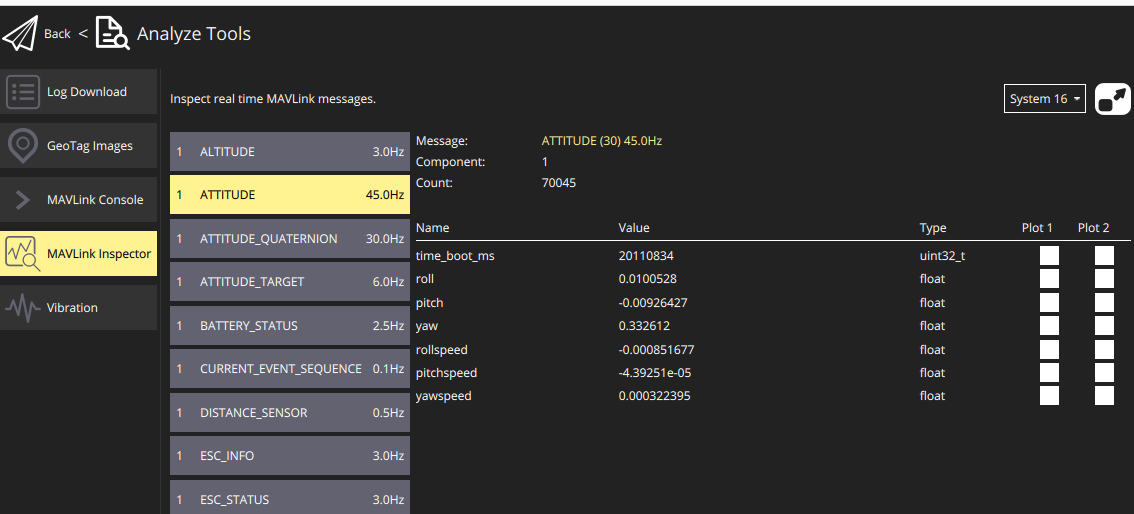


    Screenshot from 2025-10-20 15-10-37.png

    Ask your questions right here!
  • Login

  • Login or register to search.
  • First post
    Last post
0
  • Categories
  • Recent
  • Tags
  • Popular
  • Users
  • Groups