Hi,
I'm trying to configure a VOXL2 to fly outdoors with GPS. And so far I'm struggling with the configuration of the GPS module. The GPS module I use has a Ublox-F9P chip that I have configured to do RTK, which outputs UBX protocol at a selectable baudrate. I fly this same module with this configuration, doing RTK, in a drone with VOXL Fligth and it works perfectly.
As for the compass, I connect a stand alone mag to the i2c port. On the VOXL2 I have not yet got to work with the mag.
In VOXL2 I connect the gps module to the GNSS TX 3P3V and GNSS RX 3P3V ports of the J19 connector. But I can't get it to work. Also I don't see px4 parameters of gps configuration like: SER_GPS1_BAUD or GPS_1_CONFIG.
I see that in the file /etc/modalai/voxl-px4.config there is the following:
# On M0054 the GPS and RC drivers run on SLPI DSP
else
    if [ "$GPS" == "MATEK" ]; then
        # Use this gps start line instead for Matek Systems M8Q-5883 module
        /bin/echo "Starting Mateksys M8Q-5883 GPS"
        qshell gps start
    elif [ "$GPS" == "HERE3" ]; then
        # Use this line for the Here3 GPS module
        /bin/echo "Starting Here3 GPS"
        qshell gps start
    else
        # Only the newer Holybro unit is supported on M0054
        /bin/echo "Starting Holybro GPS"
        qshell gps start -d 7 -b 115200
Does this mean that only Matek GPS, HERE 3 and Holybro can be used?
Running flowing commands outputs:
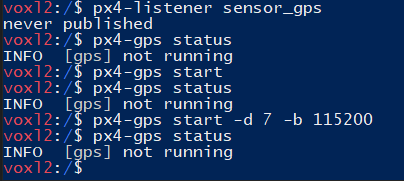
System info:

Any thoughts on this? Thanks!