Skip to content
  • Categories
  • Recent
  • Tags
  • Popular
  • Users
  • Groups
Collapse
Brand Logo

ModalAI Forum

A

alarm_hq

@alarm_hq
Contributor
Unfollow Follow
About
Posts
16
Topics
4
Shares
0
Groups
1
Followers
0
Following
0

Posts

Recent Best Controversial

  • Stabilized Flight Mode
    A alarm_hq

    @tom After playing around with CP_DIST, it seems any value > 0 causes position mode to no longer want to allow x/y translation. From what I understand, any value < 0 disables object avoidance. Is this true?

    As far as I'm aware, my settings should be in parity with Modal provided guidance in regards to seeker setup with additional configurations overridden to support voxl-mapper.

    Thanks for the stabilized advice @mohammednaveed, I've gone as far to replace manual mode with this setting.

    Ask your questions right here!

  • Stabilized Flight Mode
    A alarm_hq

    How can I enable a stabilized flight mode / configure the RC controller to do so?

    Currently I have manual / position / off-board.
    In positional mode, the drone will stabilize, but only allows changes to the z-position.

    Colloquially speaking, position mode previously allowed for x/y translation, but I don't have any proof of that nor could I explain what would have possibly changed from that point in time.

    Ask your questions right here!

  • TOF SLAM
    A alarm_hq

    @Matt-Turi thanks so much!

    Ask your questions right here!

  • TOF SLAM
    A alarm_hq

    Thanks Matt, I think these are all great suggestions and I look forward to trying it out.

    Good luck with the flycontrols or similar change!

    Ask your questions right here!

  • TOF SLAM
    A alarm_hq

    I have generated a path, though was unable to have the drone take off. Does the drone have to be in a hover state, or can it take off with the plan?

    I don't have a specific preference for the camera control model, other than it's easier to use with a laptop trackpad. If i had to pick one, I'd say flycontrols.

    /**
     * This file contains configuration that's specific to voxl-mapper.
     */
    {
    	"robot_radius":	0.2,
    	"point_skip":	7,
    	"voxel_size":	0.20000000298023224,
    	"voxels_per_side":	16,
    	"esdf_save_path":	"/data/voxl_mapper/esdf_map",
    	"tsdf_save_path":	"/data/voxl_mapper/tsdf_map",
    	"mesh_save_path":	"/data/voxl_mapper/mesh.ply",
    	"esdf_max_distance":	4,
    	"esdf_min_distance":	0.20000000298023224,
    	"esdf_default_distance":	2,
    	"esdf_inner_sphere_radius":	0.20000000298023224,
    	"esdf_outer_sphere_radius":	0.600000023841858,
    	"rrt_min_distance":	0.2,
    	"rrt_max_runtime_nanoseconds":	-1,
    	"rrt_use_first_solution":	true,
    	"rrt_treat_unknown_as_occupied":	true,
    	"rrt_send_tree":	false,
    	"loco_num_segments":	12,
    	"loco_derivative_to_optimize":	3,
    	"loco_poly_degree":	12,
    	"loco_smoothness_cost_weight":	0.3,
    	"loco_collision_cost_weight":	12,
    	"loco_waypoint_cost_weight":	0.025,
    	"loco_min_collision_sampling_dist":	0.2,
    	"loco_add_waypoints":	true,
    	"loco_scale_time":	true,
    	"loco_split_at_collisions":	true,
    	"loco_resample_trajectory":	true,
    	"loco_verbose":	false
    }
    

    /etc/modalai/voxl-mapper.conf

    Ask your questions right here!

  • TOF SLAM
    A alarm_hq

    I can sometimes get the paths to load in the 3D view. At least, i got working the first time, but was still unable to fly. Does the drone need to be actively flying with off-board (holding position) enabled, or is it sufficient to be powered on with off-board enabled at the controller?

    Subsequent attempts had similar behaviour to what i had before with no indication at the UI/terminal of why the path had not loaded. I need to step away from this for at least the weekend, but I'm definitely stuck.

    To be very verbose, my process is to turn the drone on, wait about a minute, then hand carry the drone around the space (about 30 degrees yawed towards walls) doing two passes, one clockwise, one counter clockwise. Sometimes i'll skip the second pass if the 2d map looks good enough. I'll land back at ~0,0,0 then pick a point in the ui, once satisfied with the choice, press the go! button.

    I'm thinking the issue may be from selecting a new point after the first one was inadequate. This might be anecdotal, but it feels like any point after the first leads to issues.

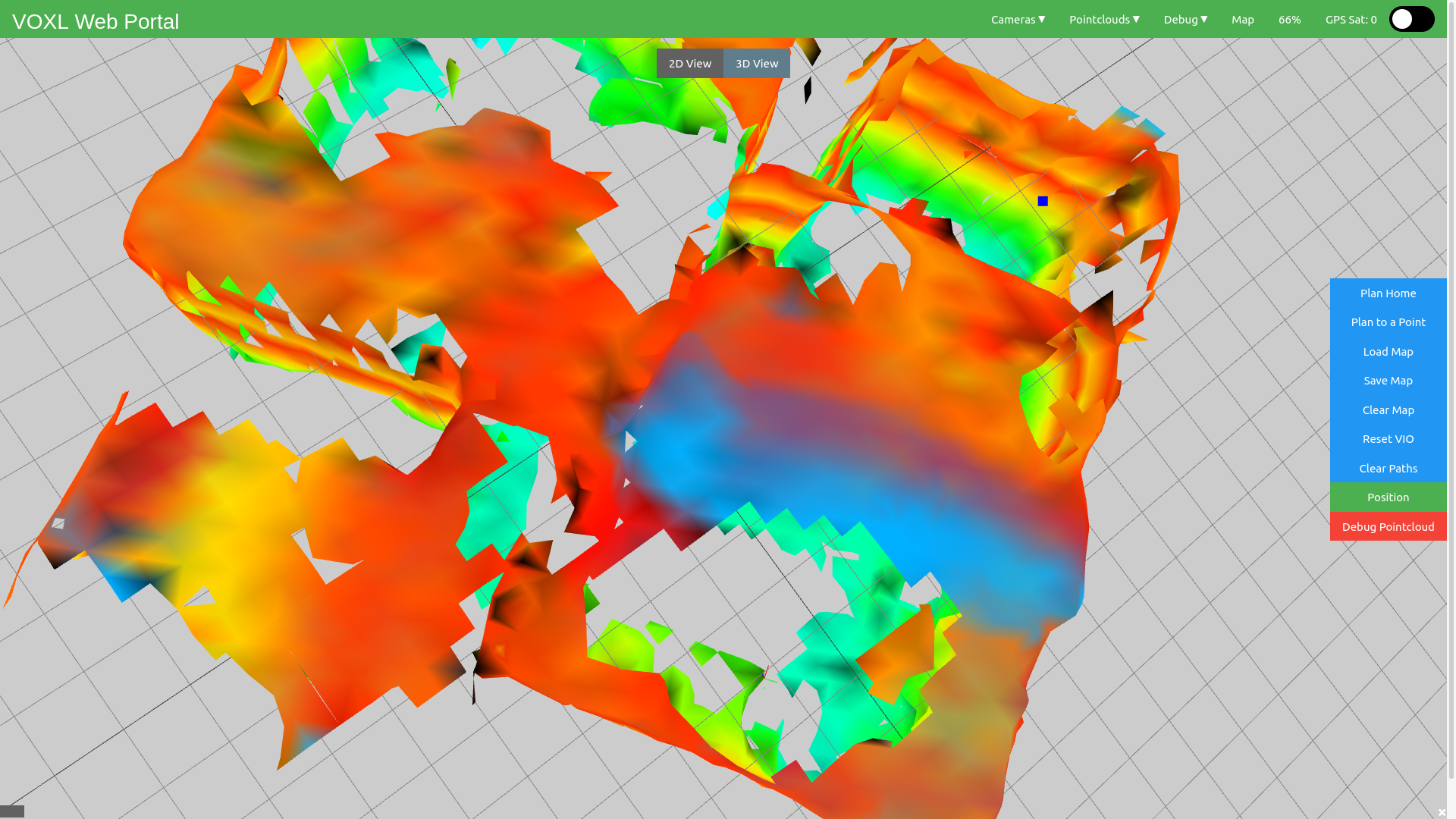
    Here is my view after a path was not generated after planning to a point (top right). Drone slightly visible in the bottom right.
    path_plan.png

    Unrelated, and perhaps should be another topic, is there a way to view the 3d/2d maps with a different camera control model? IE not the default trackball?

    Ask your questions right here!

  • TOF SLAM
    A alarm_hq

    I'm still having issues generating the path, though now voxl-mapper is not giving me the success messages as before.

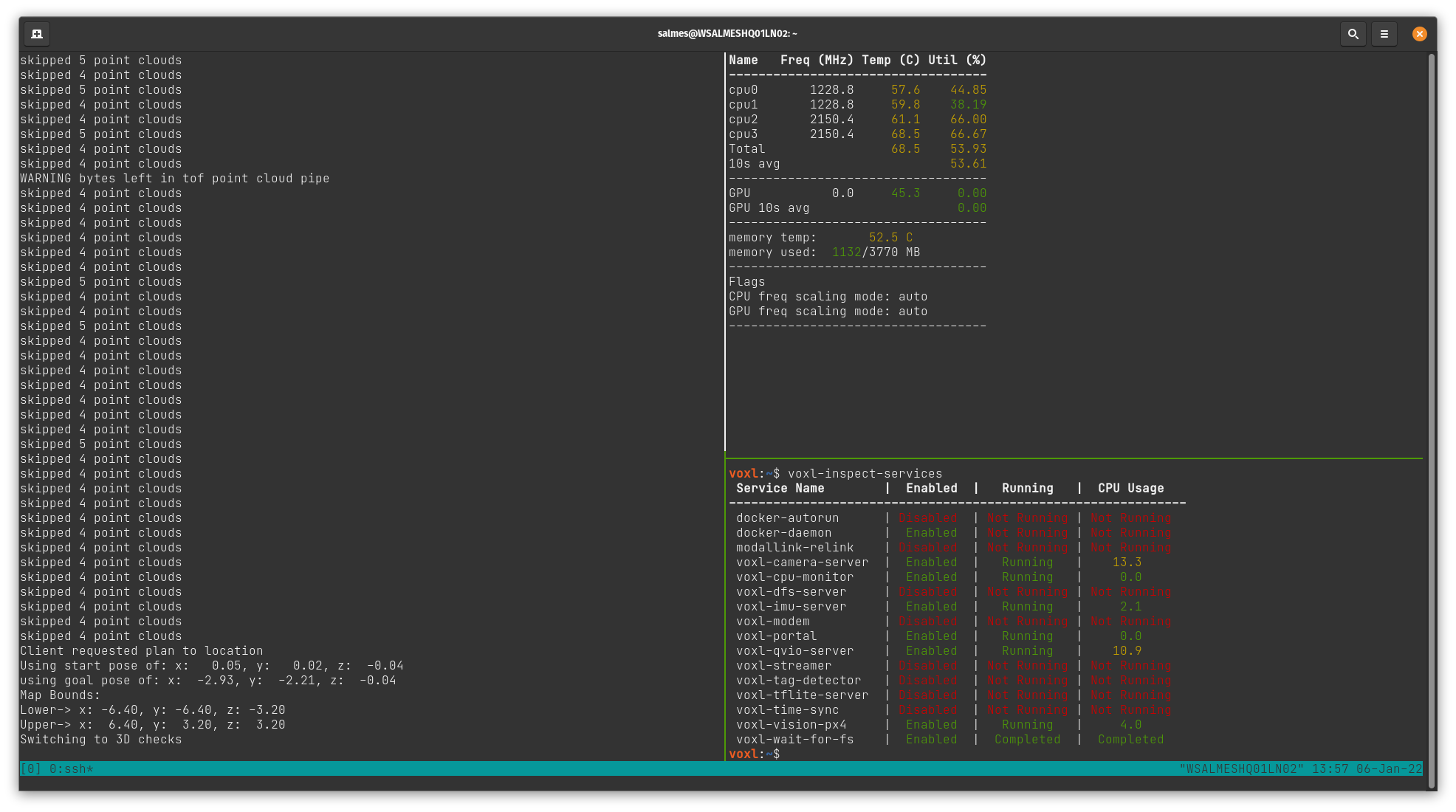
    Additionally, I've included output from voxl-mapper, voxl-inspect-cpu and voxl-inspect-services.
    voxl-status.png

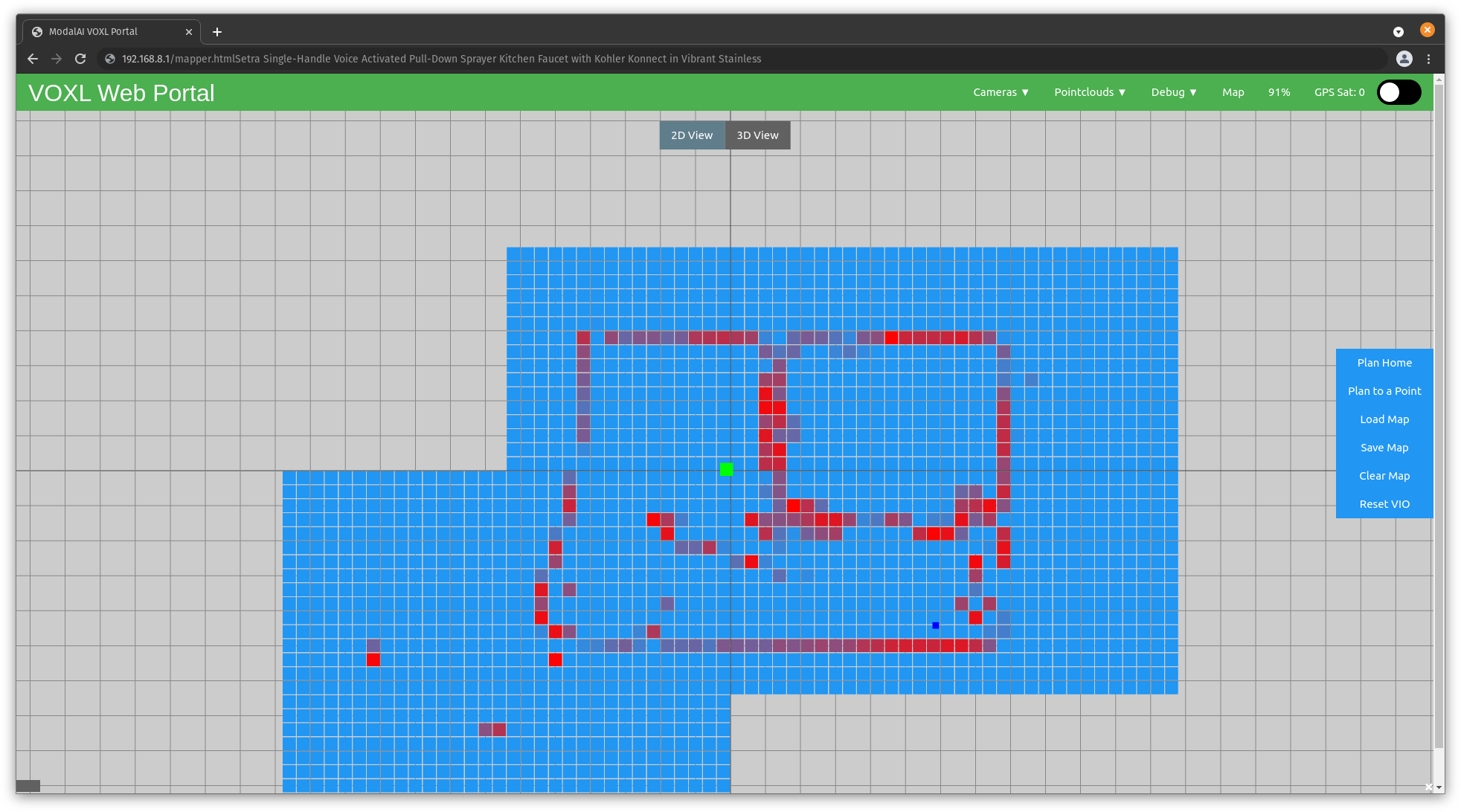
    As of now, using the seeker, I've configured voxl-vision-px4.conf and voxl-mapper.conf as specified in the voxl-mapper dev branch readme. Using the voxl-portal I was able to generate this map:
    point_plan.png

    When clicking on 'Plan To a Point', voxl-mapper outputs: Client requested plan to location. I see a green 'Go!' button appear, but no paths. Clicking the button seems to cause the ui to hang briefly, and then return to the original menu items with no effect on the drone.

    voxl-mapper simply states Switching to 3D checks.

    Any guidance would be greatly appreciated.

    Ask your questions right here!

  • TOF SLAM
    A alarm_hq

    I was using a plot branch of voxl-portal and what I believe to be the dev of mapper.

    However, I'll just recompile and reinstall both.

    Ask your questions right here!

  • TOF SLAM
    A alarm_hq

    voxl-inspect-services

     Service Name        |  Enabled  |   Running   |  CPU Usage
    --------------------------------------------------------------
     docker-autorun      | Disabled  | Not Running | Not Running
     docker-daemon       | Disabled  | Not Running | Not Running
     modallink-relink    | Disabled  | Not Running | Not Running
     voxl-camera-server  |  Enabled  |   Running   |     6.1
     voxl-cpu-monitor    |  Enabled  |   Running   |     0.0
     voxl-dfs-server     | Disabled  | Not Running | Not Running
     voxl-imu-server     |  Enabled  |   Running   |     0.0
     voxl-modem          | Disabled  | Not Running | Not Running
     voxl-portal         |  Enabled  |   Running   |     0.0
     voxl-qvio-server    |  Enabled  |   Running   |    11.9
     voxl-streamer       | Disabled  | Not Running | Not Running
     voxl-tag-detector   | Disabled  | Not Running | Not Running
     voxl-tflite-server  | Disabled  | Not Running | Not Running
     voxl-time-sync      | Disabled  | Not Running | Not Running
     voxl-vision-px4     |  Enabled  |   Running   |     4.0
     voxl-wait-for-fs    |  Enabled  |  Completed  |  Completed 
    

    Current voxl-vision-px4.conf:

    {
            "qgc_ip":       "192.168.8.84",
            "en_localhost_mavlink_udp":     true,
            "en_secondary_qgc":     false,
            "secondary_qgc_ip":     "192.168.1.29",
            "qgc_udp_port_number":  14550,
            "localhost_udp_port_number":    14551,
            "udp_mtu":      512,
            "en_vio":       true,
            "en_voa":       true,
            "en_send_vio_to_qgc":   true,
            "en_send_voa_to_qgc":   true,
            "en_set_clock_from_gps":        true,
            "en_force_onboard_mav1_mode":   true,
            "en_reset_px4_on_error":        true,
            "qvio_auto_reset_quality":      0.00050000002374872565,
            "horizon_cal_tolerance":        0.300000011920929,
            "voa_upper_bound_m":    1.25,
            "voa_lower_bound_m":    1.25,
            "en_adsb":      false,
            "adsb_uart_bus":        7,
            "adsb_uart_baudrate":   57600,
            "px4_uart_bus": 5,
            "px4_uart_baudrate":    921600,
            "offboard_mode":        "trajectory",
            "follow_tag_id":        0,
            "en_tag_fixed_frame":   false,
            "fixed_frame_filter_len":       5,
            "en_transform_mavlink_pos_setpoints_from_fixed_frame":  false
    }
    

    Running on seeker drone

    Ask your questions right here!

  • TOF SLAM
    A alarm_hq

    @Matt-Turi I've been beta-testing the mapper project this week and seem to be 95% of the way there.

    Mapping appears to go well, walls are reliably detected and the mesh looks good for flight. However, within the mapper I cannot seem to get a path to load.
    From the mesh view, I'm clicking plan to point, and selecting an arbitrary point within the map and press 'go'. From terminal (voxl-mapper -d), I see that it solves for the path (fairly quickly), attempts to do some smoothing and ultimately reports a Success message.

    However, I don't see the path load in the mapper, nor do I see any indication to proceed with a flight.

    Ask your questions right here!

  • Invalid local position
    A alarm_hq

    I found the QGC
    EKF2_AID_MASK parameter settings above (configuring to 280: Vision position fusion, vision yaw fusion, vision velocity fusion) to allow the seeker to enter position and off-board modes.

    Prior to configuring, QGC was receiving VIO but was still unable to enter position mode as referenced here

    To make the forum search engine happy: seeker position mode rejected

    Ask your questions right here!

  • Voxl-mapper instructions
    A alarm_hq

    I was able to compile, deploy and run the voxl-mapper tool.

    I've generated some 0-byte ply and related files /etc/voxl_mapper, and noticed that when viewing live in rviz seems to result in triggering timestamp too new.

    What would be an ideal mapping process? How should the drone be handled in order to keep the service alive?

    Thanks!

    Ask your questions right here!

  • Seeker replacement props
    A alarm_hq

    What model props came with the seeker kit?

    I made the mistake of throwing out the packaging they came in prior to purchasing back up props.

    Ask your questions right here!

  • How to: Seeker ESC calibration
    A alarm_hq

    Awesome, that was the driver I had used. Thanks for clarifying!

    Ask your questions right here!

  • How to: Seeker ESC calibration
    A alarm_hq

    And if I've already made the "mistake" of reflashing px4 firmware, is the closed loop RPM control affected?

    Ask your questions right here!

  • How to: Seeker ESC calibration
    A alarm_hq

    I'm unsure how to calibrate the ESCs on the seeker.

    I can't use qgroundcontrol as the seeker doesn't have 5v input, non battery power input as documented here

    However, using the px4-esc-tool to calibrate the seeker's ESC, the prompts request your to remove J1007 from the VOXL Flight. This connector is not populated from the factory.

    Any advice? Should I just ignore it and move to the next step?

    Ask your questions right here!
  • Login

  • Don't have an account? Register

  • Login or register to search.
  • First post
    Last post
0
  • Categories
  • Recent
  • Tags
  • Popular
  • Users
  • Groups