
Upgrade Tensorflow Version tflite-server
-
@Matt-Turi is there a way to change small stuff in tflite-server code without building from source? Or is there a way to do it over ssh?. I can't access the usb slot from the voxl of the drone. I just wanna change the box color and confidence threshhold.
-
@Philemon-Benner If you make any changes to the code you will need to rebuild it from source. Once built, you can push this package over ssh either manually or using the deploy_to_voxl.sh script that is up on dev, which has an arg for ssh and send ip. Lines 106 and 107 of the script have the scp and opkg install commands that are used.
-
@Philemon-Benner If you make any changes to the code you will need to rebuild it from source. Once built, you can push this package over ssh either manually or using the deploy_to_voxl.sh script that is up on dev, which has an arg for ssh and send ip. Lines 106 and 107 of the script have the scp and opkg install commands that are used.
@Matt-Turi Thank you for the fast answer. Then i will build it from source.
 But could be a cool feature in the future, if Box Color, Box Thickness and Confidence Threshhold would be in the config file.
 -
@Philemon-Benner great suggestion, I'll add that in soon. As for the green stripes issue seen with the dev version using a Flir Boson camera and voxl-uvc-server, I was able to successfully start and run tflite-server (mobilenetv2 w/gpu) with the same setup and only saw a few green "flickers" every few seconds due to the high input rate (60 fps) of the boson camera. I will work on some handling for this case, but have you tried your latest ssdlite_mobilenet_v2 model with the dev version of voxl-tflite-server (0.2.0)?
-
@Philemon-Benner great suggestion, I'll add that in soon. As for the green stripes issue seen with the dev version using a Flir Boson camera and voxl-uvc-server, I was able to successfully start and run tflite-server (mobilenetv2 w/gpu) with the same setup and only saw a few green "flickers" every few seconds due to the high input rate (60 fps) of the boson camera. I will work on some handling for this case, but have you tried your latest ssdlite_mobilenet_v2 model with the dev version of voxl-tflite-server (0.2.0)?
@Matt-Turi No i think because if you just update with opkg just the package is updatet and not the folders like the ones in /usr/bin/dnn where the models are stored. But yeah i will have a look at it. And also is the flickering happening on the in- or output? Because if it's happening in the input the inference results obviously will be less accurate, because of the green stripes.
-
@Philemon-Benner when you update with opkg, all included files will also be updated including the /usr/bin/dnn/ directory. In regards to v0.2.0, I pushed up a patch yesterday that should fix the flickering (was only on output). As long as the skip_n_frames parameter is set to at least 1 with the boson camera (since it comes in at a fixed 60fps), you should be good to go!
A note on inference with the Boson 640 Black-White Thermal Camera, I had some interesting results as the included mobilenet/most general models are not trained on thermal datasets, so keep that in mind when evaluating inference.
-
@Philemon-Benner when you update with opkg, all included files will also be updated including the /usr/bin/dnn/ directory. In regards to v0.2.0, I pushed up a patch yesterday that should fix the flickering (was only on output). As long as the skip_n_frames parameter is set to at least 1 with the boson camera (since it comes in at a fixed 60fps), you should be good to go!
A note on inference with the Boson 640 Black-White Thermal Camera, I had some interesting results as the included mobilenet/most general models are not trained on thermal datasets, so keep that in mind when evaluating inference.
@Matt-Turi yeah thanks for updating that i will definitely try it today. Yeah i know i already trained a complete dataset on thermal camera recordings and it's working like a charm. But really hot things are a source of false detection but i guess that just needs more training. Thank you for all the suggestions you made and for the fast response times. One last Question i'm really interested in how you made the boxes following so clean even with shakey Camera, as if we would inference every frame?
-
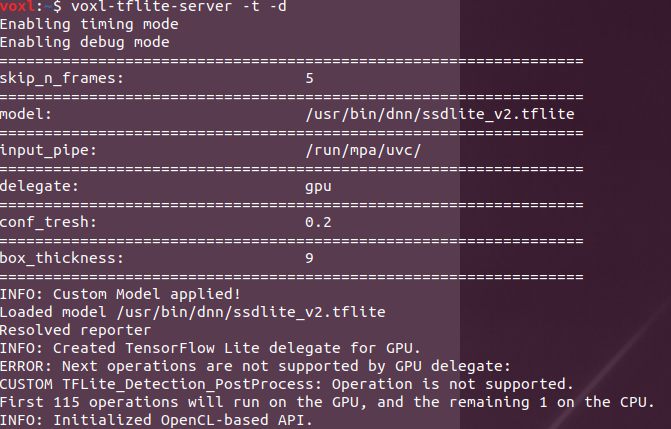
@Matt-Turi thanks for the update on the dev branch. It's now able to show the stream without any flickering. I also managed to add the conf_tresh and box_thickness to the config file and it works really nice.
-
@Matt-Turi is there a way that i can text you in private? I have a question and video material that i want to ask for but it shouldn't be publicly shown.
-
Hey @Philemon-Benner, great to hear everything is running smoothly! For the smooth detections/ inference every frame, try playing around with the skip_n_frames parameter in the config file, this is there so we can adjust the input data rate to match the max output rate of the model. Running with the -t flag can give you an overview of how much time is needed to process a single frame, and then you can adjust from there.
Feel free to send me an email at matt.turi@modalai.com for something non-public.
-
Hey @Philemon-Benner, great to hear everything is running smoothly! For the smooth detections/ inference every frame, try playing around with the skip_n_frames parameter in the config file, this is there so we can adjust the input data rate to match the max output rate of the model. Running with the -t flag can give you an overview of how much time is needed to process a single frame, and then you can adjust from there.
Feel free to send me an email at matt.turi@modalai.com for something non-public.
@Matt-Turi Ok nice i've send an email to you

Reading along? Create a free ModalAI Forum account to join in.
With an account you can reply, ask your own question, get an email when a ModalAI engineer answers, and mark the reply that solved it. Your place in each thread is saved between visits.
Questions about VOXL, Flight Core, ESCs and ModalAI drones are answered here by the engineers who build them.
Register Login