
Hadron ov64b snapshots have a vertical image artifact
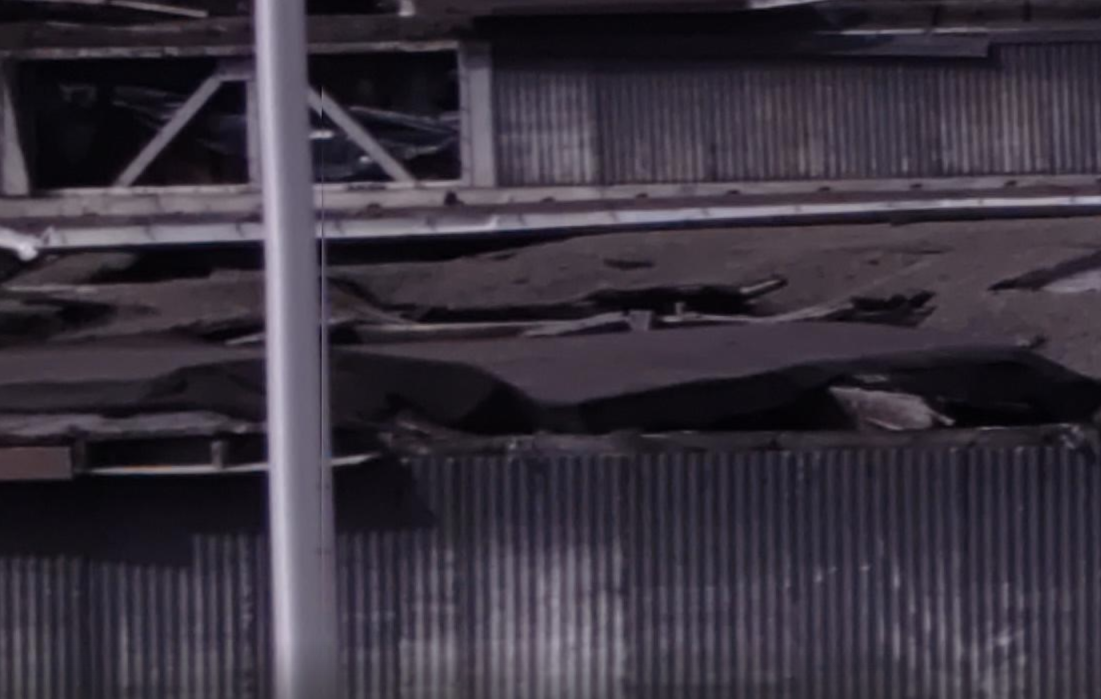
-
@cguzikowski , you need to update your camera server to allow misp to accept the new resolutions. You can install the latest one from voxl-packages.modalai.com/dists/qrb5165/dev/binary-arm64/
@Alex-Kushleyev Thank you! This now works great and I can save the raw files as a .bin file. Do you have tips for performing raw-jpg conversion both on and offline? I have also tried to take snapshots with the current setup, by disabling MISP and Raw preview, and enabling snapshot and setting the snapshot dimensions to 9248x6944 (9216x6944, 4624x3472, and 4608x3472 all give the error of unsupported file size).
voxl-camera-serverseems to start up, then immediately gets killed without an error. Here is the output of the command:MISP channels enabled in defaults : 0 MISP channels enabled in config file: 0 Setting MISP AWB to Auto MISP channels enabled in defaults : 0 MISP channels enabled in config file: 0 ================================================================= configuration for 2 cameras: cam #0 name: boson type: boson bayer_type: 0 enabled: 1 camera_id: 0 camera_id_second: -1 fps: 30 en_rotate: 0 en_rotate2: 0 en_preview: 1 en_raw_preview: 1 preview_width: 640 preview_height: 512 en_misp: 1 misp_width: 512 misp_height: 640 en_small_video: 0 small_video_width: 640 small_video_height: 480 en_large_video: 0 large_video_width: -1 large_video_height: -1 en_snapshot: 0 snap_width: -1 snap_height: -1 exif_focal_length: 0.000000 exif_focal_len_35mm_format:0 exif_fnumber: 0.000000 ae_mode: off msv_exposure_min_us: 20 msv_exposure_max_us: 33000 gain_min : 100 gain_max : 100 standby_enabled: 0 decimator: 1 independent_exposure:0 cam #1 name: hires type: ov64b bayer_type: 1 enabled: 1 camera_id: 1 camera_id_second: -1 fps: 30 en_rotate: 0 en_rotate2: 0 en_preview: 1 en_raw_preview: 0 preview_width: 9248 preview_height: 6944 en_misp: 0 misp_width: 1280 misp_height: 720 en_small_video: 0 small_video_width: 1024 small_video_height: 768 en_large_video: 0 large_video_width: 3840 large_video_height: 2160 en_snapshot: 1 snap_width: 9248 snap_height: 6944 exif_focal_length: 3.100000 exif_focal_len_35mm_format:17 exif_fnumber: 1.240000 ae_mode: lme_msv msv_exposure_min_us: 20 msv_exposure_max_us: 33000 gain_min : 100 gain_max : 1600 standby_enabled: 0 decimator: 1 independent_exposure:0 fsync_en: 0 fsync_gpio: 109 ================================================================= thread is locked to cores: 4 5 6 7 connected to mavlink pipe Connected to cpu-monitor Starting Camera: boson (id #0) ModalExposureMSV: initializing for camera name type gbm_create_device(156): Info: backend name is: msm_drm MISP Initializing for camera boson Detected 1 platform(s) Detected 1 GPU device(s) Estimated imu dt = 0.000977s ERROR in json_from_yaml, failed to open file MISP: Loading intrinsics cal file boson_intrinsics.yml for camera boson, ret -1 WARNING: Lens calibration for camera boson is missing (boson_intrinsics.yml). Using defaults: Starting Camera: hires (id #1) ModalExposureMSV: initializing for camera name hires type ov64b ------ voxl-camera-server: Started 2 of 2 cameras ------ voxl-camera-server: Camera server is now running KilledDon't necessarily need to use the snapshot command, but we want some way to get JPG images off the voxl.
-
@Alex-Kushleyev Thank you! This now works great and I can save the raw files as a .bin file. Do you have tips for performing raw-jpg conversion both on and offline? I have also tried to take snapshots with the current setup, by disabling MISP and Raw preview, and enabling snapshot and setting the snapshot dimensions to 9248x6944 (9216x6944, 4624x3472, and 4608x3472 all give the error of unsupported file size).
voxl-camera-serverseems to start up, then immediately gets killed without an error. Here is the output of the command:MISP channels enabled in defaults : 0 MISP channels enabled in config file: 0 Setting MISP AWB to Auto MISP channels enabled in defaults : 0 MISP channels enabled in config file: 0 ================================================================= configuration for 2 cameras: cam #0 name: boson type: boson bayer_type: 0 enabled: 1 camera_id: 0 camera_id_second: -1 fps: 30 en_rotate: 0 en_rotate2: 0 en_preview: 1 en_raw_preview: 1 preview_width: 640 preview_height: 512 en_misp: 1 misp_width: 512 misp_height: 640 en_small_video: 0 small_video_width: 640 small_video_height: 480 en_large_video: 0 large_video_width: -1 large_video_height: -1 en_snapshot: 0 snap_width: -1 snap_height: -1 exif_focal_length: 0.000000 exif_focal_len_35mm_format:0 exif_fnumber: 0.000000 ae_mode: off msv_exposure_min_us: 20 msv_exposure_max_us: 33000 gain_min : 100 gain_max : 100 standby_enabled: 0 decimator: 1 independent_exposure:0 cam #1 name: hires type: ov64b bayer_type: 1 enabled: 1 camera_id: 1 camera_id_second: -1 fps: 30 en_rotate: 0 en_rotate2: 0 en_preview: 1 en_raw_preview: 0 preview_width: 9248 preview_height: 6944 en_misp: 0 misp_width: 1280 misp_height: 720 en_small_video: 0 small_video_width: 1024 small_video_height: 768 en_large_video: 0 large_video_width: 3840 large_video_height: 2160 en_snapshot: 1 snap_width: 9248 snap_height: 6944 exif_focal_length: 3.100000 exif_focal_len_35mm_format:17 exif_fnumber: 1.240000 ae_mode: lme_msv msv_exposure_min_us: 20 msv_exposure_max_us: 33000 gain_min : 100 gain_max : 1600 standby_enabled: 0 decimator: 1 independent_exposure:0 fsync_en: 0 fsync_gpio: 109 ================================================================= thread is locked to cores: 4 5 6 7 connected to mavlink pipe Connected to cpu-monitor Starting Camera: boson (id #0) ModalExposureMSV: initializing for camera name type gbm_create_device(156): Info: backend name is: msm_drm MISP Initializing for camera boson Detected 1 platform(s) Detected 1 GPU device(s) Estimated imu dt = 0.000977s ERROR in json_from_yaml, failed to open file MISP: Loading intrinsics cal file boson_intrinsics.yml for camera boson, ret -1 WARNING: Lens calibration for camera boson is missing (boson_intrinsics.yml). Using defaults: Starting Camera: hires (id #1) ModalExposureMSV: initializing for camera name hires type ov64b ------ voxl-camera-server: Started 2 of 2 cameras ------ voxl-camera-server: Camera server is now running KilledDon't necessarily need to use the snapshot command, but we want some way to get JPG images off the voxl.
@cguzikowski , sorry for the delay.
Long term, our plan is to add snapshot functionality directly into misp (just like you were getting snapshots from the ISP). That is not too difficult to achieve, may be a few weeks away.
Also let me ask you this: would you want to save the raw bayer and get that from voxl2 and convert to jpg / png offline? That would give you maximum control over quality / processing algorithm. Alternatively, de-bayering can be done on voxl2 and saved as lossy or lossless image?
We do have tools to convert bayer -> yuv -> jpeg but not yet in a standalone app.
You you can do for now is the following:
- set misp output resolution equal to the raw resolution
- this will enable misp to publish the de-bayered yuv to the image pipe
- then you can use voxl-record-raw-image to save the yuv. Alternatively, you can test a WIP version of this tool which can save yuv as jpeg : https://gitlab.com/voxl-public/voxl-sdk/utilities/voxl-mpa-tools/-/merge_requests/37
- ideally this logging would be done within camera server to reduce overhead for sending these huge images over the pipe. But the approach i described should work for now.
I will be able to test this again mid next week, meanwhile please let me know if you run into the saving issue. I will double check the issue with snapshot resolution being too large. How large was the isp snapshot that you tested before and had artifacts?
Alex
-
@cguzikowski , sorry for the delay.
Long term, our plan is to add snapshot functionality directly into misp (just like you were getting snapshots from the ISP). That is not too difficult to achieve, may be a few weeks away.
Also let me ask you this: would you want to save the raw bayer and get that from voxl2 and convert to jpg / png offline? That would give you maximum control over quality / processing algorithm. Alternatively, de-bayering can be done on voxl2 and saved as lossy or lossless image?
We do have tools to convert bayer -> yuv -> jpeg but not yet in a standalone app.
You you can do for now is the following:
- set misp output resolution equal to the raw resolution
- this will enable misp to publish the de-bayered yuv to the image pipe
- then you can use voxl-record-raw-image to save the yuv. Alternatively, you can test a WIP version of this tool which can save yuv as jpeg : https://gitlab.com/voxl-public/voxl-sdk/utilities/voxl-mpa-tools/-/merge_requests/37
- ideally this logging would be done within camera server to reduce overhead for sending these huge images over the pipe. But the approach i described should work for now.
I will be able to test this again mid next week, meanwhile please let me know if you run into the saving issue. I will double check the issue with snapshot resolution being too large. How large was the isp snapshot that you tested before and had artifacts?
Alex
@Alex-Kushleyev Thank you!
I was able to get both the full YUV and them in JPEG working. We also noticed that the vertical artifact seemed to disappear in these images. Regarding the resolution we were using when we had the artifacts, we were using 9248 × 6944 on the old drivers.
-
@cguzikowski , sorry for the delay.
Long term, our plan is to add snapshot functionality directly into misp (just like you were getting snapshots from the ISP). That is not too difficult to achieve, may be a few weeks away.
Also let me ask you this: would you want to save the raw bayer and get that from voxl2 and convert to jpg / png offline? That would give you maximum control over quality / processing algorithm. Alternatively, de-bayering can be done on voxl2 and saved as lossy or lossless image?
We do have tools to convert bayer -> yuv -> jpeg but not yet in a standalone app.
You you can do for now is the following:
- set misp output resolution equal to the raw resolution
- this will enable misp to publish the de-bayered yuv to the image pipe
- then you can use voxl-record-raw-image to save the yuv. Alternatively, you can test a WIP version of this tool which can save yuv as jpeg : https://gitlab.com/voxl-public/voxl-sdk/utilities/voxl-mpa-tools/-/merge_requests/37
- ideally this logging would be done within camera server to reduce overhead for sending these huge images over the pipe. But the approach i described should work for now.
I will be able to test this again mid next week, meanwhile please let me know if you run into the saving issue. I will double check the issue with snapshot resolution being too large. How large was the isp snapshot that you tested before and had artifacts?
Alex
@Alex-Kushleyev Hey Alex, we have been performing some tests and noticed the images we were getting were quite noisy. What are some of the settings that we can change in the voxl-camera-server to reduce the noise? I messed around with the ae_desired_msv setting and gain_max setting. I also noticed that the white balance seems to have a very visible green shift when the exposure is lower (tried to upload an image but got a "request entity too large" error)
Also as a side note, the metadata seems to not be recording when using
voxl-record-raw-image -j -
@Alex-Kushleyev Hey Alex, we have been performing some tests and noticed the images we were getting were quite noisy. What are some of the settings that we can change in the voxl-camera-server to reduce the noise? I messed around with the ae_desired_msv setting and gain_max setting. I also noticed that the white balance seems to have a very visible green shift when the exposure is lower (tried to upload an image but got a "request entity too large" error)
Also as a side note, the metadata seems to not be recording when using
voxl-record-raw-image -j@cguzikowski , if you want, you can attache a cropped image, so that it's smaller size.
In general, the pixel noise increases as you the pixel gain is increased. Part of Auto Exposure control is controlling exposure time and gain (both of which contribute to the image brightness), but higher gain has higher pixel noise and higher exposure values will result in motion blur.
The Qualcomm ISP has lots of liters, including noise reduction, which are applied when you use the ISP snapshot (even though they have not been tuned for the particular camera, the ISP output may result in better de-noised image). There are several types of filters, for example spatial (such as bilateral filter) and temporal (TNR - temporal noise reduction), and it's usually a combination of both with the filter weights increasing as the gain increases (more noise requires more noise reduction).
Currently, MISP does not have any de-noise filtering, but we are working on adding some. That is why i was discussing with you the ability to process the image offline (from the original bayer source). You could save the full raw image and perform any filtering you need in post processing. This approach is similar to using a RAW image on a fancy camera and then importing that into image processing software on a laptop / desktop, which can perform a lot more filters / effects directly on the raw image (loss-less).
What i suspect is that you are testing in the low-light environment and you are seeing the effects of high gain (high pixel noise). the MISP auto exposure tries to balance exposure and gain and there are a few parameters for that, but in your tests you should see what exposure and gain values the camera is at when you see the noisy image. You can use voxl-portal to control exposure and gain to see what the difference is. I believe the max gain for ov64b is 16x (1600).
I am about to set up your use case again for testing and i will investigate the noise and the original ISP snapshot artifact and we can also compare the image noise from the ISP snapshot and misp snapshot.
Unfortunately the lens for ov64b in the Hadron unit is very small, which reduces the amount of light that gets into the sensor. The sensor is 8+K resolution which means the pixel size is small, so the amount of light that gets to each pixel is small. To compensate for that, we would typically want a larger lens, but it is probably not possible to change the lens in this specific Hadron unit (we have not tried).
If you want to explore offline image processing, you would need:
- the original raw bayer (which you can already save)
- the gain and exposure used for that frame (i will need to check, i thin we had an option to save the exposure and gain as part of the file name).
- then you can have offline processing that is dependent on exposure / gain and apply the filters of your choice.
- the only down side is that the raw snapshots are huge, but you can probably zip them up if needed to store a lot of them on voxl2 before offloading.
Alex
-
@cguzikowski , if you want, you can attache a cropped image, so that it's smaller size.
In general, the pixel noise increases as you the pixel gain is increased. Part of Auto Exposure control is controlling exposure time and gain (both of which contribute to the image brightness), but higher gain has higher pixel noise and higher exposure values will result in motion blur.
The Qualcomm ISP has lots of liters, including noise reduction, which are applied when you use the ISP snapshot (even though they have not been tuned for the particular camera, the ISP output may result in better de-noised image). There are several types of filters, for example spatial (such as bilateral filter) and temporal (TNR - temporal noise reduction), and it's usually a combination of both with the filter weights increasing as the gain increases (more noise requires more noise reduction).
Currently, MISP does not have any de-noise filtering, but we are working on adding some. That is why i was discussing with you the ability to process the image offline (from the original bayer source). You could save the full raw image and perform any filtering you need in post processing. This approach is similar to using a RAW image on a fancy camera and then importing that into image processing software on a laptop / desktop, which can perform a lot more filters / effects directly on the raw image (loss-less).
What i suspect is that you are testing in the low-light environment and you are seeing the effects of high gain (high pixel noise). the MISP auto exposure tries to balance exposure and gain and there are a few parameters for that, but in your tests you should see what exposure and gain values the camera is at when you see the noisy image. You can use voxl-portal to control exposure and gain to see what the difference is. I believe the max gain for ov64b is 16x (1600).
I am about to set up your use case again for testing and i will investigate the noise and the original ISP snapshot artifact and we can also compare the image noise from the ISP snapshot and misp snapshot.
Unfortunately the lens for ov64b in the Hadron unit is very small, which reduces the amount of light that gets into the sensor. The sensor is 8+K resolution which means the pixel size is small, so the amount of light that gets to each pixel is small. To compensate for that, we would typically want a larger lens, but it is probably not possible to change the lens in this specific Hadron unit (we have not tried).
If you want to explore offline image processing, you would need:
- the original raw bayer (which you can already save)
- the gain and exposure used for that frame (i will need to check, i thin we had an option to save the exposure and gain as part of the file name).
- then you can have offline processing that is dependent on exposure / gain and apply the filters of your choice.
- the only down side is that the raw snapshots are huge, but you can probably zip them up if needed to store a lot of them on voxl2 before offloading.
Alex
I am testing OV64b now. I confirmed that snapshot of size 9216x6944 is not possible (i think i can enable it), but 9248x6944 works.
Also, please see this post, there was a bug that broke snapshot in recent releases, which i just fixed. perhaps that was an issue for you when you switched to latest camera server : https://forum.modalai.com/topic/5166/snapshot-crashes-voxl-camera-server
I am going to see if i can get MISP running together with ISP snapshot, right now it only runs when preview and misp are disabled and i have small_video and snapshot streams enabled and snapshot resolution set to 9248x6944 and small_video resolution to something smaller.
Alex
-
I am testing OV64b now. I confirmed that snapshot of size 9216x6944 is not possible (i think i can enable it), but 9248x6944 works.
Also, please see this post, there was a bug that broke snapshot in recent releases, which i just fixed. perhaps that was an issue for you when you switched to latest camera server : https://forum.modalai.com/topic/5166/snapshot-crashes-voxl-camera-server
I am going to see if i can get MISP running together with ISP snapshot, right now it only runs when preview and misp are disabled and i have small_video and snapshot streams enabled and snapshot resolution set to 9248x6944 and small_video resolution to something smaller.
Alex
OK, some updates..
-
the reason why the resolution 9216x6944 was not accepted for snapshot is that the camera pipeline has a list of allowed resolutions and that resolution was not one of them. I could add the resolution 9216x6944 to the list, but actually another resolution (9216x6912) was already supported, so i updated the ov64b driver to include that. The latest driver is available here : https://storage.googleapis.com/modalai_public/temp/ov64b/20260417/ov64b_20260417.zip
- this driver has the following resolutions : 9248x6944, 9216x6944 9216x6912 and the other lower resolutions. You can use 9216x6912 since it's compatible with misp and isp snapshot.
-
I also added 9216x6912 resolution to the supported misp resolutions in camera server (dev branch) as well as allowed using misp with snapshot (previously it would throw an error since we thought that previously they were not compatible).
-
Actually, snapshot does work with raw_preview + misp, but here is a warning that gets printed continuously:
WARNING: preview buffer pool for Cam(hires), Frame(30) has 0 free, skipping requestwe can work around this warning by adding the following line to the
voxl-camera-server.conffor the ov64b camera. this limits the number of buffers that are queued up for the streams and resolves the warning."max_request_queue_depth": 6,So with these changes, you should be able to use two configurations
- preview + raw_preview + misp + snapshot
- small_video + snapshot
Please use the latest camera server from dev branch.
Right now, if you enable misp + small+video + snapshot, it does not work properly, but i will try it figure it out. Here is an example set up for small video + snapshot, but you can easily change it to use misp by disabling small_video and enabling preview + misp (and set auto exposure to "auto" from "isp" (auto will use misp auto exposure)).
Please try it out. I do agree that the ISP output has better overall image quality than MISP, also related to pretty significant lens shading of this small lens on ov64b. We will work on improvements of misp image processing.
For now, you just need to decide whether you need both RAW bayer and ISP JPG, in which case you cannot use small_video for streaming (until i resolve the issue). This means slightly worse image quality for live streaming. But if you are ok with ISP jpg, you can disable misp and use small_video stream for streaming.
By the way, i did not see any artifacts in the jpeg from ISP. Can you please let me know if the artifact is in every frame and where exactly it is located? or is the occurrence and location random?
{ "type": "ov64b", "name": "hires", "enabled": true, "camera_id": 1, "fps": 30, "en_preview": false, "en_misp": false, "max_request_queue_depth": 6, "preview_width": 9216, "preview_height": 6912, "en_raw_preview": true, "en_small_video": true, "en_large_video": false, "en_snapshot": true, "ae_mode": "isp", "gain_min": 100, "gain_max": 1600, "misp_width": 1600, "misp_height": 1200, "misp_venc_enable": false, "misp_venc_mode": "h265", "misp_venc_br_ctrl": "cqp", "misp_venc_Qfixed": 38, "misp_venc_Qmin": 15, "misp_venc_Qmax": 50, "misp_venc_nPframes": 29, "misp_venc_mbps": 30, "misp_venc_osd": false, "misp_awb": "auto", "misp_gamma": 1, "misp_zoom": 1, "ae_desired_msv": 110, "exposure_min_us": 20, "exposure_max_us": 33000, "exposure_soft_min_us": 5000, "ae_filter_alpha": 0.6, "ae_ignore_fraction": 0.2, "ae_slope": 0.05, "ae_exposure_period": 1, "ae_gain_period": 1, "small_video_width": 1600, "small_video_height": 1200, "small_venc_mode": "h264", "small_venc_br_ctrl": "cqp", "small_venc_Qfixed": 30, "small_venc_Qmin": 15, "small_venc_Qmax": 40, "small_venc_nPframes": 9, "small_venc_mbps": 2, "en_snapshot_width": 9216, "en_snapshot_height": 6912, "exif_focal_length": 3.1, "exif_focal_length_in_35mm_format": 17, "exif_fnumber": 1.24, "snapshot_jpeg_quality": 75 } -
-
OK, some updates..
-
the reason why the resolution 9216x6944 was not accepted for snapshot is that the camera pipeline has a list of allowed resolutions and that resolution was not one of them. I could add the resolution 9216x6944 to the list, but actually another resolution (9216x6912) was already supported, so i updated the ov64b driver to include that. The latest driver is available here : https://storage.googleapis.com/modalai_public/temp/ov64b/20260417/ov64b_20260417.zip
- this driver has the following resolutions : 9248x6944, 9216x6944 9216x6912 and the other lower resolutions. You can use 9216x6912 since it's compatible with misp and isp snapshot.
-
I also added 9216x6912 resolution to the supported misp resolutions in camera server (dev branch) as well as allowed using misp with snapshot (previously it would throw an error since we thought that previously they were not compatible).
-
Actually, snapshot does work with raw_preview + misp, but here is a warning that gets printed continuously:
WARNING: preview buffer pool for Cam(hires), Frame(30) has 0 free, skipping requestwe can work around this warning by adding the following line to the
voxl-camera-server.conffor the ov64b camera. this limits the number of buffers that are queued up for the streams and resolves the warning."max_request_queue_depth": 6,So with these changes, you should be able to use two configurations
- preview + raw_preview + misp + snapshot
- small_video + snapshot
Please use the latest camera server from dev branch.
Right now, if you enable misp + small+video + snapshot, it does not work properly, but i will try it figure it out. Here is an example set up for small video + snapshot, but you can easily change it to use misp by disabling small_video and enabling preview + misp (and set auto exposure to "auto" from "isp" (auto will use misp auto exposure)).
Please try it out. I do agree that the ISP output has better overall image quality than MISP, also related to pretty significant lens shading of this small lens on ov64b. We will work on improvements of misp image processing.
For now, you just need to decide whether you need both RAW bayer and ISP JPG, in which case you cannot use small_video for streaming (until i resolve the issue). This means slightly worse image quality for live streaming. But if you are ok with ISP jpg, you can disable misp and use small_video stream for streaming.
By the way, i did not see any artifacts in the jpeg from ISP. Can you please let me know if the artifact is in every frame and where exactly it is located? or is the occurrence and location random?
{ "type": "ov64b", "name": "hires", "enabled": true, "camera_id": 1, "fps": 30, "en_preview": false, "en_misp": false, "max_request_queue_depth": 6, "preview_width": 9216, "preview_height": 6912, "en_raw_preview": true, "en_small_video": true, "en_large_video": false, "en_snapshot": true, "ae_mode": "isp", "gain_min": 100, "gain_max": 1600, "misp_width": 1600, "misp_height": 1200, "misp_venc_enable": false, "misp_venc_mode": "h265", "misp_venc_br_ctrl": "cqp", "misp_venc_Qfixed": 38, "misp_venc_Qmin": 15, "misp_venc_Qmax": 50, "misp_venc_nPframes": 29, "misp_venc_mbps": 30, "misp_venc_osd": false, "misp_awb": "auto", "misp_gamma": 1, "misp_zoom": 1, "ae_desired_msv": 110, "exposure_min_us": 20, "exposure_max_us": 33000, "exposure_soft_min_us": 5000, "ae_filter_alpha": 0.6, "ae_ignore_fraction": 0.2, "ae_slope": 0.05, "ae_exposure_period": 1, "ae_gain_period": 1, "small_video_width": 1600, "small_video_height": 1200, "small_venc_mode": "h264", "small_venc_br_ctrl": "cqp", "small_venc_Qfixed": 30, "small_venc_Qmin": 15, "small_venc_Qmax": 40, "small_venc_nPframes": 9, "small_venc_mbps": 2, "en_snapshot_width": 9216, "en_snapshot_height": 6912, "exif_focal_length": 3.1, "exif_focal_length_in_35mm_format": 17, "exif_fnumber": 1.24, "snapshot_jpeg_quality": 75 }Can you please clarify what you meant by the following statement in your previous post:
"Also as a side note, the metadata seems to not be recording when using voxl-record-raw-image -j"
Thanks!
-
-
Can you please clarify what you meant by the following statement in your previous post:
"Also as a side note, the metadata seems to not be recording when using voxl-record-raw-image -j"
Thanks!
FYI the voxl-mpa-tools updates have been merged to dev (including the jpeg saving option and option to save timestamp, exposure, gain in the filename -- i think that is what you were referring to). One small change, the timestamp in the filename changed from milliseconds to microseconds.
https://gitlab.com/voxl-public/voxl-sdk/utilities/voxl-mpa-tools/-/tree/dev
-
FYI the voxl-mpa-tools updates have been merged to dev (including the jpeg saving option and option to save timestamp, exposure, gain in the filename -- i think that is what you were referring to). One small change, the timestamp in the filename changed from milliseconds to microseconds.
https://gitlab.com/voxl-public/voxl-sdk/utilities/voxl-mpa-tools/-/tree/dev
@Alex-Kushleyev I have been doing some tests and the updates to the camera server and mpa tools seem to work great, thank you! What I meant about the metadata not recording is this data only shows up when using the snapshot command, and does not show up when using the jpeg flag in the voxl-record-raw-image command:
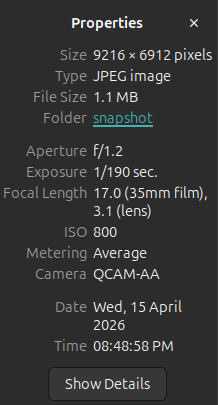
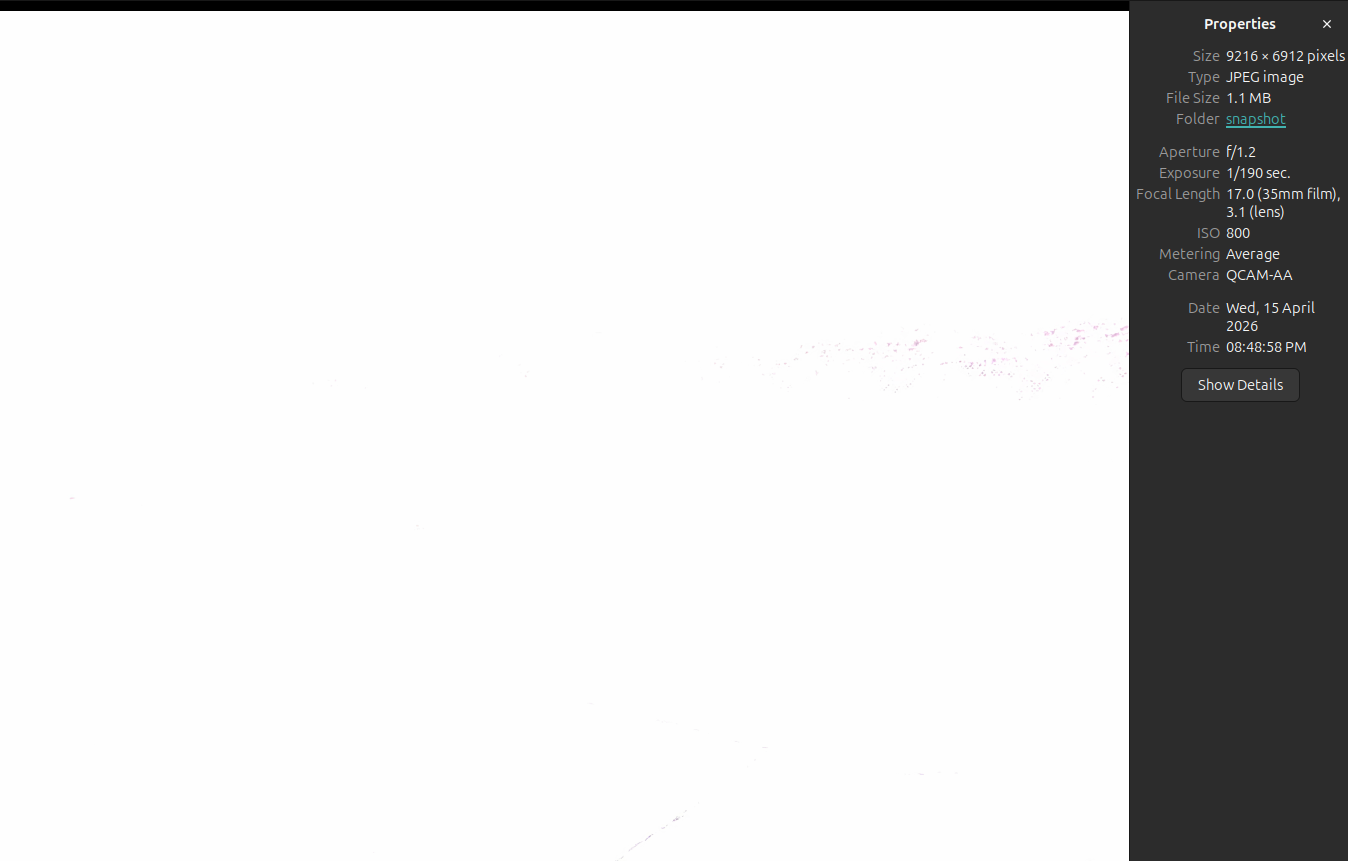
Also noticed the auto exposure doesn't seem to settle unless the camera's feed is opened on the voxl-portal. Here are two images I took - voxl-camera-server was running for a considerable time before taking either one.
Before looking at the live stream in the portal:
After looking at the stream in the portal for a few seconds (I could see the exposure settle down)
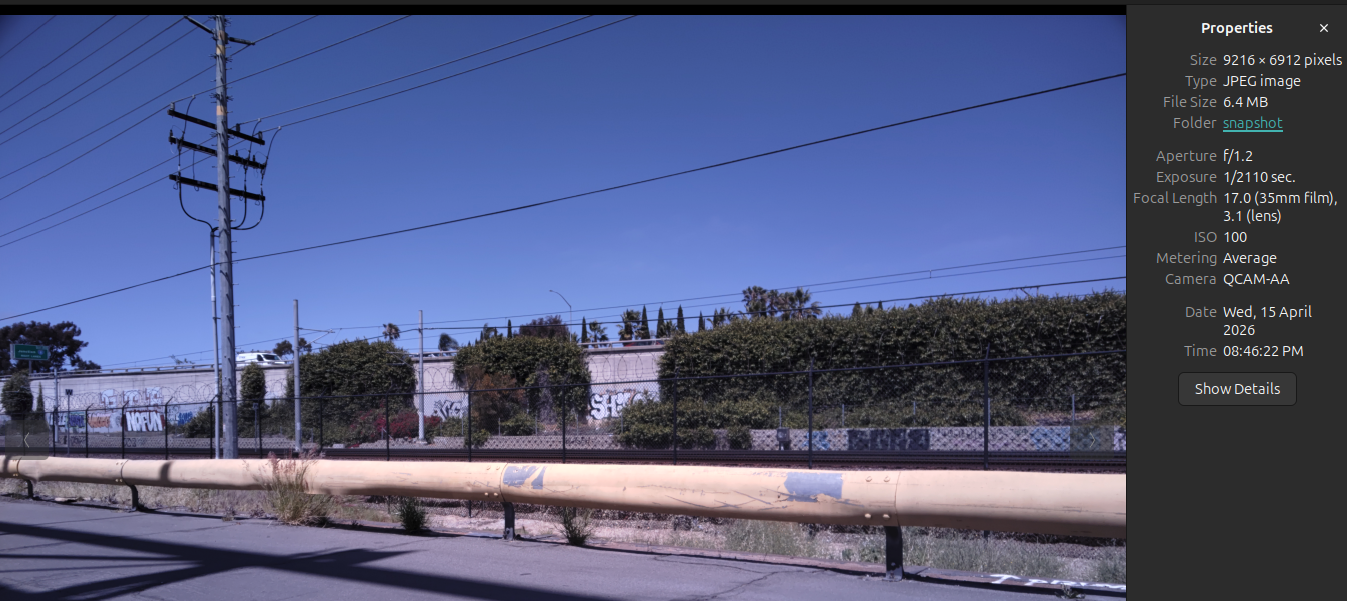
Didn't mess with voxl-camera-server at all in between taking the two images.
-
@Alex-Kushleyev I have been doing some tests and the updates to the camera server and mpa tools seem to work great, thank you! What I meant about the metadata not recording is this data only shows up when using the snapshot command, and does not show up when using the jpeg flag in the voxl-record-raw-image command:
Also noticed the auto exposure doesn't seem to settle unless the camera's feed is opened on the voxl-portal. Here are two images I took - voxl-camera-server was running for a considerable time before taking either one.
Before looking at the live stream in the portal:
After looking at the stream in the portal for a few seconds (I could see the exposure settle down)
Didn't mess with voxl-camera-server at all in between taking the two images.
We can add the jpeg meta to the jpeg file saved from
voxl-record-raw-image. which fields specifically are good to have?Also, regarding the exposure settling - can you please provide the exact configuration you are running? specifically, which are enabled (misp, small_video, snapshot) and is auto exposure set to "isp" or not -- maybe provide a camera server config? When using MISP, i believe there is a case that if none of the streams are being used, the AE won't run, but we can fix this for the case of enabled snapshot.
Alex
-
We can add the jpeg meta to the jpeg file saved from
voxl-record-raw-image. which fields specifically are good to have?Also, regarding the exposure settling - can you please provide the exact configuration you are running? specifically, which are enabled (misp, small_video, snapshot) and is auto exposure set to "isp" or not -- maybe provide a camera server config? When using MISP, i believe there is a case that if none of the streams are being used, the AE won't run, but we can fix this for the case of enabled snapshot.
Alex
@Alex-Kushleyev Our application doesn't specifically need the metadata, just figured I should point it out in case it was intended to be there. It may be useful to have shutter speed, ISO, aperture, and date/time though.
Ah yes that seems to be the issue, we are using MISP, preview, and snapshot. It would be useful to have the AE run without us viewing the stream. Here is the conf file:
{ "version": 0.1, "fsync_en": false, "fsync_gpio": 109, "cameras": [{ "type": "boson", "name": "boson", "enabled": true, "camera_id": 0, "fps": 30, "en_preview": true, "en_misp": true, "preview_width": 640, "preview_height": 512, "en_raw_preview": true, "en_small_video": false, "en_large_video": false, "ae_mode": "off", "en_rotate": false, "misp_width": 512, "misp_height": 640, "misp_venc_enable": true, "misp_venc_mode": "h264", "misp_venc_br_ctrl": "cqp", "misp_venc_Qfixed": 30, "misp_venc_Qmin": 15, "misp_venc_Qmax": 50, "misp_venc_nPframes": 29, "misp_venc_mbps": 2, "misp_venc_osd": false, "misp_awb": "off", "misp_gamma": 1, "misp_zoom": 1, "gain_min": 100, "gain_max": 100 }, { "type": "ov64b", "name": "hires", "enabled": true, "camera_id": 1, "fps": 30, "en_preview": true, "en_misp": true, "preview_width": 9216, "preview_height": 6912, "en_raw_preview": true, "en_small_video": false, "en_large_video": false, "en_snapshot": true, "ae_mode": "isp", "gain_min": 100, "gain_max": 100, "misp_width": 9216, "misp_height": 6912, "misp_venc_enable": false, "misp_venc_mode": "h265", "misp_venc_br_ctrl": "cqp", "misp_venc_Qfixed": 38, "misp_venc_Qmin": 15, "misp_venc_Qmax": 50, "misp_venc_nPframes": 29, "misp_venc_mbps": 30, "misp_venc_osd": false, "misp_awb": "auto", "misp_gamma": 1, "misp_zoom": 1, "ae_desired_msv": 75, "exposure_min_us": 1000, "exposure_max_us": 1001, "exposure_soft_min_us": 5000, "ae_filter_alpha": 0.6, "ae_ignore_fraction": 0.2, "ae_slope": 0.1, "ae_exposure_period": 1, "ae_gain_period": 1, "max_request_queue_depth": 6, "en_snapshot_width": 9216, "en_snapshot_height": 6912, "exif_focal_length": 3.1, "exif_focal_length_in_35mm_format": 17, "exif_fnumber": 1.24, "snapshot_jpeg_quality": 90 }] } -
@Alex-Kushleyev Our application doesn't specifically need the metadata, just figured I should point it out in case it was intended to be there. It may be useful to have shutter speed, ISO, aperture, and date/time though.
Ah yes that seems to be the issue, we are using MISP, preview, and snapshot. It would be useful to have the AE run without us viewing the stream. Here is the conf file:
{ "version": 0.1, "fsync_en": false, "fsync_gpio": 109, "cameras": [{ "type": "boson", "name": "boson", "enabled": true, "camera_id": 0, "fps": 30, "en_preview": true, "en_misp": true, "preview_width": 640, "preview_height": 512, "en_raw_preview": true, "en_small_video": false, "en_large_video": false, "ae_mode": "off", "en_rotate": false, "misp_width": 512, "misp_height": 640, "misp_venc_enable": true, "misp_venc_mode": "h264", "misp_venc_br_ctrl": "cqp", "misp_venc_Qfixed": 30, "misp_venc_Qmin": 15, "misp_venc_Qmax": 50, "misp_venc_nPframes": 29, "misp_venc_mbps": 2, "misp_venc_osd": false, "misp_awb": "off", "misp_gamma": 1, "misp_zoom": 1, "gain_min": 100, "gain_max": 100 }, { "type": "ov64b", "name": "hires", "enabled": true, "camera_id": 1, "fps": 30, "en_preview": true, "en_misp": true, "preview_width": 9216, "preview_height": 6912, "en_raw_preview": true, "en_small_video": false, "en_large_video": false, "en_snapshot": true, "ae_mode": "isp", "gain_min": 100, "gain_max": 100, "misp_width": 9216, "misp_height": 6912, "misp_venc_enable": false, "misp_venc_mode": "h265", "misp_venc_br_ctrl": "cqp", "misp_venc_Qfixed": 38, "misp_venc_Qmin": 15, "misp_venc_Qmax": 50, "misp_venc_nPframes": 29, "misp_venc_mbps": 30, "misp_venc_osd": false, "misp_awb": "auto", "misp_gamma": 1, "misp_zoom": 1, "ae_desired_msv": 75, "exposure_min_us": 1000, "exposure_max_us": 1001, "exposure_soft_min_us": 5000, "ae_filter_alpha": 0.6, "ae_ignore_fraction": 0.2, "ae_slope": 0.1, "ae_exposure_period": 1, "ae_gain_period": 1, "max_request_queue_depth": 6, "en_snapshot_width": 9216, "en_snapshot_height": 6912, "exif_focal_length": 3.1, "exif_focal_length_in_35mm_format": 17, "exif_fnumber": 1.24, "snapshot_jpeg_quality": 90 }] }@cguzikowski , got it, thanks for the clarification. I will add a camera server config param that would force the auto exposure to run all the time, regardless of whether the streams are used or not. this should be simple.
Also, i was wondering if you decided that the ISP snapshot is good enough for you or you want to explore saving the RAW bayer and processing offline? We have been experimenting with some approaches for offline processing and I can share some scripts, which have some flexibility on how much to de-noise , sharpen, etc. I am also going to add the LSC (lens shading correction) for the offline processing (and later into real-time misp pipeline) to correct for those artifacts that you saw where the colors change across the image.
Alex
-
@cguzikowski , got it, thanks for the clarification. I will add a camera server config param that would force the auto exposure to run all the time, regardless of whether the streams are used or not. this should be simple.
Also, i was wondering if you decided that the ISP snapshot is good enough for you or you want to explore saving the RAW bayer and processing offline? We have been experimenting with some approaches for offline processing and I can share some scripts, which have some flexibility on how much to de-noise , sharpen, etc. I am also going to add the LSC (lens shading correction) for the offline processing (and later into real-time misp pipeline) to correct for those artifacts that you saw where the colors change across the image.
Alex
@Alex-Kushleyev Sorry for the delayed response, but I believe the ISP snapshots are good enough quality for us, but could I still get the scripts to mess around and test with?
Also is the most recent camera server here the version with the auto-auto exposure? If so, what is the parameter to use to activate that?
-
@cguzikowski , got it, thanks for the clarification. I will add a camera server config param that would force the auto exposure to run all the time, regardless of whether the streams are used or not. this should be simple.
Also, i was wondering if you decided that the ISP snapshot is good enough for you or you want to explore saving the RAW bayer and processing offline? We have been experimenting with some approaches for offline processing and I can share some scripts, which have some flexibility on how much to de-noise , sharpen, etc. I am also going to add the LSC (lens shading correction) for the offline processing (and later into real-time misp pipeline) to correct for those artifacts that you saw where the colors change across the image.
Alex
@Alex-Kushleyev Also just noticed the vertical artifact again. The artifact is only present in the snapshots and not the raw images saved as jpeg - will definitely need those post processing scripts now.
Here is the raw image:
And here is the snapshot:
-
@Alex-Kushleyev Also just noticed the vertical artifact again. The artifact is only present in the snapshots and not the raw images saved as jpeg - will definitely need those post processing scripts now.
Here is the raw image:
And here is the snapshot:
@cguzikowski , thanks for following up.
I don't know why the ISP is outputting the jpeg with the issue - that is outside of our area of expertise. It could be a bug in the ISP or JPEG encoder.
I will get together some scripts i have been using for testing. I need add the LSC (lens shading correction) otherwise the colors look wrong and also image gets darker towards the edges. In order to apply LSC correction, we need a map (either look-up table or a poly fit) of each channel's response as a function of pixel coordinate (or radius) -- this needs to be calibrated (not for each camera module, but for each camera type + lens type). So after the calibration, my results should apply to your camera as well.
I will follow up early next week.
Alex
-
@cguzikowski , thanks for following up.
I don't know why the ISP is outputting the jpeg with the issue - that is outside of our area of expertise. It could be a bug in the ISP or JPEG encoder.
I will get together some scripts i have been using for testing. I need add the LSC (lens shading correction) otherwise the colors look wrong and also image gets darker towards the edges. In order to apply LSC correction, we need a map (either look-up table or a poly fit) of each channel's response as a function of pixel coordinate (or radius) -- this needs to be calibrated (not for each camera module, but for each camera type + lens type). So after the calibration, my results should apply to your camera as well.
I will follow up early next week.
Alex
@cguzikowski , quick question for you. For your application, does it matter how much time (reasonable) it takes to debayer the image? some of my offline processing scripts are not optimized for real-time operation, but are very flexible to use and the full resolution image from ov64b is huge and it may take a few seconds to process without optimizations.
We also have opencl code that runs offline pretty quick on an nvidia GPU, but it does not have as many tuning knobs.
I guess it all depends on whether you are using the images right on the voxl2 or just collecting and analyzing offline at a later time.
Alex
-
@cguzikowski , quick question for you. For your application, does it matter how much time (reasonable) it takes to debayer the image? some of my offline processing scripts are not optimized for real-time operation, but are very flexible to use and the full resolution image from ov64b is huge and it may take a few seconds to process without optimizations.
We also have opencl code that runs offline pretty quick on an nvidia GPU, but it does not have as many tuning knobs.
I guess it all depends on whether you are using the images right on the voxl2 or just collecting and analyzing offline at a later time.
Alex
@Alex-Kushleyev Thanks for the follow up and working towards the calibration map. For us the real time processing speed doesn't matter too much, but the image file size does as we need to send the unprocessed images over radio in real time. We were hoping to use
voxl-record-raw -j -q 90as this doesn't show the vertical artifact and results in reasonable file sizes. -
@cguzikowski , quick question for you. For your application, does it matter how much time (reasonable) it takes to debayer the image? some of my offline processing scripts are not optimized for real-time operation, but are very flexible to use and the full resolution image from ov64b is huge and it may take a few seconds to process without optimizations.
We also have opencl code that runs offline pretty quick on an nvidia GPU, but it does not have as many tuning knobs.
I guess it all depends on whether you are using the images right on the voxl2 or just collecting and analyzing offline at a later time.
Alex
@Alex-Kushleyev Hi Alex, just following up to see if it would be possible to get those image processing scripts. Also we have been trying to get the Hadron working on another voxl2 and have followed the same steps you gave before and we are using the same camera server. The boson seems to be working, but the hires camera does not. When both are enabled the camera server starts up and then immediately says "aborted". With the boson disabled I see the following output from
voxl-camera-server:MISP channels enabled in defaults : 0 MISP channels enabled in config file: 0 Setting MISP AWB to Auto MISP channels enabled in defaults : 0 MISP channels enabled in config file: 0 max request queue depth: 6 ================================================================= configuration for 2 cameras: cam #0 name: boson type: boson bayer_type: 0 enabled: 0 camera_id: 0 camera_id_second: -1 fps: 30 en_rotate: 0 en_rotate2: 0 en_preview: 1 en_raw_preview: 1 preview_width: 640 preview_height: 512 en_misp: 1 misp_width: 512 misp_height: 640 en_small_video: 0 small_video_width: 640 small_video_height: 480 en_large_video: 0 large_video_width: -1 large_video_height: -1 en_snapshot: 0 snap_width: -1 snap_height: -1 exif_focal_length: 0.000000 exif_focal_len_35mm_format:0 exif_fnumber: 0.000000 ae_mode: off msv_exposure_min_us: 20 msv_exposure_max_us: 33000 gain_min : 100 gain_max : 100 standby_enabled: 0 decimator: 1 independent_exposure:0 cam #1 name: hires type: ov64b bayer_type: 1 enabled: 1 camera_id: 1 camera_id_second: -1 fps: 30 en_rotate: 0 en_rotate2: 0 en_preview: 1 en_raw_preview: 1 preview_width: 9216 preview_height: 6944 en_misp: 1 misp_width: 9216 misp_height: 6944 en_small_video: 0 small_video_width: 1024 small_video_height: 768 en_large_video: 0 large_video_width: 3840 large_video_height: 2160 en_snapshot: 0 snap_width: 3840 snap_height: 2160 exif_focal_length: 3.100000 exif_focal_len_35mm_format:17 exif_fnumber: 1.240000 ae_mode: isp msv_exposure_min_us: 20 msv_exposure_max_us: 33000 gain_min : 100 gain_max : 800 standby_enabled: 0 decimator: 1 independent_exposure:0 fsync_en: 0 fsync_gpio: 109 ================================================================= thread is locked to cores: 4 5 6 7 connected to mavlink pipe Connected to cpu-monitor Skipping Camera: boson, configuration marked disabled Starting Camera: hires (id #1) ModalExposureMSV: initializing for camera name type Estimated imu dt = 0.000976s gbm_create_device(156): Info: backend name is: msm_drm MISP Initializing for camera hires Detected 1 platform(s) Detected 1 GPU device(s) ERROR in json_from_yaml, failed to open file MISP: Loading intrinsics cal file hires_intrinsics.yml for camera hires, ret -1 WARNING: Lens calibration for camera hires is missing (hires_intrinsics.yml). Using defaults: ------ voxl-camera-server: Started 1 of 2 cameras ------ voxl-camera-server: Camera server is now running ERROR: Received "Result" error from camera: hires, frame number 0 ERROR: Received "Buffer" error from camera: hires, frame number 0 WARNING: Pushed buffers back to pools for frame: 0 ERROR: Received "Result" error from camera: hires, frame number 1 ERROR: Received "Buffer" error from camera: hires, frame number 1 WARNING: Pushed buffers back to pools for frame: 1 ERROR: Received "Result" error from camera: hires, frame number 2 ERROR: Received "Buffer" error from camera: hires, frame number 2 WARNING: Pushed buffers back to pools for frame: 2 ERROR: Received "Result" error from camera: hires, frame number 3 ERROR: Received "Buffer" error from camera: hires, frame number 3 WARNING: Pushed buffers back to pools for frame: 3 ERROR: Received "Result" error from camera: hires, frame number 4 ERROR: Received "Buffer" error from camera: hires, frame number 4 WARNING: Pushed buffers back to pools for frame: 4 ERROR: Received "Request" error from camera: hires, frame number 5 WARNING: Pushed buffers back to pools for frame: 5 ^C received SIGINT Ctrl-C ------ voxl-camera-server: Camera server is now stopping ------------------------------ Stats For Camera hires: Received Frame Count: 12 Request Error Count: 1 Buffer Error Count: 5 Result Error Count: 5 ------ voxl-camera-server: Camera server exited gracefully, returning 0Here is the output of
voxl-versionon the non-working voxl:──────────────────────────────────────────────────────────────────────────────── system-image: 1.8.06-M0054-14.1a-perf kernel: #1 SMP PREEMPT Wed Oct 22 03:21:50 UTC 2025 4.19.125 ──────────────────────────────────────────────────────────────────────────────── hw platform: M0054 mach.var: 1.0.0 SKU: MCCA-M0054-C11-T0-M0-X0 ──────────────────────────────────────────────────────────────────────────────── voxl-suite: 1.6.3 ──────────────────────────────────────────────────────────────────────────────── Packages: Repo: http://voxl-packages.modalai.com/ ./dists/qrb5165/sdk-1.6/binary-arm64/ Last Updated: 2023-03-02 13:58:13 List: libfc-sensor 1.0.9 libmodal-cv 0.6.0 libmodal-exposure 0.1.4 libmodal-flow 1.0.3 libmodal-journal 0.2.7 libmodal-json 0.4.8 libmodal-pipe 2.14.11 libqrb5165-io 0.6.3 libvoxl-cci-direct 0.3.3 libvoxl-codec 0.0.2 libvoxl-cutils 0.1.6 modalai-slpi 1.2.2 mv-voxl 0.1-r0 qrb5165-bind 0.1-r0 qrb5165-dfs-server 0.2.0 qrb5165-mini-tof-server 0.2.2 qrb5165-rangefinder-server 0.1.6 qrb5165-slpi-test-sig 01-r0 qrb5165-tflite 2.17.2 voxl-bind-spektrum 0.1.1 voxl-camera-calibration 0.6.1 voxl-camera-server 2.2.23-202604170806 voxl-ceres-solver 2:2.0.0-2 voxl-configurator 1.1.5 voxl-cpu-monitor 0.7.7 voxl-docker-support 1.3.1 voxl-elrs 1.1.0 voxl-esc 1.5.7 voxl-esptool 0.2.0 voxl-feature-tracker 0.5.2 voxl-flow-server 0.3.6 voxl-gphoto2-server 0.0.10 voxl-imu-server 2.0.1 voxl-io-server 0.0.8 voxl-jpeg-turbo 2.1.3-7 voxl-lepton-server 1.3.3 voxl-lepton-tracker 0.0.4 voxl-libgeographic 1.0.0 voxl-libgphoto2 0.0.4 voxl-libuvc 1.0.7 voxl-logger 0.6.1 voxl-mavcam-manager 0.6.0 voxl-mavlink 0.1.6 voxl-mavlink-server 1.4.14 voxl-modem 1.2.3 voxl-mongoose 7.19.0 voxl-mpa-to-ros 0.3.9 voxl-mpa-tools 1.5.8 voxl-nano-tracker 0.1.7 voxl-open-vins-server 0.6.0 voxl-opencv 4.5.5-3 voxl-osd 0.3.8 voxl-portal 0.8.7 voxl-px4 1.14.0-2.0.133 voxl-px4-params 0.9.0 voxl-qvio-server 1.2.3 voxl-remote-id 0.0.9 voxl-reset-slpi 0.0.1 voxl-state-estimator 0.0.6 voxl-streamer 0.8.0 voxl-suite 1.6.3 voxl-tag-detector 0.1.0 voxl-tflite-server 0.5.1 voxl-utils 2.0.2 voxl-uvc-server 0.1.7 voxl-vision-hub 1.9.21 voxl-vtx 2.0.2 voxl-wavemux 0.0.3 voxl2-io 0.0.3 voxl2-security-hardening-utls 1.0-r0 voxl2-system-image 1.8.06-r0 voxl2-wlan 1.0-r0 ────────────────────────────────────────────────────────────────────────────────And here are the versions for the working voxl:
────────────────────────────────────────────────────────────────────────────────
system-image: 1.8.06-M0054-14.1a-perf
kernel:       #1 SMP PREEMPT Wed Oct 22 04:13:18 UTC 2025 4.19.125
────────────────────────────────────────────────────────────────────────────────
hw platform:  M0054
mach.var:     1.0.1
SKU:          TF-M0054-4-V1-C11
────────────────────────────────────────────────────────────────────────────────
voxl-suite:   1.6.3
────────────────────────────────────────────────────────────────────────────────
Packages:
Repo:  http://voxl-packages.modalai.com/ ./dists/qrb5165/sdk-1.6/binary-arm64/
Last Updated: 2026-05-07 16:00:59
List:
libfc-sensor                   1.0.9
libmodal-cv                    0.6.0
libmodal-exposure              0.1.4
libmodal-flow                  1.0.3
libmodal-journal               0.2.7
libmodal-json                  0.4.8
libmodal-pipe                  2.14.11
libqrb5165-io                  0.6.3
libvoxl-cci-direct             0.3.3
libvoxl-codec                  0.0.2
libvoxl-cutils                 0.1.6
modalai-slpi                   1.2.2
mv-voxl                        0.1-r0
qrb5165-bind                   0.1-r0
qrb5165-dfs-server             0.2.0
qrb5165-mini-tof-server        0.2.2
qrb5165-rangefinder-server     0.1.6
qrb5165-slpi-test-sig          01-r0
qrb5165-tflite                 2.17.2
voxl-ardupilot                 4.8.0-8ed7441c
voxl-bind-spektrum             0.1.1
voxl-camera-calibration        0.6.1
voxl-camera-server             2.2.23-202604170806
voxl-ceres-solver              2:2.0.0-2
voxl-configurator              1.1.5
voxl-cpu-monitor               0.7.7
voxl-docker-support            1.3.1
voxl-elrs                      1.1.0
voxl-esc                       1.5.7
voxl-esptool                   0.2.0
voxl-feature-tracker           0.5.2
voxl-flow-server               0.3.6
voxl-gphoto2-server            0.0.10
voxl-imu-server                2.0.1
voxl-io-server                 0.0.8
voxl-jpeg-turbo                2.1.3-7
voxl-lepton-server             1.3.3
voxl-lepton-tracker            0.0.4
voxl-libgeographic             1.0.0
voxl-libgphoto2                0.0.4
voxl-libuvc                    1.0.7
voxl-logger                    0.6.1
voxl-mavcam-manager            0.6.0
voxl-mavlink                   0.1.6
voxl-mavlink-server            1.4.14
voxl-microdds-agent            3.0.0-0
voxl-modem                     1.2.3
voxl-mongoose                  7.19.0
voxl-mpa-to-ros                0.3.9
voxl-mpa-to-ros2               0.0.7
voxl-mpa-tools                 1.5.8
voxl-nano-tracker              0.1.7
voxl-open-vins-server          0.6.0
voxl-opencv                    4.5.5-3
voxl-osd                       0.3.8
voxl-portal                    0.8.7
voxl-px4                       1.14.0-2.0.133
voxl-px4-params                0.9.0
voxl-qvio-server               1.2.3
voxl-remote-id                 0.0.9
voxl-reset-slpi                0.0.1
voxl-ros2-foxy                 0.0.1
voxl-state-estimator           0.0.6
voxl-streamer                  0.8.0
voxl-suite                     1.6.3
voxl-tag-detector              0.1.0
voxl-tflite-server             0.5.1
voxl-utils                     2.0.2
voxl-uvc-server                0.1.7
voxl-vision-hub                1.9.21
voxl-vtx                       2.0.2
voxl-wavemux                   0.0.3
voxl2-io                       0.0.3
voxl2-security-hardening-utls  1.0-r0
voxl2-system-image             1.8.06-r0
voxl2-wlan                     1.0-r0
────────────────────────────────────────────────────────────────────────────────
The versions look to be the same for the most part, which is confusing us.
-
@Alex-Kushleyev Hi Alex, just following up to see if it would be possible to get those image processing scripts. Also we have been trying to get the Hadron working on another voxl2 and have followed the same steps you gave before and we are using the same camera server. The boson seems to be working, but the hires camera does not. When both are enabled the camera server starts up and then immediately says "aborted". With the boson disabled I see the following output from
voxl-camera-server:MISP channels enabled in defaults : 0 MISP channels enabled in config file: 0 Setting MISP AWB to Auto MISP channels enabled in defaults : 0 MISP channels enabled in config file: 0 max request queue depth: 6 ================================================================= configuration for 2 cameras: cam #0 name: boson type: boson bayer_type: 0 enabled: 0 camera_id: 0 camera_id_second: -1 fps: 30 en_rotate: 0 en_rotate2: 0 en_preview: 1 en_raw_preview: 1 preview_width: 640 preview_height: 512 en_misp: 1 misp_width: 512 misp_height: 640 en_small_video: 0 small_video_width: 640 small_video_height: 480 en_large_video: 0 large_video_width: -1 large_video_height: -1 en_snapshot: 0 snap_width: -1 snap_height: -1 exif_focal_length: 0.000000 exif_focal_len_35mm_format:0 exif_fnumber: 0.000000 ae_mode: off msv_exposure_min_us: 20 msv_exposure_max_us: 33000 gain_min : 100 gain_max : 100 standby_enabled: 0 decimator: 1 independent_exposure:0 cam #1 name: hires type: ov64b bayer_type: 1 enabled: 1 camera_id: 1 camera_id_second: -1 fps: 30 en_rotate: 0 en_rotate2: 0 en_preview: 1 en_raw_preview: 1 preview_width: 9216 preview_height: 6944 en_misp: 1 misp_width: 9216 misp_height: 6944 en_small_video: 0 small_video_width: 1024 small_video_height: 768 en_large_video: 0 large_video_width: 3840 large_video_height: 2160 en_snapshot: 0 snap_width: 3840 snap_height: 2160 exif_focal_length: 3.100000 exif_focal_len_35mm_format:17 exif_fnumber: 1.240000 ae_mode: isp msv_exposure_min_us: 20 msv_exposure_max_us: 33000 gain_min : 100 gain_max : 800 standby_enabled: 0 decimator: 1 independent_exposure:0 fsync_en: 0 fsync_gpio: 109 ================================================================= thread is locked to cores: 4 5 6 7 connected to mavlink pipe Connected to cpu-monitor Skipping Camera: boson, configuration marked disabled Starting Camera: hires (id #1) ModalExposureMSV: initializing for camera name type Estimated imu dt = 0.000976s gbm_create_device(156): Info: backend name is: msm_drm MISP Initializing for camera hires Detected 1 platform(s) Detected 1 GPU device(s) ERROR in json_from_yaml, failed to open file MISP: Loading intrinsics cal file hires_intrinsics.yml for camera hires, ret -1 WARNING: Lens calibration for camera hires is missing (hires_intrinsics.yml). Using defaults: ------ voxl-camera-server: Started 1 of 2 cameras ------ voxl-camera-server: Camera server is now running ERROR: Received "Result" error from camera: hires, frame number 0 ERROR: Received "Buffer" error from camera: hires, frame number 0 WARNING: Pushed buffers back to pools for frame: 0 ERROR: Received "Result" error from camera: hires, frame number 1 ERROR: Received "Buffer" error from camera: hires, frame number 1 WARNING: Pushed buffers back to pools for frame: 1 ERROR: Received "Result" error from camera: hires, frame number 2 ERROR: Received "Buffer" error from camera: hires, frame number 2 WARNING: Pushed buffers back to pools for frame: 2 ERROR: Received "Result" error from camera: hires, frame number 3 ERROR: Received "Buffer" error from camera: hires, frame number 3 WARNING: Pushed buffers back to pools for frame: 3 ERROR: Received "Result" error from camera: hires, frame number 4 ERROR: Received "Buffer" error from camera: hires, frame number 4 WARNING: Pushed buffers back to pools for frame: 4 ERROR: Received "Request" error from camera: hires, frame number 5 WARNING: Pushed buffers back to pools for frame: 5 ^C received SIGINT Ctrl-C ------ voxl-camera-server: Camera server is now stopping ------------------------------ Stats For Camera hires: Received Frame Count: 12 Request Error Count: 1 Buffer Error Count: 5 Result Error Count: 5 ------ voxl-camera-server: Camera server exited gracefully, returning 0Here is the output of
voxl-versionon the non-working voxl:──────────────────────────────────────────────────────────────────────────────── system-image: 1.8.06-M0054-14.1a-perf kernel: #1 SMP PREEMPT Wed Oct 22 03:21:50 UTC 2025 4.19.125 ──────────────────────────────────────────────────────────────────────────────── hw platform: M0054 mach.var: 1.0.0 SKU: MCCA-M0054-C11-T0-M0-X0 ──────────────────────────────────────────────────────────────────────────────── voxl-suite: 1.6.3 ──────────────────────────────────────────────────────────────────────────────── Packages: Repo: http://voxl-packages.modalai.com/ ./dists/qrb5165/sdk-1.6/binary-arm64/ Last Updated: 2023-03-02 13:58:13 List: libfc-sensor 1.0.9 libmodal-cv 0.6.0 libmodal-exposure 0.1.4 libmodal-flow 1.0.3 libmodal-journal 0.2.7 libmodal-json 0.4.8 libmodal-pipe 2.14.11 libqrb5165-io 0.6.3 libvoxl-cci-direct 0.3.3 libvoxl-codec 0.0.2 libvoxl-cutils 0.1.6 modalai-slpi 1.2.2 mv-voxl 0.1-r0 qrb5165-bind 0.1-r0 qrb5165-dfs-server 0.2.0 qrb5165-mini-tof-server 0.2.2 qrb5165-rangefinder-server 0.1.6 qrb5165-slpi-test-sig 01-r0 qrb5165-tflite 2.17.2 voxl-bind-spektrum 0.1.1 voxl-camera-calibration 0.6.1 voxl-camera-server 2.2.23-202604170806 voxl-ceres-solver 2:2.0.0-2 voxl-configurator 1.1.5 voxl-cpu-monitor 0.7.7 voxl-docker-support 1.3.1 voxl-elrs 1.1.0 voxl-esc 1.5.7 voxl-esptool 0.2.0 voxl-feature-tracker 0.5.2 voxl-flow-server 0.3.6 voxl-gphoto2-server 0.0.10 voxl-imu-server 2.0.1 voxl-io-server 0.0.8 voxl-jpeg-turbo 2.1.3-7 voxl-lepton-server 1.3.3 voxl-lepton-tracker 0.0.4 voxl-libgeographic 1.0.0 voxl-libgphoto2 0.0.4 voxl-libuvc 1.0.7 voxl-logger 0.6.1 voxl-mavcam-manager 0.6.0 voxl-mavlink 0.1.6 voxl-mavlink-server 1.4.14 voxl-modem 1.2.3 voxl-mongoose 7.19.0 voxl-mpa-to-ros 0.3.9 voxl-mpa-tools 1.5.8 voxl-nano-tracker 0.1.7 voxl-open-vins-server 0.6.0 voxl-opencv 4.5.5-3 voxl-osd 0.3.8 voxl-portal 0.8.7 voxl-px4 1.14.0-2.0.133 voxl-px4-params 0.9.0 voxl-qvio-server 1.2.3 voxl-remote-id 0.0.9 voxl-reset-slpi 0.0.1 voxl-state-estimator 0.0.6 voxl-streamer 0.8.0 voxl-suite 1.6.3 voxl-tag-detector 0.1.0 voxl-tflite-server 0.5.1 voxl-utils 2.0.2 voxl-uvc-server 0.1.7 voxl-vision-hub 1.9.21 voxl-vtx 2.0.2 voxl-wavemux 0.0.3 voxl2-io 0.0.3 voxl2-security-hardening-utls 1.0-r0 voxl2-system-image 1.8.06-r0 voxl2-wlan 1.0-r0 ────────────────────────────────────────────────────────────────────────────────And here are the versions for the working voxl:
────────────────────────────────────────────────────────────────────────────────
system-image: 1.8.06-M0054-14.1a-perf
kernel:       #1 SMP PREEMPT Wed Oct 22 04:13:18 UTC 2025 4.19.125
────────────────────────────────────────────────────────────────────────────────
hw platform:  M0054
mach.var:     1.0.1
SKU:          TF-M0054-4-V1-C11
────────────────────────────────────────────────────────────────────────────────
voxl-suite:   1.6.3
────────────────────────────────────────────────────────────────────────────────
Packages:
Repo:  http://voxl-packages.modalai.com/ ./dists/qrb5165/sdk-1.6/binary-arm64/
Last Updated: 2026-05-07 16:00:59
List:
libfc-sensor                   1.0.9
libmodal-cv                    0.6.0
libmodal-exposure              0.1.4
libmodal-flow                  1.0.3
libmodal-journal               0.2.7
libmodal-json                  0.4.8
libmodal-pipe                  2.14.11
libqrb5165-io                  0.6.3
libvoxl-cci-direct             0.3.3
libvoxl-codec                  0.0.2
libvoxl-cutils                 0.1.6
modalai-slpi                   1.2.2
mv-voxl                        0.1-r0
qrb5165-bind                   0.1-r0
qrb5165-dfs-server             0.2.0
qrb5165-mini-tof-server        0.2.2
qrb5165-rangefinder-server     0.1.6
qrb5165-slpi-test-sig          01-r0
qrb5165-tflite                 2.17.2
voxl-ardupilot                 4.8.0-8ed7441c
voxl-bind-spektrum             0.1.1
voxl-camera-calibration        0.6.1
voxl-camera-server             2.2.23-202604170806
voxl-ceres-solver              2:2.0.0-2
voxl-configurator              1.1.5
voxl-cpu-monitor               0.7.7
voxl-docker-support            1.3.1
voxl-elrs                      1.1.0
voxl-esc                       1.5.7
voxl-esptool                   0.2.0
voxl-feature-tracker           0.5.2
voxl-flow-server               0.3.6
voxl-gphoto2-server            0.0.10
voxl-imu-server                2.0.1
voxl-io-server                 0.0.8
voxl-jpeg-turbo                2.1.3-7
voxl-lepton-server             1.3.3
voxl-lepton-tracker            0.0.4
voxl-libgeographic             1.0.0
voxl-libgphoto2                0.0.4
voxl-libuvc                    1.0.7
voxl-logger                    0.6.1
voxl-mavcam-manager            0.6.0
voxl-mavlink                   0.1.6
voxl-mavlink-server            1.4.14
voxl-microdds-agent            3.0.0-0
voxl-modem                     1.2.3
voxl-mongoose                  7.19.0
voxl-mpa-to-ros                0.3.9
voxl-mpa-to-ros2               0.0.7
voxl-mpa-tools                 1.5.8
voxl-nano-tracker              0.1.7
voxl-open-vins-server          0.6.0
voxl-opencv                    4.5.5-3
voxl-osd                       0.3.8
voxl-portal                    0.8.7
voxl-px4                       1.14.0-2.0.133
voxl-px4-params                0.9.0
voxl-qvio-server               1.2.3
voxl-remote-id                 0.0.9
voxl-reset-slpi                0.0.1
voxl-ros2-foxy                 0.0.1
voxl-state-estimator           0.0.6
voxl-streamer                  0.8.0
voxl-suite                     1.6.3
voxl-tag-detector              0.1.0
voxl-tflite-server             0.5.1
voxl-utils                     2.0.2
voxl-uvc-server                0.1.7
voxl-vision-hub                1.9.21
voxl-vtx                       2.0.2
voxl-wavemux                   0.0.3
voxl2-io                       0.0.3
voxl2-security-hardening-utls  1.0-r0
voxl2-system-image             1.8.06-r0
voxl2-wlan                     1.0-r0
────────────────────────────────────────────────────────────────────────────────
The versions look to be the same for the most part, which is confusing us.
Sorry for the delay.
Regarding the new HW not working, since you have two identical setups, i would recommend swapping components to identify what exactly is not working. This is the most efficient way to diagnose it. From the logs you provided, the ov64b camera is detected and initialized, it seems, but no frames come in, which could be a cabling or interposer issue.
I will get back to you with an update on the lens shading tomorrow.
Alex

Reading along? Create a free ModalAI Forum account to join in.
With an account you can reply, ask your own question, get an email when a ModalAI engineer answers, and mark the reply that solved it. Your place in each thread is saved between visits.
Questions about VOXL, Flight Core, ESCs and ModalAI drones are answered here by the engineers who build them.
Register Login