
Hi-Res camera disconnect
-
Hello,
We are experiencing interruptions with our cameras. We are actively seeing it in voxl-streamer, but believe it might be having an effect on flight stability as well (we are using VIO)
When using voxl-streamer we are able to see the video feed for a few minutes, and then it cuts out.
The main error we see is this
ERROR: Got 0 bytes. Expecting 40
closing FDs for client channel 0
here it is in context
---------- hi-res camera -----------------yocto:~# voxl-streamer Using configuration file /etc/modalai/voxl-streamer.conf requesting name voxl-streamer0 with complete path /run/mpa/hires_preview/voxl-streamer0 connected after 1 attempt(s) Stream available at rtsp://127.0.0.1:8900/live A new client has connected to the RTSP server An existing client has disconnected from the RTSP server A new client has connected to the RTSP server WARNING: Got 59392 bytes. Expecting 460800. skipping frame. WARNING: Got 59432 bytes. Expecting 460800. skipping frame. WARNING: Got 61400 bytes. Expecting 460800. skipping frame. WARNING: Got 59392 bytes. Expecting 460800. skipping frame. ERROR: Got 0 bytes. Expecting 40 closing FDs for client channel 0 Trying to stop loop An existing client has disconnected from the RTSP server voxl-streamer ending yocto:~#We also see this with the tracking camera
----------- tracking --------------yocto:~# voxl-streamer -c tracking-mpa Using configuration tracking-mpa Using configuration file /etc/modalai/voxl-streamer.conf requesting name voxl-streamer0 with complete path /run/mpa/tracking/voxl-streamer0 connected after 2 attempt(s) WARNING: Got 212992 bytes. Expecting 307200. skipping frame. Stream available at rtsp://127.0.0.1:8900/live A new client has connected to the RTSP server An existing client has disconnected from the RTSP server A new client has connected to the RTSP server WARNING: Got 208896 bytes. Expecting 307200. skipping frame. WARNING: Got 212992 bytes. Expecting 307200. skipping frame. WARNING: Got 208896 bytes. Expecting 307200. skipping frame. WARNING: Got 208896 bytes. Expecting 307200. skipping frame. WARNING: Got 208896 bytes. Expecting 307200. skipping frame. WARNING: Got 212992 bytes. Expecting 307200. skipping frame. WARNING: Got 208896 bytes. Expecting 307200. skipping frame. WARNING: Got 212992 bytes. Expecting 307200. skipping frame. WARNING: Got 212992 bytes. Expecting 307200. skipping frame. WARNING: Got 208896 bytes. Expecting 307200. skipping frame. WARNING: Got 208896 bytes. Expecting 307200. skipping frame. WARNING: Got 208896 bytes. Expecting 307200. skipping frame. WARNING: Got 208896 bytes. Expecting 307200. skipping frame. WARNING: Got 208896 bytes. Expecting 307200. skipping frame. WARNING: Got 208896 bytes. Expecting 307200. skipping frame. WARNING: Got 208896 bytes. Expecting 307200. skipping frame. WARNING: Got 208896 bytes. Expecting 307200. skipping frame. WARNING: Got 208896 bytes. Expecting 307200. skipping frame. ERROR: Got 0 bytes. Expecting 40 closing FDs for client channel 0 Trying to stop loop An existing client has disconnected from the RTSP server voxl-streamer ending yocto:~#I wanted to include some information from the camera server as well.
------------- voxl-camera-server ---------------------Jan 01 00:08:59 apq8096 bash[2367]: voxl-camera-server ERROR: Framenumber: 15506 ErrorCode: 4 Jan 01 00:08:59 apq8096 bash[2367]: voxl-camera-server ERROR: Framenumber: 15507 ErrorCode: 4 Jan 01 00:08:59 apq8096 bash[2367]: voxl-camera-server ERROR: Framenumber: 15508 ErrorCode: 4 Jan 01 00:08:59 apq8096 bash[2367]: voxl-camera-server ERROR: Framenumber: 15513 ErrorCode: 4 Jan 01 00:08:59 apq8096 bash[2367]: voxl-camera-server ERROR: Framenumber: 15514 ErrorCode: 4 Jan 01 00:08:59 apq8096 bash[2367]: voxl-camera-server ERROR: Framenumber: 15516 ErrorCode: 4 Jan 01 00:09:00 apq8096 bash[2367]: ERROR in pipe_server_send_to_client, tried to write 460800 bytes but write returned 59392 Jan 01 00:09:00 apq8096 bash[2367]: ERROR in pipe_server_send_to_client, tried to write 460800 bytes but write returned 61440 Jan 01 00:09:00 apq8096 bash[2367]: ERROR in pipe_server_send_to_client, tried to write 460800 bytes but write returned 59392 Jan 01 00:09:01 apq8096 bash[2367]: voxl-camera-server ERROR: Framenumber: 15551 ErrorCode: 4 Jan 01 00:09:01 apq8096 bash[2367]: voxl-camera-server ERROR: Framenumber: 15551 ErrorCode: 4 Jan 01 00:09:01 apq8096 bash[2367]: voxl-camera-server ERROR: Framenumber: 15552 ErrorCode: 4 Jan 01 00:09:01 apq8096 bash[2367]: voxl-camera-server ERROR: Framenumber: 15552 ErrorCode: 4and QVIO, but there does not appear to be a lot here
Jan 01 00:00:08 apq8096 voxl-qvio-server[2072]: loading /data/modalai/opencv_tracking_intrinsics.yml
Jan 01 00:00:08 apq8096 voxl-qvio-server[2072]: WARNING: disconnected from camera server, resetting VIO
Jan 01 00:09:21 apq8096 voxl-qvio-server[2072]: WARNING: output data thread fell behind
Jan 01 00:09:25 apq8096 voxl-qvio-server[2072]: WARNING: output data thread fell behind
Jan 01 00:09:32 apq8096 voxl-qvio-server[2072]: WARNING: output data thread fell behind
Jan 01 00:09:34 apq8096 voxl-qvio-server[2072]: WARNING: output data thread fell behind
Jan 01 00:09:35 apq8096 voxl-qvio-server[2072]: WARNING: output data thread fell behind
Jan 01 00:09:38 apq8096 voxl-qvio-server[2072]: WARNING: output data thread fell behind
Jan 01 00:09:42 apq8096 voxl-qvio-server[2072]: WARNING: output data thread fell behind
Jan 01 00:09:46 apq8096 voxl-qvio-server[2072]: WARNING: output data thread fell behind
Jan 01 00:10:18 apq8096 voxl-qvio-server[2072]: WARNING: output data thread fell behind
Questions we asked ourselves
Q: Could it be hardware setup? Loose cable?
A: I tried this on 2 different setups and had the same issueQ: Have you changed any default camera settings?
A: NoQ: What is your camera settings setup
A: Hi-res + tracking (we have stereo too, but I can not seem to get any stream from them. tried voxl-inspect-cam but still not nothing)Q: What cameras are you using?
A: Both tracking and hi-res from modalaiAny insight would be much appreciated. Thank you for your time
-
these issues don't seem to be common.
Which version of software are you using?
What else is running? Those data fell behind errors indicate that too much is running on the cpu. Can you test while also running voxl-inspect-cpu?
-
Thank you for the quick reply @Chad-Sweet
Here is the version informationyocto:~# voxl-version cat: /etc/modalai/voxl-software-bundle-version.txt: No such file or directory -------------------------------------------------------------------------------- system-image: ModalAI 3.2.0 BUILDER: ekatzfey BUILD_TIME: 2021-02-05_19:54 kernel: #1 SMP PREEMPT Fri Feb 5 20:03:22 UTC 2021 3.18.71-perf factory-bundle: 1.0.1 (Yocto installation) -------------------------------------------------------------------------------- architecture: aarch64 processor: apq8096 os: GNU/Linux -------------------------------------------------------------------------------- voxl-suite: Package: voxl-suite Version: 0.3.4 Depends: voxl-utils (>= 0.6.0), libmodal_json (>= 0.3.4), libmodal_pipe (>= 1.7.8), librc_math (>= 1.1.4), libvoxl_io (>= 0.5.4), mavlink-camera-manager (>= 0.0.1), opencv (>= 4.5.1), openmp (>= 10.0.1), voxl-camera-server (>= 0.5.6), voxl-dfs-server (>= 0.0.7), voxl-docker-support (>= 1.1.1), voxl-gphoto2 (>= 0.0.5), voxl-hal3-tof-cam-ros (>= 0.0.5), voxl-imu-server (>= 0.7.8), voxl-modem (>= 0.11.0), voxl-mpa-tflite-server (>= 0.0.2), voxl-mpa-tools (>= 0.1.6), voxl-nodes (>= 0.1.3), voxl-qvio-server (>= 0.2.1), voxl-rtsp (>= 1.0.3), voxl-streamer (>= 0.2.1), voxl-vision-px4 (>= 0.8.1), voxl-vpn (>= 0.0.3) Status: install user installed Section: base Architecture: all Maintainer: james@modalai.com MD5Sum: e1e5bf1a125affe5036099f6ce895bed Size: 1818 Filename: voxl-suite_0.3.4.ipk Description: meta-package for voxl-suite stable release Installed-Time: 333 Package: voxl-suite Version: 0.2.0 Depends: docker, imu_app (= 0.0.6), libvoxl_io (= 0.5.2), voxl-cam-manager (= 0.2.2), voxl-docker-support (= 1.1.1), voxl-hal3-tof-cam-ros (= 0.0.2), voxl-modem (= 0.10.0), voxl-nodes (= 0.0.8), voxl-rtsp (= 1.0.2), voxl-utils (= 0.5.2), voxl-vision-px4 (= 0.6.8), voxl_imu (= 0.0.4), voxl-time-sync (= 0.0.1), voxl-vpn (= 0.0.2), librc_math (= 1.1.2), libmodal_pipe (= 1.2.2), modalai-vl (= 0.1.3) Status: unknown ok not-installed Section: base Architecture: armv7a Maintainer: james@modalai.com MD5Sum: af706cd3c1ea59f274f2ed9b93141f1d Size: 870 Filename: voxl-suite_0.2.0.ipk Description: meta-package to install all of the voxl-suite --------------------------------------------------------------------------------I will run voxl-inspect-cpu now
-
It appears I do not have voxl-inspect-cpu
yocto:~# ls /usr/bin/ | grep voxl
voxl-backup
voxl-calibrate-imu
voxl-camera-server
voxl-configure-camera-server
voxl-configure-cameras
voxl-configure-dfs
voxl-configure-docker-support.sh
voxl-configure-extrinsics
voxl-configure-modem
voxl-configure-mpa
voxl-configure-qvio
voxl-configure-vision-px4
voxl-dfs-server
voxl-docker
voxl-env
voxl-fan
voxl-gphoto2
voxl-gpio
voxl-gpio-loopback
voxl-hwscan
voxl-i2c
voxl-imu-server
voxl-inspect-apriltag-config
voxl-inspect-cam
voxl-inspect-extrinsics
voxl-inspect-imu
voxl-inspect-points
voxl-inspect-pose
voxl-inspect-qvio
voxl-inspect-services
voxl-inspect-vibration
voxl-kill-pipe
voxl-logger
voxl-modem
voxl-modem-start.sh
voxl-mpa-tflite-server
voxl-perfmon
voxl-px4-shell
voxl-qvio-server
voxl-replay
voxl-reset-qvio
voxl-rtsp
voxl-spi
voxl-streamer
voxl-test-mavparser
voxl-test-time
voxl-time-sync
voxl-uart-loopback
voxl-version
voxl-vision-px4
voxl-vpn-init
voxl-wifi
Looking into how to download this tool now
-
Hi,
It looks like you are using an older version of our software bundle (0.3.2 sys image + 0.3.4 sdk). Our current (0.3.3. sys image + 0.4.6 sdk) platform release can be found on our downloads page. That release contains significant stability improvements to camera server as well as a number of other tools and will make it much easier to debug the problem if it persists. -
That is great to hear. Thanks @Alex-Gardner!
I will update.I assumed I was on the latest as I had seen I was on factory bundle 1.0.1 and saw on this page: https://docs.modalai.com/downloads/
That the latest factory bundle was 1.0.1.
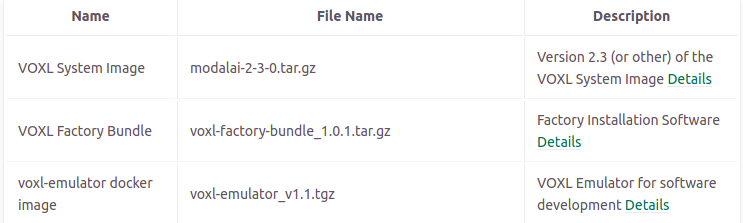
Should I be paying attention to the
system-image: ModalAI 3.2.0When checking whether the system needs an update?


Reading along? Create a free ModalAI Forum account to join in.
With an account you can reply, ask your own question, get an email when a ModalAI engineer answers, and mark the reply that solved it. Your place in each thread is saved between visits.
Questions about VOXL, Flight Core, ESCs and ModalAI drones are answered here by the engineers who build them.
Register Login