
[URGENT] RB5 VOXL2 doesn't recognize replaced hires camera
-
systemctl status voxl-camera-server:
Feb 07 11:59:55 m0052 voxl-camera-server[1528]: setting ov7251 BLC register for cam id 1 Feb 07 11:59:55 m0052 voxl-camera-server[1528]: Starting Camera: tracking (id #2) Feb 07 11:59:55 m0052 voxl-camera-server[1528]: Using gain limits min: 54 max: 3451 Feb 07 11:59:55 m0052 voxl-camera-server[1528]: setting ov7251 BLC register for cam id 2 Feb 07 11:59:55 m0052 voxl-camera-server[1528]: Starting Camera: hires (id #3) Feb 07 11:59:55 m0052 voxl-camera-server[1528]: WARNING: cam hires (id 3) does not seem to be alive Feb 07 11:59:55 m0052 voxl-camera-server[1528]: ------ voxl-camera-server: Started 2 of 3 cameras Feb 07 11:59:55 m0052 voxl-camera-server[1528]: ------ voxl-camera-server: Camera server is now running Feb 07 11:59:55 m0052 voxl-camera-server[1528]: WARNING: Camera stereo Received much newer master than child (33.3ms), discarding child Feb 07 13:01:59 m0052 voxl-camera-server[1528]: WARNING: Camera stereo Received much newer child than master (33.8ms), discarding master lines 3-18/18 (END) -
systemctl status voxl-camera-server:
Feb 07 11:59:55 m0052 voxl-camera-server[1528]: setting ov7251 BLC register for cam id 1 Feb 07 11:59:55 m0052 voxl-camera-server[1528]: Starting Camera: tracking (id #2) Feb 07 11:59:55 m0052 voxl-camera-server[1528]: Using gain limits min: 54 max: 3451 Feb 07 11:59:55 m0052 voxl-camera-server[1528]: setting ov7251 BLC register for cam id 2 Feb 07 11:59:55 m0052 voxl-camera-server[1528]: Starting Camera: hires (id #3) Feb 07 11:59:55 m0052 voxl-camera-server[1528]: WARNING: cam hires (id 3) does not seem to be alive Feb 07 11:59:55 m0052 voxl-camera-server[1528]: ------ voxl-camera-server: Started 2 of 3 cameras Feb 07 11:59:55 m0052 voxl-camera-server[1528]: ------ voxl-camera-server: Camera server is now running Feb 07 11:59:55 m0052 voxl-camera-server[1528]: WARNING: Camera stereo Received much newer master than child (33.3ms), discarding child Feb 07 13:01:59 m0052 voxl-camera-server[1528]: WARNING: Camera stereo Received much newer child than master (33.8ms), discarding master lines 3-18/18 (END)Hi @smilon,
Are you able to test the original camera that was connected before you replaced it?
Regarding the following statement, "Also note, that when I briefly have connection I verified that all the rest cameras are streaming fine through voxl-streamer." -- are you saying that after replacement the M0025 camera briefly worked but stopped working?
Please check any interposers / flex cables between the camera and main board.
Alex
-
Hi @smilon,
Are you able to test the original camera that was connected before you replaced it?
Regarding the following statement, "Also note, that when I briefly have connection I verified that all the rest cameras are streaming fine through voxl-streamer." -- are you saying that after replacement the M0025 camera briefly worked but stopped working?
Please check any interposers / flex cables between the camera and main board.
Alex
This post is deleted! -
This post is deleted!
-
Hi @smilon,
Are you able to test the original camera that was connected before you replaced it?
Regarding the following statement, "Also note, that when I briefly have connection I verified that all the rest cameras are streaming fine through voxl-streamer." -- are you saying that after replacement the M0025 camera briefly worked but stopped working?
Please check any interposers / flex cables between the camera and main board.
Alex
@Alex-Kushleyev Dear Alex,
I ended up re-flashing SDK1.1.2 on the RB5 and now I don't get an "unrecognized error" on the hires camera, however I still haven't managed to get it to work. The problem now seems to be that it's not able to recognize several imx214 supported resolutions and therefore the hires camera doesn't start up. For example in the following voxl-camera-server.conf:
{
			"type":	"imx214",
			"name":	"hires",
			"enabled":	true,
			"camera_id":	3,
			"fps":	30,
			"en_preview":	false,
			"preview_width":	640,
			"preview_height":	480,
			"en_raw_preview":	false,
			"en_small_video":	true,
			"small_video_width":	640,
			"small_video_height":	480,
			"small_venc_mode":	"h265",
			"small_venc_br_ctrl":	"cqp",
			"small_venc_Qfixed":	30,
			"small_venc_Qmin":	15,
			"small_venc_Qmax":	40,
			"small_venc_nPframes":	9,
			"small_venc_mbps":	2,
			"en_large_video":	true,
			"large_video_width":	640,
			"large_video_height":	480,
			"large_venc_mode":	"h265",
			"large_venc_br_ctrl":	"cqp",
			"large_venc_Qfixed":	38,
			"large_venc_Qmin":	15,
			"large_venc_Qmax":	50,
			"large_venc_nPframes":	29,
			"large_venc_mbps":	30,
			"en_snapshot":	true,
			"en_snapshot_width":	4208,
			"en_snapshot_height":	3120,
			"ae_mode":	"isp"
		}
I get the following status info from the voxl-camera-server:
Feb 10 13:48:55 m0052 voxl-camera-server[2929]: WARNING: Failed to start cam hires due to invalid resolution
Feb 10 13:48:55 m0052 voxl-camera-server[2929]: WARNING: assuming cam is missing and trying to compensate
Feb 10 13:48:55 m0052 voxl-camera-server[2929]: Starting Camera: stereo_rear (originally id #5) with id offset: 1
Feb 10 13:48:55 m0052 voxl-camera-server[2929]: Using gain limits min: 54 max: 3451
Feb 10 13:48:55 m0052 voxl-camera-server[2929]: WARNING: Camera stereo_front Received much newer master than child (33.2ms), discarding
Feb 10 13:48:55 m0052 voxl-camera-server[2929]: setting ov7251 BLC register for cam id 4
Feb 10 13:48:55 m0052 voxl-camera-server[2929]: setting ov7251 BLC register for cam id 3
Feb 10 13:48:55 m0052 voxl-camera-server[2929]: ------ voxl-camera-server: Started 3 of 4 cameras
Feb 10 13:48:55 m0052 voxl-camera-server[2929]: ------ voxl-camera-server: Camera server is now running
Feb 10 13:48:55 m0052 voxl-camera-server[2929]: WARNING: Camera stereo_rear Received much newer child than master (33.3ms), discarding m
I obviously tried with the Sentinel default config before modifying the resolutions to 640x480. I would appreciate if you provided a list of the supported resolutions for the M0025 sensor, just for my own sanity checks.
More info:
I am using voxl-camera-server 1.8.9+1. And to clarify with my previous post, no I haven't seen the hires cam working yet. Also a link to the shop for the replacement: https://www.modalai.com/products/msu-m0025-2?srsltid=AfmBOop_qPdLSNdkIYk-s1uaBYXFxWmQ77v__3fUlWISbT7HQM_sLcW0
-
This post is deleted!
-
@smilon ,
I believe what is happening is that your IMX214 is still not being detected and camera server is trying to skip the undetected camera.
In your config, you specified that imx214 is camera id 3, but the camera server prints the following, which means it detected ov7251 as camera id 3:
setting ov7251 BLC register for cam id 3if you run
voxl-camera-server -l, does camera server detect imx214 at the very top of the output?If something seems confusing, you can try physically disconnecting all cameras except for your IMX214 and modify the
voxl-camera-server.confto only use one camera (imx214, which should be camera id 0, the only camera). That would be a good start to confirm the single hires camera is working.Alex
-
@smilon ,
I believe what is happening is that your IMX214 is still not being detected and camera server is trying to skip the undetected camera.
In your config, you specified that imx214 is camera id 3, but the camera server prints the following, which means it detected ov7251 as camera id 3:
setting ov7251 BLC register for cam id 3if you run
voxl-camera-server -l, does camera server detect imx214 at the very top of the output?If something seems confusing, you can try physically disconnecting all cameras except for your IMX214 and modify the
voxl-camera-server.confto only use one camera (imx214, which should be camera id 0, the only camera). That would be a good start to confirm the single hires camera is working.Alex
Ok so you were right. Think I just found the issue

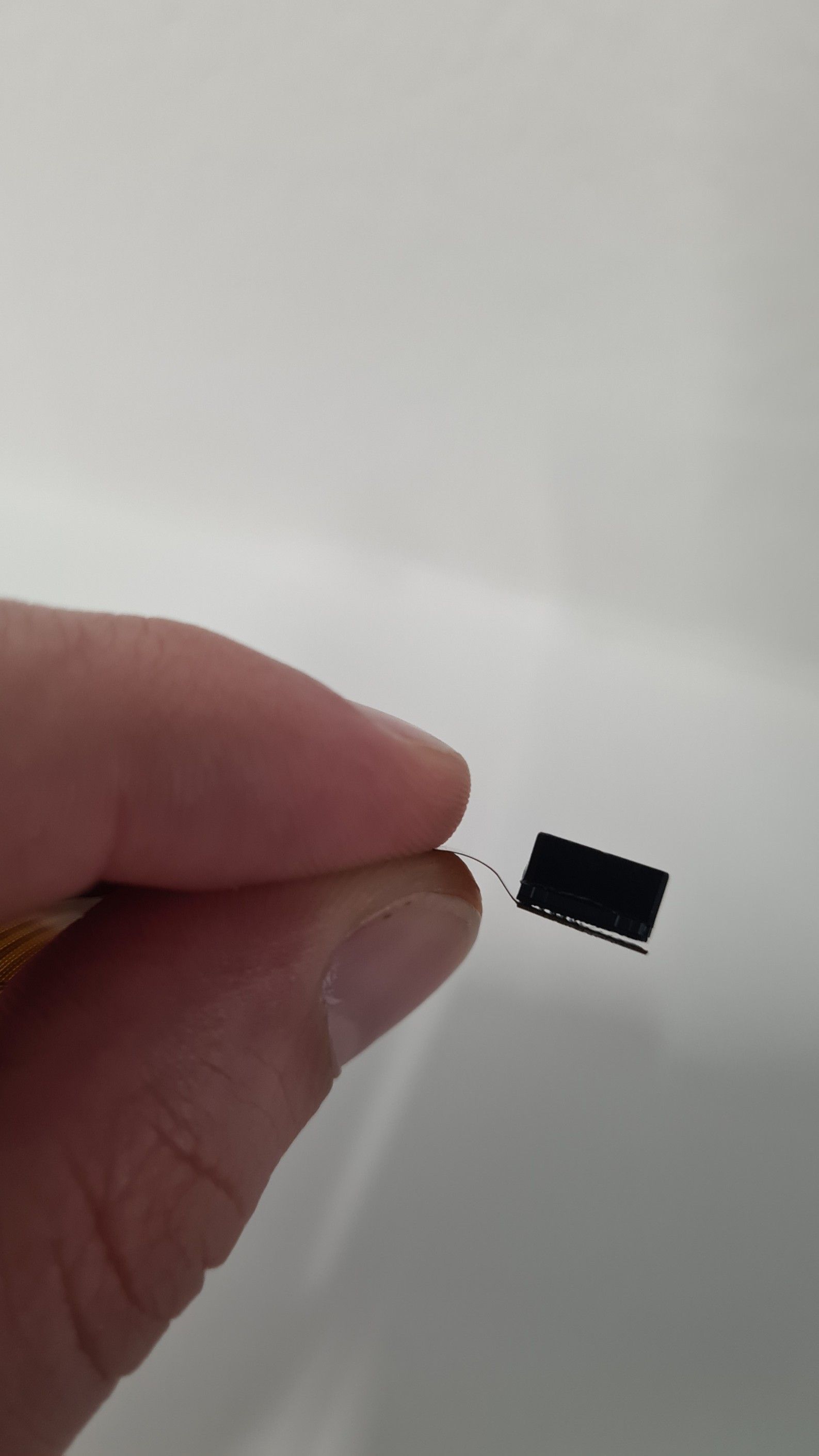
(the backplate of the sensor is detached)
I didn't notice that when we got it a few weeks ago. Can we send it back and you can send us over a new one? Or try to see if it can be repaired? Who can we talk to, its kind of time-sensitive.
Thanks a lot again,
Milton
-
Ok so you were right. Think I just found the issue
(the backplate of the sensor is detached)
I didn't notice that when we got it a few weeks ago. Can we send it back and you can send us over a new one? Or try to see if it can be repaired? Who can we talk to, its kind of time-sensitive.
Thanks a lot again,
Milton
@smilon , Can you please clarify what this is a picture of? I don't recognize it from this angle.
Alex
-
@smilon , Can you please clarify what this is a picture of? I don't recognize it from this angle.
Alex
@Alex-Kushleyev Dear Alex,
It's the M0025-002 high resolution camera. Perhaps the connection sodder was loose and it popped off real easily. In hindsight, perhaps it's not worth anyone's time. If you can provide any repair tricks that'd be neat otherwise I'll probably have to send a new order in.
Best,
Milton

Reading along? Create a free ModalAI Forum account to join in.
With an account you can reply, ask your own question, get an email when a ModalAI engineer answers, and mark the reply that solved it. Your place in each thread is saved between visits.
Questions about VOXL, Flight Core, ESCs and ModalAI drones are answered here by the engineers who build them.
Register Login