Skip to content
  • Categories
  • Recent
  • Tags
  • Popular
  • Users
  • Groups
Collapse
Brand Logo

ModalAI Forum

  1. ModalAI Support Forum
  2. Ask your questions right here!
  3. Invalid local position

Invalid local position

Scheduled Pinned Locked Moved Ask your questions right here!
30 Posts 5 Posters 9.4k Views 3 Watching
  • Oldest to Newest
  • Newest to Oldest
  • Most Votes
Reply
  • Reply as topic
Log in to reply
This topic has been deleted. Only users with topic management privileges can see it.
  • D Offline
    D Offline
    DillonAllen
    Contributor
    wrote on last edited by
    #5

    Okay, While I was waiting for your reply I went ahead and checked all of the cables and unplugged and re-plugged all of the cameras on the board and now I am getting this from the services:

     Service Name        |  Enabled  |   Running   |  CPU Usage
    --------------------------------------------------------------
     docker-autorun      | Disabled  | Not Running | Not Running
     docker-daemon       | Disabled  | Not Running | Not Running
     modallink-relink    | Disabled  | Not Running | Not Running
     voxl-camera-server  |  Enabled  |   Running   |   7.5%
     voxl-cpu-monitor    |  Enabled  |   Running   |   0.0%
     voxl-dfs-server     |  Enabled  |   Running   |  10.0%
     voxl-imu-server     |  Enabled  |   Running   |   1.9%
     voxl-modem          | Disabled  | Not Running | Not Running
     voxl-qvio-server    |  Enabled  |   Running   |   2.2%
     voxl-streamer       | Disabled  | Not Running | Not Running
     voxl-tag-detector   |  Enabled  |   Running   |   4.1%
     voxl-tflite-server  |  Enabled  |   Running   |   0.0%
     voxl-time-sync      | Disabled  | Not Running | Not Running
     voxl-vision-px4     |  Enabled  |   Running   |   2.0%
    
    1 Reply Last reply
    0
    • ? Offline
      ? Offline
      A Former User
      wrote on last edited by
      #6

      Are you still not getting localization data?

      1 Reply Last reply
      0
      • D Offline
        D Offline
        DillonAllen
        Contributor
        wrote on last edited by
        #7

        Still getting invalid local position data

        1 Reply Last reply
        0
        • D Offline
          D Offline
          DillonAllen
          Contributor
          wrote on last edited by
          #8

          Heres the output from QGC:

          nsh> ekf2 status
          INFO  [ekf2] local position: invalid
          INFO  [ekf2] global position: invalid
          INFO  [ekf2] time slip: 0 us
          ekf2: update: 8677 events, 49546us elapsed, 5.71us avg, min 1us max 94us 4.090us rms
          nsh> listener vehicle_visual_odometry
          
          TOPIC: vehicle_visual_odometry
           vehicle_odometry_s
              timestamp: 431364179  (297.960915 seconds ago)
              timestamp_sample: 431346994  (17185 us before timestamp)
              x: -682.8690
              y: -951.3774
              z: -868.9987
              q: [0.9878, -0.0083, 0.0614, -0.1428]
              q_offset: [0.0000, 0.0000, 0.0000, 0.0000]
              pose_covariance: [nan, nan, nan, nan, nan, nan, nan, nan, nan, nan, nan, nan, nan, nan, nan, nan, nan, nan, nan, nan, nan]
              vx: 0.0002
              vy: 0.0009
              vz: -0.0032
              rollspeed: 0.0095
              pitchspeed: 0.0000
              yawspeed: 0.0000
              velocity_covariance: [nan, nan, nan, nan, nan, nan, nan, nan, nan, nan, nan, nan, nan, nan, nan, nan, nan, nan, nan, nan, nan]
              local_frame: 1
              velocity_frame: 3
          nsh> 
          
          1 Reply Last reply
          0
          • ? Offline
            ? Offline
            A Former User
            wrote on last edited by
            #9

            Do you see data from voxl-inspect-qvio

            1 Reply Last reply
            0
            • D Offline
              D Offline
              DillonAllen
              Contributor
              wrote on last edited by
              #10

              Yes, but it is very iffy, when I have it sitting on my desk and move it around all of the data changes like it should, but then when I move it to the floor or vice versa then it will start giving me the LOW_FEATURES error

               T_imu_wrt_vio (m)   |Roll Pitch Yaw (deg)| state| error_code
                 -0.02   -0.01   -0.07|   0.2    0.4    0.2| OKAY | 
              
              1 Reply Last reply
              0
              • ? Offline
                ? Offline
                A Former User
                wrote on last edited by
                #11

                Yeah it'll be unstable when its being moved around like that, it's meant to have the service start at the takeoff location and then track initial features on the floor/wall during takeoff. However, this does show that localization data is coming from the VIO service, so the problem is further down the line.

                The two things to look at now are the vvpx4 config file at cat /etc/modalai/voxl-vision-px4.conf and make sure that the QGC stuff is set up properly, and that en_vio and send_vio_to_qgc are both set to true.

                If all of that looks good, then you should run voxl-inspect-pose vvpx4_body_wrt_local to see if the voxl-vision-px4 service is getting the localization data peroperly.

                1 Reply Last reply
                0
                • D Offline
                  D Offline
                  DillonAllen
                  Contributor
                  wrote on last edited by
                  #12

                  I believe that I have the voxl-vision-px4 setup correctly for QGC, here is the conf file:

                  yocto:/$ cat /etc/modalai/voxl-vision-px4.conf
                  /**
                   * VOXL Vision PX4 Configuration File
                   *
                   */
                  {
                  	"qgc_ip":	"192.168.8.20",
                  	"en_localhost_mavlink_udp":	true,
                  	"en_secondary_qgc":	false,
                  	"secondary_qgc_ip":	"192.168.1.214",
                  	"qgc_udp_port_number":	14550,
                  	"localhost_udp_port_number":	14551,
                  	"udp_mtu":	512,
                  	"en_vio":	true,
                  	"en_voa":	false,
                  	"en_send_vio_to_qgc":	true,
                  	"en_send_voa_to_qgc":	false,
                  	"en_set_clock_from_gps":	true,
                  	"en_force_onboard_mav1_mode":	true,
                  	"en_reset_px4_on_error":	true,
                  	"qvio_auto_reset_quality":	0.00050000002374872565,
                  	"en_adsb":	false,
                  	"adsb_uart_bus":	7,
                  	"adsb_uart_baudrate":	57600,
                  	"px4_uart_bus":	5,
                  	"px4_uart_baudrate":	921600,
                  	"offboard_mode":	"figure_eight",
                  	"follow_tag_id":	0,
                  	"en_tag_fixed_frame":	false,
                  	"fixed_frame_filter_len":	5,
                  	"en_transform_mavlink_pos_setpoints_from_fixed_frame":	false
                  }
                  

                  And here is the output for voxl-inspect-pose vvpx4_body_wrt_local:

                  timestamp(ms)|     Position (m)     | Roll Pitch Yaw (deg) |    Velocity (m/s)    | angular rate (deg/s) |
                        153336 |   0.00  -0.01  -0.09 |   -0.6   11.0   -0.2 |  -0.00   0.00   0.00 |  -0.00  -0.03   0.01 
                  
                  1 Reply Last reply
                  0
                  • ? Offline
                    ? Offline
                    A Former User
                    wrote on last edited by
                    #13

                    Yeah that all looks fine, but there's no data in the local_position_ned or either of the odometry messages?

                    1 Reply Last reply
                    0
                    • D Offline
                      D Offline
                      DillonAllen
                      Contributor
                      wrote on last edited by
                      #14

                      In QGC I only have the ODOMETRY data, but there is no local_position_ned tab if that is what you're referring to.

                      1 Reply Last reply
                      0
                      • ? Offline
                        ? Offline
                        A Former User
                        wrote on last edited by
                        #15

                        And what happens if you try to put it in position mode?

                        1 Reply Last reply
                        0
                        • D Offline
                          D Offline
                          DillonAllen
                          Contributor
                          wrote on last edited by
                          #16

                          It just tells me "REJECT POSITION CONTROL"

                          1 Reply Last reply
                          0
                          • ? Offline
                            ? Offline
                            A Former User
                            wrote on last edited by
                            #17

                            I've asked some of our px4 experts what their thoughts are, can you share your px4 params file so we can see what's going on there since this seems to be a px4-side issue.

                            1 Reply Last reply
                            0
                            • D Offline
                              D Offline
                              DillonAllen
                              Contributor
                              wrote on last edited by
                              #18

                              I couldn't figure out how to share the file through here, so I uploaded them to a drop box:
                              https://www.dropbox.com/s/7kxknquutoav00i/PX4_Param_Voxl.params?dl=0

                              1 Reply Last reply
                              0
                              • ? Offline
                                ? Offline
                                A Former User
                                wrote on last edited by
                                #19

                                We noticed that your EKF2 Aid mask is different from what we usually run, did you install the voxl px4 parameters file as here or did you create your own? Can you try to run with our default parameters file and see what happens?

                                1 Reply Last reply
                                0
                                • D Offline
                                  D Offline
                                  DillonAllen
                                  Contributor
                                  wrote on last edited by
                                  #20

                                  I ran the parameters from the quickstart guide, I also ran the indoor_VIO helper and just changed the aid mask to fit was in the quickstart guide. I reverted it back to its original settings and the drone is still having the same problems.

                                  1 Reply Last reply
                                  0
                                  • D Offline
                                    D Offline
                                    DillonAllen
                                    Contributor
                                    wrote on last edited by
                                    #21

                                    So I've tried completely resetting the parameters on the drone back to factory and reloading all of the parameters again, but I am still getting invalid local position data.

                                    Also as a small side note, should the tracking camera be inverted? (for example, I move an object from the top of the tracking camera and it shows up from the bottom on the feed)

                                    1 Reply Last reply
                                    0
                                    • Chad SweetC Offline
                                      Chad SweetC Offline
                                      Chad Sweet
                                      ModalAI Team
                                      wrote on last edited by
                                      #22

                                      Do you have a magnetometer connected? We have seen this issue when the px4 ekf doesn't initialize due to missing sensor

                                      1 Reply Last reply
                                      0
                                      • Cliff WongC Offline
                                        Cliff WongC Offline
                                        Cliff Wong
                                        ModalAI Team
                                        wrote on last edited by
                                        #23

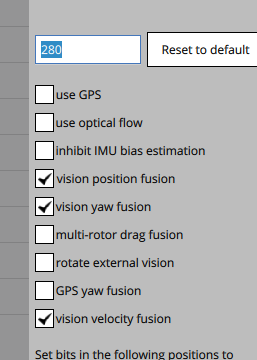
                                        Hi Dillion--the reject control on mode switching is from having GPS activated (sounds like you don't have a 3D fix) considering your aid mask is 329. For vio-only flight, the parameters should be this:start-vio.png

                                        If that does not solve it, you'll need to confirm in QGC's nuttx shell that vio message data is getting to PX4:

                                        • In QGC, goto the [mavlink console] under [analysis tools], press [enter] to get a nuttx prompt
                                        • type "uorb top vehicle_visual_odometry" [enter]
                                        • confirm you're getting similar rates like this (key is the rate column)
                                        TOPIC NAME                    INST #SUB RATE #Q SIZE
                                        vehicle_visual_odometry          0    1   30  1  256 
                                        vehicle_visual_odometry_aligned  0    0   15  1  256
                                        

                                        That will confirm vio data is being processed directly in PX4's EKF module. If not, we'll need to have you setup the video overlay to verify vio data itself (aka verify a mavlink issue).

                                        A 1 Reply Last reply
                                        0
                                        • D Offline
                                          D Offline
                                          DillonAllen
                                          Contributor
                                          wrote on last edited by
                                          #24

                                          Since we are attempting to preforming indoor flight using VIO I had disabled the SYS_HAS_MAG and the GPS_1 config like it says in the quickstart guide, so for this reason I didn't have the GPS and magnetometer plugged in. Once I plugged in the GPS and magnetometer the drone had valid position data and we were able to actually fly the drone.

                                          The problem now is that when we flew it (which was outside in the sun which might have caused problems) the drone would take off in position mode very nice for about 5 seconds then it would start to freak out and flying more sporadically which is when we would land the drone. Is this due to the drone being flown outside is the sun or is this some type of calibration issue?

                                          1 Reply Last reply
                                          0

                                          Hello! It looks like you're interested in this conversation, but you don't have an account yet.

                                          Getting fed up of having to scroll through the same posts each visit? When you register for an account, you'll always come back to exactly where you were before, and choose to be notified of new replies (either via email, or push notification). You'll also be able to save bookmarks and upvote posts to show your appreciation to other community members.

                                          With your input, this post could be even better 💗

                                          Register Login
                                          Reply
                                          • Reply as topic
                                          Log in to reply
                                          • Oldest to Newest
                                          • Newest to Oldest
                                          • Most Votes


                                          ModalAI
                                          Categories Recent Tags ModalAI.com Docs
                                          © 2026 ModalAI® · Accelerating autonomy for smaller, smarter, safer drones · Powered by NodeBB
                                          • Login

                                          • Don't have an account? Register

                                          • Login or register to search.
                                          • First post
                                            Last post
                                          0
                                          • Categories
                                          • Recent
                                          • Tags
                                          • Popular
                                          • Users
                                          • Groups