
Starling fan attachment and optimization
-
When the drone is flying, there should be plenty of air flow to cool down the board, however it does depend on the overall system load, of course. Your CPU and GPU are both loaded to about 45% each, which is not too much, but without any cooling at all, can certainly reach high temperatures. The CPU will throttle itself (above 95C) to avoid damage, but it is definitely not great to run the board so hot for extended periods of time and many cycles.
The simplest thing you can do, if you want to avoid modifying the vehicle, is use a small desktop fan that will blow air onto the board while you are testing in non-flying state.
Mounting the fan on the vehicle would require modifications of the frame component design.
Alex
@Alex-Kushleyev Ok thanks I will try out the desktop cooling fan recommendation, and I did see a significant throttling in performance where my own algorithm which worked fine on my PC wasn't even able to do a simple O(1) lookup.
But about the mounting of the fan, let's assume I can design some temporary 3d printed mount for the fan, may I know how to electrically connect to / solder to a power source like a power module / GPIO of the voxl2?
-
@Alex-Kushleyev Ok thanks I will try out the desktop cooling fan recommendation, and I did see a significant throttling in performance where my own algorithm which worked fine on my PC wasn't even able to do a simple O(1) lookup.
But about the mounting of the fan, let's assume I can design some temporary 3d printed mount for the fan, may I know how to electrically connect to / solder to a power source like a power module / GPIO of the voxl2?
@Darshit-Desai VOXL2 has a fan connector on both VOXL2 and VOXL2 mini:
https://docs.modalai.com/voxl2-connectors/#j2---5vdc-fan-control
https://docs.modalai.com/voxl2-mini-connectors/#j2---5vdc-fan-controlWe also sell a cooling fan that works with VOXL1/2 : https://www.modalai.com/products/voxl-cooling-fan . on VOXL2, the fan output is always on and we (currently) do not have a way to control it.
-
@Darshit-Desai VOXL2 has a fan connector on both VOXL2 and VOXL2 mini:
https://docs.modalai.com/voxl2-connectors/#j2---5vdc-fan-control
https://docs.modalai.com/voxl2-mini-connectors/#j2---5vdc-fan-controlWe also sell a cooling fan that works with VOXL1/2 : https://www.modalai.com/products/voxl-cooling-fan . on VOXL2, the fan output is always on and we (currently) do not have a way to control it.
@Alex-Kushleyev We have the MODAL AI PCB fans in our inventory already, I see that on starling right where the fan connetor is present for the voxl2 board there is screw hole through which a allen head bolt goes in, this is kind of a bad design because even if I use a flat head screw it would still obstruct the connector.
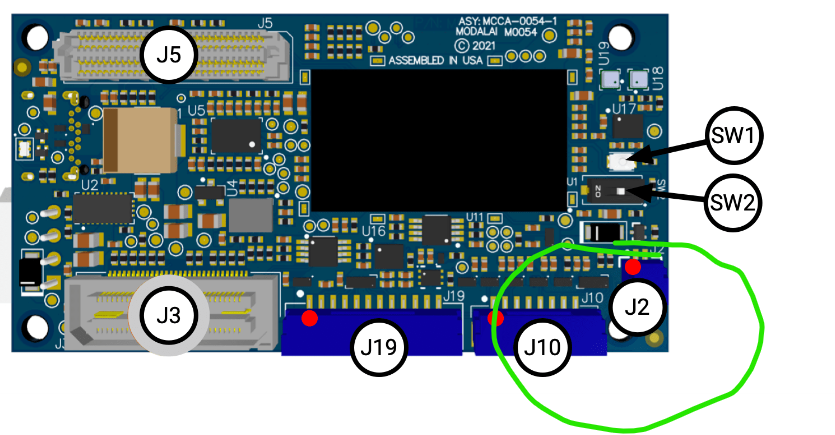
Also for the desktop testing I am using a 12 V 0.5 Amp fan, would that emulate a similar amount of airflow as it would be in flight when the thrust motors rotate, (Considering I don't use any cooling on PCB). The fan diameter is around 120 mm and is the same size as the ones which are present in desktop CPUs
-
@Alex-Kushleyev We have the MODAL AI PCB fans in our inventory already, I see that on starling right where the fan connetor is present for the voxl2 board there is screw hole through which a allen head bolt goes in, this is kind of a bad design because even if I use a flat head screw it would still obstruct the connector.
Also for the desktop testing I am using a 12 V 0.5 Amp fan, would that emulate a similar amount of airflow as it would be in flight when the thrust motors rotate, (Considering I don't use any cooling on PCB). The fan diameter is around 120 mm and is the same size as the ones which are present in desktop CPUs
@Darshit-Desai , I agree, the J2 location is not ideal..
Regarding the external fan, you should try it out and see what works for you on the bench test. In flight we don't use a fan because the board typically does not overheat, but it is hard to say how much airflow is coming from the propellers.
-
@Darshit-Desai , I agree, the J2 location is not ideal..
Regarding the external fan, you should try it out and see what works for you on the bench test. In flight we don't use a fan because the board typically does not overheat, but it is hard to say how much airflow is coming from the propellers.
@Alex-Kushleyev Sure I will try it out, but given the size of the external fan I want to simulate the exact run of the drone with the airflow to check if it's able to handle the load or do I need to do more optimization (like modify voxl_mpa_to_ros service or remove other services)
-
@Alex-Kushleyev Sure I will try it out, but given the size of the external fan I want to simulate the exact run of the drone with the airflow to check if it's able to handle the load or do I need to do more optimization (like modify voxl_mpa_to_ros service or remove other services)
@Darshit-Desai , i would say it is not possible to simulate the exact airflow from the drone with an external fan, so my suggestion is set up an external fan for any bench-top development you need to do (to avoid overheating while not flying) and as soon as you are ready to test things out, just test fly. Keep in mind that you can do a manual flight (thrust + attitude) while your CPU / GPU is loaded up with processing as needed. Don't wait too long before you test in flight.
-
@Darshit-Desai , i would say it is not possible to simulate the exact airflow from the drone with an external fan, so my suggestion is set up an external fan for any bench-top development you need to do (to avoid overheating while not flying) and as soon as you are ready to test things out, just test fly. Keep in mind that you can do a manual flight (thrust + attitude) while your CPU / GPU is loaded up with processing as needed. Don't wait too long before you test in flight.
Also, it is very typical for software on drones to operate in "idle" mode while not flying to avoid overheating due to cpu load and lack of air flow from propellers. There is usually no need to run the full processing stack at max power while the drone is just sitting on the ground. And if you need to test on bench while not flying (during development), just use external fan.
-
Also, it is very typical for software on drones to operate in "idle" mode while not flying to avoid overheating due to cpu load and lack of air flow from propellers. There is usually no need to run the full processing stack at max power while the drone is just sitting on the ground. And if you need to test on bench while not flying (during development), just use external fan.
@Alex-Kushleyev Ok I have tested it with a desktopfan it does make a dent in the rise in temperature, I still want to install the Voxl Fan on the drone before flying, I saw the drawings the hole near the J2 connector has 33.5 mm diameter. Is it safe to remove that bolt to install a flat head bolt and what size should it be in inches/mm?
-
@Alex-Kushleyev Ok I have tested it with a desktopfan it does make a dent in the rise in temperature, I still want to install the Voxl Fan on the drone before flying, I saw the drawings the hole near the J2 connector has 33.5 mm diameter. Is it safe to remove that bolt to install a flat head bolt and what size should it be in inches/mm?
@Darshit-Desai , do you mean the hole has 3.5mm (not 33.5 mm)?
i will check if we have a recommended screw for this.
-
@Darshit-Desai , do you mean the hole has 3.5mm (not 33.5 mm)?
i will check if we have a recommended screw for this.
The guidance regarding the fan connector J2 being close to the mounting hole on VOXL2 is the following:
we recommend plugging the fan connector into J2 prior to inserting the mounting screw into the VOXL2 mounting hole. After the fan has been connected to J2, the fan wire can be carefully manipulated around the mounting screw during the screw installation to avoid pinching of the wire. The thickness of the fan wire permits a tight bend. Please try it out!
-
The guidance regarding the fan connector J2 being close to the mounting hole on VOXL2 is the following:
we recommend plugging the fan connector into J2 prior to inserting the mounting screw into the VOXL2 mounting hole. After the fan has been connected to J2, the fan wire can be carefully manipulated around the mounting screw during the screw installation to avoid pinching of the wire. The thickness of the fan wire permits a tight bend. Please try it out!
@Alex-Kushleyev That worked after some effort,(almost broke the connector)
I seem to now have a good grasp because with the fan and the flight propellers running the temperatures seem to still reach 75 deg C and there is also throttling happening at some 100-500 millisecond differences, the only other way seems to be to cannibalise mpa-to-ros package and profile my own code
-
@Alex-Kushleyev That worked after some effort,(almost broke the connector)
I seem to now have a good grasp because with the fan and the flight propellers running the temperatures seem to still reach 75 deg C and there is also throttling happening at some 100-500 millisecond differences, the only other way seems to be to cannibalise mpa-to-ros package and profile my own code
@Darshit-Desai 75C is normal, the CPU will not start throttling itself until about 95C.
If you look at output of
voxl-inspect-cpu, it will tell you what frequency each core is running at. If you set the cpu into performance mode usingvoxl-set-cpu-mode perf, all cores will be fixed to max frequency and will stay at max unless the temperature is too high (above 95C) and the thermal management will kick in.If CPU is in auto mode, the core frequencies will jump up and down depending on the required load.
-
@Darshit-Desai 75C is normal, the CPU will not start throttling itself until about 95C.
If you look at output of
voxl-inspect-cpu, it will tell you what frequency each core is running at. If you set the cpu into performance mode usingvoxl-set-cpu-mode perf, all cores will be fixed to max frequency and will stay at max unless the temperature is too high (above 95C) and the thermal management will kick in.If CPU is in auto mode, the core frequencies will jump up and down depending on the required load.
@Alex-Kushleyev Yes I have been checking using that command. The fact is that the moment the core temperatures hit more then 75C the position mode starts to turn off automatically showing it isn't ready to fly even when the starling is in flight, this also gives the rest of the algorithm a throttling effect like the ros messages which are delivered to the algorithm are slower
-
@Darshit-Desai 75C is normal, the CPU will not start throttling itself until about 95C.
If you look at output of
voxl-inspect-cpu, it will tell you what frequency each core is running at. If you set the cpu into performance mode usingvoxl-set-cpu-mode perf, all cores will be fixed to max frequency and will stay at max unless the temperature is too high (above 95C) and the thermal management will kick in.If CPU is in auto mode, the core frequencies will jump up and down depending on the required load.
@Alex-Kushleyev Here are some screenshots of the QGC, CPU Monitor and my code running in parallel in the terminal,
The following services were running:
1)Modified MPAtoROS launch node, with topics like /tof_pc, /voa_pc and /tflite_data only being published
2)Tflite server
3)Couple of ros nodes which use the data from above services to find the position of objects in the environmentFirst photo when my code starts up and the cpu core temperature is low:
https://drive.google.com/file/d/1AS1crU9FcIAUmhwG3nD1MG9CElVbwTiu/view?usp=sharingSecond screenshot is when the core temperature crosses >70 deg C, note how the position mode turns to red showing not ready
https://drive.google.com/file/d/1fzKAZKkbLDWjiuCCvKxyHo7UnE8GWeNK/view?usp=sharingThird screenshot: Here I found a peculiar warning which was not being sent to QGC in the voxl portal where it showed high accelerometer bias warning? Could that be the cause, can higher CPU core temperature cause that?
https://drive.google.com/file/d/1E8s7nQja1ijlcgFzkGI80TtRCWk703D7/view?usp=sharingThis led me to believe that my fan placement might be wrong so I am putting a photo of my starling drone with the fan placement, Is it correct or am I facing some other issues?
Here are the photos of the fan on the starling drone:
https://drive.google.com/file/d/1ApMiFDQItF9ZbxI8yD-_GXnhKaqCu3yo/view?usp=sharing,
https://drive.google.com/file/d/1Axz_itT0f9L1AVpDvHCaoIwfVr3JRWFt/view?usp=sharing,
https://drive.google.com/file/d/1B0UbtqbfJIjkOFo1PaPIW3eRHECIo5d1/view?usp=sharing,
https://drive.google.com/file/d/1B141Pc6Q6DCoFynJykV3PbuiFIsjCvco/view?usp=sharing -
@Alex-Kushleyev Here are some screenshots of the QGC, CPU Monitor and my code running in parallel in the terminal,
The following services were running:
1)Modified MPAtoROS launch node, with topics like /tof_pc, /voa_pc and /tflite_data only being published
2)Tflite server
3)Couple of ros nodes which use the data from above services to find the position of objects in the environmentFirst photo when my code starts up and the cpu core temperature is low:
https://drive.google.com/file/d/1AS1crU9FcIAUmhwG3nD1MG9CElVbwTiu/view?usp=sharingSecond screenshot is when the core temperature crosses >70 deg C, note how the position mode turns to red showing not ready
https://drive.google.com/file/d/1fzKAZKkbLDWjiuCCvKxyHo7UnE8GWeNK/view?usp=sharingThird screenshot: Here I found a peculiar warning which was not being sent to QGC in the voxl portal where it showed high accelerometer bias warning? Could that be the cause, can higher CPU core temperature cause that?
https://drive.google.com/file/d/1E8s7nQja1ijlcgFzkGI80TtRCWk703D7/view?usp=sharingThis led me to believe that my fan placement might be wrong so I am putting a photo of my starling drone with the fan placement, Is it correct or am I facing some other issues?
Here are the photos of the fan on the starling drone:
https://drive.google.com/file/d/1ApMiFDQItF9ZbxI8yD-_GXnhKaqCu3yo/view?usp=sharing,
https://drive.google.com/file/d/1Axz_itT0f9L1AVpDvHCaoIwfVr3JRWFt/view?usp=sharing,
https://drive.google.com/file/d/1B0UbtqbfJIjkOFo1PaPIW3eRHECIo5d1/view?usp=sharing,
https://drive.google.com/file/d/1B141Pc6Q6DCoFynJykV3PbuiFIsjCvco/view?usp=sharingPlease avoid mounting the cpu fan in a way that adds stress to the board. In your particular case, it seems the fan is wedged between the wifi dongle and the actual CPU, which will actually put pressure and can bend the board. IMU is very sensitive to stresses inside the PCB and slight bending can affect the IMU bias. Additionally, direct contact of the fan to the VOXL2 PCB can add some small vibrations (which can potentially throw off any detector in PX4 that is looking for a perfectly still IMU for initialization).
To confirm the IMU bias issue, you can inspect the IMU data using QGC (mavlink inspector) and see if the XYZ accelerometer (while sitting still) changes significantly as the board warms up. Then you can remove the wedged fan (and hold it close to the board) and test again and see if the unusual accel bias is gone (when warmed up).
My strong recommendation is to remove the fan from its current location. You may want to design + 3D print an plastic mount, perhaps integrated with the GPS mount, but also having extra attachment points so that it does not oscillate / vibrate due to being cantilevered. If you want to go that route, i can see if we can share the GPS mount CAD file with you.
Alex
-
Please avoid mounting the cpu fan in a way that adds stress to the board. In your particular case, it seems the fan is wedged between the wifi dongle and the actual CPU, which will actually put pressure and can bend the board. IMU is very sensitive to stresses inside the PCB and slight bending can affect the IMU bias. Additionally, direct contact of the fan to the VOXL2 PCB can add some small vibrations (which can potentially throw off any detector in PX4 that is looking for a perfectly still IMU for initialization).
To confirm the IMU bias issue, you can inspect the IMU data using QGC (mavlink inspector) and see if the XYZ accelerometer (while sitting still) changes significantly as the board warms up. Then you can remove the wedged fan (and hold it close to the board) and test again and see if the unusual accel bias is gone (when warmed up).
My strong recommendation is to remove the fan from its current location. You may want to design + 3D print an plastic mount, perhaps integrated with the GPS mount, but also having extra attachment points so that it does not oscillate / vibrate due to being cantilevered. If you want to go that route, i can see if we can share the GPS mount CAD file with you.
Alex
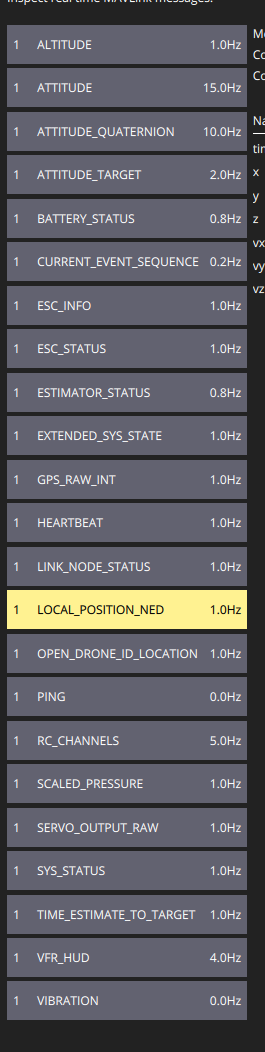
@Alex-Kushleyev said in Starling fan attachment and optimization:
To confirm the IMU bias issue, you can inspect the IMU data using QGC (mavlink inspector) and see if the XYZ accelerometer (while sitting still)
Which parameter would it be? Position NED?
-
Please avoid mounting the cpu fan in a way that adds stress to the board. In your particular case, it seems the fan is wedged between the wifi dongle and the actual CPU, which will actually put pressure and can bend the board. IMU is very sensitive to stresses inside the PCB and slight bending can affect the IMU bias. Additionally, direct contact of the fan to the VOXL2 PCB can add some small vibrations (which can potentially throw off any detector in PX4 that is looking for a perfectly still IMU for initialization).
To confirm the IMU bias issue, you can inspect the IMU data using QGC (mavlink inspector) and see if the XYZ accelerometer (while sitting still) changes significantly as the board warms up. Then you can remove the wedged fan (and hold it close to the board) and test again and see if the unusual accel bias is gone (when warmed up).
My strong recommendation is to remove the fan from its current location. You may want to design + 3D print an plastic mount, perhaps integrated with the GPS mount, but also having extra attachment points so that it does not oscillate / vibrate due to being cantilevered. If you want to go that route, i can see if we can share the GPS mount CAD file with you.
Alex
@Alex-Kushleyev Also I have consistently observed that cpu0-cpu3 have 1.8-2.0 GHz frequency and on an average 45-65% utilization even when the ros nodes are not running while, cpu7 when the ros nodes are running has 1.9-2.8 Ghz average frequency with 70-85% utilization while cpu4-6 are relatively lighter with only 0.6-0.7 Ghz frequency and ~20% utilization at maximum even when I run my complete code stack, is there a specific reason for such a scenario?
-
Please avoid mounting the cpu fan in a way that adds stress to the board. In your particular case, it seems the fan is wedged between the wifi dongle and the actual CPU, which will actually put pressure and can bend the board. IMU is very sensitive to stresses inside the PCB and slight bending can affect the IMU bias. Additionally, direct contact of the fan to the VOXL2 PCB can add some small vibrations (which can potentially throw off any detector in PX4 that is looking for a perfectly still IMU for initialization).
To confirm the IMU bias issue, you can inspect the IMU data using QGC (mavlink inspector) and see if the XYZ accelerometer (while sitting still) changes significantly as the board warms up. Then you can remove the wedged fan (and hold it close to the board) and test again and see if the unusual accel bias is gone (when warmed up).
My strong recommendation is to remove the fan from its current location. You may want to design + 3D print an plastic mount, perhaps integrated with the GPS mount, but also having extra attachment points so that it does not oscillate / vibrate due to being cantilevered. If you want to go that route, i can see if we can share the GPS mount CAD file with you.
Alex
@Alex-Kushleyev I tried this recommendation by removing the fan and holding it up and running my code it didn't make any difference as soon as the temperatures go above 75 the accelerometer bias flag is active. Also I don't think fan placement is an issue because the fan is placed right above the heat sink of the cpus and not anywhere near the imus, there is sufficient space between the wifi dongle and the board to move around a little.
@Alex-Kushleyev said in Starling fan attachment and optimization:
Then you can remove the wedged fan (and hold it close to the board) and test again and see if the unusual accel bias is gone (when warmed up).
The bias issues only come when I run the object detection and my own sensor fusion module, without that code running and the fan installed the drone is able to fly in position mode. This is more of a cpu heating and load distribution issue, somehow I think cpu0-3 are pinned for some MPA services and pipes and the rest of the 4 cpus are not being utilized equally, I am looking into multi threading for load distribution in my code, let me know if there are any more recommendations
-
@Alex-Kushleyev I tried this recommendation by removing the fan and holding it up and running my code it didn't make any difference as soon as the temperatures go above 75 the accelerometer bias flag is active. Also I don't think fan placement is an issue because the fan is placed right above the heat sink of the cpus and not anywhere near the imus, there is sufficient space between the wifi dongle and the board to move around a little.
@Alex-Kushleyev said in Starling fan attachment and optimization:
Then you can remove the wedged fan (and hold it close to the board) and test again and see if the unusual accel bias is gone (when warmed up).
The bias issues only come when I run the object detection and my own sensor fusion module, without that code running and the fan installed the drone is able to fly in position mode. This is more of a cpu heating and load distribution issue, somehow I think cpu0-3 are pinned for some MPA services and pipes and the rest of the 4 cpus are not being utilized equally, I am looking into multi threading for load distribution in my code, let me know if there are any more recommendations
@Darshit-Desai , it is not a good idea to have any external components touching any components of the VOXL2 board. The reason is that if there is even a minor crash, the movement of the external components (fan in this case), can put mechanical stress on the processor itself and cause internal damage.
There are some exceptions, such as if you put VOXL2 inside a metal enclosure, you could have a metal heatsink make contact with the cpu or something like that. In your case, the fan is touching the CPU and the wifi dongle, which puts mechanical constraints such that if there is impact, the fan can be jammed between the cpu and wifi dongle, potentially causing damage to VOXL2 components.
Here is how a fan was integrated into VOXL1/2 flight deck:
- https://www.modalai.com/products/voxl-flight-deck
- https://www.modalai.com/products/voxl-2-flight-deck
Although it is harder to see it on voxl2 flight dec, but voxl1 flight deck pictures clearly show a FR4 material that is used to separate the fan from main board and is also used for mounting.
-
@Alex-Kushleyev I tried this recommendation by removing the fan and holding it up and running my code it didn't make any difference as soon as the temperatures go above 75 the accelerometer bias flag is active. Also I don't think fan placement is an issue because the fan is placed right above the heat sink of the cpus and not anywhere near the imus, there is sufficient space between the wifi dongle and the board to move around a little.
@Alex-Kushleyev said in Starling fan attachment and optimization:
Then you can remove the wedged fan (and hold it close to the board) and test again and see if the unusual accel bias is gone (when warmed up).
The bias issues only come when I run the object detection and my own sensor fusion module, without that code running and the fan installed the drone is able to fly in position mode. This is more of a cpu heating and load distribution issue, somehow I think cpu0-3 are pinned for some MPA services and pipes and the rest of the 4 cpus are not being utilized equally, I am looking into multi threading for load distribution in my code, let me know if there are any more recommendations
Back to the accelerometer, you can use the following command to print out the raw accel data:
px4-listener sensor_accel

TOPIC: sensor_accel
 sensor_accel
    timestamp: 306076285 (0.437680 seconds ago)
    timestamp_sample: 306076069 (216 us before timestamp)
    device_id: 2490378 (Type: 0x26, SPI:1 (0x00))
    x: -0.27078
    y: 7.87261
    z: 5.88561
    temperature: 24.30556
    error_count: 1
    clip_counter: [0, 0, 0]
    samples: 10
So you should make sure the board is level and check this message periodically as you are running processing as the board heats up. (in my case the board is not flat, so you are not seeing (0,0,9.8). I am curious what the accel reading is at the start and then when you get the accel bias warning.
Worth taking a look at px4 imu calibration. I have not done this myself, but it looks like this is the right resource : https://docs.px4.io/main/en/advanced_config/sensor_thermal_calibration.html
Regarding CPU frequencies, when cpu governor is in auto mode, it will try to scale down cpu frequencies to save power. but if you want maximum performance, you can set to to performance mode:
voxl-set-cpu-mode perfNote that this does not persist after reboot, if you want permanent change, you can change
more /etc/modalai/voxl-cpu-monitor.confand set normal cpu mode toperf


Reading along? Create a free ModalAI Forum account to join in.
With an account you can reply, ask your own question, get an email when a ModalAI engineer answers, and mark the reply that solved it. Your place in each thread is saved between visits.
Questions about VOXL, Flight Core, ESCs and ModalAI drones are answered here by the engineers who build them.
Register Login